


 Video Converter Ultimate
 Näytön tallennin
 Videon korjaus
Edullisia menetelmiä DV:n muuntamiseen FLV:ksi helposti
DV-tiedosto on tiedosto, joka sisältää digitaalista videota. DV-tiedostojen analyysimme on paljastanut, että digitaalinen video on yksi tämän formaatin käyttötavoista. Emme ole vielä täysin selittäneet, mitä nämä tiedostot sisältävät tai miten käyttäjät niitä käyttävät, mutta tiimimme käsittelee tuhansia eri tiedostotyyppejä. Jos sinulla on lisätietoja formaatista, kuulisimme niistä mielellämme. Tiedostopääte .flv taas osoittaa FLV- (Flash Video) tiedostoja. Käyttäjät voivat käyttää Adobe Flash Playeria tai Adobe Airia suoratoistaakseen ääni- ja videosisältöä internetin kautta FLV-muodossa. FLV-tiedostot koodaavat datansa samalla tavalla kuin SWF-tiedostot. Ratkaistessaan DV-videoformaatin yhteensopivuusongelmia käyttäjät muuntavat sen usein FLV-muotoon, joka toimii monenlaisten mediasoittimien kanssa. Jos siis etsit työkaluja, joilla voi muuntaa DV:n FLV-videomuotoon, jatka tämän artikkelin lukemista.

Osa 1. Paras tapa muuntaa DV FLV:ksi offline-tilassa
Video Converter Ultimate on yksi erinomainen ohjelmisto, jonka avulla voit muuntaa DV-videoformaatin FLV:ksi. Sen erittäin nopean muunnostehon ansiosta voit muuntaa DV:n FLV-muotoon sekunneissa tavalla, johon muut työkalut eivät yllä. Tämän ohjelmiston ansiosta sinun ei tarvitse huolehtia DV:n muuntamisesta muihin formaatteihin, sillä se tukee useita eri muotoja, joita et ehkä edes tulisi ajatelleeksi, kuten MP4, MOV, 3GP, FLV, WMV, WEBM, MPEG jne. Pelkän muuntamisen lisäksi ohjelmistossa on monia muita työkaluja: se voi rajata, parantaa, yhdistää, nopeuttaa ja tehdä paljon muuta, mikä auttaa viemään videosi seuraavalle tasolle.

Video Converter Ultimate
6 357 200+ latausta- Se tukee yli 1000 erilaista video- ja äänimuotoa.
- Muunna 30 kertaa nopeammin kuin muut muuntimet.
- Voi muuntaa videon jopa 4K HD -laatuiseksi.
- Se tarjoaa lukuisia muita työkaluja, jotka auttavat parantamaan videotasi.
- Se ei vaadi raskaita huoltolaitteita toimiakseen.
Ilmainen latausWindows 7 tai uudempiTurvallinen lataus
Ilmainen latausMacOS 10.7 tai uudempiTurvallinen lataus
Vaihe 1: Lataa ohjelmisto napsauttamalla yllä olevaa Free Download -painiketta. Sen jälkeen asenna ohjelma tietokoneellesi ja suorita se napsauttamalla Start Now asennuksen päätyttyä.
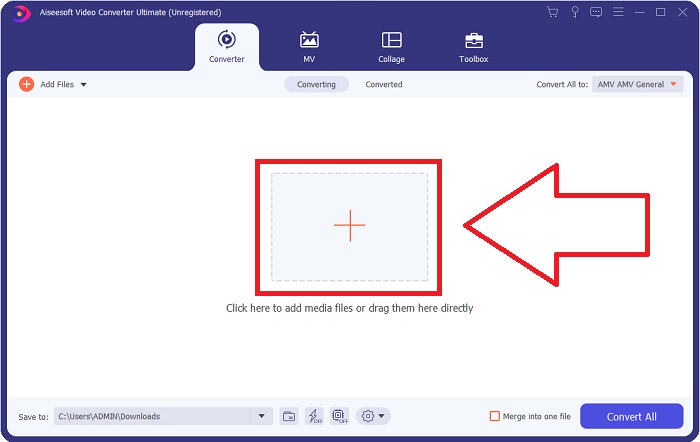
Vaihe 2: Näet sitten ikkunan avautuvan näytöllesi. Ohjelma näyttää oletuksena Converter-toiminnon. Tuodaksesi tiedoston tietokoneeltasi napsauta keskellä olevaa + -painiketta tai vedä mikä tahansa DV-videotiedosto suoraan ikkunan keskelle.
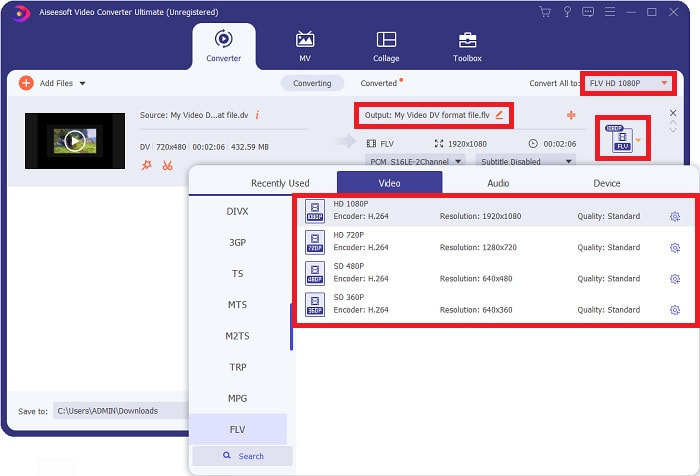
Vaihe 3: Olet jo puolivälissä prosessia. Napsauta videoiden ulostulomuodon vieressä olevaa formaattikuvaketta ja valitse FLV-videomuoto. Tämän jälkeen voit myös valita eri videolaatuja, joita ohjelma tarjoaa.
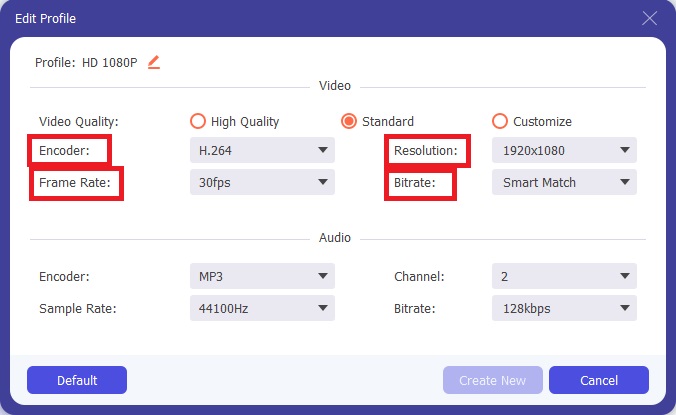
Vaihe 4: Vain pieni viimeinen silaus. Jos mikään valmiista videolaatuasetuksista ei vastaa tarpeitasi, voit mukauttaa videon ulostulon laatua napsauttamalla videolaatuvalinnan vieressä olevaa rataskuvaketta.
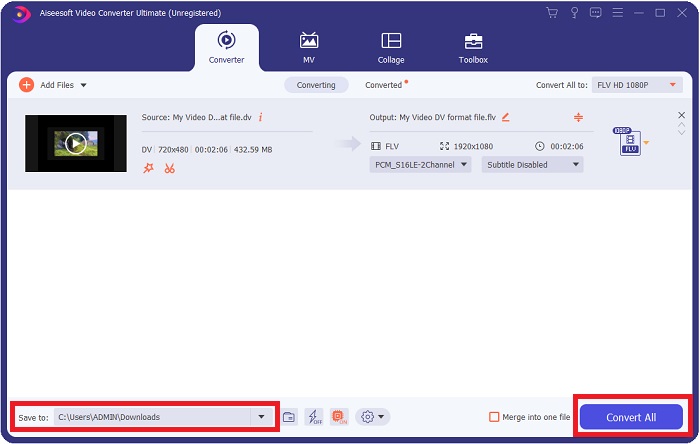
Vaihe 5: Nyt olet jo loppusuoralla. Siirry näytön toisessa kulmassa olevaan Save to -kenttään ja valitse sijainti, jonne haluat tallentaa muunnetun tiedoston. Voit nyt käynnistää muunnoksen napsauttamalla näytön oikeassa alakulmassa olevaa Convert All -painiketta.
Osa 2. Kuinka muuntaa DV FLV Online -muotoon
Internet tarjoaa ja esittelee monia erilaisia verkkotyökaluja, joiden avulla voit muuntaa DV:n FLV-muotoon. Yksi niistä on Free Video Converter Online, joka erottuu muista erityisen nopean muunnosprosessinsa ansiosta: se voi muuntaa tiedoston vain sekunneissa. Se tukee myös formaatteja kuten MP4, FLV, MOV, M4A, TS, WMV, ASF, VOB, AAC, WMA ja monia muita. Se muuntaa videot myös HD-laatuisiksi ilman laadun heikkenemistä. Tämä maksuton videomuunnin on suosittu, koska se mahdollistaa muuntamisen lisäksi myös videoiden hienosäädön vaivattomasti. Käydään nyt läpi kaikki vaiheet, jotka auttavat sinua käyttämään tätä verkkopohjaista muunninta.
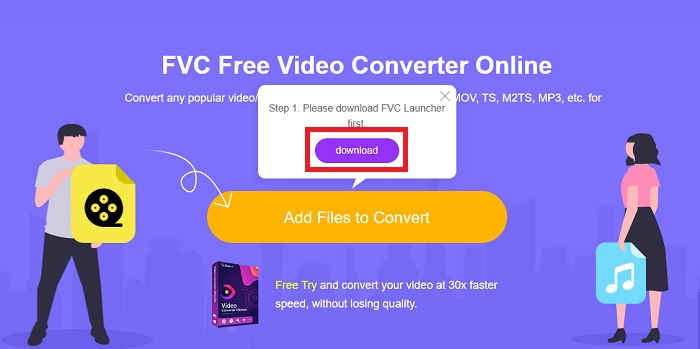
Vaihe 1: Päästäksesi tämän verkkotyökalun etusivulle napsauta tätä linkkiä ja jatka eteenpäin. Napsauta tietokoneesi näytöllä näkyvää Add Files to Convert -painiketta ladataksesi käynnistysohjelman, jonka avulla voit käyttää tätä verkkotyökalua. Napsauta sen jälkeen painiketta uudelleen ja jatka tiedoston lataamiseen.
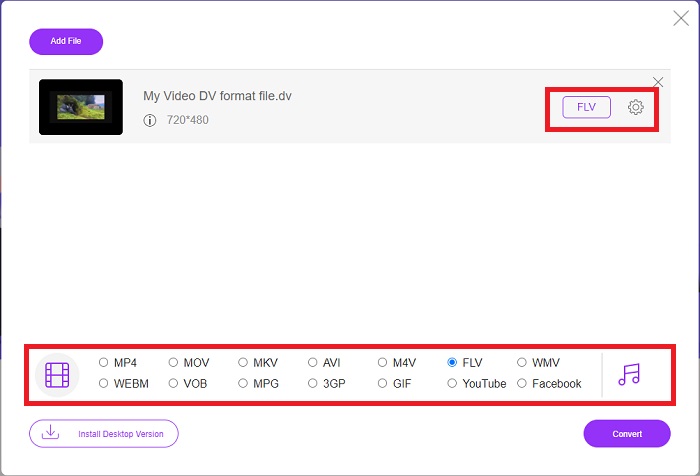
Vaihe 2: Kun olet valinnut muunnettavan tiedoston, valitse FLV-videomuoto näytön alareunassa olevasta videoformaattivalikosta. Voit myös säätää videon ominaisuuksia, kuten resoluutiota, kuvanopeutta jne., napsauttamalla rataskuvaketta ja muuttamalla asetuksia.
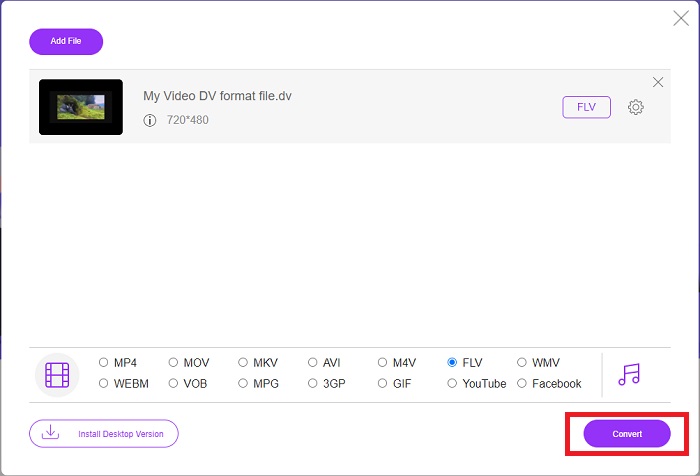
Vaihe 3: Tämän jälkeen voit aloittaa muunnoksen napsauttamalla ikkunan vasemmassa alakulmassa olevaa Convert-painiketta.
Osa 3. Vertailukaavio: DV vs. FLV
Digital Video (DV) -tiedosto luodaan digitaalikameralla ja tallennetaan raaka-muodossa, jota käyttäjät aina käyttävät. Digital Video (DV) -tiedosto sisältää Digital Interface Blocks (DIF) -lohkoja, joista kukin sisältää 80 tavua. Ääni, video ja metatiedot voidaan kaikki sisällyttää DIF-lohkoihin. DIF-lohkot voidaan tallentaa tietokonetiedostoina raakamuodossaan tai niiden ympärille käärittyinä tiedostomuotoina – multipleksoimalla lohkot 150 lohkon jaksoiksi. Videokehys voi sisältää enintään kymmenen tai kaksitoista jaksoa.
Verkkovideopalvelut kuten YouTube, Hulu ja Vevo käyttävät Adobe Systemsin Flash Video -formaattia (FLV) verkkovideoihinsa. Adobe Flash Player (mukaan lukien selaimen liitännäiset) ja kolmansien osapuolien ohjelmistot voivat lukea ja toistaa FLV-tiedostoja lähes kaikissa käyttöjärjestelmissä (paitsi iOS:ssä). iPhone- ja Android-laitteilla FLV-tiedostoja voidaan toistaa avoimen lähdekoodin ohjelmistoilla ja tietyillä selaimilla. Flash aiheuttaa silti ongelmia iOS:ssä. FLV-tiedostoja voi katsella vain FLV-soittimella, ja käyttäjät voivat käyttää näyttökaappaus- ja tallennusohjelmia FLV-videoiden tallentamiseen.
| Tiedostopääte | DV (.dv) | FLV (.flv) |
| Tiedoston nimi | Digitaalinen video | Flash-videotiedosto |
| Kehittäjä | Useita videokameroiden valmistajia | Adobe System Incorporated |
| Plussat | ◆ Tavalliseen Mini DV:hen mahtuu 19,5 Gt, mikä vastaa noin 0,25 senttiä tallennustilaa kohti. ◆ Intuitiivinen HD-muunnos standardiin ◆ Teipit on helppo merkitä ja ne sopivat erinomaisesti pitkäaikaiseen säilytykseen. | Kun on kyse dynaamisten ja interaktiivisten verkkosivujen luomisesta, Adobe Flash voi olla valtava voimavara. Prosessi on yksinkertainen, mutta tulokset voivat olla merkittäviä. Kukin aikanaan Flashia käytettiin laajalti myös yksinkertaisissa videopeleissä. |
| Haittoja | ◆ Firewire-yhteys vaaditaan (useimmissa varastossa olevissa tietokoneissa ei ole tätä). ◆ Nauhoituksen laatu heikkenee joka kerta. ◆ Se tallentaa vain 60–90 minuuttia kerrallaan. | Haittapuolena on, että FLV:n suosio on laskenut vuosien varrella. FLV-sisällön luominen voi kestää kauan ja maksaa paljon rahaa. Lisäksi käyttäjät eivät voi katsella Flash-sisältöä iOS-laitteilla, mikä rajoittaa vakavasti sen kykyä houkutella uusia seuraajia. |
| Ohjelmat, jotka tukevat tiedostoa | ◆ VLC Media Player | ◆ RealPlayer ◆ Apple QuickTime Player ◆ VLC Media Player ◆ MPlayer |
Osa 4. Usein kysytyt kysymykset muuntamisesta DV:ksi FLV:ksi
Mikä resoluutio on DV?
DV:n kanssa vakioresoluutio tallentaa 720 vaakapikseliä ja 480 lomitettua juovaa maissa, jotka käyttävät 60 Hz:n sähkövirtaa ja 576 juovaa 50 Hz:n sähkövirralla. Digitaalisen videon (HDV) teräväpiirtoversio on virallinen HDV-standardi, ja Panasonicin DVCPRO HD on esimerkki tällaisesta muodosta (katso HDV ja DVCPRO).
Onko DV-video lomitettu?
Alhaalla on aina paljon DV-materiaalia ensin. Muut materiaalit saattavat ilmestyä ensin. Tulkitse tuotu leike uudelleen kenttäerotuksen ollessa päällä, laske ensin alas (tiedosto > tulkitse materiaalia > keskellä) nähdäksesi, onko se lomitettu. Käytä sitten projektin ikkunassa Alt-kaksoisnapsauttamalla pikakuvaketta päästäksesi siihen. Käytä sivu ylös/Dn -näppäimiä navigoidaksesi videossa. Lomitusta esiintyy, jos video muuttuu joka kerta, kun painat toistopainiketta. Nykivä liike osoittaa, että kenttäjärjestys on virheellinen, ja materiaali tulee tulkita uudelleen käyttämällä toista kenttäjärjestystä.
Onko FLV sopiva videomuoto?
Adobe Flash Player tallentaa videotiedostot FLV-muodossa. Kaikki videoalustat ja selaimet hyväksyvät sen yhdeksi tuetuista videomuodoista. Online-videon suoratoistoalustat, kuten YouTube, hyötyvät FLV-muodon käytöstä. Pienen tiedostokoon ansiosta ne on nopea ja helppo ladata.
Johtopäätös
Yhteenvetona huomaat, että parhaat muuntimet, joita tämä artikkeli suosittelee, ovat ohjelmisto Video Converter Ultimate ja verkkotyökalu Free Video Converter Online. Nämä kaksi muunninta erottuvat muista, koska niissä on ammattitasoiset lisätoiminnot ja käyttäjäystävällinen käyttöliittymä.
-
 Paras strategia DV-tiedoston muuntamiseksi AVI-muotoon yksityiskohtaisilla vaiheilla
 Haluatko muuntaa DV-tiedoston AVI:ksi? Lue sitten tämä artikkeli saadaksesi tietoa ainutlaatuisesta työkalusta, jolla voit muuntaa, ja mediasoittimen DV:n toistamiseen PC- tai Mac-tietokoneellasi.
-
 Kaksi parasta tapaa muuntaa DV-tiedostoja MOV-muotoon ilmaiseksi työpöydällä ja verkossa
 Onko sinulla ongelmia DV-tiedostojen muuntamisessa MOV-muotoon Macissa? Jos tämä on ongelmasi, voimme ratkaista sen yhdessä, jos luemme tämän artikkelin.
-
 MP4 - FLV | Kolme parasta ilmaista muunninta (online / Mac / Windows)
 Tämä viesti on yksityiskohtainen opas MP4-FLV-muunnokseen. Voit vaihtaa 3 parasta ilmaista muunninta vaihtaaksesi MP4: n FLV: ksi verkossa, Windows- tai Mac-tietokoneella helposti.
