


 Video Converter Ultimate
 Näytön tallennin
 Videon korjaus
2 suositeltua muuntajaa F4V:n vaihtamiseen FLV:ksi opetusohjelmien avulla
Adobe Flash Player tukee F4V- ja FLV‑muotoja toistomediakonteinereina internetistä striimattavaa sisältöä varten. Vaikka formaatti perustuukin Adobeen, nämä kaksi ovat silti monella tapaa erilaisia. Esimerkiksi FLV:hen koodattu data ei ole samaa kuin F4V:ssä, koska FLV muistuttaa SWF:ää. Lisäksi, jos haluat muuntaa F4V:n FLV:ksi ja saada kooderin, joka on SWF:n kaltainen, lue tämä artikkeli saadaksesi lisätietoja.

Osa 1. 2 eniten valittavasta muuntimesta F4V:n muuntamiseksi FLV:ksi
1. valinta. FVC Video Converter Ultimate
FVC Video Converter Ultimate on erittäin suositeltu F4V–FLV‑muunnin, jonka voit ladata Windows- tai Mac‑tietokoneellesi. Tässä työkalussa on nopein ja luotettavin muunnosprosessi, johon tulet koskaan törmäämään, ja se on jo tyydyttänyt miljoonia käyttäjiä. Lisäksi muuntaminen ei ole tämän työkalun ainoa vahvuus. Arvaa mitä? Voit myös muokata täällä, esimerkiksi leikata videota, yhdistää, vahvistaa ääntä, rajata ja paljon muuta. Jos haluat ainutlaatuisen muuntimen, joka vastaa tarpeitasi, tämä muunnin on sinua varten. Alla olevat tiedot ovat vaiheittaiset ohjeet siitä, miten muunnetaan F4V‑tiedostosi FLV‑muotoon muutamassa minuutissa.
Kuinka muuntaa F4V FLV:ksi FVC Video Converter Ultimate ‑ohjelman avulla:
Vaihe 1. Napsauta latauspainiketta ladataksesi ohjelmiston tietokoneesi levylle.
Ilmainen latausWindows 7 tai uudempiTurvallinen lataus
Ilmainen latausMacOS 10.7 tai uudempiTurvallinen lataus
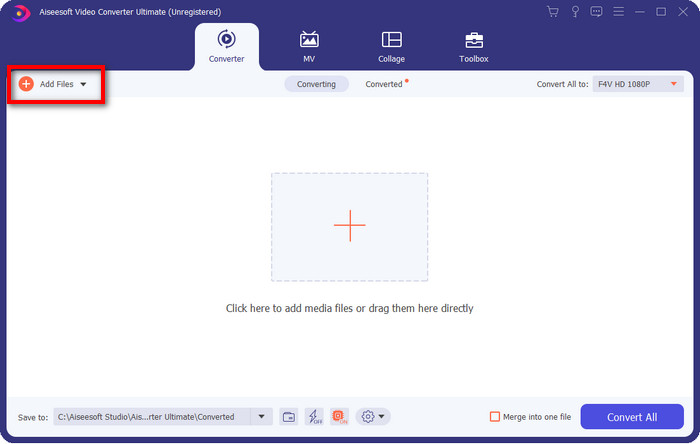
Vaihe 2. Napsauta ohjelmistoa avataksesi sen, lisää tiedosto napsauttamalla Add Files käyttöliittymän oikeassa yläkulmassa ja napsauta Open, kun olet valinnut muunnettavan F4V‑tiedoston.
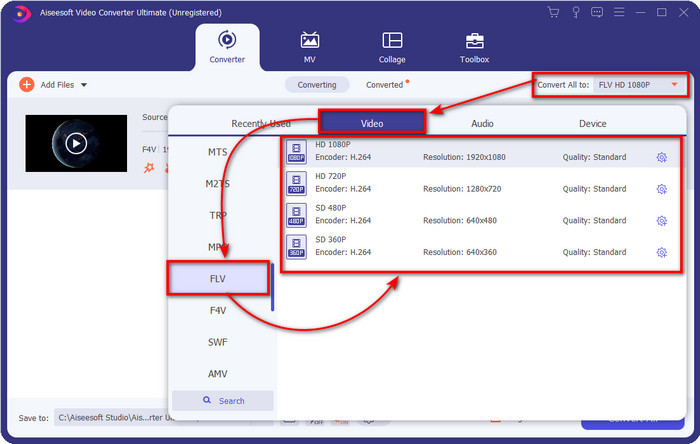
Vaihe 3. Napsauta Convert All to ‑painiketta ja vaihda muodoksi FLV.
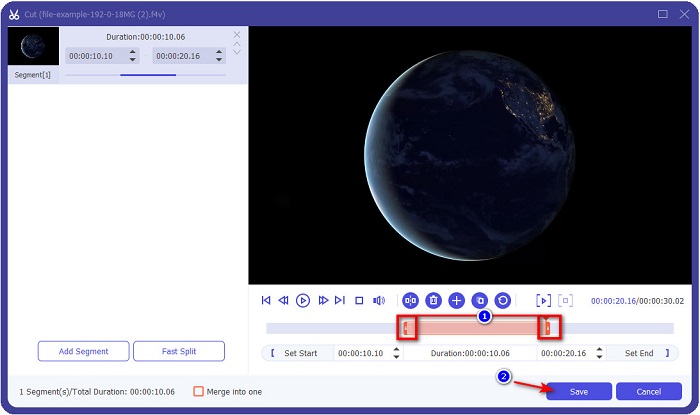
Haluatko tehdä videosta lyhyemmän? Jos haluat, napsauta saksien kuvaketta. Säädä kahvaa haluamasi pituuden mukaan ja napsauta sitten Save tallentaaksesi muutokset.
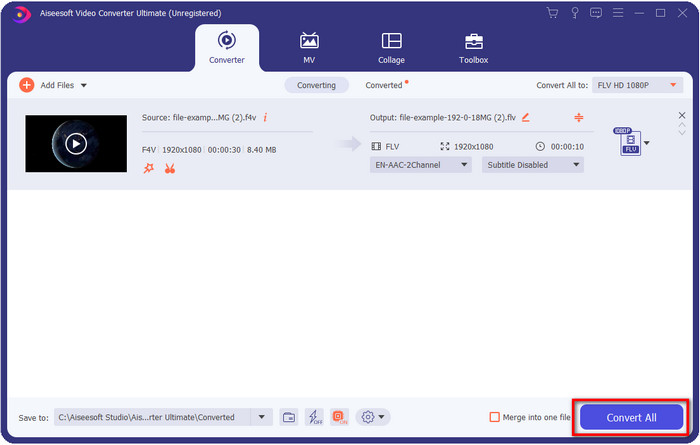
Vaihe 4. Muuttaaksesi F4V:n FLV:ksi napsauta Convert All, jolloin prosessi alkaa nopeasti. Tietokoneen kansio avautuu näyttäen, mihin tiedostosi tallentuu.
Plussat
- Se muuntaa vaivattomasti useita F4V-tiedostoja FLV-, AVI-, MOV-, MKV- ja yli 200 muuhun muotoon.
- Laitteistokiihdytys ja nopea muunnos ovat käytettävissä täällä nopeuttaaksesi muuntamista.
- Se on saatavilla kaikissa Windowsissa ja macOS:ssä.
- Työkalulaatikossa on poikkeuksellisia videonmuokkausominaisuuksia, jotka tekevät videostasi ilmiömäisen.
Haittoja
- Se on ostettava ennen kuin voit käyttää sitä.
- Muuntimen lataaminen työpöydällesi on välttämätöntä.
2. valinta. FVC ilmainen videomuunnin verkossa
FVC Free Video Converter Online auttaa sinua suorittamaan muunnosprosessin verkossa. Työkalu on käytettävissä kaikissa selaimissa F4V:n muuntamiseen FLV:ksi verkossa ilman rajoituksia. Et kuitenkaan voi tehdä erämuunnosta, koska sitä ei tueta. Silti voit saavuttaa haluamasi formaatin tällä verkkopohjaisella muuntimella. Haluatko tietää miten? Noudata sitten alla olevia ohjeita.
Kuinka muuntaa F4V FLV:ksi FVC Free Video Converter Online ‑työkalun avulla:
Vaihe 1. Avaa verkkotyökalu napsauttamalla tätä linkkiä.
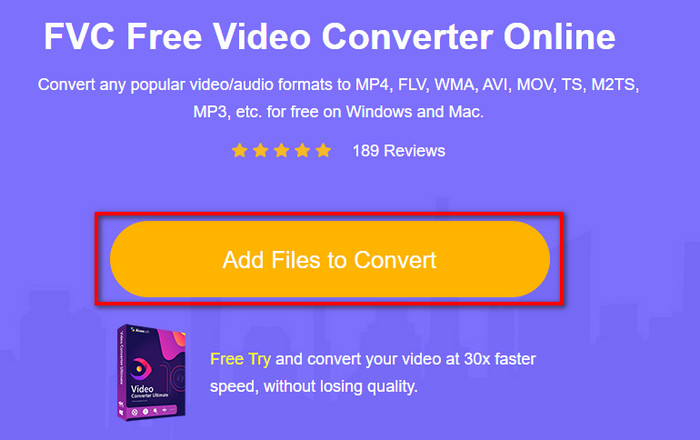
Vaihe 2. Verkkokonvertterin pääkäyttöliittymässä napsauta Add Files to Convert ‑painiketta. Etsi avautuvasta kansiosta F4V‑tiedosto ja paina Open.
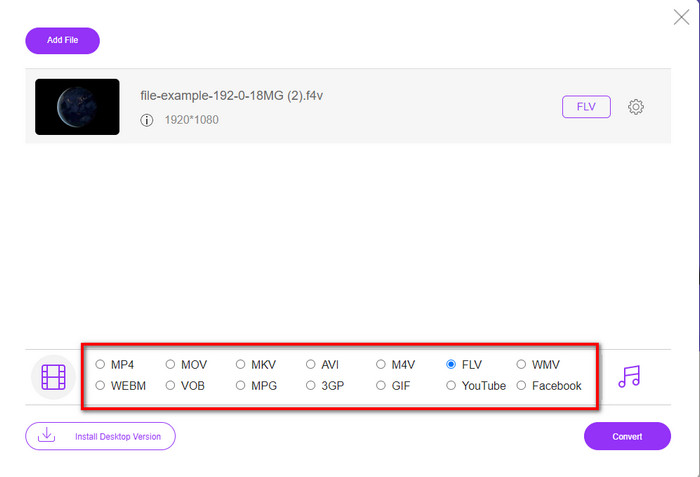
Vaihe 3. Alareunassa on monia formaatteja, joista voit valita; napsauta FLV.
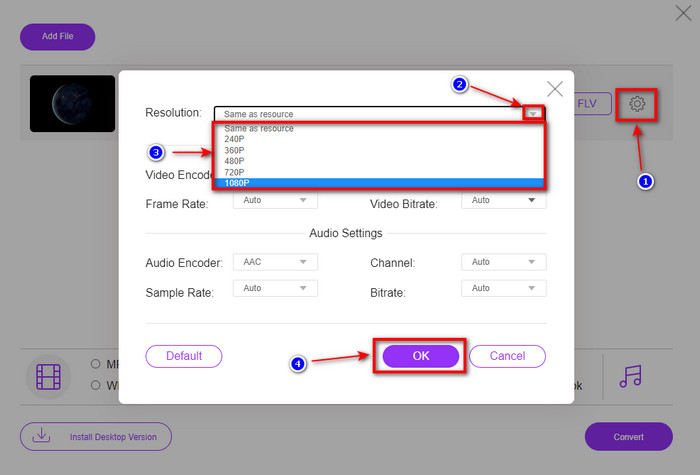
Haluatko vaihtaa videon tarkkuutta? Napsauta sitten hammasrattaan kuvaketta, avaa pudotusvalikko ja valitse videon laatu.
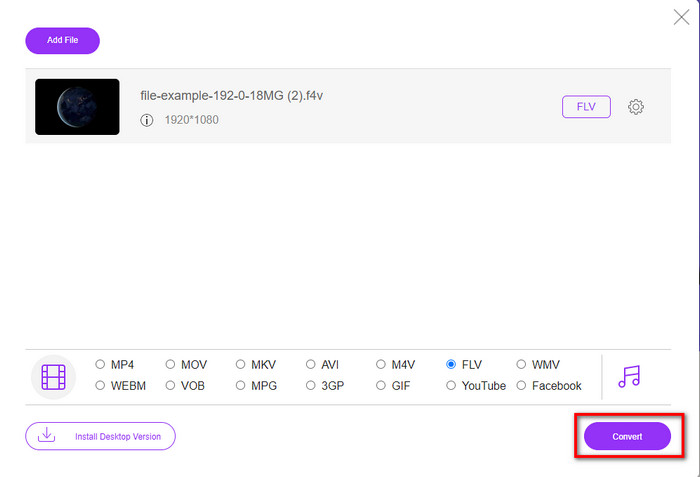
Vaihe 4. Aloita F4V:n muuntaminen FLV:ksi napsauttamalla Convert.
Plussat
- Saatavilla kaikissa käyttämissäsi verkkoselaimissa.
- Ilmainen ja helppokäyttöinen online-muunnin.
- Ei haittaohjelmia eikä mainoksia pääsivustolla.
Haittoja
- Internet-yhteys on pakollinen.
- Se ei tue videoeditointiominaisuuksia, kuten FVC Video Converter Ultimate.
Osa 2. F4V vs. FLV: Mikä muoto on paras
Kuten alussa todettiin, nämä kaksi muotoa ovat Adobe-säilöjä, joiden avulla voit jakaa niitä verkossa. Mutta nyt verrataan näiden kahden muodon eroja lukemalla alla olevat tiedot.
F4V-muoto on Quicktime-säilö, kuten MP4-muoto. Se on ISO-perusmediatiedostomuoto videoiden suoratoistoon Internetin kautta. Tämä muoto on myös FLV:n päivitetty versio. Silti FLV:n videon ja äänen koodauksessa on paljon ongelmia. Lisäksi et voi luoda HTML-verkkosivua, kuten FLV voi tehdä puolestasi.
FLV on tiedostoja, joilla on lähes sama rakenne kuin SWF:llä. Tätä muotoa tuetaan enemmän Adobe Flash Playerissä ja useimmissa HTML 5:ssä. Se tukee videon ja äänen pakkausta, kuten Sorenson Spark- tai VP6-koodekit. Lisäksi, jos harkitset videon lataamista verkosta, tämä muoto on paras valinta. Toisin kuin F4V, jos haluat luoda HTML-koodia verkkosivullesi, tämä on muoto sinulle.
Olisi parasta muuntaa F4V FLV:ksi, koska FLV:stä saatavat edut eivät ole käytettävissä F4V:ssä. Vaikka sanotaan, että F4V on uusi versio FLV:stä, FLV:n ainutlaatuisuus on kuitenkin sellaista, jota F4V ei voi kopioida monin tavoin.
Osa 3. Usein kysytyt kysymykset F4V:n muuntamisesta FLV:ksi
Kuinka voin toistaa F4V-videoita?
Vahvan mediasoittimen avulla voit tehdä tämän vaivattomasti, ja paras esimerkki on Aiseesoft Blu-ray Player. Seuraa näitä yksinkertaisia vaiheita saadaksesi selville, miten toistaa F4V‑tiedostoja. Lataa ensin ohjelmisto työpöydällesi ja käynnistä se. Lataa tiedosto työkaluun napsauttamalla Open File. Kun lataus on valmis, tiedosto alkaa toistua automaattisesti.
Kumpi on parempi? F4V vai MOV?
Se riippuu siitä, mihin tarkoitukseen haluat sitä käyttää. Esimerkiksi F4V on erinomainen mediantiedostojen jakeluun verkossa ilman laadun heikkenemistä. Jos kuitenkin haluat muokata videoita Macilla, valitse MOV. Joten jos haluat muokata F4V‑videoitasi Macilla, sinun täytyy opetella, kuinka muuntaa F4V MOV:ksi.
Sisältääkö F4V korkealaatuista tulostusta?
F4V-tiedostot voivat sisältää 1080 tai 720 videolaatua, mutta tiedostokoko pysyy minimaalisena.
Johtopäätös
Nyt kun olemme oppineet, miten F4V muunnetaan FLV:ksi muuntimien avulla, on oikea hetki valita luotettava muunnin arvioiden perusteella. Jos haluat kokea ilmaisen verkkomuunnosprosessin, sinun kannattaa käyttää FVC Free Video Converter Online ‑työkalua. Tämä verkkotyökalu ei kuitenkaan voi päihittää ylhäällä esiteltyä ultimate‑muunninta. Ilman sen kummempaa esittelyä suosimme FVC Video Converter Ultimate ‑ohjelmaa, koska se hoitaa muunnostyösi helposti ja nopeasti. Tämä ilmiömäinen muunnin on ainutlaatuinen ja tekee vaikutuksen moniin käyttäjiin erikoisilla ominaisuuksillaan. Voimme siis sanoa, että olemme nyt askeleen lähempänä menestystä näiden työkalujen avulla.
-
 4 uusinta online- ja offline-muunninta F4V:n muuntamiseksi AVI-muotoon
 Eikö sinulla ole aavistustakaan, mitä muunninta sinun pitäisi käyttää F4V:n muuntamiseen AVI:ksi tai muuksi videomuodoksi? Lue sitten tämä artikkeli, kun opimme muuntamaan käytettävissä olevan työkalun avulla.
-
 Kuinka muuntaa F4V MOV:ksi laadun menettämättä [Ratkaistu]
 Jos sinulla on vaikeuksia tunnistaa joitain videomuotoja, kuten F4V. Lue tämä artikkeli saadaksesi lisätietoja F4V- ja MOV-videomuodosta ja kuinka muuntaa F4V MOV:ksi eri menetelmillä.
-
 Muunna TRP FLV:ksi helpoimmilla offline- ja online-menetelmillä
 Haluatko muuntaa TRP-videotiedostosi FLV:ksi nopeasti ja ilman vaivaa? Lue tämä artikkeli tarjotaksesi parhaan ohjelmiston ja verkkopalvelun, joka sopii parhaiten tilanteeseen.
