


 Video Converter Ultimate
 Näytön tallennin
 Videon korjaus
 Suojattu lataus
3 tehokasta tapaa muuntaa FLV VOB: ksi ilmaiseksi
Jos lataat videon YouTubesta ja haluat tallentaa sen DVD:lle, saatat huomata, että Internetistä ladattu video on FLV-muodossa. Polttaaksesi sen DVD:lle sinun täytyy muuntaa FLV-tiedostot VOB-muotoon. Siksi tässä artikkelissa esitellään 3 menetelmää FLV:n muuntamiseen VOB:ksi ilmaiseksi, ja voit toteuttaa sen helposti pöytäkoneella.

Osa 1. Kuinka viedä VOB FLV: stä ilmaiseksi
FVC Free FLV Converter on ihanteellinen työkalu FLV:n muuttamiseen VOB-muotoon. Kaikki yhdessä -videomuuntimena sen avulla voit muuntaa, yhdistellä ja mukauttaa FLV-tiedostoja korkealla laadulla ja nopeudella. Voit myös lisätä teemoja videoiden koristeluun ja jakaa niitä eri laitteilla, kuten iPhonella ja iPadilla.

- Muunna FLV VOB: ksi ja muiksi muodoiksi ilmaiseksi yhdellä napsautuksella.
- Antaa sinun poistaa selektiivisesti käytöstä tai muokata ääniraitoja.
- Lisää teema FLV-videollesi ennen muuntamista.
- Tarjoa ilmainen, nopea ja yksinkertainen tapa muuntaa FLV-tiedostot erään.
Ilmainen latausWindows 7 tai uudempiTurvallinen lataus
Ilmainen latausMacOS 10.7 tai uudempiTurvallinen lataus
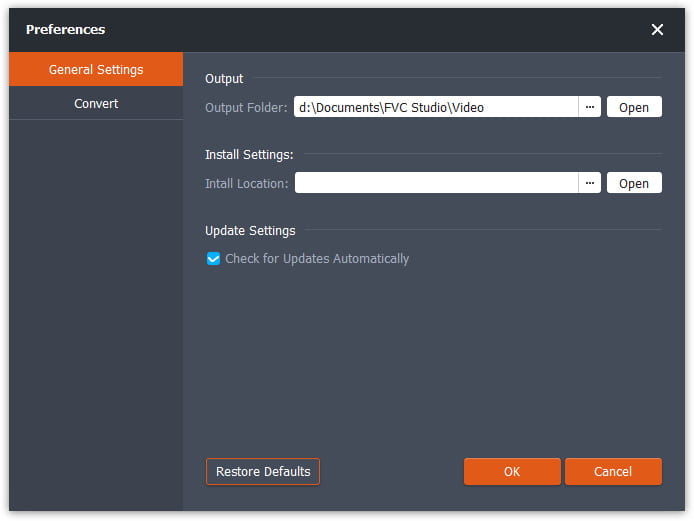
Vaihe 1. Kun olet ladannut ja käynnistänyt Free FLV Converterin, voit valita kansion VOB-tiedoston tallentamista varten. Napsauta käyttöliittymän yläosassa olevaa Menu-vaihtoehtoa ja siirry kohtaan Preference. General Settings -kohdassa voit valita tulostekansion.
Vaihe 2. Lisätäksesi FLV-tiedostoja sinun tulee napsauttaa käyttöliittymässä olevaa Add Files -painiketta. Sen jälkeen voit valita tiedostot selausikkunassa. Sitten sinun tulee napsauttaa Output Format -kenttää ja valita VOB-muoto.

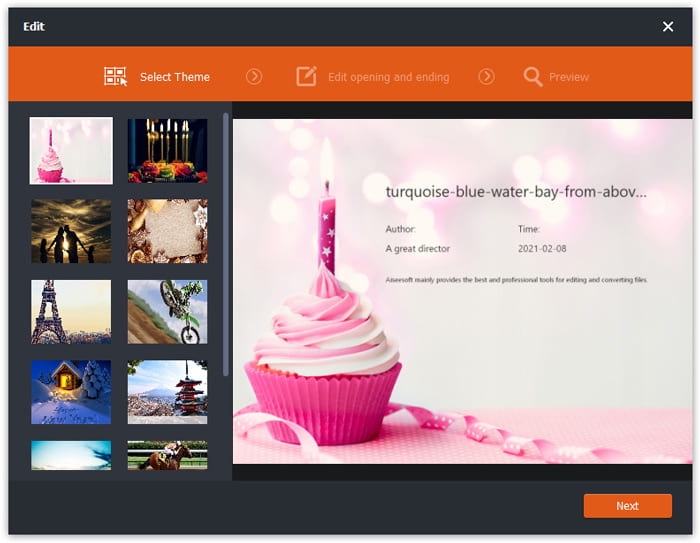
Vaihe 3. Voit lisätä teemoja videotiedostoosi ennen muunnosta. Napsauta käyttöliittymässä olevaa Edit-painiketta ja siirry kohtaan Select Theme. Voit valita teemoja, kuten syntymäpäivä, perhe ja maisema FLV-videollesi. Sen jälkeen voit esikatsella videon efektejä ja tallentaa sen.
Vaihe 4. Aloittaaksesi muunnoksen sinun täytyy napsauttaa pääkäyttöliittymässä olevaa Convert-painiketta. Kansio avautuu automaattisesti ja löydät VOB-tiedoston sieltä.
Ilmainen FLV Converter on monipuolinen ohjelmisto FLV-videoiden muuntamiseen, ja voit päivittää videosi edistyneillä muokkausominaisuuksilla.
Osa 2. Kuinka muuttaa FLV VOB Online: ksi
FVC Free Online Video Converter on ilmainen verkkotyökalu FLV:n muuntamiseen VOB-muotoon. Siinä on hyvin jäsennelty ja selkeä käyttöliittymä, joka on helppokäyttöinen kaikille käyttäjille. Koska se on verkkotyökalu, mitään ei tarvitse ladata tai asentaa.
- 1. Yhdellä napsautuksella voit muuntaa FLV: n VOB: ksi sekunneissa menettämättä laatua.
- 2. Mukauta FLV-tiedosto ennen muuntamista.
- 3. Turvallinen ja vakaa käyttää.
Vaihe 1. Siirry Free Online Video Converter -sivustolle. Sinun täytyy napsauttaa Add Files to Convert -painiketta. Selausikkuna ponnahtaa esiin, jotta voit lisätä FLV-tiedostot.
Lataa työpöytäversio muuntaaksesi tiedostoja erissä.
Vaihe 2. Tiedostojen lisäämisen jälkeen sinun täytyy valita vientimuoto. Useita formaatteja on listattu ikkunan alareunassa. Etsi VOB ja napsauta sen vieressä olevaa ympyrää.
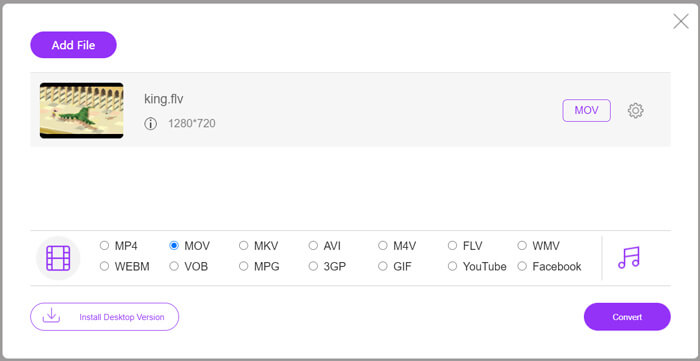
Vaihe 3. Ennen muunnosta voit napsauttaa Gear-kuvaketta säätääksesi FLV-tiedoston asetuksia, kuten videon resoluutiota, koodekkia, äänen voimakkuutta ja kanavaa.
Vaihe 4. Napsauta Convert-painiketta aloittaaksesi muunnoksen. Kun muunto on valmis, löydät VOB-tiedoston kansiosta, jonka olet aiemmin määrittänyt.
Yhteenvetona voidaan todeta, että Free Online Video Converter on kätevä ja tehokas työkalu FLV:n muuttamiseen VOB-muotoon ilmaiseksi verkossa. Lisäksi voit pakata FLV-tiedostoja täällä.
Osa 3. Kuinka käyttää käsijarrua FLV: n koodaamiseen VOB: ksi
Käsijarru on ilmainen ja avoimen lähdekoodin transkooderi, jonka avulla voit muuntaa FLV: n VOB: ksi. Se tukee Windows- ja Mac-järjestelmiä. Tässä on vaiheet FLV: n muuntamiseksi VOB: ksi käsijarrulla.
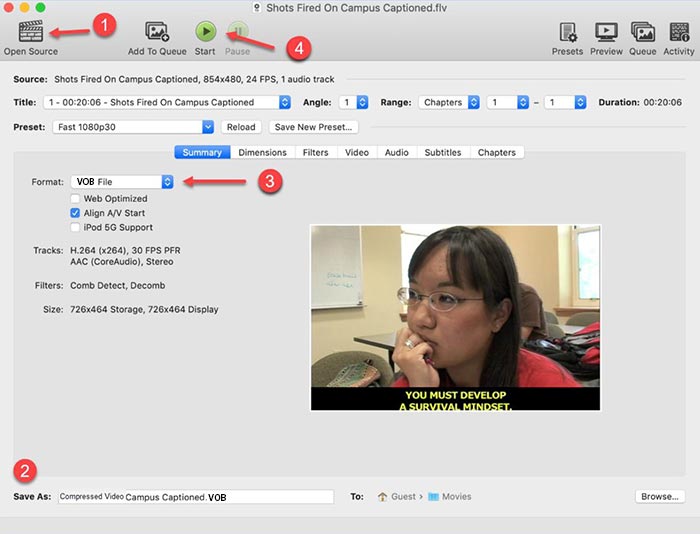
Vaihe 1. Lataa ja käynnistä Handbrake. Lisätäksesi FLV-tiedostoja sinun täytyy napsauttaa Open Source -painiketta. Löydät FLV-tiedoston selausikkunasta.
Vaihe 2. Aseta sitten kansio tulostettavan VOB-tiedoston tallentamista varten napsauttamalla käyttöliittymän alareunassa olevaa Save As -kenttää.
Vaihe 3. Valitse sen jälkeen VOB-muoto Format-kentästä.
Vaihe 4. Napsauta Start-painiketta aloittaaksesi muunnoksen.
FLV vs. VOB
Adobe Flash Player käytti FLV:tä videosisällön, kuten elokuvien ja TV-ohjelmien, toimittamiseen. Nykyään Adobe ei enää kehitä soitinta ja suosittelee käyttäjiä poistamaan sen asennuksen turvallisuussyistä. Voit kuitenkin käyttää FLV-muotoa monissa muissa kuin Adobe-/Macromedia-ohjelmissa.
VOB-muotoa käytetään usein tallentamaan DVD-levyn elokuvadataa, joka sisältää videon, äänen, tekstityksen, DVD-valikot ja muuta sisältöä. Se on yleensä alustettu MPEG-2-järjestelmävirroiksi. Voit avata VOB-tiedostoja erilaisilla videotoistotyökaluilla.
Osa 4. UKK FLV: n muuntamisesta VOB: ksi
1. Mikä on FLV-muoto?
FLV (Flash Video) on tiedostomuoto, joka käyttää Adobe Flash Playeria videon tai äänen siirtämiseen Internetin kautta. Se on vakiomuoto videoille alustoilla ja sivustoilla, kuten YouTube ja Hulu. (Löydät FLV-soittimen täältä)
2. Miksi minun pitäisi muuntaa FLV VOB: ksi?
Kun haluat tallentaa videoita Internetistä DVD-levyille, sinun on muunnettava FLV VOB: ksi. VOB on muoto, joka sisältää videoiden suoratoiston MPEG-2-muodossa ja äänen suoratoiston useissa muodoissa DVD-levyllä.
3. Kuinka voin leikata FLV-tiedoston ennen muuntamista?
Voit käyttää ammattimaista videonmuokkausohjelmistoa leikata FLV-tiedostoja, kuten Video Converter Ultimate. Sen avulla voit asettaa aikajanan alku- ja loppupisteen videon leikkaamiseksi.
Johtopäätös
Tämä artikkeli tarjoaa 3 varmennettua tapaa muuntaa FLV VOB-muotoon. Voit käyttää FVC Free FLV Converteria ja Free Online Video Converteria vaivattomaan ja ilmaiseen muuntamiseen. On myös muita ilmaisohjelmia, kuten Handbrake tai VLC Media Player, joita voit käyttää muunnokseen. Voit ladata ne, kokeilla ja katsoa, ratkaisevatko ne ongelmasi. Jos sinulla on kysyttävää FLV:n muuttamisesta VOB-muotoon tai haluat tietää siitä lisää, jätä kommenttisi alle.
Ilmainen latausWindows 7 tai uudempiTurvallinen lataus
Ilmainen latausMacOS 10.7 tai uudempiTurvallinen lataus
-
 VLC ei toista DVD: tä, kuinka korjaan sen
 Voiko VLC toistaa DVD: tä? Miksi VLC ei toista DVD: täni? Kuinka saan VLC: n toistamaan DVD-levyä Windows 10: ssä? Tämä viesti jakaa 3 vinkkiä korjaamaan VLC, joka ei toista DVD-ongelmaa.
-
 Kolme parasta tapaa muuntaa MP4 nopeasti VOB: ksi
 Kuinka muuntaa MP4 VOB: ksi Windows PC: ssä ja Macissa? Tämän ongelman ratkaisemiseksi tämä viesti jakaa 3 parasta tapaa auttaa muuntamaan MP4 VOB: ksi ilmaiseksi.
-
 Parhaat tavat muuntaa VOB FLV:ksi
 Haluatko muuntaa VOB-tiedoston FLV-tiedostoksi? Voit suorittaa tehtävän helposti joko työpöydällä tai verkossa olevilla muuntimilla. Lue tämä opas ja opi muuttamaan VOB FLV: ksi helposti ja nopeasti.

