


 Video Converter Ultimate
 Näytön tallennin
 Videon korjaus
 Suojattu lataus
FLV to WMA Converter - Kuinka purkaa WMA-ääni FLV-videosta ilmaiseksi
Kun olet ladannut Flash-videotiedostot YouTube-verkkosivustolta, voit muuntaa FLV: n WMA-häviöttömäksi ääneksi. WMA (Windows Media Audio) on sarja Microsoftin kehittämiä audiokoodekkeja ja niitä vastaavia äänikoodausmuotoja. WMA-ääni tukee monikanavaista ja korkean resoluution ääntä. Tästä artikkelista opit 2 tapaa muuntaa FLV-videot WMA-ääniksi Windowsissa ja Macissa.

Osa 1. Paras tapa purkaa WMA-ääni FLV: stä ilmaiseksi
FVC Free FLV Converter on ilmainen, helppokäyttöinen ja nopea FLV–WMA-muunnin, joka tukee FLV-tiedostojen erämuuntoa WMA-muotoon Windows- ja Mac-tietokoneilla. Samalla voit muuntaa FLV-videot myös muihin video- ja ääniformaatteihin, kuten HD MP4, AVI, WMV, MKV, 3GP, MP3, AAC, AC3 jne. Sisäänrakennetun muokkaustoiminnon avulla voit muokata WMA-tiedostojen metatietoja ilmaiseksi.

FVC Free FLV Converter
145000+ latausta- Muunna FLV WMA: ksi Windows 10/8/7 / Vista / XP: ssä ja Mac OS X: ssä.
- Pakkaa, yhdistä, lisää teemoja ja muokkaa WMA-tiedoston metatietoja.
- Lisää erityisiä teemoja FLV-tiedostoihisi, kuten loma, perhe, syntymäpäivä.
- Erä muuntaa FLV WMA, MP3, AAC, FLAC, M4R, OGG, WAV.
Ilmainen latausWindows 7 tai uudempiTurvallinen lataus
Ilmainen latausMacOS 10.7 tai uudempiTurvallinen lataus
Vaihe 1. Lisää FLV-tiedosto
Kun olet ladannut FVC Free FLV Converter -ohjelman ilmaiseksi, voit asentaa ja käynnistää sen tietokoneellasi. Napsauta Add File(s) -painiketta tuodaksesi Flash‑videotiedoston. Voit myös vetää ja pudottaa useampia FLV-tiedostoja ohjelmaan kerralla.

Vaihe 2. Muokkaa FLV-tiedostoa
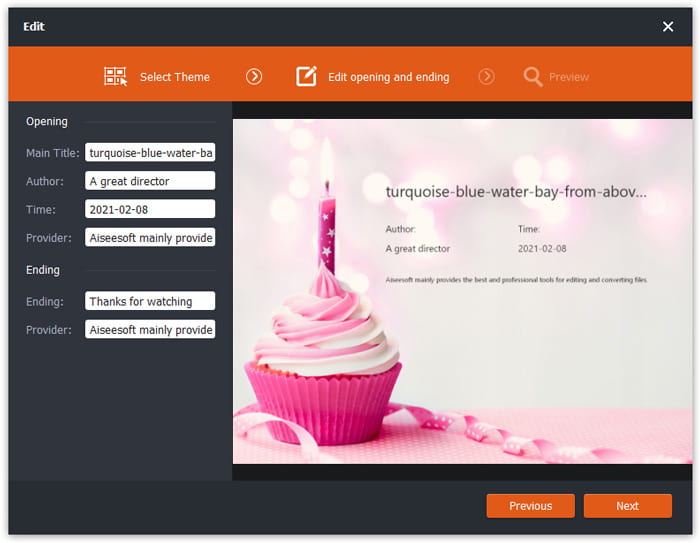
Napsauta Edit-painiketta aloittaaksesi FLV-tiedoston muokkaamisen. Voit valita tietyn teeman ja muokata tietoja, kuten otsikkoa, tekijää, aloitus- ja lopetusajankohtaa.
Vaihe 3. Aseta lähtö WMA: ksi
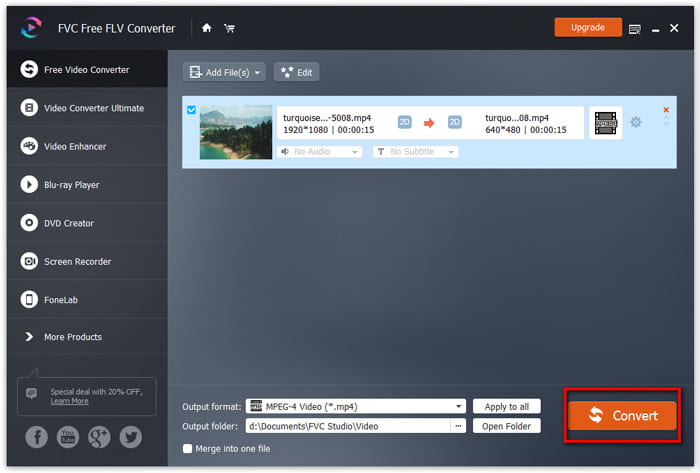
Siirry sitten Output format -alueelle ja kirjoita hakukenttään WMA. Täällä voit valita WMA - Windows Media Audio (*.wma) tulostusmuodoksi.

Vaihe 4. Muunna FLV WMA: ksi
Siirry Output folder -alueelle ja valitse kohdekansio, johon WMA-tiedosto tallennetaan. Voit napsauttaa Convert-painiketta aloittaaksesi FLV-tiedoston muuntamisen WMA‑äänitiedostoksi ilmaiseksi.
Osa 2. Kuinka muuntaa FLV WMA Online -palveluksi ilmaiseksi
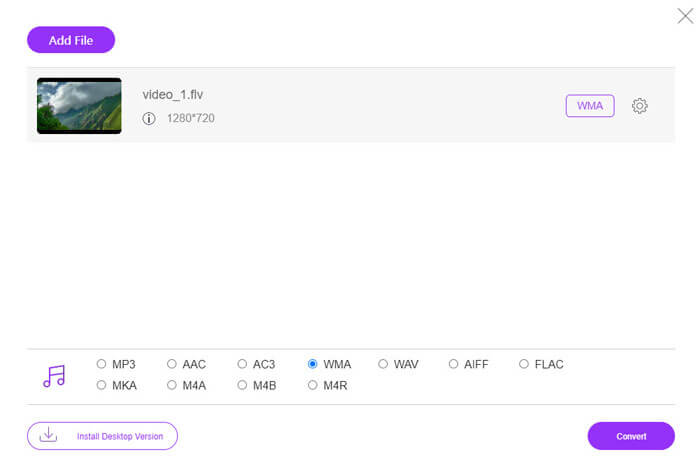
Jos et halua ladata mitään ohjelmistopakettia, voit kokeilla FVC Free Audio Converter -työkalua. Se on tehokas verkkopohjainen FLV–WMA-muunnin, jonka avulla voit muuntaa minkä tahansa yleisen video- tai äänitiedoston WMA-, MP3-, AAC-, FLAC-, WAV-muotoon jne. Voit oppia yksityiskohtaisesti, miten FLV muunnetaan WMA-muotoon FVC Free Audio Converter -palvelulla.
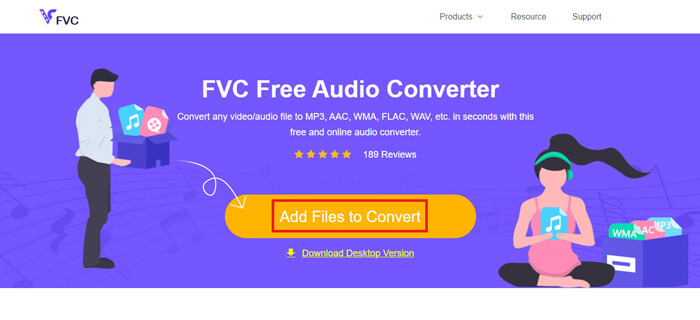
Vaihe 1. Vieraile FVC Free Audio Converterin virallisella sivustolla (https://www.free-videoconverter.net/free-audio-converter/). Napsauta Add Files to Convert -painiketta ladataksesi ja asentaaksesi käynnistysohjelman. Voit ladata FLV-tiedostot paikalliselta tietokoneelta.
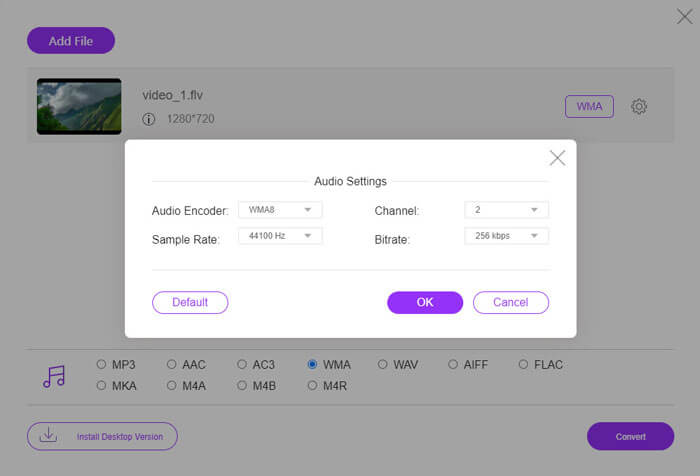
Vaihe 2. Valitse alareunasta WMA ja aseta se tulostusmuodoksi. Jos haluat säätää lisäasetuksia, voit napsauttaa hammasrataskuvaketta asettaaksesi äänen enkooderin, kanavan, näytteenottotaajuuden ja bittinopeuden. Napsauta OK-painiketta tallentaaksesi muutokset.
Vaihe 3. Lopuksi voit napsauttaa Convert-painiketta aloittaaksesi FLV-tiedostosi muuntamisen WMA-muotoon verkossa ilmaiseksi.
Osa 3. Usein kysytyt kysymykset FLV: n muuntamisesta WMA: ksi
Mikä on FLV-tiedosto ja miten voin toistaa sitä?
FLV on Adoben kehittämä flash-videotiedostomuoto. Se voi tallentaa videota, ääntä, tekstiä, alaindeksiä ja muuta. Sekä Windows Media Player että QuickTime eivät tue FLV: tä, joten sinun on käytettävä kolmannen osapuolen mediasoitinta FLV: n avaamiseen, kuten VLC.
Mihin WMA-muotoa käytetään?
WMA on häviöllinen äänimuoto, jonka Microsoft on luonut kilpailemaan MP3: n kanssa. WMA: ta käytetään pääasiassa verkkomusiikin suoratoistoon. .WMA-laajennuksella varustettu WMA-tiedosto on Windows Media Audio. Windows Media Player tukee sitä täydellisesti.
Onko WMA-musiikkisoitinta?
Kyllä. Käytettävissä on useita WMA-musiikkisoittimia, kuten FVC Free Video Player, KMPlayer, Elmedia Video Player, Macgo Free Mac Media Player, VOX Music Player, VLC Media Player, GOM Media Player, foobar2000, AIMP, Samsung Music jne.
Johtopäätös
Tässä artikkelissa puhuimme pääasiassa kahdesta ilmaisesta tavasta muuntaa FLV-video WMA: ksi Windows 10 PC: ssä ja Macissa. Toivottavasti kaikki nämä ratkaisut auttavat sinua ratkaisemaan ongelmasi. Seuraavan kerran, kun lataat Flash-videoita verkkosivustolta, voit kokeilla FVC Free FLV Converter -ohjelmaa muuntaa FLV-video WMA: ksi, MP3: ksi, AAC: ksi, MP4: ksi, AVI: ksi, VOB: ksi jne.
-
 FLV WAV: ksi - Muunna FLV WAV: ksi verkossa ilmaiseksi ja Mac / PC: llä
 Kuinka muuntaa FLV-tiedosto? Voiko VLC muuntaa YouTube FLV: n WAV: ksi? Tämä viesti kertoo 3 ilmaista tapaa muuntaa FLV WAV: ksi ilman laadun heikkenemistä.
-
 2 helppoa tapaa muuntaa MOV-tiedostot FLV: ksi Windows / Macissa
 Kuinka muuntaa MOV FLV: ksi ilmaiseksi? Tässä ovat parhaat videomuuntimet työpöydällä ja verkossa, jotta MOV-tiedosto voidaan muuntaa FLV: ksi sekunneissa maksamatta penniäkään.
-
 Kuinka muuntaa WMA MP3: ksi Mac / Windows / Online
 Onko mahdollista muuntaa WMA MP3: ksi Windows Media Playerilla? Kuinka muuntaa WMA MP3-tiedostoksi? Tämä viesti jakaa 4 yksinkertaista tapaa, joiden avulla voit muuntaa äänen WMA: sta MP3: ksi Macissa, Windows PC: ssä ja verkossa.
