


 Video Converter Ultimate
 Näytön tallennin
 Videon korjaus
 Suojattu lataus
3 ilmaista tapaa muuntaa FLV Xbox-pelaamista varten
FLV-muotoa käytetään laajasti uutis- ja videonjakosivustoilla. Kun lataat verkkovideoita esimerkiksi YouTubesta, Hulusta tai Facebookista, saat useimmiten FLV‑tiedostoja. FLV-formaattia tukevat monet soittimet, laitteet, alustat ja selaimet. Xboxilla sitä ei kuitenkaan voi toistaa.
Xbox on enemmän kuin pelikonsolei: sillä voi myös toistaa videoita ja musiikkia USB‑muistitikulta tai ulkoiselta kiintolevyltä. Xbox tukee monia suosittuja mediatiedostoja. Kuten yllä mainittiin, FLV‑tiedostoja ei kuitenkaan voi toistaa suoraan Xboxilla. Jos haluat katsoa FLV‑tiedostoja Xboxilla, sinun täytyy muuntaa FLV Xboxin tukemaan formaattiin.

Tässä artikkelissa esitellään 3 ilmaista tapaa muuntaa FLV Xboxille sopivaan muotoon. Kun haluat katsoa FLV‑tiedostoja Xbox One-, Xbox 360-, uuden Xbox Series X- tai Xbox Series S ‑konsolin kautta, voit käyttää näitä menetelmiä FLV‑tiedostojen muuntamiseen Xboxin tukemaksi tiedostoksi.
Osa 1. Kuinka muuntaa FLV vapaasti Xbox Onlineksi
Monet videomuuntimet voivat auttaa muuntamaan FLV: n Xbox-tuettuun muotoon, kuten AVI tai MP4. Jos olet tekemisissä joidenkin pienten FLV-videoleikkeiden kanssa, sinun on ensin kokeiltava ilmaista online FLV to Xbox -muunninta.
Free Online Video Converter on helppokäyttöinen videomuunnin, jonka avulla voit muuntaa FLV‑tiedostot MP4-, AVI-, WMV-, MOV‑ tai muuhun Xbox-konsolin tukemaan formaattiin. Toisin kuin monet muut verkkomuuntimet, se ei vaadi tilin luomista tai sisäänkirjautumista. Lisäksi FLV‑muunnokselle ei ole lainkaan tiedostokokorajoitusta. Alla oleva ohje kertoo, miten sitä käytetään.
Vaihe 1. Tämä verkossa toimiva FLV–Xbox‑muunnin on yhteensopiva kaikkien yleisten selainten, kuten Chromen, Safarin, IEn ja Firefoxin kanssa. Avaa selain ja siirry Online FLV to Xbox converter ‑sivulle.
Vaihe 2. Kun olet sivulla, napsauta Add Files to Convert ja sitten Download-painiketta asentaaksesi käynnistysohjelman FLV‑muunnosta varten. Kun käynnistysohjelma on valmis, avautuu ponnahdusikkuna, jossa voit lisätä FLV‑tiedostosi.

Vaihe 3. Ladatun FLV‑tiedoston alla näet luettelon suosituista videoformaateista, kuten MP4, AVI, MOV, FLV, WMV, MKV ja muita. Voit valita Xboxin tukeman formaatin, esimerkiksi MP4:n tai AVI:n.
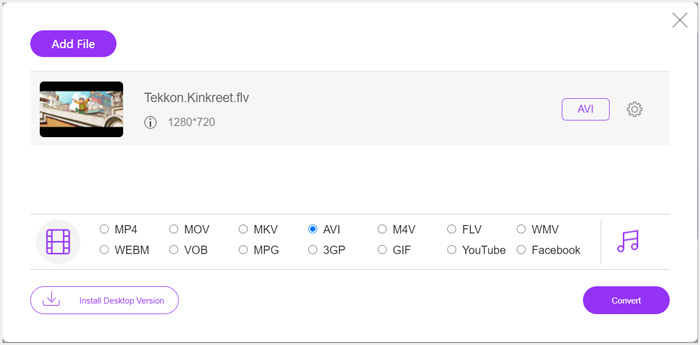
Vaihe 4. Jos haluat mukauttaa tarkemmin tulostettavan videon ja äänen asetuksia, napsauta Settings-kuvaketta tulostusformaatin vieressä. Sen jälkeen voit napsauttaa Convert-painiketta aloittaaksesi FLV–Xbox‑muunnoksen. Valmis video tallentuu automaattisesti tietokoneellesi heti muunnoksen valmistuttua.
Osa 2. Kuinka muuntaa FLV Xbox Onlineen FreeConvertilla
FreeConvert on toinen suosittu video‑ ja äänimuunnin, jonka avulla voit muuntaa FLV‑tiedostot Xboxin tukemaan MP4-, AVI- tai WMV‑muotoon. Se tarjoaa erillisen FLV to Xbox Video Converter ‑työkalun, jolla voit muuntaa FLV‑tiedostosi suoraan Xboxille sopiviksi.
Vaihe 1. Avaa selain ja siirry tälle FLV to Xbox Video Converter ‑sivulle.
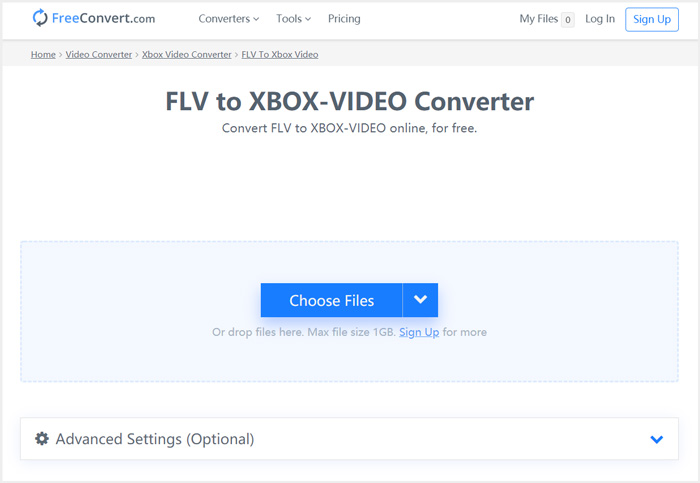
Vaihe 2. Napsauta Choose Files ‑painiketta selataksesi ja ladataksesi FLV‑tiedoston. Voit myös lisätä tiedoston URL-osoitteesta, Google Drivesta tai Dropboxista.
Vaihe 3. Voit napsauttaa Add More Files ladataksesi lisää FLV‑tiedostoja, jotka haluat muuntaa. Kohdeformaatti on oletuksena XBOX. Voit yksinkertaisesti napsauttaa Convert to Xbox Video ‑painiketta käynnistääksesi FLV–Xbox‑muunnoksen.
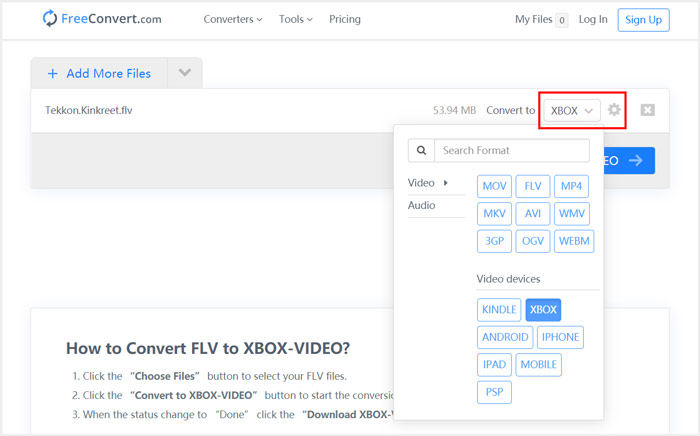
Samanlaisia vaiheita seuraamalla voit toistaa mitä tahansa musiikkia Xboxilla sen jälkeen kun olet muuntanut kappaleet Xboxin tukemiin formaatteihin.
Tämä FLV to Xbox Video Converter alkaa ladata ja muuntaa videosi. Muunnoksen jälkeen voit napsauttaa Download-painiketta tallentaaksesi tiedoston Macille tai Windows‑tietokoneelle. Vaihtoehtoisesti voit tallentaa sen Google Driveen tai Dropboxiin. Näet jonkin verran mainoksia käyttäessäsi tätä ilmaista FLV–Xbox‑muunninta.
Osa 3. Parempi tapa vapaasti muuntaa FLV Xboxiksi Mac- ja Windows PC -käyttöjärjestelmissä
Verkko‑FLV‑muuntimien lisäksi voit käyttää myös muita ilmaisia videomuuntimia FLV‑tiedostojen muuntamiseen ja toistamiseen Xbox‑pelikonsolilla. Tässä esittelemme tehokkaan ohjelman nimeltä Free FLV Converter. Se on erityisesti suunniteltu erilaisia FLV‑muunnoksia varten.

- Muunna mikä tahansa FLV Xbox-tuettuun muotoon, kuten MP4, AVI, WMV, MOV ja paljon muuta.
- Tarjoa joukko teemoja FLV-tiedoston muokkaamiseen ja mukauttamiseen.
- Edistyneet moniydinsuorittimet ja GPU-kiihdytykset FLV: n muuntamiseksi Xboxiksi nopeasti.
- Muunna yksi tai useampi FLV-tiedosto Xboxiksi ilman kuvan tai äänenlaadun heikkenemistä.
Ilmainen latausWindows 7 tai uudempiTurvallinen lataus
Ilmainen latausMacOS 10.7 tai uudempiTurvallinen lataus
Vaihe 1. Kaksoisnapsauta ensin latauspainiketta asentaaksesi ohjelman maksutta tietokoneellesi. Avaa se ja napsauta Add Files tuodaksesi FLV‑tiedosto(t).

Vaihe 2. Valitse MP4 tai AVI kohdeformaatiksi Output format ‑pudotusvalikosta. Lisäasetuksia varten voit napsauttaa Settings-kuvaketta tulostusformaatin vieressä avataksesi Profile Settings ‑ikkunan.
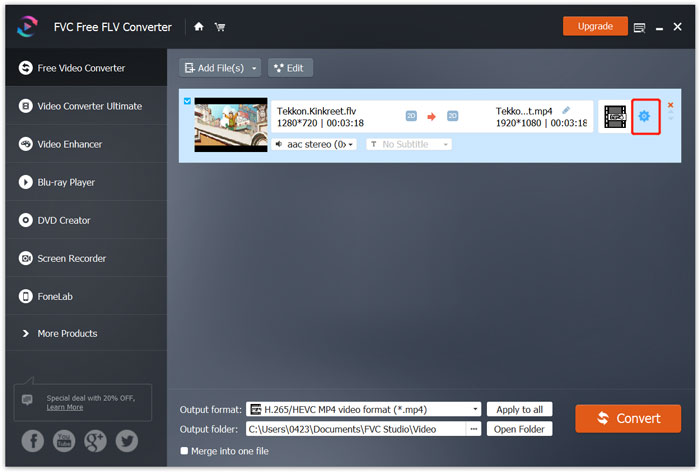
Output format ‑valikossa on myös erillinen Xbox-kategoria, jonka kautta voit muuntaa FLV‑tiedostot suoraan Xbox Onen tai Xbox 360:n tukemaan muotoon. Tätä varten ohjelma on kuitenkin päivitettävä maksulliseen versioon.
Vaihe 3. Napsauta Convert-painiketta käynnistääksesi videomuunnoksen FLV:stä MP4:ään tai muuhun Xboxin tukemaan videoformaattiin.
Osa 4. UKK FLV: n pelaamisesta Xboxilla
Kysymys 1. Mitä muotoja Xbox One tukee?
Yhtenä suosituimmista pelikonsoleista XBox on yhteensopiva monien usein käytettyjen video- ja äänimuotojen kanssa, mukaan lukien MP4, AVI, M4V, MOV, WMV, MKV, H.264 AVCHD, WAV, WMA, 3GP video, 3GP audio, AAC , MP3 ja paljon muuta.
Kysymys 2. Kuinka toistaa videoita Xboxilla?
Jos sinulla on Elokuvat ja TV -sovellus Xbox Onella tai Xbox 360: llä, kun suoratoistat videota Xboxiin tai liität ulkoisen aseman Xboxiin, voit käyttää sitä videoiden katseluun helposti.
Kysymys 3. Mikä pelaaja voi toistaa FLV-tiedostoja?
Kun haluat toistaa FLV-tiedostoja Macilla, Windows-tietokoneella tai kannettavalla iOS / Android-laitteella, VLC Media Player on aina hyvä vaihtoehto siihen. Se tarjoaa pöytä- ja mobiilisovelluksia, joiden avulla voit toistaa FLV-tiedostoja tietokoneellasi tai puhelimellasi.
Johtopäätös
Etkö voi toistaa FLV-tiedostoja Xbox-pelikonsolilla? Tätä varten sinun on ensin muunnettava FLV Xbox-tuettuun tiedostoon. Tästä viestistä löydät 3 ilmaista tapaa muuntaa ja toistaa FLV Xboxilla.
-
 10 parasta FLV-soitinta Windowsille, Macille, iOS: lle ja Androidille vuonna 2021
 FLV-soittimen avulla voit helposti käyttää FLV-tiedostojasi Windows-, Mac-, Android- ja iOS-laitteilla. Katso parhaat FLV-tiedostosoittimet, jotka voit ladata juuri nyt.
-
 Opetusohjelma GIF-tiedostojen pakkaamiseen ja tiedostokoon pienentämiseen korkealaatuisina
 Tässä on 2 helppoa tapaa pakata GIF tietokoneellasi tai matkapuhelimellasi. Voit käyttää FVC Free Online Video Compressoria ja Photoshopia pienentämään GIF-tiedostokokoa eri näkökulmista.
-
 Top 4 ilmaista tapaa muuntaa FLV-videot MP4: ksi työpöydällä ja verkossa
 Tässä oppaassa jaetaan neljä ilmaista tapaa muuntaa FLV-videotiedostosi MP4-muotoon Windows 10/8/7 / XP: ssä ja Mac OS X: ssä, jotta voit nauttia videoista millä tahansa laitteella.
