


 Video Converter Ultimate
 Näytön tallennin
 Videon korjaus
Offline- ja online-muunnosprosessi: paras tapa muuntaa OGV FLV:ksi
Kun käytät OGV-videoita, tämä häviöllinen videotiedostojen pakkausmuoto saattaa alkaa ärsyttää, koska kuva muuttuu sumeaksi säätöjen jälkeen. Tilanne kuitenkin paranee, jos muunnetaan OGV ensin FLV‑muotoon ennen verkossa jakamista; ainoa haaste on löytää helppokäyttöinen mutta tehokas videomuunnin. Onneksi käytössäsi on tähän paras ratkaisu sekä offline‑ että online‑käyttöön, jolla voit helposti muuntaa OGV:n FLV‑muotoon. Seuraa vain tämän artikkelin ohjeita mukavuutesi vuoksi.

Osa 1. Kuinka muuntaa OGV FLV:ksi helposti [Offline]
Rehellisesti sanottuna verkossa on tarjolla paljon videomuuntimia, mutta vain harvat niistä tukevat OGV‑muunnosta. Koska kyseinen formaatti ei ole kovin yleinen useimpien videonkatsojien keskuudessa, muuntimet eivät vaivaudu sisällyttämään sitä tuettuihin tiedostomuotoihin. Tässä kohtaa Video Converter Ultimate tulee apuun. Se tukee täysin OGV‑tiedostojen tuontia ja mahdollistaa OGV‑videotiedostojen nopean muuntamisen FLV‑muotoon. On myös syytä huomata, että se voi muuntaa OGV‑videosi ja lisäksi muokata niitä käytännöllisillä työkaluilla. Kaikki tarvitsemasi löytyy Video Converter Ultimatesta. Siksi tarjoamme sinulle kaikkein yksinkertaisimmat vaiheet, joita voit seurata:
Vaihe 1: Ennen kuin voit käyttää ohjelmistoa, sinun on asennettava se tietokoneellesi. Voit tehdä tämän napsauttamalla jotakin alla olevista Ilmainen lataus ‑painikkeista käyttämäsi käyttöjärjestelmän mukaan. Odota, että .exe‑ tai .dmg‑tiedosto latautuu valmiiksi, ja kun se on valmis, avaa se asennusprosessin käynnistämiseksi. Lopuksi voit käynnistää ohjelmiston heti asennuksen päätyttyä napsauttamalla Aloita nyt.
Ilmainen latausWindows 7 tai uudempiTurvallinen lataus
Ilmainen latausMacOS 10.7 tai uudempiTurvallinen lataus
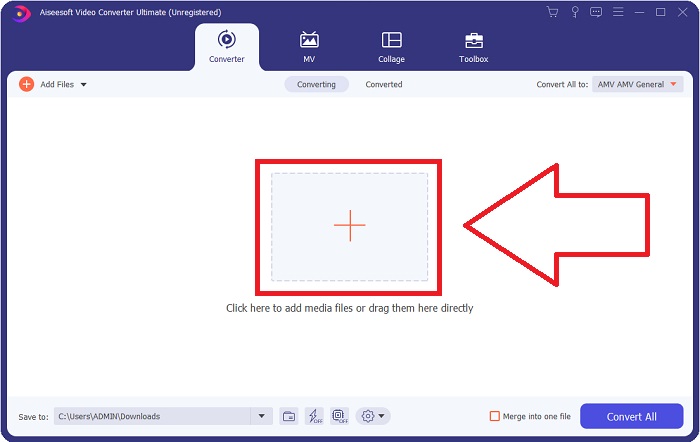
Vaihe 2: Kun ikkuna ponnahtaa esiin, näet käyttöliittymän, jonka keskellä on +‑painike. Tuodaksesi muunnettavan videotiedoston napsauta painiketta tai vedä ja pudota varsinainen tiedosto ohjelmaan.
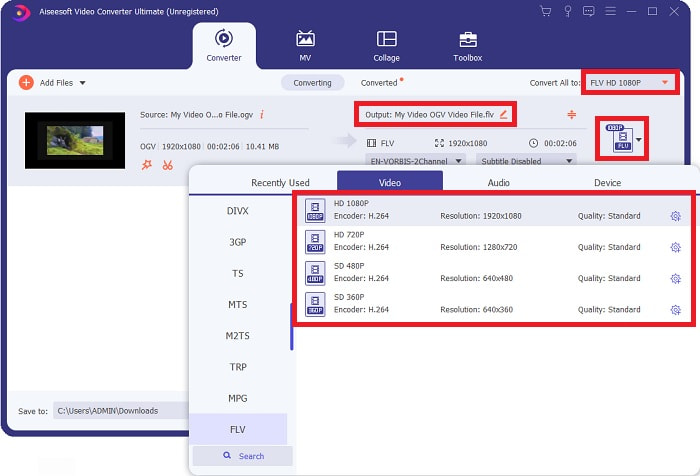
Vaihe 3: Oikealla näkyy, mikä tiedostomuoto videollasi tällä hetkellä on. Napsauta sitä, niin näet kaikki käytettävissä olevat muodot. Tässä tapauksessa selaa alaspäin ja valitse FLV, tai voit etsiä sen alapuolella olevasta hakukentästä. Välilehden oikealla puolella voit myös valita, millaisen videolaadun haluat muunnetulle tiedostolle.
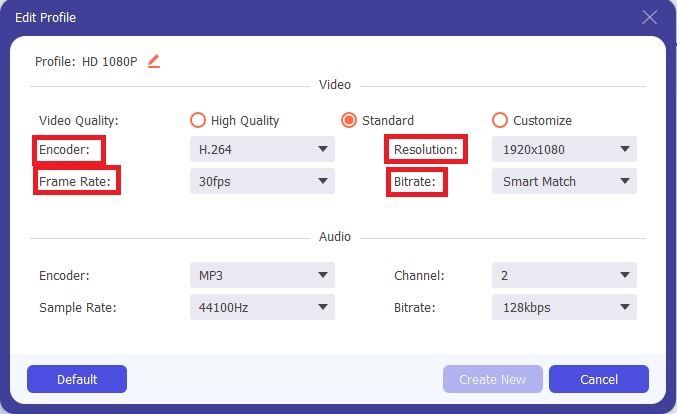
Vaihe 4: Jos etsit lisää asetuksia, löydät niitä napsauttamalla hammasrataskuvaketta valitsemasi videolaadun vieressä. Tämän avulla voit muokata tarkemmin videon resoluutiota ja muita vaihtoehtoja, kuten kuvanopeutta (frame rate), näytteenottotaajuutta (sample rate), bittinopeutta (bitrate) ja koodekkia (encoder). Kun olet tyytyväinen, napsauta oikeassa alakulmassa olevaa Luo uusi ‑painiketta tallentaaksesi muutokset.
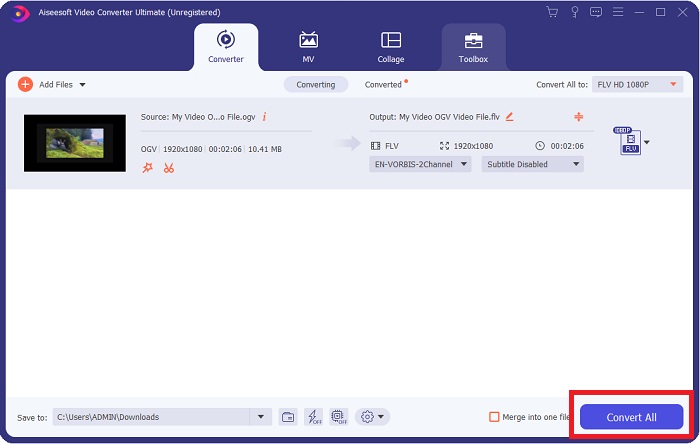
Vaihe 5: Kun olet valmis kaikkien säätöjen kanssa, voit aloittaa varsinaisen muunnoksen napsauttamalla oikeassa alakulmassa olevaa Muunna kaikki ‑painiketta ja odottamalla, että prosessi valmistuu.
Osa 2. Toinen käytettävissä oleva menetelmä OGV:n muuntamiseksi FLV:ksi [Online]
Jos aika on kortilla ja sinun täytyy muuntaa OGV‑tiedostosi FLV‑muotoon mahdollisimman nopeasti, ei tarvitse huolehtia, sillä tähänkin on ratkaisu. Voit käyttää saman ohjelmiston online‑versiota, joka tarjoaa sinulle edelleen suurta käyttömukavuutta ja sujuvan muunnosprosessin. FVC Free Video Converter Online on verkkotyökalu, joka voi helposti muuntaa OGV‑tiedostot FLV‑muotoon ja tarjoaa silti samat resoluutio‑ ja äänenlaatuasetukset. Käyttö onnistuu seuraavien ohjeiden avulla:
Vaihe 1: Napsauta tätä linkkiä, niin sinut ohjataan suoraan online‑muuntimeen. Sivun keskellä on painike nimeltä Lisää muunnettavat tiedostot. Sinun on napsautettava sitä ladataksesi käynnistysohjelman, jota tarvitset muunnettavan videotiedoston tuontiin.
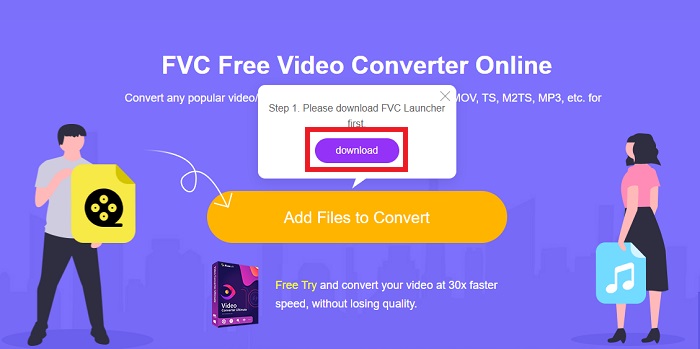
Vaihe 2: Kun olet valmis, voit nyt lähettää tiedostosi napsauttamalla uudelleen samaa painiketta. Jos lataus onnistuu, näyttöön tulee käyttöliittymä. Siitä voit valita FLV muiden ikkunan alareunassa tarjottujen muotojen joukosta.
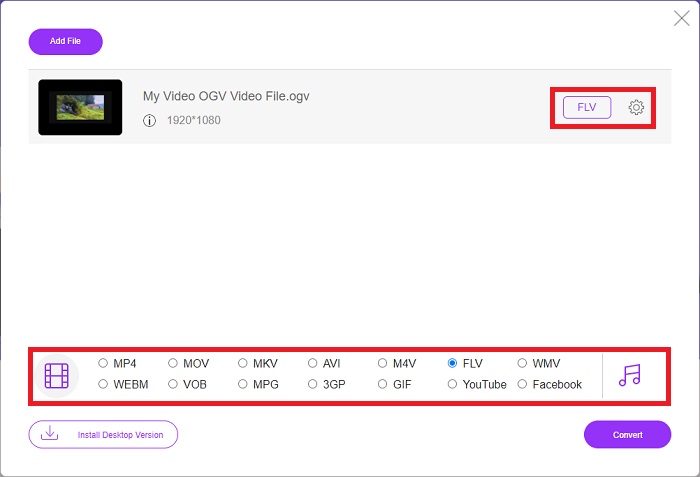
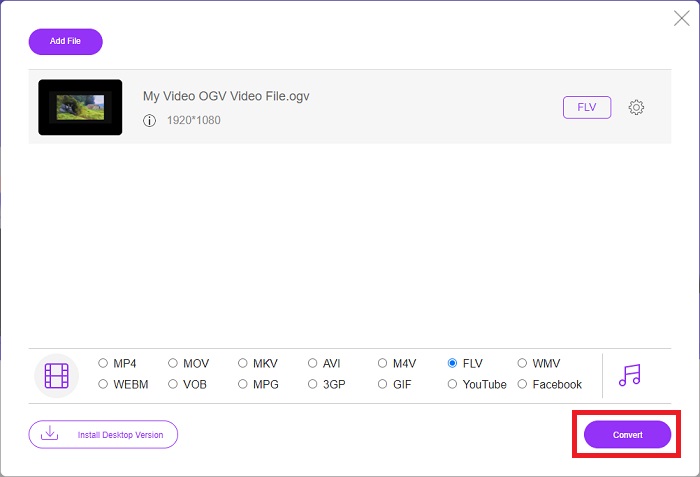
Vaihe 3: Samoin löydät kauempaa oikealta hammasrataskuvakkeen, jonka kautta voit jatkaa videosi muokkaamista. Napsauttamalla sitä löydät video‑ ja ääniasetukset, joissa voit muokata koodekkeja, resoluutiota, kuvanopeutta ja muuta. Napsauta OK ja sen jälkeen oikeassa alakulmassa olevaa Muunna‑painiketta aloittaaksesi muunnosprosessin.
Osa 3. Laajennettu tieto OGV:stä ja FLV:stä
Jos haluat tietää enemmän kahdesta verrattavasta tiedostosta, tarjoamme sinulle kaikki tarvittavat tiedot, jotka saatat haluta lukea:
Ogg Vorbis -videokoodausmenetelmä voi yleensä linkittää tiedostoihin, joiden tiedostotunniste on .ogv. Ogg Vorbis on avoimen lähdekoodin, patentoimaton äänenpakkausmuoto. Ääni-, video- ja tietotiedostojen säilömuoto tunnetaan nimellä Ogg, kun taas äänenpakkaustekniikka Vorbis on nimetty. OGV-tiedostomuoto on videotiedostojen säilö. OGV-tiedostoista voi löytyä videostreameja, jotka on linkitetty yhteen tai useampaan videokoodekkiin, kuten Theora ja DivX. Käyttäjät voivat toistaa tallennettua materiaalia sisältötiedoston sisällä useilla medialaitteilla näitä tiedostoja käyttämällä.
Toisaalta Adobe Flash Video (FLV) -säilömuotoon tallennettu videotiedosto on FLV-tiedosto. Adobe Flash Player käyttää sitä pääasiassa tarjotakseen online-videosisältöä, kuten elokuvia ja TV-jaksoja. On myös tärkeää huomata, että se on avoin muoto, jota useat muut kuin Adobe-/Macromedia-sovellukset tukevat. Tarkempaa vertailua varten teimme sinulle taulukon.
| Ogg Vorbis (OGV) | Adobe Flash Video (FLV) | |
| Tiedostopääte | .ogv | .flv |
| Kehittäjä | Xiph.Org-säätiö | Adobe Systems Incorporated |
| Tukiohjelmat | MPlayer Classic, VLC Media Player, Jriver Media Center, MPUI | RealPlayer, Apple QuickTime Player, Mplayer, VLC Media Player |
| Edut | OGG:llä on se etu, että se on patenttiton, yleisesti tunnustettu ja useimmat selaimet tukevat alkuperäisesti. Tämän seurauksena tämä muoto on hyvä vaihtoehto, jos haluat ladata elokuvan verkkosivustollesi. | Flashin kauneus on, että se voi auttaa verkkosivustoja, jotka haluavat sisällyttää liikettä ja interaktiivista sisältöä. Menettely on suoraviivainen ja sillä voi lopulta olla merkittävä vaikutus. Kaikki käyttivät myös Flashia alkeellisiin peleihin parhaimmillaan. |
| Haitat | Huolimatta laajasta käytöstään OGG-videoformaatilla on muutamia haittoja. Esimerkiksi Safari ja Internet Explorer tukevat sitä vain osittain; Tästä syystä käyttäjät eivät välttämättä katso videotasi oikein näissä selaimissa. | Haittapuolena on tietysti se, että FLV-muodosta on tullut epäsuosittu viime vuosina. FLV-sisällön luominen voi kestää kauan ja olla kallista. Toinen haittapuoli on, että Flash-materiaalia ei voi toistaa iOS-laitteilla, mikä rajoittaa vakavasti sen kykyä houkutella uusia seuraajia. |
Osa 4. OGV- ja FLV-muunnoksia koskevat usein kysytyt kysymykset
Ovatko OGG ja OGV samat?
Se on sopiva osajoukko Ogg-videomediatyypistä video/Ogg tiedostotunnisteella. ogv. Muut Ogg-sovellukset käyttävät tiedostopäätettä. ogv mediatyypin sovelluksella/ogg since. ogx on video/oggin supersetti.
Onko FLV:n laatu parempi kuin MP4?
MP4:n sanotaan sisältävän korkealaatuista videon ja äänen digikoodausta. Yleisön mielipide FLV:stä on epäselvempi, vaikka FLV:n eduista ja haitoista puhuttaessa keskitytään harvoin tiedostomuodon laatuun. Suuremman pakkausasteen ansiosta MP4 menettää vähemmän laatua. Täältä voit katsoa eri tavat muuntaa FLV‑tiedostot MP4‑muotoon.
Onko FLV häviötön vai häviöllinen kuten OGV?
Flash Videon FLV-tiedostomuoto tukee kahta versiota näytön jakokoodekista (Screen video), joka on screencast-koodausmenetelmä. Nämä muodot perustuvat bittikarttaruutuihin ja ovat häviöllisiä, kun värisyvyyttä pienennetään ja pakataan Zlibillä.
Johtopäätös
Riippumatta siitä, kuinka paljon aikaa sinulla on videotiedostojesi muuntamiseen, sekä ohjelmisto että sen online-työkalun vastine tarjoavat sinulle sopivimman. Lyhyesti sanottuna Video Convert Ultimate ja Free Video Converter ovat ne, jotka tulee ensimmäisenä mieleen, kun kyse on videon muuntamisesta, jotta voit säästää aikaa Internetin selaamiseen ja parhaan löytämiseen. Tässä annamme sinulle parhaan.
-
 Parhaat tavat muuntaa VOB FLV:ksi [ilmainen ja online mukana]
 Haluatko muuntaa VOB-tiedoston FLV-tiedostoksi? Voit suorittaa tehtävän helposti joko työpöydällä tai verkossa olevilla muuntimilla. Lue tämä opas ja opi muuttamaan VOB FLV: ksi helposti ja nopeasti.
-
 4 parasta ilmaista RMVB - FLV Converter -sovellusta työpöydällä tai verkossa
 Tämä artikkeli kertoo sinulle parhaat RMVB-FLV-muunninohjelmistot ja verkkosovellukset, jotka voivat muuntaa RMVB (RealMedia Variable Bitrate) -tiedostot FLV-videoiksi.
-
 Kuinka pakata OGV-tiedosto menettämättä laatua
 Etkö voi lähettää suuria OGV-tiedostoja muille? No, tämä artikkeli esittelee sinulle 2 helppoa tapaa, joilla voit pakata OGV-tiedostoja helposti.
