


 Video Converter Ultimate
 Näytön tallennin
 Videon korjaus
 Suojattu lataus
Kuinka muuntaa VOB ilmaiseksi FLV:ksi työpöytä- ja online-ratkaisuilla vuonna 2022
VOB-muotoiset tiedostot sijaitsevat tavallisesti DVD-levyn juurihakemistossa VIDEO_TS-kansiossa. VOB-videot sisältävät suurimman osan levylle tallennetuista tiedoista, kuten videon, äänen, tekstitykset, DVD-valikot ja muun navigointisisällön. Jos kuitenkin haluat ladata VOB-tiedostoja sosiaalisiin verkostoihin, kuten YouTubeen, sinun on muutettava VOB-tiedostojen muoto suoratoistoa tukeviin videotiedostomuotoihin, kuten FLV:hen – joka on internetissä käytettävän suoratoistomedian vakiomuoto. Tässä artikkelissa kerromme, miten voit muuntaa VOB-tiedostot FLV-muotoon verkossa tai ilmaisella VOB–FLV-muunninohjelmalla parempaa suoratoistoa varten.

Osa 1. Kuinka muuntaa VOB FLV: ksi ilmaisella työpöytäohjelmistolla
Jos haluat vaihtaa VOB-tiedostojesi muodon nopeasti FLV:ksi, kokeile ohjelmaa FVC Free FLV Converter. Tällä ilmaisohjelmalla voit muuntaa videotiedostoja VOB-muodosta FLV-, MP4-, AVI-, WMV-, MOV- ja moniin muihin muotoihin. Lisäksi ohjelma pystyy tarvittaessa suorittamaan perusmuokkauksia videoille. Lataa vain VOB–FLV-muunnin ja toimi seuraavien helppojen ohjeiden mukaan.
Ilmainen latausWindows 7 tai uudempiTurvallinen lataus
Ilmainen latausMacOS 10.7 tai uudempiTurvallinen lataus
Vaihe 1. Käynnistä FVC Free FLV Converter
Lataa ensin VOB FLV -muunnin Windows- tai Mac-tietokoneellesi. Kun asennustiedosto on ladattu, kaksoisnapsauta sitä ja seuraa näytön ohjeita. Sen jälkeen, käynnistä se tietokoneellasi, ja sen käyttöliittymä on alla.

Vaihe 2. Lisää VOB-tiedostot ohjelmaan
Napsauta Add File(s) -painiketta, valitse VOB-tiedostosi ja jatka napsauttamalla Next.

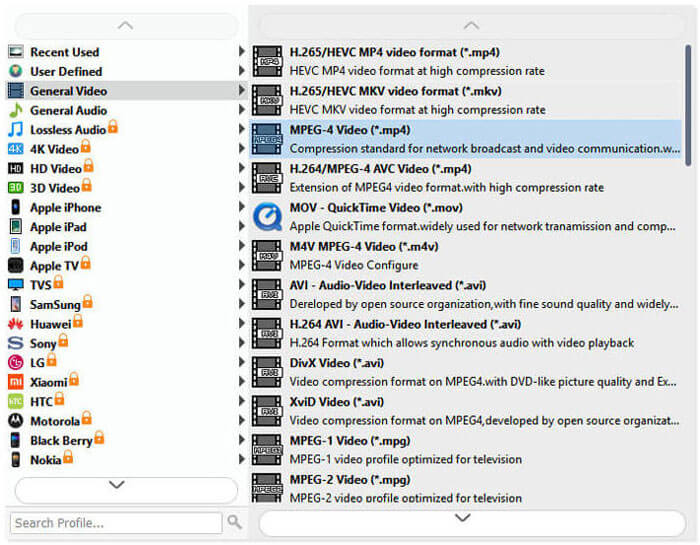
Vaihe 3. Valitse FLV lähtömuodoksi
Valitse sitten FLV-tiedostomuoto Output format -kentästä.
Vaihe 4. Muunna VOB FLV-muotoon
Napsauta Open Folder -painiketta ja valitse kansio, johon haluat tallentaa muunnetut tiedostot. Aloita VOB-tiedostojesi muuntaminen FLV-muotoon napsauttamalla Convert-painiketta. Kun muunnos on valmis, kansio, johon muunnetut tiedostot tallennettiin, avautuu automaattisesti.
Osa 2. Kuinka muuntaa VOB FLV Online
Verkkopalveluiden käyttäminen VOB: n muuttamiseksi FLV: ksi on myös hyvä valinta. Olemme valinneet kaksi online-VOB-FLV-muunninta, joista voit valita. Kaikki nämä verkkotyökalut ovat ilmaisia, ja monet käyttäjät käyttävät niitä usein. Lue, kuinka voit muuntaa VOB: n FLV: ksi tietokoneellasi online-työkalujen avulla.
FVC: n ilmainen online-videomuunnin
FVC Free Online Video Converter on monipuolinen verkkotyökalu, joka tukee yleisimpiä video- ja äänitiedostomuotoja. Tiedostojen muuntaminen tämän verkkopalvelun avulla on turvallista, ja muunnetut tiedostot poistetaan palvelimelta heti, kun olet ladannut tulostiedoston. Muunnos ei vaadi ohjelmiston asennusta, ja koko muunnosprosessi on yksinkertainen.
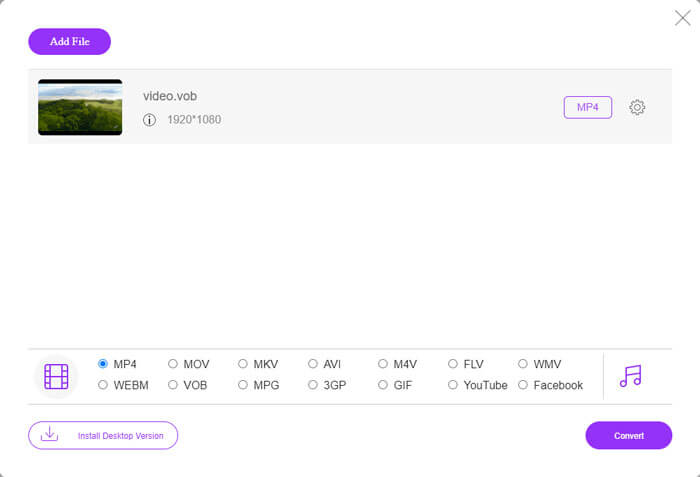
Voit vaihtaa VOB-tiedostosi FLV-muotoon noudattamalla seuraavia ohjeita.
Vaihe 1. Siirry FVC Free Online Video Converter -sivustolle ja napsauta Add Files to Convert -painiketta lisätäksesi VOB-tiedostosi. Ensimmäisellä käyttökerralla sinun on ladattava ja asennettava käynnistysohjelma.
Vaihe 2. Varmista, että FLV on valittu lähtömuodoksi ikkunan alareunassa Videos- tai Video-luokasta.
Vaihe 3. Napsauta Convert-painiketta ja valitse sitten kohdekansio. Kun muunnosprosessi on valmis, muunnettu tiedosto ladataan automaattisesti, ja kansio, johon muunnetut tiedostot tallennetaan, avautuu.
ConvertFiles
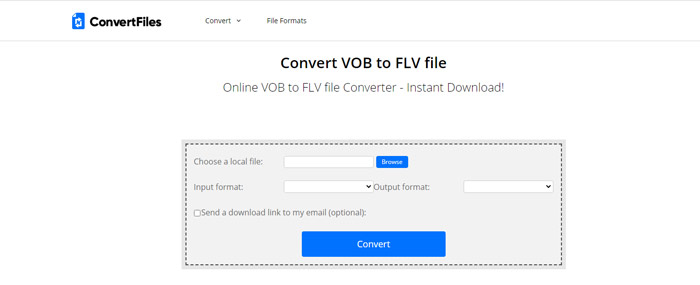
ConvertFiles on toinen ilmainen VOB-FLV-tiedostomuunnin verkossa. Tämä palvelu voi muuntaa erilaisia tiedostotyyppejä ilmaiseksi muutamassa minuutissa. Tämä palvelu voi lähettää muunnetun tiedoston latauslinkin sähköpostiosoitteeseesi tarvittaessa. Muunnos ei vaadi ohjelmiston asennusta ja koko muunnosprosessi on yksinkertainen. Huomaa kuitenkin, että tämä online-työkalu voi muuntaa jopa 250 Mt tiedostoja.
Näin voit käyttää tätä online-VOB-FLV-muunninta.
Vaihe 1. Siirry ConvertFiles-verkkosivulle, napsauta Browse ja lisää VOB-tiedostosi palveluun.
Vaihe 2. Valitse sitten pudotusvalikosta Output format vaihtoehto Flash Video File (.flv).
Vaihe 3. Napsauta Convert-painiketta aloittaaksesi VOB-tiedostojen muuntamisen FLV-muotoon. Kun tiedosto on muunnettu onnistuneesti, näet linkin, jota napsauttamalla pääset lataussivulle ja voit ladata muunnetut tiedostosi.
Osa 3. VOB- ja FLV-muotojen vertailu
| Vertailuparametri | VOB | FLV |
| Tiedostopääte | .vob | .flv |
| Kehittäjä | DVD-foorumi | Adobe Systems |
| Video 00-koodekit | MPEG-1, MPEG-2 | On2 VP6, Sorenson Spark, Näytön video, Näytön video 2, H.264 |
| Äänikoodekit | MP1, MP2, PCM, AC-3, DTS | MP3, ADPCM, Nellymoser, Speex, AAC |
| Ohjelmat, jotka avaavat VOB / FLV-tiedostot | Windows Media PlayerVLC Media Player | VLC Media PlayerAdobe Flash Player |
Osa 4. VOB-FLV-muunnoksen usein kysytyt kysymykset
Mikä on VOB?
VOB (video object) on DVD-Video-levyjen konttimuoto. VOB voi sisältää videota, ääntä, tekstityksiä, DVD-valikoita sekä navigoinnin DVD-levyn kappaleiden välillä. VOB-muoto perustuu yleensä MPEG-2-standardiin, ja sen voi avata lähes millä tahansa mediasoittimella. Lue lisää artikkelista Top 5 VOB -soitinta Windows 10/8/7 -tietokoneille ja Macille ja tutustu tarkemmin VOB-soittimiin.
Mikä on FLV?
FLV on audiovisuaalinen konttimuoto, jota käytetään digitaalisen videon suoratoistoon internetissä Adobe Flash Player 6:lla tai uudemmalla. Voit toistaa FLV-tiedostoja esimerkiksi Windows Media Playerilla, VLC:llä, Adobe Media Playerilla, Winampilla, RealPlayerilla tai muilla FLV-soittimilla.
Sisältävätkö VOB-tiedostot ääntä?
Joo. VOB-tiedosto sisältää video-, ääni-, tekstitys- ja DVD-valikot.
Johtopäätös
Kuten näette, voit muuntaa MP4: n FLV: ksi säilyttäen samalla alkuperäisen videon korkean laadun ilmaisella VOB-tiedostomuuntimella. Lisäksi voit tehdä VOB-FLV-muunnoksen verkossa. Edellä mainitut pöytätietokoneet ja online-VOB-FLV-muuntimet ovat kaikki ilmaisia. Toivomme, että löydät tyydyttävän ratkaisun, joka vastaa parhaiten tarpeitasi.
-
 Mikä on VOB -tiedosto ja kuinka muuttaa VOB -tiedosto ilmaiseksi GIF -muotoon
 Haluatko tietää lisää VOB-tiedostoista ja niiden jakamisesta kopioinnin jälkeen? tai Miksi sinun on muutettava VOB GIF-muotoon? Lue sitten tämä artikkeli huolellisesti.
-
 VOB MP4: ksi - 3 tapaa muuntaa VOB-tiedostot MP4: ksi ilmaiseksi irtotavarana
 Tässä artikkelissa esitellään 3 ilmaista VOB MP4 -muuntimeen ja siihen liittyviä oppaita. Voit vapaasti muuntaa VOB: n MP4-tiedostoiksi ilmaiseksi Windows / Mac / verkossa helposti.
-
 Kuinka pakata VOB-tiedostoja verkossa ja ilmaiseksi
 Etsitkö menetelmiä pakata VOB-tiedostoja? Tässä artikkelissa on paras tapa pienentää VOB-tiedostojen kokoa.
