


 Video Converter Ultimate
 Näytön tallennin
 Videon korjaus
Vinkkejä ja temppuja WebM-tiedostojen muuntamiseen FLV:ksi Windowsille/Macille/Onlinelle
Onko sinulla ongelmia WebM-tiedostopäätteellä olevien videoiden toistamisessa? Ehkä etsit parhainta ratkaisua muuntamalla tiedoston laitteellasi toistettavaan formaattiin. Jos näin on, olet onnekas, sillä tässä artikkelissa käsitellään kahta parasta WebM-muunninta, joita voit käyttää verkossa tai offline-tilassa. Hypätään siis suoraan ilmaiseen WebM–FLV-muuntimeen, jota voit käyttää työpöydälläsi, ja opitaan, miten WebM muunnetaan käytännössä.

Osa 1. Huippuluokan WebM to FLV Converter Windowsissa ja Macissa
Ensimmäisenä listalla on ilmiömäinen WebM–FLV-muunnin, jonka voit ladata työpöydällesi ratkomaan ongelmasi. FVC Video Converter Ultimate on paras valinta muuntimeksi, kun haluat saavuttaa 100% onnistumisprosentin muunnoksissasi. Sitä käytetään erityisesti video- ja äänitiedostojen muuntamiseen yhteen yli 200:sta valittavissa olevasta yhteensopivasta formaatista. Se on vieläkin hiotumpi, sillä se tarjoaa yksinkertaisen muunnosprosessin erittäin suurella nopeudella ilman laadun heikkenemistä. Tämä muunnin vie konvertoinnin uudelle tasolle – haluatko kokea sen? Siinä tapauksessa opitaan käyttämään tätä työkalua seuraamalla alla olevia yksityiskohtaisia ohjeita.
Vaiheet WebM-tiedostojen muuntamiseksi FLV-muotoon FVC Video Converter Ultimatella:
Vaihe 1. Napsauta alla olevaa latauspainiketta ja seuraa asennusohjeita.
Ilmainen latausWindows 7 tai uudempiTurvallinen lataus
Ilmainen latausMacOS 10.7 tai uudempiTurvallinen lataus
Vaihe 2. Lisätäksesi WebM-tiedostosi napsauta Add Files käyttöliittymän vasemmassa yläkulmassa. Valitse sitten kansiostasi .webm-tiedosto ja napsauta Open.
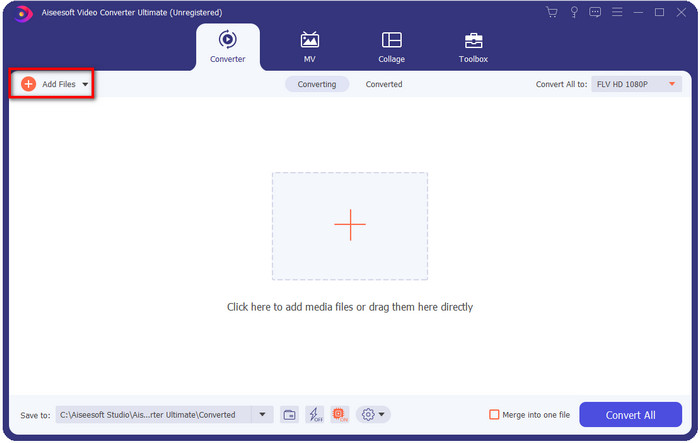
Voit vetää ja pudottaa tiedostoja käyttöliittymässä, jos haluat lisätä useita WebM-tiedostoja tai muita tiedostoja erämuunnoksia varten.
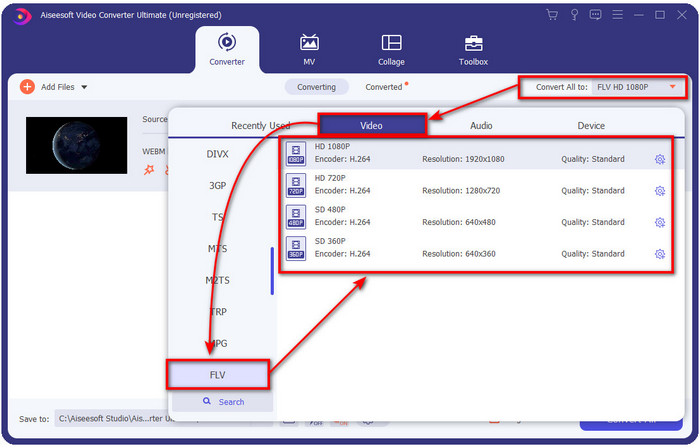
Vaihe 3. Napsauta Convert All -vaihtoehtoa käyttöliittymän oikeassa yläkulmassa ja valitse FLV-formaatti.
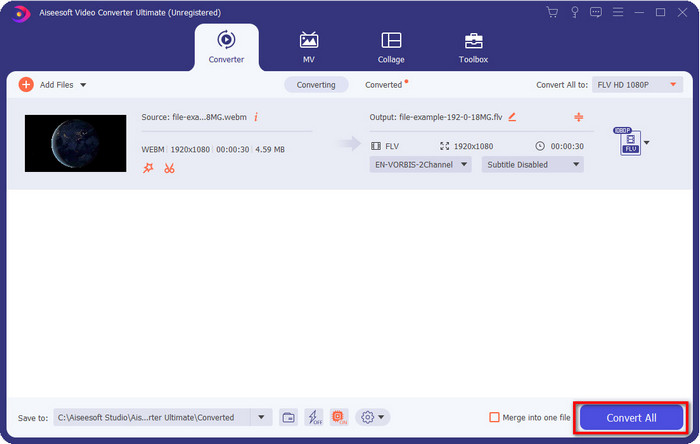
Vaihe 4. Napsauta Convert All aloittaaksesi ja muuntaaksesi WebM:n FLV:ksi. Prosessin jälkeen näytölle avautuu kansio, jossa on vastikään muunnettu FLV-tiedosto.
Plussat
- Se tukee lukemattomia muotoprofiileja, joista voit valita.
- Tukee Hardware Acceleration & Fast Conversion nopeampaa muunnosprosessia.
- Se tarjoaa useita edistyneitä muokkausominaisuuksia, kuten leikkaus, yhdistäminen, rajaus, tehosteiden lisääminen ja paljon muuta.
- Muunna WebM-tiedostot erässä.
- Saatavilla kaikissa käyttöjärjestelmissä, kuten Windows ja Mac.
Haittoja
- Lataa se työpöydällesi.
- Maksullinen muuntaja.
Osa 2. Muunna WebM FLV:ksi ilmaiseksi verkossa
FVC Free Video Converter Online tarjoaa tehokkaan WebM–FLV-muuntimen verkossa. Tämä muunnin on käytettävissä kaikissa haluamissasi hakukoneissa. Sen sijaan että lataisit muuntimen työpöydällesi, mikset käyttäisi tätä verkkotyökalua vaihtoehtona? Sen lisäksi, että se on ilmainen, se on myös mainos- ja haittaohjelmavapaa. Monet toiminnoista, joita FVC Video Converter Ultimatessa on – erityisesti tuettujen formaattien laajuus – eivät kuitenkaan ole tässä mukana. Haluatko tietää, miten tätä verkkopohjaista muunninta käytetään? Seuraa silloin alla annettuja ohjeita.
Vaiheet WebM-tiedostojen muuntamiseksi FLV-muotoon verkossa FVC Free Video Converter Onlinella:
Vaihe 1. Napsauta tätä FVC Free Video Converter Online avataksesi muuntimen verkkosivun.
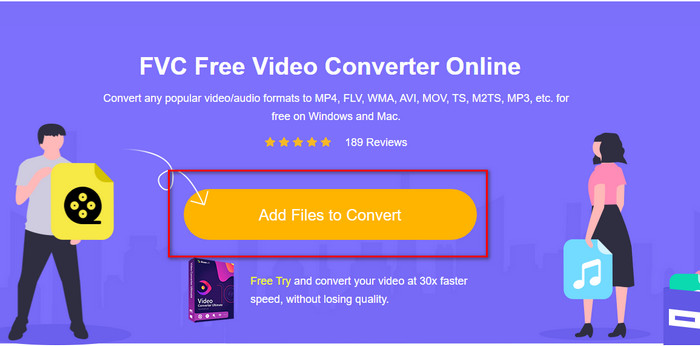
Vaihe 2. Muuntimen verkkosivulla napsauta Add Files to Convert asentaaksesi verkkotyökalun käynnistysohjelman. Napauta sitä uudelleen, jolloin kansio avautuu; etsi .webm-tiedosto ja napsauta Open.
Vaihe 3. Aseta formaatiksi FLV valitsemalla se avattavasta luettelosta.
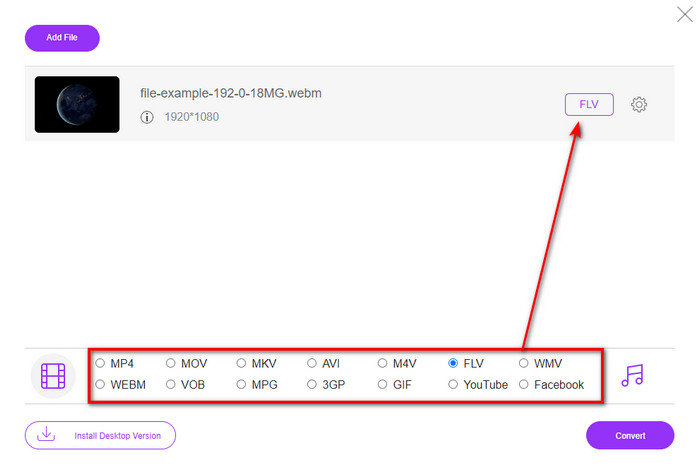
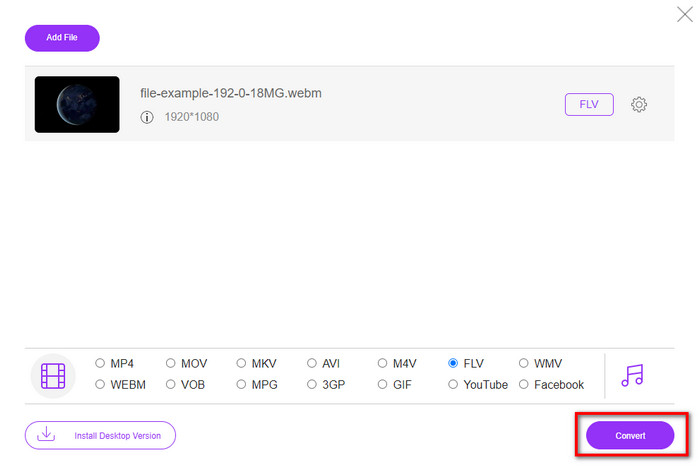
Vaihe 4. Muuntaaksesi tiedoston napsauta Convert.
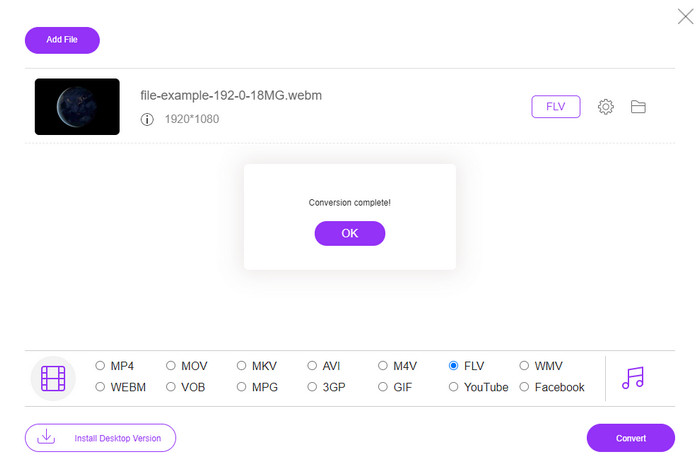
Vaihe 5. Kun muunnos on valmis, näytöllesi avautuu kansio.
Plussat
- Saatavilla ja vapaasti käytettävissä kaikissa verkkoselaimissa.
- Ei nokkosia mainoksia, ja se on haittaohjelmavapaa.
- Se tukee keskipitkän alueen formaattia.
Haittoja
- Internet-yhteys tarvitaan.
- Erikoisominaisuudet eivät ole käytettävissä tässä muuntimessa.
Osa 3. WebM vs. FLV
WebM on pelattavissa useimmissa HTML5-selaimissa. Tämän muodon tarkoitus on olla rojaltivapaa ja käytettävissä kaikissa verkkoselaimissa videoiden ja äänen toistamiseen. Lisäksi se voi mukautua kaikkiin käyttäjien kaistanleveystilanteisiin. Se toistaa pääasiassa videoita ja ääntä vaikuttamatta laatuun, vaikka käyttäjillä on kauheat Internet-yhteydet. Toinen tämän muodon upea ominaisuus on erillisen koodekin käyttäminen video- ja äänivirrassa. Vaikka tämä muoto voi sisältää korkealaatuista videota, jotkin älypuhelimet ja mediasoittimet eivät voi toistaa tämän tyyppisiä videoita. On monia syitä, ettet voi toistaa tiedostoa, ja yksi niistä on käyttöjärjestelmäversiosi vanhentuminen.
Toisin kuin WebM, FLV:n tarkoitus on toimittaa videosisältöä Internetin kautta Adobe Flash Playerin tai Adobe Airin avulla. Lisäksi tämä muoto voi sisältää videosisällön lisäksi myös elementtejä, kuten metatietoja, lyhyttä otsikkoa, ääntä ja videovirtaa. Vaikka formaatissa on laajennuksia, et tarvitse sitä tiedoston toistamiseen mediasoittimella tai tallentamiseen puhelimeen. Kuten WebM, tämä muoto käyttää myös erillisiä video- ja äänipakkauskoodekkeja.
Jotta WebM-tiedostosi olisi yhteensopiva, sinun on muutettava WebM FLV-muotoon. Vaikka voit tallentaa WebM-tiedostoja laitteellesi, se on silti tallennustilan tuhlausta, jos et voi käyttää sitä. Lisäksi WebM-tiedoston muuttaminen toistettavaan muotoon antaa sinulle mahdollisuuden tarkastella tiedostoa useilla laitteilla.
Osa 4. Usein kysytyt kysymykset WebM:stä FLV:ksi muuntamisesta
Tukeeko VLC WebM-muotoa?
VLC on yksi monikäyttöisistä mediasoittimista, jonka voit ladata Windowsille, Macille ja jopa älypuhelimiisi. Se tukee monenlaisia video- ja äänentoistoja, mukaan lukien .webm-tiedostot. Mutta jos haluat katsoa WebM-tiedostojasi paremmalla mediasoittimella, lue tämä artikkeli saadaksesi lisätietoa viidestä parhaasta ohjelmistosta WebM-tiedostojen toistoon.
Kuinka muuntaa WebM GIF:ksi?
WebM-tiedostojen muuntaminen animoiduksi GIF-kuvaksi onnistuu alle minuutissa. Haluatko tietää, miten WebM muunnetaan GIF:ksi? Jos kyllä, napsauta tätä linkkiä saadaksesi lisätietoja.
Voinko pakata WebM-tiedostoni?
Ehdottomasti kyllä, voit pienentää WebM-tiedostosi kokoa, jotta voit lähettää sen sähköpostitse tai säästää tilaa asemallasi. Jos sinulla ei ole sopivaa ohjelmistoa, olet onnekas, sillä olemme seuloneet puolestasi 2 ilmaista WebM-pakkausohjelmaa, joita voit käyttää.
Johtopäätös
Nyt kun tiedämme, miten WebM-tiedostomme muunnetaan FLV-muotoon, on aika valita muunnin, jota sinun kannattaa käyttää. Vaikka nämä kaksi täällä esiteltyä WebM-muunninta voivat taata onnistumisesi, niiden kyvykkyys on silti erilainen. Jos esimerkiksi haluat muuntaa WebM-tiedostosi verkossa täysin ilman rajoituksia ja mainoksia, sinun kannattaa valita FVC Free Video Converter Online. Mutta jos haluat tehdä enemmän kuin pelkän tiedostojen muuntamisen, valintasi on FVC Video Converter Ultimate. Epäröitkö yhä tämän ultimate-muuntimen kykyjä? Siinä tapauksessa sinun kannattaa ladata se heti työpöydällesi ja kokea muuntimen täysi toiminnallisuus itse.
-
 3 tapaa muuntaa WebM MP3:ksi menettämättä äänenlaatua
 Onko sinulla ongelma, koska WebM-tiedostoja ei voida käyttää tallentamaasi äänen toistamiseen? Lue sitten tämä artikkeli, sillä tarjoamme tehokkaan avun muuntamalla WebM MP3:ksi.
-
 3 Upea ohjelmisto, jota käytetään WebM-tiedoston muuntamiseen AVI-muotoon
 Eikö sinulla ole aavistustakaan kuinka WebM muunnetaan AVI:ksi? Aloitetaan sitten tämän artikkelin lukeminen. Kuten määritämme kaikki WebM:n tiedot ja kolme muuntajaa, joita voit käyttää muuntamiseen.
-
 Helposti seurattavat menetelmät WEBM:n muuntamiseksi MOV:ksi
 Onko sinusta vaikeaa, että WebM-videoitasi ei voi toistaa safarilla, etkä halua vaihtaa selaimeen, joka tukee tätä muotoa? Lue tämä artikkeli oppiaksesi muuttamaan WebM MOV:ksi helposti.
