


 Video Converter Ultimate
 Näytön tallennin
 Videon korjaus
 Suojattu lataus
Lopullisia tapoja muuntaa PNG JPG:ksi merkittävien muuntimien avulla
PNG-tiedostomuodolla on usein suurempi tiedostokoko kuin muilla formaateilla. Yksi haittapuoli on tiedostojen lähettäminen, lataaminen tai jakaminen verkkosivustoilla. Latausprosessi on liian hidas, mikä tekee siitä aikaa vievää. JPG-tiedosto taas on kooltaan pienempi kuin PNG. Näin kuvat on nopeampi tallentaa ja ladata verkkoon. Niitä on myös helppo avata muissa sovelluksissa ja laitteissa. Onneksi tämä artikkeli antaa sinulle riittävästi tietoa siitä, miten PNG muutetaan JPG:ksi. Muunnosta varten tarvitset luotettavia kuvamuuntimia. Lisäksi opit, mitä nämä muodot tarkoittavat. Lue tämä kirjoitus, jos haluat muuttaa PNG-kuvasi JPG-muotoon.

Osa 1. PNG:n ja JPG:n esittely
Mikä on PNG
PNG tai Portable Network Graphics on rasterimuoto ilman häviötä. Se on aivan uusi GIF-muodon muunnelma. Saatavilla on suurempi värisyvyys, joka näyttää miljoonia sävyjä. Yksi nykyään yleisimmistä kuvaformaateista on PNG. Sekä RGBA- että RGB-kuvamuotojen tallentaminen paletin perusteella on yksi PNG:n ominaisuuksista. Lisäksi se yrittää siirtää valokuvia verkossa. PNG:tä käytetään usein myös tulostukseen. Useimmat ihmiset käyttävät tätä tiedostoa. Lisäksi verkkografiikan asiantuntijat käyttävät yleisesti tätä kuvamuotoa. Läpinäkyvillä väreillä varustetuissa taustoissa ne käyttävät myös PNG-muotoa. Tämän muodon pienentynyt tiedostokoko on toinen etu. Silti visuaalisen laadun heikkeneminen on tuskin havaittavissa. Se voi tuottaa samaa laatua kuin alkuperäinen. PNG tarjoaa monia etuja. Pakkauksen ansiosta taataan erinomainen kuvanlaatu.
Mikä on JPG
Joint Photographic Experts Group luo JPEG-tiedostomuodon. Se on yksi Internetin ja muiden laitteiden yleisimmistä kuvatiedostomuodoista. 10:1 - 20,1 on pakkaussuhde. Häviöllinen laajennus tehdään laajennuksen kanssa. Mutta puristussuhde on säädettävissä. Tämä saavuttaa tasapainon kuvanlaadun ja tallennustilan välillä. Sekä valokuvien jakoalustat että digitaalikamerat käyttävät JPEG-laajennusta. JPEG:llä on useita etuja. Voit käyttää sitä sekä taideteoksissa että valokuvissa. Se johtuu sopeutumiskyvystä rasterimuokkauksessa. Taideteosten ja valokuvien tulostaminen korkealla resoluutiolla ja alhaisella pakkauksella on mahdollista.
Osa 2. Kuinka muuntaa PNG JPG Online
Muunna PNG JPG:ksi FVC Free Image Converterin avulla
FVC Free Image Converter on yksi parhaista työkaluista, joita voit käyttää. Sen avulla voit muuntaa PNG:n JPG:ksi vaivattomasti. Se tarjoaa selkeän käyttöliittymän ja vaiheet, mikä tekee siitä ihanteellisen käyttäjille. Lisäksi, jos haluat muuntaa useita PNG-tiedostoja JPG-muotoon, se on mahdollista. Tämä kuvamuunnin tukee erämuunnosta. Voit myös tallentaa useita muunnettuja tiedostoja yhdellä napsautuksella. Sen lisäksi se tukee muita syötemuotoja, kuten PNG, BMP, TIFF, GIF ja paljon muuta. Yksi työkalun hyvistä puolista on se, että siinä ei ole häiritseviä mainoksia. Sen käyttöliittymä on siisti, joten voit keskittyä tiedostojen muuntamiseen. Sinun ei myöskään tarvitse asentaa tätä muunninta. Voit käyttää sitä suoraan selaimessasi. Lisäksi kuvan laatu pysyy samana kuin alkuperäisessä tiedostossa muunnoksen jälkeen. Näin voit varmistaa, että lopputulos on miellyttävä katsella ja käyttää. FVC Free Image Converter suojaa yksityisyyttäsi. Se ei tallenna tietojasi muunnosprosessin jälkeen.
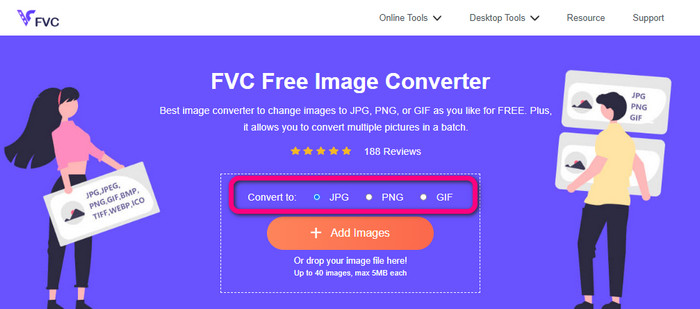
Vaihe 1: Avaa selaimessasi FVC Free Image Converter -sivusto. Napsauta JPG-tiedostomuotoa formaattivalikosta.
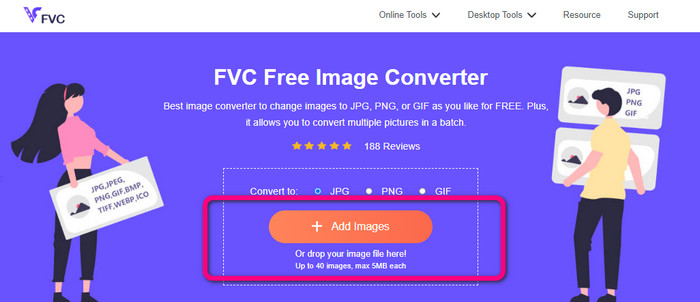
Vaihe 2: Napsauta Plus-kuvaketta tai Add Images -painiketta lisätäksesi PNG-kuvan. Voit myös pudottaa kuvatiedoston ruutuun. Tämän jälkeen kuva muunnetaan automaattisesti.
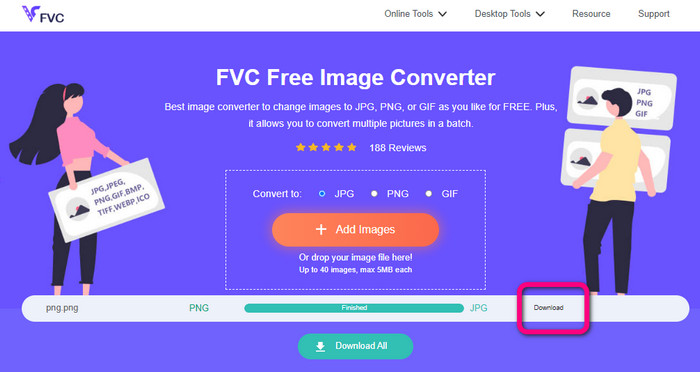
Vaihe 3: Viimeisessä vaiheessa napsauta Download-painiketta tallentaaksesi valmiin kuvan tietokoneellesi.
Muunna PNG JPG:ksi Canvan avulla
Toinen verkkopohjainen tapa muuntaa PNG JPG:ksi on käyttää palvelua Canva. Tämä verkkotyökalu on helppokäyttöinen, joten sen käyttö on vaivatonta. Myös muunnosprosessi on yksinkertainen, mikä sopii aloittelijoille. Se tarjoaa nopean muunnoksen ja voi muuntaa niin monta tiedostoa kuin haluat. Canva on käytettävissä kaikilla selaimilla, kuten Google Chromella, Firefoxilla, Edgellä ja muilla. Lisäksi kuvien muuntamisen aikana voit tehdä paljon muutakin. Voit rajata ja muuttaa kuvan kokoa. Voit myös lisätä kuvakkeita, tarroja jne. Näin voit parannella kuvia samalla kun vaihdat tiedostomuotoa. Vaikka Canva onkin erinomainen työkalu, siinä on myös haittapuolia. Ilmaisversiossa on monia rajoituksia. Ominaisuudet, pilvitallennustila, muokkaustyökalut ja muu ovat rajallisia. Sinun täytyy ostaa tilaus, jotta saat käyttöösi rajattomat ja laajemmat ominaisuudet. Lisäksi, koska se on verkkopohjainen kuvamuunnin, tarvitset internet-yhteyden.
Vaihe 1: Avaa Canva selaimessasi tai sovelluksessa käyttääksesi PNG–JPG-muunninta. Käytä valmista mallipohjaa tai tyhjää asettelua aloittaaksesi suunnitteluprojektin.
Vaihe 2: Vedä ja pudota käyttämäsi PNG-tiedosto sivulle tai valitse se laitteeltasi.
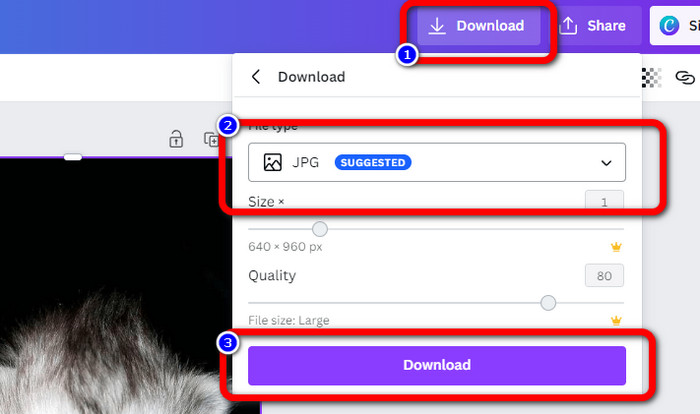
Vaihe 3: Siirry hallintapaneelin oikeaan yläkulmaan ja napsauta Download-painiketta. Valitse sitten JPG muodoksi, johon haluat tallentaa. Napsauta sen jälkeen Download-painiketta uudelleen tallentaaksesi kuvan tietokoneellesi.
Muunna PNG JPG:ksi Convertion avulla
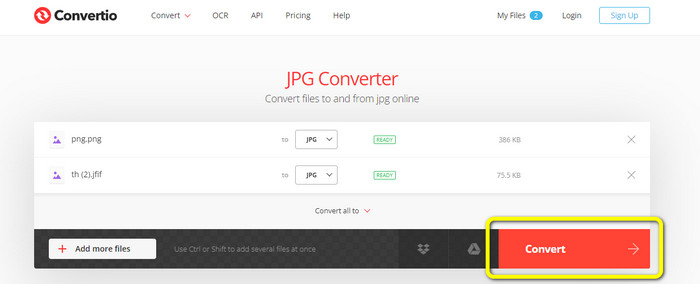
Convertio pystyy myös muuntamaan PNG:n JPG:ksi. Tämän verkkopohjaisen kuvamuuntimen avulla voit muuttaa PNG-kuvasi nopeasti JPG-muotoon. Convertio tarjoaa yksinkertaisen tavan muuntaa kuvia. Sen käyttäjäystävällinen käyttöliittymä tekee siitä helpon ymmärtää kaikille käyttäjille, erityisesti aloittelijoille. Lisäksi se tukee useita kuvamuotoja, kuten PNG, GIF, BMP, SVG ja paljon muuta. Tämä kuvamuunnin tukee myös erämuunnosta. Tämän erinomaisen ominaisuuden ansiosta voit muuntaa useita kuvia samanaikaisesti. Lisäksi kuvien ohella voit muuntaa myös video-, ääni- ja asiakirjatiedostoja. Näin sinun ei tarvitse etsiä toista verkkotyökalua. Ilmaisversiossa voi kuitenkin ladata vain enintään 100 Mt:n tiedostoja. Suuremman maksimikoon lisäämiseksi sinun on hankittava maksullinen tilaus. Voit myös ostaa kalliimman paketin saadaksesi rajattoman käytön.
Vaihe 1: Avaa selaimesi ja etsi Convertio. Kun olet pääsivulla, napsauta Choose Files -painiketta. Avaa PNG-valokuva tietokoneeltasi ladataksesi sen.
Vaihe 2: Jos haluat tehdä erämuunnoksen, napsauta Add more files -painiketta. Sen avulla voit ladata lisää kuvatiedostoja. Valitse sen jälkeen formaattivalikosta JPG tulosmuodoksi.
Vaihe 3: Kun olet ladannut tiedostot ja asettanut tulosmuodon, napsauta Convert-painiketta. Muunnos alkaa välittömästi. Prosessin jälkeen napsauta Download-painiketta tallentaaksesi tiedostot valitsemaasi sijaintiin.
Osa 3. Kuinka muuttaa PNG JPG-muotoon offline-tilassa
Muunna PNG JPG:ksi Video Converter Ultimate -sovelluksella
Video Converter Ultimate on yksi parhaista offline-kuvamuuntimista. Tällä ladattavalla ohjelmalla voit muuntaa PNG:n JPG:ksi nopeasti. Se tarjoaa nopean muunnosnopeuden, joten voit muuntaa lukuisia tiedostoja lyhyessä ajassa. Lisäksi voit muuntaa useita tiedostoja kerralla erämuunnostoiminnon ansiosta. Video Converter Ultimate tukee myös monia kuvamuotoja, kuten PNG, BMP, WEBP, TIF ja muita. Tällä offline-kuvamuuntimella on selkeä käyttöliittymä ja yksinkertaiset muunnosvaiheet. Näin sekä ammattilaiset että tavalliset käyttäjät voivat muuntaa kuvia vaivattomasti. Ohjelmaa voi käyttää sekä Mac- että Windows-tietokoneilla. Seuraa alla olevia helppoja ohjeita muuntaaksesi PNG JPG:ksi Macilla tai Windowsilla Video Converter Ultimatella.
Vaihe 1: Lataa Video Converter Ultimate Windows- tai Mac-tietokoneellesi. Käynnistä ohjelma asennuksen jälkeen. Voit painaa alla olevaa Download button -painiketta päästäksesi muuntimeen.
Ilmainen latausWindows 7 tai uudempiTurvallinen lataus
Ilmainen latausMacOS 10.7 tai uudempiTurvallinen lataus
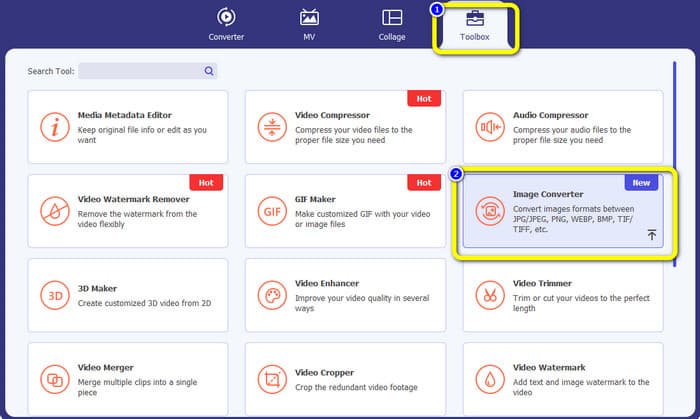
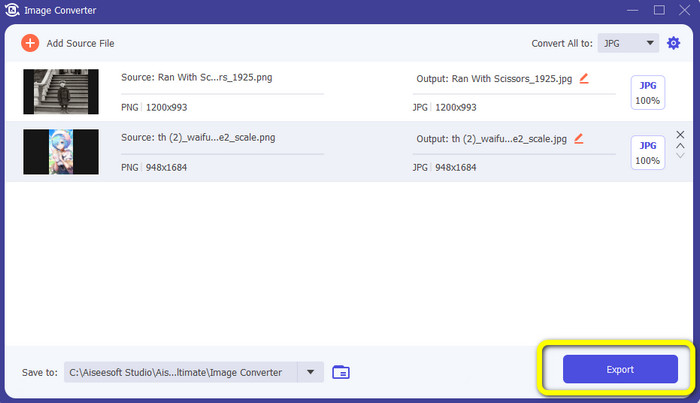
Vaihe 2: Valitse Toolbox-paneeli, kun käyttöliittymä tulee näkyviin. Valitse sitten Image Converter -työkalu. Kun napsautat sitä, avautuu uusi käyttöliittymä.
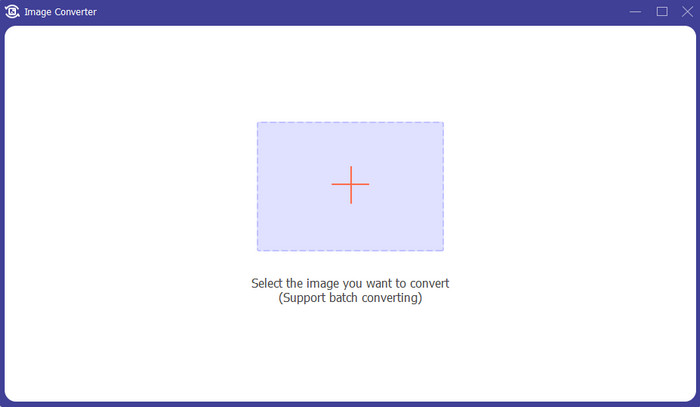
Vaihe 3: Napsauta +-kuvaketta. Valitse sitten PNG-kuva, kun tietokoneen kansio avautuu näytölle.
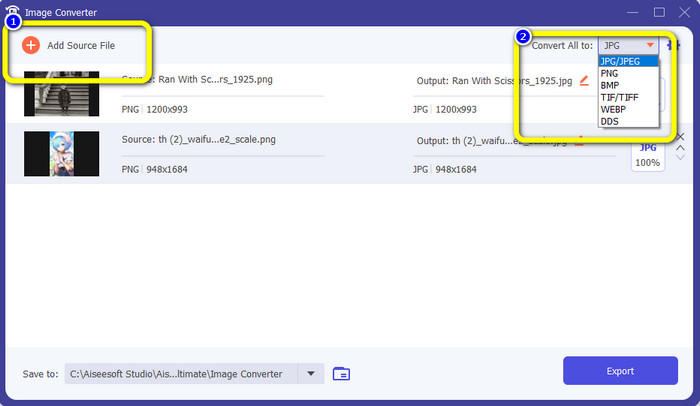
Vaihe 4: Jos haluat tehdä erämuunnoksen, napsauta Add Source File -painiketta. Siirry sitten Convert All to -vaihtoehtoon ja valitse JPG-tiedostomuoto.
Vaihe 5: Napsauta Export-painiketta tallentaaksesi lopullisen kuvan muunnoksen jälkeen. Voit tämän jälkeen avata JPG-kuvasi tiedostokansiosta.
Osa 4. Muunna PNG JPG:ksi mobiililaitteella
Muunna PNG JPG:ksi käyttämällä PNGtoJPG:tä
Jos haluat oppia muuttamaan PNG:n JPG:ksi iPhonella ja Androidilla, käytä PNGtoJPG-sovellusta. Tämä on ilmainen lataussovellus, joka sopii iPhone- ja Android-puhelimiin. Sen avulla voit muuntaa kuvatiedostot helposti ja välittömästi. Siinä on myös välttämätön muunnosmenettely. Tällä tavalla kaikki käyttäjät voivat käyttää tätä sovellusta, ensisijaisesti ei-ammattilaiset. Lisäksi PNGtoJPG-sovellus tarjoaa nopean muunnosprosessin, mikä tekee siitä kätevän. Valitettavasti toisin kuin muut kuvanmuuntimet, se ei tue erämuunnosprosessia. Joten sinun on muunnettava kuvat manuaalisesti, mikä vie aikaa.
Vaihe 1: Asenna PNGtoJPG-sovellus Apple Storesta tai Play Storesta. Käynnistä se sen jälkeen.
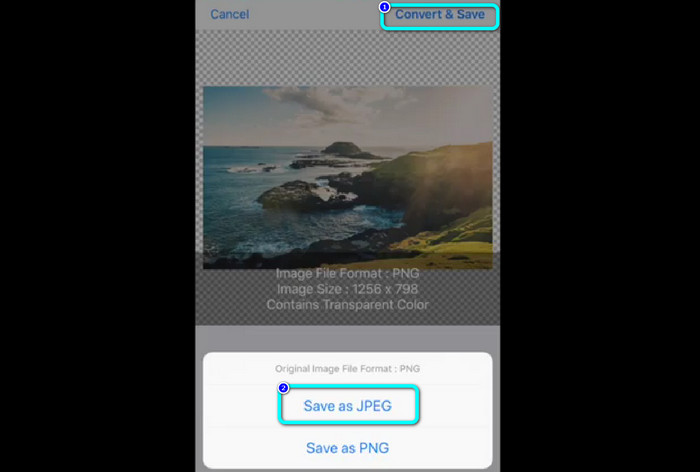
Vaihe 2: Paina Load a photo -vaihtoehtoa keskellä näkyvästä käyttöliittymästä sovelluksen käynnistämisen jälkeen. Tämän jälkeen valokuvasi tulevat näkyviin. Valitse PNG-kuva, jonka haluat muuntaa.
Vaihe 3: Siirry näytön oikeaan yläkulmaan ja napsauta Convert & Save -painiketta. Kun uusi valikko tulee näkyviin, valitse Save as JPEG -vaihtoehto. Näin voit muuntaa PNG-tiedoston JPG-muotoon. Napsauta tästä, jos haluat oppia, miten voit muuntaa JPG:n PNG:ksi.
Osa 5. Usein kysyttyä PNG:n muuntamisesta JPG:ksi
1. Kuinka muuttaa PDF JPEG-tiedostoksi?
Paras tapa muuntaa PDF JPG:ksi on käyttää verkkopohjaista ohjelmistoa PDF Simpli. Napsauta Upload PDF to Upload -painiketta. Valitse sitten PDF-tiedosto kansiostasi. Siirry käyttöliittymän oikeaan yläkulmaan ja napsauta Convert-painiketta. Valitse lopuksi JPG muodoksi formaattivalikosta.
2. Kuinka avaan PNG-tiedostoja Windows 11/10:ssä?
Paras tapa on avata tietokoneesi tiedostoselain. Siirry kansioon, jossa PNG-kuva sijaitsee. Napsauta kuvaa hiiren oikealla painikkeella ja valitse Open.
3. Kuinka voin muuntaa JPG-tiedostoja ilmaiseksi?
Voit käyttää FVC Free Image Converter -työkalua muuntaaksesi JPG-tiedostoja ilmaiseksi. Riippumatta siitä, kuinka monta kuvaa sinun täytyy muuntaa, palvelu ei veloita sinulta mitään.
Johtopäätös
Tässä ovat parhaat tavat muuntaa PNG JPG:ksi käyttäen kuvamuuntimia sekä verkossa että offline-tilassa. Jos kuitenkin haluat mahdollisimman helposti käytettävän kuvamuuntimen, käytä FVC Free Image Converter -työkalua.
-
 Muunna JPEG JPG:ksi tehokkaasti [Luettelo viisi menetelmää]
 Tule ja hanki yksinkertaisimmat opetusohjelmat JPEG:n muuntamisesta JPG-kuvatiedostomuotoon. Napsauta tätä opasviestiä ja aloita haluamiesi menetelmien oppiminen.
-
 Täydelliset tiedot eroista JPEG vs. JPG vs. PNG
 Tämä viesti antaa sinulle tarpeeksi tietoa eroista JPEG vs. JPG vs. PNG. Lisäksi opit muuntamaan kuvat näihin tiedostoihin.
-
 8 hämmästyttävää kuvanmuuntajaa [Täydelliset tiedot]
 Tämä arvostelu kertoo sinulle parhaista kuvatiedostomuuntimista, joita voit käyttää kuvatiedostojen muuntamiseen. Lue tämä viesti tietääksesi parhaan kuvanmuuntimen sinulle
