


 Video Converter Ultimate
 Näytön tallennin
 Videon korjaus
 Suojattu lataus
4 helpointa tapaa poistaa iFunny-vesileimoja
iFunny on yksi suosituimmista sovelluksista, jos haluat lukea hauskoja viestejä kuvien (meemien) kanssa. Osa näistä kuvista sisältää kuitenkin iFunny‑vesileiman, mikä on ärsyttävää. Jos haluat tutustua parhaisiin menetelmiin näiden vesileimojen poistamiseksi, olet oikealla sivulla. Esittelemme sinulle useita sovelluksia, joiden avulla voit poistaa häiritsevät elementit kuvistasi. Nämä työkalut on testattu ja todettu toimiviksi, joten sinun ei tarvitse epäillä niiden luotettavuutta. Oletko valmis oppimaan parhaat tavat poistaa iFunny‑vesileimat? Lue silloin tämä artikkeli alusta loppuun.

Osa 1: iFunny-vesileimojen poistaminen rajaustyökalulla
Yksi parhaista tavoista poistaa iFunny-vesileimat on käyttää rajaustyökalua. Tätä menetelmää voidaan käyttää, jos vesileima on sijoitettu kuvan reunaan tai kulmaan. Voit leikata kuvan sivulta toiselle ja ylhäältä alas. Jos haluat rajata iFunny-vesileiman kuvistasi, seuraa alla olevia yksinkertaisia ohjeita.
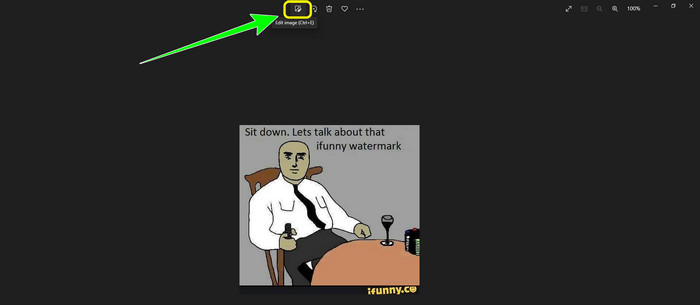
Vaihe 1: Avaa kuvasi, jossa on iFunny‑vesileima. Valitse Muokkaa kuvaa ‑vaihtoehto käyttääksesi rajaus‑työkalua. Voit myös painaa näppäinyhdistelmää ctrl+E.
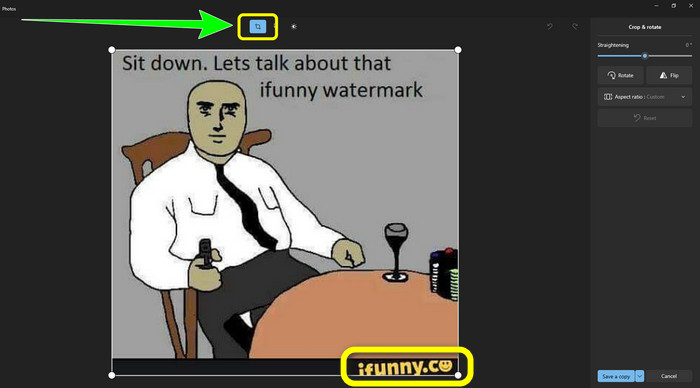
Vaihe 2: Napsauta sen jälkeen Rajaus-työkalua. Tämän jälkeen voit rajata kuvasi poistaaksesi iFunny‑vesileiman kuvasta.
Vaihe 3: Kun olet saanut kuvasi rajattua, napsauta Tallenna kopio ‑painiketta. Odota tallennusprosessin valmistumista ja tallenna lopullinen kuva haluamaasi sijaintiin.
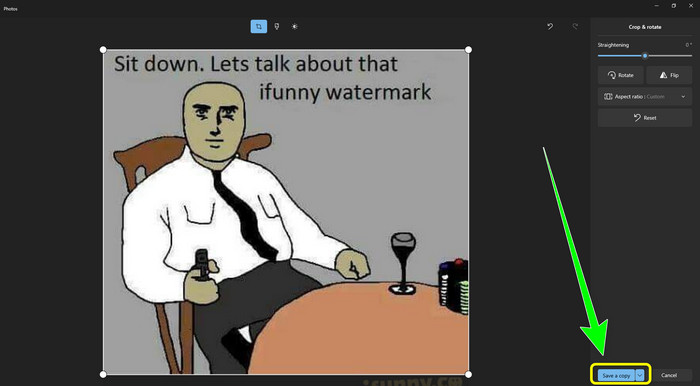
Tämä on helpoin tapa poistaa iFunny-vesileimat rajaustyökalulla.
Osa 2: Parhaat tavat poistaa iFunny Watermark ilman rajausta
FVC Free Watermark Removerin käyttö
Jos etsit iFunny‑vesileiman poistajaa, voit käyttää ohjelmaa FVC Free Watermark Remover. Tämän sovelluksen avulla voit poistaa vesileimat kuvista helposti ja välittömästi. Voit luottaa tähän vesileimanpoistajaan myös silloin, kun kuvassasi on useita vesileimoja. Lisäksi lähes kaikki kuvatiedostomuodot ovat tuettuja tässä verkkotyökalussa, mukaan lukien JPG, PNG, BMP, TIFF ja monet muut. Ei‑toivottujen kohteiden ja vesileimojen poistamiseen kuvista tämä vesileimanpoistaja tarjoaa kolme eri työkalua: lasson, siveltimen ja monikulmion. Näiden työkalujen avulla voit helposti poistaa kuvastasi kaiken, mitä et halua siinä näkyvän. Lisäksi FVC Free Watermark Remover ‑työkalulla on selkeä ja ymmärrettävä käyttöliittymä, joka on kaikkien käyttäjien, sekä aloittelijoiden että ammattilaisten, ulottuvilla. Tiedostosi on myös turvassa, koska tämä vesileimanpoistaja takaa yksityisyytesi – vain sinä voit muokata kuvaasi. Lopuksi kyseessä on ilmainen ohjelma, joten voit käyttää sitä milloin tahansa ja ladata rajattomasti tiedostoja, joita haluat parannella.
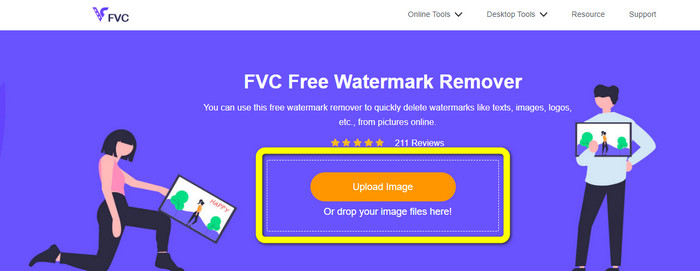
Vaihe 1: Avaa selaimessasi FVC Free Watermark Remover. Napsauta sitten Lataa kuva ‑painiketta lisätäksesi kuvasi, jossa on iFunny‑vesileima.
Vaihe 2: Kun olet lisännyt kuvasi, korosta iFunny‑vesileima vesileimanpoistotyökaluilla.
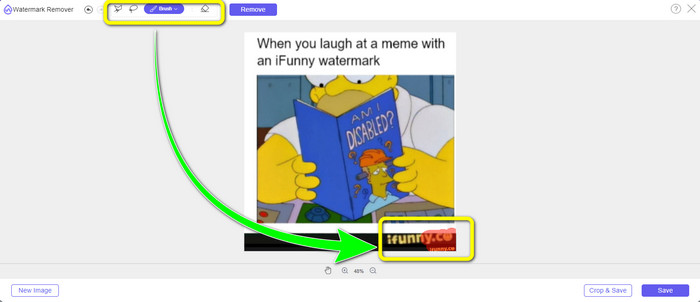
Vaihe 3: Napsauta seuraavaksi Poista-painiketta poistaaksesi iFunny‑vesileimat kuvastasi.
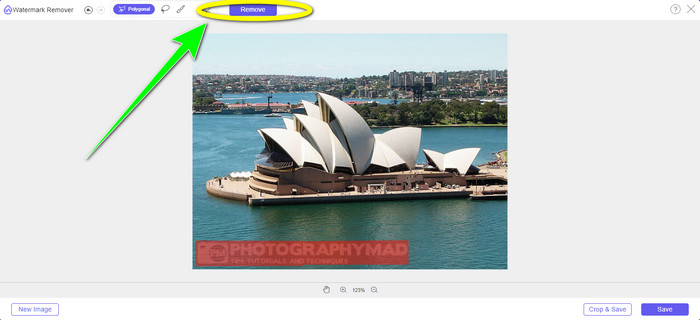
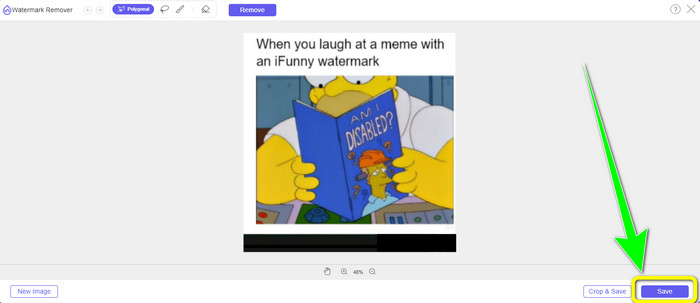
Vaihe 4: Poistoprosessin jälkeen viimeinen vaihe on napsauttaa Tallenna-painiketta ladataksesi kuvan laitteellesi ilman iFunny‑vesileimaa.
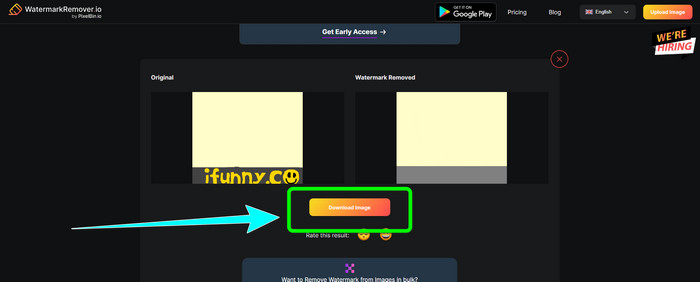
WatermarkRemover.io:n avulla
Käytä palvelua WatermarkRemover.io, jos haluat käyttää toista verkkosovellusta päästäksesi eroon iFunny‑vesileimoista kuvistasi. Tämän ilmaisen työkalun avulla voit poistaa kuvistasi kaikki ylimääräiset elementit, kuten logot, kuvatekstit, leimat ja paljon muuta. Voit poistaa myös useita vesileimoja samasta kuvasta. Lisäksi se tarjoaa helppokäyttöisen käyttöliittymän, mikä on ihanteellista aloittelijoille. Tämä verkkotyökalu tukee erilaisia kuvamuotoja, kuten PNG, JPG, WEBP ja JPEG. Ilmaiskäytössä on kuitenkin rajoituksia: voit ladata kerralla vain 50 kuvaa ja tallennustilaa on vain 25 Gt. Jos haluat ladata enemmän kuvia ja saada lisää tallennustilaa, sinun täytyy ostaa tilaus, joka on melko kallis. Seuraa alla olevia ohjeita käyttääksesi tätä erinomaista iFunny‑vesileiman poistajaa.
Vaihe 1: Avaa selaimesi ja siirry sivustolle WatermarkRemover.io. Napsauta Upload Image ‑painiketta ladataksesi kuvasi, jossa on iFunny‑vesileima. Voit myös vetää tiedoston laatikkoon.
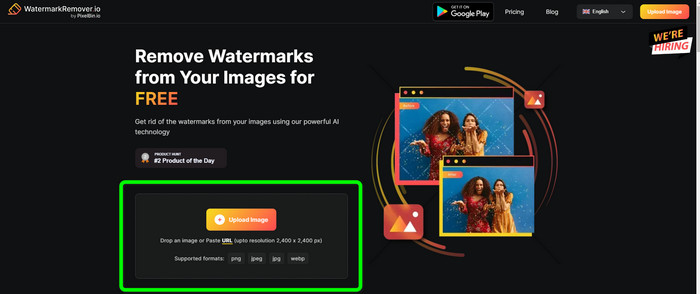
Vaihe 2: Kun kuva on ladattu, se poistaa iFunny‑vesileiman automaattisesti. Kun kuva näkyy jo ilman vesileimaa, napsauta Lataa-painiketta.
Apowersoft Watermark Remover Onlinen käyttö
Poistaaksesi iFunny‑vesileimat kuvistasi välittömästi myös Apowersoft Watermark Remover Online on sinulle hyvä verkkosovellus. Se voi pyyhkiä pois ei‑toivotut elementit kuvistasi, kuten allekirjoitukset, tekstit, logot ja paljon muuta. Lisäksi se tukee erilaisia kuvatiedostomuotoja, kuten JPEG, JPG, PNG, TIFF ja muita. Aloittelijat voivat käyttää tätä työkalua, vaikka heillä ei olisi paljoa taitoja, koska Apowersoft Watermark Remover Online tarjoaa yksinkertaiset toiminnot ja helposti ymmärrettävän käyttöliittymän. Myös tiedosto poistetaan automaattisesti sen jälkeen, kun olet poistanut vesileiman ja ladannut kuvasi, mikä tarkoittaa, ettei kukaan muu näe työtäsi. Vesileimojen poistamisen lisäksi valokuvista tämä työkalu voi poistaa vesileimoja myös videoista, mikä on käyttäjälle kätevää. Se tukee erilaisia videotiedostomuotoja, kuten MOV, WMV, MP4, 3GP, AVI jne. Tämä verkkopohjainen vesileimanpoistaja on kuitenkin hidas poistoprosessissaan, mikä ei ole ihanteellista käyttäjille. Lisäksi se ei toimi ilman internet‑yhteyttä. Jos haluat käyttää tätä työkalua, seuraa alla olevia perusvaiheita.
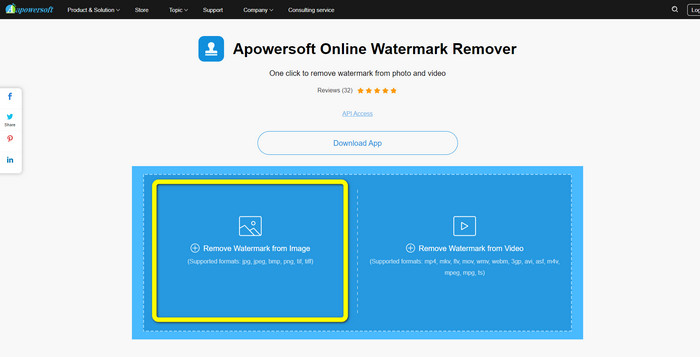
Vaihe 1: Etsi Apowersoft Online Watermark Remover. Napsauta sitten Remove Watermark from Image ‑painiketta lisätäksesi kuvasi, jossa on iFunny‑vesileima.
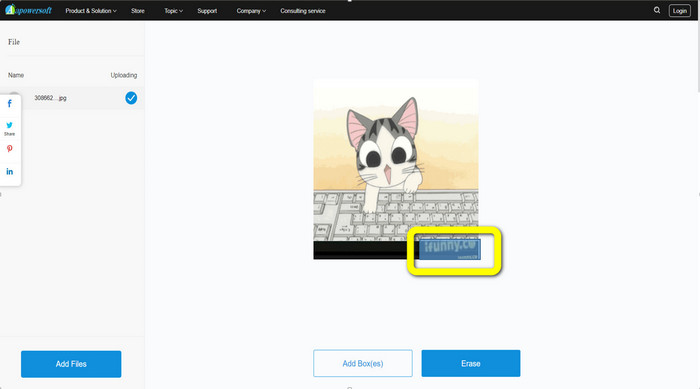
Vaihe 2: Kun olet lisännyt tiedoston, voit käyttää sinistä ruutua peittääksesi iFunny‑vesileiman kuvastasi.
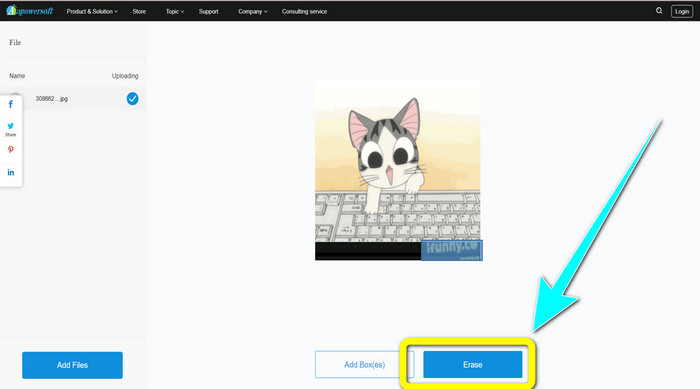
Vaihe 3: Napsauta sitten Pyyhi-painiketta. Odota poistoprosessin valmistumista ja lataa lopullinen tiedosto.
Liittyy aiheeseen:
Rehellinen arvostelu Inpaint‑vesileimanpoistajasta ja sen vaihtoehdoista
Suorat tavat poistaa vesileima JPG‑kuvasta verkossa
Osa 3: Usein kysyttyä iFunny-vesileimojen poistamisesta
Mikä on paras sovellus iFunny-vesileiman poistamiseen?
Paras sovellus, jota voit käyttää, on FVC Free Watermark Remover. Tällä työkalulla voit helposti poistaa iFunny‑vesileiman kuvastasi. Lisäksi siinä on nopea poistoprosessi ja se tarjoaa helpoimmat menetelmät, minkä vuoksi se on paras vesileimanpoistaja.
Voinko myös poistaa vesileimat videostani?
Kyllä, ehdottomasti. Voit käyttää monia verkko‑ ja offline‑sovelluksia poistaaksesi vesileimoja videoistasi. Tässä parhaat työkalut, joita voit kokeilla.
1. Video Converter Ultimate.
2. Media.io
3. HitPaw
4. Online Video Cutter
5. Apowersoft Online Watermark Remover.
Onko olemassa rajaustyökalua, jota voin käyttää FVC Free Watermark Removerissa?
Joo. FVC Free Watermark Removerilla on kaksi tapaa poistaa vesileimat valokuvasta. Ensimmäinen on käyttää erilaisia vesileimanpoistotyökaluja, kuten Lasso, Brush ja Polygonal. Toinen on rajaustyökalun käyttö.
Johtopäätös
Kuten edellä on esitetty, voit käyttää monia suoraviivaisia menetelmiä poistaa iFunny‑vesileimat, esimerkiksi erilaisten työkalujen ja rajaus‑ominaisuuden avulla. Jos kuitenkin haluat poistaa häiritsevät elementit kuvistasi mahdollisimman yksinkertaisesti, käytä nyt ohjelmaa FVC Free Watermark Remover.
-
 Erinomaisia tapoja poistaa tarra valokuvasta ja videosta
 Haluatko vaivattomasti poistaa tarroja videoista ja valokuvista? Tässä on tehokkaita tapoja, mukaan lukien luotettavimmat ja helpoimmat menetelmät, joita voit kokeilla.
-
 Tapoja kuinka poistaa Reddit-vesileimat helposti kuvista
 Jos olet täällä, saatat etsiä erinomaista Reddit-vesileimanpoistoainetta. Siinä tapauksessa näytämme sinulle helpoimman tavan poistaa Reddit-vesileimat.
-
 Vesileiman poistaminen Lightroom Mobilessa [Ratkaistu]
 Haluatko oppia poistamaan vesileimoja valokuvista? Tässä on helpoimmat tavat, joita voit kokeilla matkapuhelimillasi ja tietokoneillasi.
