


 Video Converter Ultimate
 Näytön tallennin
 Videon korjaus
Puolueeton arvostelu Imglargerista: Kaikki mitä sinun tarvitsee tietää
Kuvien tarkentamisesta on tullut monille tärkeää, erityisesti silloin kun käsitellään valokuvia, joiden laatu on heikentynyt monista eri syistä. Jos kuulut tähän joukkoon ja haluat parantaa kuviesi laatua, nykyään on saatavilla useita työkaluja – yksi niistä on Imglarger. Tämä työkalu on tunnettu kuvanmuokkain, ja siinä on erityinen toiminto, jonka avulla käyttäjät voivat suurentaa ja parantaa kuviensa laatua. Jos haluat tietää tästä työkalusta enemmän, jatka lukemista. Älä myöskään jätä väliin mahdollisuutta tutustua ilmaiseen vaihtoehtoiseen kuvanparannustyökaluun.

Osa 1. Syvällinen arvostelu Imglargerista
Imglarger on monipuolinen ja tehokas verkkotyökalu, joka on suunniteltu kuvien parantamiseen ja suurentamiseen laadusta tinkimättä. Tekoälyä hyödyntävä kuvankäsittelytyökalu mahdollistaa käyttäjien skaalata kuvia kokoon 200%, 400% ja jopa kokoon 800% yhdellä napsautuksella. Lisäksi tekoälyteknologia ei ainoastaan suurenna kuvia, vaan myös poistaa epätarkkuutta ja parantaa selkeyttä koon muuttamisen aikana, varmistaen, että kuvat näyttävät teräviltä ja selkeiltä suuremmissakin kokoluokissa.
Plussat
- Käyttäjillä on paljon vaihtoehtoja kuviensa skaalaamiseen.
- Tekoäly terävöittää ja parantaa kuvia automaattisesti, mikä säästää aikaa.
- Voit käsitellä useita kuvia kerralla, mikä helpottaa joukkomuokkausta.
- Käyttöliittymä on erittäin yksinkertainen ja helppokäyttöinen.
- Kuvat poistetaan 24 tunnin kuluttua yksityisyyden suojaamiseksi.
Haittoja
- Ilmaisen sarjan ominaisuudet ovat rajalliset.
- Jopa premium-versiossa on 10 megatavun tiedostokokoraja.
Osa 2. Imglarger-hinnoittelusuunnitelma
Imglarger ei ole täysin ilmainen. Vaikka se tarjoaa ilmaisen version, ominaisuudet ja toiminnot tuntuvat rajoitetuilta. Tämän vuoksi käyttäjien on päivitettävä ilmaisversionsa premium-versioon voidakseen nauttia työkalun kaikista toiminnoista. Alla on hinnoittelusuunnitelmat, mukaan lukien niiden hinnat ja sisältyvät toiminnot:
On hienoa, että Imglargerilla on erilaisia hinnoittelupaketteja, joissa käyttäjillä on enemmän vaihtoehtoja valita tarpeisiinsa ja budjettiinsa parhaiten sopiva vaihtoehto. Ilmainen paketti voi kuitenkin tuntua melko rajoitetulta, erityisesti käyttäjille, joiden on käsiteltävä korkeamman resoluution kuvia tai työskenneltävä useiden tiedostojen parissa samanaikaisesti. Jotta voit nauttia kaikista ominaisuuksista täysin rajoituksetta, päivittäminen maksulliseen pakettiin on ehdottomasti suositeltavaa.
Osa 3. Kuinka käyttää Imglarger.comia kuvien skaalaamiseen
Nyt kun tiedät, mitä Imglarger on, on aika oppia, miten sillä suurennetaan kuvia. Tämä valokuvien suurennustyökalu on erittäin yksinkertainen ja intuitiivinen käyttää, joten se sopii kaiken tasoisille käyttäjille, myös aloittelijoille. Alla on vaiheittainen opas Imglargerin käyttöön kuvien suurentamiseksi:
Vaihe 1. Mene ensin työkalun viralliselle sivustolle. Tee se niin, että etsit hakukoneestasi sivuston Imglarger.com.
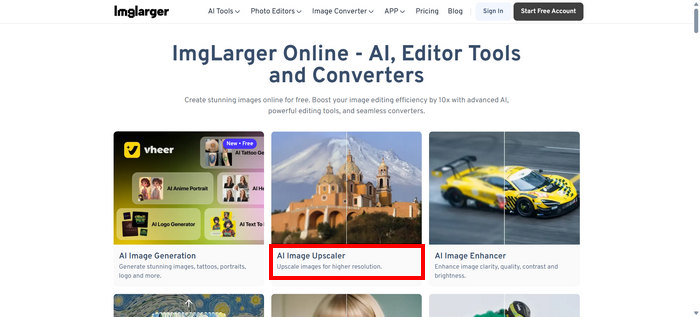
Vaihe 2. Kun olet päässyt heidän sivustolleen, valitse työkalujen joukosta AI Image Upscaler.
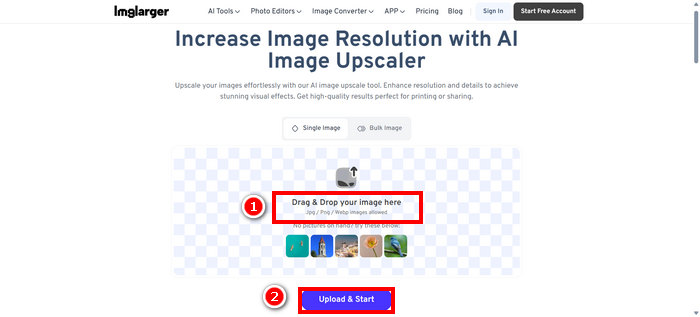
Vaihe 3. Sen jälkeen napsauta kohtaa Drag & Drop your image here tai vedä kuvasi vain siihen. Kun olet valinnut kuvasi, napsauta Upload & Start.
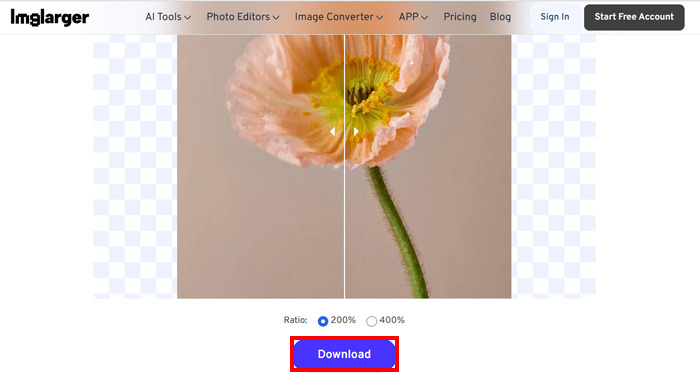
Vaihe 4. Nyt voit esikatsella parannettua kuvaasi ja verrata sitä alkuperäiseen laatuun. Kun olet tyytyväinen tulokseen, napsauta alla olevaa Download-painiketta.
Jos haluat skaalata useita kuvia suuremmalle, sinun on ensin valittava Bulk Image, mutta huomaa, että tämä on käytettävissä vain premium-versioissa.
Osa 4. Paras vaihtoehto Imglargerille: FVC Free Image Upscaler
Jos etsit ilmaista vaihtoehtoa Imlargerille, paras työkalu tähän on FVC Free Image Upscaler. Tämän työkalun avulla käyttäjät voivat suurentaa ja parantaa kuviensa laatua vain muutamassa vaiheessa. Sen yksinkertaisen ja intuitiivisen käyttöliittymän ansiosta käyttäjän tarvitsee vain ladata kuvansa, ja työkalu parantaa sen automaattisesti.
Pääpiirteet
• Kuvan skaalaus on tekoälyn tehostama, mikä parantaa kuvanlaatua automaattisesti.
• Antaa käyttäjien muuttaa kuvien kokoa 2×, 4×, 6× tai 8× menettämättä niiden laatua.
• Korjaa automaattisesti epäselvät osat ja palauttaa kadonneet yksityiskohdat.
• Tukee suosittuja tiedostomuotoja, kuten JPG, JPEG, PNG ja BMP.
• Ei vesileimaa skaalatuissa kuvissa.
• Nopea käsittely ja tulosten reaaliaikainen esikatselu.
Tässä vaiheittainen opas kuvan koon muuttamiseen FVC Free Image Upscaler -työkalulla:
Vaihe 1. Mene ensin työkalun viralliselle sivustolle. Tee se niin, että avaat Chromen ja etsit hakukoneesta FVC Free Image Upscaler -työkalun.
Vaihe 2. Kun olet avannut työkalun, napsauta Upload a Photo tuodaksesi sen kuvan, jota haluat suurentaa.
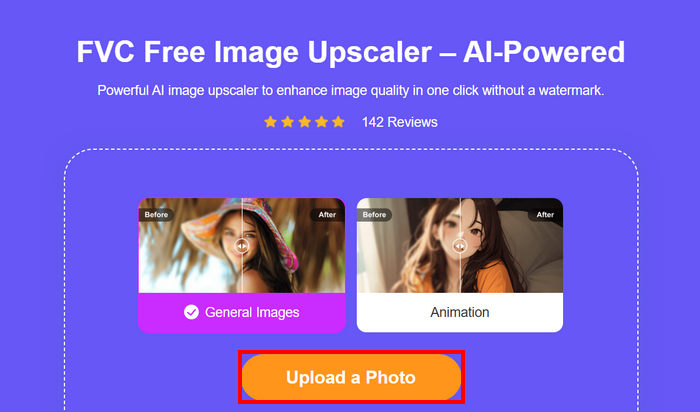
Vaihe 3. Odota, että kuva suurennetaan. Muutaman sekunnin kuluttua näet esikatselun parannetusta kuvasta. Voit myös siitä näkymästä vaihtaa kuvan tilaa ja säätää, miten haluat sen suurennettavan. Kun olet valmis, napsauta Save-painiketta.
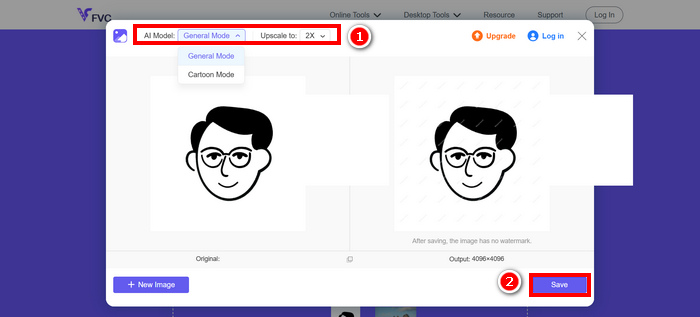
FVC Free Image Upscaler on todellakin paras vaihtoehto Imglargerille. Sitä paitsi se on ilmainen ja erittäin helppokäyttöinen. Se tarjoaa laadukasta, skaalattua tulostusjälkeä ja tukee laajaa valikoimaa tulostusmuotoja.
Osa 5. Usein kysytyt kysymykset Imglarger-arvosteluista
Lisääkö Imglarger vesileiman kuvaan?
Ei. Imglarger ei lisää vesileimaa suurentamiisi tai muokkaamiisi kuviin, vaikka käyttäisit ilmaista versiota.
Kuinka paljon Imglarger voi skaalata kuvaa ylöspäin?
Imglargerin avulla voit skaalata kuvan ylös sen alkuperäisestä koosta 200% jopa 800%:ään. Tätä työkalua tukeva tekoälyteknologia parantaa valokuvien laatua skaalausprosessin aikana.
Voinko käsitellä useita kuvia kerralla Imglargerilla?
Kyllä, tällä kuvanparannustyökalulla voi käsitellä useita kuvia kerralla, mutta tämä ominaisuus on käytettävissä vain maksullisille käyttäjille. Ilmaiset käyttäjät voivat käsitellä vain yhden kuvan kerrallaan. Päivittäminen premium-tilaukseen avaa eräkäsittelyn, mikä on erityisen hyödyllistä käyttäjille, joiden on muokattava tai suurennettava useita kuvia nopeasti ja tehokkaasti.
Johtopäätös
Imglarger on todella erinomainen kuvanparannustyökalu. Se tarjoaa hyviä ominaisuuksia, joustavia hinnoitteluvaihtoehtoja ja paljon muuta. On kuitenkin tärkeää huomata, että sen ilmaisversiosta puuttuu joitakin ominaisuuksia, joita löytyy muiden ilmaisten suurennustyökalujen versioista. Jos etsit ilmaista vaihtoehtoa, kannattaa kokeilla myös FVC Free Image Upscaler -työkalua. Molemmat työkalut tuottavat erittäin laadukkaita tuloksia, joten valitse se, joka sopii sinulle parhaiten.
-
 Kuvan suurentaminen online- ja offline-tulostusta varten
 Jos sinulla on huonolaatuinen kuva ja haluat suurentaa sitä, meillä on sinulle ratkaisu. Lue tämä artikkeli oppiaksesi suurentamaan kuvan tulostamista varten.
-
 7 helppoa tapaa lisätä korkealaatuisen kuvan resoluutiota
 Kuinka lisäät kuvien resoluutiota Photoshopissa? Voinko tehdä JPEG-kuvasta korkeamman resoluution? Opi 7 tapaa lisätä kuvien resoluutiota.
-
 Parhaat kuvakoon pienennykset pöytätietokoneissa ja mobiililaitteissa
 Katso tämän artikkelin suosituimmat sovellukset saadaksesi parhaan valokuvakoon pienennyslaitteen suosikkilaitteellesi. Opi paras koon optimointi kuville nyt!
