


 Video Converter Ultimate
 Näytön tallennin
 Videon korjaus
 Suojattu lataus
Kuinka poistaa WOW Slider -vesileima ilmaiseksi
WOW Slider on yksi suosituimmista diaesitysten tekotyökaluista, jolla voit luoda näyttäviä kuvadiaesityksiä. Sovellus on ilmainen ladata, eikä se vie paljon tallennustilaa laitteeltasi. Lisäksi siinä on intuitiivinen käyttöliittymä, joten diaesitysten tekeminen on helppoa. Toisin kuin monet muut kuvapalvelut, WOW Slider ei käytä Flashia eikä vaadi liitännäisiä. WOW Slider lisää kuitenkin vesileiman tekemiisi diaesityksiin. Siksi monet käyttäjät etsivät tapaa poistaa WOW Sliderin vesileima ilmaiseksi. Lue eteenpäin oppiaksesi, miten poistat WOW Sliderin vesileiman ilmaiseksi.

Osa 1. WOW Slider -vesileiman poistaminen ilman ostamista
Voit poistaa vesileiman sovelluksella, jos ostit WOW Sliderin. Mutta jos ei, voit käyttää työkaluja poistaaksesi WOW Slider -vesileiman diaesityksestäsi. Siksi lue tämä osa kattavasti oppiaksesi poistamaan WOW Sliderin ilman ostamista.
FVC-vapaa vesileimanpoistoaine
FVC Free Watermark Remover on yksi suosituimmista verkossa toimivista vesileimanpoistajista, ja se toimii kaikilla verkkoselaimilla, kuten Google Chromella, Firefoxilla ja Safarilla. Tämä verkkotyökalu on turvallinen, ilmainen, eikä vaadi tilauksia. Lisäksi se on aloittelijaystävällinen, koska siinä on selkeä ja helppokäyttöinen käyttöliittymä. Se tukee myös monia kuvamuotoja, kuten PNG, JPG, JPEG, BMP jne. Tässä työkalussa on vaikuttavaa se, että voit valita useista valintatyökaluista poistaaksesi vesileiman kuvastasi. Jos siis haluat käyttää tätä ilmaista vesileimanpoistajaa, toimi seuraavasti.
WOW Slider -vesileiman poistaminen FVC Free Watermark Remover -vesileiman poistajalla:
Vaihe 1. Avaa ensin selaimesi ja etsi FVC Free Watermark Remover. Nopeaa käyttöä varten napsauta annettua linkkiä.
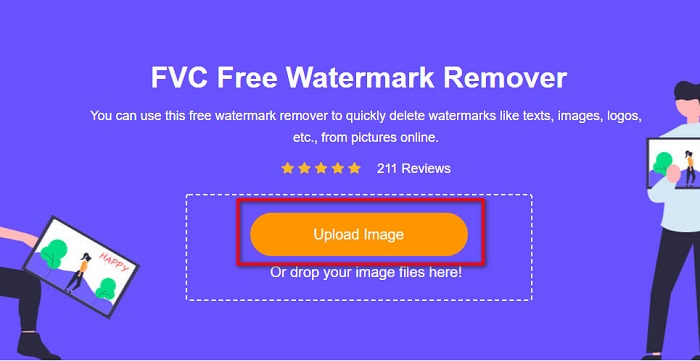
Vaihe 2. Napsauta sitten Upload Image -painiketta ladataksesi WOW Slider -kuvan, josta haluat poistaa vesileiman.
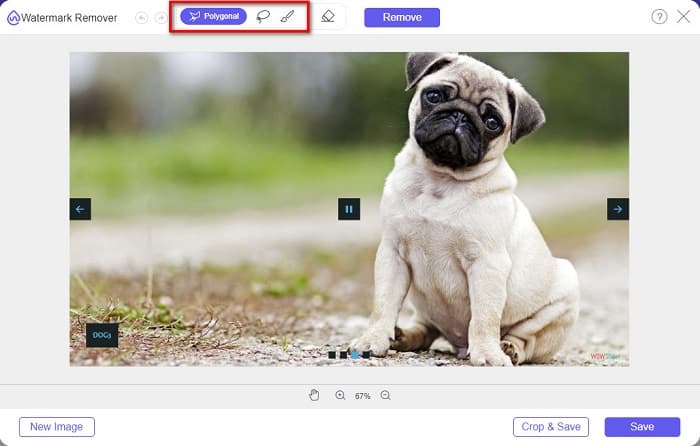
Vaihe 3. Kun olet ladannut kuvasi, valitse valintatyökalu, jota haluat käyttää vesileiman poistamiseen. Voit valita Lasso, Polygonal tai Brush -työkalun välillä.
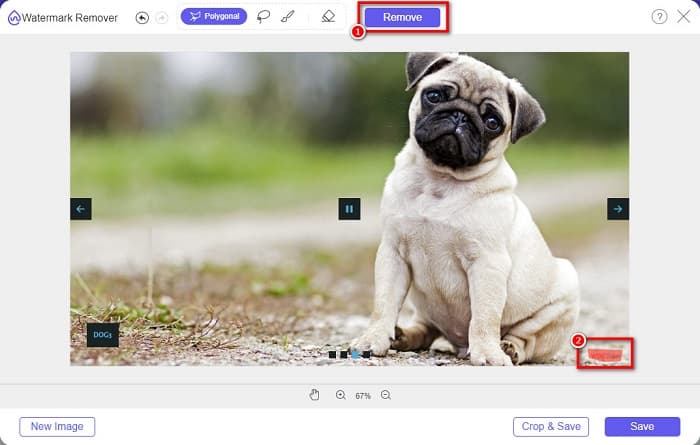
Vaihe 4. Rajaa sitten alue, jossa WOW Sliderin vesileima sijaitsee. Napsauta sen jälkeen Remove poistaaksesi vesileiman kuvastasi.
Vaihe 5. Lopuksi napsauta Save-painiketta tallentaaksesi kuvasi tietokoneellesi.
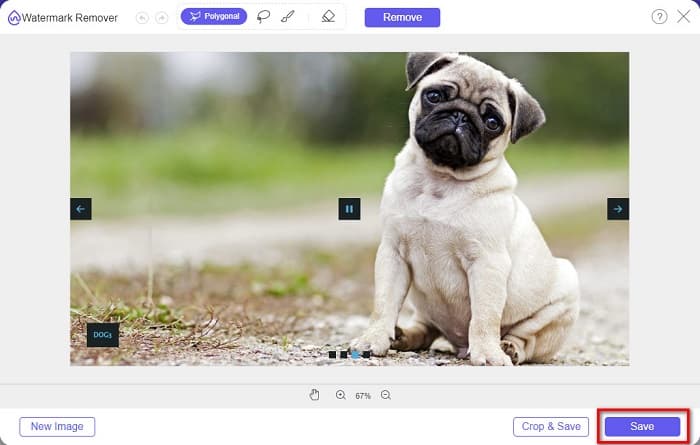
Ja siinä se! Voit nyt tarkastella WOW Slider -kuvaasi ilman WOW Slider -vesileimaa.
Bitwar-vesileimojen asiantuntija
Bitwar Watermark Expert on vesileimanpoisto-ohjelma, joka voi poistaa WOW Sliderin vesileiman diaesityksestäsi. Tämä offline-vesileimanpoistaja on käyttöliittymältään yksinkertainen, joten se sopii hyvin aloittelijoille. Lisäksi sen avulla voit poistaa tai lisätä vesileimoja kuviin tai videoihin. VIP-versiossa voit käsitellä useita videoita erässä ja poistaa niistä vesileimat. Voit ladata tämän ohjelmiston Windows-tietokoneellesi. Sinun täytyy kuitenkin ostaa sovellus, ennen kuin pääset käsiksi sen muihin toimintoihin. Siitä huolimatta Bitwar Watermark Expert on erinomainen työkalu WOW Slider -diaesityksesi vesileimojen poistoon.
Poista WOW Slider -vesileima diaesityksestä Bitwar Watermark Expert -sovelluksella:
Vaihe 1. Lataa Bitwar Watermark Expert laitteellesi ja avaa se latauksen jälkeen.
Vaihe 2. Ohjelman päänäkymässä näet neljä vaihtoehtoa. Napsauta Photo Watermark Remover -vaihtoehtoa.
Vaihe 3. Napsauta sitten keskellä näyttöä olevaa +-painiketta ladataksesi WOW Slider -kuvan.
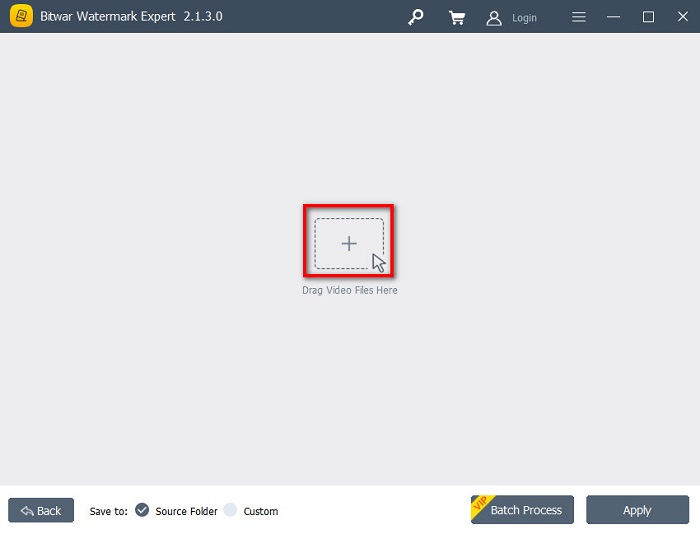
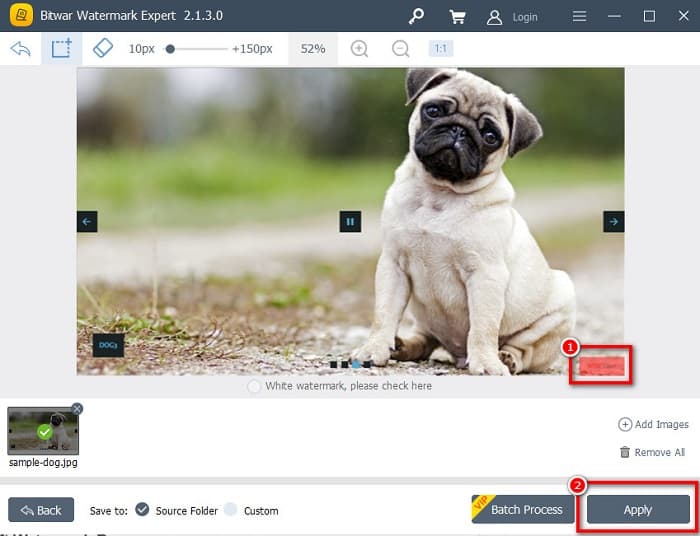
Vaihe 4. Valitse seuraavaksi valintatyökalu, jota haluat käyttää vesileiman poistamiseen kuvastasi. Valitse sen jälkeen vesileima-alue kuvastasi.
Vaihe 5. Napsauta lopuksi Apply-painiketta poistaaksesi vesileiman WOW Slider -diaesityksestäsi. Näillä ohjeilla voit myös poistaa vesileimoja Placeitista.
Apowersoft vesileimanpoistoaine
Toinen offline-vesileimanpoistaja, jota voit käyttää, on Apowersoft Watermark Remover. Tämän vesileimanpoistajan avulla voit helposti poistaa kaikenlaisia vesileimoja (logo, teksti, kuva) videoistasi. Voit ladata sen lähes kaikille alustoille, kuten Windowsille ja Macille. Lisäksi siinä on toiminto, jolla voit poistaa ja lisätä vesileimoja kuviin. Siinä on myös kolme vesileiman valintatyökalua WOW Slider -diaesityksesi vesileiman poistamiseksi. Lisäksi se on käyttäjäystävällinen työkalu, jossa on helppokäyttöinen ohjelmistoalusta. Tämän työkalun haittapuolena on, että siinä on vain vähän muokkaustoimintoja.
WOW Slider -vesileiman logon poistaminen Apowersoft Watermark Remover -ohjelmalla:
Vaihe 1. Lataa laitteellesi Apowersoft Watermark Remover. Seuraa asennusohjeita ja avaa sitten sovellus.
Vaihe 2. Napsauta sen jälkeen Poista vesileima kuvasta -vaihtoehtoa. Vedä ja pudota kuva, josta haluat poistaa vesileiman.
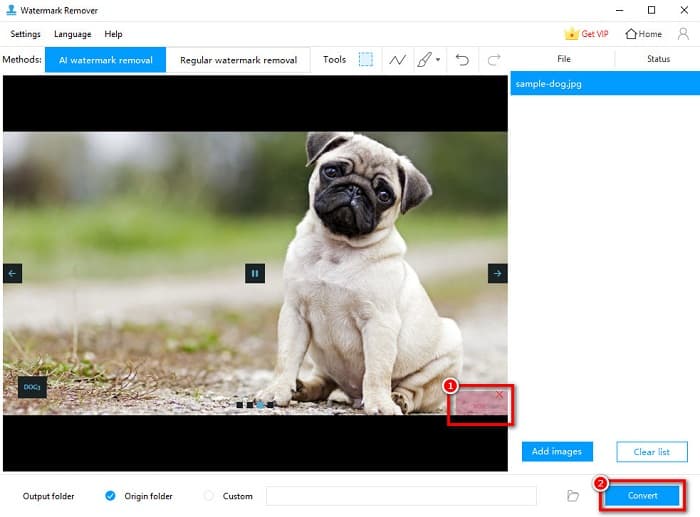
Vaihe 3. Näet vesileimanpoistotyökalut Tools-paneelissa. Napsauta sitten valintatyökalua, jota haluat käyttää. Rajaa tai valitse vesileima kuvastasi.
Vaihe 4. Kun olet valmis, napsauta Convert-painiketta tallentaaksesi lopputuloksen.
Osa 2. Vesileiman poistaminen WOW-liukusäätimestä ostamalla
Haluat ehkä lukea tämän osan, jos etsit kuinka poistaa vesileima WOW Slideristä.
WOW Sliderin avulla voit luoda uskomattomia diaesityksiä hämmästyttävällä laadulla. Sen helppokäyttöisen ohjelmistoliittymän avulla voit tuottaa korkealaatuisia diaesityksiä, jotka voit jakaa ystäviesi kanssa. Lisäksi, jos haluat luoda muiston parhaalle ystävällesi, diaesityksen luominen WOW Sliderillä on hyvä idea.
Ikävä puoli WOW Sliderilla tehdyn diaesityksen luomisessa on se, että ohjelma lisää vesileiman tuotokseesi. Jos kuitenkin ostat WOW Slider -sovelluksen, sinun ei enää tarvitse poistaa vesileimoja, koska tuotoksissasi ei ole WOW Sliderin vesileimaa. Siksi kerromme, miten poistat vesileiman ostamalla lisenssin.
Vaihe 1. Lataa WOW Slider laitteellesi ja heti latauksen jälkeen maksa sovellus ja syötä lisenssikoodisi rekisteröityäksesi.
Vaihe 2. Rekisteröinnin jälkeen poista vesileima käytöstä kohdasta Menu panel > Slider > Properties.
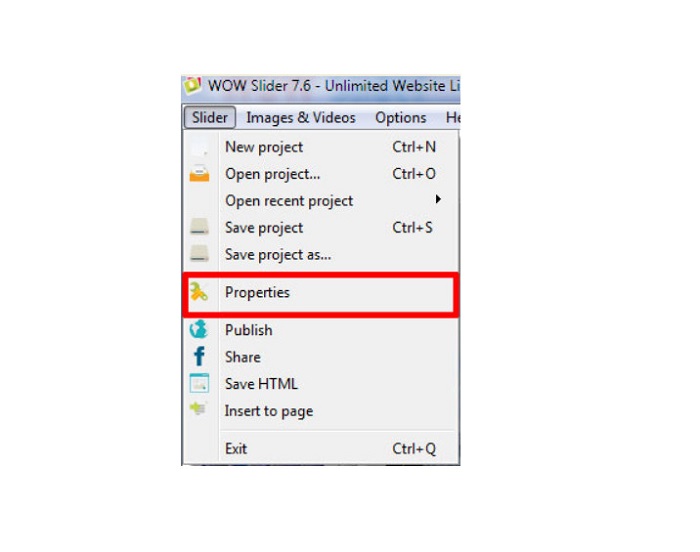
Vaihe 3. Ominaisuusikkuna avautuu; napsauta sitten Design. vaihtoehto.
Vaihe 4. Design-välilehdellä näet valintaruudun nimeltä Watermark. Poista valinta ruudusta poistaaksesi vesileiman käytöstä diaesityksessäsi.
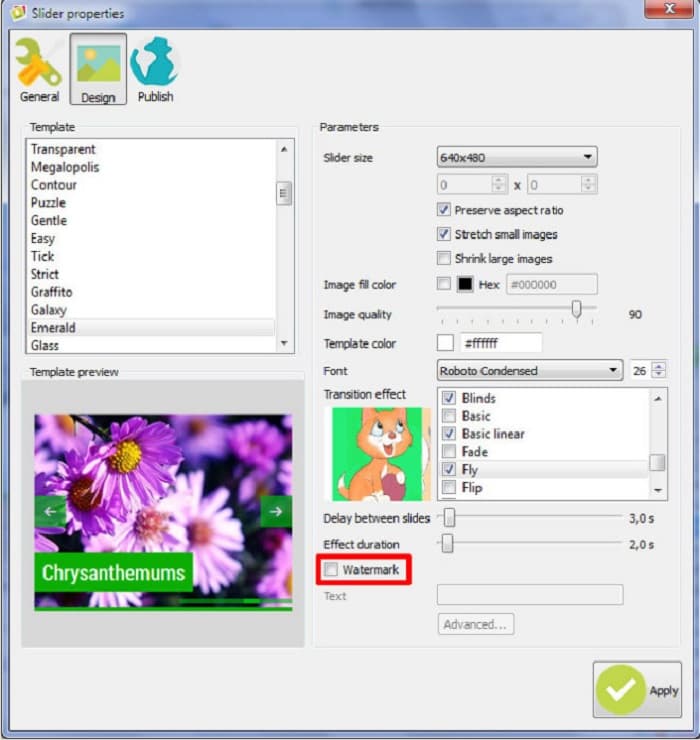
Vaihe 5. Voit julkaista diaesityksesi verkkosivustollasi ilman WOW Sliderin vesileimaa.
Osa 3. Usein kysyttyä WOW Slider -vesileiman poistamisesta
Miksi WOW Slider laittaa vesileimoja tuotetuille diaesityksille?
WOW Slider upottaa vesileiman diaesitystuloksiinsa, jotta käyttäjiä rohkaistaan käyttämään vesileimatonta versiota. Sovellus ei jätä vesileimaa ulostuloosi, jos ostat sovelluksen.
Voitko poistaa useita vesileimoja videostasi?
Joo. Vesileimanpoistoaineiden avulla voit poistaa vähintään kaksi vesileimaa videostasi. Jos haluat poistaa useita vesileimoja videostasi, käytä FVC Video Converter Ultimate -ohjelmaa.
Mikä on paras online-vesileimanpoistoaine käytettäväksi?
Verkosta löytyy monia vesileimanpoistotyökaluja. Monet kuitenkin suosittelevat FVC Free Watermark Remover -työkalua, koska se on turvallinen ja ilmainen.
Johtopäätös
Nyt ongelmasi siitä, miten poistaa WOW Sliderin vesileima, on ratkaistu! Käyttämällä yllä mainittuja vesileimanpoistotyökaluja voit helposti poistaa WOW Sliderin vesileiman diaesityksestäsi. Mutta jos haluat ilmaisen ja turvallisen verkkotyökalun, käytä FVC Free Watermark Remover -sovellusta.
-
 Ilmaisia tapoja poistaa VideoShop-vesileima videoista [vaivattomasti]
 VideoShop-vesileiman poistamiseksi laitteesi tarvitsee vesileimanpoistoaineen. Jos haluat tietää, mitä nämä ovat, lue tämä artikkeli.
-
 3 lähestymistapaa Viva-videovesileiman poistamiseksi videoista [nopein tapa]
 Tarvitset erillisen vesileimanpoistoaineen poistaaksesi Viva Video -vesileiman videoista. Lue tämä artikkeli saadaksesi lisätietoja siitä!
-
 Äärimmäiset työkalut vesileiman poistamiseen Renderforestin vietyistä videoista
 Vesileiman poistamiseen Renderforestista tarvitset vesileimanpoistoaineen laitteellesi, kaikki työkalut joita voit käyttää, ovat täällä.
