


 Video Converter Ultimate
 Näytön tallennin
 Videon korjaus
 Suojattu lataus
Helppoja vaiheita valokuvan koon muuttamiseen Facebookissa
Monet nuoret aikuiset ja aikuiset käyttävät Facebookia suosituimpana sosiaalisen median alustana. Facebook on sovellus, jossa voit ladata kuvia ja jakaa tai lähettää niitä ystävillesi. Ja moni haluaa ladata Facebookiin laadukkaita kuvia. Jos haluat sinäkin ladata korkearesoluutioisia ja -laatuisia kuvia, meillä on työkalu, josta on sinulle apua. Onneksemme löysimme iPhonelle, Androidille ja verkkoon sovelluksia, joilla voit muuttaa kuvien kokoa nopeasti ja tehokkaasti. Joten istu alas mukavasti, sillä tässä artikkelissa opit nopeasti, miten muuttaa kuvien kokoa Facebookia varten.

Osa 1. Valokuvan koon muuttaminen iPhonessa Facebookissa
Jos käytät iPhone-laitetta, voit ladata AppStoresta sovelluksia, jotka auttavat sinua muuttamaan valokuvasi kokoa. Lisäksi on olemassa ilmaisia sovelluksia, joita voit käyttää iPhone-laitteellasi. Kaikki sovellukset eivät kuitenkaan tuota korkealaatuisia tuloksia. Siksi etsimme parasta sovellusta kuvien koon muuttamiseen välittömästi.
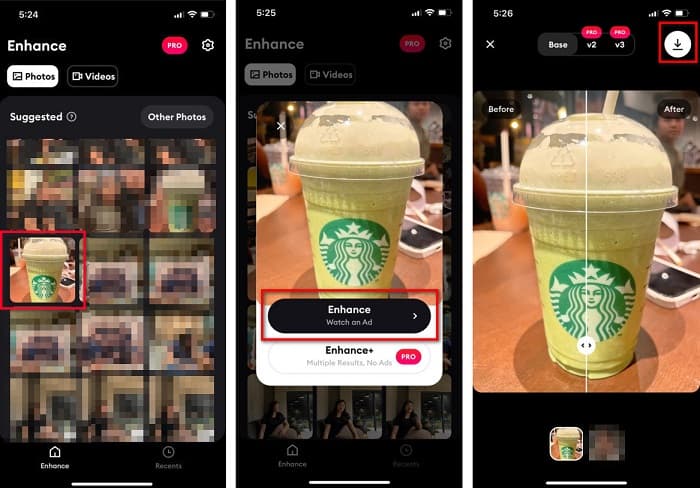
Remini on suosituin kuvan koonmuutos‑ ja parannussovellus, jonka voit ladata iPhoneen. Sovelluksessa on käyttäjäystävällinen käyttöliittymä, koska sen toiminnot ovat intuitiivisia. Lisäksi Remini voi parantaa kuvaasi tekoälyyn (AI, Artificial Intelligence) perustuvalla parannustoiminnolla, joka muuttaa kuvasi kokoa automaattisesti ja parantaa sen huippulaatuiseksi. Eikä siinä kaikki – tällä sovelluksella voit parantaa myös videoitasi sen videoenhancer‑ominaisuudella. Lisäksi se tukee kaikkia yleisiä kuvamuotoja, kuten JPEG, JPG ja PNG. Hienoa tässä sovelluksessa on myös se, että voit ladata sen ilmaiseksi App Storesta. Jos siis haluat käyttää tätä sovellusta Facebook‑kansikuvan koon muuttamiseen, seuraa alla olevia ohjeita.
Kuvan koon muuttaminen Remini-sovelluksella:
Vaihe 1. Avaa App Store, etsi Remini-sovellus ja lataa se laitteellesi. Avaa sovellus asennuksen jälkeen.
Vaihe 2. Kun avaat sovelluksen, näet kuvasi ja voit valita kuvan, jota haluat parantaa. Napauta sitten Enhance-painiketta siirtyäksesi seuraavaan näkymään.
Vaihe 3. Ennen kuin pääset seuraavaan näkymään, sinun on ensin katsottava mainos. Tämän jälkeen näet kuvasi ennen ja jälkeen ‑version. Napauta Latauskuvaketta näytön oikeassa yläkulmassa.
Osa 2. Valokuvan koon muuttaminen Androidissa Facebookissa
Oletko Android-käyttäjä? Älä huoli; esittelemme myös sovelluksen, jolla voit muuttaa kuvan kokoa. Vaikka PlayStoresta voit ladata monia sovelluksia, valitsimme niistä parhaat esittelemään sinulle. Lue alta, kuinka voit muuttaa kuvien kokoa Facebookissa Androidissa.
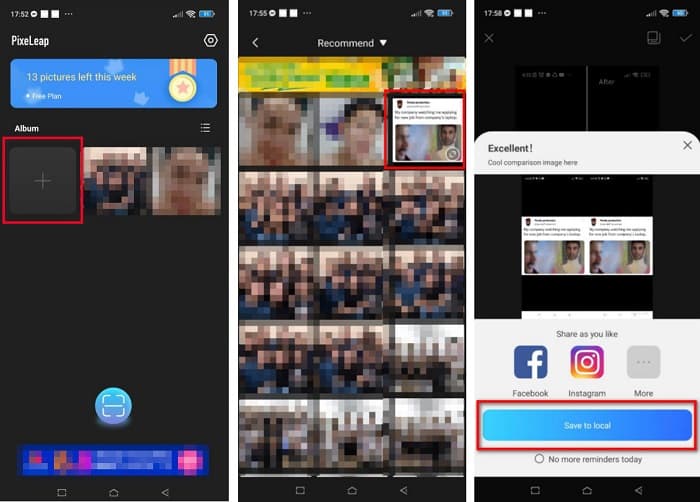
AI Photo Enhancer & PixelLeap on toinen erinomainen sovellus, jonka avulla voit muuttaa kuvasi kokoa paremman laadun saavuttamiseksi. Tämän kuvan koonmuutosohjelman voi ladata Play Storesta ilmaiseksi ja se on turvallinen käyttää. Lisäksi jos haluat parantaa tai palauttaa vanhan kuvan, AI Photo Enhancer & PixelLeap sopii siihen. Tekoälyteknologiansa ansiosta sinun tarvitsee vain ladata kuva, jonka kokoa haluat muuttaa, ja sovellus parantaa sen automaattisesti. Lisäksi siinä on yksinkertainen käyttöliittymä, joten se on erittäin hyvä valinta aloittelevalle käyttäjälle. Siinä on myös muita muokkaustoimintoja, kuten oikaisu, värittäminen, animointi, ilmeiden lisääminen ja kirkastaminen. Ongelmallista sovelluksessa on kuitenkin se, että siinä on paljon mainoksia, jotka vievät aikaa, ja se lisää vesileiman lopputulokseen. Siitä huolimatta tämä sovellus on hyvä ratkaisu, jos haluat muuttaa kuvan kokoa Facebookia varten ilman rajaamista.
Kuvan koon muuttaminen AI Photo Enhancerilla ja PixelLeapilla:
Vaihe 1. Asenna AI Photo Enhancer & PixelLeap Android‑laitteeseesi.
Vaihe 2. Napauta sovelluksen pääkäyttöliittymässä +‑merkillä varustettua ruutua ladataksesi kuvan, jonka kokoa haluat muuttaa. Sen jälkeen sovellus näyttää mainoksen ennen kuin siirryt seuraavaan näkymään.
Vaihe 3. Selaa kuvaa, jonka kokoa haluat muuttaa, ja napauta sitä. Kun olet valinnut kuvan, napauta Enhance-vaihtoehtoa. Sovellus parantaa kuvasi automaattisesti. Napauta lopuksi Save to local tallentaaksesi lopputuloksen.
Osa 3. Kuinka muuttaa valokuvan kokoa verkossa Facebookissa
Online-sovelluksen käytön etuna on, että sen avulla voit säästää tilaa laitteessasi. Tämän lisäksi on monia vapaasti käytettävissä olevia verkkosovelluksia, joita voit käyttää selaimessasi. Joten jos haluat käyttää online-sovellusta Facebookiin ladattavan kuvan koon muuttamiseen, näytämme sinulle, kuinka voit muuttaa valokuvan kokoa Facebookissa.
FVC Free Image Upscaler on paras verkkopohjainen kuvan koonmuutossovellus, jonka avulla voit suurentaa kuvaa jopa 2x‑, 4x‑, 6x‑ ja 8x‑kokoiseksi. Yksinkertaisen käyttöliittymänsä ansiosta myös aloittelijat voivat helposti muuttaa kuvan kokoa. Lisäksi se tukee kaikkia kuvamuotoja, kuten JPEG, JPG, PNG ja BMP. Vielä vaikuttavampaa tässä sovelluksessa on se, että se hyödyntää tekoälyteknologiaa, joka tunnistaa automaattisesti kuvan matalaresoluutioiset kohdat ja parantaa niitä. Se pystyy myös korjaamaan kadonneet pikselit, väritekstuurit ja muut yksityiskohdat kokonaan ja tarkasti. Lisäksi se toimii kaikissa verkkoselaimissa, kuten Googlessa, Firefoxissa ja Safarissa. Jos siis haluat käyttää FVC Free Image Upscaler ‑palvelua kuvasi koon muuttamiseen tai parantamiseen, seuraa alla olevia helppoja ohjeita.
Facebookin kuvan koon muuttaminen FVC Free Image Upscaler -sovelluksella:
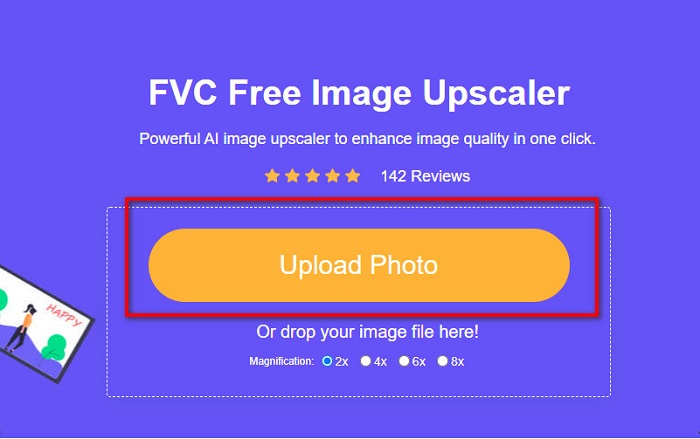
Vaihe 1. Avaa selaimesi ja kirjoita hakukenttään FVC Free Image Upscaler. Voit myös klikata annettua linkkiä päästäksesi suoraan sivustolle. Napsauta Upload Photo käynnistääksesi sovelluksen.
Vaihe 2. Napsauta ohjelman pääkäyttöliittymässä Upload Photo tuodaksesi kuvan, jonka kokoa haluat muuttaa.
Vaihe 3. Valitse seuraavassa näkymässä suurennus, jonka haluat kuvalle. Voit valita 2x, 4x, 6x tai 8x suurennuksen. Jatka sitten seuraavaan vaiheeseen.
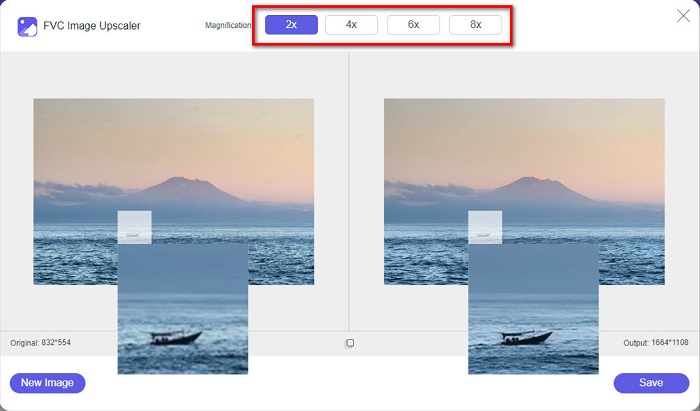
Vaihe 4. Valitse lopuksi Save-painike tallentaaksesi lopputuloksen tietokoneellesi. Näet eron alkuperäisen tiedoston ja koonmuutetun kuvan välillä. Vain sekunnissa kuvasi on tallennettu.
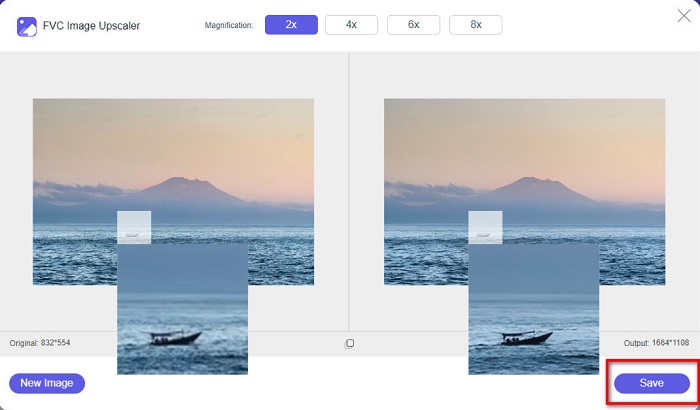
Ja siinä se! Yhtä helppoa kuin ABC, kuvasi on nyt parannettu ja sen kokoa muutettu.
Liittyy aiheeseen:
Miten terävöittää kuvaa verkossa ja offline‑tilassa neljällä helpolla tavalla
Miten muuttaa kuvan kokoa – Adobe Resize Image [verkossa ja offline‑tilassa]
Osa 4. Usein kysyttyä valokuvan koon muuttamisesta Facebookissa
Mikä on paras valokuvasuhde Facebookissa?
Mitä tulee valokuvasuhteeseen, pystysuuntaisen kuvan käyttäminen, jonka kuvasuhde on 4:5 ja 1200 x 1500 px, on parasta. Ja jos haluat neliön kuvan, resoluution on oltava 1080 x 1080 px.
Mikä on Facebook-viestin koko?
Facebook-julkaisun suositeltu kuvakoko on 1200 x 630 pikseliä pikseloitumisen välttämiseksi ja nopeamman latausajan vuoksi.
Mikä on paras kuvamuoto ladata Facebookiin?
Paras ja suositeltu kuvamuoto Facebookiin ladattavaksi on JPG-muoto. On parasta ladata JPG-muoto, jonka RGB-väri on alle 15 Mt.
Johtopäätös
Edellä esitellyt ratkaisut auttavat sinua, jos haluat muuttaa kuvan kokoa Facebookia varten. Kun olet lukenut tämän artikkelin huolellisesti, toivomme, että olet oppinut kaiken tarvittavan. Voit varmasti muuttaa minkä tahansa kuvan kokoa iPhone-, Android‑ tai verkkosovellusten avulla. Parhaita tuloksia varten käytä kuitenkin FVC Free Image Upscaler ‑palvelua, jonka avulla säästät myös tilaa laitteessasi.
-
 Paras Photo Resizer -sovellus verkossa, offline-tilassa, Androidissa ja iPhonessa
 Mitkä ovat parhaat valokuvien kokoa muuttavat sovellukset? Napsauta sivua saadaksesi tietoa viisi tehokkainta valokuvien koonmuutossovellusta, joilla voit parantaa tiedostoasi tai muuttaa sen kokoa.
-
 Kuvan koon muuttaminen - Adobe Muuta kuvan kokoa [online ja offline]
 Jos etsit Adobe-kuvan kokoa, meillä on ratkaisu sinulle. Katso tämä viesti perusteellisesti oppiaksesi kuinka muuttaa kuvien kokoa Adoben avulla tietokoneellasi.
-
 4 parasta offline- ja online-GIF-suurennusta, joita et saa missata
 Tämä viesti on sinulle, jos etsit parhaita GIF-suurentimia. Luettelimme tietokoneellesi tehokkaimmat online- ja offline-GIF-suurentimet.
