


 Video Converter Ultimate
 Näytön tallennin
 Videon korjaus
3 eri tapaa muuntaa MPG-tiedostoja MOV-muotoon työpöydälläsi tai verkossa
Muodon muuntaminen on olennaista, varsinkin kun puhumme yhteensopivuudesta ja tiedostomuodon käyttötarkoituksesta. Kuten MPG, tämä muoto tallentaa DVD-levyiltä peräisin olevaa dataa, kuten lomitettua metatietoa, ääntä ja videota. Mutta kun tämä muoto rippaa DVD:ltä ja sitä yritetään toistaa Quicktimessa tai muokata iMoviessa, sitä ei voi ladata, koska formaattia ei tueta. Voit kuitenkin muuntaa .mpg-tiedostosi tuettuun muotoon, kuten MOV-muotoon. Tässä artikkelissa esitellään parhaat muunnosohjelmat, joilla voit muuntaa MPG:n MOV:ksi Macilla ilmaiseksi ilman, että laatu kärsii.

Osa 1. Kuinka muuntaa MPG MOV:ksi Macissa ja Windowsissa
Ensimmäisenä listalla on kaikkien muuntimien kärkikastia, jonka avulla voit oppia muuntamaan MPG:n MOV:ksi Macilla tai PC:llä. FVC Video Converter Ultimate tarjoaa korkealaatuisimman ja nopeimman muunnoksen, jonka voit tehdä alle minuutissa. Lataa tämä erityisesti silloin, jos sinulla ei ole aiempaa kokemusta tiedostojen muuntamisesta etkä halua pettyä heti ensimmäisellä kerralla. Jos taas olet käyttäjä, joka haluaa lisätä erikoistehosteita, rajata kuvaa, yhdistää tiedostoja ja tehdä paljon muuta, tutustu tämän muuntimen Toolbox-työkalupakkiin. Lisäksi, jos etsit luotettavaa ja helppokäyttöistä ohjelmistoa ja haluat saavuttaa erinomaisen lopputuloksen välittömästi, seuraa alla olevia ohjeita.
Vaihe 1. Lataa MPG–MOV-muunnin ilmaiseksi Macille tai PC:lle. Asenna sen jälkeen ohjelma ja tee nopea perusasetusten määritys.
Ilmainen latausWindows 7 tai uudempiTurvallinen lataus
Ilmainen latausMacOS 10.7 tai uudempiTurvallinen lataus
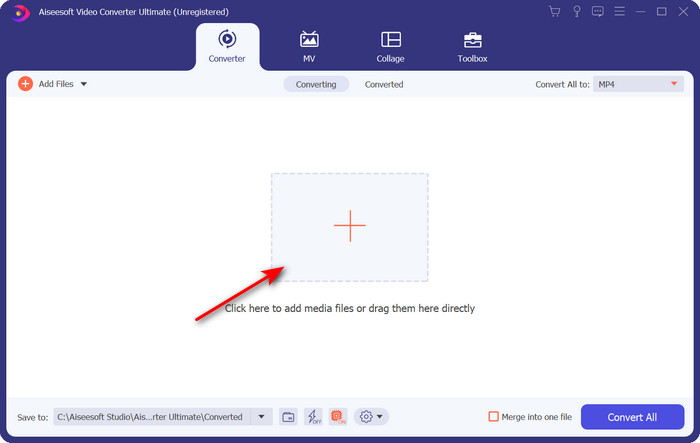
Vaihe 2. Lisätäksesi tiedoston napsauta plusmerkkiä käyttöliittymän keskellä. Etsi kansiosta seuraavaksi avautuva .mpg-tiedosto, napsauta sitten Open ja jatka eteenpäin.
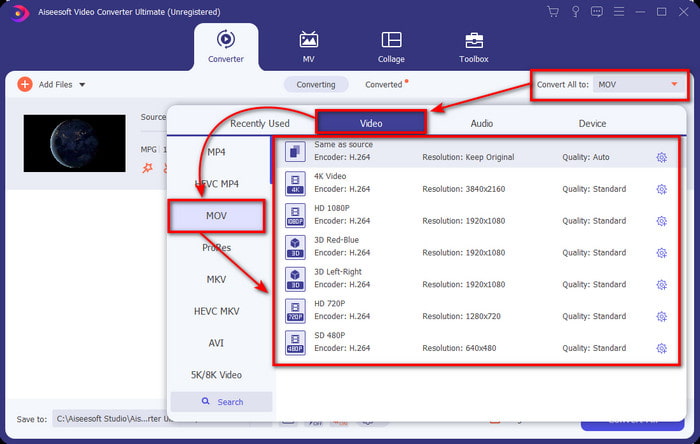
Vaihe 3. Napsauta pudotusvalikkoa ja valitse MOV-muoto tai jokin muu luettelossa saatavilla oleva formaatti.
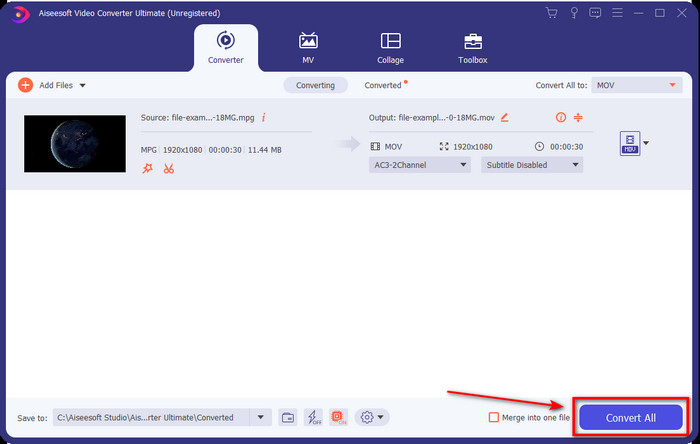
Vaihe 4. Kun olet valmis aloittamaan muunnosprosessin, napsauta Convert All.
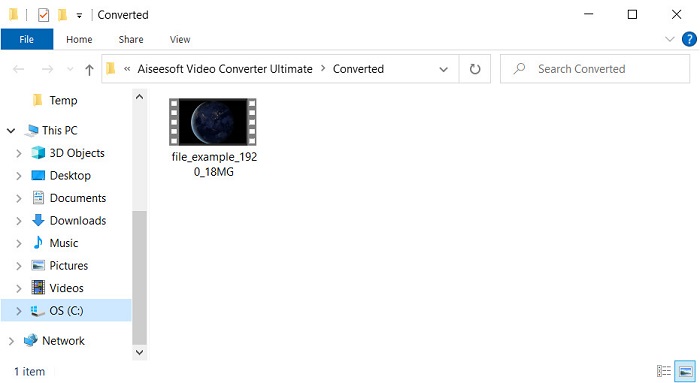
Vaihe 5. .mov-tiedostosi on valmis muutamassa sekunnissa, ja kun kansio avautuu näytöllesi, napsauta ensimmäistä tiedostoa katsoaksesi tai muokataksesi sitä Apple-laitteellasi.
Osa 2. Muunna MPG MOV:ksi Quicktimella
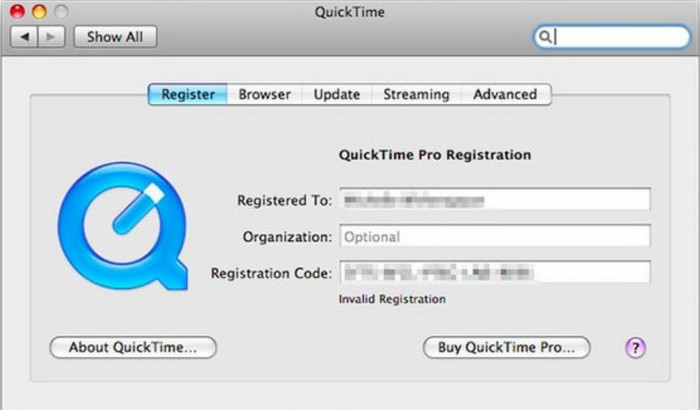
Quicktime Player on Applen laitteille tarkoitettu, sisäänrakennettu mediasoitin, joka toistaa lähes kaikkia video- ja äänitiedostomuotoja. Tiesitkö kuitenkin, että voit käyttää sitä myös muuntimena? Tämän työkalun tarjoama muunnos ei ole yhtä yksityiskohtainen kuin yllä mainitun ensimmäisen muuntimen, mutta jos sinulla on Apple-laite ja haluat muuntaa MPG:n MOV:ksi Quicktime Playerilla, seuraa alla olevia ohjeita.
Vaihe 1. Avaa Quicktime Player Macilla, klikkaa sen ylävalikosta File, valitse Open File, etsi kansiosta .mkv-tiedosto ja paina Open.
Vaihe 2. Napsauta uudelleen File, mutta valitse tällä kertaa Export As ja valitse luettelosta haluamasi pikseliresoluutio.
Vaihe 3. Aloittaaksesi tiedoston muuntamisen Quicktimessa, napsauta Save.
Osa 3. Muunna MPG MOV-muotoon käyttämällä ilmaista online-MPG-MOV-muunninta
Haluatko tietää, mikä on paras ilmainen MPG–MOV-muunnin verkossa, jos et halua ottaa riskiä ohjelmiston lataamisesta? Silloin FVC Free Video Converter Online on oikea valinta. Se on yksinkertainen, toimii kaikissa selaimissa, on haittaohjelmista vapaa ja luotettava verkkotyökalu. Kaikki, mitä perusmuuntimelta voi odottaa, löytyy täältä. Lisäksi tämä ohjelma tukee lukuisia mediaformaatteja ja muuntaa tiedostoja ilman, että sinun tarvitsee kirjautua sisään. Haluatko käyttää tätä työkalua? Seuraa silloin näitä yksinkertaisia vaiheita.
Vaihe 1. Napsauta tätä linkkiä siirtyäksesi FVC Free Video Converter Online -palvelun viralliselle verkkosivulle.
Vaihe 2. Kun olet verkkokäyttöliittymässä, napsauta Add Files to Convert. Etsi kansiosta muunnettava .mpg-tiedosto ja paina sitten Open.
Lataa työpöytäversio muuntaaksesi tiedostoja erissä.
Vaihe 3. Tiedoston lataamisen jälkeen valitse MOV-muoto alavalikosta.
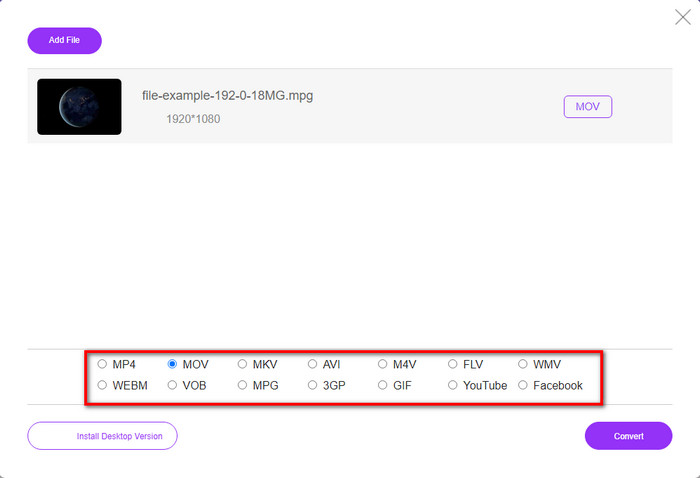
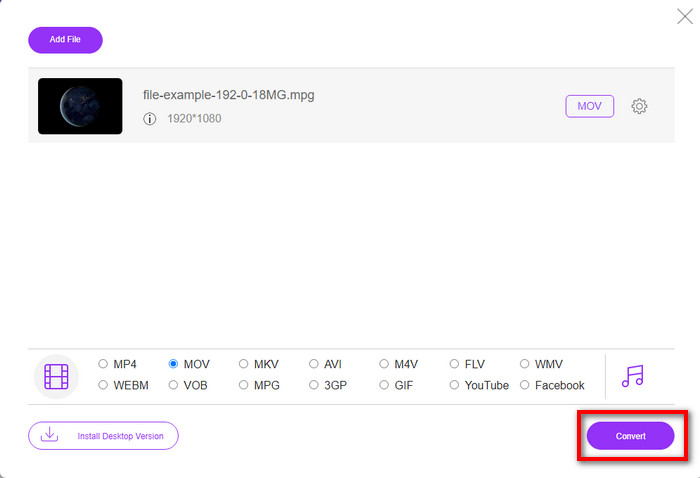
Vaihe 4. Koska olet jo valinnut MOV-muodon, lataa se nyt napsauttamalla Convert.
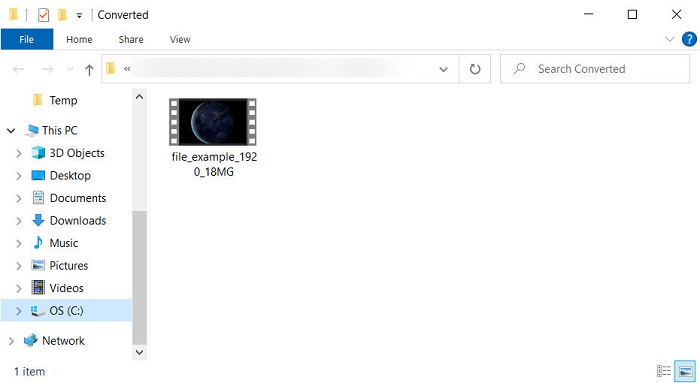
Vaihe 5. Muunnoksen jälkeen näyttöön avautuu kansio, jossa on .mov-tiedosto.
Osa 4. Laaja tietämys MPG:stä MOV:ksi ja miksi se pitää muuntaa
MPG on hyvin tunnettu mediamuoto, joka käyttää MPEG:tä digitaalisena standardivideomuotona. Tämäntyyppiset tiedostot käyttävät yleensä MPEG-1- ja MPEG-2-tiedostoja mediatiedostojen kooderina. Se käyttää näitä kahta kompressoria tukemaan kompressorin kaikkia puutteita, erityisesti korkeamman resoluution videoiden tallentamiseen. Kuten aiemmin todettiin, tämä muoto voi sisältää kolme elementtiä: äänen, videon ja metatiedot yhdessä streamissa elokuvien nopeampaa jakelua varten verkossa.
Mutta MOV voi tallentaa korkealaatuisen videon ja kristallinkirkkaan äänen, jota yleensä käytetään videon muokkaamiseen. Toisin kuin MPG, tämä multiplex-mediamuoto voi seurata erilaisia mediatietoja, kuten videota, ääntä ja tekstityksiä. Mutta tämän muodon yleisesti käytetty kooderi ja dekooderi on MPEG-4.
MPG on parasta muuttaa MOV-muotoon, koska kun siirrät tiedoston Apple-laitteille, se ei toistu Quicktimessa tai muokkaa sitä iMoviessa. Vaikka Quicktime Player ja iMovie tukevat MPEG-1- ja MPEG-4-tiedostoja, muita MPEG-tiedostoja, kuten MPEG-2:ta, jota .mpg käyttää, ei tueta. Jotta tiedosto olisi yhteensopiva Apple-laitteiden kanssa, sinun on muutettava tiedosto MOV-muotoon.
Mailia per päihde vs. liikkuva nopeus
Moving Picture Experts Groupin (MPEG) valmistama MPG on yleinen digitaalinen videomuoto video-, ääni- ja metatietojen tallentamiseen. Se on varsin hyödyllinen luotaessa elokuvia Internetissä jaettavaksi. Nämä MPG-tiedostot sisältävät yleensä MPEG-1- tai MPEG-2-video-/äänipakkauksen.
MOV-muotoa voidaan käyttää elokuvan, TV-ohjelman, lyhyen videoleikkeen tai kotielokuvan tallentamiseen. Se on itse asiassa tallennettu QuickTime-tiedostomuotoon (QTFF), jonka Apple esitteli vuonna 1991. MOV-tiedostoja käytetään usein, kun ihmiset haluavat tallentaa videon korkealaatuisina.
Osa 5. MPG- ja MOV-muunnoksia koskevat usein kysytyt kysymykset
Kuinka kauan MPG:n muuntaminen kestää?
On kaksi tekijää, jotka voivat vaikuttaa muuntoprosessiisi. Ensinnäkin, jos käytät online-muunninta, se riippuu Internetin nopeudesta. Tämä prosessi kestäisi kauemmin verrattuna toiseen ei-pohjaiseen muuntimeen. Ja viimeinen, mitä suurempi tiedostokoko, sitä kauemmin sen muuntaminen kestää. Joten jos .mpg-tiedostosi koko on suuri, odotat yleensä sen loppumista.
Voinko toistaa .mpg-tiedostoja VLC:llä?
VLC on yksi suurimmista mediasoittimista, jonka voit ladata kaikille laitteille toistaaksesi videoita ei-toistettavassa muodossa alkuperäisellä mediasoittimellasi. Voit myös toistaa täällä kaikkia MPEG-1-, MPEG-2-, MPEG-3- ja MPEG-4-muotoja.
Vaikuttaako MPG:n pakkaaminen laatuun?
Tiedoston pakkaamisen ei pitäisi vaikuttaa laatuun, koska teet siitä vain pienemmän. Mutta jos pakkaat .mpg-tiedostosi liian paljon, sen laatu heikkenee jonkin verran. Välttääksesi tämän, sinun kannattaa lukea tämä 7 parhaan videonpakkausohjelman lista, joita voit käyttää.
Johtopäätös
Kertaaksesi kaikki yllä mainitut yksityiskohtaiset tiedot, voit muuntaa MPG:si MOV:ksi, jos haluat käyttää videota Apple-laitteissa. Vaikka ohjelmistot, kuten Quicktime ja iMovie, tukevat MPEG-1:tä ja MPEG-4:ää, MPEG-2:ta ja MPEG-3:a ei kuitenkaan tueta. Joten, jotta se olisi yhteensopiva Apple-laitteidesi kanssa, on ihanteellinen muuntaa se. Kaikki tässä mainitut työkalut ovat erittäin tehokkaita ja helppokäyttöisiä, jos muunnat tiedoston.
-
 FLV to MPG - Kuinka muuntaa FLV MPG: ksi Macissa, PC: ssä ja verkossa ilmaiseksi
 Miten muuntaa FLV MPEGiksi? Voinko muuntaa FLV: n MPG: ksi ilmaiseksi? Tämä viesti jakaa 3 ilmaista videomuunninta, joiden avulla voit muuntaa FLV: n MPG: ksi ilman laadun heikkenemistä.
-
 Kuinka muuntaa MPG GIF-muotoon [Online & Offline]
 Haluatko ilmaista paljon parempia tunteita? Sen sijaan sinun on käytettävä GIF-tiedostoa. Tämä kirjoitus opettaa sinulle, kuinka voit muuntaa MPG-tiedoston GIF-muotoon ilmaistaksesi tunteesi paljon paremmin.
-
 [2022] Kuumat valinnat MPG-AVI-muuntimesta, joka auttaa sinua muuttamaan MPG-muodot AVI-muotoon
 Oletko koskaan miettinyt MPG:n muuntamista AVI-videotiedostoksi vain toistaaksesi sen videosoittimellasi? Tässä on paras artikkeli, jonka voit löytää ja jossa puhutaan yllä olevasta ongelmasta.

