


 Video Converter Ultimate
 Näytön tallennin
 Videon korjaus
Nopea ja helposti ymmärrettävä opas TRP:n muuntamisesta MOV:ksi
TRP-muoto ei ole kovin yleinen, joten sitä ei useinkaan voi toistaa mediasoittimella tai edes muokata editointiohjelmissa. Jotkut käyttäjät ovat yrittäneet muuttaa .trp-päätteen muotoon .ts, .mpg, .mp4 ja toistaa tiedostot sitten mediasoittimella. Useimmat ovat kuitenkin epäonnistuneet tässä; vaikka tiedoston päätteen voi vaihtaa, sen rakenne pysyy samana. Välttääksesi tämän virheen, mikset mieluummin yrittäisi muuntaa TRP:n MOV-muotoon? Näin ratkaiset ongelman varmasti. Alla opit, mitä TRP-muoto on ja miten se muunnetaan toistettavaksi MOV-muotoon.

Osa 1. Mitä ovat TRP ja MOV
TRP tunnetaan siitä, että se multipleksoi digitaalisia video- ja äänivirtoja ja toistaa ne sitten synkronisesti. Lisäksi tätä muotoa käytetään usein virheenkorjauksessa kaikissa digitaalisissa videolähetyksissä tai DVB:ssä. Lisäksi .trp käyttää kahta erillistä koodekkia videon koodaamiseen H.263:ksi tai H.264:ksi ja AC3:ksi ääntä varten. Koodauksen jälkeen tähän tallennetut visuaaliset äänitiedostot ovat valmiita lähetettäväksi koko verkkoon ilman etäisyysrajoituksia. Vaikka muoto näyttää erinomaiselta, tiedostot tallennetaan säilyttäen samalla huippuluokan laadun. Jotkut ohjelmistot eivät kuitenkaan sovellu tähän muotoon.
Päinvastoin, MOV-muoto haluaa pitää korkealaatuisen videon ja äänen toistossa jokaisessa Quicktime-soittimessa. Vaikka muoto on Applelle, voit silti toistaa videon, vaikka sinulla ei olisi Macia tai iOS:a, koska tämä muoto tukee lukuisia mediasoittimia ja editoijia.
Joten nyt ihanteellinen ratkaisu tähän TRP-ongelmaan on muuntaa se, varsinkin jos haluat siirtää tiedoston Maciin tai iPhoneen ja toistaa tai muokata sitä myöhemmin. Jatketaan ilman enempää viiveitä muuntimeen, jota voit käyttää ihanteellisesti TRP-tiedostojen muuntamiseen MOV-muotoon.
Osa 2. Kuinka muuntaa TRP:ksi MOV:ksi ilmiömäisellä ohjelmistolla Windows/Macissa
Tämä TRP–MOV-muunnin on listan kärjessä, koska se on paras työkalu TRP-tiedostojen muuntamiseen, FVC Video Converter Ultimate. Se on täydellinen työkalu, kun haluat nopeimman ja helpoimman tavan dekoodata ja enkoodata TRP-tiedostojasi. Koodauksen ja dekoodauksen lisäksi tämän ohjelmiston avulla voit myös muokata videota, yhdistää, leikata, rajata jne. Kaikki tämä on mahdollista asiakkaiden ansiosta, jotka ovat luottaneet työkaluun, muuntaneet sillä tiedostojaan ja ostaneet sen.
Plussat
- Nopein TRP-muunnin, jolla voit muuntaa TRP:n MOV-, AVI-, MP4-, MKV- ja moniin muihin muotoihin.
- Ei rajoituksia muuntamiseen, ja erämuunnos toimii hyvin.
- Ladattavissa kaikille PC- tai Mac-työasemille.
- Lisäominaisuudet ovat sisäänrakennetussa Toolboxissa.
Haittoja
- Sinun on ostettava ohjelmisto ennen sen käyttöä.
- Tiedosto on ladattava asemallesi.
Aloitetaan tämän erittäin suositellun muuntimen käyttäminen ilman lisäselityksiä noudattamalla alla olevia ohjeita.
Vaihe 1. Ennen kuin käytät ohjelmaa, lataa se ensin koneellesi, asenna ja napsauta sitten Start Now avataksesi ohjelman.
Ilmainen latausWindows 7 tai uudempiTurvallinen lataus
Ilmainen latausMacOS 10.7 tai uudempiTurvallinen lataus
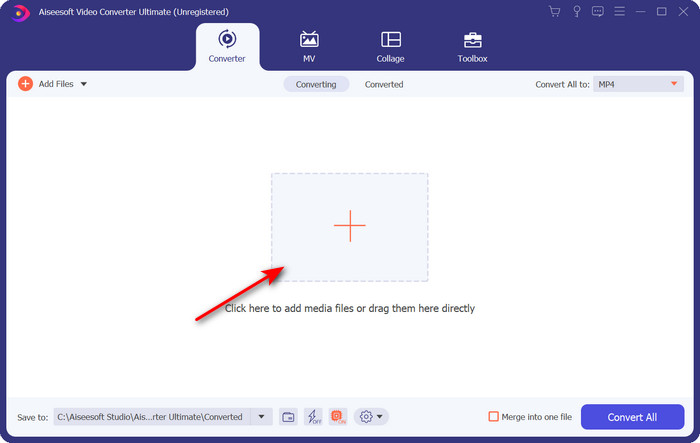
Vaihe 2. Napsauta + -painiketta ohjelman käyttöliittymän keskellä; näytölle avautuu kansio. Etsi .trp-tiedosto ja napsauta Open ladataksesi sen.
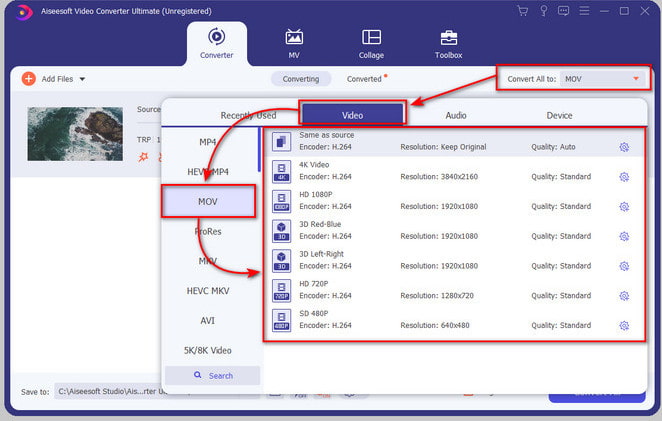
Vaihe 3. Napsauta Convert All ja etsi MOV-muoto, ja valitse sitten haluamasi tarkkuus.
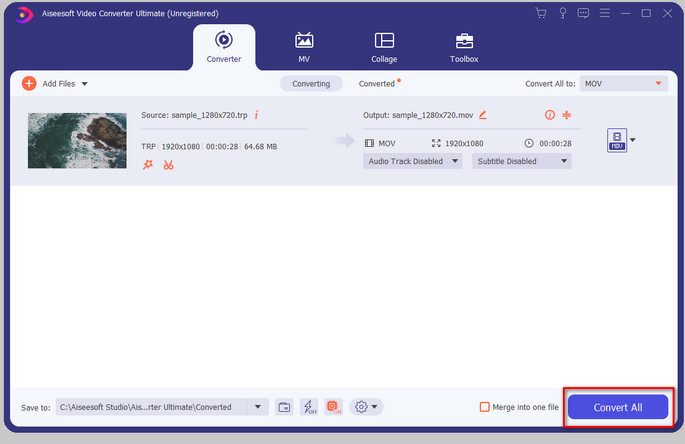
Vaihe 4. Kun olet valmis aloittamaan muunnoksen .mov-muotoon, napsauta Convert All.
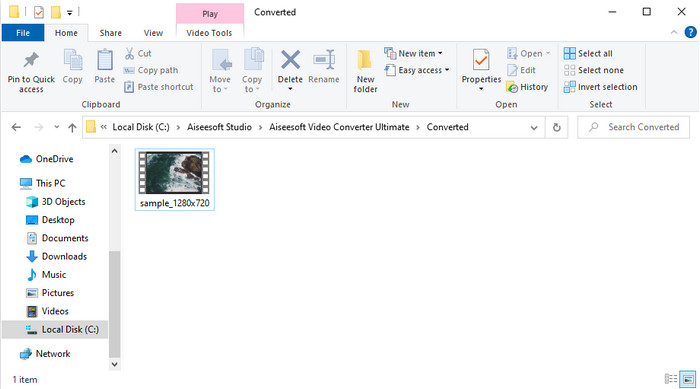
Vaihe 5. Odota, kunnes prosessi on valmis; sen jälkeen näytölle ilmestyy uusi kansio tekemälläsi muunnetulla tiedostolla. Katsoaksesi tiedoston Macilla tai millä tahansa iOS-laitteella, napsauta sitä.
Osa 3. Kuinka muuntaa TRP:ksi MOV:ksi ilmaiseksi kaikissa online-selaimissa
Etkö halua ladata ohjelmistoa TRP–MOV-muunnosta varten? Silloin suosittelemme käyttämään työkalua FVC Free Video Converter Online tiedoston muuntamiseen verkossa. Toisin kuin yllä esitelty ensimmäinen työkalu, tämä verkkopohjainen muunnin toimii suoraan selaimessa. Se on varmasti haittaohjelmaturvallinen eikä sisällä mainoksia käyttöliittymässä. Tämän verkkotyökalun haittapuolena on kuitenkin se, ettei sitä voi käyttää ilman internet-yhteyttä. Lisäksi tämä työkalu tukee vähemmän tiedostomuotoja verrattuna ohjelmaan FVC Video Converter Ultimate. Muuten sitä voi käyttää ilmaiseksi ja ilman rajoituksia. Jos siis haluat kokeilla tätä verkkopohjaista muunninta, jatka seuraaviin käyttöohjeisiin.
Plussat
- Yhteensopiva kaikissa hakukoneissa.
- Ei rajoituksia TRP:n muuntamiselle MOV-, MP4-, AVI- jne.
- Ei ärsyttävää mainontaa käyttöliittymässä.
Haittoja
- Et voi suorittaa erämuunnoksia parhaana työkaluna.
- Verkkotyökalun käyttäminen vaatii Internetiä, koska se on Internet-pohjainen työkalu.
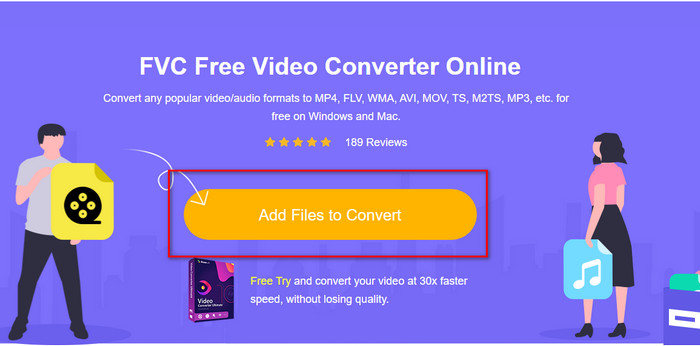
Vaihe 1. Käynnistääksesi verkkotyökalun napsauta tätä linkkiä.
Vaihe 2. Valitse Add Files to Convert; kansio avautuu. Etsi tiedosto kansiosta ja napsauta Open.
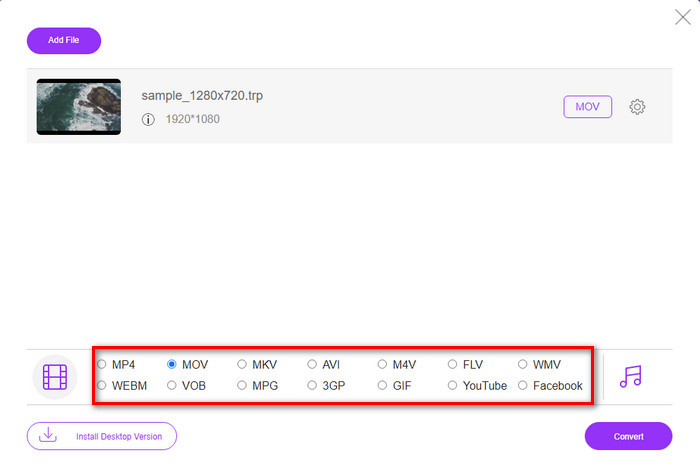
Vaihe 3. Valitse luettelosta MOV tai valitse jokin muu haluamasi muoto.
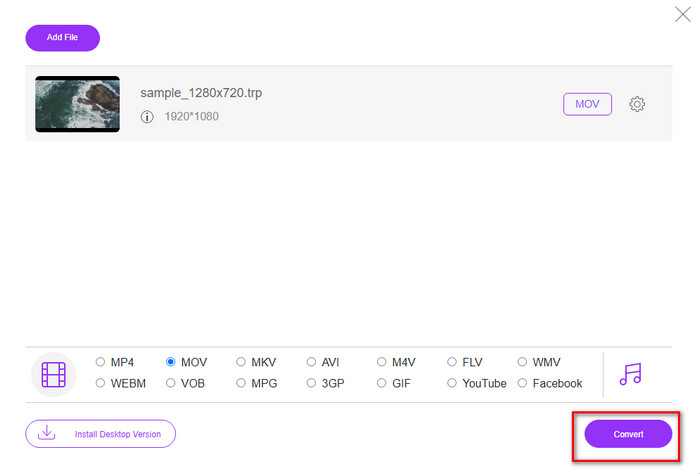
Vaihe 4. Aloita lopuksi tiedoston muuntaminen napsauttamalla Convert.
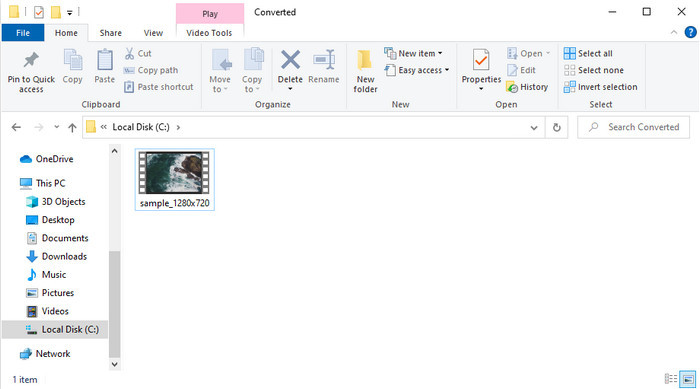
Vaihe 5. Kun muunnos on valmis, näytölle ilmestyy kansio muunnetun tiedoston kanssa.
Osa 4. Usein kysytyt kysymykset TRP:n muuntamisesta MOV:ksi
Voinko yhdistää .trp-tiedostoja yhdeksi videoksi?
Kyllä, voit yhdistää kaksi tai useampia .trp-videoita ja ladata ne yhtenä tiedostona. Tämä on erittäin helppoa, jos käytät ohjelmaa FVC Video Converter Ultimate. Haluatko oppia, miten se tehdään? Napsauta sitten tätä linkkiä ja käytä 5 minuuttia oppiaksesi TRP-tiedostojen yhdistämisen – tai muidenkin videoiden, kuten MP4, MOV, AVI ja monien muiden.
Kuinka kauan TRP:n muuntaminen MOV:ksi kestää?
Se riippuu muunnettavan videon pituudesta, tai jos käytät verkkotyökalua, se riippuu Internetin nopeudesta. Prosessi vaihtelee riippuen siitä, mitä käytät. Menestys on kuitenkin varmaa, jos käytät yllä esitettyjä muuntimia.
Muuttuuko TRP-tiedoston koko muuntamisen jälkeen?
Tiedoston koko saattaa muuttua hieman, mutta sen ei pitäisi kaksin- tai kolminkertaistua. Jos kuitenkin koet, että muunnetut .trp-videosi ovat suuria, voit lukea tämän artikkelin ja oppia, miten pakata TRP-videoita.
Johtopäätös
Lopuksi, jos haluat muuntaa TRP-tiedostosi MOV-muotoon verkossa, suosittelemme lämpimästi käyttämään työkalua FVC Free Video Converter Online. Se on erinomainen verkkopohjainen muunnin, joka auttaa sinua muuttamaan formaatin uuteen. Mutta jos haluat muuntaa tiedostosi uudeksi muodoksi helpommalla tavalla ja tehdä erämuunnoksia, käytä ohjelmaa FVC Video Converter Ultimate. Tämä työkalu tarjoaa parhaan mahdollisen lopputuloksen, kehittyneet ominaisuudet ja runsaasti eri formaattivaihtoehtoja – koet täyden tehon muunnoksissa näiden kahden työkalun avulla. Valitsitpa kumman muuntimen tahansa, et tee väärää ratkaisua.
-
 Helpoin opas TRP:n muuntamiseen AVI:ksi Windowsissa ja Macissa
 Ehkä et tunne TRP-videomuotoa ja ihmettelet, kuinka aiot muuntaa TRP:n AVI:ksi? Lue tämä artikkeli lisäksi saadaksesi tietoa ongelmaan liittyvistä yksityiskohdista.
-
 Erinomaisia menetelmiä VOB:n muuntamiseen MOV:ksi
 Online-videoiden lataaminen on kätevää, mutta entä jos video on VOB-muodossa ja soitin ei tue sitä? Tämä viesti opettaa sinulle, kuinka VOB muunnetaan MOV:ksi.
-
 Nopeita ja helppoja vinkkejä WMV:n muuntamiseen MOV:ksi [Todistettu]
 Haluatko tietää, mitkä ovat parhaat ja helppokäyttöiset muuntimet, jotka muuntavat WMV:n MOV:ksi? Jatka tämän artikkelin lukemista, sillä siinä käsitellään kaikkia mahdollisia vaihtoehtoja, joita sinun on harkittava.
