


 Video Converter Ultimate
 Näytön tallennin
 Videon korjaus
Selvitä parhaat videon MP3-muuntimet Webissä, pöytäkoneissa ja matkapuhelimissa
Musiikki on yksi parhaista viihdemuodoista, joita maailma voi meille tarjota. Tukemaan rakkauttamme musiikkiin – erityisesti artistiin, jota kuuntelemme päivittäin – saatamme joskus haluta kuunnella lempikappalettamme tilanteessa, jossa internetiä ei ole saatavilla. Ei hätää, voit pelastaa tilanteen lataamalla musiikkivideon. Videotiedoston koko on kuitenkin paljon suurempi kuin pelkän äänitiedoston. Tämän ratkaisemiseksi tutustumme eri työkaluihin, joilla voit muuntaa videon MP3-muotoon ja säästää tilaa. Voit luottaa tähän artikkeliin, sillä se esittelee vahvaa näyttöä ongelman ratkaisemiseksi, joten pysy mukana ja aloitetaan.

Osa 1. Paras Video MP3 -muunnin Windowsille ja Macille vertailukaaviolla
FVC Free MP3 Converter
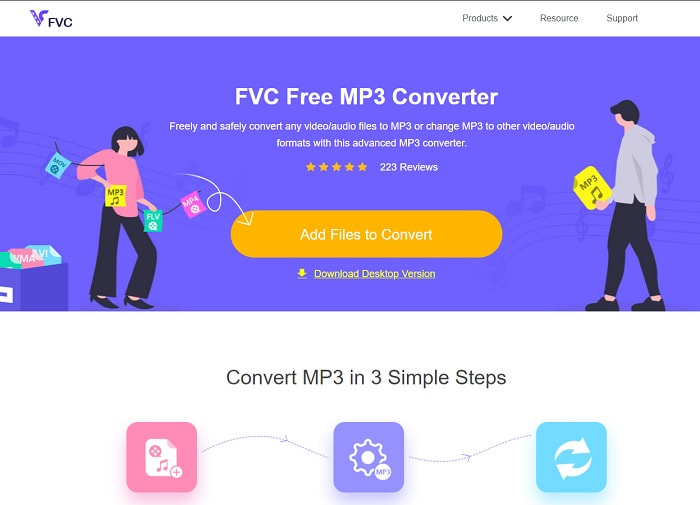
Jos etsit ilmaista video–MP3-muunninta, FVC Free MP3 Converter tarjoaa juuri sen. Vaikka tämä työkalu sisältää monia samoja ominaisuuksia kuin mobiilimuuntimet ja muut verkkopohjaiset muuntimet, se hallitsee yhä verkon muuntimien kuninkaana nopean ja tarkan muunnoksensa ansiosta. Sen haittapuolena on kuitenkin se, että tuettujen formaattien valikoima on melko suppea, mikä voi rajoittaa muunnosmahdollisuuksiasi. Siitä huolimatta se on vähintäänkin hyvä muunnin. Jos haluat tietää lisää työkalusta, jatka lukemista ja seuraa alla olevia ohjeita sen käyttöön.
Vaihe 1. Napsauta yllä olevaa hyperlinkkiä, joka vie sinut varsinaiseen verkkotyökaluun.
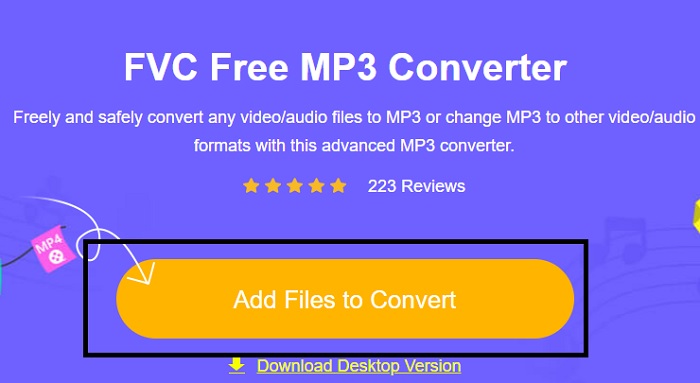
Vaihe 2. Tämän jälkeen napsauta Add Files to Convert avataksesi ja käynnistääksesi työkalun.
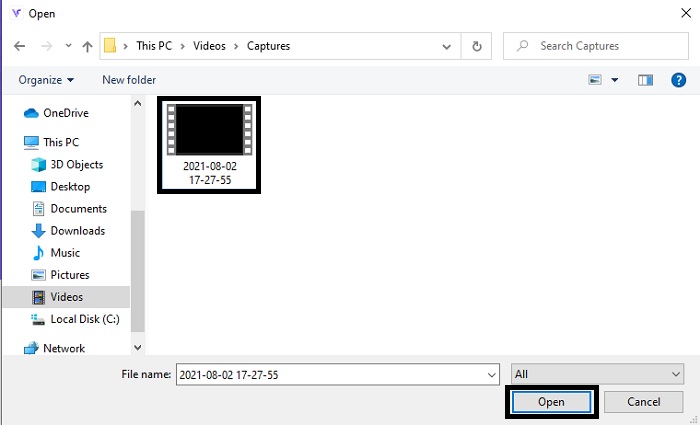
Vaihe 3. Etsi videotiedosto, jonka haluat muuntaa, ja napsauta Open lisätäksesi tiedoston.
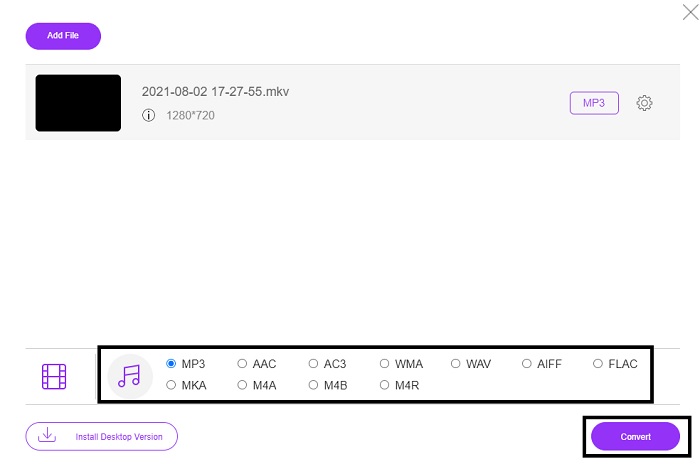
Vaihe 4. Valitse tästä, mihin ääniformaattiin haluat tiedoston muunnettavan. Kun olet valmis aloittamaan muunnoksen, napsauta Convert.
Vaihe 5. Jos haluat kuunnella muunnetun tiedoston, napsauta tätä folder-painiketta näyttääksesi tiedoston sijainnin.
FVC Video Converter Ultimate
Jos ensimmäinen työkalu ei tuota haluamaasi tulosta, voit käyttää tätä FVC Video Converter Ultimate -ohjelmaa, monien suosikkimuunninta. Toisin kuin mikään aiemmin käyttämäsi (tai käyttämätön) muunnin, tämä työkalu on hyvin ainutlaatuinen monella eri tavalla. On sanottu, ettei mikään ylitä sitä muunnosprosessissa, editoinnissa, luomisessa, parannuksessa jne. Saatat ehkä ajatella, ettei työkalu ole käyttäjäystävällinen, mutta se on väärä oletus. Se on erittäin helppokäyttöinen, ja vaikka et olisi ammattilainen muuntamisessa, pystyt silti tuottamaan näyttäviä lopputuloksia. Tutustutaan siis siihen, kuinka muuntaa video MP3-muotoon tämän huippuluokan muuntimen avulla.
Vaihe 1. Lataa ensin tämä työpöytäsovellus koneellesi. Muuta asennusasetuksia halutessasi ja napsauta lopuksi Finish tallentaaksesi muutokset.
Ilmainen latausWindows 7 tai uudempiTurvallinen lataus
Ilmainen latausMacOS 10.7 tai uudempiTurvallinen lataus
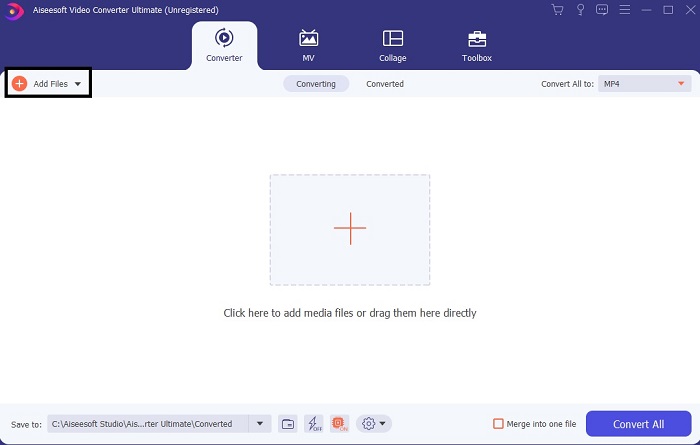
Vaihe 2. Tällainen käyttöliittymä ilmestyy näytöllesi. Paina Add Files -painiketta tai plus-kuvaketta lisätäksesi tiedoston käyttöliittymään.
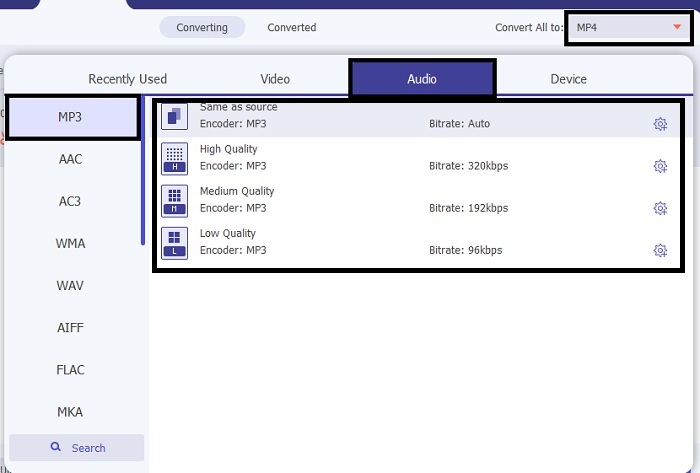
Vaihe 3. Kun olet valinnut tiedoston, jonka haluat muuntaa, napsauta drop-down-valikkoa Convert All -vaihtoehdon vieressä ja valitse yli 500 eri formaatista.
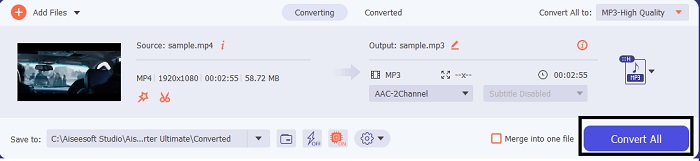
Vaihe 4. Napsauta sitten Convert All aloittaaksesi videon muuntamisen MP3-muotoon.
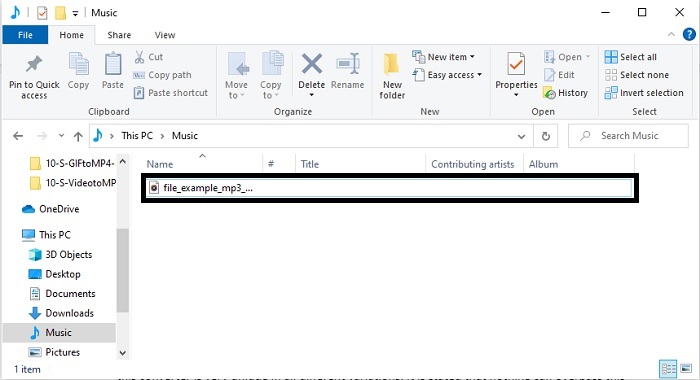
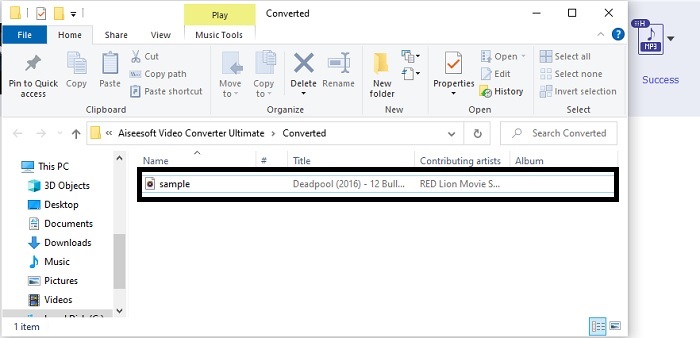
Vaihe 5. Kun kaikki on valmista, näytölle avautuu tiedostonhallintaikkuna. Napsauta muunnettua tiedostoa kuunnellaksesi ja nauttiaksesi siitä.
Lisävaiheet äänen tehostamiseksi ennen muuntamista FVC Video Converter Ultimaten avulla
Muokkaa ääntä yhden FVC Video Converter Ultimate -ohjelman ominaisuuden avulla. Ennen videon muuntamista on hyvä parantaa ääntä, jotta kuuntelukokemus olisi myöhemmin parempi. Jos haluat tietää, miten se tehdään, seuraa vaiheittaista ohjetta, kuinka vahvistat ääntä Volume Booster -toiminnolla.
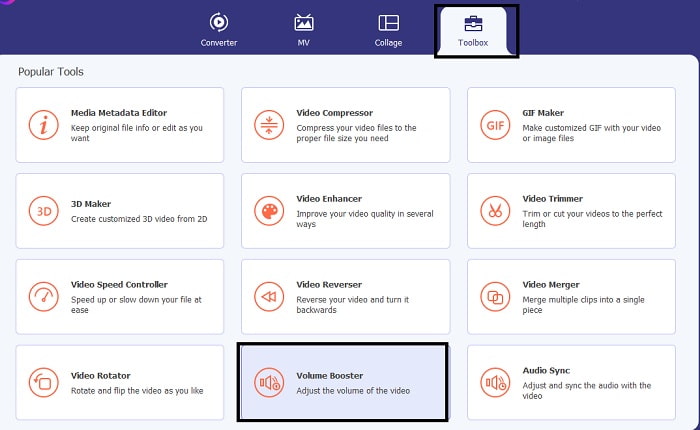
Vaihe 1. Jos olet jo asentanut työkalun, mene Toolbar-valikkoon ja napsauta siellä Volume Booster.
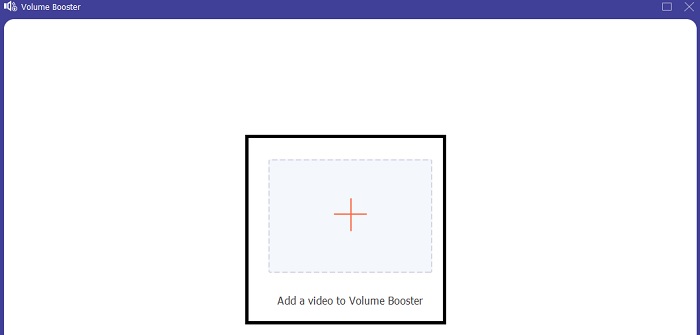
Vaihe 2. Valitse videotiedosto, jonka ääntä haluat parantaa, ja napsauta Open lisätäksesi sen.
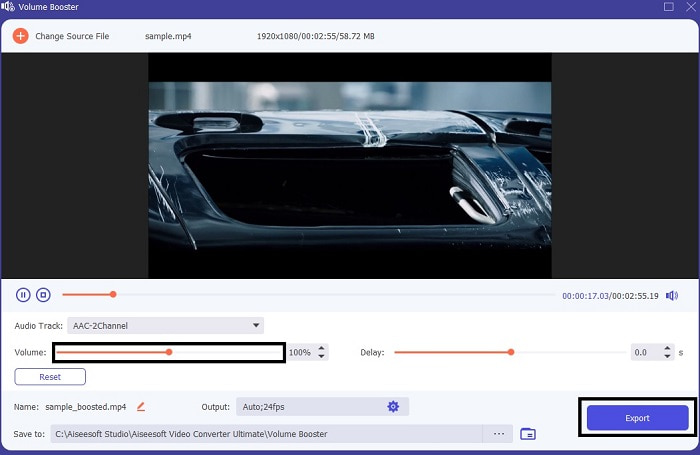
Vaihe 3. Säädä volume slides -liukusäätimiä mieltymystesi mukaan. Napsauta sen jälkeen cog-kuvaketta ja muuta ulostuloasetuksia; kun olet valmis, napsauta OK tallentaaksesi muutokset. Napsauta lopuksi Export tallentaaksesi lopullisen version ja nauttiaaksesi siitä.
FVC Free Video Converter ja Video Converter Ultimate vertailu
Vaikka molemmat työkalut antavat sen, mitä tarvitset, koska ne ovat oman erikoisuutensa parhaita. Päättäminen, mitä käyttää, voi olla vaikeaa. Mutta tämän asian ratkaisemiseksi tässä on vertailukaavio näiden kahden työkalun välillä. Tutkitaan heidän heikkouksiaan ja vahvuuksiaan yksittäisinä työkaluina.
| ominaisuudet | FVC Free MP3 Converter | Video Converter Ultimate |
| Äänen muuntaminen |  | |
| Muokkausominaisuudet |  | |
| Helppo ladata tai käyttää | | |
| Käyttäjäystävällinen | | |
| Ohjelma tuettu | Web-pohjainen työkalu | Työpöytäpohjainen työkalu |
| Käytettävissä oleva ohjelmisto | Kaikissa ohjelmistoissa | Kaikissa ohjelmistoissa |
| Hintaluokka | Sen ilmainen online-työkalu | 1 kuukausi: $25.00 Vuodelle: $31.20 Elinikäinen lisenssi: $55.20 |
Osa 2. Video MP3-sovellukset iPhone- ja Android-laitteille
1. Video MP3 Converter
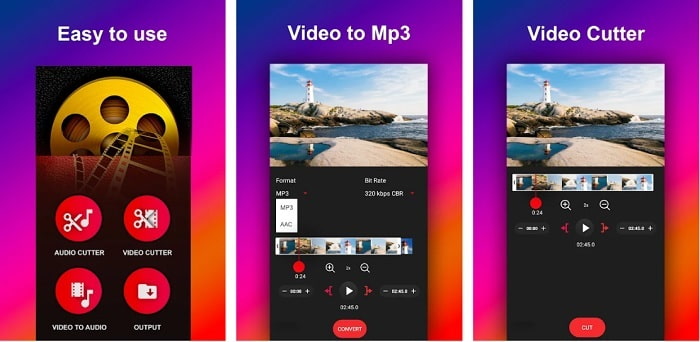
Jos etsit video–MP3-muunninta Androidille, saatat pitää tästä Video to MP3 Converter -sovelluksesta. Työkalu on suunniteltu erityisesti minkä tahansa medi tiedoston muuntamiseen MP3- tai AAC-muotoon. Lisäksi voit säätää bittinopeutta ja rajata tiedostoa tämän sovelluksen avulla. Vaikka ulostulon laatu on korkea, muunnettu tiedosto ei tallennu suoraan musiikkikansioon. Tämä on hieman ärsyttävää, sillä välittömän kuuntelun sijaan joudut etsimään tiedoston vasta muunnosprosessin jälkeen.
2. MP4 MP3:ksi - Muunna video ääneksi, leikkaa soittoääniä
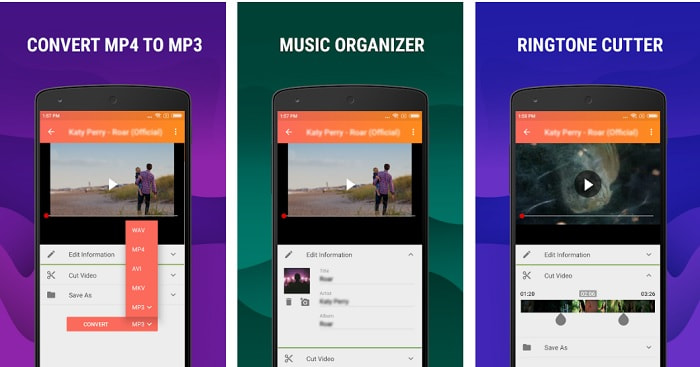
Vaikka ensimmäinen työkalu listalla tarjoaa haluamasi MP3-muunnoksen, MP4 to MP3 - Convert Video to Audio, Cut Ringtones voi joiltain osin olla sitä parempi. Tämä on kuitenkin vain Android-käyttäjille tarkoitettu työkalu, joten et voi käyttää sitä, jos käytössäsi on iOS-laite. Sovelluksen arvio on 4,0 tähteä Play Storessa, mutta käyttäjämäärä on melko pieni. Monilla käyttäjillä on sama huolenaihe: muuntamisen jälkeen tiedostoa ei löydy mistään – aivan kuten ensimmäisessäkin sovelluksessa. Siitä huolimatta osa käyttäjistä käyttää tätä edelleen henkilökohtaisena MP3-muuntimenaan, koska sillä voi muuntaa useita tiedostoja kerralla.
Aiheeseen liittyvää:
Kuinka muuntaa MP4 MP3-muotoon
3. Audio Converter
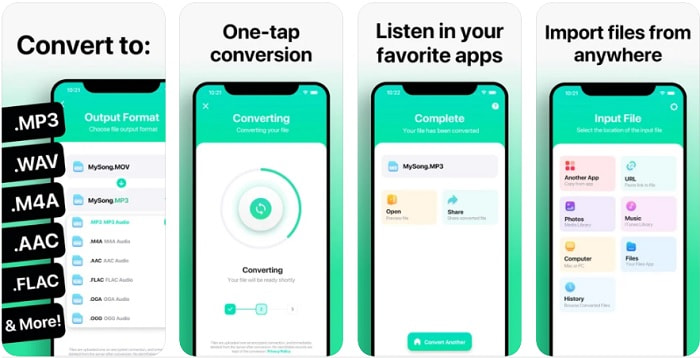
Jos olet iOS-käyttäjä, saatat ajatella, ettei puhelimellasi voi tehdä laadukasta äänimuunnosta. Olet kuitenkin väärässä, sillä The Audio Converter tarjoaa erinomaisen muunnosprosessin ja paljon muuta. Videon muuntaminen MP3-muotoon iPhonessa on helppoa tämän työkalun avulla. Haittapuolena on, että ilmaisversiossa on kokorajoitus. Jos haluat muuntaa suurempia tiedostoja, sinun täytyy maksaa tilauksesta. Joissain tapauksissa, jos haluat peruuttaa tilauksen, sovelluksessa ei ole selkeää peruutuspainiketta. Ole siis varovainen tämän työkalun kanssa, sillä maksutavasta riippuen kortillesi saattaa tulla ei‑toivottuja veloituksia.
Osa 3. Vertailukaavio
| ominaisuudet | FVC Free MP3 Converter | FVC Video Converter Ultimate | Video MP3-muunnin | MP4 MP3:ksi – Muunna video ääneksi, leikkaa soittoääniä | Äänenmuunnin |
| Audio Converter | | | | | |
| Formaattien tuet | MP3, AAC, AC3, WMA, WAV, AIFF, FLAC, MKA, M4A, M4B, M4R | Yli 500 mediamuotoa saatavilla | MP3 & AAC | MP3 | MP3 & AAC |
| Työkalun saavutettavuus | Web-pohjainen työkalu | Työpöytäpohjainen työkalu | Android-puhelinpohjainen sovellus | Android-puhelinpohjainen sovellus | iOS-puhelimiin perustuva sovellus |
| Hintaluokka | Sen ilmainen online-työkalu | 1 kuukausi: $25.00 Vuodelle: $31.20 Elinikäinen lisenssi: $55.20 | Ilmainen ladattava Android-sovellus | $6,49 – $19,99 per tuote | Premium Passi$3.99 Elinikäinen passi$6.99 |
Osa 4. Usein kysytyt kysymykset videoista MP3:ksi
Miksi videoitani ei voi toistaa tietokoneellani?
On mahdollista, ettei videotiedoston formaatti ole tuettuna oletusmediasoittimessasi. Tällöin voit käyttää FVC Free Video Player -soitinta videotiedostojen katseluun. Se tukee yli 200 tunnettua formaattia, joten voit katsoa lähes mitä tahansa videota ilman pelkoa, ettei se toistu.
Onko MP3 paras äänimuoto?
Vaikka MP3 tunnetaan yleismaailmallisena ääniformaattina, jota käytetään kaikkialla äänen toistamiseen, tallentamiseen ja säilömiseen, sitä parempi ääniformaatti on AAC. Vaikka AAC onkin laadukkaampi, sen tiedostokoko on suurempi kuin MP3:n – mutta ei läheskään niin suuri kuin esimerkiksi AVI:n. MP3-tiedostojen muuntamiseen voit käyttää tätä MP3–AAC-verkkokonvertteria sen sijaan, että turvautuisit turvattomiin ja heikon pakkauksen työkaluihin.
Mikä on äänen huono puoli?
Äänitiedostot ovat kooltaan huomattavasti pienempiä kuin videot, mutta ne ovat vähemmän interaktiivisia, koska ne eivät tarjoa yleisölle visuaalista sisältöä. Jos teet podcastia, sinun kannattaa valita paras mahdollinen ääninauhuri – eli FVC Screen Recorder. Tämä työkalu tarjoaa erinomaiset mahdollisuudet tallenteiden editointiin ja tukee monia useampia ääniformaatteja kuin useimmat ladattavat tai verkkopohjaiset työkalut. Jos tallentaminen on ongelma, ratkaisu on FVC Screen Recorder. Napsauta tästä saadaksesi käyttöösi ammattimaisempia MP3-tallentimia.
Johtopäätös
Nyt kun olemme päässeet artikkelin loppuun, alkuperäinen ongelma on ratkottu. Vaikka tiemme tästä eroavat ja jätämme tapauksen sinun käsiisi, etsintä päättyy siinä vaiheessa, kun valitset täydellisen työkalun – esimerkiksi FVC Video Converter Ultimate -ohjelman – johon voit luottaa. Aina kun käytät tätä työkalua, voit odottaa nopeaa, luotettavaa ja turvallista muunnosprosessia. Jos kohtaat ongelmia äänessäsi ja haluat parantaa sitä, voit tehdä senkin tämän avulla. Toivomme, että jatkat edelleen FVC Video Converter Ultimate -ohjelman tutkimista, sillä se tarjoaa ensiluokkaisen muunnoskokemuksen. Näiden täsmällisten, juuri sinua varten esitettyjen todisteiden avulla voimme todeta, että jos olet nyt tyytyväinen, tapaus on päätetty.
-
 [2021] Kuusi parasta ilmaista ja online-tapaa muuntaa M2TS MP3:ksi
 Voiko M2TS-tiedoston muuntaa MP3-tiedostoksi? Tässä viestissä olemme listanneet kuusi parasta ilmaista ja online-tapaa, joilla voit muuntaa M2TS: n MP3-, AAC-, AIFF- ja muiksi äänimuodoiksi.
-
 4 100%-työmenetelmää FLV-videotiedostojen muuntamiseksi MP3-muotoon
 Kuinka muuntaa FLV MP3-tiedostoksi? Sinun tarvitsee vain lukea tämä artikkeli huolellisesti, löytää suosikkimenetelmäsi ja seurata vaiheittaista opasta saadaksesi haluamasi.
-
 4 parasta tapaa muuntaa OGG MP3: ksi menettämättä laatua
 Kuinka muuntaa OGG-tiedostosi MP3-muotoon kuunneltavaksi tietokoneella tai mobiililaitteella? Täällä jaamme 5 helpoin tapa tehdä se työpöydällä tai verkossa.
