


 Video Converter Ultimate
 Näytön tallennin
 Videon korjaus
 Suojattu lataus
DVR MP4:ksi: Tee mediaelämästäsi vaivatonta muuntamalla
Astu maailmaan, jossa mukavuus ja vapaus yhdistyvät parhaiden DVR–MP4-muunnosratkaisujen avulla. Jätä monimutkaisuus taaksesi ja toivota tervetulleeksi DVR-tallenteidesi vaivaton muuntaminen monikäyttöiseen MP4-muotoon. Nauti huolettomasta saatavuudesta ja avaa DVR-sisällöllesi kokonaan uusia mahdollisuuksia. Aloita sitten muuntaminen MP4-muotoon jo tänään ja vapauta mediasi koko potentiaali hymy huulilla. Haluatpa jakaa rakkaita hetkiä tai katsella suosikkiohjelmiasi liikkeellä ollessasi, käyttäjäystävällinen ratkaisumme tekee tästä äärimmäisen helppoa.

Osa 1. Paras tapa muuntaa DVR MP4:ksi
FVC Video Converter Ultimate on monipuolinen ja helppokäyttöinen videonmuunnosohjelma, jonka avulla voit muuntaa videosi vaivattomasti. Se tarjoaa nopeat muunnosnopeudet, tuki erämuunnokselle, muokattavat tulostusasetukset sekä mahdollisuuden erottaa äänen videoista. Tutustu työkaluun paremmin vilkaisemalla sen keskeisiä ominaisuuksia.
Tärkeimmät ominaisuudet
◆ Muokkaustyökalut: Ohjelmistossa on perusmuokkaustyökalut, joiden avulla voit leikata, rajata, lisätä vesileimoja tai käyttää videotehosteita videoiden parantamiseksi ennen muuntamista.
◆ Korkealaatuinen tulostus: Säilytä videoidesi koskematon laatu tai valitse useita koodausvaihtoehtoja varmistaaksesi muunnetun sisällön optimaalisen tulostuslaadun.
◆ Monikielinen tuki: Ohjelmisto tukee useita kieliä, joten se on käyttäjien käytettävissä kaikkialla maailmassa.
Vaihe 1. Hanki oikea asennusohjelma
Ensinnäkin sinun on hankittava oikea asennusohjelma. Alla on asennusohjelmat Windows- ja Mac-tietokoneille. Kun olet hankkinut työkalun, asenna se tietokoneellesi. Käynnistä se sitten tietokoneellasi.
Ilmainen latausWindows 7 tai uudempiTurvallinen lataus
Ilmainen latausMacOS 10.7 tai uudempiTurvallinen lataus
Vaihe 2. Lataa DVR-tiedosto
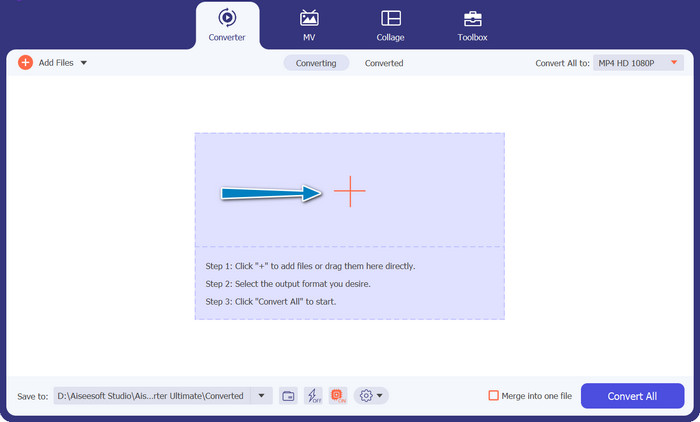
Napsauta nyt pääkäyttöliittymässä olevaa Plus-painiketta ja valitse kohteena oleva DVR-tiedosto tietokonekansiostasi. Sen jälkeen näet tiedoston esikatselukuvan.
Vaihe 3. Valitse tulostusmuoto
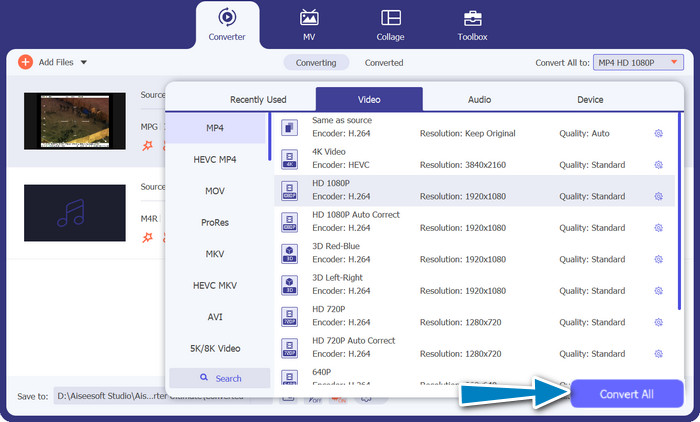
Seuraavaksi avaa pudotusvalikko, josta näet kaikki käytettävissä olevat muodot. Siirry Video-välilehdelle ja etsi MP4-muoto. Tämän jälkeen voit valita haluamasi laadun videomuunnoksellesi.
Vaihe 4. Käynnistä muunnosprosessi
Kun olet ladannut tiedoston ja valinnut tulostusmuodon, napsauta ohjelman käyttöliittymän alareunassa olevaa Convert All -painiketta aloittaaksesi muunnosprosessin.
Osa 2. Paras tapa muuntaa DVR MP4:ksi verkossa ilmaiseksi
Oletko kuullut työkalusta nimeltä Free MP4 Video Converter Online? Se on loistava työkalu, jonka avulla voit muuntaa videosi suosittuun MP4-muotoon. Näin voit varmistaa, että videosi toimivat millä tahansa laitteella tai alustalla. Ja mikä parasta, se on erittäin helppokäyttöinen! Seuraa ohjeita tämän verkkopohjaisen DVR–MP4-muuntimen käyttämiseksi ja tutustu tarkemmin sen ominaisuuksiin.
Tärkeimmät ominaisuudet
◆ Maksuton: FVC Free MP4 Converter Online on saatavilla ilmaiseksi, joten se on taloudellinen valinta videoiden muuntamiseen MP4-muotoon.
◆ Rajoittamaton käyttö: FVC Free MP4 Converter Online -sovelluksella muunnettavien videoiden määrälle ei ole rajoituksia, joten voit muuntaa niin monta videota kuin tarvitset ilman rajoituksia.
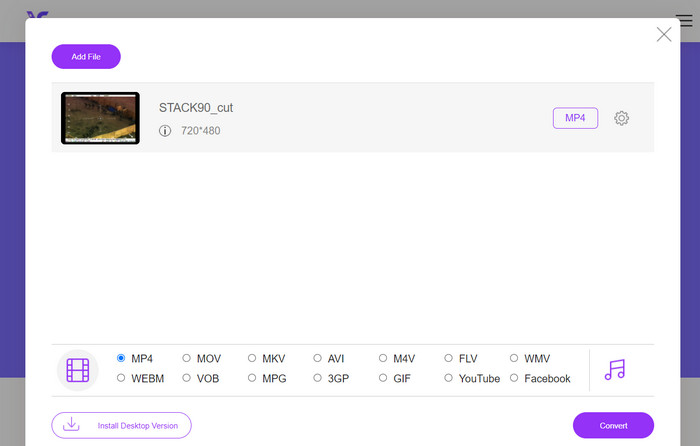
Vaihe 1. Ensiksi sinun on siirryttävä ohjelman verkkosivustolle napsauttamalla yllä työkalun kuvauksessa olevaa linkkiä. Napsauta sitten etusivulla Add Files to Convert -painiketta ladataksesi DVR-tiedostoja.
Vaihe 2. Valitse sen jälkeen tietokoneeltasi tiedosto, jonka haluat muuntaa. Kun lataus on valmis, työkalu asettaa tulostusmuodoksi automaattisesti MP4.
Vaihe 3. Lopuksi paina Convert-painiketta käynnistääksesi muunnosprosessin. Odota sitten, että prosessi valmistuu.
Osa 3. Muunna DVR MP4:ksi toisella tavalla
FFmpeg on tehokas komentorivityökalu, joka voi muuntaa DVR:n MP4:ksi ja tehdä muita multimediatehtäviä. Sen käyttö vaatii jonkin verran teknistä ymmärrystä, mutta sitä voidaan räätälöidä monin tavoin ja sitä käytetään usein multimedian käsittelyyn.
Tärkeimmät ominaisuudet
◆ Komentorivikäyttöliittymä: FFmpeg toimii komentorivikomentojen kautta, mikä antaa kokeneille käyttäjille joustavuutta monimutkaisten muunnostoimintojen suorittamiseen.
◆ Kehittynyt käsittely: Se tarjoaa edistyneitä ominaisuuksia, kuten videon suodatuksen, skaalauksen, rajauksen ja äänenkäsittelyn, joiden avulla käyttäjät voivat hienosäätää muunnoksiaan.
Vaihe 1. Lataa ja asenna FFmpeg sen viralliselta sivustolta (https://ffmpeg.org/) käyttöjärjestelmäsi mukaan.
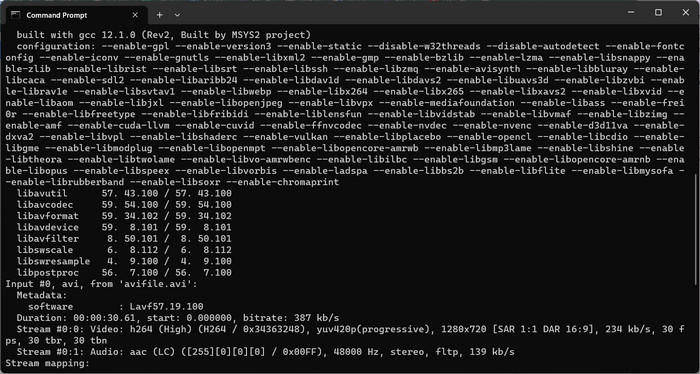
Vaihe 2. Avaa sitten tietokoneellasi komentokehote tai pääteikkuna.
Vaihe 3. Siirry sen jälkeen hakemistoon, johon FFmpeg on asennettu, tai anna komennossa FFmpeg-suoritettavan tiedoston koko polku.
Vaihe 4. Käytä FFmpeg-komentorivisyntaksia määrittääksesi syötteenä käytettävän DVR-tiedoston ja halutun tulostustiedostomuodon (MP4). Esimerkiksi: ffmpeg -i input.dvr output.mp4.
Vaihe 5. Lopuksi paina Enter-näppäintä suorittaaksesi komennon. FFmpeg aloittaa muunnosprosessin ja näyttää edistymisen komentokehotteessa.
Lisälukemista:
Viimeinen opas ja ilmaisia tapoja muuntaa DV WMV:ksi [Online & Offline]
Vaivattomat menetelmät: näin muunnetaan MTV MP4-muotoon
Osa 4. Kolmen tavan vertailu
Olemme koonneet seuraavan taulukon auttaaksemme sinua valitsemaan FVC Video Converter Ultimaten, Free MP4 Video Converter Onlinen ja FFmpeg:n välillä DVR-MP4-muuntimena.
| Video Converter Ultimate | Ilmainen MP4 Video Converter verkossa | FFmpeg | |
| Muototuki | Laaja valikoima formaatteja | Rajoitetut muodot | Laaja valikoima formaatteja |
| Räätälöinti | Lisälähtöasetukset | Peruslähtöasetukset | Laaja räätälöinti |
| Käyttöliittymä | Työpöytäohjelmisto | Web-pohjainen käyttöliittymä | Komentorivityökalu |
| Esitys | Tehokas ja nopea | Riippuu netin nopeudesta | Riippuu järjestelmän ominaisuuksista |
| Yksityisyys | Paikallinen tiedostomuunnos | Online-tiedostojen muuntaminen | Paikallinen tiedostomuunnos |
Osa 5. Usein kysyttyä DVR:n muuntamisesta MP4:ksi
Kuinka avaan DVR-tiedoston?
Windows Media Center voi kaapata ja toistaa DVR-MS-muotoon tallennettuja DVR-tiedostoja henkilökohtaisella tietokoneellasi.
Voiko VLC toistaa DVR-tiedostoja?
VLC saattaa pystyä toistamaan DVR-tiedostoja, mutta vain jos siinä on asianmukaiset sisäänrakennetut ääni- ja videodekooderit. DVR-tiedostot voivat toistaa ääntä ja videota MPEG-2- ja AAC-muodossa. VLC vaatii MPEG-2-videodekooderin ja AAC-äänikooderin toistaakseen DVR-tiedostoja tehokkaasti.
Voinko muuntaa DVR-tiedostoja muihin videomuotoihin kuin MP4?
Kyllä, käyttämästäsi ohjelmistosta riippuen voit usein muuntaa DVR-tiedostoja useisiin muihin videomuotoihin, mukaan lukien AVI, MKV, MOV tai WMV. Tämän joustavuuden ansiosta voit valita toisto- tai jakamistarpeihisi parhaiten sopivan muodon.
Onko vaarana tietojen katoaminen tai laadun heikkeneminen muunnosprosessin aikana?
Kun käytetään hyvämaineisia ja luotettavia ohjelmistoja, tietojen katoamisen tai laadun heikkenemisen riski on minimaalinen. On kuitenkin aina suositeltavaa tehdä varmuuskopio alkuperäisistä DVR-tiedostoistasi ennen muuntamista varmuuden vuoksi.
Voiko FFmpeg muuntaa DVR-tiedostoja muihin muotoihin kuin MP4?
Kyllä, FFmpeg on tehokas komentorivityökalu, joka tukee erilaisia video- ja äänimuotoja. Asianmukaisilla komennoilla voit muuntaa DVR-tiedostoja muun muassa AVI-, MKV- tai MOV-muotoihin.
Johtopäätös
Valitsemalla tarpeisiisi sopivan työkalun voit tehokkaasti muuntaa DVR-tiedostot MP4-muotoon säilyttäen videon laadun. Suosit sitten työpöytäohjelmistoa tai verkkopohjaista muunninta, nämä vaihtoehdot tarjoavat joustavuutta DVR-tiedostojen muuntamiseen ja parantavat monimediakokemustasi.
-
 Kuinka pakata DV-tiedosto menettämättä laatua Windows / Macissa
 Kun haluat jakaa DV-videot Sony-kamerallasi, voit oppia lisää tavasta pakata DV sähköpostiin tai SNS: ään menettämättä laatua ilmaiseksi.
-
 Kaksi parasta tapaa muuntaa DV-tiedostoja MOV-muotoon ilmaiseksi työpöydällä ja verkossa
 Onko sinulla ongelmia DV-tiedostojen muuntamisessa MOV-muotoon Macissa? Jos tämä on ongelmasi, voimme ratkaista sen yhdessä, jos luemme tämän artikkelin.
-
 Kuinka muuntaa DV MP4-tiedostomuotoon [ongelma ratkaistu]
 Oletko kiinnostunut muuttamaan DV:n MP4:ksi offline- ja online-muuntimien avulla? Sitten olet oikealla tiellä. Tarjoamme sinulle parhaat ratkaisut, jotka haluat.
