


 Video Converter Ultimate
 Näytön tallennin
 Videon korjaus
HTML:n muuntaminen MP4:ksi verkossa: 3 parasta muuntajaa, joita kannattaa harkita
Ihmiset lataavat usein HTML-videoita internetistä monista eri syistä. Yksi pääsyy on se, että ne voidaan katsoa myöhemmin ilman hyvää internet-yhteyttä. Tämä on erityisen kätevää matkustaessa tai kun nettiyhteys on epävakaa. Toinen yleinen syy on säilyttää video ja jakaa se muille, joilla ei ole pääsyä alkuperäiseen verkkolähteeseen. Riippumatta siitä, miksi sinulla on HTML-tiedostoja, niiden muuntaminen paljon yleisempään videoformaattiin, kuten MP4:ään, on tarpeen. Näin varmistetaan sujuva ja ongelmaton laitetyhteensopivuus. Jos haluat muuntaa HTML:n MP4:ksi, tarvitset työkalun, joka käsittelee HTML:ää erittäin hyvin. Onneksi olemme koonneet parhaat verkkopohjaiset muuntimet, joita voit harkita käyttäväsi.

Osa 1. Miksi HTML-videot on muutettava MP4-muotoon
Kuten aiemmin mainittiin, verkkovideoiden, kuten HTML:n, muuntamiseen yleiseen videomuotoon, kuten MP4, on useita syitä. Mutta tämän tarpeen tarkentamiseksi tässä on yksityiskohtaisempi selitys. Tämän tyyppinen muunnos voi olla tarpeen, kun haluat säilyttää HTML-tiedoston sisällön. Tämä pätee erityisesti multimediaelementteihin, kuten videoihin, jotka ovat yleisesti saatavilla kaikissa mediasoittimissa ja eri alustoissa.
Näet, HTML-tiedostot sisältävät erityyppistä tietoa, jonka verkkoselaimet voivat tuottaa, mutta kaikki mediasoittimet eivät tue niitä. Näin ollen tärkein syy etsiä HTML-MP4-muunnin tehokkaaseen muuntamiseen on se, että voit kapseloida multimediasisällön tavalliseen videomuotoon, jota voidaan helposti toistaa useilla soittimilla. Lisäksi tämä muunnos varmistaa soveltuvuuden myös multimediasisällön jakamiseen ja kuluttamiseen useilla alustoilla.
Osa 2. HTML:n muuntaminen MP4-muotoon verkossa
Aloitetaan jahdataan tapaamalla tehokkaat online-muuntimet, jotka auttavat sinua saavuttamaan parhaat MP4-tulosteet HTML-tiedostoistasi.
1. Online-Convert.com
Ensimmäinen muunnin luettelossa on Online-Convert.com. Se on kätevä mutta monikäyttöinen tiedostomuunnin, jonka avulla voit muuttaa HTML-tiedostosi nopeasti eri tulostusmuotoihin verkossa. HTML-tiedostoiksi muuntamisen lisäksi voit myös säätää muita asetuksia, kuten valita oikean esiasetuksen ja muuttaa näytön kokoa, videon bittinopeutta ja kuvanopeutta. Lisäksi sen avulla voit kiertää, leikata, peilata, kääntää, rajata ja asettaa videoprojektisi äänen. Varmasti tämä HTML-MP4-muunnin tarjoaa runsaasti valmiita vaihtoehtoja erilaisiin tarpeisiin. Parasta on, että sen käyttäminen ei maksa penniäkään, eikä sinua näy ärsyttäviä mainoksia! Siinä on kuitenkin tiedostokokorajoitus, eikä se tue tiedostojen joukkomuuntamista. Tästä huolimatta tässä on vaiheet muuntamisen suorittamiseksi nopeasti.
Vaihe 1. Valitse pääsivustolla tähän muunnostarpeeseen sopiva muunnostyökalu. Lataa sitten HTML-tiedostosi napsauttamalla Choose File-painiketta.
Vaihe 2. Kun tiedosto on ladattu onnistuneesti, voit siirtyä alemmaksi tekemään tarvittavia muokkauksia tulostiedostoon. Muussa tapauksessa napsauta START-painiketta käynnistääksesi muunnosprosessin.
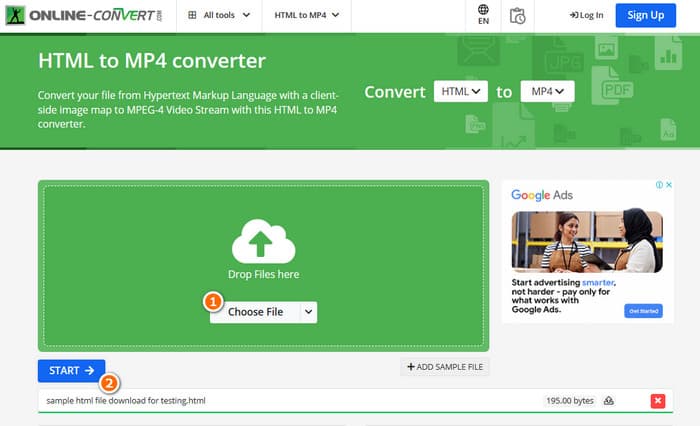
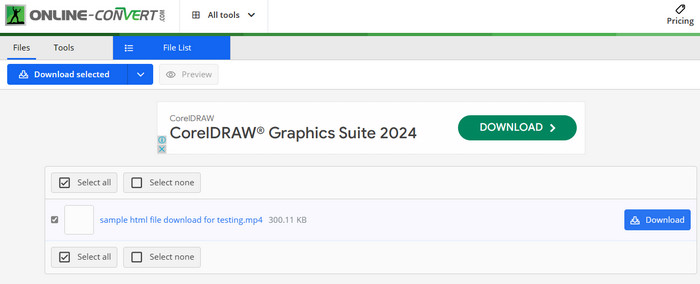
Vaihe 3. Kun muunnos on valmis, sinun on ladattava muunnettu tiedosto tallentaaksesi sen laitteellesi.
2. AConvert
Toinen joustava muunnin, jonka avulla voit muuntaa HTML:n MP4:ksi verkossa, on AConvert. Tämä muunnin on helppokäyttöinen työkalu eri tiedostomuotojen muuntamiseen maksutta. Lisäksi AConvert on suunniteltu palvelemaan kaikkia, joilla on kokemusta tai ei, jotka tarvitsevat muunnospalveluita verkossa. Yksi sen erottuvista ominaisuuksista on sen joukkomuunnos, joka antaa sinulle mahdollisuuden muuntaa useita tiedostoja kerralla, mikä säästää aikaa, kun sinulla on useita tiedostoja käsiteltävänä. Muutosprosessi saattaa kuitenkin kestää odotettua kauemmin, ja sivustolla olevat mainokset voivat olla hieman häiritseviä. Sillä välin tässä on pikaopas, joka auttaa sinua muuttamaan HTML-tiedostoja AConvertin avulla.
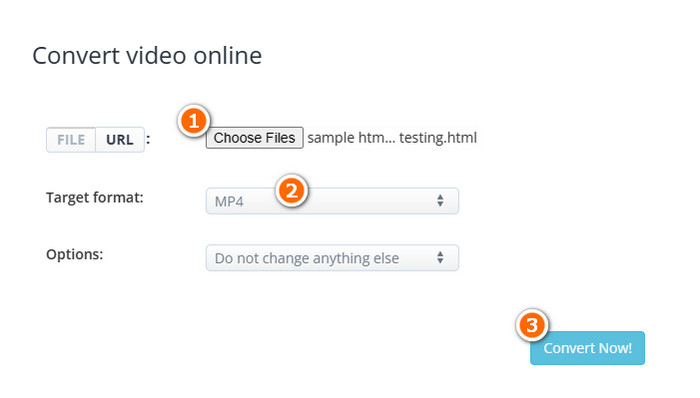
Vaihe 1. Napsauta Choose Files -painiketta, kun saavut työkalun viralliselle muunnossivulle. Valitse sitten HTML-tiedosto, jonka haluat muuntaa.
Vaihe 2. Tämän jälkeen siirry Target format -osioon ja valitse MP4 tulostiedostomuodoksi.
Vaihe 3. Kun kaikki on valmista, napsauta Convert Now-painiketta aloittaaksesi prosessin. Kun muunnos on onnistunut, lataa muunnettu tiedosto vientiä varten.
3. Converterpoint - HTML5 Online Video Converter
Tässä on Converterpoint täydentääksesi kolmen tehokkaan HTML-verkkomuuntimen joukon. Tämä verkkotyökalu voi olla hyödyllinen paitsi tavallisille käyttäjille myös yksityishenkilöille tai yrityksille, jotka haluavat muuntaa videoita käytettäviksi verkkosivustoilla, sosiaalisen median alustoilla tai muilla HTML5:tä tukevilla digitaalisilla kanavilla.
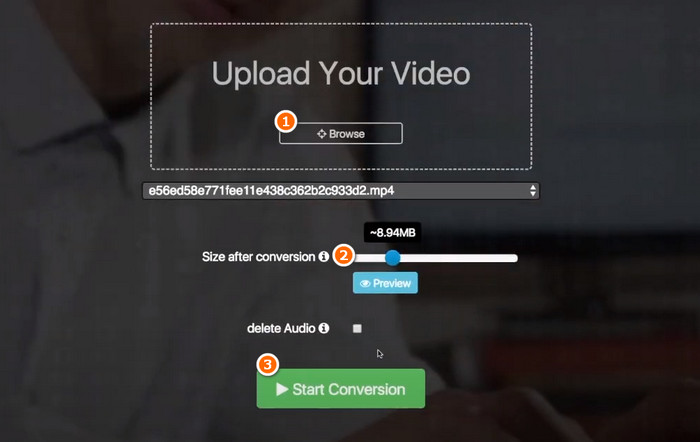
Vaihe 1. Lataa videosi napsauttamalla sen Browse-painiketta.
Vaihe 2. Kun lataus on valmis, aseta haluamasi tulostiedoston koko muunnoksen jälkeen.
Vaihe 3. Napsauta sitten Start Conversion-painiketta aloittaaksesi prosessin.
Osa 3. Bonusvinkki: Muunna mediamuodot MP4:ksi ilmaiseksi verkossa
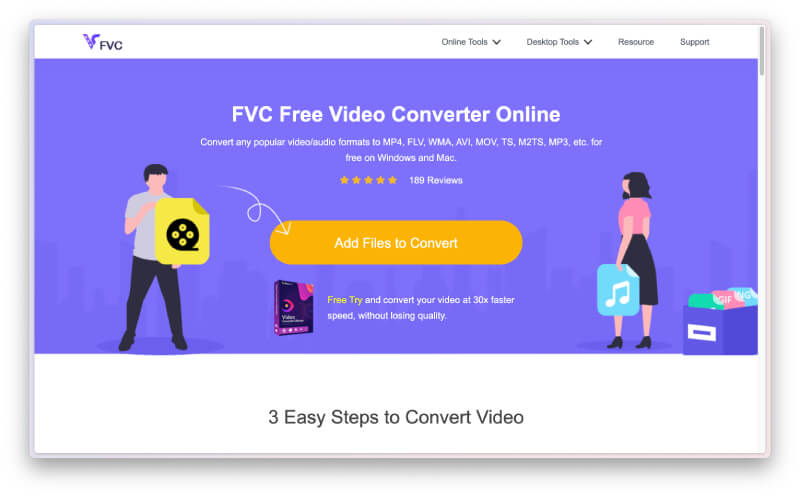
Etkö saa tarpeeksesi ja haluat enemmän kuin pelkän verkkomuuntimen HTML:n muuntamiseen MP4:ksi? Tutustu silloin siihen, miten tämä FVC Free Video Converter Online auttaa sinua erilaisten video- ja äänitiedostojen muunnostehtävissä. Se on erinomainen mediatiedostojen muunnin, jonka avulla voit muuntaa rajattomasti tiedostoja ilman minkäänlaisia rajoituksia! Lisäksi se on erittäin nopea muunnosnopeudeltaan, sillä se toimii erityisellä tekniikalla, joka tekee muunnoksesta paljon nopeamman kuin muilla työkaluilla. Jos sinulla siis on suuri määrä ääni- tai videotiedostoja, jotka pitää muuntaa MP4-muotoon, seuraa alla olevia ohjeita.
Vaihe 1. Napsauta Add Files to Convert -painiketta, kun saavut työkalun viralliselle sivustolle. Tämä mahdollistaa ensimmäisen tiedoston lataamisen.
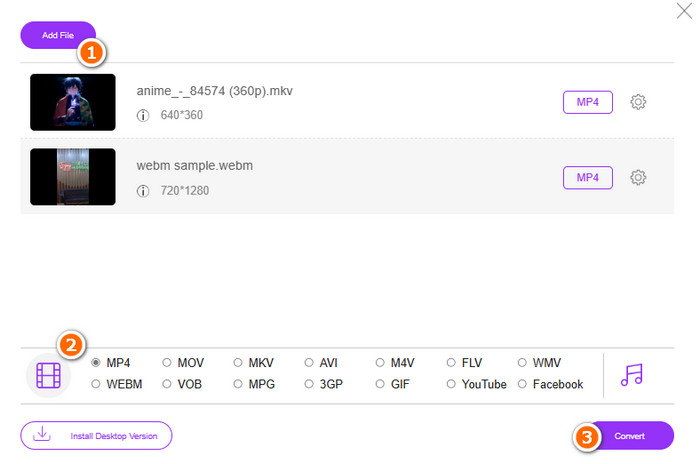
Vaihe 2. Kun olet valinnut ensimmäisen ladattavan tiedoston, voit ladata lisää napsauttamalla pääikkunassa Add file -painiketta. Aseta sitten tiedostoille MP4-muoto valitsemalla se formaattivalikosta ikkunan alareunasta.
Vaihe 3. Napsauta lopuksi Convert-painiketta käynnistääksesi joukkomuunnosprosessin.
Osa 4. Usein kysyttyä HTML-tiedostojen muuntamisesta MP4-muotoon
Voidaanko HTML-tiedostoja muuntaa MP4-muotoon?
Kyllä, HTML-tiedostot voidaan muuntaa MP4-muotoon ottamalla niistä kopio ja muuntamalla se MP4:ksi.
Kuinka kauan HTML-tiedoston muuntaminen MP4-muotoon kestää?
Kesto riippuu aina eri asioista, kuten kuinka suuri tiedostokoko on ja kuinka luotettava muunnostyökalu on.
Voinko tallentaa HTML-videon?
Kyllä voit. Löydät myös joitakin ilmaisia MP4-tallentimia verkosta auttamaan nauhoituksessa samalla, kun HTML-video toistetaan.
Johtopäätös
Yllä ovat verkkopohjaiset muuntimet, jotka ovat tunnettuja HTML:n muuntamisesta MP4:ksi. Sinulla on nyt runsaasti vaihtoehtoja muunnoksen tekemiseen. Toisaalta, jos haluat tunnetun ääni- ja videotiedostojen muuntimen, joka tarjoaa poikkeuksellista laatua muunnosprosessissa ja tuottaa korkealaatuisia tulosteita, FVC Free Video Converter Online on paras valinta.
-
 Kuinka muuntaa RAR-muotoon MP4 sekä online- että offline-tavoilla
 Jos etsit tehokasta RAR-MP4-muunninta, olet oikealla sivulla. Tämä viesti tarjoaa sinulle online- ja offline-tapoja hankkia.
-
 AVCHD vs. MP4: katsaus kumpi on parempi valita
 Katso tämä AVCHD vs. MP4 -julkaisu ja opi, mikä videomuoto sopii sinulle parhaiten. Kaiva lisää tietääksesi niiden kuvaukset, erot jne.
-
 Paras tekniikka muuntaa HEIC tehokkaasti MP4:ksi
 Opi parhaat tavat suorittaa HEIC-muunnos MP4:ksi tietokoneellasi ja iPhone-laitteillasi. Tämä viesti sisältää tehokkaan muuntamisen tekniikan.
