


 Video Converter Ultimate
 Näytön tallennin
 Videon korjaus
 Suojattu lataus
Kuinka muuntaa MP4 WebM: ksi laadukkaasti - Tässä on 4 parasta menetelmää, jotka sinun pitäisi tietää
Jos haluat ladata suuren MP4-videon HTML 5 -sivustoille ja Chromecastille, kuinka muuntaa MP4 WebM: ksi alkuperäisellä laadulla? WebM sisältää joko VP8-, VP9-, AV1-video-, Vorbis- tai Opus-äänen, joka on yhteensopiva kaikkien tärkeimpien HTML5-selainten, kuten Google Chrome, Firefox ja Opera, kanssa. Opi vain lisätietoja 4 tehokkaasta MP4 to WebM -muuntimesta ja valitse haluamasi tarpeidesi mukaan.

Osa 1: 2 menetelmää MP4: n muuntamiseksi WebM Onlinen ilmaiseksi
Yläosa 1: Kuinka muuntaa MP4 WebM: ksi ilmaisella ilmaisella videomuuntimella
FVC ilmainen online-MP4–WebM-muunnin mahdollistaa useimpien videoformaattien muuntamisen sekä video- ja ääniasetusten säätämisen muutamalla klikkauksella. Lisäksi voit muuntaa useita formaatteja ilman vesileimaa tai kokorajoituksia. Muunnos on turvallinen ja vakaa, eikä tietoja katoa.
- 1. Tuki erämuunnokselle, jonka avulla voit muuntaa joukon videoita tai ääntä.
- 2. Tarjoa yksinkertainen ja intuitiivinen käyttöliittymä MP4-tiedostojen muuntamiseen vain kolmessa vaiheessa.
- 3. Turvallinen ja vakaa muunnos, jota ei menetetä muunnoksen aikana.
- 4. Muokkaa videon bittinopeutta, näytettä, kehysnopeutta sekä tarkkuutta haluamallasi tavalla.
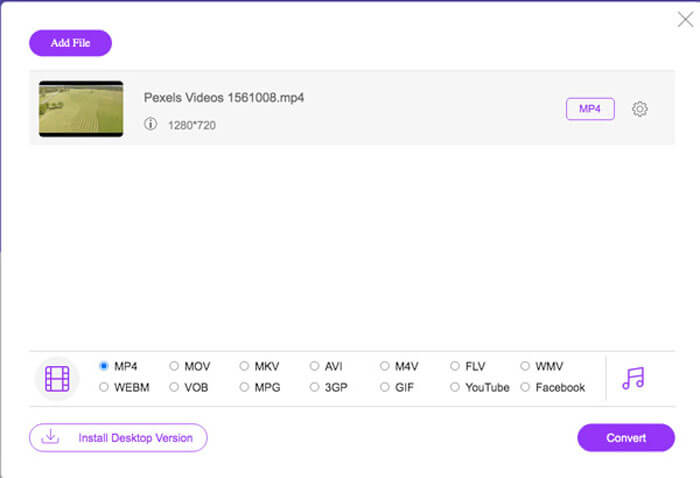
Vaihe 1. Mene online-MP4–WebM-muuntimeen, josta voit ladata PKG-tiedoston tietokoneellesi. Sen jälkeen voit napsauttaa Add Files to Convert -painiketta ladataksesi MP4-tiedostot ohjelmaan.
Lataa työpöytäversio muuntaaksesi tiedostoja erissä.

Vaihe 2. Voit valita WebM-vaihtoehdon tulostusmuodoksi. Kun haluat säätää asetuksia, voit napsauttaa Gear-kuvaketta muokataksesi videokoodekkia, kuvanopeutta, videobittinopeutta ja muita asetuksia.
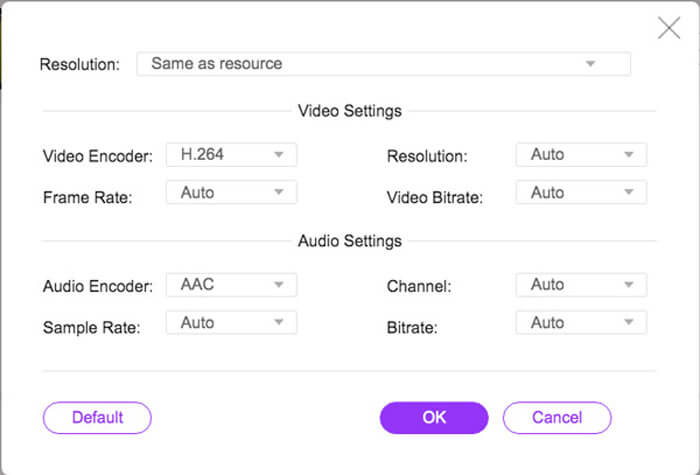
Vaihe 3. Kun olet tyytyväinen tulostiedostoon, voit napsauttaa Convert-painiketta muuntaaksesi MP4:n WebM-muotoon verkossa. MP4-tiedostojen muuntaminen ja tallentaminen tietokoneellesi kestää vain muutamia sekunteja.
Top 2: Kuinka muuntaa MP4 WebM Onlineen CloudConvertin kautta
CloudConvert on toinen ilmainen online-MP4-tiedosto WebM-muuntimeksi, joka muuntaa suurimman osan videoformaatista. Sen avulla voit myös ladata videoita paikallisesta tallennustilastasi sekä pilvipalvelusta. Voit käyttää sitä ilmaiseksi, mutta rajoitettu enintään 25 minuuttiin muuntoaikaa tiedostoa kohden.
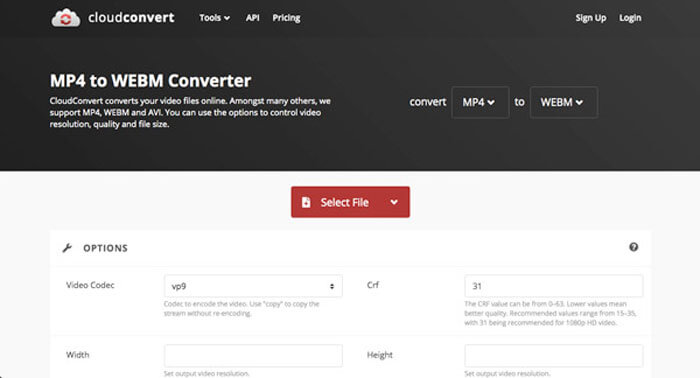
Vaihe 1. Siirry sivustolle CloudConvert.com ja napsauta sitten Select File -painiketta eri kanavista, kuten From my Computer, By URL, From Google Drive, From Drop ja From OneDrive.
Vaihe 2. Valitse MP4 syöteformaatiksi ja WebM tulostusformaatiksi. Lisäksi voit säätää asetuksia, kuten FPS, äänikoodekki, kuvasuhde, videokoodekki ja muuta.
Vaihe 3. Tämän jälkeen voit napsauttaa Convert-painiketta muuntaaksesi MP4:n WebM-muotoon vastaavasti. Sen jälkeen voit ladata muunnetun WebM-tiedoston tietokoneellesi tai ladata sen pilvipalveluun tarpeen mukaan.
Osa 2: 2 tapaa muuntaa MP4 WebM: ksi PC / Mac-tietokoneella
Top 3: Kuinka muuntaa MP4 WebM: ksi FFmpeg: n avulla
Jos olet perehtynyt koodekiin tai yksinkertaisesti käytä FFmpegiä MP4: n muuntamiseen WebM: ksi ilmaiseksi, voit käyttää VP8: ta tai VP9: ää saadaksesi sopivan pienemmän koon videon. Varmista vain, että FFmpeg on koottu tukemaan libvpx: tä ja libvorbisia.
Vaihe 1. Jos haluat kääntää lähdekoodista, sinun tulee käyttää seuraavaa lippua ennen MP4:n muuntamista WebM-muotoon.
--with-fdk-aac --with-ffplay --with-freetype --with-frei0r --with-libass --with-libvo-aacenc --with-libvorbis --with-libvpx --with-opencore- amr --with-openjpeg --with-opus --with-rtmpdump --with-speex --with-theora --with-toolsVaihe 2. Sen jälkeen voit kääntää MP4-tiedostosi FFmpegillä käyttäen vaatimustesi mukaista koodekkia.
ffmpeg -i fvc.mp4 -vcodec libvpx -acodec libvorbis "fvc.webm"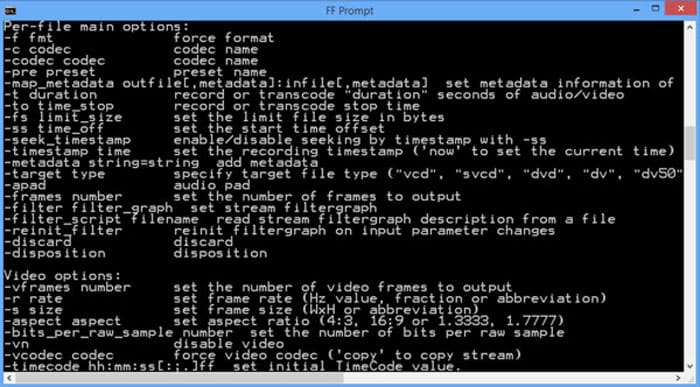
Top 4: Kuinka muuntaa MP4 WebM: ksi käsijarrulla
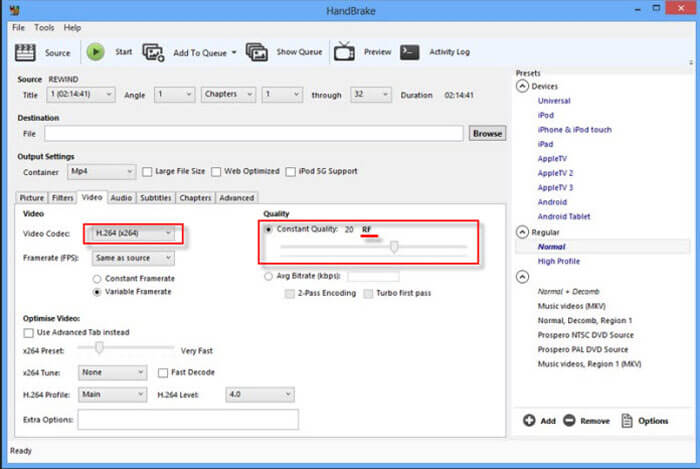
Käsijarru on avoimen lähdekoodin MP4-WebM-muunnin Macille ja Windowsille, jonka avulla voit muuntaa video- ja äänimuotosi mihin tahansa muotoon, mukaan lukien MP4, WebM sekä esiasetukset. Tässä on yksityiskohtainen prosessi, jonka sinun pitäisi tietää.
Vaihe 1. Lataa ja asenna MP4–WebM-muunnin tietokoneellesi, käynnistä ohjelma ja valitse MP4-tiedostot, jotka haluat muuntaa erämuunnoksena.
Vaihe 2. Valitse vientiin tarvitsemasi videoformaatti Formaatti-välilehdeltä, esimerkiksi WebM-muoto. Lisäksi voit säätää video- ja ääniasetuksia saadaksesi halutunlaisen WebM-tulosteen.
Vaihe 3. Napsauta 'Convert'-painiketta muuntaaksesi MP4:n WebM-muotoon. Kun olet suorittanut muunnosprosessin, voit tarkastella tarkempia tietoja videosta tiedostossa ohjelman avulla. (Katso kuinka muuntaa WebM MP4:ksi)
MP4 vs. WebM
Moving Picture Experts Groupin (MPEG) vuonna 2001 julkaisema MP4-muoto voi auttaa sinua tallentamaan video-, ääni-, tekstitys- ja kuvatiedot eri raidoille. Se on lyhenne sanoista MPEG-4 Part 14. Lisäksi se on yksi suosituimmista videoiden suoratoistoon ja jakamiseen käytetyistä muodoista.
WebM on avoimen lähdekoodin ja rojaltivapaa muoto, joka on suunniteltu videoiden toimittamiseen verkossa. Se käyttää MKV:n kaltaista konttirakennetta, mikä tarkoittaa, että se voi tallentaa sekä video- että äänidataa. Ja monet verkkoselaimet, kuten Chrome, Edge ja Firefox, tukevat tätä muotoa oletuksena.
Osa 3: FAQ MP4: n muuntamisesta WebM: ksi helposti
1. Mikä on WebM-tiedostomuoto?
WebM on audiovisuaalinen mediatiedostomuoto, jonka Google otti ensimmäisen kerran käyttöön. Tämän tiedostomuodon videovirrat pakataan VP8- tai VP9-videokoodekkeilla. MP4: ään verrattuna se on kooltaan suhteellisen pieni ja nopea latausnopeus. Mutta WebM-tiedostomuoto ei ole yhteensopiva kaikkien selainten kanssa, kun muunnat MP4: n WebM: ksi.
2. WebM VS MP4, mikä on parempi?
Mitä eroja WebM: n ja MP4: n välillä on? Kodekit määrittävät WebM: n ja MP4: n laadun. Yleensä MP4: n lähtö on korkealaatuista ja suurempaa. Tietysti WebM voi tarjota myös korkealaatuista, mutta kooltaan suhteellisen pientä. Suurin ero on, että WebM-tiedosto ei ole yhteensopiva älypuhelinten, kuten iPadin tai iPhonen, kanssa.
3. Kuinka toistaa WebM-tiedostoja älypuhelimella?
Voit toistaa WebM-tiedostoja iPhonella tai Android-puhelimella lataamalla VLC Media Player-, MX Player- tai muun mediasoittimen etukäteen. Tietenkin voit myös muuntaa WebM: n MP4: ksi, joka on yhteensopiva useimpien laitteiden kanssa.
Johtopäätös
Kun haluat ladata suuria videoita YouTubeen, Vimeoon ja muihin HTML5-yhteensopiviin sivustoihin, saat lisätietoja artikkelista 4 usein käytetystä ilmaisesta MP4 to WebM -muuntimesta. Jos haluat koodata MP4: n alkuperäisellä laadulla, FVC Free Online Video Converter on aina paras valinta, jonka voit ottaa huomioon.
-
 Kuinka muuntaa MP3 MP4: ksi kuvalla Windows 10: ssä ja Macissa
 Kuinka muuntaa MP3 MP4: ksi korkealaatuisena? Tämä viesti näyttää 3 tehokasta ja ilmaista tapaa vaihtaa MP3 MP4-kuviksi Windows- ja Mac-tiedostoilla.
-
 50 Mt - 5 Mt - Kuinka pakata MP4-tiedosto sekunneissa
 MP4-video on liian suuri lataamista varten? Haluatko pienentää videon kokoa? Tässä on 3 tehokasta tapaa pakata MP4-tiedosto pienempään kokoon ilman rajoituksia.
-
 Kuinka muuntaa MP4 M4A: ksi Windows / Macissa (ilmainen ja online)
 Kuinka muuntaa MP4 M4A: ksi verkossa? Voinko poimia äänen MP4-tiedostoista? Lue tämä viesti ja saat kaikki vastaukset muuntamisesta MP4: stä M4A: ksi.

