


 Video Converter Ultimate
 Näytön tallennin
 Videon korjaus
3 Online- ja offline-MPG-MP4-muunninta, jotka sinun on yritettävä muuntaa MPG-tiedostoja
MP4 on nykyään yksi yleisimmistä tiedostomuodoista, joita näet internetissä. Vaikka MPG ja MP4 ovat monella tapaa samankaltaisia, niissä on myös eroja. Ja jos haluat muuntaa MPG-tiedostosi MP4-tiedostomuotoon, olemme testanneet nykyään suosittuja videonmuuntimia. Lisäksi olemme valinneet sinulle parhaat MPG–MP4-muuntimet tutkittavaksi!

Osa 1. Miksi sinun on muutettava MPG MP4:ksi
Miksi MPG:n muuntaminen MP4:ksi on merkittävää? MPG ja MP4 ovat muotoja, joita käytetään usein internetissä olevissa videoissa. Mutta mitä eroa niillä on? MPG eli MPEG on alkuperäinen formaatti, joka käyttää MPEG-koodekkia. Se on pakkausmenetelmä, joka tuottaa korkealaatuisia videotiedostoja.
Toisaalta MP4 on yksi yleisimmistä videotiedostomuodoista ja käyttää nykyaikaista videopakkausta. Joten kumpi on parempi? MP4:n korkea pakkauskyky mahdollistaa tiedostojen pakkaamisen pienempiin kokoihin kuin mikään muu videotiedostomuoto, kuten MPG.
Osa 2. 3 tapaa muuntaa MPG MP4:ksi
Tässä on erinomaisia videomuuntimia, joita voit käyttää online- ja offline-tilassa, ja oppia muuttamaan MPG MP4:ksi.
1. Käytä Video Converter Ultimatea
Video Converter Ultimate on mediatiedostojen muunnin, jonka avulla voit helposti muuntaa MPG-tiedostosi MP4-tiedostomuotoon. Tässä muuntimessa on helppokäyttöinen käyttöliittymä, mutta se tuottaa vaikuttavia lopputuloksia. Siinä on ominaisuuksia, joilla voit muokata, parantaa ja pakata MPG-tiedostoasi. Lisäksi voit suorittaa MPG–MP4-erämuunnoksia tällä ohjelmalla.
Video Converter Ultimatessa on myös vaihtoehto, jolla voit kollaasoida kuvia ja videoita. Lisäksi, jos haluat luoda GIF-tiedoston, tässä muuntimessa on tämä ominaisuus. Lisäksi tämän muuntimen avulla voit muuntaa suuria tiedostoja pilaamatta niiden laatua. Vaikka sen ominaisuudet näyttävät ammattimaisilta, voit käyttää niitä nopeasti, koska ne ovat vain helppokäyttöisiä.
Vaihe 1. Lataa tämä muunnin napsauttamalla alla olevaa latauspainiketta. Seuraa asennusohjeita ja avaa sitten sovellus.
Ilmainen latausWindows 7 tai uudempiTurvallinen lataus
Ilmainen latausMacOS 10.7 tai uudempiTurvallinen lataus
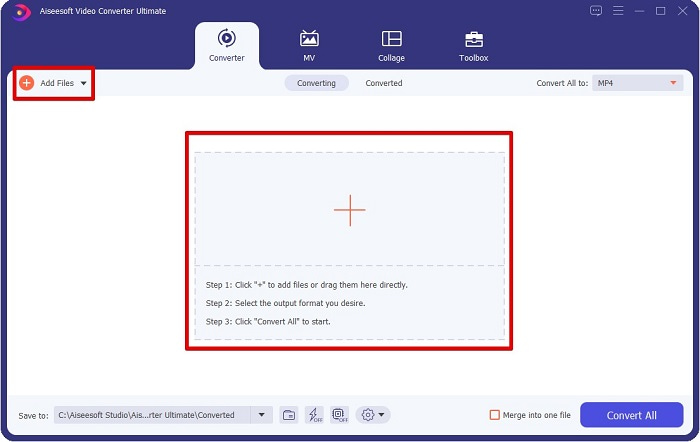
Vaihe 2. Kun olet käynnistänyt muuntimen, napsauta Add Files -painiketta tai +-painiketta ladataksesi MPG-tiedostosi. Tietokoneesi tiedostot avautuvat, ja voit etsiä haluamasi tiedoston kansioistasi. Napsauta sitten Open lisätäksesi tiedoston jonoon.
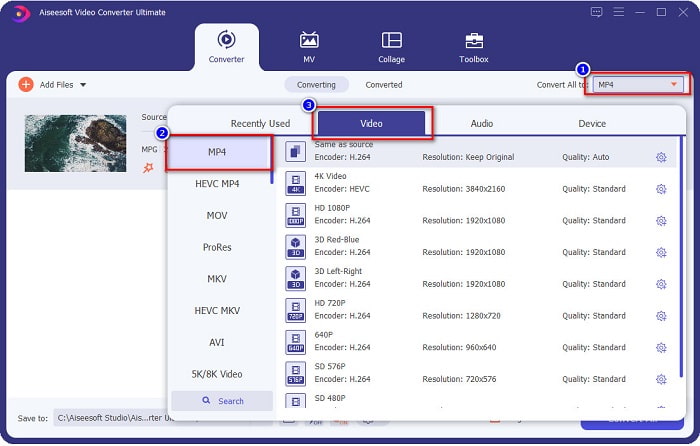
Vaihe 3. Vaihtaaksesi MPG-tiedostosi formaattia napsauta Convert All to -painiketta näytön oikeassa yläkulmassa. Kun näet luettelon tiedostomuodoista, valitse MP4-tiedostomuoto.
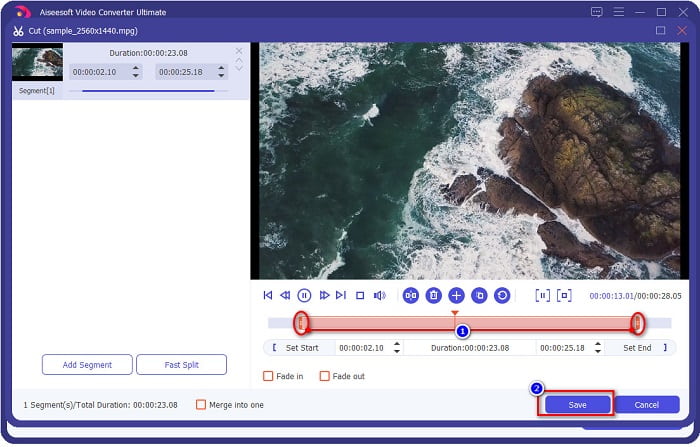
Jos haluat lyhentää videosi kestoa, napsauta scissor-kuvaketta leikataaksesi videota. Vetämällä play head -painikkeita voit säätää videosi pituutta. Kun olet valmis, napsauta Save.
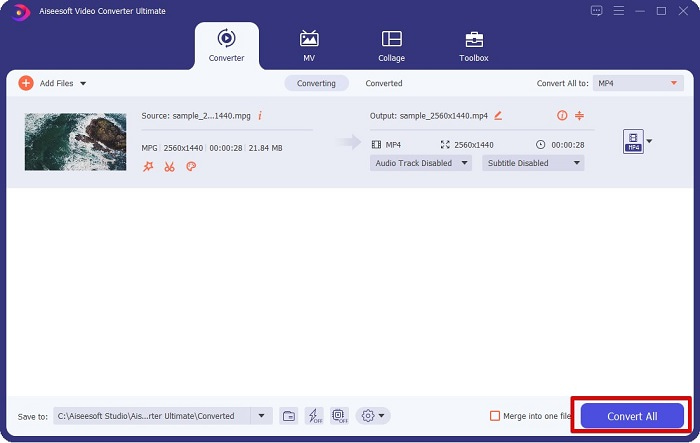
Vaihe 4. Kun olet valinnut haluamasi tiedostomuodon, napsauta Convert All muuntaaksesi MPG-tiedostosi MP4-tiedostoksi. Odota hetki, niin MPG-tiedostosi muunnetaan MP4-tiedostoksi. Näillä yksinkertaisilla vaiheilla olet helposti muuntanut MPG-tiedostosi MP4-muotoon.
2. Käytä ilmaista online-muunninta
FVC Free Online Video Converter antaa sinun muuntaa MPG-tiedostosi MP4-tiedostomuotoon ilmaiseksi ilman rekisteröitymistä. Se on ilmainen verkkopohjainen videonmuunnin, jonka avulla voit muuntaa ilman rajoituksia. Lisäksi voit muuntaa suuria tiedostoja verkossa tämän työkalun avulla. Sinun ei myöskään tarvitse ladata mitään, koska pääset siihen käsiksi suoraan selaimella. Haittapuolena on kuitenkin se, että se on riippuvainen internet-yhteydestä, eli muunnoksen nopeus riippuu yhteytesi nopeudesta. Siitä huolimatta monet käyttäjät ovat hyödyntäneet tätä muunninta, ja se on todettu erinomaiseksi videonmuuntimeksi.
Tässä on luettelo vaiheista muuntamiseen FVC Free Online Video Converterissa:
Vaihe 1. Avaa selaimesi ja etsi FVC Free Online Video Converter.
Vaihe 2. Kun olet jo verkkosivulla, napsauta Add Files to Convert. Ponnahdusikkuna tulee näkyviin, ja sinun täytyy ensin ladata käynnistysohjelma. Kun käynnistysohjelma on ladattu, sinut ohjataan tiedostoihisi. Valitse MPG-tiedosto, jonka haluat muuntaa.
Lataa työpöytäversio muuntaaksesi tiedostoja erissä.
Vaihe 3. Kun olet valinnut MPG-tiedoston, näet ensimmäisen käyttöliittymän, jossa näkyy luettelo videotiedostomuodoista. Valitse MP4 ennen kuin muunnet MPG-tiedostosi MP4-muotoon verkossa.
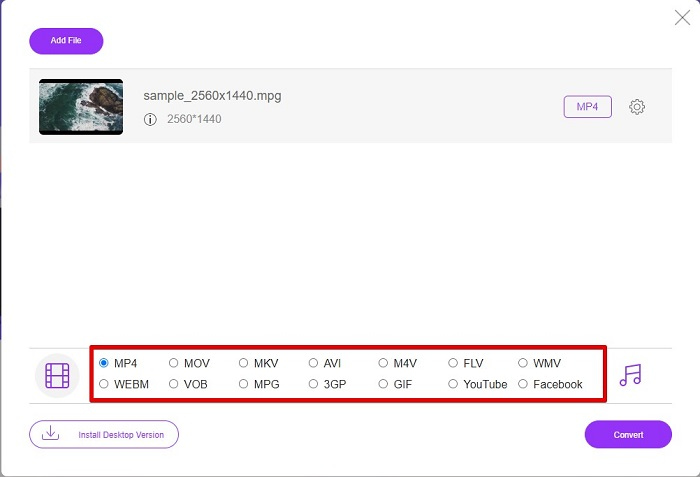
Vaihe 4. Napsauta Convert-painiketta aloittaaksesi muunnoksen. Uusi välilehti avautuu, ja valitset, mihin kohtaan tietokoneellasi haluat tallentaa muunnetun tiedoston, ja napsautat sitten select folder.
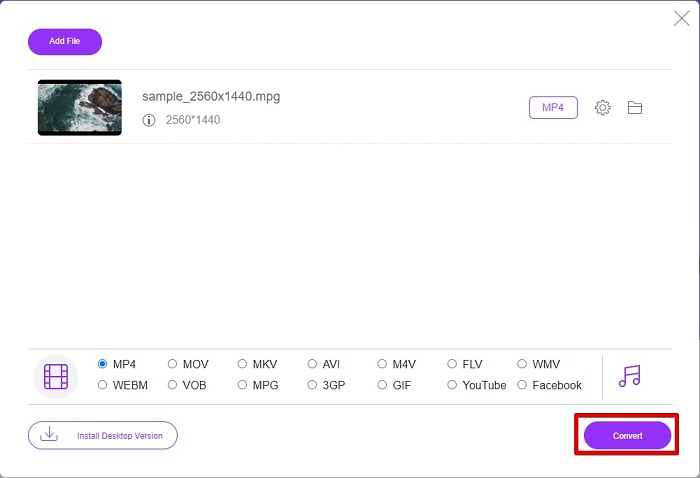
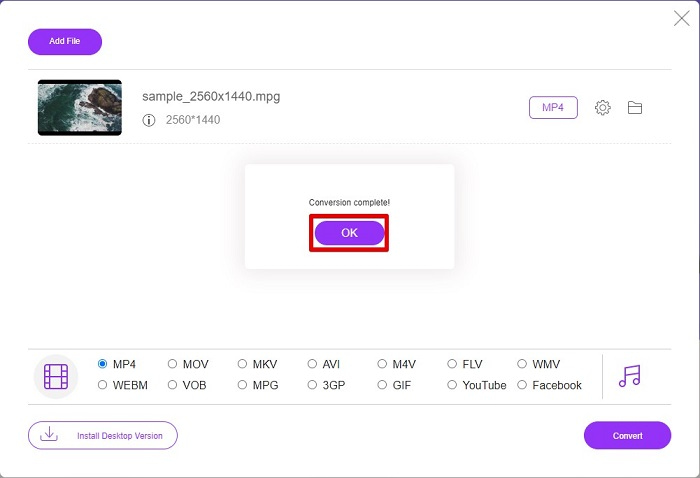
Vaihe 5. Lopuksi tiedostosi alkaa muuntua, ja kun muunnos on valmis, napsauta OK viimeistelläksesi sen. Siinä kaikki! Olet saanut muunnoksen valmiiksi yhtä helposti kuin 1–2–3!
3. Käytä osoitetta ConvertFiles.com
ConvertFiles.com on ilmainen online-muunninsovellus, joka muuntaa MPG-tiedostosi MP4-muotoon. Sen avulla voit muuntaa tiedostomuotoja, jopa 300 eri tiedostomuotoa. Ja jos etsit MPG-MP4-muunninta verkossa, jonka avulla voit muuntaa asiakirjoja, piirustuksia, videoita, esityksiä ja paljon muuta. Kuitenkin, kun käytät tätä online-muunninta, kohtaat paljon häiritseviä mainoksia. Tästä huolimatta tämä online-muunnin on edelleen kokeilemisen arvoinen, ja se on osoittautunut lupaavaksi.
Näin voit muuntaa MPG-tiedostosi MP4-tiedostomuotoon:
Vaihe 1. Hae selaimessasi ConvertFiles.com siirtyäksesi suoraan verkkosivulle.
Vaihe 2. Valitse MPG-tiedostosi napsauttamalla suorakaiteen muotoista painiketta tai Browse-painiketta Choose a local file -kohdan vieressä. Etsi MPG-tiedostosi ja valitse se.
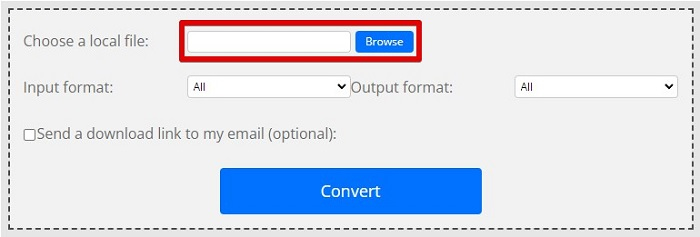
Vaihe 3. Kun olet valinnut MPG-tiedoston, jonka haluat muuntaa, valitse tulostusmuodoksi .mp4 napsauttamalla drop-down-painiketta.
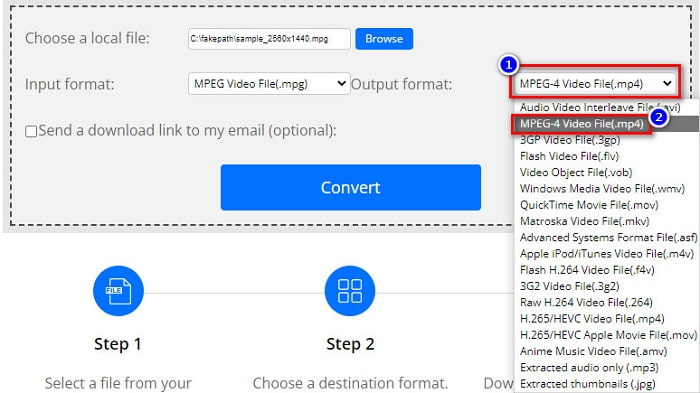
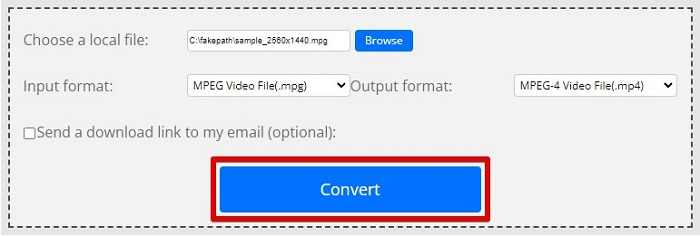
Vaihe 4. Kun olet valinnut haluamasi tiedostomuodon, voit nyt muuntaa tiedoston napsauttamalla Convert.
MPG vs. MP4
Moving Picture Experts Groupin (MPEG) valmistama MPG on yleinen digitaalinen videomuoto video-, ääni- ja metatietojen tallentamiseen. Se on varsin hyödyllinen luotaessa elokuvia Internetissä jaettavaksi. Nämä MPG-tiedostot sisältävät yleensä MPEG-1- tai MPEG-2-video-/äänipakkauksen.
Moving Picture Experts Groupin (MPEG) vuonna 2001 julkaisema MP4-muoto voi auttaa sinua tallentamaan video-, ääni-, tekstitys- ja kuvatiedot eri raidoille. Se on lyhenne sanoista MPEG-4 Part 14. Lisäksi se on yksi suosituimmista videoiden suoratoistoon ja jakamiseen käytetyistä muodoista.
Osa 3. Usein kysytyt kysymykset MPG- ja MP4-muodosta
Voinko muuntaa MPG-tiedostoja MP4-muotoon menettämättä sen laatua?
Joo. Video Converter Ultimate antaa sinun muuntaa MPG-tiedostosi MP4-muotoon menettämättä sen laatua tiedostokoosta huolimatta.
Missä voin toistaa MPG-tiedostoja?
MPG-tiedostot ovat laajasti tuettuja. Siksi monet mediasoittimet pystyvät avaamaan tämän tiedostomuodon, kuten Microsoft Windows Media Player ja VideoLAN VLC Media Player. Voit lukea lisää tästä artikkelista: Best 4 MPG/MPEG Players for Windows/Mac/Android/iPhone [2021]
Voinko muuntaa MP4:n MPG:ksi?
Joo. Voit muuntaa MPG:n MP4-tiedostomuotoon käyttämällä yllä lueteltuja tiedostomuuntimia.
Johtopäätös
Yllä luettelemamme muuntimet ovat osoittautuneet luotettaviksi. Ne ovat helppokäyttöisiä ja ilmaisia! Mutta jos haluat tiedostomuuntimen, joka voi muuntaa MPG-tiedostosi MP4-tiedostomuotoon ja jossa on upeat ominaisuudet tiedostojesi parantamiseen, Video Converter Ultimate on paras valinta. Lisäksi, jos haluat mainosvapaan verkkopohjaisen muuntimen, joka pystyy myös muuntamaan suuria tiedostoja vaivattomasti, kokeile FVC Free Online Converter.
-
 3 helppoa tapaa muuntaa MPG MOV:ksi Macissa/Windowsissa/Online-tilassa
 Haluatko muuntaa MPG-tiedostosi ja siirtää ne myöhemmin iOS:lle, iPodille, iPadille tai Macille? Tämä artikkeli auttaa selvittämään, kuinka MPG muunnetaan MOV: ksi vaiheiden avulla.
-
 Kuinka muuntaa MPG FLV:ksi menettämättä laatua [Todistettu]
 Sinun on katsottava suosikkielokuvasi tällä mediasoittimella, mutta se ei tue MPG:tä. Yritä muuntaa MPG-tiedostosi FLV:ksi näiden tässä artikkelissa esiteltyjen muuntimien avulla.
-
 2 Ultimate MPG-muunninta MPG:n muuntamiseksi WMV:ksi ilmaiseksi
 Haluatko muuntaa MPG:n WMV:ksi ilmaiseksi? Siinä tapauksessa olet onnekas, koska huomasimme, että voit muuntaa MPG-tiedostoja kahdella työkalulla.

