


 Video Converter Ultimate
 Näytön tallennin
 Videon korjaus
Kuinka muuntaa RAR MP4:ksi: Pura ja muuta RAR-tiedostot MP4:ksi oikein
Jos olet tekniikasta perillä oleva henkilö, tiedät, että RAR- ja MP4-tiedostot ovat arkipäiväisiä. Käytännössä RAR-tiedostot ovat kuin pakattuja nippuja, jotka voivat sisältää kaikenlaista – videoita, kuvia, mitä tahansa. Oletko kuitenkaan koskaan miettinyt, miten RAR-tiedoston voisi muuntaa MP4-muotoon paremman yhteensopivuuden vuoksi? Tämä kysymys nousee usein esiin, kun lataat netistä elokuvia, jotka tulevat RAR-paketteina, tai saat sähköpostitse videoita RAR-muodossa, eikö niin? Jotta saat ne MP4-muotoon, sinun on ensin purettava eli ”unzipattava” RAR-paketti ja muunnettava sen sisältämät videot MP4-muotoon. Jatka siis tämän artikkelin lukemista, niin opit kaksi yksinkertaista tapaa – offline ja online – joilla saat tämän RAR–MP4-muunnoksen tehtyä.

Osa 1. Muunna RAR MP4-muotoon online ezyZipillä
Aloitetaan suositellusta online-muuntimesta, joka pystyy käsittelemään RAR-tiedostoja tehokkaasti. Ezyzip on sinun liittolaisesi aina, kun olet vaikeuksissa tiedostojen muuntamisen kanssa. Se on paras online-valinta MP4-tiedostojen purkamiseen RAR-arkistosta vaivattomasti. Sinun ei tarvitse sotkea tietokonettasi ylimääräisellä MP4-muunninohjelmistolla. Tämä johtuu siitä, että ezyZip toimii suoraan selaimessasi, mikä säästää asennusongelmia. Lisäksi tämä työkalu ei rajoitu vain RAR-tiedoston muuntamiseen MP4-muotoon verkossa ilmaiseksi, koska se tukee myös monia muita tiedostojen purkamis- ja muuntamisvaihtoehtoja.
Se, mikä erottaa ezyZipin muista online-muuntimista, on sen ainutlaatuinen lähestymistapa. Se pitää tiedostosi turvassa käsittelemällä koko asian paikallisesti selaimessasi. Tämä tarkoittaa, että työllistä lataamista tai lataamista ulkoisille palvelimille ei tarvita, mikä johtaa salamannopeisiin muunnoksiin. On huomattava, että saatat unohtaa kokorajoitukset, kun käytät ezyZipiä, koska tämä työkalu ei aseta mitään rajoituksia. Tämä tarkoittaa myös, että yksityisyytesi säilyy ennallaan, koska tiedostosi eivät koskaan poistu selaimesta! Nyt emme anna tämän dian mennä opettamatta sinulle ezyZip-prosessia tiedostojen muuntamiseen RAR-tiedostosta MP4-muotoon. Siksi alla oleva opas on annettu.
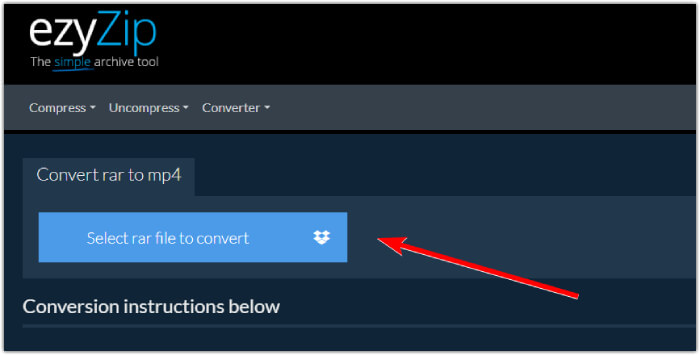
Vaihe 1. Siirry muuntimen viralliselle sivustolle ja tuo RAR-tiedostosi napsauttamalla Valitse muunnettava rar-tiedosto -painiketta.
Vaihe 2. Kun tiedostot on ladattu, työkalu muuntaa ne automaattisesti RAR-arkistossa. Napsauta nyt Tallenna-painiketta tallentaaksesi jokaisen MP4-tiedoston haluamaasi kohdekansioon.
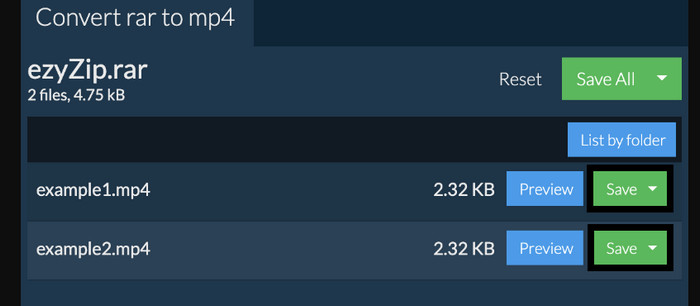
Vaihe 3. Jos Tallenna-painike on poikkeustapauksessa harmaana, se tarkoittaa, että käyttämäsi selain ei ole muuntimen tukema. Muussa tapauksessa, kun tiedostot on tallennettu onnistuneesti, saat mahdollisuuden tarkastella muunnettuja tiedostojasi.
Osa 2. Muunna RAR MP4:ksi offline-tilassa WinRAR:n avulla
On olemassa loistavia offline-tapoja muuntaa RAR MP4:ksi WinRARilla. WinRAR on suosittu ohjelmisto, joka on suunniteltu erityisesti Windows-käyttäjille. Se on ohjelmisto, joka tarjoaa joukon hyödyllisiä ominaisuuksia pakattujen tiedostojen hallintaan. Lisäksi tämä ohjelma yksinkertaistaa RAR-tiedostojen purkamista ja purkamista, jotta ne voidaan purkaa ja käyttää. Lisäksi WinRAR jatkaa, koska se tarjoaa myös mahdollisuuden muuntaa RAR-tiedostoja erilaisiin videomuotoihin, kuten MP4 tai M4V. Tämä toiminto osoittautuu korvaamattomaksi käyttäjille, joiden on työskenneltävä RAR-arkistoon tallennetun multimediasisällön kanssa. Jos siis haluat tietää kuinka purkaa ja muuttaa RAR-tiedostot MP4:ksi WinRarilla, jatka vaiheittaisten ohjeiden lukemista alla.
Vaihe 1. Lataa ensin tunnettu RAR-asiantuntijaohjelma tietokoneellesi. Käytä lataamiseen luotettavaa lähdettä. Käynnistä ohjelma asennuksen jälkeen heti, jotta voit aloittaa muunnosprosessin.
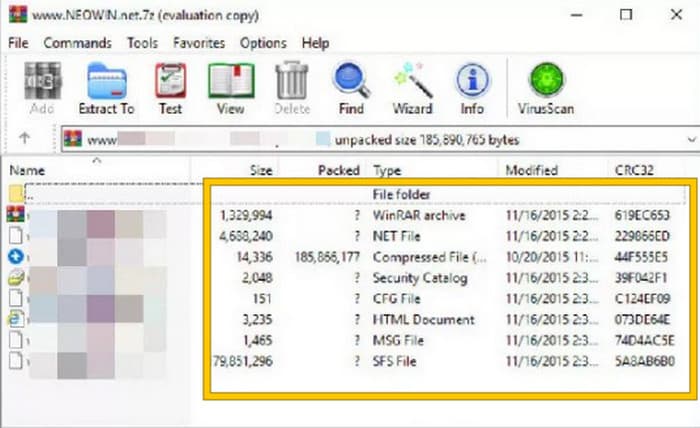
Vaihe 2. Kun ohjelma on käynnistetty, voit välittömästi avata tai ladata RAR-tiedoston, jonka haluat muuntaa MP4-muotoon. Tiedät, onko tiedosto ladattu, sillä se näkyy käyttöliittymän keskellä.
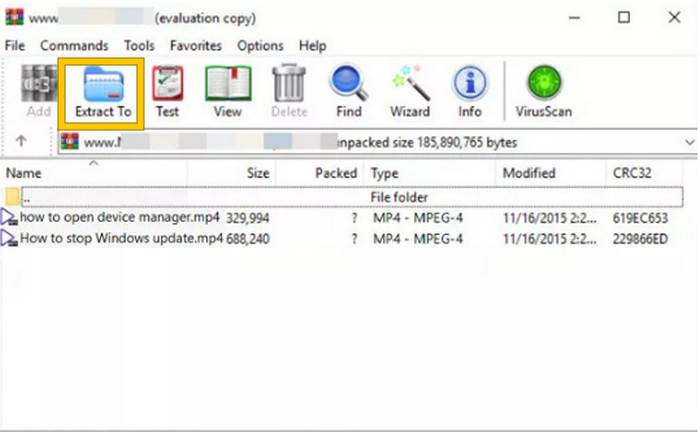
Vaihe 3. Aloita lopuksi muuntaminen tai purkaminen napsauttamalla Pura kohteeseen -painiketta valikkorivillä. Kun toiminto on valmis, voit avata muunnetut tiedostot suoraan käyttöliittymästä.
Osa 3. Bonusvinkki: Paras tapa muuntaa audio/video MP4-muotoon verkossa
Annamme sinulle vielä bonusvinkin, jolla voit muuntaa minkä tahansa video- ja äänitiedoston MP4:ksi parhaalla ja nopeimmalla tavalla! Tutustu tähän FVC Free Video Converter Online -työkaluun, jonka avulla videoiden ja äänitiedostojen muuntaminen eri muotoihin, kuten MP4:ään, on erittäin helppoa ja täysin ilmaista. Lisäksi voit muuntaa teräväpiirtovideosi suosittuihin formaatteihin nopeasti säilyttäen alkuperäisen laadun ja tarkkuuden. Tulet myös pitämään sen salamannopeasta prosessista, jonka ansiosta voit muuntaa useita tiedostoja kerralla lähes hetkessä!
Siellä on enemmän! Tämän FVC Free Video Converter Online -sovelluksen avulla voit myös muokata videoitasi ja ääntäsi mielesi mukaiseksi. Tämä johtuu siitä, että tämän muuntimen avulla voit säätää esimerkiksi resoluutiota, kuvanopeutta, bittinopeutta ja jopa ääniasetuksia, kuten äänenvoimakkuutta ja bittinopeutta, haluamiisi asetuksiin. Tämä tarkoittaa, että voit muokata mediaasi haluamallasi tavalla ja viedä sen helposti. Jos siis mietit, kuinka video- tai äänitiedostot muunnetaan MP4-muotoon verkossa, noudata alla olevia yksinkertaisia ohjeita.
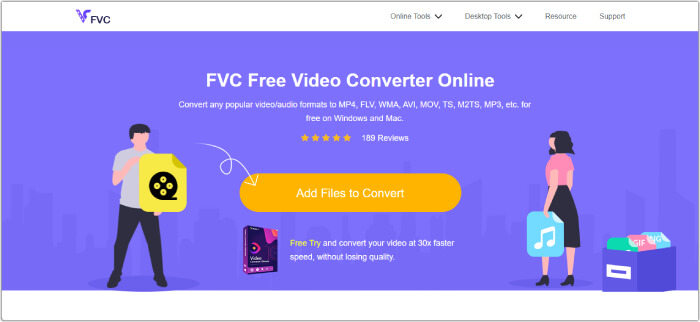
Vaihe 1. Aloita prosessi vierailemalla FVC Free Video Converter Online -työkalun virallisella sivustolla. Kun olet saapunut sivulle, napsauta Lisää muunnettavia tiedostoja -painiketta ladataksesi käynnistysohjelman ja tuodaksesi ensimmäisen tiedoston.
Vaihe 2. Kun tiedosto on ladattu sisään, voit lisätä lisää mediatiedostoja napsauttamalla Lisää tiedosto -painiketta päätyötilassa. Aseta ne sitten MP4-muotoon napsauttamalla tiedostoja ja valitsemalla alareunasta MP4-formaatti.
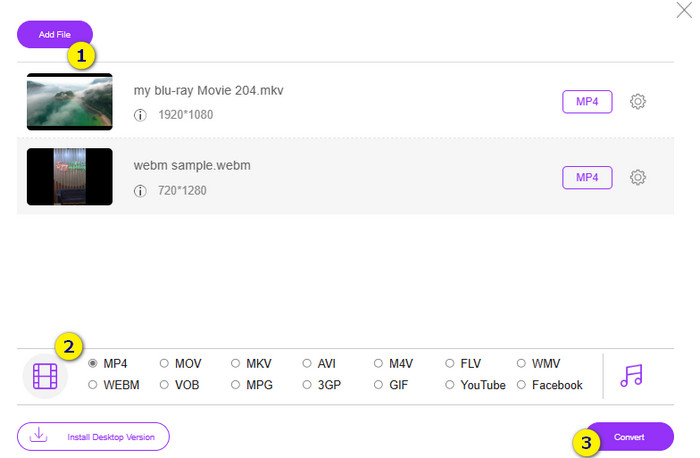
Vaihe 3. Sen jälkeen on aika käynnistää nopea ja eräajona tehtävä muunnos napsauttamalla alareunassa olevaa Muunna-painiketta.
Lisälukemista:
Paras MP4-editori Windowsille ja Macille vuonna 2025
Osa 4. Usein kysytyt kysymykset RAR- ja MP4-muuntamisesta
Mikä on RAR-tiedosto?
RAR-tiedostot pakataan arkistotiedostomuotoon. Sen avulla voit tallentaa useita tiedostoja yhteen säiliöön ja samalla pienentää niiden kokonaiskokoa.
Kuinka voin muuntaa RAR:n MP4:ksi Macissa?
Muuntaaksesi RAR:n MP4:ksi Macilla voit ensin käyttää videonpurkuohjelmaa, kuten Unarchiveria, RAR-arkiston sisällön purkamiseen. Sen jälkeen kaikki yhteensopivat videotiedostot purkamisessa saadun sisällön joukosta voidaan muuntaa MP4-muotoon tehokkaalla muuntimella. Tähän voit käyttää ohjelmaa FVC Video Converter Ultimate.
Voiko RAR-tiedosto sisältää videoita?
RAR-tiedosto on kuin zip-kansio, joka voi sisältää minkä tahansa tiedoston. Joten kyllä, RAR-tiedosto voi sisältää videoita.
Johtopäätös
Tämä artikkeli sopii erinomaisesti RAR–MP4-muunnostehtävääsi, sillä se esittelee parhaat tavat tehdä se omalla laitteellasi. Onneksi tarjolla on myös paras video- ja äänimuunnin verkossa, jonka avulla työskentelet kuin ammattilainen!
-
 Tapoja videon pakkaamiseen verkossa videotiedoston koon pienentämiseksi
 Jos etsit videokompressoreita verkosta, älä löydä lisää, sillä me autamme sinua! Tässä on joitain kätevimmistä työkaluista, joita voit käyttää.
-
 Kuinka pakata MP4-video pienempään kokoon
 MP4-video on liian suuri lataamista varten? Haluatko pienentää videon kokoa? Tässä on 3 tehokasta tapaa pakata MP4-tiedosto pienempään kokoon ilman rajoituksia.
-
 Kuinka pakata videoita ilmaiseksi / Kokeile näitä 7 online-videokompressoria
 Lue ja hanki 7 tapaa pakata videoita ilmaiseksi tietokoneellasi tai puhelimellasi. Voit pienentää suuret videot pieniksi tiedostokokoiksi sähköpostille, Twitterille, Instagramille, YouTubelle, WhatsAppille ja muille helposti.
