


 Video Converter Ultimate
 Näytön tallennin
 Videon korjaus
 Suojattu lataus
Kuinka muuntaa SWF MP4: ksi kolmella tavalla
Yhden vaikeimmista videoformaatista, SWF:n, muuntamiseksi MP4-muotoon voit käyttää täällä esiteltyä ilmaista kolmen parhaan SWF–MP4-muuntimen listaa.

SWF on Adoben Flash-tiedostomuoto, jota käytetään multimedialle, vektorigrafiikalle ja ActionScriptiä hyödyntäville selaimille. SWF-tiedostot on helppo avata Adobe Flash Playerilla. Vain rajalliset liitännäiset, kuten Adobe Flash Player ja Adobe Integrated Runtime, voivat kuitenkin toistaa Adobe-ohjelmien ja muiden kolmannen osapuolen ohjelmien luomia SWF-tiedostoja. Jos haluat toistaa SWF-tiedostoja useammilla soittimilla, sinun on muunnettava SWF MP4-muotoon, joka on suosituin videoformaatti ja toimii lähes kaikissa soittimissa.
Kun olet kokeillut joitain erilaisia menetelmiä ja sovelluksia, ja olet keksinyt tämän ilmaisen top 3 -luettelon.
Osa 1. Ilmainen Video Converter - Muunna SWF MP4: ksi PC / Macilla
SWF, web-muodossa, on tuotettu erinomaisella animaation laadulla ja äänikoodekilla, joka voidaan ladata mihin tahansa. Tämän seurauksena on vaikea löytää ohjelmistoa, joka voi avata tai muokata SWF-tiedostoa ilman Adobe-tuotteita. Silti on olemassa ilmainen SWF-MP4-muunnin.
Free Video Converter on ilmainen SWF-tiedostomuunnin, joka voi muuntaa SWF-tiedostot MP4-, MOV-, AVI-, WMV-, MKV- ym. muotoon Windows- ja Mac-tietokoneilla.

Ilmainen FLV to MP4 Converter
30000+ latausta- Erä muuntaa SWF ja FLV MP4: ksi ilmaiseksi PC: llä ja Macilla.
- Muunna SWF MP4: ksi H.264: ssä, MPEG4: ssä ja muissa.
- Muunna SWF muuhun muotoon, kuten MOV, AVI, MP3, MKV jne.
- Muokkaa SWF-tiedostoa ennen MP4-tiedostojen viemistä.
Ilmainen latausWindows 7 tai uudempiSuojattu lataus
Ilmainen latausMacOS 10.7 tai uudempiSuojattu lataus
Plussat
- Erä muuntaa SWF MP4: ksi.
- Tukee monenlaisia formaatteja.
- Muunna SWF laitteiksi.
Haittoja
- Muokkausominaisuudet ovat heikkoja.
Vaiheet SWF: n muuntamiseksi MP4: ksi ovat melko helppoja.
Vaihe 1. Lisää SWF-tiedostot
Lataa ilmainen SWF: n MP4-muunnosohjelma tietokoneelle napsauttamalla yllä olevaa latauslinkkiä. Käynnistä se heti.
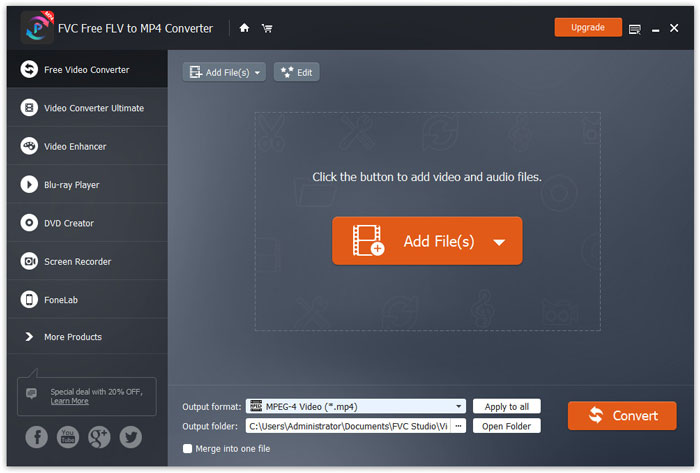
Napsauta Add Files(s) -painiketta ladataksesi yhden tai useamman SWF-tiedoston tähän ohjelmaan.
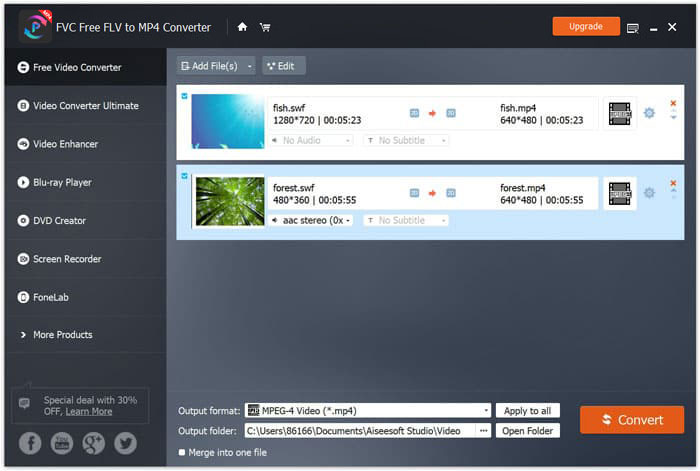
Vaihe 2. Mukauta MP4
Valitse MP4 alareunan Output format -pudotusvalikosta. Täältä voit myös valita laitteen, jolla SWF-tiedostot voidaan avata, kuten PSP, Avid Media Composer, Adobe Premiere, Apple iPhone, Samsung, PS3/4, Xbox jne.

Lisäksi sen avulla voit muokata videokoodekkia, tarkkuutta, bittinopeutta jne. Napsauttamalla MP4-lähdön vieressä olevaa rataskuvaketta.
Vaihe 3. Vie SWF MP4-muotoon
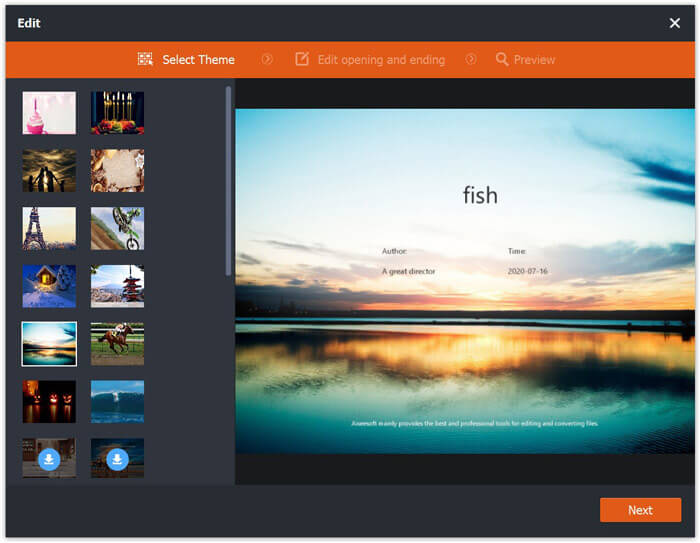
Lisävalintana pääikkunan Edit-painikkeella voit muokata SWF-tiedostoa ja lisätä alku- ja lopputeeman.
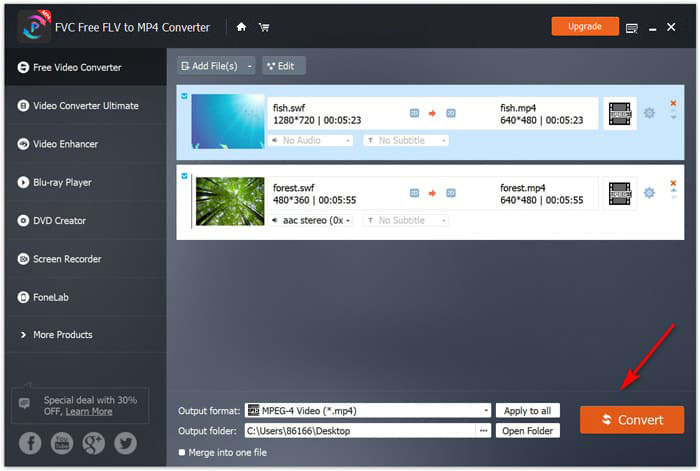
Kun kaikki on asetettu, valitse alareunasta kohdekansio muunnetuille MP4-tiedostoille ja napsauta sitten oikeassa alakulmassa olevaa Convert-painiketta muuntaaksesi SWF-tiedostot heti MP4-videoiksi.
Osa 2. Free Online Video Converter - Muunna SWF MP4 Online: ksi
Etkö halua asentaa mitään ohjelmistoja SWF: n muuttamiseksi MP4: ksi? Kokeile vain ilmaista online-videomuunninta.
Free Online Video Converter on verkkopohjainen muunnostyökalu, jolla voit muuntaa SWF:n MP4-muotoon selaimen kautta. Se muuntaa SWF- ja FLV-tiedostot MP4:ksi ja muihin suosittuihin muotoihin, kuten MP4, AVI, MOV jne. Lisäksi se voi erottaa äänen SWF-tiedostosta taustamusiikin säilyttämiseksi.
Plussat
- Muunna SWF Facebookiksi ja YouTubeksi.
- Luo GIF-tiedostoja SWF-tiedostoista.
- Mukauta videotarkkuutta, koodekkia jne.
Haittoja
- Editointiominaisuuksien puute.
Tässä on opas ilmaisen online-videomuuntimen käyttämiseen SWF: n muuttamiseksi MP4: ksi.
Vaihe 1. Lataa SWF-tiedostot verkkoon
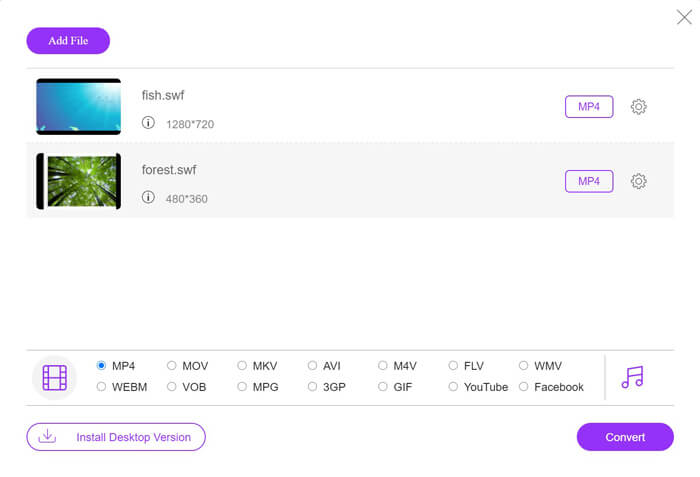
Avaa tämä ilmainen SWF–MP4-verkkokonvertteri selaimessasi. Napsauta Add Files to Convert -painiketta; ponnahdusikkuna pyytää lataamaan ja asentamaan käynnistysmoduulin. Toimi ohjeiden mukaan, ja onnistuneen asennuksen jälkeen avautuu ikkuna. Valitse paikalliselta tietokoneeltasi SWF-tiedostot, jotka haluat muuntaa MP4-muotoon tälle sivustolle.
Vaihe 2. Valitse MP4
Rastita alareunassa oleva MP4-valintaruutu. Sen lisäksi tarjolla on muita tulostusmuotoja, kuten AVI, VOB, FLV, M4V, MKV, GIF, YouTube, MP3, WMA jne. Settings-kuvake MP4-valinnan vieressä antaa säätää enkooderia, kuvanopeutta, resoluutiota, bittinopeutta ja muita parametreja.

Vaihe 3. Muunna SWF MP4-muotoon
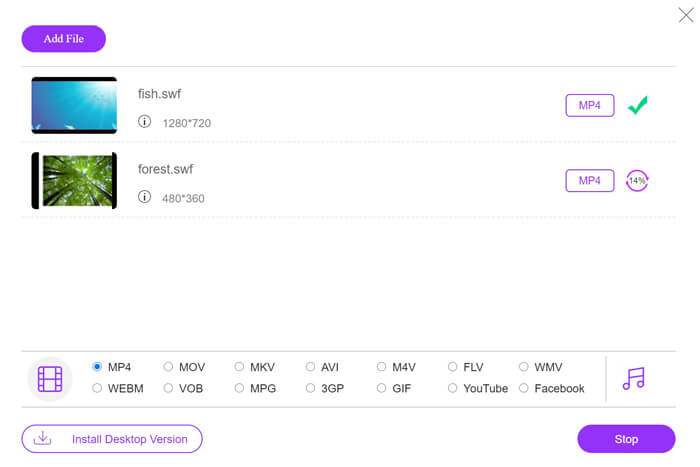
Kun kaikki asetukset on tehty, napsauta Convert-painiketta valitaksesi sijainnin muunnetuille MP4-tiedostoille. Napsauta sitten Convert-painiketta uudelleen käynnistääksesi SWF–MP4-muunnoksen välittömästi.
Osa 3. VLC - Vaihda SWF MP4: ksi Windows / Macissa
VLC on kuuluisa avoimen lähdekoodin mediasoittimesta, joka toistaa SWF-, FLV-, MP4- ja muita formaatteja. On kuitenkin piilotettuja toimintoja, joista saatat puuttua, ja SWF: n muuntaminen MP4: ksi on yksi niistä. Koska VLC: tä ei ole suunniteltu videomuuntimelle, se toimii hieman eri tavalla muunnettaessa SWF MP4: ksi.
Plussat
- Muunna SWF MP4: ksi irtotavarana.
- Muunna SWF MP4: ksi ilmaiseksi.
Haittoja
- Ei ole ystävällinen käyttää SWF-muuntimena.
- Muunnosnopeus on hidas.
Tämä lyhyt opetusohjelma näyttää kuinka SWF muunnetaan MP4: ksi VLC: ssä.
Vaihe 1. Lisää SWF-tiedostot VLC:hen
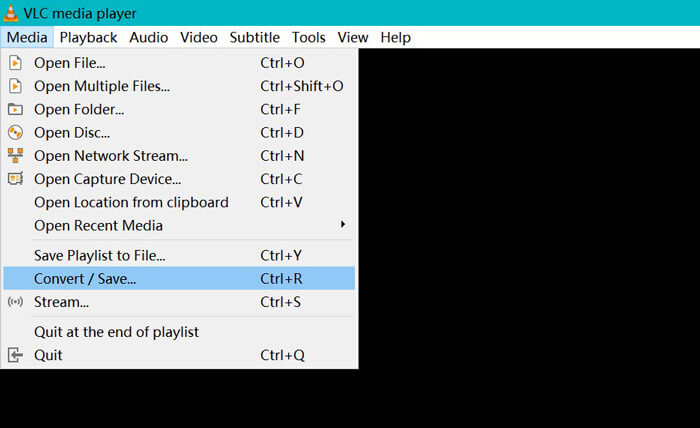
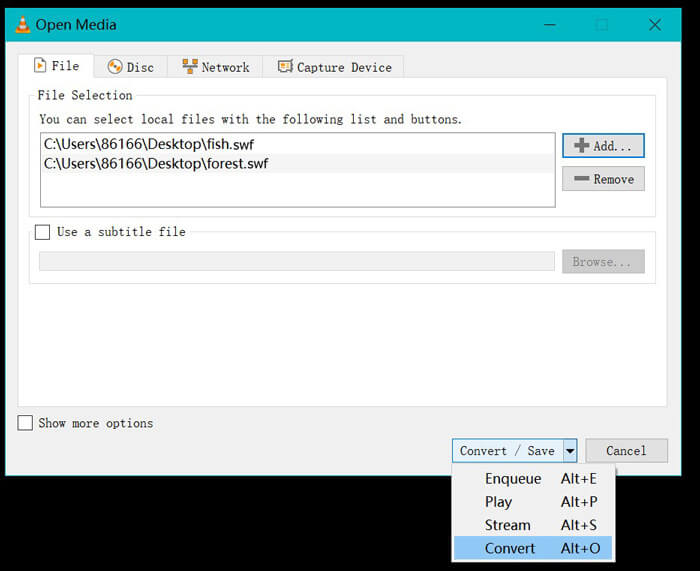
Käynnistä VLC tietokoneellasi (Windows, Mac, Linux tai Chrome). Etsi yläreunasta Media-valikko ja valitse alasvetovalikosta Convert / Save.
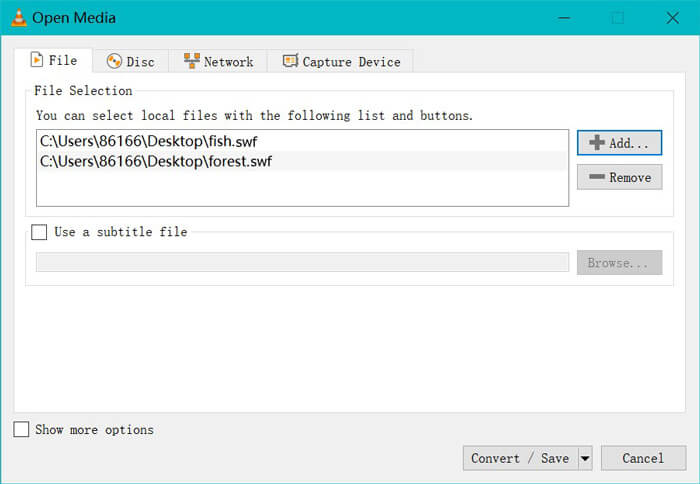
Napsauta oikeassa reunassa olevaa Add-painiketta ladataksesi tietokoneellasi olevat SWF-tiedostot.
Vaihe 2. Valitse MP4
Valitse Convert alareunassa olevan Convert / Save -pudotusvalikon vaihtoehdoista.
Tämän jälkeen siirryt Convert-ikkunaan, jossa etsit MP4-vaihtoehdon Profile-pudotusvalikosta.
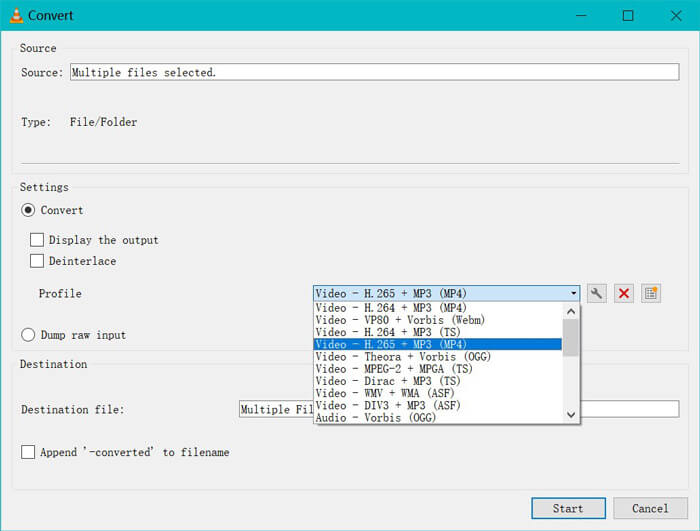
MP4-lähdön vieressä olevan asetuskuvakkeen avulla voit säätää kapselointia, videokoodekkia, äänikoodekkeja ja tekstityksiä.
Vaihe 3. Muunna SWF MP4-muotoon VLC:ssä
Valitse sitten kohde muunnettujen MP4-tiedostojen tallentamiseksi napsauttamalla Käynnistä-painiketta aloittaaksesi SWF: n muuntamisen MP4: ksi VLC: n kautta.
Löydät edistymisen VLC-soittimesta. VLC-muunnos käyttää tallennusominaisuutta muunnostehtävän loppuunsaattamiseen niin, että muunnosnopeus on hidas.
Osa 4. SWF: n ja MP4: n usein kysytyt kysymykset
Käytetäänkö SWF-tiedostoja edelleen?
Adobe on virallisesti lopettanut SWF: n, mikä osoittaa, että sitä ei enää tueta tai kehitetä. HTML5-videotuki ja CSS3-animaatiot ovat korvanneet SWF: n.
Tukeeko PS3 SWF-tiedostoja?
Joo. Sony PlayStation Portable -konsolit voivat toistaa rajoitettuja SWF-tiedostoja Sonyn verkkoselaimessa alkaen firmware-versiosta 2.71. Molemmat PS3 voivat suorittaa SWF-tiedostoja Internet-selainten kautta.
Miksi MP4-videoni ei toimi VLC: ssä Android-puhelimellani?
VLC: n muunnosominaisuus on käytettävissä vain tietokoneella. Jos käytät VLC: tä Android- tai iOS-laitteilla, se ei salli SWF: n muuntamista MP4: ksi.
Johtopäätös
Tämä viesti kerää kolme parasta avoimen lähdekoodin SWF: ää MP4-muuntimeen, jotta voit muuttaa SWF: n MP4: ksi toistettavaksi useammalla laitteella. Luettelemme myös ilmaisen muuntimen edut ja haitat viitteellesi.
Mikä ilmainen SWF - MP4-muunnin on suosikkisi?
Vai onko sinulla parempia suosituksia?
Joko niin, ilmoita minulle jättämällä kommenttisi alla.
-
 MOV VS MP4 - kumpi on parempi
 Mikä MOV VS MP4 on parempi? Tämä viesti kertoo eron MP4: n ja MOV: n välillä, jotta saat paremman valinnan videotiedostoihisi.
-
 7 tapaa muuntaa MP4 AVI: ksi Windows / Mac / iPhone / Android / Online
 Haluatko saada kaikki ilmaiset tapat muuntaa AVI MP4-videoiksi? Älä missaa tätä artikkelia. Tässä on 7 tapaa muuntaa AVI-tiedostot MP4: ksi ilmaiseksi Windowsissa, Macissa, iPhonessa, Androidissa ja verkossa.
-
 Kuinka muuntaa MTS-tiedostot MP4: ksi
 Etkö tiedä, miten muuntaa MTS-tiedosto MP4: ksi? Tästä oppaasta löydät 6 ilmaista ja helppoa tapaa vaihtaa MTS-muoto MP4: ksi Windowsissa tai Macissa ilman laadun heikkenemistä.
