


 Video Converter Ultimate
 Näytön tallennin
 Videon korjaus
 Suojattu lataus
WTV to MP4 Converter: Kuinka muuntaa WTV MP4: ksi
WTV on DVR-MS-muodon seuraaja, jonka Microsoft on kehittänyt tallentamaan Windows Media Centerin tallentamaa TV-sisältöä. Koodattu MPEG-2- ja MPEG-4-standardeilla sekä MPEG-1 Layer II- tai Dolby Digital AC-3 -tekniikalla WTV: tä tuetaan vain harvoilla ohjelmistoilla, kuten FFMPEG, Windows Media Center, CyberLink PowerDVD 12, Nero 12, HandBrake, CCextractor jne.

Jos haluat katsella tai jakaa WTV‑tiedostoja kätevästi, sinun kannattaa muuntaa WTV MP4‑muotoon, joka on yleisin lähes kaikilla laitteilla toimiva formaatti.
Olemme etsineet Internetistä WTV–MP4‑muunninta ja löytäneet 2 parasta ilmaista WTV–MP4‑muunninta WTV‑tiedostojen muuttamiseksi MP4‑muotoon.
Osa 1. Ilmainen videomuunnin - Muunna WTV MP4-verkkoon
WTV:n muuntaminen MP4:ksi on hyvin helppoa. Helpoin tapa vaihtaa WTV MP4‑muotoon on tehdä se verkossa. Free Online Video Converter on ilmainen ohjelma WTV‑tiedostojen muuntamiseen MP4:ksi ja muihin yleisiin video‑ ja ääniformaatteihin. Tämä ilmainen verkkotyökalu toimii Windows 10/8/7 ‑järjestelmissä sekä Mac OS X 10.7 tai uudemmissa, ja voit helposti koodata WTV:n MP4:ksi muutamassa vaiheessa.
Voit virtaviivaistaa prosessia seuraamalla opasta:
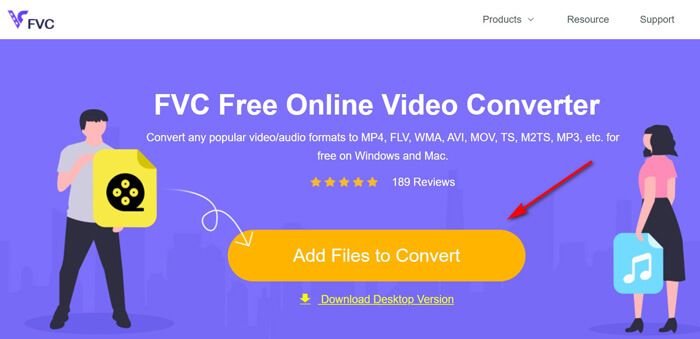
1. Napsauta Add Files to Convert ‑painiketta ladataksesi WTV‑tiedostot tietokoneelta.
2. Valitse MP4 valintaruudusta.
3. Napsauta Convert muuntaaksesi ja ladataksesi WTV‑tiedostot automaattisesti.
Nyt olemme täällä opastamassa, kuinka WTV voidaan muuntaa MP4: ksi yksityiskohtaisesti.
Vaihe 1. Lisää WTV‑tiedostot
Avaa tämä ilmainen WTV–MP4‑muunnin selaimessasi. Napsauta Add Files to Convert ‑painiketta, jolloin esiin tulee ponnahdusikkuna, joka kehottaa lataamaan ja asentamaan käynnistysohjelman. Lataa se vain, ja asennuksen onnistuttua avoimen lähdekoodin ikkuna tulee näkyviin. Sen jälkeen voit valita tietokoneeltasi WTV‑tallenteet ladattavaksi. Tämä ilmainen työkalu tukee erämuunnosta, joten voit lisätä useamman kuin yhden WTV‑tiedoston verkossa.
Vaihe 2. Valitse MP4
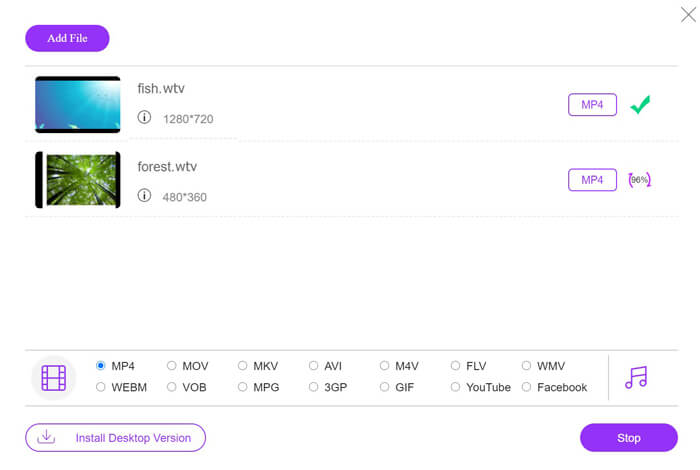
Rastita MP4‑valintaruutu alareunassa, josta löydät myös muita tulostusvaihtoehtoja, kuten MKV, AVI, M4V, FLV, VOB, GIF, YouTube, Facebook, MP3, AAC, WMA, WAV, FLAC jne.
Lisäksi voit napsauttaa Settings‑kuvaketta lähtö‑MP4‑paneelin vieressä säätääksesi enkooderia, kuvanopeutta, tarkkuutta, bittinopeuksia ja muita parametreja.

Vaihe 3. Muunna WTV MP4‑muotoon
Kun kaikki on valmista, napsauta Convert‑painiketta. Tällöin avautuu ikkuna, jossa sinua pyydetään valitsemaan kohdekansio muunnetuille MP4‑tiedostoille. Valitse kohde ja palaa tähän ilmaiseen verkkotyökaluun, napsauta Convert uudelleen aloittaaksesi MP4‑tiedostojen muuntamisen ja lataamisen automaattisesti. Näet muunnoksen etenemisen prosentteina suoraan.
Osa 2. Käsijarru - Muunna WTV MP4: ksi PC / Macilla
Toinen ilmainen tapa muuntaa WTV MP4: ksi on HandBrake. HandBrake on muutama ohjelmisto, joka pystyy lukemaan WTV-tiedostoja. Lisäksi se voi myös koodata WTV: n MP4 / MKV: ksi Windows- ja Mac-tietokoneillasi.
HandBrake on avoimen lähdekoodin työpöytäohjelmisto, joten lataa tämä ilmainen muunnin ensin tietokoneellesi.
Jälleen yksinkertaiset vaiheet WTV: n muuntamiseksi MP4: ksi HandBrakessa ovat seuraavat:
1. Lisää WTF-tiedostot tai koko kansio HandBrakeen.
2. Mukautettu MP4-profiili HandBrakessa.
2. Esikatsele ja muunna WTV MP4: ksi.
Tässä on kattava opas WTV: n muuttamisesta MP4: ksi HandBrake-laitteessa.
Vaihe 1. Lisää WTV‑tiedostot HandBrakeen
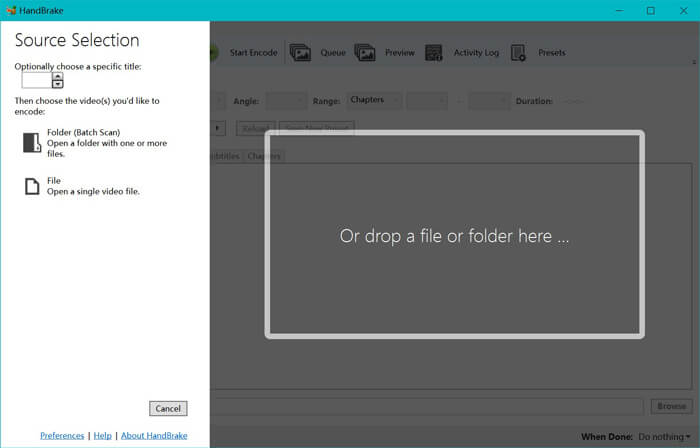
Kun olet asentanut HandBraken tietokoneellesi, ohjelma avaa oletusarvoisesti lähdevalintaikkunan. Tässä voit napsauttaa Folder tai File valitaksesi WTV‑tiedostot tai kansion pääikkunaan. Vaihtoehtoisesti voit myös vetää ja pudottaa WTV‑tiedostot ohjelmaan.
Vaihe 2. Valitse MP4‑muoto
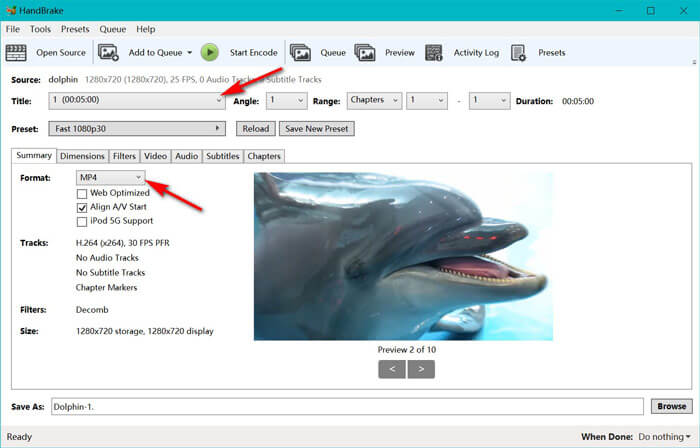
Kun olet ladannut WTV‑tiedostot, voit valita tarkalleen muunnettavan WTV‑tiedoston Title‑pudotusvalikosta. Valitse sitten MP4 Summary‑välilehdeltä tulostusmuodoksi valitulle WTV‑tiedostolle. Lisäksi HandBrake antaa sinun säätää mittoja, suodattimia, videokoodekkia/laatua, ääniraitaa jne. MP4:n lisäksi se voi muuntaa myös muita formaatteja, kuten AVI, MOV, M2TS jne. MKV‑muotoon.
Vaihe 3. Esikatsele ja muunna WTV MP4‑muotoon
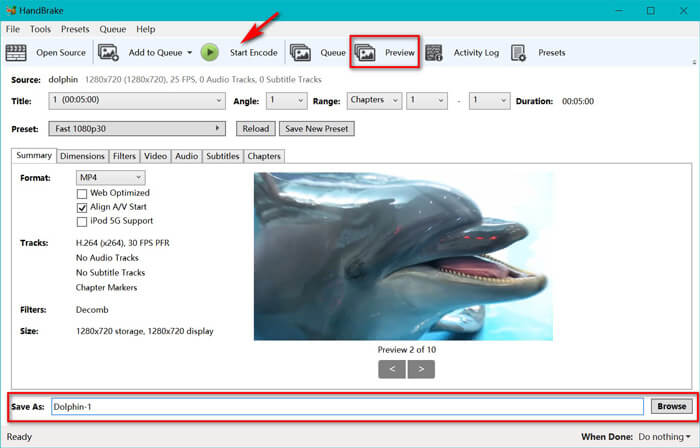
HandBraken Preview‑toiminto työkalupalkissa antaa sinun nähdä, miltä uusi MP4‑videosi näyttää ennen koodausta. Kun kaikki asetukset ovat kohdallaan, anna muunnetuille MP4‑tiedostoille nimi ja valitse uusien videoiden tallennuspaikka napsauttamalla alareunassa olevaa Browse‑painiketta. Lopuksi napsauta vain työkalupalkin Start Encode ‑painiketta muuntaaksesi WTV‑tiedostot MP4‑muotoon.
Osa 3. WTV: n ja MP4: n usein kysytyt kysymykset
Miksi HandBrake tallentaa MP4: n M4V: ksi?
MP4-tiedostoille HandBrake tekee MP4-tiedostot automaattisesti käyttäen laajennusta M4V, kun valitset AC3-ääni- ja SRT-tekstitykset tai sinulla on kappaleiden merkit MP4-tiedoston mukauttamiseksi. Mutta voit muuttaa .m4v-laajennuksen suoraan .mp4: ksi.
Voiko VLC-soitin toistaa WTV-tiedostoja?
VLC ei voi toistaa WTV-tiedostoja suoraan. Asenna WTV-koodipaketti asentamalla K-Lite Code Pack ja toista sitten WTV-tiedostot VLC: llä.
Voinko muuntaa suojattuja WTV-tiedostoja?
Kyllä sinä voit. Kuitenkin vain MCEBuddy tukee suojattujen kaupallisten WTF-tiedostojen muokkausta ja muuntamista. Sinun on käytettävä tätä ohjelmistoa suojattujen WTV-tiedostojen kopioimiseen ja muuntamiseen.
Johtopäätös
Jos haluat käyttää Windows Media Centerin tallennettuja WTV-tiedostoja kätevästi, sinun on ensin muunnettava WTV MP4: ksi. Tämä viesti jakaa kaksi ilmaista tapaa muuntaa WTV MP4: ksi verkossa ilmaisen online-videomuuntimen ja HandBrake-yhteyden kautta. Ilmaisen online-videomuuntimen avulla voit muuntaa WTV: n MP4: ksi ja muiksi suosituiksi muodoiksi, kun taas HandBrake antaa sinulle enemmän hallinnan muokkausta rajoitetuilla tulostusmuodoilla.
Mikä tapa on mieluisin?
Tai ehkä sinulla on parempi WTV-MP4-muunnin?
Joko niin, haluaisin kuulla sinusta. Joten, mene eteenpäin ja jätä kommentti alla.
-
 Kuinka muuntaa MXF MP4: ksi ilmaisen muuntimen avulla
 Tämä viesti on yksityiskohtainen opas MXF: n muuntamiseen MP4: ksi tietokoneella. Voit saada 4 ilmaista MXF - MP4-muunninta videokameran MXF: n koodaamiseksi MP4: ksi yksinkertaisilla vaiheilla.
-
 Kolme parasta tapaa muuntaa MP4 MOV: ksi
 Kuinka muuntaa MP4 MOV: ksi Macissa? Onko olemassa mitään ilmaista tapaa muuntaa MP4 MOV: ksi ilman laadun heikkenemistä? Tämä viesti jakaa 3 yksinkertaista tapaa auttaa sinua tekemään videon muunnos MP4: stä MOV: ksi Macissa, Windows PC: ssä ja verkossa.
-
 Kuinka muuntaa M2TS WMV: ksi Windows / Mac / Online (täysin ilmainen käyttää)
 Tässä on 3 helppoa tapaa muuntaa M2TS WMV-videoiksi. Voit vaihtaa videomuodon M2TS: stä WMV: ksi ilmaiseksi Windowsissa, Macissa ja verkossa nopeasti. Erämuunnosta tuetaan.
