


 Video Converter Ultimate
 Näytön tallennin
 Videon korjaus
Tutustu tapoihin toistaa MKV-tiedostoja PS4:llä
Elokuvien toistoa ei tue ainoastaan Xbox One S. Nyt myös PS4 yrittää pysyä kehityksessä mukana. USB-kaapelin avulla ja DLNA:n kautta PS4 pystyy nyt toistamaan MKV-, MP4-, AVI‑ ja monia muita tiedostomuotoja. Tämä tarkoittaa, että MKV kuuluu niihin tiedostoihin, joita voit toistaa. Jos haluat nähdä täydellisen luettelon tuetuista muodoista, käy PS4:n virallisella verkkosivustolla. Lisäksi et varmasti jatkaisi tämän artikkelin lukemista, ellet olisi kiinnostunut toistamaan MKV‑tiedostoja PS4:llä. Jatka lukemista – edetessäsi opit eri tapoja, joilla voit toistaa MKV-tiedostoja PS4:llä.

Osa 1. Voidaanko kaikkia MKV-tiedostoja toistaa PS4:llä?
Voinko toistaa MKV-tiedostoja PS4:llä? Varmasti voit. PS4 tukee MKV-tiedostomuotoa. Mutta kaikkia MKV-tiedostoja ei voi toistaa kunnolla. Saatat kokea epäonnistumisia sen pelaamisessa. Tämä johtuu siitä, että sinun on täytettävä PS4:n asettama standardi. Useimmiten tuetaan H.264/MPEG-4 AVC:tä. Samat säännöt pätevät, jos aiot toistaa MKV-tiedostoja USB-asemalta. Samaan aikaan audio MP3, AAC LC, AC-3 ovat tuettuja. Useimmat näistä muodoista ovat Dolby Digital -muotoja. Jos uskot täyttäväsi standardin, voit jatkaa MKV:n pelaamisen vaiheita PS4:llä suoraan.
Vaihe 1. Lataa ja asenna DivX Media Server ja käynnistä soitin. Ota sitten tietokoneellasi jakaminen käyttöön.
Vaihe 2. Lataa tai tuo MKV‑tiedosto palvelimeen.
Vaihe 3. Ennen kuin siirryt seuraavaan vaiheeseen, varmista, että sekä tietokone että PS4 ovat yhteydessä samaan Wi-Fi-verkkoon. Lataa ja asenna sitten DivX-mediasoitin PS4:lle. Avaa tämän jälkeen PS4:n mediasoitinsovellus ja valitse DivX Media Server näkyviin tulevasta laiteluettelosta.
Vaihe 4. Etsi lopuksi kohta Video, valitse video, jonka haluat toistaa, ja aloita suoratoisto.
Osa 2. Vaiheittainen opas MKV:n pelaamiseen PS4:llä USB:stä
Sillä välin, jos käytät USB-tallennustilaa, varmista, että se on joko FAT- tai exFAT-muotoiltu, tai muuten sitä ei tunnisteta. Jos uskot olevasi valmis ja flash-asema on yhteensopiva, tutustu alla olevaan vaiheittaiseen ohjeeseen.
Vaihe 1. Käynnistä PS4 ja liitä USB‑muisti. Siirry päävalikkoon. Valitse nyt Video ja etsi USB‑asemasi nimi.
Vaihe 2. Kun näet tiedostoluettelon, napsauta Display All (näytä kaikki) nähdäksesi kaikki USB:lle tallentamasi tiedostot. Kopioi tiedosto ja siirrä se PS4:lle.
Vaihe 3. Varmista lopuksi, että sinulla on vielä riittävästi tallennustilaa siirron loppuun saattamiseksi.
Osa 3. Vaihtoehtoinen tapa pelata MKV:ta PS4:llä Plex Serverin kautta
DivX:n lisäksi on myös vaihtoehtoinen soitin, jota voit käyttää MKV‑tiedostojen toistamiseen PS4:llä. Kyseessä on suoratoistomediaserveri nimeltä Plex. Tämän mediaserverin avulla voit suoratoistaa laadukkaita videoita, musiikkia, tv‑ohjelmia ja podcasteja tietokoneeltasi. Vaikka jotkut käyttäjät kokevat ongelmia tiettyjen MKV‑tiedostojen toistossa, sitä voi silti käyttää vaihtoehtona. Jos kuitenkin todella haluat käyttää Plexiä ja toistaa yhteensopimattoman tiedoston, kannattaa harkita videon muuntamista. Jotkin muuntimet pystyvät muuttamaan MKV‑tiedostosi Plexin tukemaan muotoon. Säätämällä videokoodekkia, kuvanopeutta, bittinopeutta ja muita parametreja se on mahdollista. Onko olemassa työkalu, joka pystyy tähän? Kyllä on, voit kokeilla ohjelmaa nimeltä Video Converter Ultimate. Kyllä, tämä työkalu pystyy siihen. Kokeile sitä tämän ongelman ratkaisemiseksi.
Vaihe 1. Lataa ja asenna Video Converter Ultimate tietokoneellesi.
Ilmainen latausWindows 7 tai uudempiTurvallinen lataus
Ilmainen latausMacOS 10.7 tai uudempiTurvallinen lataus
Vaihe 2. Lisää muunnettavat tiedostot napsauttamalla Add files tai yksinkertaisesti raahaa ja pudota tiedosto ohjelman ikkunaan.
Vaihe 3. Valitse sen jälkeen Plexin tukema muoto napsauttamalla Convert to All ‑pudotusvalikkoa.
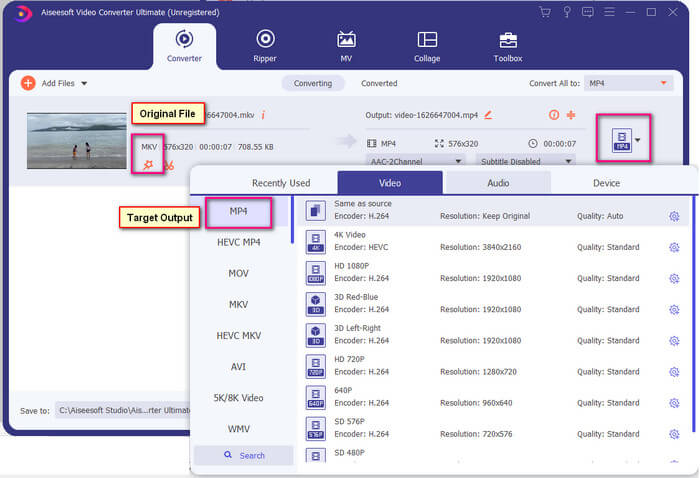
Vaihe 4. Kun muoto on valittu, napsauta Convert All ‑painiketta käynnistääksesi muunnosprosessin. Kun muunnos on valmis, kansio, johon tiedosto tallennettiin, avautuu automaattisesti.
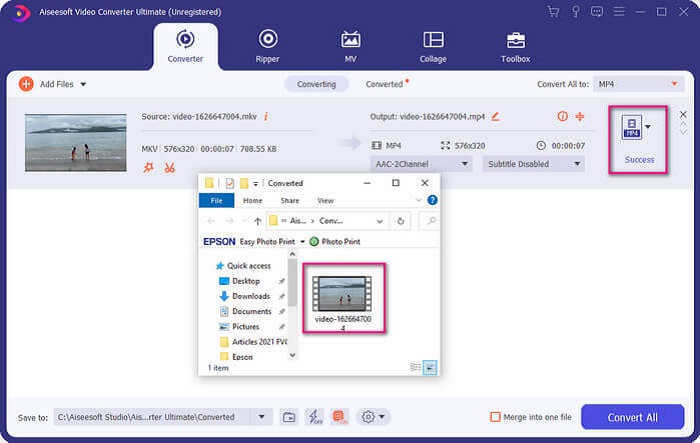
Ultimate Video Converterilla on enemmän. Voit tarkistaa alla olevan luettelon eduista ja haitoista tutustuaksesi muihin sen tarjoamiin hyviin ominaisuuksiin.
● Tämä työkalu muuntaa jopa kolme sekuntia.
● Siinä on kiihdyttävä tekniikka, joka voi parantaa muunnettua tiedostoa.
● Se tukee HD-laatua.
● Siinä on muokkaustoimintoja, kuten suodattimien ja perustehosteiden lisääminen.
● Voit säätää tekstitystä ja ääniraitaa.
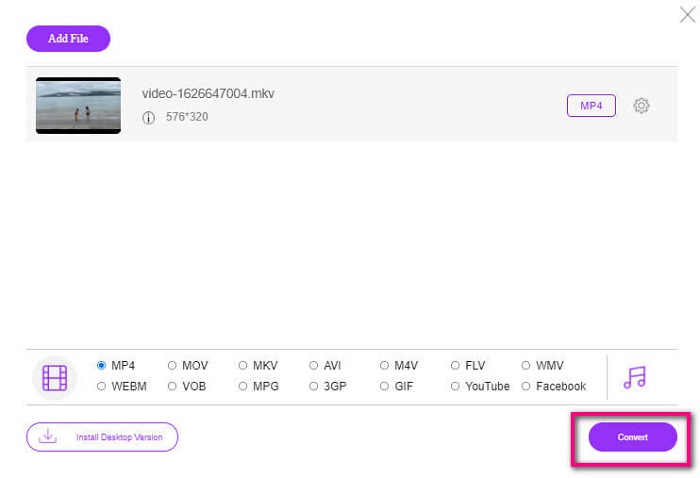
Jos etsit ilmaista muunninta, voit harkita myös työkalua FVC Free Online Video Converter. Vaikka se ei ole yhtä monipuolinen kuin Ultimate Video Converter, se pystyy silti vastaamaan tarpeeseen. Se kykenee varmasti muuntamaan tiedoston ja tekemään siitä yhteensopivan Plexin tai DivX:n kanssa. Sinun tarvitsee vain…
Vaihe 1. Käynnistä työkalu siirtymällä kuvauksessa mainitulle viralliselle sivulle.
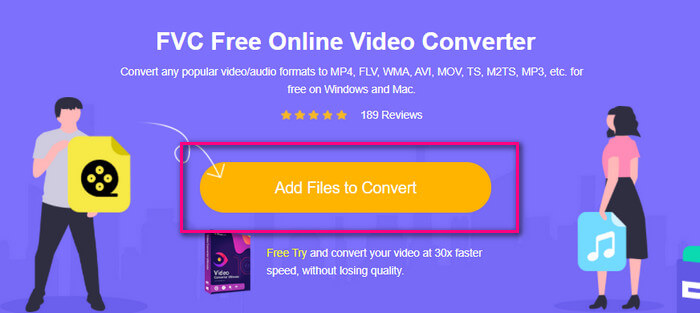
Vaihe 2. Lataa video napsauttamalla Add Files to Convert.
Vaihe 3. Vaihda muoto korostamalla alla oleva ympyrä.
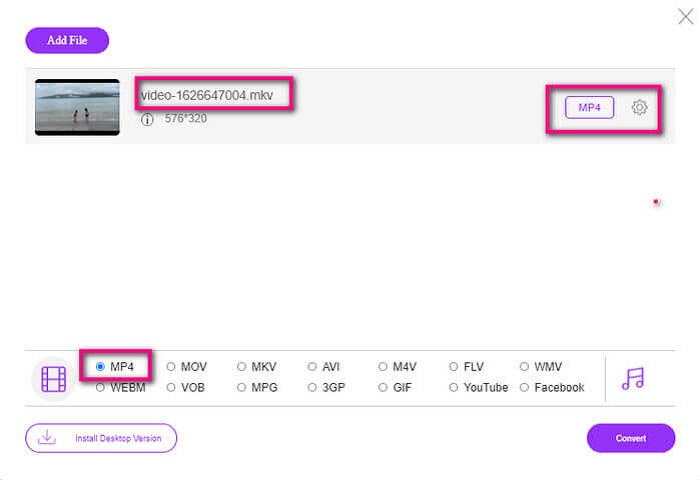
Vaihe 4. Napsauta lopuksi Convert‑painiketta ja valitse sijainti, johon haluat tallentaa tiedoston. Napsauta sitten Okay. Voit napsauttaa Folder‑kuvaketta nähdäksesi muunnetun tiedoston.
Lisälukemista
Toista MKV Windows Media Playerissa
Osa 4. Lisätietoja MKV-tiedostojen toistamisesta PS4:llä
Paljonko PS4 maksaa?
Markkinahinta on 399,99 USD Yhdysvalloissa ja Kanadassa 399,99 CAD. Hinnat voivat vaihdella maasi vähittäismyyntihinnan mukaan.
Onko mahdollista pelata CC:tä tai Close Caption MKV:ta PS4:llä?
Kyllä on. Se löytyy kohdasta Accessibility Settings (esteettömyysasetukset). Polku on seuraava: siirry PS4:n Settings‑kohtaan (asetukset), valitse Accessibility ja sitten Display Closed Captions. Napsauta siellä Options ottaaksesi tekstityksen käyttöön.
Jos PS4 tukee MKV:ta, miksi tiedostoni eivät toistu?
Kuten edellä mainittiin, sinun on varmistettava, että MKV-tiedosto täyttää käyttämäsi soittimen standardit. Sinun tarvitsee vain tarkistaa PS4:n tai muun median suoratoistopalvelimen vaatimus. Useimmilla mediapalvelimilla on myös luokitus MKV-tiedostojen toistamiseksi.
Mitä formaatteja PS4 tukee?
PS4 tukee useita tiedostomuotoja. Mutta huomaat, että useimmat tiedostomuodot ovat pakkaamattomia ja sisältävät suuren tiedoston. Vaikka se tukee myös pakkaamattomia, kuten Mp4. Sillä välin tässä on luettelo muodoista, joista puhumme: MKV, AVI, MPEG-2 PS, MPEG-2 TS, AVCHD ja XAVC ja MP4.
Johtopäätös
Lopuksi on monia tapoja, joilla voit toistaa MKV-tiedostoja suoraan tai epäsuorasti PS4:llä. Luettelossa olevat ovat yleisimmin käytettyjä medioita. DivX Stream Server ja Plex ovat vain joitain vaihtoehtoja, joita voit käyttää. On erittäin suositeltavaa muuntaa tiedosto sen sijaan, jotta vältetään hässäkkä ja liiallinen prosessi.
-
 [Ratkaistu] VLC Player ei toista MKV:ta, kuinka korjata se
 Tukeeko VLC-soitin MKV-tiedostoja? Miksi VLC ei toista MKV: tä? Tämä viesti jakaa 4 hyödyllistä vinkkiä, joiden avulla voit korjata VLC-soittimen, joka ei toista MKV-tiedostoja.
-
 Kuinka toistaa MKV-tiedostoja iPad 2025:ssä
 Kuinka toistaa MKV-tiedostoja iPad 2: lla? Voinko muuntaa MKV: n MP4: ksi pelattavaksi iPad Pro / Air / 2: lla? Tämä viesti jakaa 2 helppoa tapaa pelata MKV: tä iPadilla.
-
 Kuinka ladata MKV-koodekki Windows Media Player -sovelluksessa tasaiselle toistolle
 Etkö voi toistaa MKV-videota Windows Media Playerissa? Voit ladata MKV-koodekin ilmaiseksi Windows Media Playerille. Muunna sitä vastoin MKV, jotta se olisi toistettavissa Windows Media Playerissa.
