


 Video Converter Ultimate
 Näytön tallennin
 Videon korjaus
 Suojattu lataus
7 ilmaista videonkorjaustyökalua: parhaat valinnat videotiedostojen palauttamiseen
Ovatko rakkaat videotiedostosi kärsineet häiriöistä, toisto-ongelmista tai vioittumisesta? Älä huoli – on olemassa ratkaisu, joka ei maksa sinulle senttiäkään. Astu ilmaisten videonkorjaustyökalujen maailmaan; ne ovat avain vaurioituneiden videotiedostojesi palauttamiseen ja kunnostamiseen. Sukellamme näiden ohjelmistoaarteiden ihmeisiin ja näytämme, kuinka pelastat arvokkaat muistosi vaivattomasti. Saat ainutlaatuisen pääsyn internetin 7 parhaaseen ilmaiseen videonkorjausohjelmaan. Älä vain selaile – lue tämä läpi ajatuksella.

Osa 1. 3 parasta ilmaista videonkorjausohjelmistoa (Windows/Mac)
1. MiniTool-videon korjaus
Älä koskaan sano vähemmän, kuten nimi viittaa. MiniTool Video Repair voi korjata yhden suurimmista videoongelmistasi. Et ole koskaan tallentanut videotasi ja säästänyt samalla tilaa. Suunniteltu korjaamaan ja palauttamaan vioittuneet tai vioittuneet videotiedostot.
◆ Suunniteltu vapaamieliselle käyttäjälle. Tämä helppokäyttöinen ratkaisu antaa sinun luoda, muokata ja parannella videoitasi vaivattomasti ja täysin ilmaiseksi. Päästä luovuutesi valloilleen ja herätä videoideasi eloon tämän korvaamattoman työkalun avulla.
◆ Korjaa videoita miltä tahansa laitteelta. Tietokoneesta SD-korttiin – mukana on edistyneitä ominaisuuksia, kuten mahdollisuus lisätä näytevideo, jota ohjelma analysoi ja käyttää sen tietoja vaurioituneen videon korjaamiseen.
◆ Korjaa useita videoita yhdellä kertaa. Säästää arvokasta aikaasi ja virtaviivaistaa korjausprosessia.
Vaihe 1. Asenna ohjelmisto Minitool-verkkosivustolta.
Vaihe 2. Käynnistä ohjelmisto tietokoneeltasi ja napsauta Add Video(s).
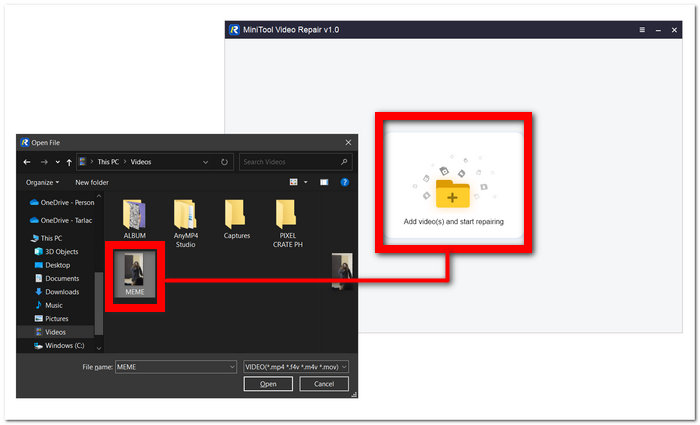
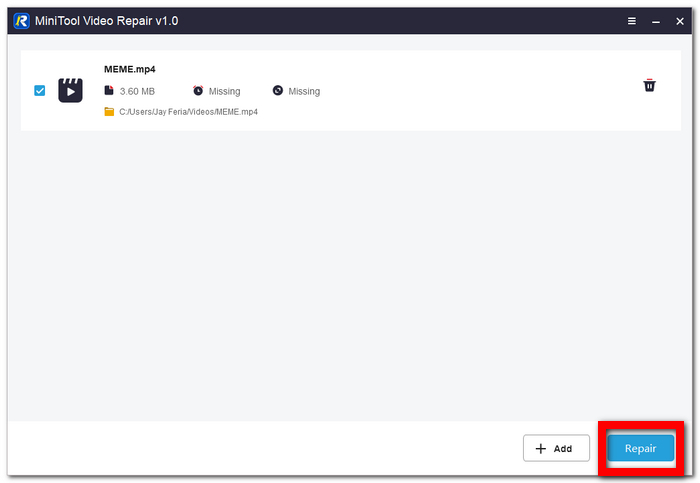
Vaihe 3. Lataa videosi ohjelmistoon ja napsauta Repair.
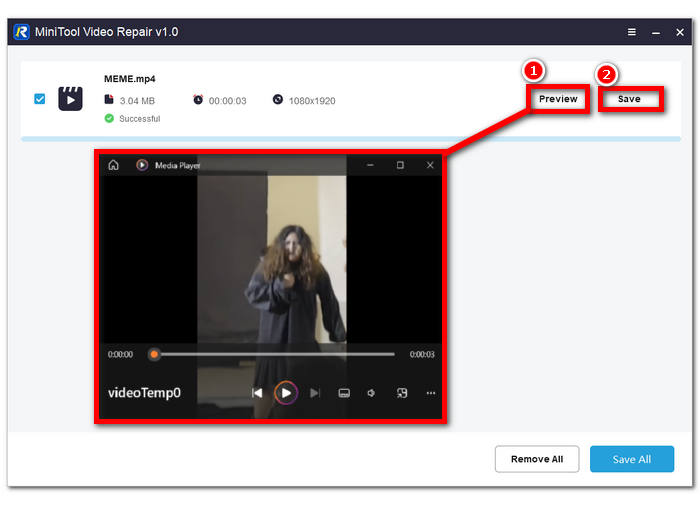
Vaihe 4. Korjauksen jälkeen voit napsauttaa Preview nähdäksesi, onko laatu kunnossa, ja jatkaa sitten kohtaan Save tallentaaksesi korjatun videotiedoston tietokoneellesi.
2. Aiseesoft Video Repair
Rikkinäisen korjaaminen on asia, jossa Aiseesoft Video Repair on omimmillaan. Sinun ei enää koskaan tarvitse kokea tunnekuohua vain huomataksesi, että videosi ovat vioittuneet eikä niitä voi toistaa. Ohjelmisto hyödyntää erittäin korkeatasoista palautustekniikkaa, mikä tekee siitä yhden niistä työkaluista verkossa, joihin kannattaa kiinnittää huomiota – ja syystäkin.
◆ Hyvästi tuntikausien turhautumiselle. Koe saumattoman videonpalautuksen taika jo tänään. Säästä aikaasi ja pelasta muistosi palauttamalla vioittuneet videosi vaivattomasti helppokäyttöisellä ohjelmistollamme.
◆ Näytevideopohjaisen palautuksen taika. Huippuluokan teknologia varmistaa, että rakkaat muistosi tai ammattiprojektisi näyttävät yhtä upeilta kuin vertailuvideo, säilyttäen jokaisen yksityiskohdan ja tarkkuuden nautintoasi tai esitystäsi varten.
◆ Vahvat tietoturvatoimet. Käytämme alan uusimpia salausmenetelmiä, käyttöoikeusvalvontaa ja vahvoja todennusprotokollia tietojesi suojaamiseksi. Voit luottaa siihen, että tietosi ovat turvassa palautusprosessin aikana, mikä antaa sinulle mielenrauhaa ja varmuutta palvelumme käytössä.
Vaihe 1. Lataa ja asenna ohjelmisto tietokoneellesi. Asennuksen jälkeen avaa ohjelma.
Ilmainen latausWindows 7 tai uudempiSuojattu lataus
Ilmainen latausMacOS 10.7 tai uudempiSuojattu lataus
Vaihe 2. Päänäkymässä napsauta +-painiketta ohjelman käyttöliittymän vasemmalla puolella lisätäksesi vioittuneen videotiedostosi. Seuraavaksi lisää näytevideo napsauttamalla +-painiketta käyttöliittymän oikealla puolella.
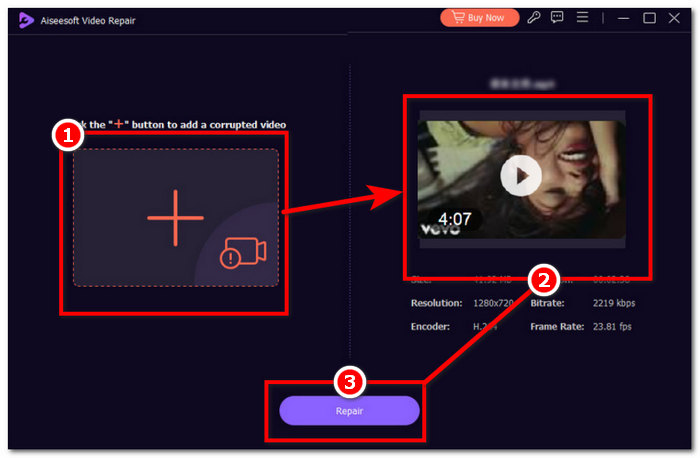
Vaihe 3. Napsauta Repair aloittaaksesi korjausprosessin, ja kun ohjelma on saanut vioittuneen videotiedoston korjattua, voit napsauttaa Preview tarkistaaksesi laadun itse.
Vaihe 4. Kun olet tyytyväinen lopputulokseen, napsauta Save tallentaaksesi videon tietokoneellesi.
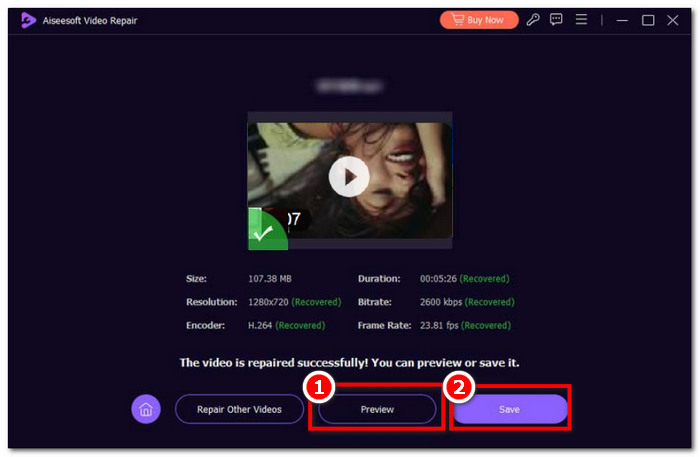
Nopea nopeus, pikanäppäimet, vahva suojaus ja esikatselu ovat joitakin Aiseesoft Video Repairin tärkeimpiä ominaisuuksia. Intuitiivinen ohjelmisto nopeatempoiseen työmäärään, joka antaa sinulle etulyöntiaseman laadun suhteen.
3. Stellar Phoenix -videon korjaustyökalu
Paras usko, että Stellar Phoenix Video Repair Tool, kun sitä käytetään, voisi tehdä koko työstäsi yksinkertaisempaa. Ilmainen korjausvideotiedosto, jossa on tekoälyyn integroidut työkalut, korkealaatuisin ja selkeä muotoilu.
◆ AI:lla tehostettu työkalu. Kadonneiden ja vioittuneiden tietojen ammattimainen palauttaminen vaatii ammattitason ohjelmiston, joka hyödyntää jatkuvasti kehittyviä tekoälyalgoritmeja viimeistellyn ja pikselintarkan korjauksen saavuttamiseksi.
◆ Huippuluokan laatua. Voit odottaa korkeaa korjausonnistumisprosenttia sekä esikatseluominaisuutta, jolla tarkistat virheettömän palautuksen korkeimmalla mahdollisella laadulla, kuvataajuudella ja bittinopeudella – tukien sinulle tuttuja videoformaatteja.
◆ Sulavampi ja suoraviivaisempi. Sinun ei enää tarvitse nähdä vaivaa puolivillaisten ohjelmien kanssa, jotka eivät täytä odotuksia; sen sijaan korjaa videoita jo tänään eri laitteilta selkeän ja yksinkertaisen käyttöliittymän ansiosta.
Vaihe 1. Mene Stellar Phoenix Video Repair Tool -verkkosivustolle ja lataa sekä asenna ohjelmisto.
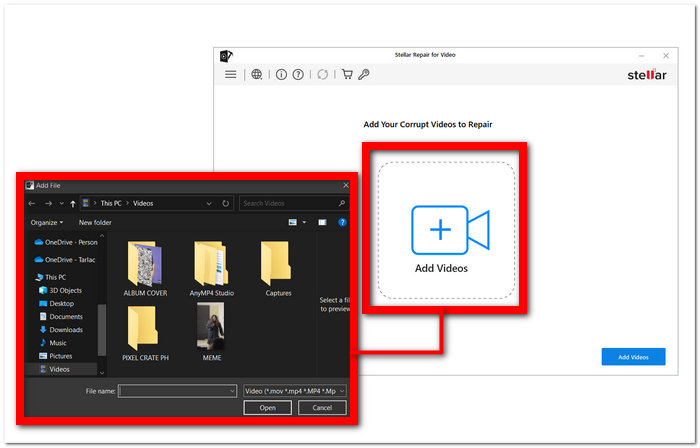
Vaihe 2. Kun olet asentanut ohjelmiston, avaa se ja napsauta Add Videos -osiota.
Vaihe 3. Valitse vioittuneet videot, jotka haluat palauttaa.
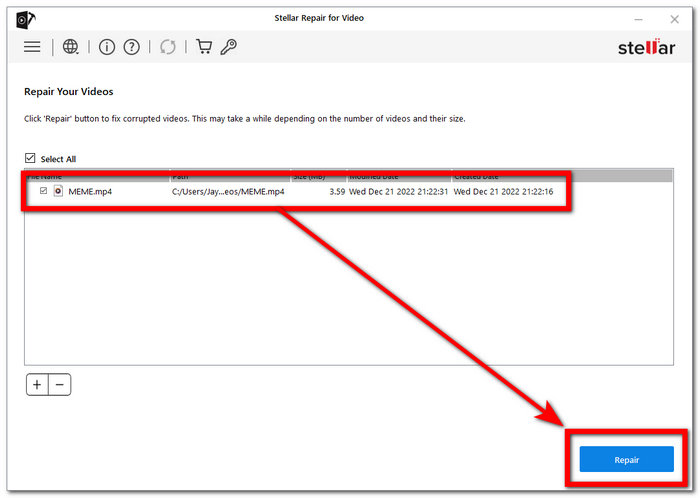
Vaihe 4. Napsauta Repair aloittaaksesi videoidesi korjaamisen.
Kaikki on ammattimaisesti suunniteltu maksimoidaksesi ja tuodaksesi esiin ammattilaisesi näin edullisessa järjestelmävaatimuksessa. Erikoistunut videon korjaamiseen, sen ytimessä, FVC Video Repairilla, korruptioongelmat eivät enää ole.
Osa 2. 2 parasta ilmaista videonkorjaustyökalua verkossa
1. EaseUS RepairVideo
Vioittuneiden videoiden korjaaminen on helppoa ohjelmistomme avulla riippumatta siitä, ilmenivätkö ongelmat kuvauksen, editoinnin, siirron tai minkä tahansa muun prosessin aikana. RepairVideo pystyy käsittelemään erilaisia videomuotoja, mukaan lukien MP4, MOV, M2TS, MKV, MTS, 3GP, AVI, FLV, M4V ja paljon muuta.
◆ 19 vuoden kokemus. Olemme onnistuneesti korjanneet lukemattomia videoita kotivideoista ammattikuvaan, jotta asiakkaamme voivat elää uudelleen arvokkaita hetkiään ilman häiriöitä tai korruptiota. Voit luottaa laajaan osaamiseemme ja omistautumiseemme palauttaa videosi eloon – haasteista riippumatta.
◆ Korjaus useilta eri laitteilta. Huippumerkit, kuten Canon, Nikon, Sony, GoPro, DJI jne. Olipa kyseessä materiaali puhelimestasi tai muista videolaitteista, työkalumme on suunniteltu palauttamaan arvokkaat videosi vaivattomasti, jotta et koskaan menettäisi tärkeitä muistoja.
◆ Nopea ja vaivaton. Yli 120 miljoonan korjatun videon kokemuksella takaamme sinulle nopean palvelun.
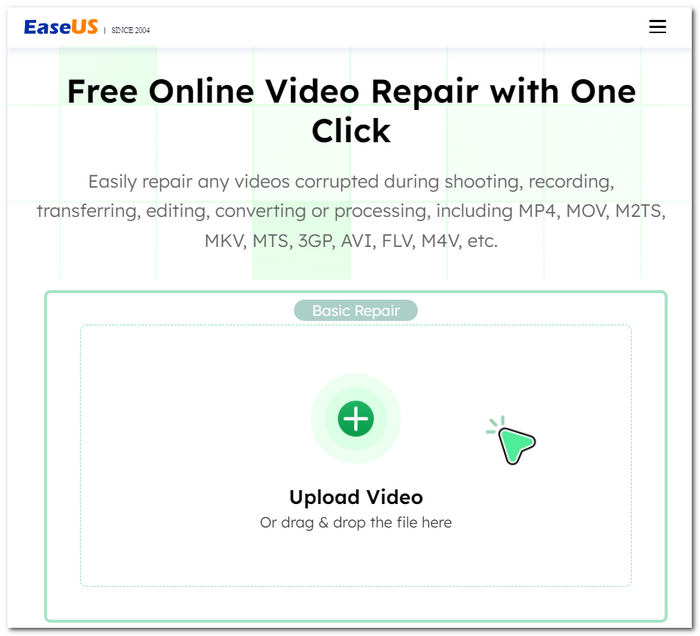
Sano hyvästit turhauttaville videohäiriöille ja toisto-ongelmille; Ratkaisumme on palauttaa videosi niiden alkuperäiseen laatuun. Riippumatta siitä, kuinka videosi vaurioituvat, se tarjoaa tehokkaan tavan palauttaa ja korjata ne. Nauti arvokkaista muistoistasi keskeytyksettä – luota työkaluumme, joka tekee videoistasi kuin uusia.
2. iSkysoft Repairit Online
Se tukee useita vioittuneita tai vaurioituneita videotiedostomuotoja, mukaan lukien MP4, MOV, 3GP ja paljon muuta. Olipa videosi matkapuhelimissa, kameroissa, muistikorteissa tai tietokoneissa, työkalumme voi korjata ne tehokkaasti helposti.
◆ Ammattilaistason palautustyökalu. Pyrimme säilyttämään jokaisen yksityiskohdan ja kirkkauden. Ohjelmistomme avulla voit elää uudelleen arvokkaat hetkesi tinkimättä kuva- tai äänenlaadusta – riippumatta siitä, kuinka pahasti tiedostot ovat vaurioituneet. Videosi, muistosi – täydellisesti palautettuina.
◆ Ei kompromisseja videodatan suhteen. Rakkaat muistosi ja sisältösi säilyvät koskemattomina koko korjausprosessin ajan. Voit luottaa siihen, että palautamme videosi vahingoittamatta niiden luontaista viehätystä ja selkeyttä.
◆ Korjaus laajalta laitekirjolta. Mobiilipuhelimista ja kameroista muistikortteihin ja tietokoneisiin. Helppokäyttöisen ohjelmistomme avulla voit palauttaa ja katsella videoitasi ilman vaivaa – riippumatta siitä, millä laitteella ne on kuvattu.
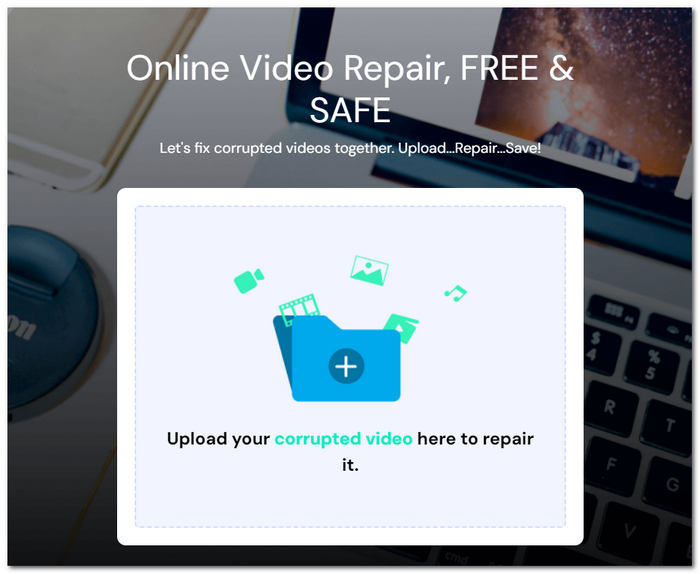
Korjausprosessi on vaivaton; lataa vain vaurioituneet videotiedostot, ja muutamassa minuutissa voit ladata täysin palautetut versiot. Voit luottaa tietojesi turvallisuuteen, sillä tiedostonsiirtosi on suojattu 2048-bittisellä salatulla yhteydellä, mikä varmistaa yksityisyytesi ja suojasi.
Osa 3. Parhaat videonkorjaussovellukset videoiden korjaamiseen iOS Androidissa
1. Jatka
Esittelyssä tehokas ja käyttäjäystävällinen videon parannus- ja muokkaussovellus, joka on yhteensopiva Android- ja iOS-laitteiden kanssa.
◆ Selkeä ja yksinkertainen käyttöliittymä. Tekee käyttäjille uskomattoman helpoksi nostaa videonsa ammattitasolle.
◆ Intuitiiviset työkalut. Voit vaivattomasti rajata, leikata, säätää toistonopeutta, parantaa videon laatua ja paljon muuta – varmistaen, että videosi näyttävät ja kuulostavat mahdollisimman hyviltä.
◆ Laaja tekijänoikeusvapaan musiikin kirjasto. Mahdollistaa täydellisen ääniraidan lisäämisen – ei vain parantaen videoidesi laatua, vaan tehden niistä entistäkin vangitsevampia ja mukaansatempaavampia.
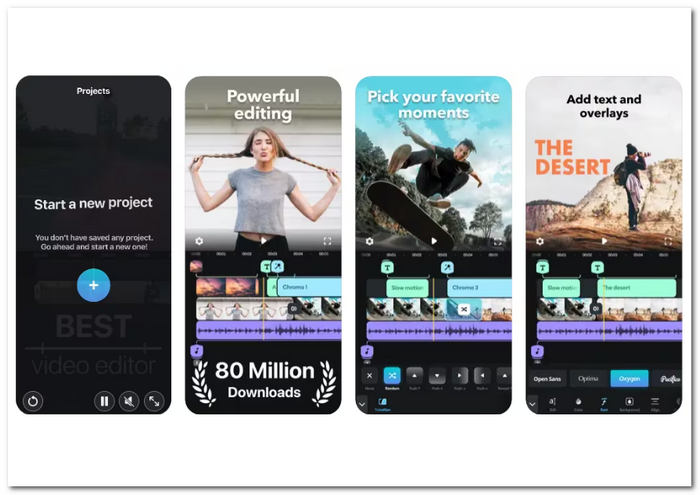
Olitpa sisällöntuottaja, vloggaaja tai joku, joka haluaa korostaa rakkaita muistojaan, Splice tarjoaa monipuolisen ratkaisun kaikkiin videoeditointitarpeisiisi. Lataa nyt sovelluskaupastasi ja hyödynnä videoluomustesi koko potentiaali.
2. KinemasterBackup
Arvostettu videonparannustyökalusovellus Android- ja iOS-laitteille. Tämä käyttäjäystävällinen sovellus tarjoaa joukon muokkaustyökaluja, joiden avulla voit muuttaa videoitasi.
◆ Monipuolinen ominaisuuspaketti. Suunnattu videoidesi laadun parantamiseen. Voit säätää kirkkautta, kontrastia, kylläisyyttä, valaistusta ja paljon muuta tuottaaksesi ammattimaisen näköistä videosisältöä.
◆ 4K-videoiden käsittely. Varmistaa, että sisältösi säilyy huippuluokkaisena tarkkuuden suhteen.
◆ Helppo integroida eri alustoihin. Mahdollistaa videoiden lataamisen YouTubesta, Instagramista ja muista suosituista sosiaalisen median kanavista.
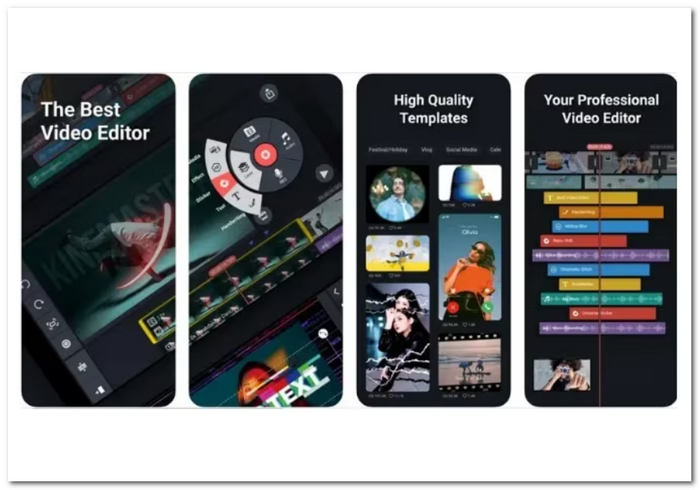
Rajauksesta tehosteiden, suodattimien, peittokuvien ja jopa kehyskohtaisten leikkausten lisäämiseen, KineMaster antaa sinulle mahdollisuuden kohottaa videosisältöäsi. Sovellus mahdollistaa videon kerrostamisen, mikä antaa sinulle luovan vapauden yhdistää useita elementtejä saumattomasti.
Osa 4. Usein kysyttyä Top Free Video Repairista
Onko Wondershare Video Repair ilmainen?
Ohjelma Wondershare Video Repair ei ole ilmainen. Voit yleensä kokeilla sen ominaisuuksia ilmaisella kokeiluversiolla, mutta saatat tarvita lisenssin tai tilauksen saadaksesi täyden käyttöoikeuden ja ominaisuudet.
Onko olemassa ilmaista videonkorjaussovellusta?
Kyllä, saatavilla on ilmaisia videonkorjaussovelluksia ja -työkaluja. Joitakin ilmaisia videokorjausohjelmistovaihtoehtoja ovat Splice ja KinemasterBackup, kuten aiemmin mainittiin. Ne ovat ladattavissa Android- ja iOS-laitteille ilmaiseksi, ja ne ovat tilauspohjaisia lisäominaisuuksien saamiseksi.
Toimivatko ilmaiset videonkorjaustyökalut todella?
Joissakin videoongelmissa ilmaiset videonkorjausohjelmat voivat olla hyödyllisiä. Ne ovat erittäin hyödyllisiä yleisiin vaikeuksiin, mukaan lukien pienet toistohäiriöt, synkronointiongelmat ja vioittuneet tiedostot. Siitä huolimatta videotiedoston tuhoutumisaste voi määrittää sen tehokkuuden. Monimutkaisempiin ja vakavampiin ongelmiin voidaan tarvita ammattimaisia videokorjauspalveluita tai ostettuja ohjelmistoja, joissa on kehittyneitä toimintoja. Ennen kuin tarkastelet premium-vaihtoehtoja, on aina hyvä idea testata ilmaista työkalua nähdäksesi, voiko se korjata videoongelmiasi.
Johtopäätös
Ilmaiset videonkorjaustyökalut ovat todellinen pelastus kenelle tahansa, jonka videotiedostot ovat vaurioituneet tai korruptoituneet. Ne tarjoavat edullisen tavan palauttaa arvokkaat muistosi ilman ammattilaisen apua. Erilaisten sovellusten ja työkalujen ansiosta voit valita juuri sen, joka parhaiten vastaa tarpeitasi ja mieltymyksiäsi.
Älä anna toisto-ongelmien pilata katselukokemustasi. Kokeile jotakin näistä ilmaisista videonkorjaustyökaluista jo tänään ja nauti videoistasi niin kuin niiden on tarkoitus – virheettöminä ja unohtumattomina.
-
 Videon toiston epäonnistumisen 5 -ongelman korjaaminen helposti
 Oletko kokenut jonkun lataamiesi videoiden toistamisen, mutta videon toiston epäonnistuminen -virheilmoitus 5 on häirinnyt sinua? Tässä on kaikki, mitä sinun tarvitsee tietää.
-
 Videoitani ei toisteta. Mitä minun pitäisi tehdä niiden korjaamiseksi
 Oletko jumissa videoissa, joita ei toisteta, etkä tiedä kuinka korjata ne? Olet oikealla tiellä korjataksesi ongelmasi. Tässä on kaikki, mitä sinun tarvitsee tietää.
-
 5 100%: n toimivia ratkaisuja videoiden korjaamiseen, joita ei toisteta iPadilla
 Videoitasi ei toisteta iPadissa? Tässä on viisi ratkaisua, jotka auttavat sinua pääsemään eroon tästä ongelmasta, ja voit sitten nauttia suosikkivideoistasi helposti luurilla.
