


 Video Converter Ultimate
 Näytön tallennin
 Videon korjaus
 Suojattu lataus
Opi kaikki siitä, mikä on 3D tai kolmiulotteisuus
Haluatko tietää, mitä 3D on? 3D- tai kolmiulotteiset elokuvat ja kuvat ovat yleistymässä. Koska elämme nykyaikaa, 3D-elokuvan luominen on helppoa eri työkaluilla. Mutta ensin meidän on ymmärrettävä kaikki 3D:stä: tausta, määritelmä ja 3D-videon tekeminen.
Tässä artikkelissa perehdymme 3D‑tekniikkaan ja sen parametreihin. Jos siis haluat oppia, mitä 3D on, lue tämä artikkeli.

Osa 1. Mikä on 3D
3D- tai kolmiulotteiset kohteet näyttävät leveyden, korkeuden ja syvyyden. Näemme päivittäin 3D-objekteja, koska fyysinen ympäristömme on itse kolmiulotteinen. Meillä ihmisillä olevan 3D-havainnon ansiosta voimme havaita 3D-kohteet, joita kutsutaan myös syvyyshavaituksi. Kun katsot ympärillesi, silmiemme verkkokalvo muodostaa kaksiulotteisen kuvan, ja aivomme käsittelevät kaksi kuvaa 3D-visuaalisina kuvina. Mutta tiesitkö? Onko meillä ihmisillä työkaluja, joita käytämme syvyyden havaitsemiseen?
Tässä ovat ihmisen työkalut, joita käytämme syvyyshavaintoon:
Stereoskooppinen näkö – Stereoskooppinen näkö on kahden silmän avulla havaittu syvyysvaikutelma. Se on yksi aivojen kyvyistä rekisteröidä kolmiulotteisia muotoja ja näkyjä. Tässä näössä lähellä olevat kohteet näyttävät erottuvan toisistaan enemmän kuin kauempana olevat.
Parallaksi – Tämän tyyppistä näköä mitataan kahden suoran välisillä kulmilla. Kun liikutat päätäsi puolelta toiselle, läheiset kohteet näyttävät liikkuvan enemmän kuin etäiset kohteet.
Koon tuttuus – Jos olet entuudestaan tuttu jonkin esineen todellisen koon kanssa, voit arvioida, kuinka suurena sen pitäisi näkyä myös kauempaa. Samoin, jos kahdella esineellä on sama todellinen koko, mutta toinen näyttää suuremmalta, oletetaan, että suuremmalta näyttävä on lähempänä.
Akkommodaatio – Kun tarkennat katseesi lähellä olevaan kohteeseen, silmän linssi muuttuu fyysisesti. Sen perusteella silmä ja aivot päättelevät, kuinka kaukana kohde on. Akkommodaatio on myös se mekanismi, jonka avulla silmä pitää kohteen tarkkana.
Ilmaperspektiivi – Ilmaperspektiivissä kaukana olevat kohteet näyttävät pienemmiltä, koska näkymä on etäinen. Kaukaiset kohteet näyttävät lisäksi vähemmän kontrastisilta ja vähemmän värikylläisiltä.
Fyysisessä maailmassamme on myös erilaisia 3D-muotoja. 3D:tä kuvataan myös kuvaksi, joka antaa illuusion vaihtelevien etäisyyksien syvyydestä ja jota käytetään yleisesti tietokonepeleissä, grafiikassa, virtuaalitodellisuudessa ja elokuvissa.
Erilaisia 3D-muotoja:
3D‑tietokonegrafiikka – 3D‑tietokonegrafiikan avulla voidaan tuottaa kolmiulotteisia objekteja näyttöruudulle eli kaksiulotteiseen tilaan. 2D‑grafiikan pikseleillä on erilaisia ominaisuuksia, kuten sijainti, väri ja kirkkaus. 3D‑grafiikassa pikseleille lisätään sijainti Z‑akselilla. Kun pikselit yhdistetään niiden syvyystiedon kanssa, tuloksena on kolmiulotteinen pinta, jota kutsutaan tekstuuriksi.
3D‑elokuvat – 3D‑elokuvat ovat liikkuvaa kuvaa, jossa on kolmiulotteinen syvyysvaikutelma. 3D‑lasien avulla voimme katsoa 3D‑elokuvaa. Tällaisia elokuvia tehdessä hyödynnetään stereoskooppista näköä: näytetään samanaikaisesti kahta kuvaa, toinen kummallekin silmälle.
3D‑tulostus – 3D‑tulostus tunnetaan myös nimellä additiivinen valmistus. Se on prosessi, jossa digitaalisesta tiedostosta valmistetaan fyysinen kolmiulotteinen esine. Tietokoneavusteisen suunnitteluohjelman (CAD) avulla voit tulostaa 3D‑objektin digitaalisesta mallista.
Osa 2. 3D-elokuvien toistaminen
Nyt kun tiedät 3D-merkityksen, kerro meille kuinka toistaa 3D-elokuvia parhaimmalla mahdollisella ohjelmistosovelluksella.
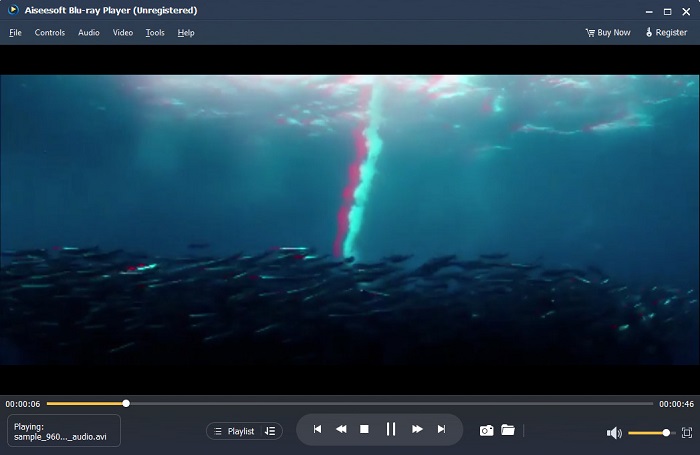
Blu-ray Player on työpöytäsovellus, jolla voit toistaa minkä tahansa tyyppistä videota. Tämän työkalun avulla voit myös toistaa 3D-elokuvia ilman lisäosia. Lisäksi monet ihmiset suosittelevat tätä mediasoitinta sen yksinkertaisen ja puhtaan käyttöliittymän vuoksi. Lisäksi tämä tehokas mediasoitin voi toistaa Blu-ray-levyjä, Blu-ray-kansioita, DVD-/kansio-/ISO-tiedostoja, joita muut mediasoittimet eivät tue. Voit myös nauttia HD-videoiden katselusta 100-prosenttisesti häviöttömällä äänellä ja dramaattisella HD-surround-äänellä. Mikä on jopa hämmästyttävää, on se, että voit luoda soittolistan, jotta sinulla ei ole vaikeuksia erottaa haluamasi videot tai audiot.
3D-elokuvan toistaminen Blu-ray-soittimella:
Vaihe 1. Lataa laitteellesi Blu‑ray Player. Seuraa asennusohjeita ja käynnistä sitten sovellus.
Vaihe 2. Napsauta ohjelman pääikkunassa Open File ‑painiketta. Laitteesi tiedostot avautuvat näkyviin, ja voit valita katsottavan 3D‑elokuvan.
Vaihe 3. Tiedostosi alkaa latautua toistoon. Voit nyt laittaa erikoisrakenteiset 3D‑lasit päähäsi ja nauttia 3D‑elokuvasta.
Osa 3. Mitä ovat 3D-TV ja 3D-lasit
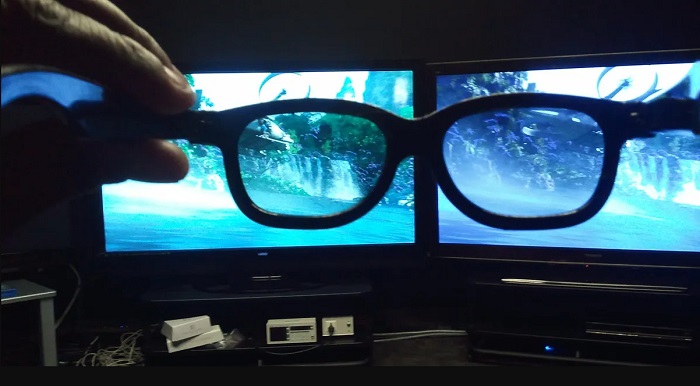
3D-televisioita on kahdenlaisia: Active-suljin 3D, Active 3D ja Passive 3D. Tämä osa erottaa niiden erot ja määrittää, minkä tyyppisiä 3D-laseja kannattaa käyttää katseltaessa Active-suljin- tai passiivista 3D-televisiota.
Aktiivisuljin‑ tai Active 3D on 3D‑televisiotekniikka, joka näyttää korkealaatuisia 3D‑kuvia vuorotellen ruudulla. Active 3D ‑TV esittää vuorotellen oikealle ja vasemmalle silmälle tarkoitetut kuvat. 3D‑lasit vuorottelevat mustaksi sulkeutuvia linssejä, jotta TV‑ruudulla näkyvä 3D‑efekti syntyy. Näin kumpikin silmä näkee vain sille tarkoitetun kuvan. Active‑shutter‑3D‑television kanssa on käytettävä aktiivisia 3D‑laseja. Tällaiset 3D‑lasit tarvitsevat pariston, jota käytetään linssien sähköiseen himmennykseen ja sulkemiseen. Laseihin on integroitu nestekidenäytöllä (LCD) toimivat linssit, jotka tahdistetaan ruudulla vuorotteleviin kuviin.
Sen sijaan passiivinen 3D‑TV on jossain määrin samankaltainen kuin elokuvateattereissa käytettävä 3D‑tekniikka. Tämän tyyppinen 3D‑TV hyödyntää erityisiä suotimia näytössä, ja 3D‑kuva nähdään laseissa olevien polarisoitujen linssien avulla. Lisäksi passiiviset 3D‑televisiot yhdistävät kaksi kuvavirtaa yhdeksi ja jakavat ne vuorotellen näytön vaakaviivoille vasenta ja oikeaa silmää varten. Näillä televisioilla käytetään passiivisia 3D‑laseja, joissa kummallakin linssillä on oma polarisaationsa. Toinen silmä näkee vain parittomat viivat ja toinen vain parilliset viivat, jolloin muodostuu 3D‑kuva. Passiiviset 3D‑lasit eivät tarvitse paristoja toimiakseen.
Osa 4. 2D vs. 3D
2D ja 3D ovat todellisia mittoja tietokonetyötilassa. 2D tai kaksiulotteiset ovat litteitä objekteja, jotka käyttävät vaaka- ja pystymittoja (X- ja Y-akseli). Koska 2D:llä on vain kaksi ulottuvuutta, näet vain viivan, kun käännät ne sivulle. Sillä on vain korkeus ja leveys, mutta siinä ei ole syvyyttä. Toisaalta 3D tai kolmiulotteinen sisältää korkeuden, leveyden ja syvyyden. Kolmiulotteinen kuva tarvitsee kahden silmän työskentelyn rinnakkain nähdäkseen kolmiulotteisen havainnon. Jos 2D käyttää X- ja Y-akselia, 3D lisää Z-ulottuvuuden, jolloin voit nähdä kohteen syvyyden.
Jos kysyt, mikä on hyvä käyttää, 2D vai 3D, vastaus on molemmat. 2D:llä ja 3D:llä on erilaisia etuja ja haittoja. Voit esimerkiksi katsoa 2D-videoita tai elokuvia missä tahansa millä tahansa laitteella ilman erityisiä 3D-laseja. 3D-elokuvien tuottama 3D-tehoste on kuitenkin hämmästyttävä ja hauskempi katsoa kuin 2D.
Osa 5. 2D-filmin muuntaminen 3D:ksi
Jos haluat katsoa hämmästyttävää 3D-elokuvaa tai leikettä kotonasi ilman 3D-laseja, voit muuntaa 2D-elokuvasi 3D:ksi käyttämällä parasta videomuunninta. Joten jos haluat muuntaa 2D-elokuvasi 3D-filmiksi, käytä tätä hämmästyttävää ohjelmistosovellusta.
FVC Video Converter Ultimate on sovellus, joka on suosittu videomuunnoksissa. Tämä ohjelma ei pelkästään muuta tiedostomuotoja, vaan sen avulla voit myös muuntaa 2D‑videon 3D‑videoksi, esimerkiksi anaglyfiseen 3D‑muotoon tai jaetun ruudun 3D‑muotoon. FVC Video Converter Ultimate on käyttäjien suosiossa, koska se tukee lähes kaikkia tiedostomuotoja, kuten MP4, MKV, AVI, FLV, WEBM, MOV, DIVX ja yli 1000 muuta. Lisäksi siinä on runsaasti edistyneitä muokkaustoimintoja, kuten 3D‑työkalu, GIF‑työkalu, videon vesileiman poistaja jne.
2D-elokuvien muuntaminen 3D-elokuviksi FVC Video Converter Ultimate -sovelluksella:
Vaihe 1. Lataa ensin FVC Video Converter Ultimate napsauttamalla alla olevaa Download‑painiketta.
Ilmainen latausWindows 7 tai uudempiTurvallinen lataus
Ilmainen latausMacOS 10.7 tai uudempiTurvallinen lataus
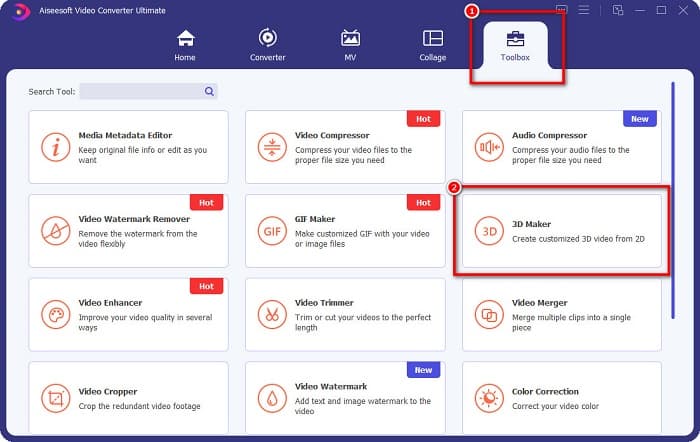
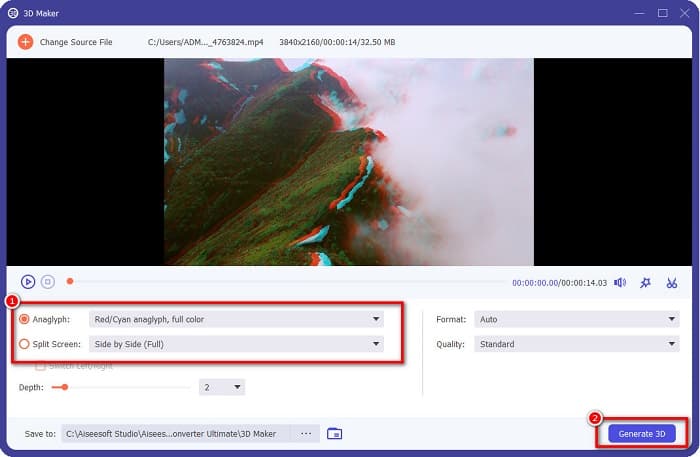
Vaihe 2. Avaa sovellus, siirry Toolbox‑paneeliin ja valitse 3D Maker.
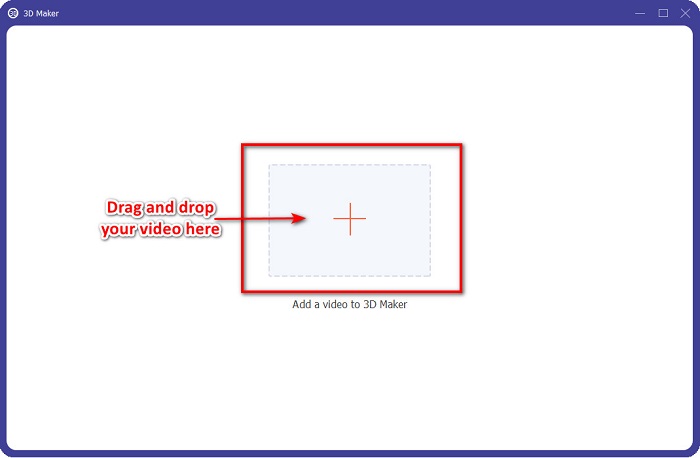
Vaihe 3. Napsauta +‑painiketta tai raahaa ja pudota 2D‑videosi laatikkoon seuraavassa näkymässä.
Vaihe 4. Valitse sitten Anaglyph 3D tai Split Screen 3D. Sen jälkeen napsauta Generate 3D ‑painiketta.
Liittyen:
Nopeimmat tavat muuntaa AVI WMV‑muotoon [Parhaat muuntimet]
Muunna MOV helposti WMV‑muotoon näillä erinomaisilla muuntimilla
Osa 6. Usein kysyttyä mitä 3D on
Voitko katsoa 3D-videoita VLC Media Playerilla?
Joo. VLC Media Player tukee kaikkia tiedostomuotoja. Voit myös toistaa 3D-elokuvia VLC-mediasoittimella.
Voitko muuntaa 3D-videoita 2D-muotoon?
FVC Video Converter Ultimate voi muuntaa 3D-videot 2D-muotoon. Voit myös muuttaa videosi tiedostomuotoa tällä muuntimella.
Kumpaa on käytetty enemmän, 2D vai 3D?
Nykyään elokuvateollisuudessa 3D-elokuvat ovat hallitsevampia kuin 2D-elokuvat. Mielenkiintoisen grafiikan ja realistisen animaation vuoksi 3D-elokuvat ovat suositumpia kuin 2D-elokuvat.
Johtopäätös
3D eli kolmiulotteinen kuva on laajalti tunnettu elokuva‑alalla ja erityisesti tietokoneissa. Nyt kun tiedät, mitä 3D on, sinulla on perustiedot siitä, miten voit itse luoda 3D‑sisältöä. Jos haluat tehdä 3D‑videon helposti, käytä ohjelmaa FVC Video Converter Ultimate.
-
 3 tapaa muuntaa MPG 3GP:ksi Windowsissa ja Macissa [ilmainen]
 Jos etsit tapoja muuntaa MPG 3GP:ksi, lue tämä artikkeli saadaksesi selville parhaat tavat muuntaa MPG 3GP:ksi Windowsissa ja Macissa.
-
 5 parasta ilmaista MPEG-DivX-muunninta Windowsille ja Macille
 Muunna MPEG-tiedostosi helposti DivX-tiedostoksi parhaiden MPEG-DivX-muuntimien avulla. Lue tämä artikkeli saadaksesi lisätietoja niistä.
-
 Parhaat MOV-DivX-muuntimet ilmaiseksi käytettäväksi Macille ja Windowsille
 Meillä on ratkaisu sinulle, jos etsit ilmaisia MOV-DivX-muuntimia. Tässä artikkelissa esitellään suosituimmat MOV-DivX-muuntimet Macille ja Windowsille.
