


 Video Converter Ultimate
 Näytön tallennin
 Videon korjaus
 Suojattu lataus
Kaikki mitä voit oppia siitä, mikä on PNG-tiedosto
Nykyään PNG-tiedostomuoto on yksi tavallisimmista kuvamuodoista. Näet sitä internetissä, tietokoneilla, matkapuhelimissa jne. Kaikilla käyttäjillä ei kuitenkaan ole käsitystä tästä muodosta. Onneksi tämä artikkeli antaa sinulle kaiken tarvitsemasi tiedon. Saat selville, mikä PNG-tiedosto on. Lisäksi tämä kirjoitus tarjoaa erinomaisia menetelmiä, joilla voit muuntaa kuvia PNG-tiedostomuotoon.

Osa 1. Yksityiskohtaiset tiedot PNG-tiedostosta
Rasteriperheen Portable Network Graphics (PNG) -laajennus suorittaa häviöttömän kuvanpakkauksen. Sitä ei ole patentoitu, ja se luotiin korvaamaan GIF, Graphics Interchange Format. Läpinäkyvyyttä tarjoavien tavallisten harmaasävykuvien lisäksi ne voivat perustua palettiin. PNG ei tue muita värityyppejä, kuten CMYK. Se johtuu siitä, että yksi sen päätarkoituksista on lähettää kuvia Internetin kautta. Se ei myöskään ottanut huomioon ammattimaisia painotöitä. Tiedostossa oleva kuva on jaettu tietopaloihin. Se sisältää koodattuja pikseleitä tai tekstikommentteja, ja eheys varmistetaan RFC 2083:lla. Monet käyttäjät törmäävät PNG-muotoon. Se johtuu siitä, että se on yksi suosituimmista muodoista nykyään. Se voi olla sähköpostin liite tai verkkosivustolta hankkimasi kuva. Joskus kuvakaappauksilla on myös tämä resoluutio. Siitä on enemmän hyötyä ammattilaisille, jotka voivat käyttää sitä.
Historiallisesti PNG-kuvamuoto sai alkunsa vuonna 1995. Oliver Fromme, IT-asiantuntija, keksi muodon PING. Mutta myöhemmin siitä tuli PNG. Tämä tiedostomuoto on GIF-muodon seuraava kehitys. GIF-muoto on kahdeksan vuotta vanhempi kuin PNG. GIF:llä on monia haittoja. Se vaatii patenttilisenssin ja rajoitetun 256 värin valikoiman. Tämä rajoitus voi vaikuttaa kuvaan, kun se avataan tietokoneen näytöllä. Tämän seurauksena PNG-tiedoston tekeminen on paras valinta. Se on patentoitu ja siinä on suurempi väripaletti.
Osa 2. Kuinka avata PNG-tiedosto
Koska tiedät jo, mikä .png-tiedosto on, tässä osassa kerrotaan, kuinka tämä muoto avataan laitteillasi ja eri selaimilla. Voit avata PNG-kuvasi millä tahansa suositulla verkkoselaimella. Se sisältää Firefoxin, Chromen, Explorerin ja paljon muuta. Menetelmä on ongelmaton.
Jos käytät selainta, voit avata PNG-kuvan painamalla näppäimistöltä Ctrl + O. Valitse PNG-kuva, jonka haluat avata. Napsauta sitten tiedostokansiosta Open-painiketta.
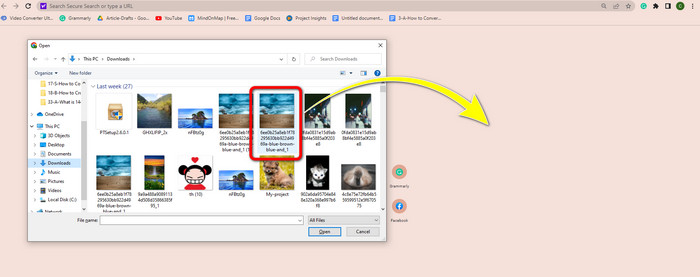
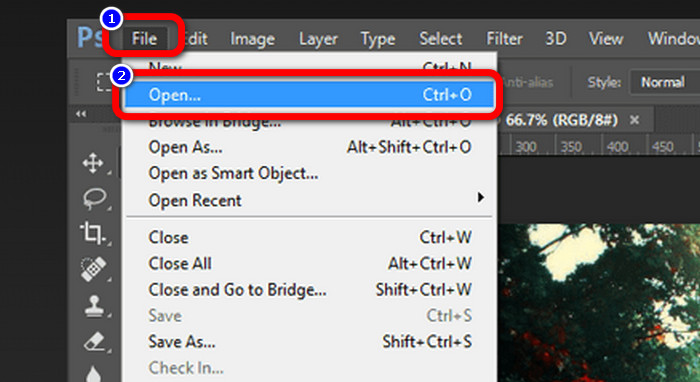
PNG-kuvia voi avata myös Photoshopissa, Drivessa tai muissa sovelluksissa. Voit siirtyä valikkoon File > Open > ja valita kuvan. Napsauta sen jälkeen Enter. Näin voit tarkastella PNG-kuvaa kyseisessä sovelluksessa.
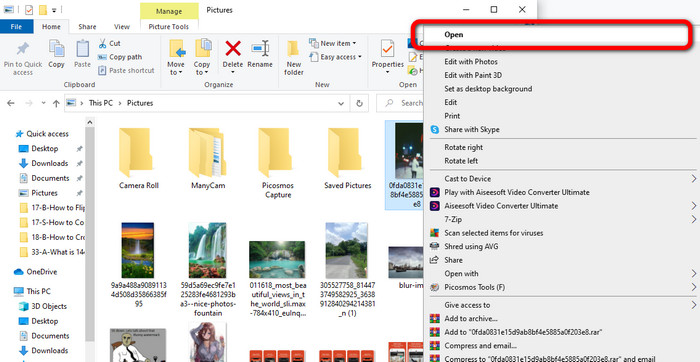
Windows-tietokoneella PNG-tiedoston avaaminen on helppoa. Napsauta tehtäväpalkista File folder avataksesi sen. Siirry Quick access -välilehdelle nähdäksesi PNG-kuvan. Kun näet kuvan, napsauta sitä hiiren oikealla painikkeella ja valitse Open-vaihtoehto. Näin voit tarkastella kuvaa koko näytön tilassa.
Osa 3. Tehokas tapa muuntaa kuvat PNG-muotoon
Muunna kuvat PNG-muotoon FVC Free Image Converterin avulla
Voit käyttää erilaisia verkkopohjaisia muuntimia kuvien muuntamiseen PNG-muotoon. Osa niistä ei kuitenkaan ole turvallisia, ja jotkin muuntimet ovat kalliita. Jos haluat turvallisen ja ilmaisen kuvamuuntimen, käytä FVC Free Image Converter -työkalua. Tämä työkalu on yksi parhaista sovelluksista kuvien muuntamiseen verkossa. Voit käyttää sitä ilmaiseksi, joten se on kaikkien käyttäjien saatavilla. Voit myös ladata kuvia eri formaateissa, kuten TIFF, JPG, PNG, GIF ja monia muita. Lisäksi kuvien muuntaminen on yksinkertaista: se tarjoaa vain kolme vaihetta, joilla muunnetaan kuvat PNG-muotoon. Voit myös muuntaa useita kuvia kerralla. Tämä muunnin tukee erämuunnosta, jolloin säästät enemmän aikaa. Lisäksi se takaa yksityisyyden poistamalla tietosi muunnosprosessin jälkeen. Sinun ei myöskään tarvitse rekisteröityä tai luoda tiliä tähän sovellukseen. Voit käyttää sitä heti, kun avaat verkkosivuston.
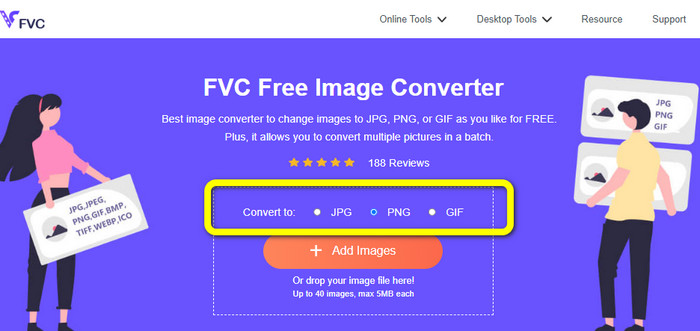
Vaihe 1: Siirry ensin FVC Free Image Converter -verkkosivustolle. Kun olet etusivulla, siirry formaattivalikkoon ja valitse halutuksi tulostusmuodoksi PNG-tiedosto.
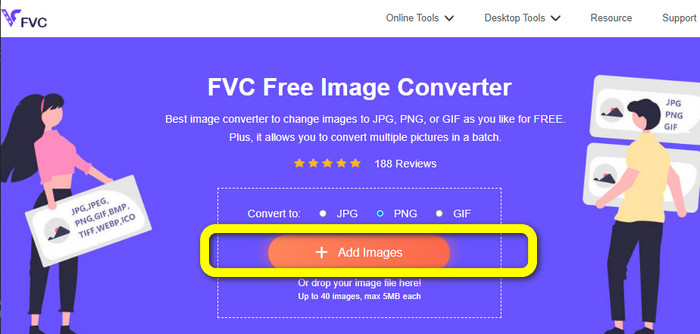
Vaihe 2: Napsauta keskiosan käyttöliittymässä Add Images -painiketta ladataksesi kuvan. Avaa tiedostokansiostasi kuva, jonka haluat muuntaa.
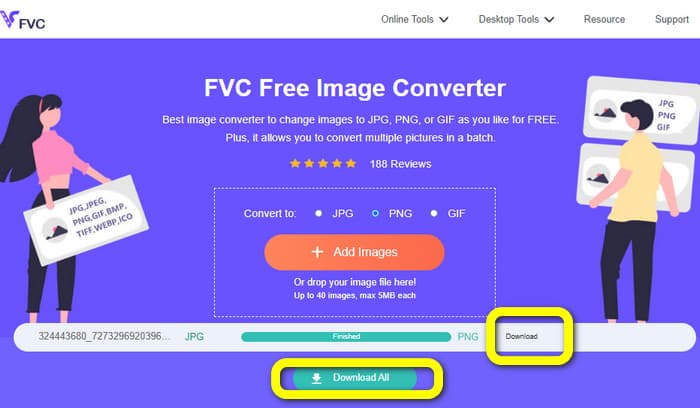
Vaihe 3: Muunnosprosessin jälkeen napsauta Download-painiketta tallentaaksesi lopullisen kuvasi. Sen jälkeen voit avata PNG-kuvan tietokoneellasi.
Muunna kuvat PNG-muotoon Coolutilsin avulla
Voit käyttää Coolutils-kuvamuunninta verkossa ilman mitään latauksia. Sinun ei tarvitse odottaa sähköpostilinkkiä, sillä tämä verkkopohjainen muunnin suorittaa muunnoksen heti. Tämän työkalun avulla voit muuntaa kuvia PNG-muotoon nopeasti. Yksi palvelun hyvistä puolista on mahdollisuus kääntää (rotate) ja muuttaa kuvan kokoa ennen muuntamista. Se ei kuitenkaan näytä esikatselua siitä, miltä käännetty kuva näyttää muunnoksen jälkeen. Koska työkalu toimii verkkoselaimessa, voit käyttää sitä millä tahansa käyttöjärjestelmällä, mukaan lukien Windows, Linux ja Mac. Ohjelma tukee monia lähdeformaatteja, kuten JPEG, PNG, GIF, BMP ja TIFF.
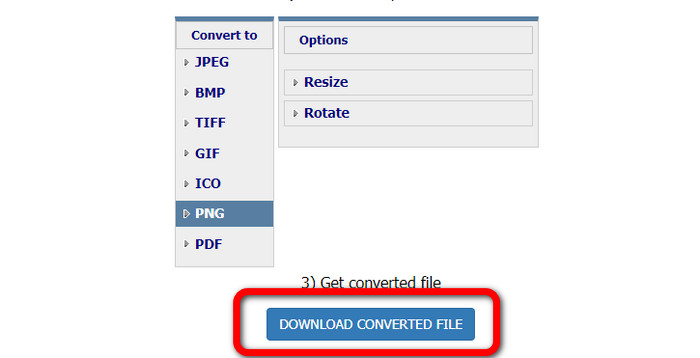
Vaihe 1: Avaa selaimesi ja etsi Coolutils. Napsauta sitten Upload File to Convert -painiketta lisätäksesi kuvan, jonka haluat muuntaa.
Vaihe 2: Valitse formaattivaihtoehdoista PNG-muoto.
Vaihe 3: Napsauta Download converted file -painiketta tallentaaksesi kuvan tietokoneellesi. Voit käyttää tätä työkalua myös kuvien muuntamiseen JPG-muotoon.
Osa 4. UKK PNG-tiedostosta
1. Mitä eroa on PNG:llä ja JPG:llä?
Suurin ero PNG- ja JPG-tiedostomuotojen välillä on niiden pakkausalgoritmi. PNG-tiedostomuoto käyttää häviötöntä algoritmia. Se tarkoittaa, että se voi pitää kaiken tiedon kuvasta. JPG-muoto käyttää häviöllistä pakkausalgoritmia. Se hylkää osan kuvan tiedoista tiedoston koon pienentämiseksi.
2. Kuinka tehokkaasti PNG-muoto näyttää kirjoitetun tekstin?
Se on tehokasta. Tämän tiedoston häviötön pakkaus voi näyttää runsaasti tekstiä sisältäviä kuvia. Se sisältää sivuasettelut ja kuvakaappaukset. Mukana on painetun tekstin, kuten käsinkirjoitettujen asiakirjojen ja sanomalehtisivujen skannaukset.
3. Mikä on parempi, JPG vai PNG?
Se riippuu tarkoituksestasi. JPG-tiedosto heikentää kuvanlaatua. Se toimii myös paremmin kuvan tiedostokoon pienentämiseen. PNG pakkasi tiedoston säilyttäen samalla kuvanlaadun. Se sopii erinomaisesti kohteiden, kuten tekstin, ikonisten grafiikoiden ja viivapiirustusten tallentamiseen.
Johtopäätös
Kaikki yllä oleva tieto kertoo sinulle PNG-tiedostomuodosta. Se antaa sinulle myös riittävästi tietoa siitä, mihin PNG-tiedostoa käytetään. Lisäksi tämä artikkeli näyttää käytännön ohjeet kuvien muuntamiseen PNG-muotoon käyttämällä FVC Free Image Converter -työkalua. Jos siis haluat muuntaa kuvatiedostoja, käytä tätä luotettavaa verkkopohjaista kuvamuunninta.
-
 8 hämmästyttävää kuvanmuuntajaa [Täydelliset tiedot]
 Tämä arvostelu kertoo sinulle parhaista kuvatiedostomuuntimista, joita voit käyttää kuvatiedostojen muuntamiseen. Lue tämä viesti tietääksesi parhaan kuvanmuuntimen sinulle
-
 Täydelliset tiedot eroista JPEG vs. JPG vs. PNG
 Tämä viesti antaa sinulle tarpeeksi tietoa eroista JPEG vs. JPG vs. PNG. Lisäksi opit muuntamaan kuvat näihin tiedostoihin
-
 Mikä on JPEG/JPG: Muunna kuvasi JPG-muotoon vaivattomasti
 Oletko kiinnostunut JPEG:n merkityksestä? Meillä on sinulle vastaus. Lisäksi opit muuntamaan eri kuvaformaatteja JPG-tiedostoiksi. Lue postaus nyt.
