


 Video Converter Ultimate
 Näytön tallennin
 Videon korjaus
Muunna AVI MKV:ksi vaivattomasti käyttämällä kolmea parasta muunnostyökalua.
Muuntaa AVI MKV:ksi saattaa kuulostaa monimutkaiselta, erityisesti jos olet uusi tiedostomuotojen muuntamisessa. On vaikeaa löytää työkaluja, jotka auttaisivat sinua muuntamaan tiedostojasi. Mutta ei hätää! Tässä artikkelissa esitellään tapoja, joilla voit helposti muuntaa AVI-tiedostosi MKV-tiedostoksi käyttämällä kolmea työkalua.

Osa 1. AVI Files VS. MKV tiedostot
AVI tai Audio Video Interleave on Microsoftin kehittämä tiedostosäiliömuoto. AVI-tiedostot sisältävät ääni- ja videodataa, joka mahdollistaa äänen ja videon toiston. Tämäntyyppinen tiedosto on Windowsin vakiovideomuoto, ei ihme, että se on yksi yleisimmistä tiedostomuodoista. Sitä vastoin MKV tai Matroska on multimediasäiliömuoto. Tämäntyyppinen tiedosto tallentaa ääni-, video- ja tekstitysraidat yhdeksi tiedostoksi. Lisäksi se on tulevaisuudenkestävä, joten sinun ei tarvitse huolehtia siitä, että tämä tiedosto on vanhentunut. Mutta miksi muunnamme AVI-tiedostoja MKV-muotoihin? Yksinkertaisesti siksi, että MKV-formaatit voivat käsitellä useita tekstitysvirtoja ja ääniraitoja eri kielillä.
Osa 2. Paras AVI-MKV-muunnin, jota sinun täytyy kokeilla
Jos etsit offline-AVI–MKV-muunninta, jossa on vaikuttavat ominaisuudet, FVC Video Converter Ultimate on sinulle sopiva työkalu. Tässä muuntimessa on erityisominaisuuksia, joita muissa muuntimissa ei ole. Voit esimerkiksi muokata videotasi, pakata tiedostoja ja jopa tehdä erämuunnoksia useista tiedostoista yhdeksi. Se tukee myös erittäin nopeaa muunnosta, joka toimii salamannopeasti. Lisäksi se tukee lukuisia tiedostomuotoja, kuten AVI–MKV, WMV, MOV, MP4, WebM ja monia muita.

FVC Video Converter Ultimate:
5 689 200+ latausta- Voit lisätä tai poista vesileima videoistasi.
- Siinä on sisäänrakennettu erittäin nopea muunnosprosessi ja laitteistokiihdytys.
- Siinä on käyttäjäystävällinen käyttöliittymä.
- Voit muuntaa useita tiedostoja yhdeksi erämuunnoksella.
- Saatavilla kaikilla alustoilla, kuten Windows ja Mac.
Ilmainen latausWindows 7 tai uudempiTurvallinen lataus
Ilmainen latausMacOS 10.7 tai uudempiTurvallinen lataus
Joten jos olet kiinnostunut tämän muuntimen käyttämisestä, seuraa alla olevia yksinkertaisia ohjeita.
Vaihe 1. Lataa ensin ohjelma napsauttamalla alla olevaa Lataa-painiketta Windowsille/Macille. Seuraa asennusohjeita ja käynnistä sitten sovellus.
Ilmainen latausWindows 7 tai uudempiTurvallinen lataus
Ilmainen latausMacOS 10.7 tai uudempiTurvallinen lataus
Vaihe 2. Kun avaat sovelluksen, näet muuntimen ensimmäisen käyttöliittymän. Tässä on työkalun aloitusnäkymä.
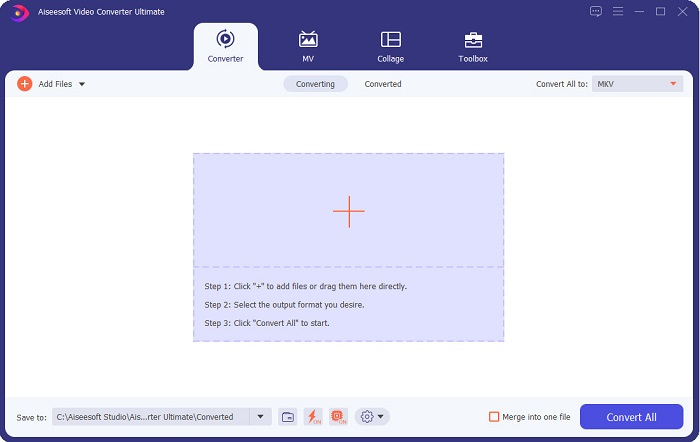
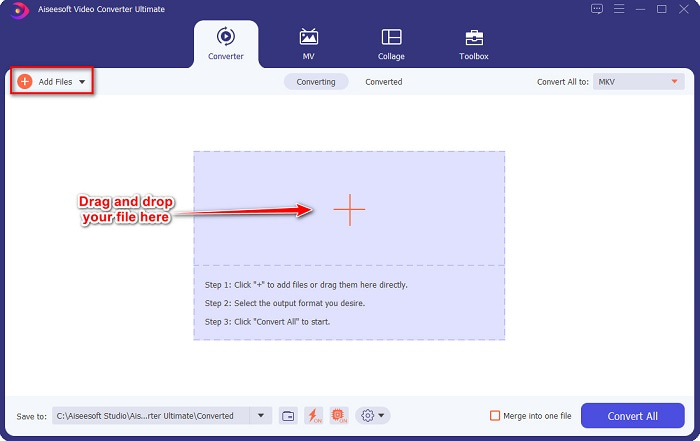
Vaihe 3. Napsauta Lisää tiedostoja -painiketta tai vedä ja pudota tiedostot +-kuvakkeen kohdalle ladataksesi AVI-tiedostosi.
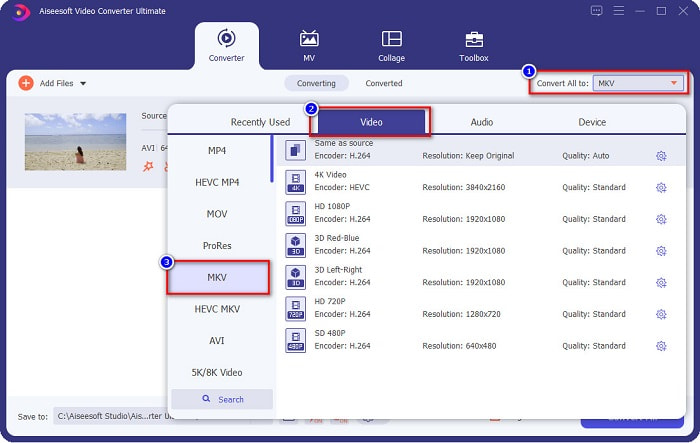
Vaihe 4. Kun olet ladannut AVI-tiedostosi, napsauta Muunna kaikki muodosta -painiketta ja valitse MKV tulostusmuodoksi.
Vaihe 5. Napsauta lopuksi Muunna kaikki -painiketta muuntaaksesi AVI-tiedostosi MKV-tiedostomuotoon. Odota sitten muutama sekunti. Ja voilà! AVI-tiedostosi on nyt muunnettu MKV-muotoon.
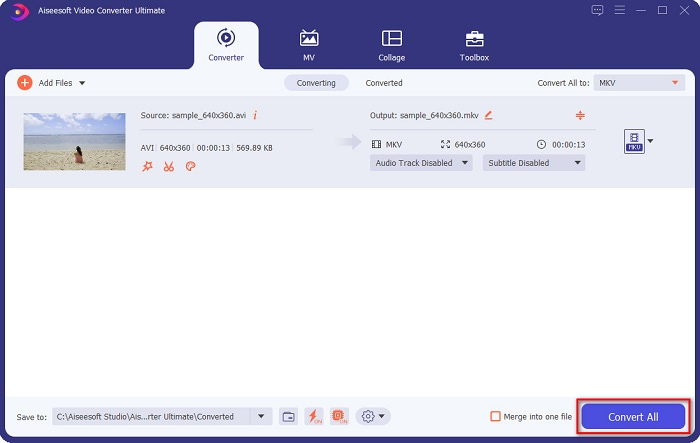
Noudattamalla yllä olevia yksinkertaisia ohjeita voit muuntaa AVI:n MKV:ksi helposti.
Osa 3. Paras tapa muuntaa AVI-tiedostoja MKV-tiedostoiksi verkossa
FVC Free Online Video Converter on yksi parhaista verkossa saatavilla olevista online-muuntimista. Tällä muuntimella voit muuntaa monia tiedostomuotoja, kuten AVI–MKV, WMA, MOV, TS, MP4 jne. Muunnin on myös helppokäyttöinen, joten se sopii hyvin aloittelijoille. Lisäksi voit muokata tiedostosi tarkkuutta, videon bittinopeutta ja kuvanopeutta. Tämä muunnin on kuitenkin riippuvainen internet-yhteydestä, joten muunnos voi joskus olla hidas.
Tässä ovat vaiheet AVI:n muuntamiseksi MKV Free Online -muotoon:
Vaihe 1. Napsauta tätä linkkiä, niin siirryt FVC Free Online Video Converterin verkkosivulle.
Vaihe 2. Napsauta sitten Lisää tiedostoja muunnettavaksi -painiketta ja käynnistä sovellus.
Lataa työpöytäversio muuntaaksesi tiedostoja erissä.
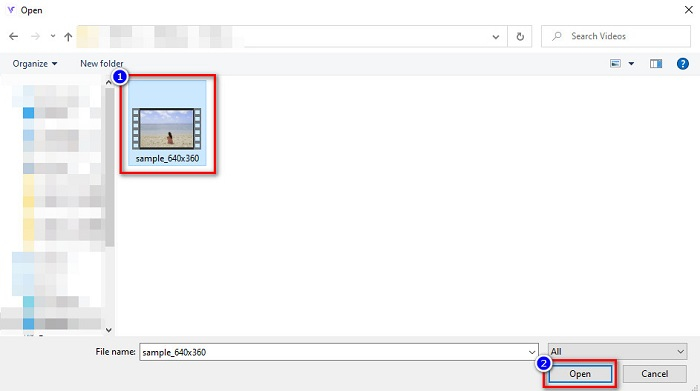
Vaihe 3. Kun olet käynnistänyt sovelluksen, sinut ohjataan tietokoneesi tiedostoihin. Valitse sitten AVI-tiedostosi ja napsauta Avaa.
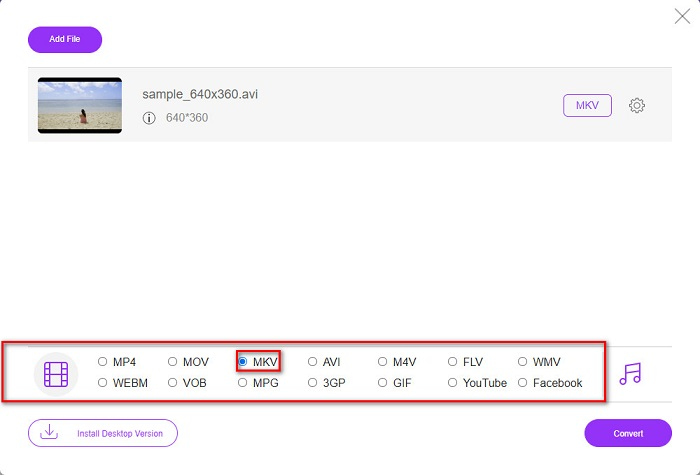
Vaihe 4. Ohjelman käyttöliittymän alareunassa näet luettelon tiedostomuodoista. Valitse MKV tiedoston lähtömuodoksi. Jatka sitten viimeiseen vaiheeseen.
Vaihe 5. Napsauta Muunna-painiketta aloittaaksesi AVI-tiedostosi muuntamisen MKV-muotoon viimeisessä vaiheessa.
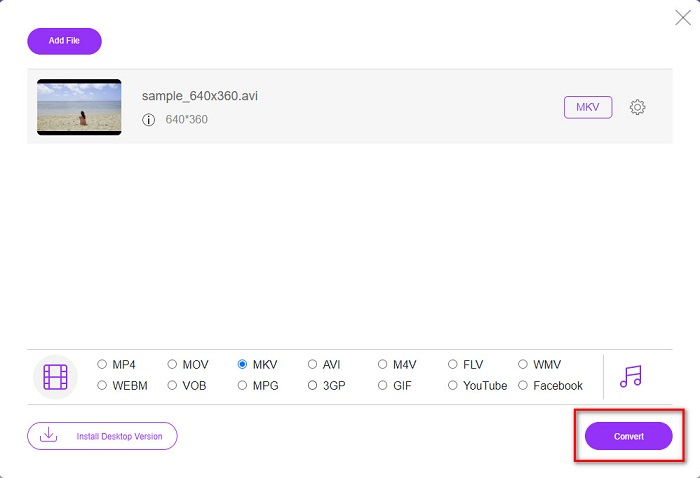
Näin helposti voit muuntaa AVI-tiedostosi MKV:ksi käyttämällä online-muunninta.
Osa 4. Muunna AVI MKV:ksi Freeware Converterilla
Ilmaisen ohjelman käyttäminen muuntimena on hyvä asia, koska voit ladata sen ilman kustannuksia. Yksi parhaista saatavilla olevista ilmaisohjelmista on VSDC Free Video Converter. Tämä muunnin on nopea, tehokas ja sen käyttöliittymä on helppokäyttöinen. Se tukee yleisiä tiedostomuotoja, kuten AVI–MKV, MPEG, WMV, FLV, MP4 ja muita. Ominaisuudet ovat kuitenkin rajalliset, kun on kyse tiedostojen muuntamisesta.
Pikaopas VSDC Free Video Converterin käyttöön
Vaihe 1. Lataa ilmainen muunnin etsimällä VSDC Free Video Converter -ohjelmaa selaimellasi. Seuraa asennusprosessia ja avaa sovellus. Kun sovellus on käynnissä, napsauta +-kuvaketta ladataksesi AVI-tiedostosi ohjelman käyttöliittymään.
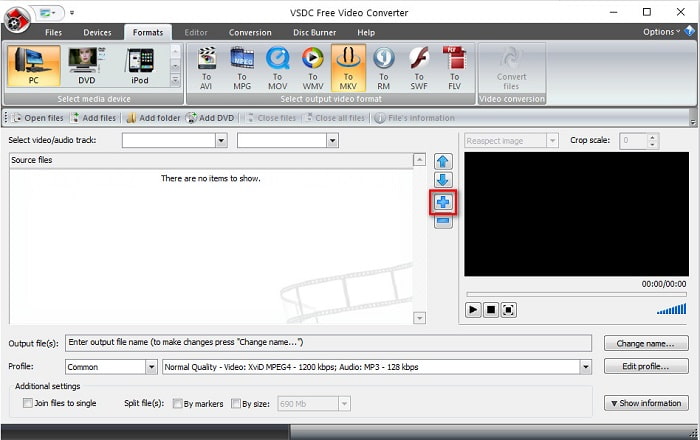
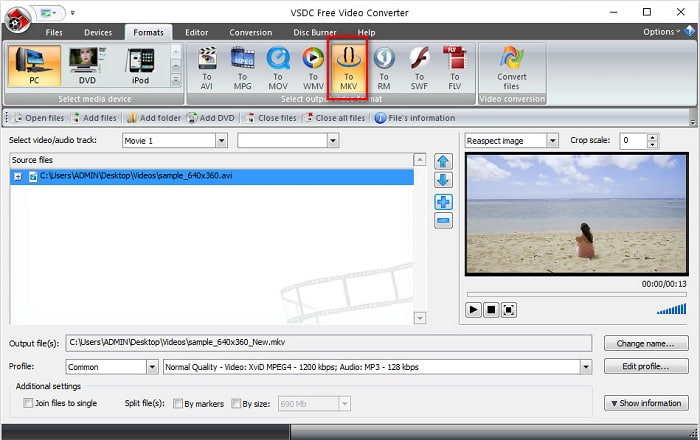
Vaihe 2. Valitse seuraavaksi haluamasi lähtömuoto ohjelman käyttöliittymän yläreunassa olevasta tiedostomuotoluettelosta. Tässä tapauksessa napsauta MKV.
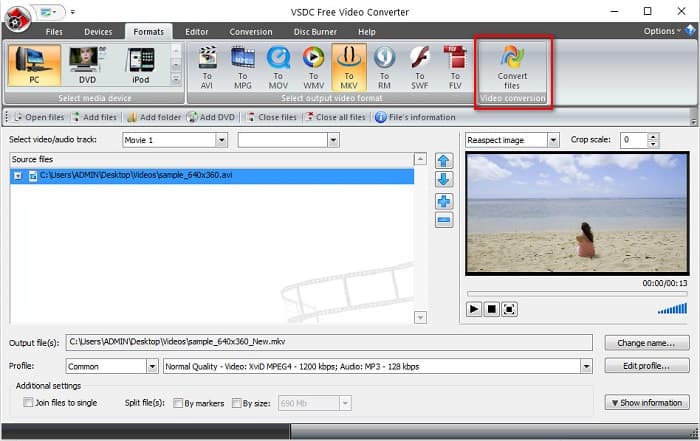
Vaihe 3. Viimeisessä vaiheessa napsauta Muunna tiedostot -painiketta. Tämän jälkeen AVI-tiedostosi muuntaminen MKV-tiedostoksi alkaa.
Noudattamalla tätä pikaopasta, voit helposti muuntaa AVI-tiedostosi MKV-tiedostoksi ilmaisen muuntimen avulla.
AVI vs. MKV
Resource Interchange File Format (RIFF) -muotoon perustuvan AVI-muodon Microsoft esitteli vuonna 1992. Se voi tallentaa korkealaatuista videota/ääntä, koska se käyttää vähemmän pakkausta. Mutta tämä aiheuttaa myös AVI-tiedoston suuren tiedostokoon, mikä voi olla ongelma, kun tilaa on rajoitetusti.
Vuonna 2002 julkaistu Matroska-multimediakonttiformaatti on avoimen lähdekoodin muoto, joka voi sisältää useita video-, ääni-, kuva- ja tekstitysraitoja. Joten voit käyttää sitä lyhyiden videoleikkeiden, TV-ohjelmien ja elokuvien tallentamiseen helposti. Se on melko suosittu anime-fanien tilaajissa.
Osa 5. Usein kysyttyä AVI:n muuntamisesta MKV:ksi
Mitä haittoja AVI:n muuntamisesta MKV:ksi on?
Koska AVI on yleisemmin käytetty muoto kuin MKV, jos muunnat AVI-tiedostosi MKV:ksi, et voi toistaa tiedostoasi muissa videosoittimissa, jotka eivät tue MKV-tiedostoja.
Kummalla on parempi suurempi tiedostokoko, AVI vai MKV?
MKV:lla on suuri tiedostokoko verrattuna AVI:hen, koska MKV sisältää monia videoita, ääntä ja tekstitysraitoja. Se tallentaa myös koko elokuvan tekstitetyllä tavalla.
Kuinka voin toistaa AVI-tiedostoja Macilla?
Mac-tietokoneet eivät pysty toistamaan AVI-videoita oletuksena. On kuitenkin olemassa tapoja, joilla voit silti toistaa tiedostosi Macilla. Yksi tapa on muuntaa AVI-tiedostosi muotoon, jota Mac pystyy toistamaan, eli MP4:ksi. Jos haluat lisätietoja AVI–MP4-muuntamisesta, napsauta tätä linkkiä.
Johtopäätös
Kaiken kaikkiaan yllä esitetyt muuntimet voivat muuntaa AVI:n MKV-tiedostoiksi vaivattomasti. Niissä kaikissa on helposti ymmärrettävä käyttöliittymä, joka ei vaikeuta niiden käyttöä. Niissä on myös ainutlaatuisia ominaisuuksia, joita muilla muuntimilla ei ole. Mutta jos haluat muuntimen, joka tuo esiin tiedostosi parhaat puolet ja jossa on ominaisuuksia, jotka voivat muokata ja muuntaa erittäin nopeasti, voit halutessasi käyttää FVC Video Converter Ultimate -ohjelmaa ensimmäisenä vaihtoehtona. Lataa se nyt ja koe sen ainutlaatuiset ominaisuudet käytettäväksi.
-
 Päätä, mikä on ihanteellinen AVI-MP3-muunnosohjelmisto [PC ja Mac]
 Haluatko tietää kuinka muuntaa AVI MP3-äänimuotoon? Alla olevasta luettelosta löydät myös erilaisia työkaluja ja vaiheita, jotka sopivat tarpeisiisi.
-
 Kuinka muuntaa AVI MOV: ksi helppojen vaiheiden ja työkalujen avulla
 Haluatko tietää kuinka muuntaa AVI toistettavaksi MOV:ksi? Sinun on noudatettava tätä artikkelia, jotta tiedät, miten se tehdään, ja vinkkejä onnistuneen muuntamisen saavuttamiseksi.
-
 Tuo ja muunna AVI iMovien tukemaan muotoon [2021]
 Onko sinulla ongelma, koska et voi tuoda AVI-tiedostoasi iMoviessa? Jos luet tämän artikkelin, olet jo valinnut oikean ratkaisun tähän ongelmaan.

