


 Video Converter Ultimate
 Näytön tallennin
 Videon korjaus
 Suojattu lataus
AVI:n tehon hyödyntäminen WebM:ssä optimaalisen verkkoyhteensopivuuden saavuttamiseksi
Nopeasti kehittyvässä digitaalisessa ympäristössä tehokkaalla mediaintegraatiolla on keskeinen rooli käyttökokemuksen parantamisessa ja sisällön saavutettavuuden maksimoimisessa. Yksi yhteinen haaste, jota multimediaharrastajat, verkkokehittäjät ja sisällöntuottajat kohtaavat, on videotiedostomuotojen yhteensopivuus eri alustoilla ja laitteilla. Erilaisten koodekkien ja tiedostopäätteiden lisääntyessä saumattomasta mediaintegraatiosta on tullut kiireellinen huolenaihe.
Tämä artikkeli perehtyy AVI–WebM-muunnoksen alueeseen ja valaisee tämän muunnosprosessin merkitystä sekä sen vaikutusta verkon yhteensopivuuteen. Lisäksi tuomme esiin ohjelmat, joita voi käyttää tähän muunnokseen. Ilman sen suurempia esittelyjä voit tutustua alla oleviin työkaluihin.

Osa 1. 5 parasta tapaa muuntaa AVI WebM:ksi
1. Video Converter Ultimate
Video Converter Ultimate on kattava ohjelmisto videonmuunnostehtäviin, mukaan lukien AVI–WebM-muunnos. Siinä on käyttäjäystävällinen käyttöliittymä ja edistyneet ominaisuudet, mikä tekee siitä tehokkaan vaihtoehdon offline-muunnoksiin.
Vaihe 1. Lataa ja asenna sovellus
Valitse jokin Ilmainen lataus -painikkeista ja tallenna tiedosto tietokoneellesi noudattamalla näytön ohjeita. Seuraavaksi käynnistä sovellus ja tutustu sen yksinkertaisiin säätimiin.
Ilmainen latausWindows 7 tai uudempiSuojattu lataus
Ilmainen latausMacOS 10.7 tai uudempiSuojattu lataus
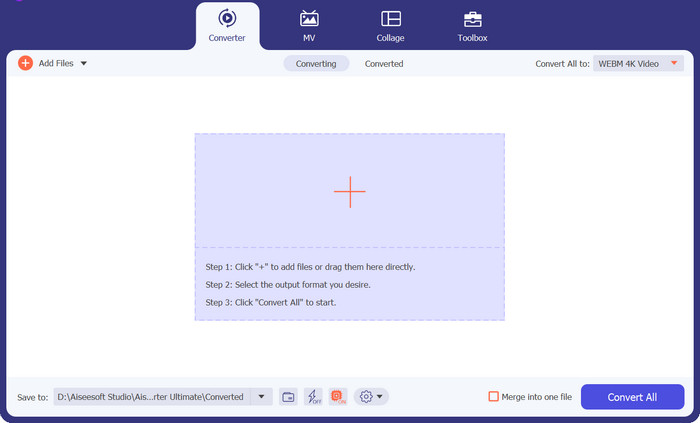
Vaihe 2. Lisää AVI-tiedostot
Siirry sen äänitiedoston sijaintiin, jonka haluat muuntaa, valittuasi ensin +-kuvakkeen pääikkunasta. Kun tiedosto on ladattu, sen esikatselu tulee näkyviin käyttöliittymässä. Voit ladata myös koko tiedostokansion, jos haluat muuntaa useita AVI-tiedostoja WebM-muotoon eräajona.
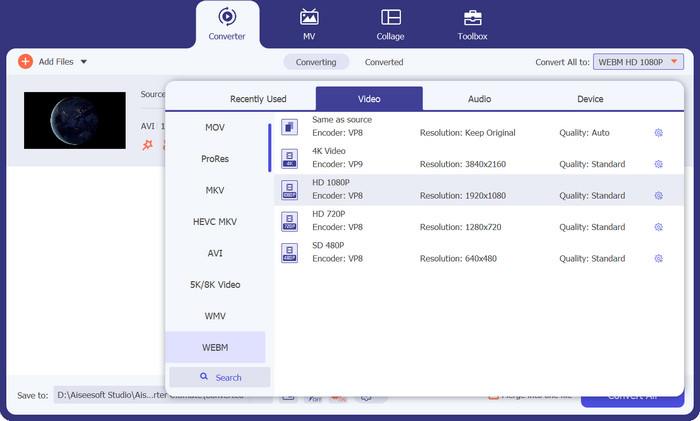
Vaihe 3. Määritä lähtöformaatti
Voit sitten valita lähtömuodon napsauttamalla Audio-välilehteä pudotusvalikossa, joka löytyy työkalun oikeasta yläkulmasta. Voit muuntaa AVI:n ja WebM:n välillä kumpaankin suuntaan käyttämällä jompaakumpaa formaattia.
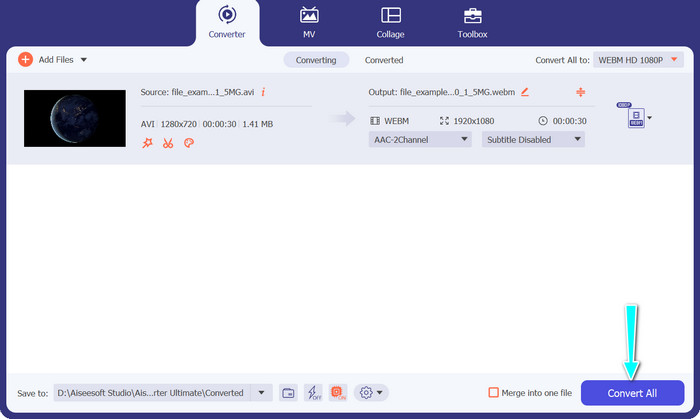
Vaihe 4. Tallenna tulokset
Valitse kohdekansio näytön alaosan valikosta. Napsauta Muunna kaikki -painiketta, kun olet valmis aloittamaan muunnoksen.
Plussat
- Se tukee laajaa valikoimaa videomuotoja, mukaan lukien AVI ja WebM.
- Tarjoaa edistyneitä videon mukautusvaihtoehtoja.
- Nopea muunnosprosessi.
Haittoja
- Ilmaisella versiolla on rajoituksia, ja täysversio vaatii oston.
2. FFmpeg
FFmpeg on tehokas komentorivityökalu, joka tunnetaan laajalti monipuolisuudestaan multimediatehtävien käsittelyssä, mukaan lukien muunnos AVI:sta WebM:ksi. Se tarjoaa laajan hallinnan videoparametreille, mikä tekee siitä kokeneiden käyttäjien ja kehittäjien suosikin. Tässä ovat vaiheet tämän AVI-WebM-muuntimen käyttämiseen:
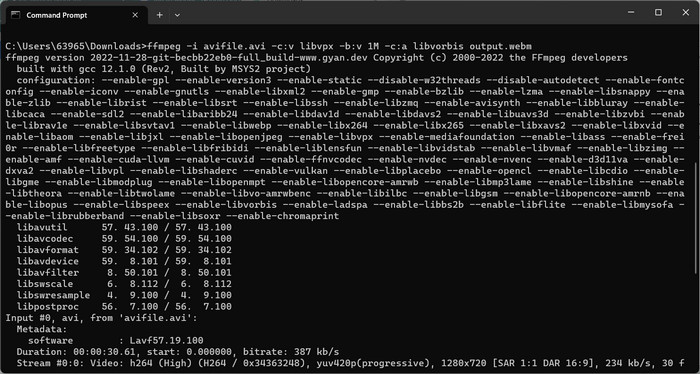
Vaihe 1. Asenna FFmpeg tietokoneellesi tai varmista, että se on jo asennettu. Avaa komentokehote tai pääte.
Vaihe 2. Syötä seuraava komento: ffmpeg -i input.avi -c:v libvpx -b:v 1M -c:a libvorbis output.webm.
Vaihe 3. Tämä komento käskee FFmpeg-ohjelmaa muuntamaan AVI-tiedoston WebM-muotoon määritetyillä video- ja äänikoodekeilla, bittinopeudella ja tulostetiedoston nimillä. Paina sitten Enter suorittaaksesi komennon.
Plussat
- Kattava video- ja ääniasetusten hallinta.
- Se tukee laajaa valikoimaa video- ja äänikoodekkeja.
- Sopii edistyneille käyttäjille ja kehittäjille.
Haittoja
- Se vaatii perehtymistä komentorivikäyttöliittymään.
- Sillä voi olla jyrkempi oppimiskäyrä aloittelijoille.
3. VLC-mediasoitin
Jos etsit ilmaista AVI-WebM-muunninohjelmaa, VLC Media Player on ohjelma. Se tunnetaan monipuolisuudestaan mediasoittimena, ja se tarjoaa myös offline-videon muunnosominaisuudet, mukaan lukien muuntaminen AVI:sta WebM:ksi.
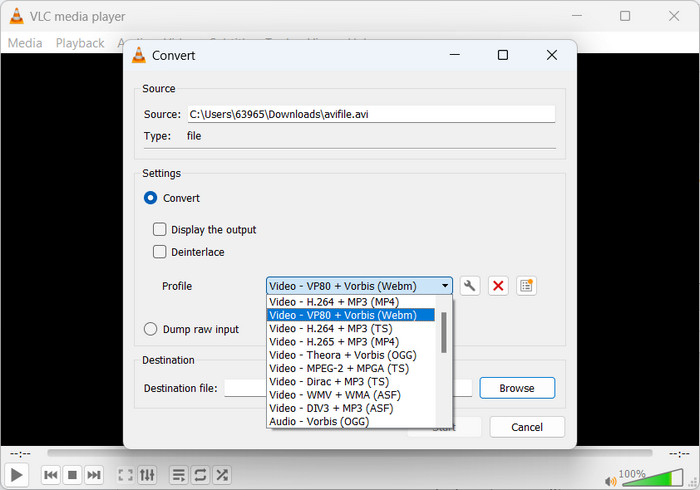
Vaihe 1. Asenna ja avaa VLC Media Player tietokoneellasi. Napsauta sitten valikkorivillä kohtaa Media ja valitse Muunna/tallenna.
Vaihe 2. Tiedosto-välilehdellä napsauta Lisää-painiketta tuodaksesi AVI-tiedoston. Napsauta sitten alareunassa olevaa Muunna/tallenna-painiketta.
Vaihe 3. Valitse Profiili-pudotusvalikosta Video – WebM + VP8 tai Video – WebM + VP9. Määritä sitten kohdekansio ja tulostetiedoston nimi.
Vaihe 4. Napsauta Aloita-painiketta aloittaaksesi muunnosprosessin.
Plussat
- Tuttu ja helppokäyttöinen käyttöliittymä.
- Mahdollistaa video- ja ääniasetusten mukauttamisen.
- Lisäominaisuudet, kuten median toisto, suoratoisto ja paljon muuta.
Haittoja
- Muunnosvaihtoehdot voivat olla rajoitettuja erityisiin muuntimiin verrattuna.
- Nopeus ja suorituskyky voivat vaihdella järjestelmän teknisten tietojen mukaan.
4. Freemake Video Converter
Freemake Video Converter on suosittu offline-videomuunnosohjelmisto, joka tukee muuntamista AVI:sta WebM:ksi ja monia muita muotoja. Se tarjoaa myös käyttäjäystävällisen käyttöliittymän ja valikoiman esiasetettuja muunnosprofiileja käytön helpottamiseksi.
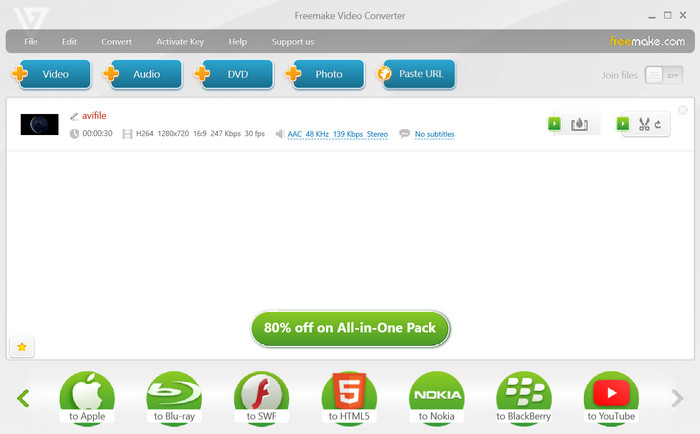
Vaihe 1. Asenna ja käynnistä Freemake Video Converter tietokoneellasi. Sen jälkeen napsauta +Video-painiketta tuodaksesi AVI-tiedoston, jonka haluat muuntaa.
Vaihe 2. Valitse nyt WebM lähtöformaatiksi alareunan paneelista ja mukauta tarvittaessa videoasetuksia.
Vaihe 3. Valitse tämän jälkeen kohdekansio, johon muunnettu WebM-tiedosto tallennetaan. Lopuksi napsauta Muunna-painiketta käynnistääksesi muunnosprosessin.
Plussat
- Tarjoaa esiasetetut muunnosprofiilit eri laitteille ja alustoille.
- Tarjoaa perusvideon muokkausominaisuudet.
- Nopea ja tehokas muunnosprosessi.
Haittoja
- Mainostuettu ilmainen versio.
- Jotkut lisäominaisuudet ovat saatavilla vain premium-versiossa.
5. FVC Free Video Converter Online
Jos pidät AVI–WebM-verkkomuuntimista, Free Video Converter Online sopii sinulle. Free Video Converter Online on verkkopohjainen työkalu, jonka avulla käyttäjät voivat muuntaa AVI-tiedostoja WebM-muotoon ilman ohjelmiston asentamista. Se tarjoaa yksinkertaisen ja kätevän tavan tehdä tiedostomuunnoksia verkossa.
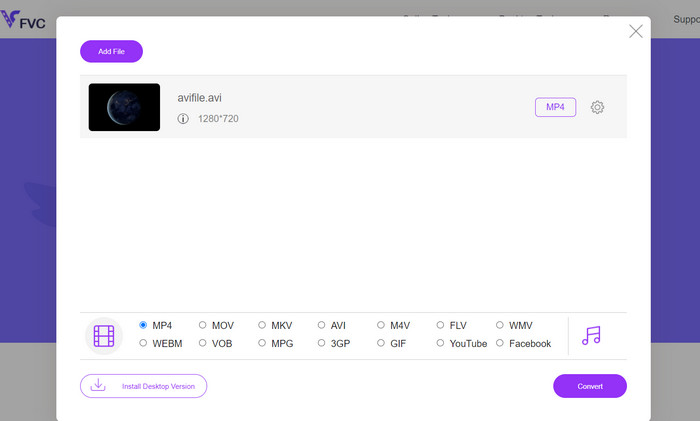
Vaihe 1. Siirry FVC Free Video Converter Online -sivustolle. Napsauta sitten Lisää muunnettavat tiedostot -painiketta.
Vaihe 2. Valitse seuraavaksi tietokoneeltasi AVI-tiedosto, jonka haluat muuntaa. Valitse sen jälkeen WEBM lähtöformaatiksi.
Vaihe 3. Napsauta lopuksi Muunna-painiketta aloittaaksesi muunnosprosessin ja odota, että muunnos valmistuu.
Plussat
- Ohjelmiston asennusta ei vaadita.
- Yksinkertainen ja käyttäjäystävällinen käyttöliittymä.
- Toimii eri alustoilla ja laitteilla.
- Nopea ja vaivaton muunnosprosessi.
Haittoja
- Vaatii vakaan Internet-yhteyden.
- Rajoitetut mukautusmahdollisuudet verrattuna offline-ohjelmistoon.
Lisälukemista:
Tapoja muuntaa AVI M4V-muotoon verkko- ja offline-työkaluilla
Muunna MOV WebM-muotoon parantaaksesi verkkosivustosi suorituskykyä
Osa 2. Usein kysytyt kysymykset AVI:n muuntamisesta WebM:ksi
Voinko muuntaa WebM:n takaisin AVI:ksi tarvittaessa?
Vaikka WebM on teknisesti mahdollista muuntaa takaisin AVI:ksi, on tärkeää huomata, että jokainen muunnos aiheuttaa jonkin verran laadun heikkenemistä. Yleensä on suositeltavaa pitää alkuperäiset AVI-tiedostot varmuuskopiot tai säilyttää ne alkuperäisessä muodossaan tarpeettoman laadun heikkenemisen välttämiseksi.
Kuinka kauan AVI:n muuntaminen WebM:ksi kestää?
Muunnosaika vaihtelee tekijöiden, kuten AVI-tiedoston koon, tietokoneesi laitteiston ominaisuuksien ja käytetyn ohjelmiston tai muunnostavan mukaan. Yleensä pienemmät tiedostot ja tehokkaammat järjestelmät nopeuttavat muunnosaikoja.
Onko AVI:n muuntamiseen WebM:ksi laillisia näkökohtia?
On tärkeää varmistaa, että sinulla on tarvittavat oikeudet tai luvat muuntaa ja käyttää AVI-tiedostoja, jotka aiot muuntaa. Noudata tekijänoikeuslakeja ja käyttöehtoja käsitellessäsi tekijänoikeudella suojattua sisältöä.
Voinko muuntaa tekstitettyjä AVI-tiedostoja WebM-muotoon säilyttäen tekstitykset?
Kyllä, on mahdollista muuntaa AVI-tiedostoja, joissa on upotettu tekstitys WebM-muotoon ja säilyttää tekstitysraita. Mahdollisuus säilyttää tekstitykset voivat kuitenkin vaihdella käytettävän ohjelmiston tai muuntimen mukaan. Varmista, että valittu ohjelmisto tukee tekstityksen muuntamista ja valitse sopivat vaihtoehdot muunnosprosessin aikana.
Voinko muuntaa salattuja tai suojattuja AVI-tiedostoja WebM-muotoon?
AVI-tiedostoja, jotka on salattu tai suojattu digitaalisen oikeuksien hallinnan (DRM) avulla, ei välttämättä voida suoraan muuntaa WebM-muotoon tai mihinkään muuhun muotoon ilman asianmukaista valtuutusta tai salauksen purkamista. Kunnioita tekijänoikeussuojatoimenpiteitä ja varmista, että sinulla on tarvittavat oikeudet muuntaa ja käyttää käsittelemiäsi tiedostoja.
Johtopäätös
Muunnos muodosta AVI WebM-muotoon on hyödyllinen ratkaisu videoiden transkoodaukseen, sillä se varmistaa optimaalisen laadun ja yhteensopivuuden eri verkkoplattormien välillä.
-
 Kuinka muuntaa AVI MP4:ksi työpöydällä tai verkossa ilmaiseksi [2023]
 Joskus katsellessamme elokuvaa puhelimellamme, käyttämämme soitin kysyy, ettei videota voida toistaa, koska se ei tue AVI-muotoa. Joten miten voimme nopeasti muuttaa AVI: n MP4: ksi ilman laadun heikkenemistä? Tässä on useita ilmaisia menetelmiä, joita voit kokeilla.
-
 [Ratkaistu] WebM-tiedostojen yhdistäminen yhdeksi häviöttömästi tietokoneella
 Kun haluat yhdistää WebM-videotiedostot katsellaksesi videoita jatkuvasti tai haluat luoda uuden videon WebM-tiedostojen mukaan, on kaksi tehokasta tapaa liittyä WebM-tiedostoihin menettämättä laatua.
-
 3 parasta vinkkiä AVI:n muuntamiseen 3GP:ksi välittömästi ]Ilmaiset muuntimet]
 Kuinka muuntaa AVI 3GP: ksi? Tässä artikkelissa luetellaan helpoimmat tavat muuntaa AVI-tiedostosi nopeasti 3GP:ksi parhailla ilmaisilla muuntimilla.
