


 Video Converter Ultimate
 Näytön tallennin
 Videon korjaus
Kuinka muuntaa AVI WMV:ksi ilmaisilla muuntimilla [nopeat vaiheet]
AVI- eli Audio Video Interleave -tiedostot, jotka Microsoft Corporation kehitti alun perin, ovat korkealaatuinen videoformaatti. Tällä tiedostomuodolla on korkea kuvanlaatu, mutta sen koko on erittäin suuri. Yksi yleinen tapa toistaa videota tai käyttää tiedostoa millä tahansa alustalla on muuntaa AVI-tiedosto WMV-tiedostoksi. Jos siis haluat tietää lisää siitä, miten muuntaa AVI WMV:ksi, jatka lukemista – esittelemme erilaisia muuntimia ja niiden käyttöön liittyvät vaiheet.

Osa 1. Muunna AVI WMV:ksi Windows 10/11:ssä
Windows 10 -käyttöjärjestelmä tukee monenlaisia tiedostoja, joita löydät verkosta. Sekä AVI- että WMV-tiedostot toimivat Windows 10:ssä. Siksi AVI-tiedoston muuntaminen WMV-tiedostoksi on helppoa, varsinkin jos käytät tätä salamannopeaa muunninta, FVC Video Converter Ultimate. Tämä muunnin on yksi tämän hetken luotettavista ja suosituista työkaluista. Lisäksi sen avulla voit muokata, parannella ja pakata tiedostojasi. Se on myös helppokäyttöinen ja voi muuntaa AVI-tiedostot WMV-muotoon Windows 10:ssä nopeasti.

FVC Video Converter Ultimate
5 689 200+ latausta- Mahdollistaa eri tiedostomuotojen muuntamisen, mukaan lukien AVI, WMV, MP4, MOV, VOB jne.
- Sisältää ominaisuuksia, joiden avulla voit yhdistää useita tiedostoja yhdeksi.
- Voit muokata, parantaa ja pakata tiedostoa.
Ilmainen latausWindows 7 tai uudempiTurvallinen lataus
Ilmainen latausMacOS 10.7 tai uudempiTurvallinen lataus
Tässä ovat vaiheet AVI-tiedoston muuntamiseksi WMV-tiedostomuotoon:
Vaihe 1. Asentaaksesi FVC Video Converter Ultimaten Windows 10 -järjestelmääsi, napsauta alla olevaa latauspainiketta. Seuraa sitten asennusohjeita ja käynnistä ohjelma.
Ilmainen latausWindows 7 tai uudempiTurvallinen lataus
Ilmainen latausMacOS 10.7 tai uudempiTurvallinen lataus
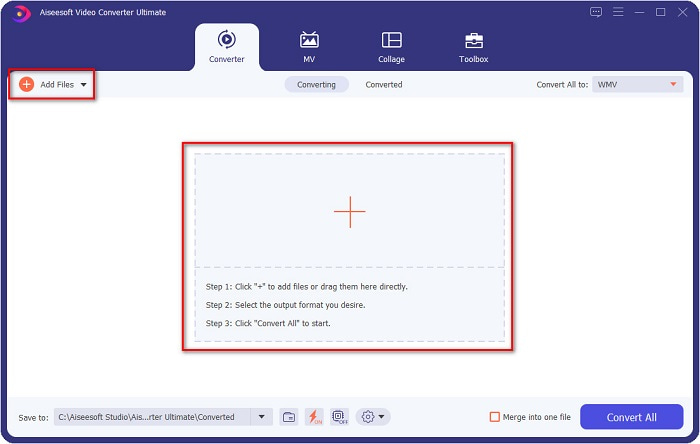
Vaihe 2. Kun olet avannut ohjelman, napsauta Add files -painiketta näytön vasemmassa yläkulmassa tai +-painiketta lisätäksesi AVI-tiedostot ohjelman pääikkunaan. Tietokoneesi tiedostot avautuvat näkyviin, valitse muunnettavaksi haluamasi AVI-tiedosto WMV-muotoon ja napsauta Open-painiketta ladataksesi tiedoston.
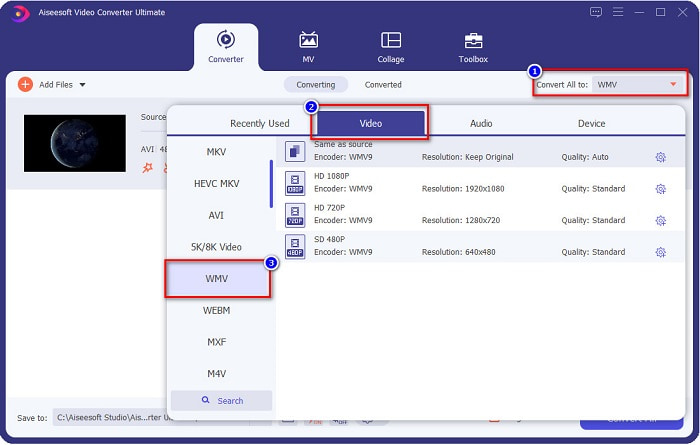
Vaihe 3. Vaihtaaksesi tiedostomuodon napsauta Convert All to -painiketta ohjelman käyttöliittymän oikeassa yläkulmassa. Luettelo eri tiedostomuodoista avautuu; valitse WMV Video-kategoriasta.
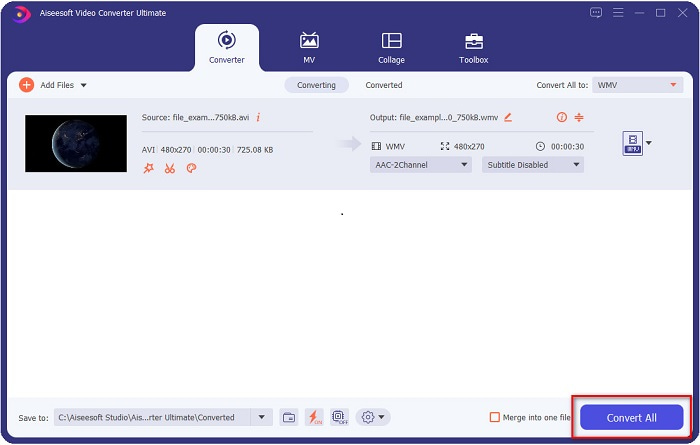
Vaihe 4. Kun olet valinnut WMV-tiedostomuodon, napsauta Convert All -painiketta muuntaaksesi AVI-tiedostosi WMV-tiedostoksi. Odota muutama sekunti – siinä kaikki! Näin helposti voit muuntaa AVI-tiedostosi WMV-muotoon.
Osa 2. Kuinka muuntaa AVI WMV:ksi ilmaiseksi
Kun muunnetaan AVI-tiedostoja WMV-muotoon, voit käyttää myös ilmaisia ladattavia muunnostyökaluja. Yksi tunnettu muunnin on Freemake Video Converter. Tällä offline-muuntimella voit muuntaa yli 500 eri formaattia, kuten AVI:n WMV:ksi, MP3:ksi, MP4:ksi, DVD:ksi ja paljon muuta. Graafinen käyttöliittymä (GUI) ei kuitenkaan ole kovin hyvä, eikä ohjelman käyttöliittymä ole kovin helppokäyttöinen. Siitä huolimatta monet käyttäjät käyttävät sitä edelleen tiedostojen muuntamiseen.
Pikaopas AVI-tiedoston muuntamiseen WMV-tiedostoksi Freemake Video Converterin avulla:
Vaihe 1. Lataa sovellus etsimällä Freemake Video Converter selaimellasi. Avaa sovellus latauksen jälkeen.
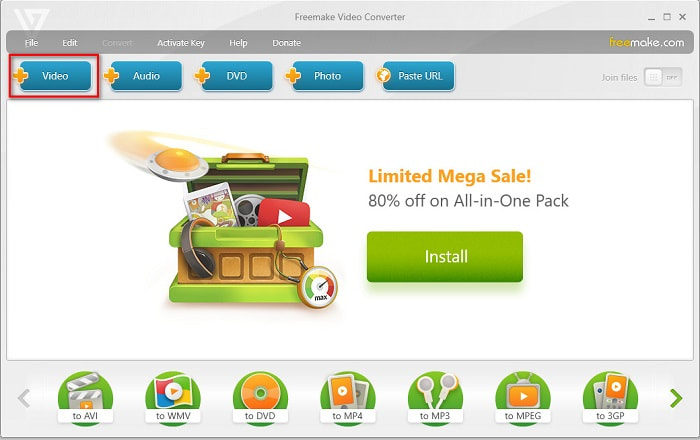
Vaihe 2. Kun olet avannut sovelluksen, napsauta Video-painiketta ja valitse AVI-tiedostosi, kun tietokoneen tiedostot tulevat näkyviin. Paina Open-painiketta lisätäksesi AVI-tiedostosi jonoon.
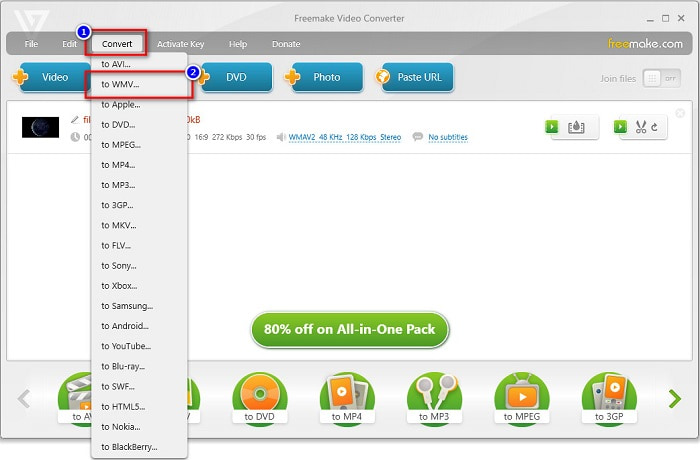
Vaihe 3. Kun olet valinnut AVI-tiedostosi, napsauta Convert-vaihtoehtoa, joka sijaitsee ohjelman käyttöliittymän yläosassa. Luettelo tiedostomuodoista avautuu, valitse niistä WMV.
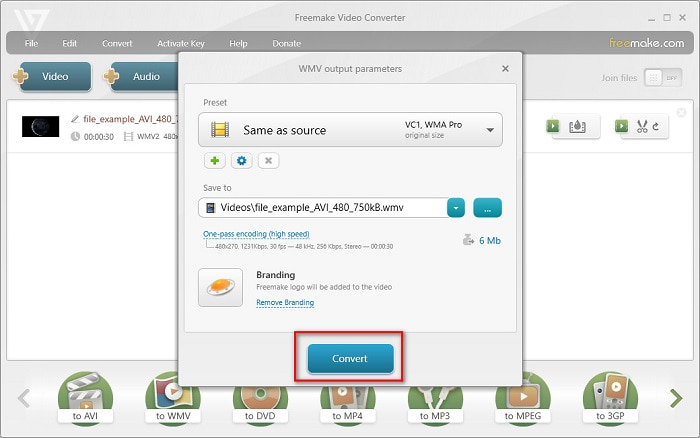
Vaihe 4. Uusi näkymä avautuu, jossa suoritat muunnoksen. Napsauta Convert-painiketta aloittaaksesi AVI-tiedostosi muuntamisen WMV-muotoon.
Osa 3. AVI-tiedostojen muuntaminen WMV-tiedostoiksi verkossa
Emme voi kieltää, että tiedostojen muuntaminen verkossa on usein kätevämpää. Siksi testasimme useita verkkotyökaluja AVI:n muuntamiseksi WMV-muotoon ja valitsimme suositeltavaksi parhaaksi FVC Free Video Converter Online -palvelun. Tällä muuntimella voit käsitellä suuria tiedostoja ilman rajoituksia. Toisaalta muunnos voi joskus olla hidas, koska työkalu on täysin internet-riippuvainen – muunnosnopeus riippuu yhteytesi nopeudesta. Siitä huolimatta FVC Free Video Converter Online on monien käyttäjien suosima ja osoittautunut yhdeksi parhaista verkkopohjaisista muuntimista.
Vaiheet, joilla muunnetaan AVI-tiedosto WMV-muotoon käyttäen työkalua FVC Free Video Converter
Vaihe 1. Etsi selaimellasi FVC Free Video Converter Online.
Vaihe 2. Kun olet sivustolla, napsauta Add Files to Convert -painiketta. Lataa sitten käynnistysohjelma, joka tulee näkyviin, kun napsautat Add Files to Convert -painiketta. Valitse sen jälkeen AVI-tiedostosi.
Lataa työpöytäversio muuntaaksesi tiedostoja erissä.
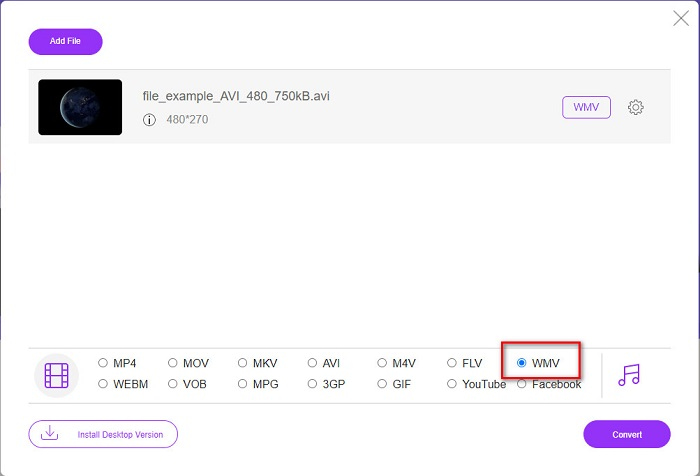
Vaihe 3. Kun olet valinnut tiedoston, ohjelman toisessa näkymässä näet luettelon tiedostomuodoista; napsauta WMV.
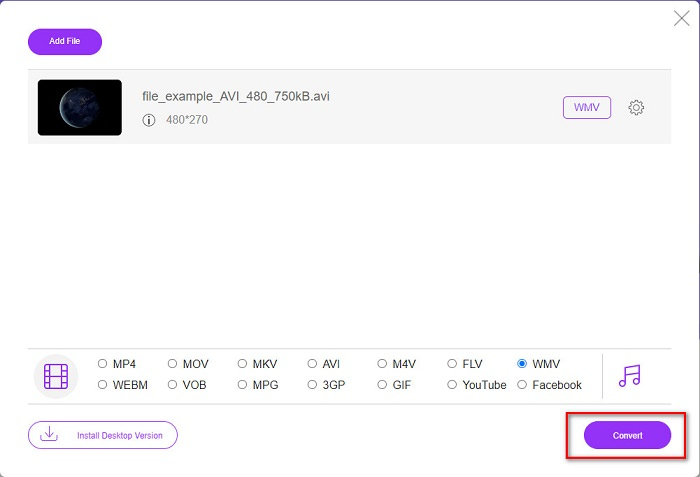
Vaihe 4. Lopuksi napsauta Convert-painiketta ohjelman käyttöliittymän oikeassa alakulmassa. Tietokoneesi tiedostot avautuvat, ja voit valita muunnetun tiedoston tallennuskohteen. Tämän jälkeen AVI-tiedostosi muuntaminen WMV-muotoon alkaa.
Osa 4. Lisätietoja AVI:sta ja WMV:stä
AVI eli Audio Video Interleave -tiedostot ovat Windows-koneiden vakiovideoformaatteja. Näissä tiedostoissa on sekä ääni että kuva, ja ne voivat käyttää erilaisia koodekkeja, kuten DivX ja XviD. Tämä tiedostomuoto on kuitenkin vain vähän pakattu, joten sen koko on melko suuri. WMV eli Windows Media Video puolestaan on tuettu monissa ohjelmissa ja laitteissa, ja Windows Media Player pakkaa tämän tyyppiset tiedostot. Lisäksi Windows-järjestelmä toistaa yleensä tällaisia tiedostoja oletuksena. Jos haluat toistaa WMV-tiedostoja vaivattomasti, lue Best WMV Players.
AVI vs. WMV
Resource Interchange File Format (RIFF) -muotoon perustuvan AVI-muodon Microsoft esitteli vuonna 1992. Se voi tallentaa korkealaatuista videota/ääntä, koska se käyttää vähemmän pakkausta. Mutta tämä aiheuttaa myös AVI-tiedoston suuren tiedostokoon, mikä voi olla ongelma, kun tilaa on rajoitetusti.
Microsoftin tuottama WMV oli yksi yleisimmistä videoformaateista 2000-luvulla. Se voidaan nähdä verkossa ja toistaa useilla Windowsin mediasoittimilla. Ja se on myös Windows Media Playerin oletusvideotiedostomuoto. Mutta sen ovat ottaneet muut muodot viime aikoina.
Osa 5. Usein kysyttyä AVI:n muuntamisesta WMV-tiedostomuotoon
Häiritseekö AVI:n vaihtaminen WMV:ksi tiedoston laatua?
Kun muunnat AVI:n WMV:ksi, tiedostojesi laatu ei vaikuta. Jotkut muuntimet eivät kuitenkaan tue korkealaatuisia pikselivideoita, minkä vuoksi laatu heikkenee.
Voitko pakata AVI-tiedostoja?
Kyllä. Voit käyttää verkossa saatavilla olevia videonpakkaustyökaluja. Voit myös muuntaa AVI-tiedostosi WMV-muotoon pienentääksesi sen kokoa. Lisäksi voit käyttää ohjelmaa FVC Video Converter Ultimate AVI-tiedostojen pakkaamiseen.
Muuttuuko AVI-tiedostoni tiedostokoko muuntamisen jälkeen?
AVI-tiedostosi tiedostokoossa on joitain tapauksia, jotka saattavat poiketa alkuperäisestä. Koska kun tiedostot muunnetaan, pakatut tiedostot puretaan, jolloin tiedostokoko muuttuu hieman.
Johtopäätös
Yhteenvetona voidaan todeta, että yllä esitetyt online- ja offline-työkalut tarjoavat lupaavia muunnosominaisuuksia, jotka voivat tyydyttää tarpeitasi AVI-tiedostojen muuntamisessa WMV-tiedostoiksi. Mutta jos etsit muunninta, joka sisältää monia ominaisuuksia, jotka auttavat sinua vastaamaan tarpeisiisi, suosittelemme käyttämään FVC Video Converter Ultimatea – epäiletkö sitä edelleen? Kokeile nyt ja ota kaikki irti tiedostoistasi!
-
 Konkreettinen opas AVI: n muuntamiseksi FLV: ksi ilmaiseksi
 AVI: n muuntamiseksi FLV: ksi tarvitaan tehokas videomuunnin. Onneksi voit oppia kaksi ja heidän vaiheittaiset ohjeet tästä yksittäisestä artikkelista.
-
 Kuinka muuntaa AVI-videot animoituiksi GIF-tiedostoiksi Windows / Macissa
 Haluatko valita mielenkiintoiset AVI-segmentit GIF-meemien luomiseen? Tämä artikkeli kertoo sinulle 2 parasta tapaa leikata AVI-videoita ja muuntaa AVI animoituiksi GIF-tiedostoiksi ilmaiseksi.
-
 Päätä, mikä on ihanteellinen AVI-MP3-muunnosohjelmisto [PC ja Mac]
 Haluatko tietää kuinka muuntaa AVI MP3-äänimuotoon? Alla olevasta luettelosta löydät myös erilaisia työkaluja ja vaiheita, jotka sopivat tarpeisiisi.

