


 Video Converter Ultimate
 Näytön tallennin
 Videon korjaus
Selvitä, mitä muuntajia voidaan helposti käyttää DivX:n muuntamiseen AVI:ksi
DivX ja AVI eivät ole toistensa kilpailijoita, vaikka ne on yhdistetty videotiedostoihin – näillä kahdella on silti paljon eroja. Esimerkiksi DivX:tä käytetään pitkien videoiden pakkaamiseen, eli se tiivistää videon sisältävän säiliön mahdollisimman pieneksi ilman, että videon laatu kärsii. AVI puolestaan on esimerkki videotiedostosäiliöstä, jota voit käyttää teräväpiirtovideon tallentamiseen, mutta paljon suuremmassa tiedostokoossa. Nyt meillä on lyhyt taustatieto näistä kahdesta. Sukelletaan siis syvemmälle, jotta ymmärrämme niitä paremmin ja opimme, kuinka muuntaa DivX AVI:ksi ilmaiseksi lukemalla tätä artikkelia eteenpäin.
Osa 1. DivX vs AVI
Kuten aiemmin todettiin, DivX ja AVI eivät todellakaan ole omia kilpailijoitaan, koska niitä voidaan käyttää sekä yhdessä että toisessa tiedostossa. Lisäksi DivX on DivX, Inc:n itsensä kehittämä tiedostopakkaus. Tämä kompressori on patentoitu, ja sen sanotaan olevan seuraavan sukupolven DVD-videovuokraamo. Mutta nyt DivX on suljettu, koska epäonnistunut yritys vaihtaa DVD-levyt. Mutta nyt voit silti käyttää työkalua ja katsella sitä joissakin vanhoissa mediasoittimissa, jotka tukevat DivX:n tarjoamaa pakkaustyyppiä.
AVI on medi tiedostomuoto, jota käytetään sisältämään video- ja äänitiedostoja eri koodekeilla. Microsoft kehitti tämän muodon käytettäväksi video- ja äänivirtojen toistoon. Loppuvuonna 1992 AVI luotiin tuomaan edistyksellistä ja tulevaisuuden video- ja äänentoistoa, joka oli alun perin tarkoitettu vain Windows-käyttöjärjestelmille. Nykyään AVI:ta voi kuitenkin käyttää myös Macilla, Linuxilla ja jopa puhelimilla. Yksi asia, jota AVI-muodossa ei ole vieläkään onnistuttu parantamaan, on kuitenkin sen pakkaus ja tiedostokoko.
DivX
◆ Kompressoreita käytetään pienentämään säiliön tiedostokokoa vaikuttamatta sen laatuun.
◆ Se on DivX Inc:n patentoima kompressori.
◆ Sen sanottiin olevan DVD-levyjen parempi versio, mutta se epäonnistui yrityksessään.
◆ Suurin osa uusista mediasoittimista ei tue DivX:ää.
AVI
◆ Se tunnetaan yhtenä tämän modernin aikakauden mullistaneista video- ja äänisäiliöistä.
◆ Tätä muotoa tuetaan useimmissa alustoissa ja ohjelmistoissa.
◆ Siinä ei ole tarkkaa pakkaustukea, koska se on häviötön.
Ja nyt kun tiedämme eron näiden kahden välillä, on nyt oikea aika tutustua DivX-AVI-muuntimeen online- ja offline-tilassa, jota voit käyttää DivX-tiedoston katseluun.
Osa 2. 4 parhaista muuntajista ja oppia muuttamaan DivX AVI:ksi
Top 1. FVC Video Converter Ultimate
Jos DivX-tiedoston muuntaminen aiheuttaa päänvaivaa, niin FVC Video Converter Ultimate on ratkaisu siihen. Toisin kuin monet muut muuntimet, tätä ohjelmistoa on parannettu vuosien aikana, ja siitä on tullut yksi ilmiömäisimmistä muunninohjelmista. Sen lisäksi, että se on yksi parhaista, siinä on myös yksi nopeimmista muunnosprosesseista, joita tulet kokemaan, sillä se hyödyntää laitteistokiihdytystä ja nopeaa muunnosta. Sisäänrakennettujen ominaisuuksiensa ansiosta se on helposti noussut kärkeen. Vaikka ohjelma on maksullinen, sen käyttäminen ei vaadi suurta sijoitusta. Jos siis haluat oppia, miten DivX muunnetaan AVI:ksi Macilla tai PC:llä, seuraa alla olevia vaiheita, kun testaamme työkalua itse.
Vaihe 1. Ennen kuin voit käyttää tätä työkalua, sinun on ensin ladattava se koneellesi. Asenna se, suorita käyttöönotto ja napsauta Start Now jatkaaksesi.
Ilmainen latausWindows 7 tai uudempiTurvallinen lataus
Ilmainen latausMacOS 10.7 tai uudempiTurvallinen lataus
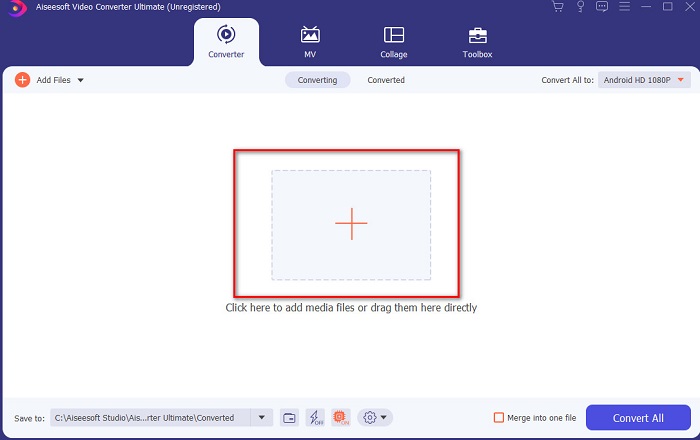
Vaihe 2. Käynnistä työkalu jatkaaksesi – tällainen käyttöliittymä tulee näkyviin. Napsauta keskellä olevaa +-painiketta, etsi haluamasi DivX-tiedosto ja napsauta sitten Open.
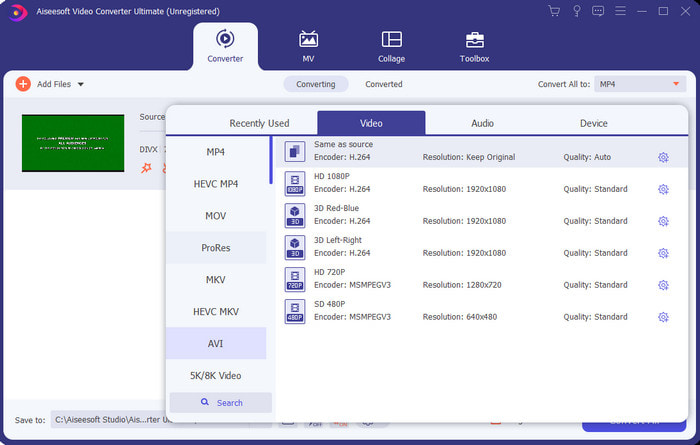
Vaihe 3. Muuttaaksesi DivX:n AVI:ksi napsauta Convert All to -vaihtoehtoa, etsi AVI-muoto ja napsauta sitä.
Vaihe 4. Aloita muunnosprosessi napsauttamalla Convert All ja odota, että prosessi valmistuu.
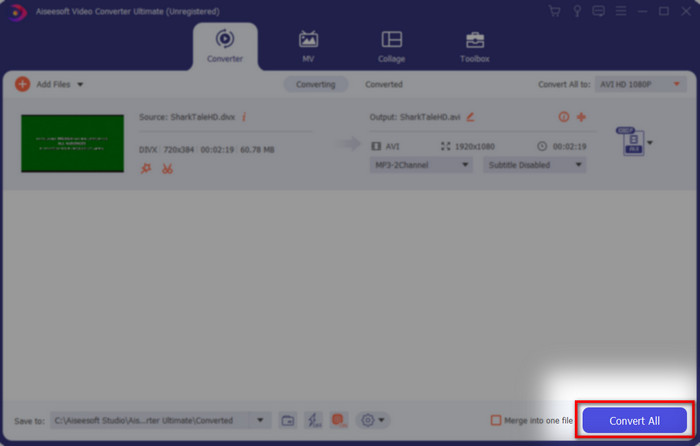
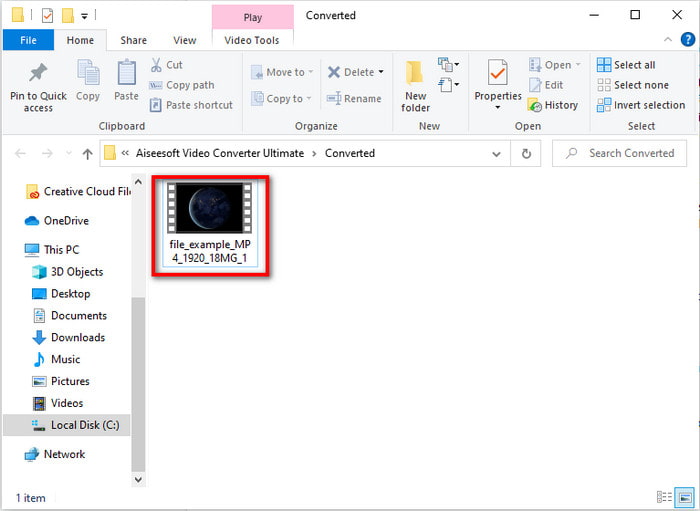
Vaihe 5. Odota, että muunnosprosessi saadaan päätökseen. Kun se on valmis, näytölle ilmestyy kansio, jossa on muunnettu tiedosto. Napsauta sitä katsoaksesi ja nauttiaksesi videosta.
Top 2. Freemake Video Converter
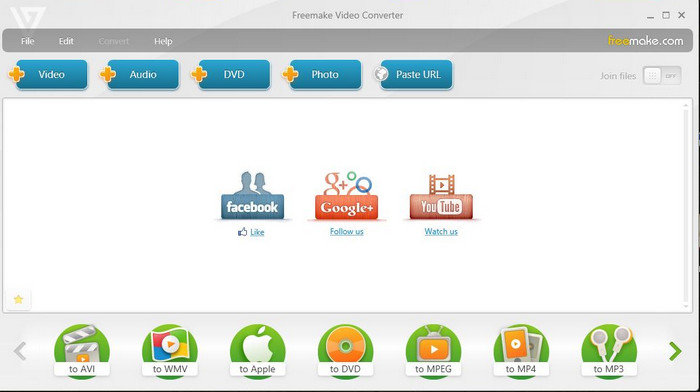
Toinen ladattava ohjelmisto, jota voit käyttää formaatin muuntamiseen, on Freemake Video Converter. Tämä työkalu on jo auttanut monia käyttäjiä muuntamaan erilaisia mediatiedostoja uuteen muotoon. Sitä pidetään laajasti yhtenä parhaista ohjelmista, jonka voit ladata ja johon voit luottaa. Vaikka työkalu onkin hyvä, se ei tue kaikkia formaatteja, ja sen muunnosprosessi on hyvin hidas, koska siinä ei ole laitteistokiihdytystä kuten FVC Video Converter Ultimatessa. Jos siis haluat muuntaa DivX:n AVI:ksi ilmaiseksi, tämä voi olla sinulle sopiva ohjelma.
Plussat
- Ilmainen minkä tahansa ohjelmiston lataaminen.
- Ulkonäkö on yksinkertaista.
Haittoja
- Ei laitteistokiihdytystä.
- Joitakin muotoja ei tueta täällä.
Suosituin 3. Ilmainen FVC-videomuunnin
Entä jos haluat muuntaa mediatiedoston uuteen muotoon, mutta et halua ladata mitään? Siinä tapauksessa FVC Free Video Converter on apunasi. Toisin kuin kaksi edellä mainittua työkalua, tätä työkalua voi käyttää ilman, että sitä tarvitsee ladata. Vaikka ohjelmisto on ilmainen käyttää, se ei silti tue kaikkia formaatteja. Lisäksi käytettävissä on vain rajallinen määrä muotoja, joihin voit muuntaa. Kuitenkin muunnosprosessi on paljon nopeampi kuin Freemake Video Converterissa. Jos siis haluat tietää, miten DivX muunnetaan AVI:ksi verkossa, seuraa alla olevia ohjeita.
Vaihe 1. Siirry FVC Free Video Converter -palvelun pääsivustolle napsauttamalla tätä linkkiä.
Vaihe 2. Paina Add Files to Convert ladataksesi käynnistysohjelman, jos käytät palvelua ensimmäistä kertaa. Jos käynnistysohjelma on jo asennettu, napsauta uudelleen Add Files to Convert, etsi tiedosto kansiosta, napsauta sitä ja paina Open.
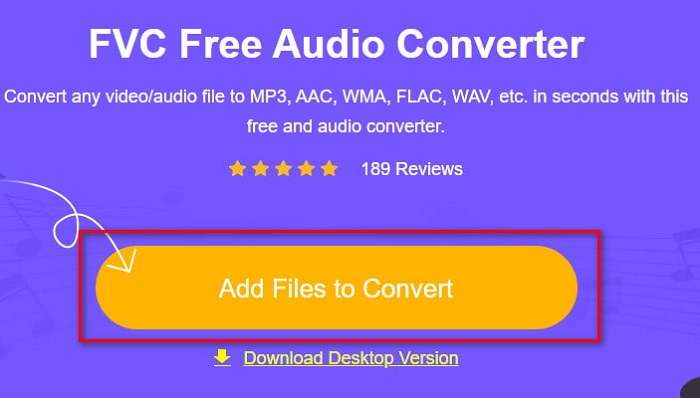
Vaihe 3. Valitse AVI-muoto alla luetelluista vaihtoehdoista tai mikä tahansa muu muoto, johon haluat tiedoston muunnettavan.
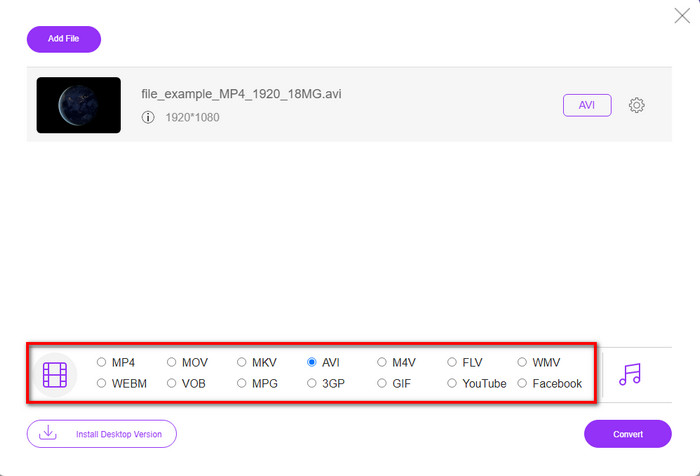
Vaihe 4. Kun olet valinnut muodon, on aika tallentaa se koneellesi napsauttamalla Convert.
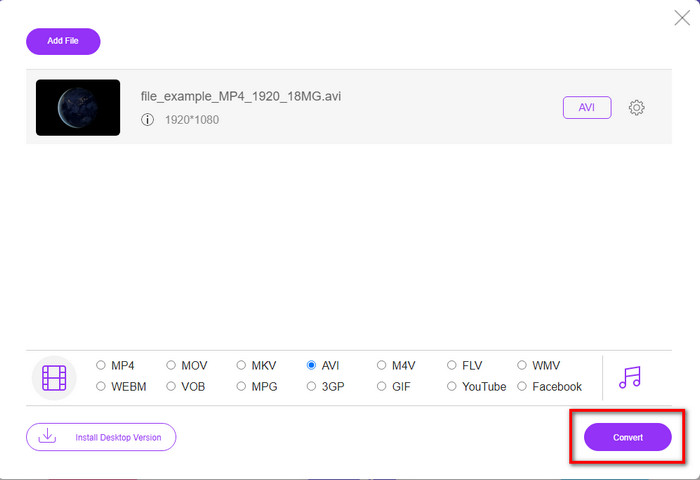
Vaihe 5. Kun prosessi on käynnissä ja valmis, odota, että tiedostokansio ponnahtaa näkyviin ruudullesi. Avaa tiedosto napsauttamalla sitä ja katso muunnettu mediatiedosto.
Top 4. Online-Convert.com
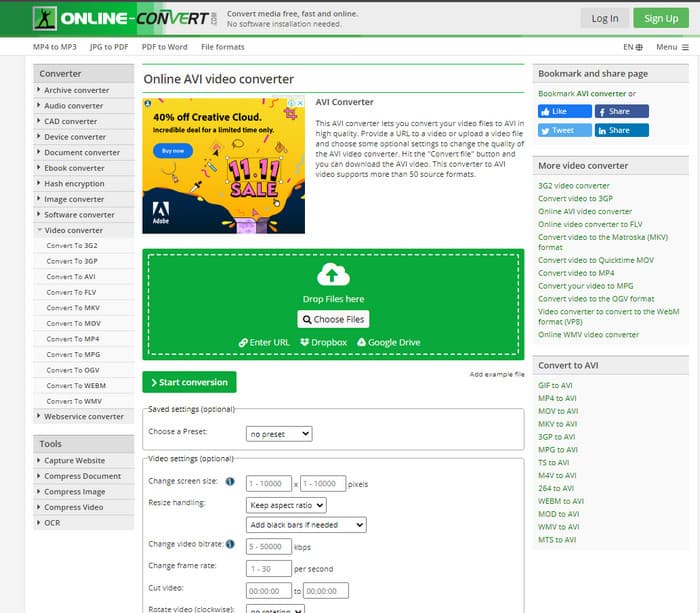
Toinen verkkotyökalu, jolla voit muuntaa mitä tahansa mediatiedostoja, on Online-Convert.com. Kuten monet muutkin verkkotyökalut, tämä muunnin tukee vain rajallista määrää formaatteja. Siinä on kuitenkin sisäänrakennettu videon säätötoiminto, jota voit käyttää, mutta sen hallinta on vaikeaa, varsinkin jos sinulla ei ole siitä kokemusta. Lisäksi tiedostojen lataaminen ja purkaminen on täällä erittäin hidasta verrattuna palveluun FVC Free Video Converter.
Plussat
- Vapaa pääsy verkossa.
- Työkalun käyttöliittymä on loistava ja siinä on vähän tai ei ollenkaan mainoksia.
- Muunnosprosessi riippuu Internet-yhteydestä.
Haittoja
- Ei pääse ilman Internetiä.
- Tuonti- ja vientiprosessi vie paljon aikaa muihin työkaluihin verrattuna.
Osa 3. Kumpi on paras muuntaa DivX AVI:ksi?
| Ominaisuudet | FVC Video Converter Ultimate | Freemake Video Converter | FVC Free Video Converter | Online-Convert.com |
| Muunna video ja ääni |  | | | |
| Erämuunnos | |  | | |
| Laitteiston kiihdytys | | | | |
| Ohjelmapohjainen työkalu | Työpöytäpohjainen työkalu | Työpöytäpohjainen työkalu | Web-pohjainen työkalu | Web-pohjainen työkalu |
| Verkkoyhteydet | Ei vaadita | Ei vaadita | Vaaditaan | Vaaditaan |
Osa 4. Usein kysytyt kysymykset DivX-AVI-muuntimista
Kumpi on parempi? DivX ja XviD?
DivX on tunnettu video- ja äänisäiliötiedostojen patentoitu koodekki, ja se on myös erikoistunut tiedoston kopioimiseen levylle pakkaamalla sitä laatua menettämättä. Vaikka XviD on DivX:n knock-off-versio, ja se on jonkin verran paljon parempi kuin DivX. Lisäksi se on ei-omistusoikeus, mikä tarkoittaa, että kuka tahansa voi käyttää tätä milloin tahansa tai milloin tahansa.
Mitä koodekit ovat?
Pakkauksenhallintaa käytetään tiedoston pakkaamiseen ja minkä tahansa ääni- ja videotiedostojen jakamiseen paljon nopeammin pienemmässä tiedostokoossa. Sitä käytetään myös mainittuun koodekkiin sidotun tiedoston purkamiseen avaamaan tekemäsi pakattu tiedosto vahingoittamatta sen uskottavuutta.
Jos haluat pienentää tiedostokokoa, sopiiko se pakata tai muuntaa?
Jos haluat säilyttää videon laadun ja pienentää sen kokoa, on ihanteellista pakata se tämän linkin avulla. Jos taas haluat paljon helpomman tavan, kannattaa harkita videoiden muuntamista MP4-muotoon ja lukea tämä artikkeli saadaksesi käsityksen siitä, miten se tehdään.
Johtopäätös
Lopuksi tämän artikkelin myötä meidän on nyt helpompi ymmärtää, mitä DivX on ja mitä AVI on. Lisäksi esittelimme sinulle neljä hyödyllistä työkalua, joita voit käyttää DivX-tiedostojesi toistamiseen muuntamalla ne AVI-muotoon. Jos siis haluat kokea 100%-menestyksen, käytä FVC Video Converter Ultimate -ohjelmistoa menestyksen takaamiseksi.
Ilmainen latausWindows 7 tai uudempiTurvallinen lataus
Ilmainen latausMacOS 10.7 tai uudempiTurvallinen lataus
-
 [Ilmainen ja online] 7 tapaa muuntaa MTS AVI:ksi Mac-/Windows-tietokoneessa
 Kuinka muuntaa MTS AVI: ksi helposti? Tästä oppaasta löydät 7 ilmaista ja helppoa tapaa muuntaa MTS-tiedostot AVI: ksi Windowsissa tai Macissa ilman laadun heikkenemistä.
-
 Opetusohjelma MP4: n muuntamiseksi AVI-tiedostoiksi 7 ilmaisella videomuuntimella
 Haluatko saada kaikki ilmaiset tavat muuntaa AVI MP4-videoksi? Sinun ei pitäisi missata tätä artikkelia. Tässä on 7 tapaa muuntaa AVI-tiedostoja MP4-muotoon ilmaiseksi Windowsissa, Macissa, iPhonessa, Androidissa ja verkossa.
-
 3 helppoa tapaa muuntaa FLV AVI: ksi työpöydällä ja verkossa
 Tässä on kolme tapaa, joiden avulla voit tehokkaasti muuntaa FLV -videotiedostosi AVI -muotoon Windowsissa ja Macissa, jotta voit katsella niitä laadukkaasti.
