


 Video Converter Ultimate
 Näytön tallennin
 Videon korjaus
 Suojattu lataus
Helpoimmat menetelmät M2TS:n muuttamiseksi M4V-tiedostomuotoon
Monet monet, kuten M2TS, saavat yhä vähemmän tukea, mitä pidemmälle tulevaisuuteen mennään. Tässä muodossa käytetään yhä alkuperäistä Blu-ray Audio Video -säiliötä, joka siirtää dataa MPEG‑2‑virran avulla. Osa laitteista, kuten iPhonet, iPodit ja Android-laitteet, ei tunnista tämän muodon rakennetta, joten et voi toistaa sitä niissä. Jos sinulla on vielä tällaista materiaalia, kannattaa se muuntaa toisiin tiedostomuotoihin, kuten M4V:hen. Jos haluat tehdä muunnoksen, lue tämä artikkeli. Tarjoamme parhaat menetelmät, joilla opit, miten muuntaa M2TS M4V-muotoon.

Osa 1: Ilmainen tapa muuntaa M2TS M4V:ksi
Sinun ei enää tarvitse murehtia M2TS-tiedostojesi muuntamisesta, jos käytät ohjelmaa FVC Free M2TS Converter. Tällä ilmaisella työkalulla voit muuntaa M2TS-tiedostot moniin yleisiin videoformaatteihin, kuten M4V, MP4 (HD H.264/MPEG-4 AVC -video), MOV, AVI, TS, VOB, MKV, FLV, SWF, ASF, WMV, MP3, M4A, OGG, WAV, WMA, FLAC ja muihin. Lisäksi työkalu tukee erämuunnosta, eli voit muuntaa useita tiedostoja kerralla. Sen muunnosnopeus on myös erittäin korkea: se voi muuntaa tiedostoja jopa 50 kertaa nopeammin kuin monet tavalliset muuntimet.
Lisäksi FVC Free M2TS Converter ei ole luotettava vain useiden tiedostojen muuntamisessa. Se tarjoaa myös sisäänrakennetun videoeditorin. Sen avulla on helppoa ladata useita M2TS-tiedostoja samanaikaisesti ja yhdistää ne yhdeksi. Lisäksi voit valita kullekin videotiedostolle tietyn teeman, kuten syntymäpäivän, perheen, ruoan, ympäristön, urheilun tai juhlan, kuten Halloween. Tällä tavalla voit varmistaa, että saat houkuttelevan ja upean videon. Lopuksi tämä työkalu on turvallinen käyttää. Se varmistaa, että ääni- ja kuvahäviöt vältetään muunnosprosessin aikana.
Ominaisuudet
◆ Muunna erilaisia videotiedostoja, kuten M2TS, M4V, MP4, MOV, AVI, FLV, WMV ja paljon muuta.
◆ Tarjoaa nopean muunnosprosessin, joka on jopa 50 kertaa nopeampi kuin keskimääräinen muunnosnopeus.
◆ Muunna useita tiedostoja samanaikaisesti.
◆ Tarjoaa videon parantamistoiminnon videoiden parantamiseksi.
◆ Yhdistä useita videoita yhdeksi kappaleeksi.
Seuraa alla olevaa yksinkertaista menettelyä oppiaksesi muuttamaan useita M2TS-tiedostoja yhdeksi M4V:ksi käyttämällä FVC Free M2TS Converter -ohjelmaa.
Vaihe 1: Lataa FVC Free M2TS Converter tietokoneellesi napsauttamalla alla olevaa Download-painiketta. Jatka sitten asennukseen ja käynnistä ohjelma.
Ilmainen latausWindows 7 tai uudempiTurvallinen lataus
Ilmainen latausMacOS 10.7 tai uudempiTurvallinen lataus
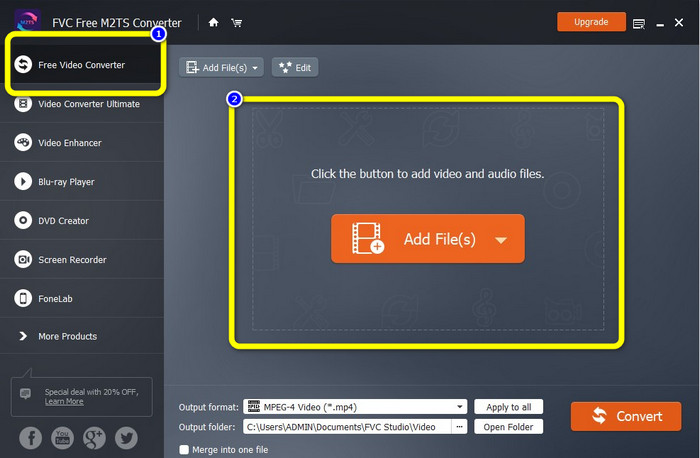
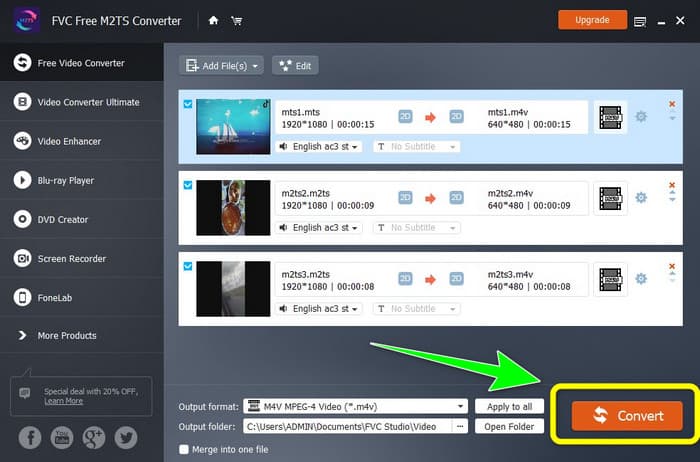
Vaihe 2: Valitse käyttöliittymän vasemmasta reunasta Free Video Converter -vaihtoehto. Napsauta sitten Add File -painiketta lisätäksesi muunnettavan M2TS-videotiedoston.
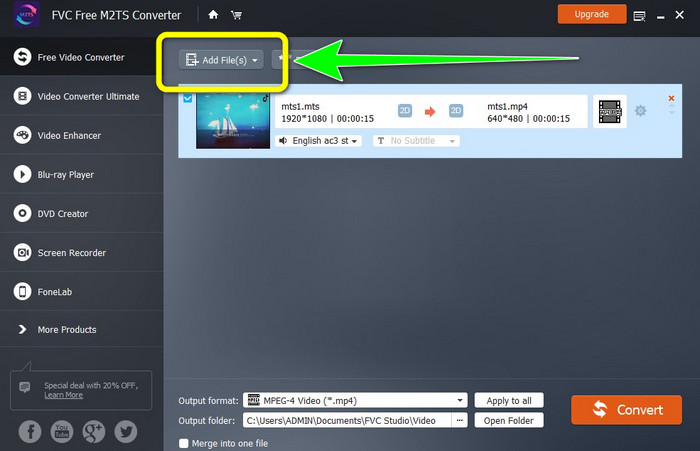
Vaihe 3: Jos haluat lisätä useita M2TS-videotiedostoja, napsauta Add Files -painiketta.
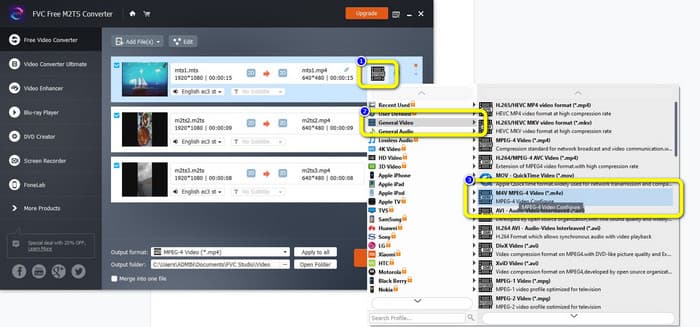
Vaihe 3: Siirry käyttöliittymän oikeassa reunassa olevaan Video-kuvakkeeseen. Valitse General Video ja sen jälkeen haluamasi tiedostomuoto, eli M4V.
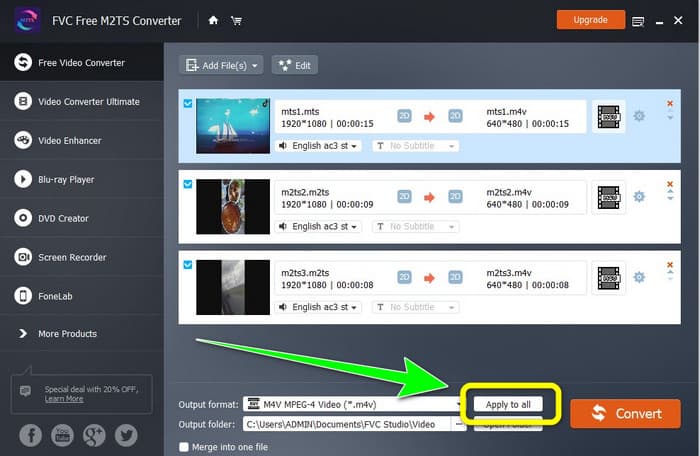
Vaihe 4: Voit käyttää samaa menettelyä muiden M2TS-tiedostojen tulostusmuodon muuttamiseen. Voit myös napsauttaa Apply to all -painiketta vaihtaaksesi kaikkien niiden lähtömuodoksi M4V yhdellä kertaa.
Vaihe 5: Kun olet vaihtanut kaikkien M2TS-tiedostojen muodoksi M4V, napsauta Convert-painiketta. Odota muunnosprosessin valmistumista ja tallenna videot haluamaasi sijaintiin.
Osa 2: Paras tapa muuntaa M2TS M4V:ksi häviöttömästi
Jos haluat toisen erinomaisen tavan yhdistää useita M2TS-tiedostoja yhdeksi M4V-tiedostoksi, voit kokeilla ohjelmaa Video Converter Ultimate. Tällä ladattavalla sovelluksella voit helposti muuntaa M2TS:n M4V:ksi laadusta tinkimättä, sillä se tukee erämuunnosta. Lisäksi sen muunnosnopeus on 30 kertaa korkeampi kuin monissa muissa muuntimissa. Näin voit muuntaa enemmän tiedostoja tuhlaamatta aikaa. Video Converter Ultimate -ohjelmassa on myös selkeä käyttöliittymä ja yksinkertaiset vaiheet muunnokseen, joten se sopii kaikentasoisille käyttäjille.
Lisäksi tämä muunnin tarjoaa myös enemmän hienoja ominaisuuksia. Jos haluat yhdistää useita M2TS-videoita ja tehdä niistä yhdeksi kappaleeksi, voit käyttää tätä sovellusta, koska siinä on Video Merger -työkalu. Tällä tavalla voit yhdistää M2TS-videosi helposti. Tämän työkalun avulla voit myös luoda kollaasin, jossa voit yhdistää kuvia ja videoita. Voit myös käyttää lukuisia ilmaisia malleja ja suodattimia. Joten voit tehdä kauniin kollaasin. Video Converter Ultimaten avulla voit nauttia enemmän toiminnoista.
Ominaisuudet
◆ Muunna yli 100 videotiedostomuotoa, mukaan lukien M4V, M2TS, MP4, AVI, FLV, MKV, WMV, VOB, MOV, SWF jne.
◆ Luo upea kollaasi ilmaisilla suodattimilla ja malleilla.
◆ Tarjoa musiikkivideon valmistaja.
◆ Tarjoaa Toolboxin videoeditointiin.
◆ Tarjoaa erämuunnosprosessin 30 kertaa nopeammalla muunnosnopeudella.
Käytä alla olevia yksityiskohtaisia ohjeita muuntaaksesi useita M2TS-tiedostoja samanaikaisesti FVC Video Converter Ultimate -sovelluksella.
Vaihe 1: Lataa Video Converter Ultimate tietokoneellesi. Voit ladata sen napsauttamalla alla olevaa Download-painiketta. Avaa sen jälkeen ohjelma.
Ilmainen latausWindows 7 tai uudempiTurvallinen lataus
Ilmainen latausMacOS 10.7 tai uudempiTurvallinen lataus
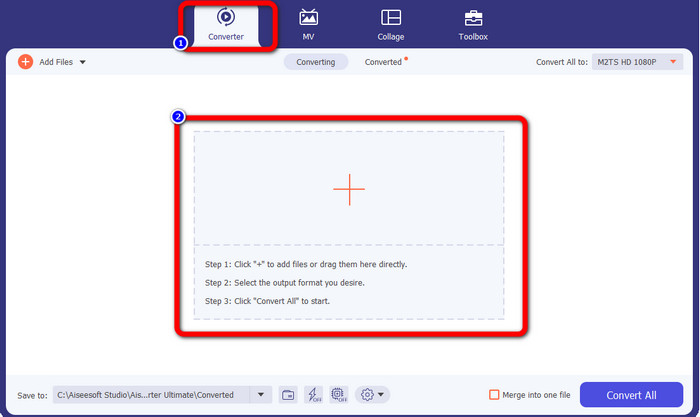
Vaihe 2: Valitse Converter-välilehti ja napsauta Plus-kuvaketta lisätäksesi M2TS-tiedostosi.
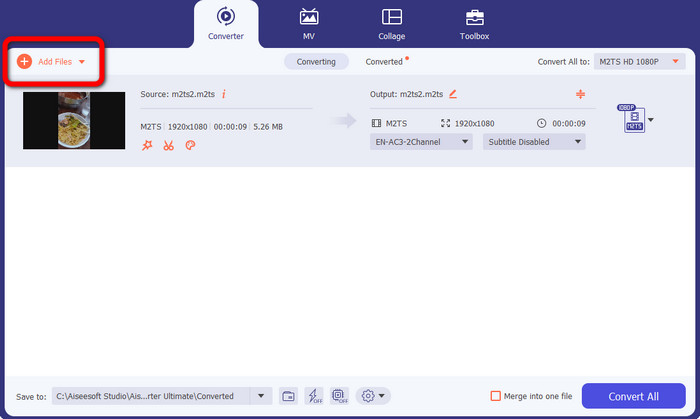
Vaihe 3: Napsauta käyttöliittymän vasemmassa reunassa olevaa Add File -painiketta lisätäksesi lisää M2TS-tiedostoja.
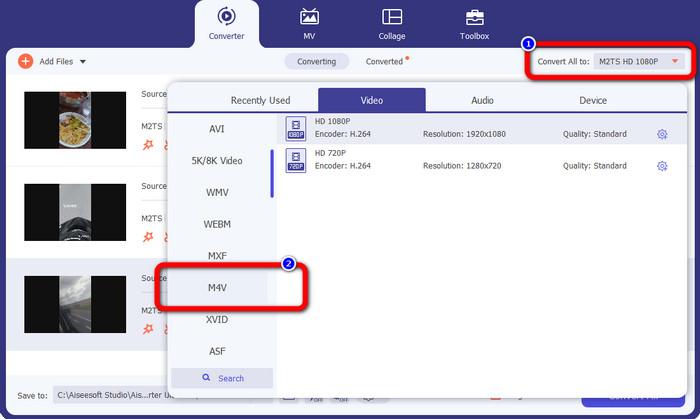
Vaihe 4: Muuntaaksesi ne M4V-tiedostoksi napsauta Convert All to -painiketta nähdäksesi formaattivaihtoehdot. Valitse sen jälkeen M4V-tiedostomuoto.
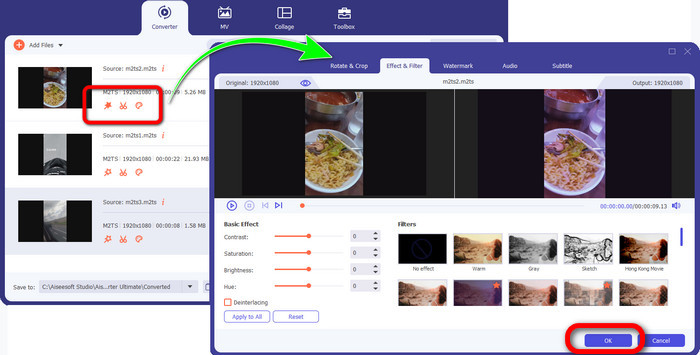
Vaihe 4: Jos haluat muokata videoitasi, napsauta muokkaustyökaluja. Voit parantaa kuvaa, muokata, lisätä suotimia ja tehosteita sekä leikata videoitasi. Kun olet valmis muokkauksen kanssa, napsauta OK.
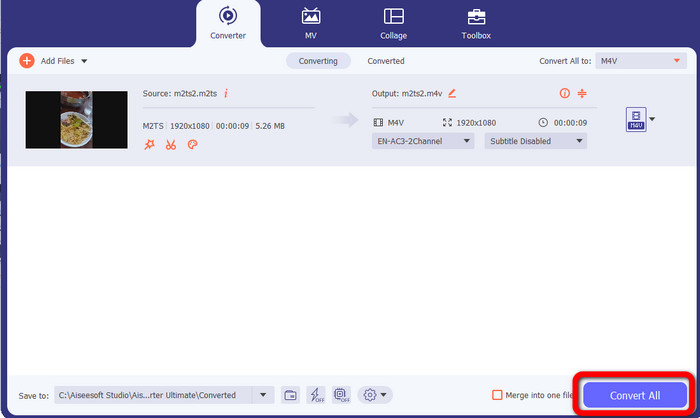
Vaihe 5: Muokatessasi videon voit sen jälkeen muuntaa sen napsauttamalla Convert All -painiketta. Tallenna video muunnosprosessin päätyttyä.
Osa 3: Mikä on M2TS?
Tiedostopääte: .m2ts
Blu-ray Disc Audio-Video (BDAV) MPEG-2 Transport Stream (M2TS) -säiliötiedostomuoto käyttää M2TS-tiedostotunnistetta. Sitä käytetään useisiin ääni-, video- ja muihin virtauksiin. MPEG-2-siirtovirtakontti toimii sen perustana. Blu-ray Disc- ja AVCHD-levyillä tätä säilötyyppiä käytetään usein korkealaatuiseen videokuvaan. Blu-ray Disc Association kehitti M2TS:n. Kaikki siihen liittyvät ohjelmat ovat All Player, VLC Media Player, Pot Player ja MPlayer.
Osa 4: Mikä on M4V?
Tiedostopääte: .m4v
Apple loi M4V-tiedostomuodon, joka on MP4-standardia muistuttava videosäiliömuoto. Ensisijainen ero on, että M4V-tiedostoilla voi olla kopiosuojaus. iTunes Storessaan Apple koodaa videotiedostoja M4V-muodossa. Tähän muotoon liittyvät ohjelmat ovat Apple QuickTime Player, Apple iTunes, Media Player Classic, KMPlayer, Real Player, Zoom Player ja VLC Media Player.
Lisälukemista:
Kuinka muuntaa M2TS AVI-muotoon verkon ja työpöydän parhailla muuntimilla
Erinomainen tapa muuntaa M2TS FLV-muotoon verkossa ja offline-tilassa
Osa 5: Usein kysyttyä M2TS:n muuntamisesta M4V:ksi
Onko M2TS parempi kuin MP4?
Koska M2TS säästää enemmän muistia ja on korkearesoluutioinen, se vaatii enemmän tilaa. MP4 on parempi kuin M2TS tallennustilan säästämiseksi.
Kuinka käyttää käsijarrua M2TS:n muuttamiseksi M4V:ksi?
Lataa käsijarru. Siirry sitten avoimeen lähdekoodiin ja lisää M2TS-tiedosto. Siirry sitten muotovaihtoehtoon ja valitse M4V. Napsauta sen jälkeen Aloita koodaus -painiketta.
Onko MTS sama kuin M2TS?
Toiminnallisesti MTS- ja M2TS-tiedostot ovat identtisiä. Molemmat HD-tiedostot on yhdistetty AVCHD-videomuotoon. On mahdollista vaihtaa M2TS-tiedostotunniste MTS-tiedostotunnisteeksi ja päinvastoin.
Johtopäätös
Yllä oleva selostus auttaa sinua oppimaan lisää siitä, miten muuntaa M2TS M4V-muotoon. Nämä kaksi ladattavaa ohjelmaa ovat parhaita muuntimia tiedostojen muuntamiseen. Ne pystyvät muuntamaan nopeasti ja laadukkaasti ilman häviöitä.
-
 Erilaisia menetelmiä MOV-tiedoston muuttamiseen M4V-tiedostomuotoon
 Haluatko tehokkaan tavan muuntaa MOV-tiedosto M4V-muotoon? Sitten tämä artikkeli täyttää toiveesi. Tässä ovat parhaat muuntimet, joita voit käyttää.
-
 Erinomaiset tekniikat GIF:n muuntamiseen M4V-muotoon välittömästi
 Tämä opas tarjoaa sinulle tehokkaimmat strategiat GIF:n muuntamiseksi M4V:ksi. Lisäksi esittelemme sinulle kaksi parasta muuntajaa, joita voit kokeilla.
-
 Yksinkertainen prosessi SWF:n muuntamiseksi tehokkaasti M4V:ksi
 Älä missaa tätä tilaisuutta oppia mutkattomia menetelmiä SWF:n muuntamiseen M4V:ksi verkossa ja ladattavan sovelluksen käyttämiseen. Lue tämä viesti saadaksesi selville!
