


 Video Converter Ultimate
 Näytön tallennin
 Videon korjaus
Yksinkertaisimmat tavat muuntaa MPG MKV:ksi parhailla muuntimilla [ilmainen]
Valitettavasti MPG-tiedostot eivät sisällä tekstitysraitoja; kuitenkin voit muuntaa tiedostosi sellaiseen tiedostomuotoon, joka tallentaa useita tekstitysraitoja eri kielillä. Ja jos etsit helppoa tapaa muuntaa MPG-tiedostosi MKV-muotoon, tarjoamme yksinkertaiset vaiheet siihen, miten voit muuntaa MPG:n MKV:ksi verkossa ja offline-tilassa; lue tämä artikkeli loppuun asti.

Osa 1. Miksi MPG muunnetaan MKV:ksi
MPG-tiedostomuoto on yksi yleisimmin käytetyistä tiedostomuodoista verkossa. Tämän tiedostomuodon on kehittänyt MPEG tai Moving Pictures Expert Groups. Lisäksi tämäntyyppiset tiedostot voivat tallentaa videota, ääntä ja metatietoja. Lisäksi lähes kaikki mediasoittimet tukevat laajasti tämäntyyppisiä tiedostoja. Sitä vastoin MKV- tai Matroska-tiedostot ovat mediatiedostosäiliö, joka tallentaa videon, äänen ja tekstitysraidat yhteen tiedostoon. Tämä tiedostotyyppi on myös kuuluisa elokuvan harrastajista, koska se pystyy käsittelemään ääniraitoja eri kielillä.
Osa 2. Nopein tapa muuntaa MPG MKV:ksi offline-tilassa
Markkinoilla on paljon muuntimia, jotka voivat muuntaa MPG:n MKV:ksi. Jos kuitenkin haluat muuntimen, joka tekee erittäin nopean muunnoksen, FVC Video Converter Ultimate on paras työkalu. Ja jos haluat poistaa vesileiman videoistasi, tässä muuntimessa on siihen tarkoitettu toiminto. Lisäksi se tukee erämuunnosta, jolla voit yhdistää useita eri tiedostomuotoja yhdeksi. Haluatko tietää, mitkä ovat tämän MPG–MKV-muuntimen edut? Lue sitten alla olevat tiedot.

FVC Video Converter Ultimate
5 689 200+ latausta- Muokkaa ja paranna videotasi selkeästi.
- Erittäin nopea muunnosprosessi on saatavilla tässä muuntimessa.
- Se voi muuntaa MPG-tiedostoja MKV-, WMV-, AVI-, MP4- ja muihin yli 1000 tiedostomuotoon.
- Saatavilla kaikissa käyttöjärjestelmissä, kuten Windows ja macOS.
Ilmainen latausWindows 7 tai uudempiTurvallinen lataus
Ilmainen latausMacOS 10.7 tai uudempiTurvallinen lataus
Noudata alla olevia ohjeita muuntaaksesi MPG-tiedostosi MKV:ksi.
Vaihe 1. Lataa FVC Converter Ultimate napsauttamalla alla olevaa Download-painiketta Windowsille tai macOS:lle. Seuraa sitten asennusohjetta ja käynnistä sovellus.
Ilmainen latausWindows 7 tai uudempiTurvallinen lataus
Ilmainen latausMacOS 10.7 tai uudempiTurvallinen lataus
Vaihe 2. Seuraavaksi napsauta Add Files-painiketta tai +-kuvaketta ladataksesi MPG-tiedostosi ohjelman pääikkunaan.
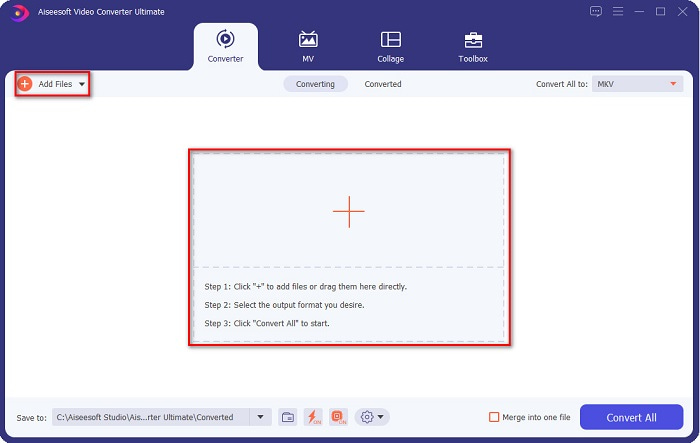
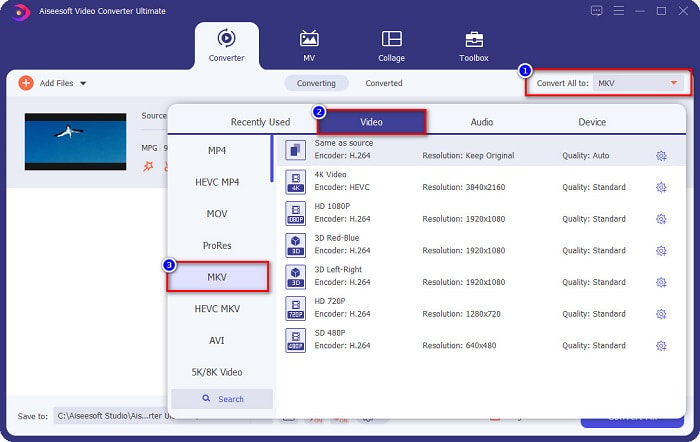
Vaihe 3. MPG-tiedoston lataamisen jälkeen valitse tulostusmuoto napsauttamalla Convert All to -painiketta. Tässä tapauksessa valitse MKV-tiedostomuoto.
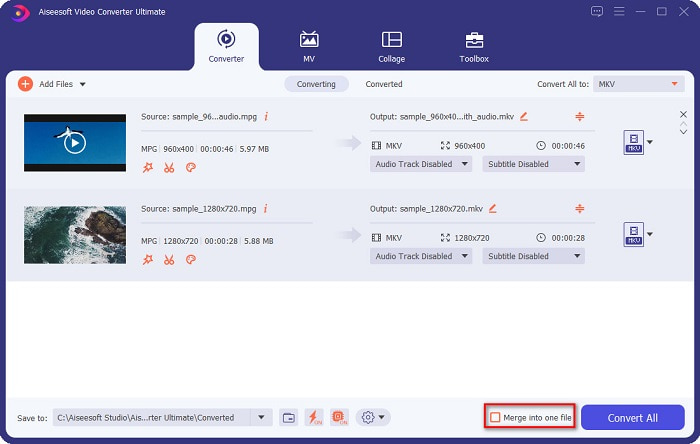
Valinnainen. Jos haluat muuntaa useita MPG-tiedostoja yhdeksi, rastita Merge into one file -ruutu. Muussa tapauksessa siirry seuraavaan vaiheeseen.
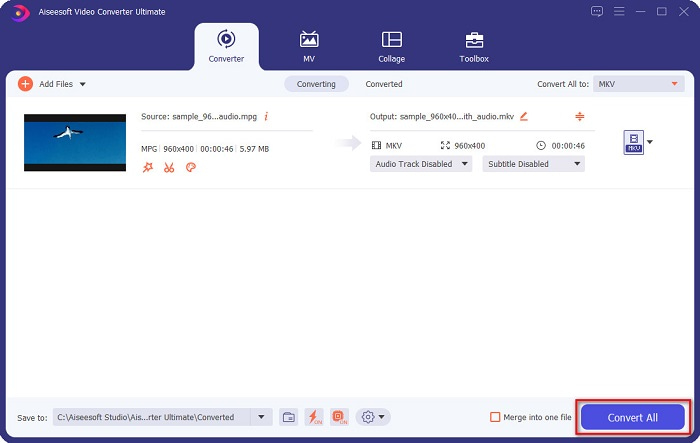
Vaihe 4. Lopuksi napsauta Convert All -painiketta muuntaaksesi MPG-tiedostosi MKV-tiedostoksi. Odota muutama sekunti, ja siinä kaikki! Näin helposti voit muuntaa MPG:n MKV:ksi.
Osa 3. Muunna MPG MKV:ksi ilmaisella työkalulla
Oletko koskaan miettinyt, mikä on paras ilmainen työkalu MPG:n muuntamiseen MKV:ksi? Olemme havainneet, että monet käyttäjät valitsevat ensisijaisesti HandBraken. Tämä ilmaisohjelma voi muuntaa MPG:n MKV-, WebM- ja MP4-tiedostoiksi. Lisäksi siinä on helppokäyttöinen käyttöliittymä, mikä on hyvä asia, jos olet aloittelija. Se tukee kuitenkin vain rajallista määrää tiedostomuotoja. Siitä huolimatta se on silti tehokas työkalu MPG:n muuntamiseen MKV:ksi.
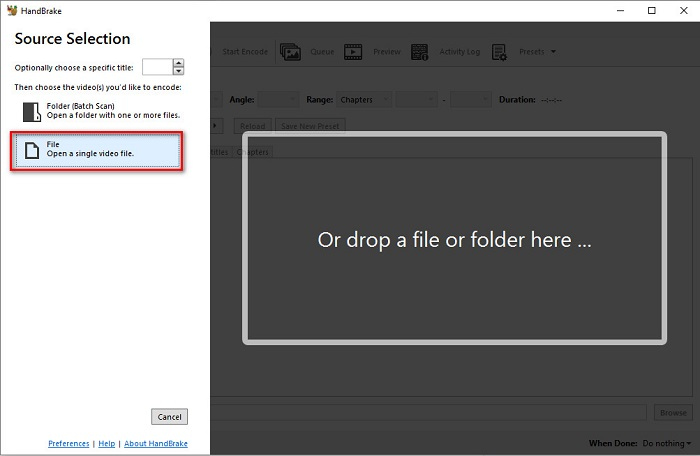
Vaihe 1. Lataa HandBrake laitteellesi ja käynnistä sovellus. Kun olet avannut sovelluksen, napsauta File-vaihtoehtoa ohjelman käyttöliittymän oikealla puolella. Kun tietokoneesi tiedostot tulevat näkyviin, valitse MPG-tiedostosi.
Vaihe 2. Valitse sitten haluamasi tulostusmuoto Format-kohdan vieressä olevasta drop-down-painikkeesta. Valitse sen jälkeen Browse-painikkeella sijainti, johon tulostiedosto tallennetaan.
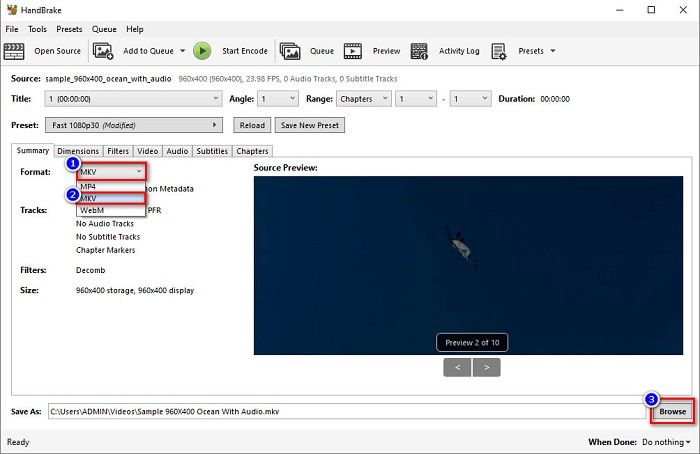
Vaihe 3. Lopuksi napsauta Start Encode -painiketta muuntaaksesi MPG-tiedostosi MKV-tiedostomuotoon.
Voit muuntaa MPG:ksi MKV:ksi ilmaisohjelmamuuntimen avulla noudattamalla yllä olevia yksinkertaisia ohjeita.
Osa 4. 2 tapoja muuntaa MPG MKV Online -muotoon
Muuntaminen online-muuntimien kautta saattaa olla kätevin vaihtoehto. Lisäksi sinun ei tarvitse ladata mitään, kun käytät online-muuntimia. Mutta sen sijaan voit muuntaa suoraan verkossa. Muunnosnopeus riippuu kuitenkin Internet-yhteytesi nopeudesta. Siitä huolimatta, olemme listanneet alla kaksi parasta tapaa muuntaa MPG-tiedostosi MKV:ksi.
Tapa 1. Käytä FVC Free Online Video Converteria
FVC Free Online Video Converter on ilmainen verkkopohjainen muunnin, joka muuntaa kätevästi erilaisia tiedostomuotoja. Se tukee muun muassa muotoja MPG–MKV, AVI, MP4, MOV, MP3 ja paljon muita. Se on myös aloittelijaystävällinen muunnin, koska sen käyttöliittymä on helppokäyttöinen. Lisäksi siinä on toiminto, jonka avulla voit muuttaa tiedostosi videon ja äänen bittinopeutta. Jos siis olet kiinnostunut tästä MPG–MKV-verkkomuuntimesta, seuraa alla olevia ohjeita.
Vaihe 1. Etsi selaimessasi FVC Free Online Video Converter tai siirry suoraan verkkosivulle napsauttamalla tätä linkkiä. Käynnistä sitten verkkosovellus.
Vaihe 2. Sovelluksen käynnistämisen jälkeen napsauta Add Files to Convert -painiketta. Tietokoneesi tiedostot tulevat näkyviin, ja sen jälkeen valitse MPG-tiedostosi.
Lataa työpöytäversio muuntaaksesi tiedostoja erissä.
Vaihe 3. Valitse sitten MKV tulostusmuodoksi.
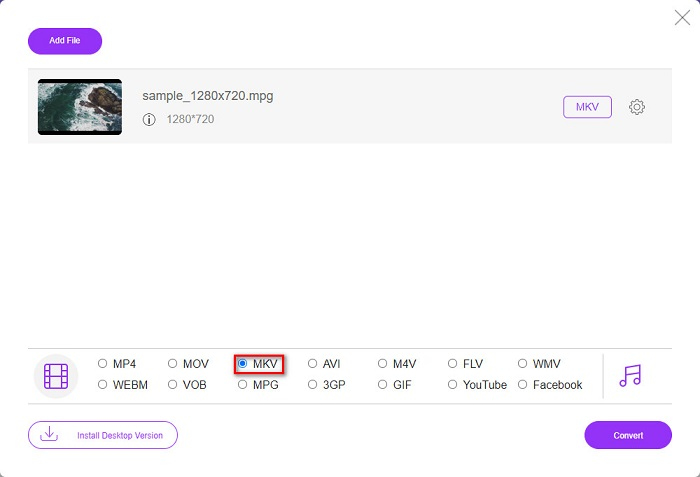
Vaihe 4. Viimeisessä vaiheessa napsauta Convert-painiketta. Tämän jälkeen MPG–MKV-muunnos alkaa.
Tapa 2. Käytä CloudConvertiä
Toinen verkkopohjainen muunnin, jota voit käyttää, on CloudConvert. Tämä muunnin on erittäin kätevä käytössä yksinkertaisen käyttöliittymänsä ansiosta. Lisäksi voit myös pakata tiedostojasi sitä käyttäessäsi. Se tukee kuitenkin vain rajallista määrää tiedostomuotoja. Siitä huolimatta monet käyttävät tätä muunninta sen helppokäyttöisyyden vuoksi.
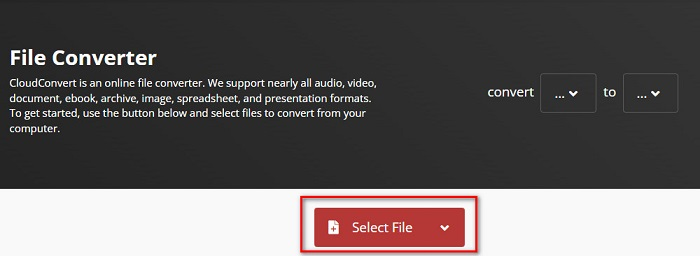
Vaihe 1. Etsi selaimessasi CloudConvert. Kun olet verkkosivulla, napsauta Select Files -painiketta. Valitse sitten MPG-tiedostosi, kun tietokoneesi tiedostot tulevat näkyviin.
Vaihe 2. Valitse sen jälkeen MKV-tiedosto tulostusmuodoksi drop-down-painikkeesta.
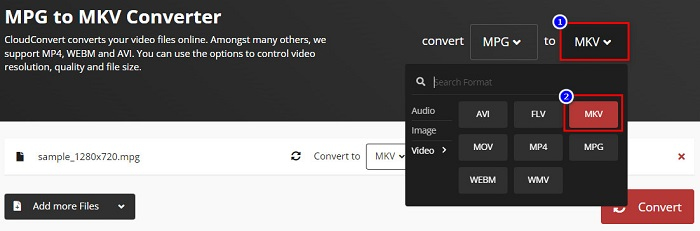
Vaihe 3. Lopuksi napsauta Convert-painiketta. Odota sitten, että tiedostosi muunnetaan, ja voilà! Näillä kolmella helpolla vaiheella voit muuttaa MPG:n MKV:ksi.
Mailinkulutus vs. MKV
Moving Picture Experts Groupin (MPEG) valmistama MPG on yleinen digitaalinen videomuoto video-, ääni- ja metatietojen tallentamiseen. Se on varsin hyödyllinen luotaessa elokuvia Internetissä jaettavaksi. Nämä MPG-tiedostot sisältävät yleensä MPEG-1- tai MPEG-2-video-/äänipakkauksen.
Vuonna 2002 julkaistu Matroska-multimediakonttiformaatti on avoimen lähdekoodin muoto, joka voi sisältää useita video-, ääni-, kuva- ja tekstitysraitoja. Joten voit käyttää sitä lyhyiden videoleikkeiden, TV-ohjelmien ja elokuvien tallentamiseen helposti. Se on melko suosittu anime-fanien tilaajissa.
Osa 5. Usein kysyttyä MPG:n muuntamisesta MKV:ksi
Vaikuttaako MPG:n muuntaminen MKV:ksi tiedoston kokoon?
Kyllä, vaikka se ei vaikuta niin paljon, kun muunnat MPG:n MKV-tiedostoksi, tiedostokoko kasvaa.
Kummalla on suurempi tiedostokoko?
MKV-tiedostoilla on suurempi tiedostokoko verrattuna MPG-tiedostoihin, koska MKV-tiedostot sisältävät videota, ääntä ja useita tekstitysraitoja yhdeksi tiedostoksi.
Voitko pakata MKV-tiedostoja?
Voit pakata MKV-tiedostoja käyttämällä tiedostojen pakkaustyökalua. FVC Video Converter Ultimate -ohjelmassa on toiminto, jonka avulla voit pakata suuria videotiedostojasi.
Johtopäätös
Tämä artikkeli sai selkäsi, jos etsit parhaita tapoja muuntaa MPG MKV-tiedostoiksi. Kaikki yllä esitetyt muuntimet osoittavat lupaavaa suorituskykyä tiedostojen muuntamisessa. Mutta jos etsit muunninta, jossa on monia erinomaisia ominaisuuksia, sinun kannattaa kokeilla käyttää FVC Video Converter Ultimatea ensimmäisenä valintasi. Jos et ole vielä vakuuttunut, lataa se kokeillaksesi parasta mahdollista muuntajaa.
-
 3 helppoa tapaa muuntaa MPG MOV:ksi Macissa/Windowsissa/Online-tilassa
 Haluatko muuntaa MPG-tiedostosi ja siirtää ne myöhemmin iOS:lle, iPodille, iPadille tai Macille? Tämä artikkeli auttaa selvittämään, kuinka MPG muunnetaan MOV: ksi vaiheiden avulla.
-
 Kuinka muuntaa MPG FLV:ksi menettämättä laatua [Todistettu]
 Sinun on katsottava suosikkielokuvasi tällä mediasoittimella, mutta se ei tue MPG:tä. Yritä muuntaa MPG-tiedostosi FLV:ksi näiden tässä artikkelissa esiteltyjen muuntimien avulla.
-
 2 Ultimate MPG-muunninta MPG:n muuntamiseksi WMV:ksi ilmaiseksi
 Haluatko muuntaa MPG:n WMV:ksi ilmaiseksi? Siinä tapauksessa olet onnekas, koska huomasimme, että voit muuntaa MPG-tiedostoja kahdella työkalulla.

