


 Video Converter Ultimate
 Näytön tallennin
 Videon korjaus
 Suojattu lataus
Tehokkaimmat online- ja offline-menetelmät MTV:n muuntamiseksi MKV:ksi
On joitakin tilanteita, joissa MTV-tiedostomuotosi ei ole yhteensopiva laitteesi tai ohjelmasi kanssa. Paras ratkaisu on vaihtaa videon tiedostomuotoa. Onneksi meillä on sinulle erinomaiset menetelmät. Tässä artikkelissa esittelemme useita sovelluksia, joilla voit muuntaa MTV:n MKV:ksi välittömästi. Älä jätä tätä artikkelia lukematta, jotta löydät parhaan MTV–MKV-muuntimen.

Osa 1: Yksityiskohtaiset tiedot MTV:stä ja MKV:sta
Mikä on MTV?
MTV tarkoittaa Music Televisionia. MTV aloitti toimintansa 1. elokuuta 1981 amerikkalaisena kaapelikanavana. Tämä tiedostomuoto luotiin mahdollistamaan videotoiston edullisissa Kiinassa valmistetuissa kannettavissa MP4-soittimissa ilman, että niiden arvoa olisi nostettu lisenssimaksuilla. MTV-soitin valmistettiin Kiinassa, ja sillä voitiin näyttää videoita, tekstitiedostoja ja kuvia. Lopuksi: se toimii näyttämällä sarjan raakoja pakkaamattomia rgb565/555-kuvaruutuja MP3-äänen toiston aikana.
Mikä on MKV?
MKV tulee sanasta Matroska Video. Se on multimediakontti, kuten MOV- ja AVI-muodot. Se tukee kuitenkin useampia tekstitysraitoja ja ääniraitoja samassa tiedostossa. Tätä Matroska-multimediakonttia käytetään videoihin. Se perustuu myös Extensible Binary Meta Language -kieleen. Erona MKV-muodon ja muiden videomuotojen välillä on se, että muut muodot ovat koodekkeja, kun taas MKV on kontti.
Osa 2: Kuinka muuntaa MTV MKV:ksi häviöttömästi
MTV:n muuntaminen MKV:ksi ilman laadun heikkenemistä on helppoa käyttämällä ohjelmaa Video Converter Ultimate. Tällä sovelluksella voi muuntaa monia tiedostoja, kuten MOV, MTS, XVID, FLV, AVI, MP4 ja paljon muuta. Itse prosessin osalta siinä on 30-kertainen muunnosnopeus, joka on vailla vertaa muihin muuntimiin nähden. Voit myös muuntaa useita tiedostoja samanaikaisesti, koska se tukee erämuunnosta. Lisäksi, jos haluat parannella videoitasi ja tehdä niistä näyttävämpiä, voit käyttää tätä työkalua. Siinä on paljon työkaluja videon muokkaamiseen ja parantamiseen, kuten videonparannustoiminto, jolla voit kasvattaa videon resoluutiota, poistaa kohinaa, optimoida kirkkautta ja kontrastia sekä vähentää videon tärinää. Näiden toimintojen avulla voit varmistaa, että videosi on entistä miellyttävämpi. Lisäksi, jos haluat lisätä videoon vesileiman, voit käyttää tätä työkalua, sillä se osaa lisätä videoon vesileimoja. Nämä ovat joitakin tämän työkalun toiminnoista, mutta jos haluat löytää lisää hyviä ominaisuuksia, sinun kannattaa kokeilla Video Converter Ultimatea.
Ominaisuudet:
◆ Pystyy luomaan kollaasin.
◆ Tarjoa videon muokkaustyökaluja, kuten Enhancer, Watermark Remover, Compressor jne.
◆ Voit luoda musiikkivideoita.
◆ Muunna useita videotiedostomuotoja.
Plussat
- Konversioprosessi on 30 kertaa nopeampi.
- Täydellinen ei-ammattimaisille käyttäjille.
- Voi muuntaa useita tiedostomuotoja, kuten MP4, MOV, MTV, MKV jne.
- Vesileimaa ei ole käytetty.
- Käytettävissä Windowsille ja Macille.
Haittoja
- Sinun on ostettava sovellus, jotta voit kokea lisää upeita ominaisuuksia.
Seuraa näitä yksityiskohtaisia oppaita muuntaaksesi MTV:n MKV:ksi välittömästi.
Vaihe 1: Lataa Video Converter Ultimate Windows- tai Mac-tietokoneellesi napsauttamalla alla olevaa Lataa-painiketta. Asenna sen jälkeen ohjelma laitteellesi ja avaa sovellus.
Ilmainen latausWindows 7 tai uudempiTurvallinen lataus
Ilmainen latausMacOS 10.7 tai uudempiTurvallinen lataus
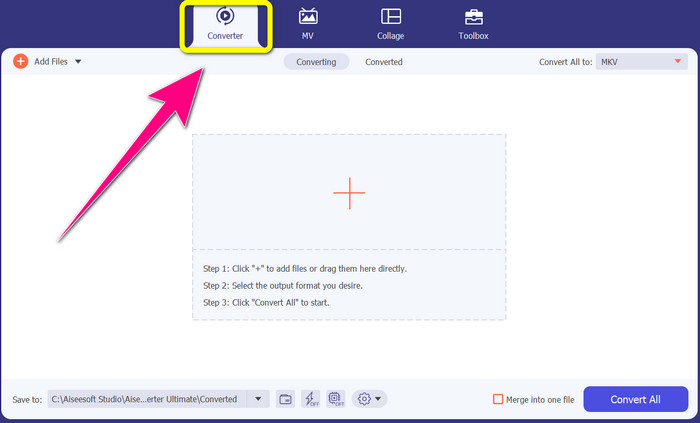
Vaihe 2: Näet neljä vaihtoehtoa käyttöliittymän yläosassa: Converter, MV, Collage ja Toolbox. Valitse Converter-välilehti.
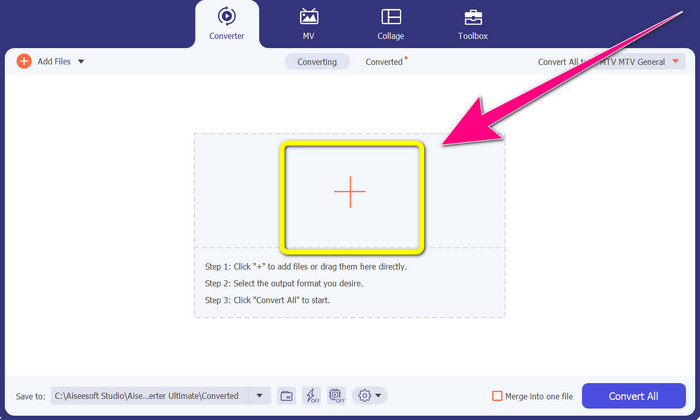
Vaihe 3: Napsauta seuraavaksi + -kuvaketta lisätäksesi MTV-videotiedoston, jonka haluat muuntaa.
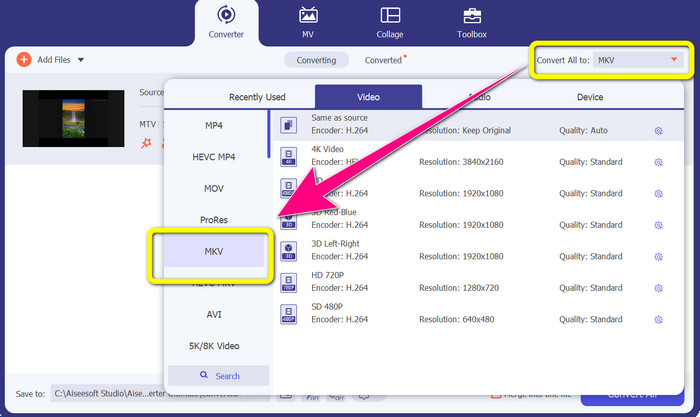
Vaihe 4: Kun olet jo lisännyt videosi, napsauta Convert all to -vaihtoehtoa. Etsi sitten muotovaihtoehdoista MKV-tiedostomuoto ja napsauta sitä.
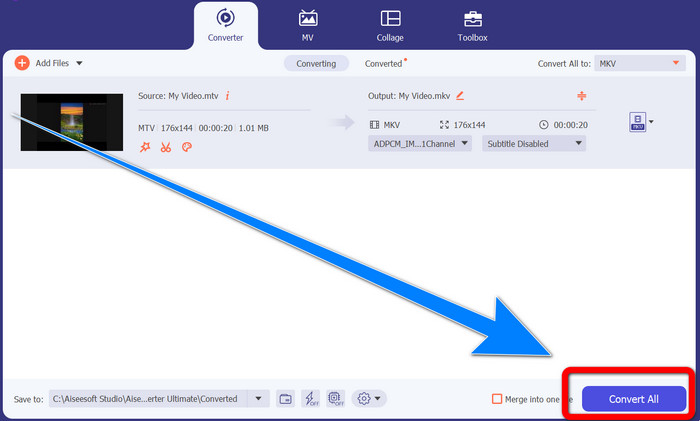
Vaihe 5: Kun olet valinnut MKV-tiedostomuodon, voit jo napsauttaa Convert All -painiketta muuntaaksesi ja tallentaaksesi lopullisen videosi.
Osa 3: Online-ohjelmisto MTV:n muuntamiseksi MKV:ksi
Converthelperin käyttö
Olet oppinut, miten MTV muunnetaan MKV:ksi Windowsissa ja Macissa. Seuraavaksi opit, miten tiedostoja muunnetaan verkossa. Yksi hyödyllisistä muuntimista, jota voit käyttää, on Converthelper. Tämä verkkotyökalu on ilmainen, ja sen avulla voit muuntaa erilaisia tiedostomuotoja, kuten MTV, MKV, DDAT, AVE, PS GFP, WMF jne. Lisäksi muunnosvaiheita on vain muutama, mikä sopii hyvin aloittelijoille. Ja Converthelperin avulla voit muuntaa useita tiedostoja ilman rajoituksia. Tämä ilmainen verkkopohjainen muunnin on kuitenkin hidas muunnosprosessissa, ja tiedostojen täydellinen muuntaminen vie jonkin verran aikaa. Lisäksi tämän työkalun suorituskyky riippuu internet-yhteydestäsi. Jotta voit siis muuntaa tiedostoja Converthelperilla, sinun täytyy olla hyvä verkkoyhteys. Seuraa alla olevia ohjeita muuntaaksesi MTV:n MKV:ksi verkossa.
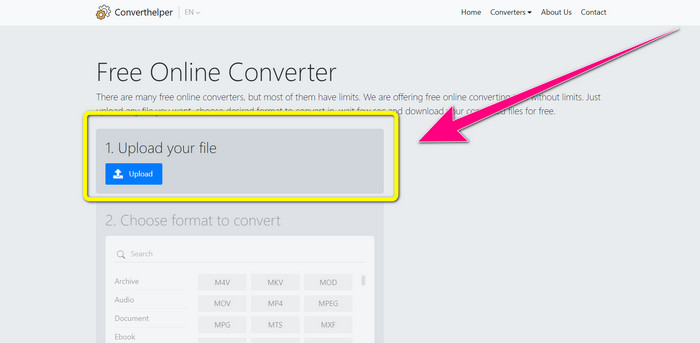
Vaihe 1: Siirry selaimella Converthelper-sivustolle. Napsauta sitten Upload-painiketta ja lisää MTV-tiedostomuodossa oleva videosi.
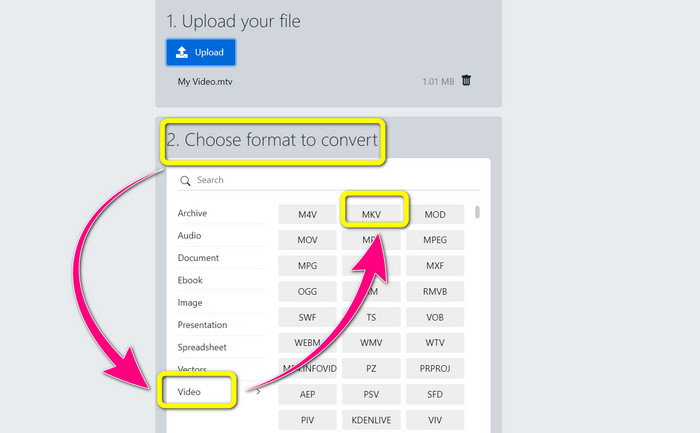
Vaihe 2: Kun olet ladannut tiedostosi, siirry kohtaan 2. Valitse muotovaihtoehdot. Napsauta Video-painiketta, etsi MKV-tiedosto ja napsauta sitä.
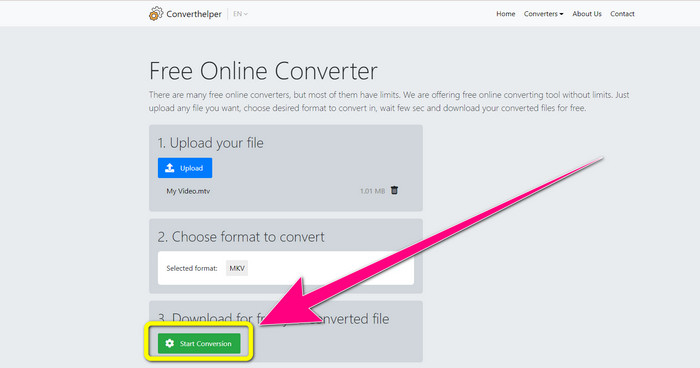
Vaihe 3: Viimeisenä vaiheena napsauta Start Conversion -painiketta muuntaaksesi MTV-tiedostosi MKV-muotoon. Odota lopullisen muunnosprosessin valmistumista ja lataa sitten lopullinen videosi MKV-tiedostona.
Online Convertin käyttö
Toinen online-työkalu, jolla voit muuntaa MTV:n MKV:ksi, on Online Convert. MTV- ja MKV-muotojen lisäksi se tukee muita muotoja, kuten MP4, AVI, GIF, FLAC, FLV, VOB, DIVX, MOV, WMV ja paljon muuta. Se ei ole luotettava vain videotiedostojen muuntamisessa. Voit myös muuntaa kuvia, asiakirjoja, ääntä ja muita muotoja. Tämä online-työkalu on hyvä myös uusille käyttäjille, koska se on helppokäyttöinen ja siinä on vain muutama vaihe erilaisten tiedostojen muuntamiseen. Tällä verkkotyökalulla on kuitenkin tiedostokokorajoitus, joka on enintään 3 Mt. Lisäksi, kuten muita verkkopohjaisia työkaluja, et voi käyttää sitä, jos sinulla ei ole Internet-yhteyttä. Joskus tämä ohjelmisto ei toimi hyvin. Muuntaa MTV-tiedostosi MKV-tiedostomuotoon seuraavien ohjeiden avulla.
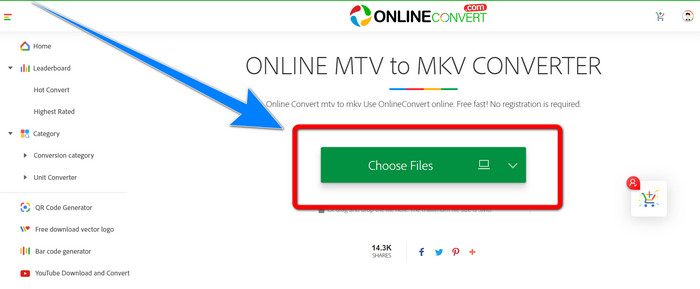
Vaihe 1: Siirry Online Convert -sivustolle. Napsauta Choose Files -painiketta tuodaksesi MTV-tiedostomuodossa olevan videosi.
Vaihe 2: Kun lataat MTV-tiedostomuodossa olevan videosi, siirry muotovaihtoehtoihin ja valitse MKV -muoto.
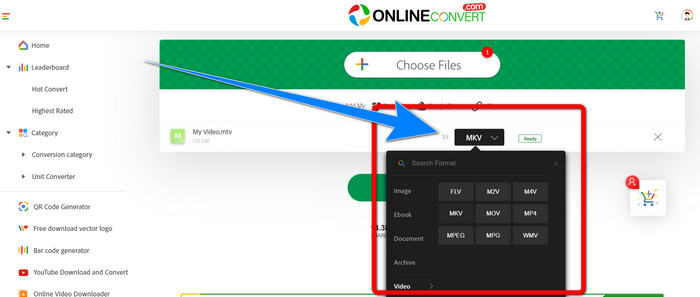
Vaihe 3: Viimeisenä vaiheena napsauta Convert -painiketta muuntaaksesi MTV-tiedostomuodon MKV-tiedostomuodoksi. Odota sen jälkeen muunnosprosessia ja tallenna muunnettu videosi.
Lisälukemista:
Parhaat menetelmät: miten muuntaa AMV MKV:ksi ilmaiseksi
[Verkossa & ilmaiseksi] Miten voin muuntaa MKV:n MP4:ksi Windowsissa/Macissa
Osa 4: Usein kysyttyä MTV:n muuntamisesta MKV:ksi
Onko MKV-muoto sama kuin MP4?
Ei, he eivät. MKF:ssä on enemmän lisäominaisuuksia, kuten useita tekstityksiä ja ääniraitoja, joten MKV:lla on suurempi tiedostokoko kuin MP4-muodossa. Lisäksi MKV:lla on korkeampi resoluutio kuin MP4:llä, koska siinä on edistynyt koodekki, jolla on korkeampi pakkaussuhde.
Voinko myös muuntaa MKV:n toiseen muotoon?
Ehdottomasti kyllä! Voit muuntaa MKV:n muihin muotoihin ohjelmistolla, joka tukee MKV-tiedostoja, kuten Video Converter Ultimate. Lataa sovellus Windows- tai Mac-laitteellesi ja nauti tiedostojesi muuntamisesta.
Onko MKV-muoto loistava?
Kyllä se on. Sillä ei ole lisenssivaatimuksia. Se tukee erinomaisia ominaisuuksia, kuten useita raitoja ja tekstityksiä ja paljon muuta.
Johtopäätös
Nämä ovat parhaat menetelmät muuntaa MTV MKV:ksi erinomaisia muuntimia käyttäen. Jos haluat muuntaa useita tiedostoja helposti ja ilman laadun heikkenemistä, käytä Video Converter Ultimate -ohjelmaa.
-
 Ilmainen MP4 - MKV Converter - Kuinka muuntaa MP4 MKV: ksi helposti
 Kun haluat muuntaa MP4: n MKV: ksi ilmaiseksi, voit oppia lisää 4 tehokkaimmasta menetelmästä, jolla MP4-tiedostot muutetaan MKV-videoiksi eri tilanteissa.
-
 Kuinka muuntaa MKV DivX:ksi online- ja offline-tilassa ilmaiseksi
 Etsitkö parhaita tapoja muuntaa MKV DivX-muotoon ilmaiseksi. Jatka lukemista saadaksesi tietää parhaat MKV-DivX-muuntimet online- ja offline-tilassa
-
 4 parhaista MKV-3GP-muuntimista Windowsille ja Macille
 Jos etsit helppokäyttöisiä MKV-3GP-muuntimia, olet onnekas! Löysimme parhaat ja ilmaiset MKV-3GP-muuntimet, joita sinun täytyy kokeilla
