


 Video Converter Ultimate
 Näytön tallennin
 Videon korjaus
Opi 4 erilaista menetelmää MXF-tiedoston muuntamiseen AVI:ksi
MXF tallentaa korkealaatuisia videoita ja ääniraitoja, joita suurin osa ammattikuvaajista käyttää mielellään. Lisäksi formaattiin voidaan liittää metatietoja, jotka kuvailevat, mitä tiedoston sisällä on. SMPTE kehitti MXF:n, jotta video saataisiin siirrettyä nopeasti laitteelta toiselle ja muokattua. Ongelma on kuitenkin se, että osa editoreista ja mediasoittimista ei tue tämän formaatin tarjoamaa HD-laatua. Tässä tapauksessa on parasta muuntaa MXF-tiedosto uuteen tiedostomuotoon, joka on saanut enemmän tukea kuin MXF, kuten AVI tai jokin muu videoformaatti. Seuraavaksi käydään läpi eri muuntimet ja opitaan, miten MXF muunnetaan AVI:ksi.
Osa 1. Kuinka muuntaa MXF AVI:ksi ilmaiseksi Windowsissa ja Macissa
FVC Video Converter Ultimate
Tämä työkalu tunnetaan yhtenä edistyneimmistä offline-työkaluista, jonka voi ladata tietokoneelle ilman katumusta. FVC Video Converter Ultimate on ollut markkinoilla jo useita vuosia. Sen ansiosta monet käyttäjät ovat jo saaneet apua tällä ohjelmistolla. Lisäksi tämän työkalun yleinen suorituskyky on ollut erinomainen koko ajan ennen muunnosta, sen aikana ja sen jälkeen. Toinen hyvä puoli on, että kaikki työkalun tarjoamat edistyneet ominaisuudet on yksinkertaistettu, joten saat erinomaisen lopputuloksen, vaikka et olisi ammattilainen. Niin vaikuttavalta kuin se näyttääkin, kokeillaan nyt, pystyykö tämä muunnin suoriutumaan tehtävästä, kun muunnetaan MXF AVI:ksi seuraamalla alla olevia ohjeita.
Vaiheet: Näin muunnetaan MXF AVI:ksi FVC Video Converter Ultimatella
Vaihe 1. Napsauta ensin alla olevaa latauspainiketta ja valitse käyttämäsi käyttöjärjestelmä. Latauksen jälkeen asenna ohjelma ja tee nopea käyttöönotto jatkaaksesi seuraavaan vaiheeseen.
Ilmainen latausWindows 7 tai uudempiTurvallinen lataus
Ilmainen latausMacOS 10.7 tai uudempiTurvallinen lataus
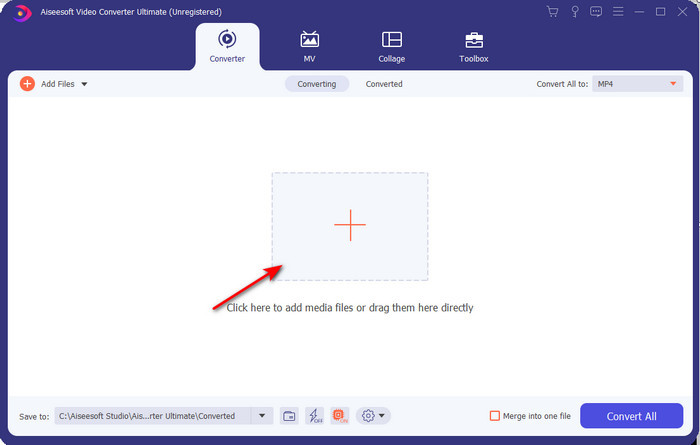
Vaihe 2. Avaa muunnin, jotta pääset siihen käsiksi, napsauta Add Files -painiketta etsiäksesi MXF-tiedoston kansiosta ja valitse sitten Open tuodaksesi sen.
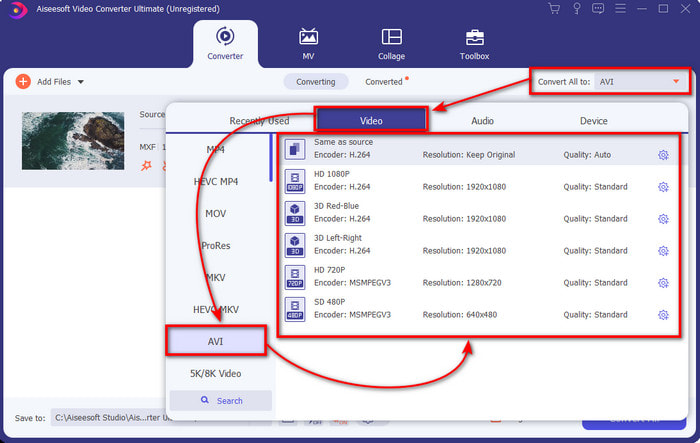
Vaihe 3. Valitse ulostuloformaatti napsauttamalla drop-down-painiketta; sen alta löydät AVI-muodon sekä muut mahdolliset vaihtoehdot.
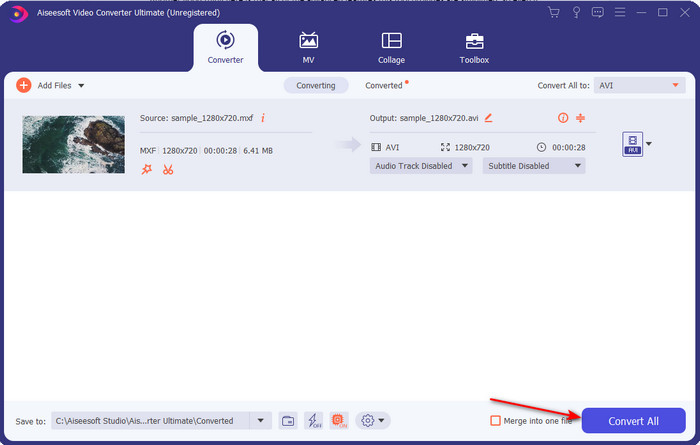
Vaihe 4. Käynnistä muunnos napsauttamalla Convert All ja odota muutama sekunti.
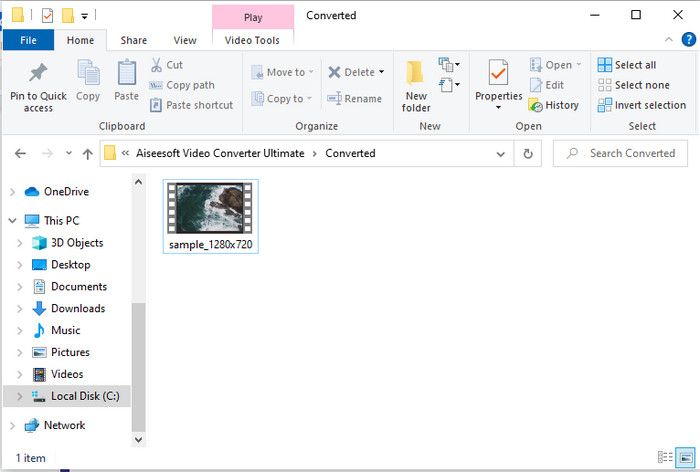
Vaihe 5. Muunnoksen jälkeen näytölle avautuu kansio, jossa on muunnettu tiedosto. Napsauta sitä ja katso video.
Osa 2. 3 online-muunninta, joita käytetään muuttamaan MXF AVI:ksi ilmaiseksi
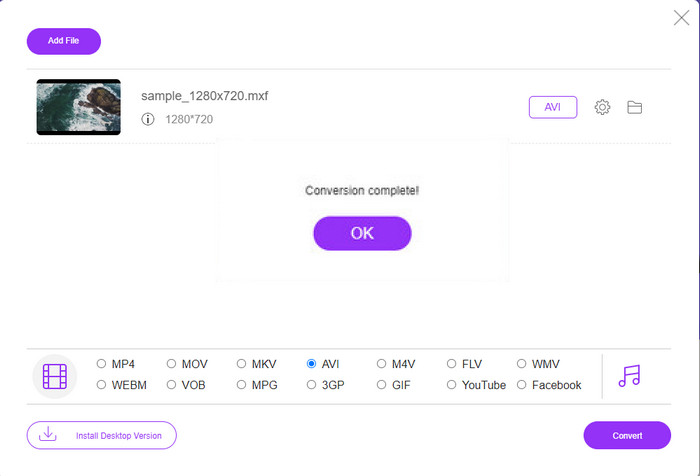
1. FVC Free Video Converter Online

Jos etsit parhaimpia tapoja muuntaa MXF AVI:ksi verkossa, FVC Free Video Converter Online on listamme paras online-muunnin. Tämä työkalu tukee useita eri formaatteja, joista voit valita, ja tarjoaa enemmän kuin kaksi alla mainittua verkkomuunninta. Lisäksi voit käyttää työkalua PC- tai Mac-selaimellasi ilman maksua ja ilman muunnosrajoituksia. Et kuitenkaan voi muuntaa useita tiedostoja kerralla, koska erämuunnosta ei tueta. Myöskään osa muokkaustoiminnoista, joita saattaisit haluta käyttää, ei ole täällä käytettävissä. Jos kuitenkin haluat mahdollisimman yksinkertaisen tavan muuntaa etkä halua ladata erillistä ohjelmaa, tämä työkalu on hyvä valinta. Siirrytään nyt vaiheisiin, joilla muunnetaan .mxf uuteen formaattiin.
Vaihe 1. Napsauta tätä linkkiä avataksesi muuntimen verkkosivun.
Vaihe 2. Kun olet avannut sivuston, paina Add Files to Convert; näyttöön ilmestyy kansioikkuna, etsi sieltä .mxf-tiedosto ja napsauta sitten Open.
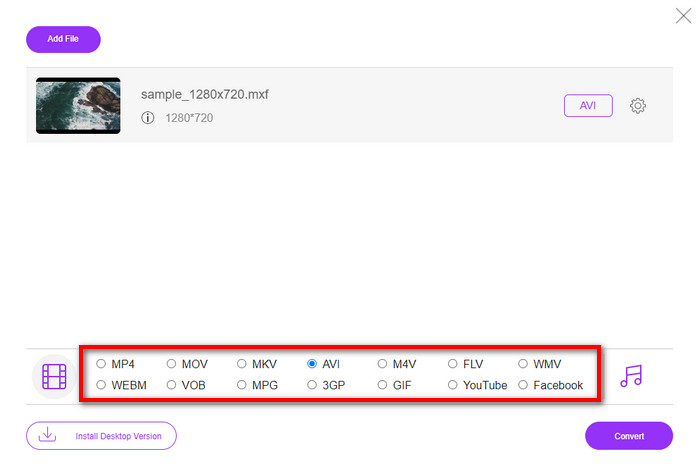
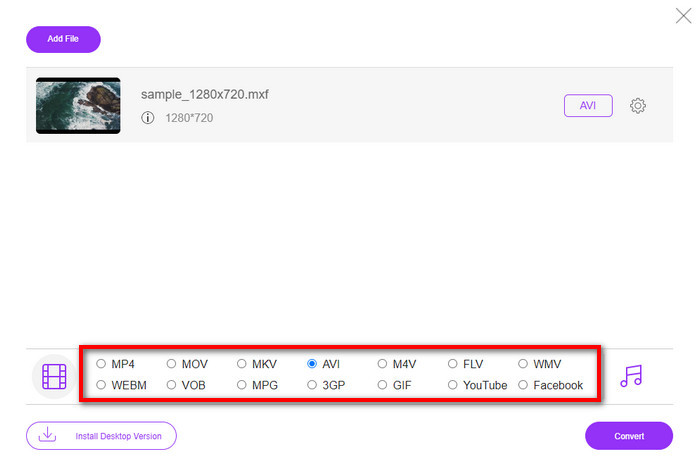
Vaihe 3. Kun tiedosto on valittu, valitse AVI-formaatti alla olevista vaihtoehdoista.
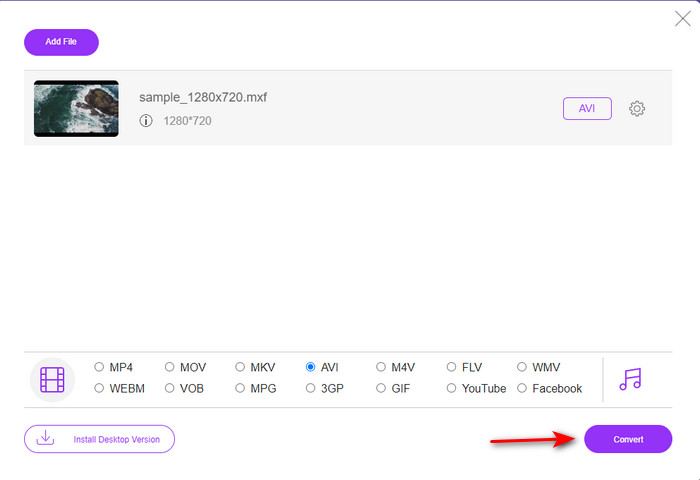
Vaihe 4. Kun olet valmis aloittamaan muunnoksen, napsauta Convert aloittaaksesi.
Vaihe 5. Muunnoksen jälkeen näyttöön avautuu kansio; avaa uusi MXF-tiedostosi versio ja katso se.
2. Freefileconvert.com
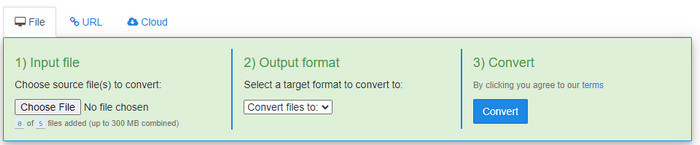
Toinen verkossa toimiva MXF–AVI-muunnin, jota voit käyttää, on Freefileconvert.com. Yksi tämän työkalun eduista on, että se tukee erämuunnosta jopa viidelle tiedostolle samanaikaisesti. Et kuitenkaan voi muuntaa näitä viittä tiedostoa eri formaatteihin, vaan niillä on oltava sama ulostuloformaatti. Sivustolla on myös häiritseviä mainoksia, ja lisäksi virustorjuntaohjelma antoi varoituksia, kun yritimme muuntaa formaattia täällä. Jos silti haluat muuntaa MXF-tiedostosi tällä sivustolla, toimi näin.
Vaihe 1. Avaa suosikkiselaimesi ja etsi Freefileconvert.com.
Vaihe 2. Tuodaksesi tiedoston napsauta Choose File. Vaihtaaksesi formaattia napsauta Convert Files to ja valitse AVI.
Vaihe 3. Paina Convert aloittaaksesi muunnosprosessin.
3. Filezigzag
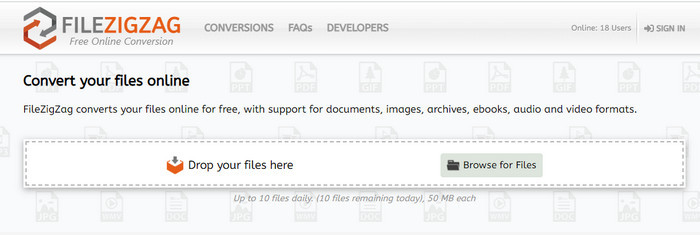
Jos haluat muuntaa MXF:n AVI:ksi ilmaiseksi, voit käyttää työkalua nimeltä Filezigzag. Tämä verkkotyökalu tarjoaa yksinkertaisen muunnosprosessin ja on helppokäyttöinen. Kaikki tässä mainitut verkkotyökalut ovat käyttäjäystävällisiä, mutta tämä poikkeaa selvästi kahdesta muusta mainitusta työkalusta. Työkalun käyttöliittymä on erinomainen ja virukseton, aivan kuten FVC Free Video Converter Online. Vaikka työkalu vaikuttaa hyvin vakuuttavalta, siinä on silti rajoituksia muunnettavien tiedostojen lukumäärän ja tiedostokoon suhteen. Tarkemmin sanottuna voit muuntaa vain kymmenen tiedostoa päivässä, ja jokaisen on oltava alle 50 Mt. Jatketaan nyt siihen, miten tätä työkalua käytetään.
Vaihe 1. Avaa verkkoselain ja etsi Filezigzag; varmista, että kyseessä on virallinen sivusto.
Vaihe 2. Napsauta Browse for File etsiäksesi tiedoston verkkokäyttöliittymästä ja aseta sitten Target Format -kenttään AVI.
Vaihe 3. Napsauta Start Converting aloittaaksesi prosessin.
Osa 3. Vertailukaavio
| Ominaisuudet | FVC Video Converter Ultimate | FVC Free Video Converter | Freefileconvert.com | Tiedostosiksak |
| Muuntaminen |  | | | |
| Erämuunnos | |  | | |
| Haittaohjelma ilmainen | | | | |
| Internetin saavutettavuus | | | | |
| Muokkausominaisuudet | | | | |
| Nopea muunnos ja laitteistokiihdytys | | | | |
Osa 4. Usein kysytyt kysymykset MXF:stä ja AVI:sta
Voinko tallentaa MXF-tiedoston Macilleni?
Kyllä, voit tallentaa sen Mac-asemallesi, mutta muista, että et voi katsella sitä QuickTime Playerillä. Et voi myöskään muokata tätä muotoa iMovie-laitteellasi, koska sitä ei tueta. Joten jos haluat saada MXF:n toimimaan Macissasi, on ihanteellinen muuntaa se uuteen muotoon, jota Mac tukee. Aivan kuten MOV, AVI, MP4, MKV ja monet muut.
Miksi .mxf-tiedostot ovat niin suuria?
Syy siihen, miksi MXF-tiedostot ovat suuria, johtuu vain siitä, että ne ovat pakkaamattomia. Sillä on sama rakenne kuin Generic Containerin kanssa toteutetussa FOURCC:ssä, jotta tallennus, editointi ja suoratoisto olisivat parempia videokameroissa. Onneksi voit käyttää joitain videokompressoreita pienentämään MXF-tiedostojasi.
Voinko käyttää MXF-tiedostoa YouTubessa?
YouTube tukee useita muotoja, ja sillä on yli 15 muotoa YouTubessa. Ja tuossa luettelossa ei ole .mxf-tiedostoja. Selvyyden vuoksi MXF-tiedostojasi ei tueta YouTubessa ja videon lähettäminen .mxf-tiedostotunnisteen alla edellyttää MXF-tiedoston muuntamista MP4- tai AVI-muotoon.
Johtopäätös
Kun päätämme kaikki yksityiskohdat, huomasimme, että MXF-tiedostot sisältävät korkealaatuista videokuvaa jokaisessa videokamerassa. Myös osa tiedoista, kuten metatiedot, tallennetaan tähän säilöön. Tämä muoto sai kuitenkin vähän tukea verrattuna toiseen muotoon. Joten nyt paras tapa toistaa tai muokata videota .mxf-muodossa on muuntaa se .avi-muotoon. Kaikki online- ja offline-työkalut toimivat hyvin tiedoston muuntamisessa. Mutta FVC Video Converter Ultimate on ylivoimaisesti vaikuttavin. Jotta voit kokea tämän työkalun äärimmäiset ominaisuudet, sinun on ladattava se heti.
-
 4 ilmaista tapaa muuntaa videokamera MXF MP4: ksi yleistä toistoa varten
 Tämä viesti on yksityiskohtainen opas MXF: n muuntamiseen MP4: ksi tietokoneella. Voit saada 4 ilmaista MXF - MP4-muunninta videokameran MXF: n koodaamiseksi MP4: ksi yksinkertaisilla vaiheilla.
-
 3 helppoa tapaa muuntaa FLV AVI: ksi työpöydällä ja verkossa
 Tässä on kolme tapaa, joiden avulla voit tehokkaasti muuntaa FLV -videotiedostosi AVI -muotoon Windowsissa ja Macissa, jotta voit katsella niitä laadukkaasti.
-
 4 tehokasta tapaa muuntaa MOV AVI:ksi PC:llä ja Macilla [2021]
 Haluatko tietää, mikä on verkon hienoin MOV-AVI-muunnin? Ja miksi FVC Ultimate Video Converter voisi olla sinulle sopiva.
