


 Video Converter Ultimate
 Näytön tallennin
 Videon korjaus
 Suojattu lataus
3 vaivatonta menetelmää TRP:n muuntamiseksi MKV:ksi
Onko sinulla vaikeuksia TRP-tiedostosi kanssa, koska et voi toistaa sitä mediasoittimessasi tai muissa ohjelmissa? Jos olet yksi niistä käyttäjistä, jotka kohtaavat tällaisen ongelman, on erittäin suositeltavaa, että luet tämän artikkelin. Voit muuntaa TRP-tiedostosi MKV-muotoon, koska useimmat ohjelmat tukevat MKV-muotoa. Tässä artikkelissa näytetään helpot menetelmät, joilla voit muuntaa TRP:n MKV:ksi Windowsilla, Macilla ja verkossa. Mitä enää odotat? Älä tuhlaa aikaasi, vaan aloita tämän artikkelin lukeminen!

Osa 1: TRP:n ja MKV:n määritelmä
Mikä on TRP?
TRP on teräväpiirtovideotiedosto, joka on koodattu MPEG-2 Part 1 -kuljetusmuotoon. Sitä käytetään usein digitaalilähetyksissä. Lisäksi sitä käytetään äänivirtoihin, ulostulon synkronointiin ja digitaaliseen videomultipleksaukseen, ja siihen kuuluu erinomaisia virheenkorjausominaisuuksia. TRP sisältää myös AC3-äänidataa ja H.264-videota. Sitä voidaan toistaa useilla videontoisto-ohjelmilla.
Mikä on MKV?
MKV eli Matroska on multimediakontti, joka hallitsee useita ääni-, tekstitys- ja videotiedostoja yhdessä tiedostomuodossa. MKV eroaa myös muista multimedian standardeista, kuten MP4:stä ja AVI:sta, koska se on avoimen lähdekoodin ja sitä voivat räätälöidä avoimen lähdekoodin ohjelmistoja käyttävät käyttäjät. MKV-tiedostomuotoa käytetäänkin yleisimmin HD-videoihin ja videoiden suoratoistoon verkossa.
Osa 2: Helpoimmat tavat muuntaa TRP MKV:ksi offline-tilassa
Video Converter Ultimaten käyttäminen
Sinun on ladattava ja käytettävä Video Converter Ultimatea muuntaaksesi TRP:n MKV:ksi häviöttömästi. Tämän sovelluksen avulla voit muuntaa minkä tahansa haluamasi videotiedostomuodon, mukaan lukien TRP ja MKV. Voit muuntaa useita videotiedostoja yhdellä prosessilla, koska tällä työkalulla on erämuunnostoiminto. Lisäksi siinä on 30 kertaa nopeampi muunnosprosessi, joten sinun ei tarvitse kuluttaa enempää aikaa eri tiedostojen muuntamiseen. Tämä sovellus tukee useita muita muotoja kuin TRP ja MKV, kuten 5K/8K video, ProRes, DV, ASF, M4V, MXF, MP4, MOV ja paljon muuta. Parasta on, että voit käyttää tätä sovellusta Windowsilla ja Macilla, mikä on hyvä uutinen kaikille käyttäjille. Lisäksi, jos haluat muuttaa videoidesi nopeutta, voit käyttää Video Speed Controller -toimintoa. Voit hidastaa videotasi 0,125-kertaisesta ja nopeuttaa niitä jopa 8 kertaa alkuperäistä nopeutta nopeammin. Jos haluat myös rajata videosi, voit tehdä niin. Tämä työkalu tarjoaa myös videon rajaustoiminnon,
Jos haluat tietää lisää tästä upeasta ohjelmistosta, sinun on ladattava se ja kokeiltava sitä itse.
Ominaisuudet:
◆ Muunna useita tiedostomuotoja.
◆ Osaa tehdä luovan kollaasin.
◆ Se tarjoaa Music Video Creatorin.
◆ Tarjoaa työkalulaatikon videoiden parantamiseen.
Plussat
- 30x nopeampi kuin muut ohjelmistomuuntimet.
- Siinä on ystävällinen käyttöliittymä, joka sopii ei-ammattimaisille käyttäjille.
- Siinä on muita ominaisuuksia kuin muuntaminen.
- Saatavilla sekä Windowsille että Macille.
- Muunna erilaisia tiedostomuotoja, kuten FLV, MP4, MOV, WBM, GIF, AMV jne.
- Voidaan muuttaa päivämäärätietoja yksitellen tai erissä.
Haittoja
- Osta tilaus käyttääksesi edistyneempiä ominaisuuksia.
Jos haluat muuntaa TRP:n MKV:ksi, noudata näitä yksinkertaisia ohjeita alla.
Vaihe 1: Lataa Windows- tai Mac-tietokoneellesi Video Converter Ultimate napsauttamalla alla olevaa Lataa-painiketta. Avaa sovellus lataamisen ja asennuksen jälkeen.
Ilmainen latausWindows 7 tai uudempiTurvallinen lataus
Ilmainen latausMacOS 10.7 tai uudempiTurvallinen lataus
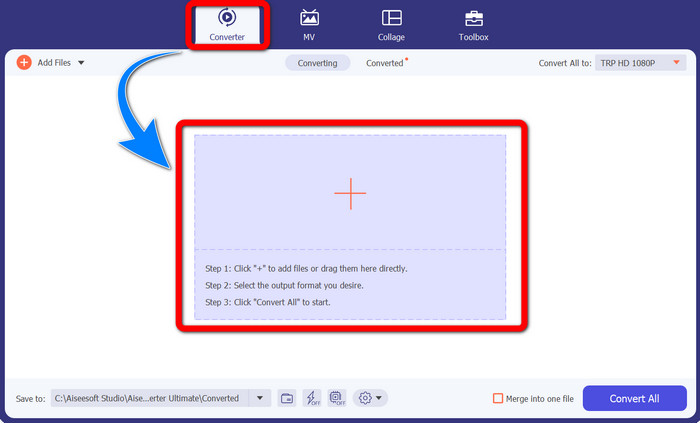
Vaihe 2: Kun olet käynnistänyt Video Converter Ultimaten, valitse Converter-paneeli. Napsauta sitten +-merkkiä tuodaksesi TRP-muotoisen videosi.
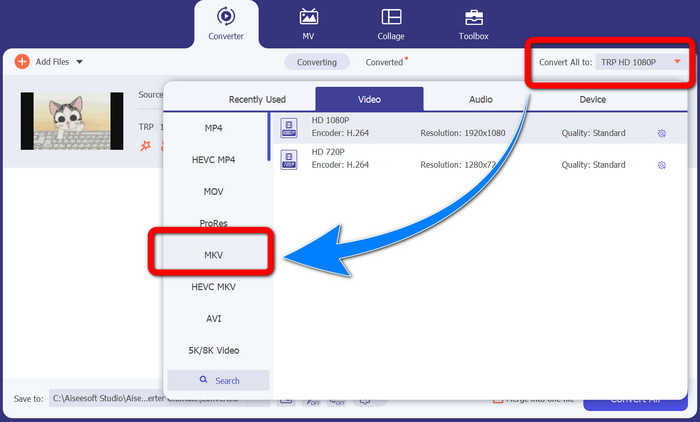
Vaihe 3: Kun olet tuonut videosi, napsauta Muunna kaikki muotoon -kuvaketta. Etsi muotovaihtoehdoista MKV-muoto ja napsauta sitä.
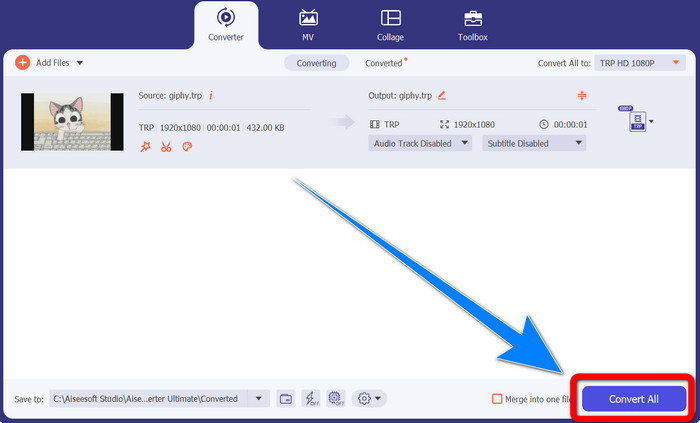
Vaihe 4: Napsauta sitten Muunna kaikki -painiketta muuntaaksesi TRP-tiedostosi MKV-muotoon.
Prism Video Converterin käyttö
Prism on toinen sovellus, jonka voit ladata Windowsille ja Macille. Tämä sovellus voi auttaa sinua muuntamaan TRP:n MKV:ksi helposti. Se tukee myös monia muita tiedostomuotoja, kuten AMV, MP4, DVD, VOB, MOV, DIVX, AVI, 3GP ja niin edelleen. Tämä sovellus on kuitenkin hyvin hidas, kun se on asennettu Windowsille tai Macille. Myös muunnosprosessi kestää kauan. Lisäksi sen käyttöliittymä on monimutkainen, mikä hämmentää aloittelijoita, joten sinun on etsittävä ohjeita tai pyydettävä apua kokeneemmilta käyttäjiltä. Jos haluat ladata ja käyttää tätä sovellusta, noudata alla olevia ohjeita.
Vaihe 1: Lataa Prism Video Converter Mac- tai Windows-tietokoneellesi.
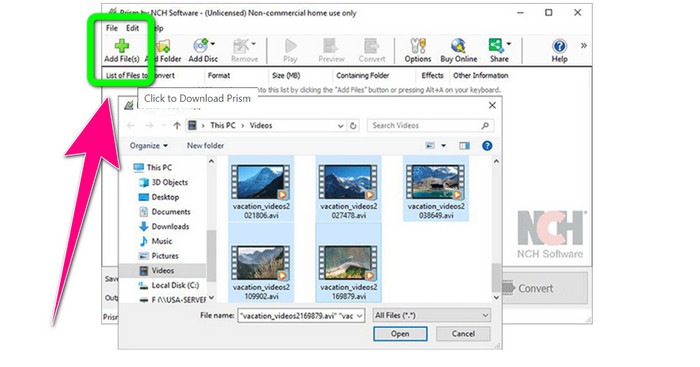
Vaihe 2: Napsauta vihreää Lisää tiedostoja -painiketta ja lisää TRP-tiedostosi.
Vaihe 3: Aseta tulostusmuoto. Valitse muotovaihtoehdoista MKV-tiedosto.
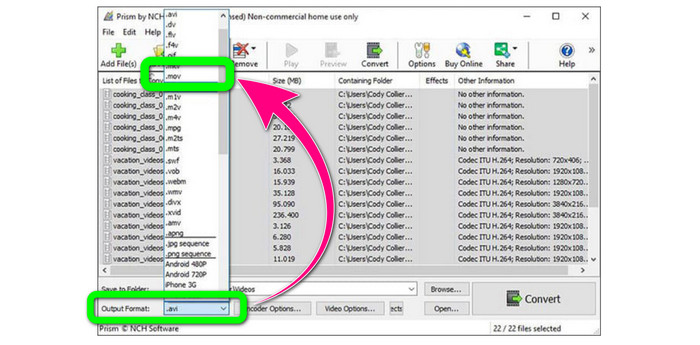
Vaihe 4: Lopuksi valitse Muunna-painike muuntaaksesi TRP-tiedostosi MKV-muotoon.
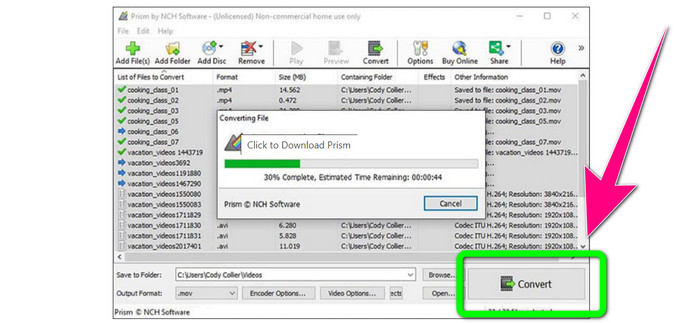
Osa 3: Online-sovellukset TRP:n muuntamiseksi MKV:ksi
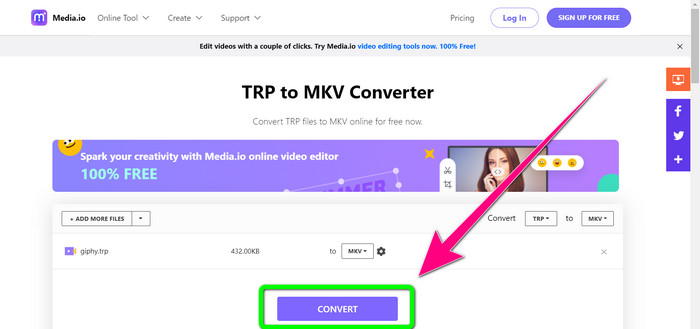
Kiinnostaako sinua muuntaa TRP MKV:ksi verkossa? Silloin voit käyttää palvelua Media.io. Tämän sovelluksen avulla voit muuntaa TRP:n MKV-muotoon. Lisäksi se tukee monia muita muotoja, kuten MP4, AVI, WMV, MOV, FLV, DIVX, XVID, 3GP jne. Se toimii myös ääni- ja kuvamuuntimena.
Lisäksi se pystyy myös videoeditointiin. Voit rajata, leikata, yhdistää, jakaa videoita ja paljon muuta. Muutosprosessi on kuitenkin hidas. Sinun on odotettava hieman kauemmin prosessin suorittamista loppuun. Siinä on myös häiritseviä mainoksia, jotka näkyvät näytöllä. Lisäksi se tarvitsee nopean Internet-yhteyden toimiakseen hyvin. Jos haluat muuntaa TRP:n MKV:ksi Media.io:n avulla, noudata alla olevia ohjeita.
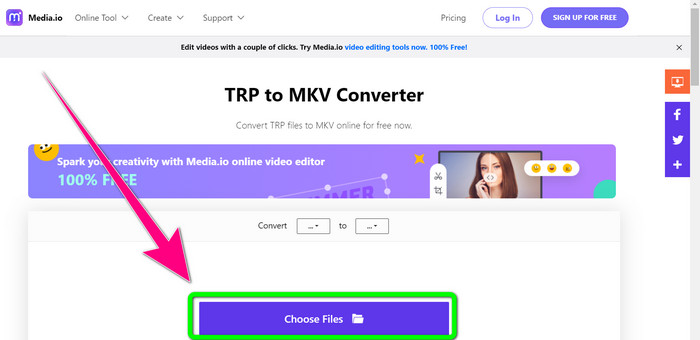
Vaihe 1: Siirry Media.io-sivustolle. Napsauta sitten Valitse tiedostot -painiketta lisätäksesi TRP-muotoisen videosi.
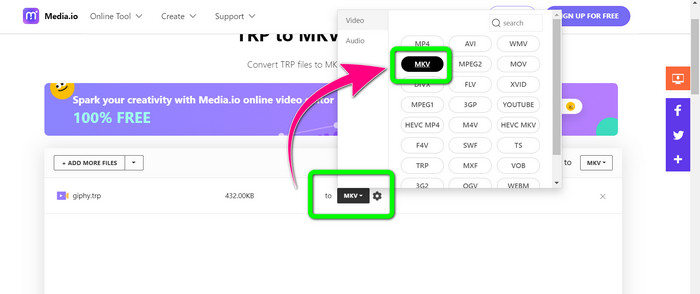
Vaihe 2: Kun olet lisännyt videosi, siirry muotovaihtoehtoihin, etsi MKV-tiedosto ja valitse se.
Vaihe 3: Viimeisessä vaiheessa napsauta Muunna-painiketta. Odota muunnosprosessin valmistumista ja tallenna videosi MKV-tiedostomuodossa.
Lisälukemista
Parhaat menetelmät: miten muuntaa AMV MKV:ksi ilmaiseksi
Muunna MTV helposti MKV:ksi näillä tehokkailla muuntimilla
Osa 4: Usein kysyttyä TRP:n muuntamisesta MKV:ksi
Miksi televisioni ei tue MKV-tiedostoa?
MKV-tiedosto on vain videosäilö, joka voidaan koodata useilla koodekeilla, kuten HEVC, MPEG-4, VP9 jne. TV:llä on huono yhteensopivuus näiden koodekkien kanssa, minkä vuoksi et voi toistaa MKV:ta televisiossasi.
Onko MKV-tiedosto hyvälaatuinen?
MKV-tiedostomuoto on suosittu korkealaatuisissa videoissa. Siinä on myös suurempi tiedostokoko. Se tarkoittaa, että MKV on kontti eikä sillä ole vaikutusta laatuun.
Onko olemassa nopeaa muuntajaa, jota voin käyttää tietokoneellani?
Ehdottomasti kyllä! Jos etsit nopeaa ohjelmistomuunninta, Video Converter Ultimate on paras sovellus. Voit muuntaa tiedostosi monta kertaa nopeammin ja helpommin.
Johtopäätös
Kaikkien edellä esiteltyjen sovellusten ja tapojen avulla muuntaa TRP MKV:ksi suosittelemme vahvasti käyttämään ohjelmaa Video Converter Ultimate. Se voi muuntaa lukuisia tiedostoja välittömästi erittäin nopealla muunnosnopeudella. Mitä enää odotat? Kokeile itse ja löydä lisää ominaisuuksia.
-
 2 vaikuttavimmista saatavilla olevista ohjelmistoista TRP:n muuntamiseksi MOV:ksi
 Etkö voinut muuntaa TRP-tiedostoja MOV-muotoon? Noudata sitten tässä artikkelissa annettua ohjetta. Kun valitsemme parhaat työkalut, joita voit käyttää TRP-tiedostojesi muuntamiseen.
- 2 vaikuttavimmista saatavilla olevista ohjelmistoista TRP:n muuntamiseksi MOV:ksi
Etkö voinut muuntaa TRP-tiedostoja MOV-muotoon? Noudata sitten tässä artikkelissa annettua ohjetta. Kun valitsemme parhaat työkalut, joita voit käyttää TRP-tiedostojesi muuntamiseen
-
 2 ammattimaista muuntajaa TRP:n muuntamiseksi WMV-muotoon [opas]
 Oletko yksi käyttäjistä, jolla on monimutkainen aika TRP-tiedoston kanssa? Jos näin on, jatkamme tämän artikkelin lukemista tietääksesi kuinka muuntaa TRP WMV: ksi ja tietää enemmän
