


 Video Converter Ultimate
 Näytön tallennin
 Videon korjaus
Yksinkertaistettu opetusohjelma TRP:n muuntamisesta WMV:ksi Pro-muuntimien avulla
Have a hard time dealing with TRP files because they can't open on your media player or editor? A low of internet users also have difficulty handling their TRP files. If you are one of those people, we suggest you stay tuned and read this article as we talk more about TRP format. Also, to solve your problem with this format, we recommend converting it into a WMV, especially if you want to play it on Windows. So now, what are you waiting for? Let's get going to the details below to convert TRP to WMV.

Osa 1. Muunna TRP WMV:ksi Video Converter Ultimate -sovelluksella
Want to know how to convert TRP to WMV with the ultimate professional tool? If so, use the FVC Video Converter Ultimate to achieve it. Before we go and learn how to convert your TRP, we must need to know about this converter tool. This converter provides an easy and swift converting process that millions of users already like. Moreover, it can convert your TRP file into WMV, AMV, MKV, AVI, or whatever format you want. Still, you can also do advanced editing here. Want to have a full scope features of this tool? Then continue reading below.

FVC Video Converter Ultimate
5 689 200++ latausta- Tukee TRP:n muuntamista WMV-, AVI-, MP4-, MOV-, MKV-muotoon ja saatavilla olevaan 200+-muotoon.
- Se on helppokäyttöinen, ja siinä on sisäänrakennettu erittäin nopea muunnos nopeampaa transkoodausta varten.
- Ei rajoituksia muuntamiseen, ja sen erämuunnos toimii hyvin.
- Edistyneet muokkausominaisuudet ovat Toolboxissa.
Ilmainen latausWindows 7 tai uudempiTurvallinen lataus
Ilmainen latausMacOS 10.7 tai uudempiTurvallinen lataus
Aloitetaan tämän A1-muuntimen käyttö ilman enempää viivytystä seuraamalla alla olevia ohjeita.
Step 1. Download the FVC Video Converter Ultimate on your drive by clicking the download button presented below. Follow the installation, then proceed on launching the tool.
Ilmainen latausWindows 7 tai uudempiTurvallinen lataus
Ilmainen latausMacOS 10.7 tai uudempiTurvallinen lataus
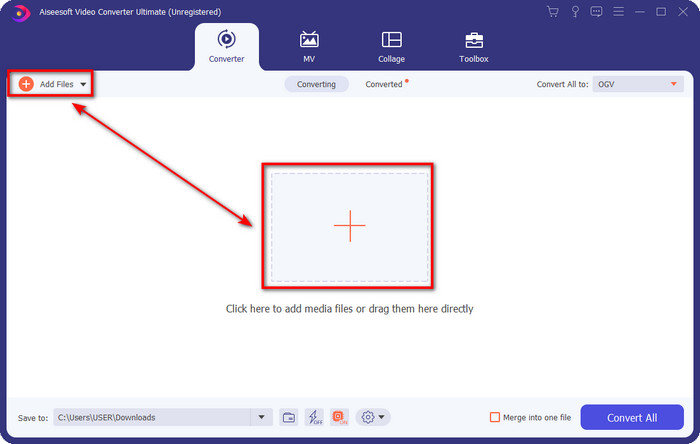
Step 2. On the homepage of the converter, click Add Files at the upper left part of the interface. Then browse the TRP file you want to convert on the folder that will show and press Open to proceed.
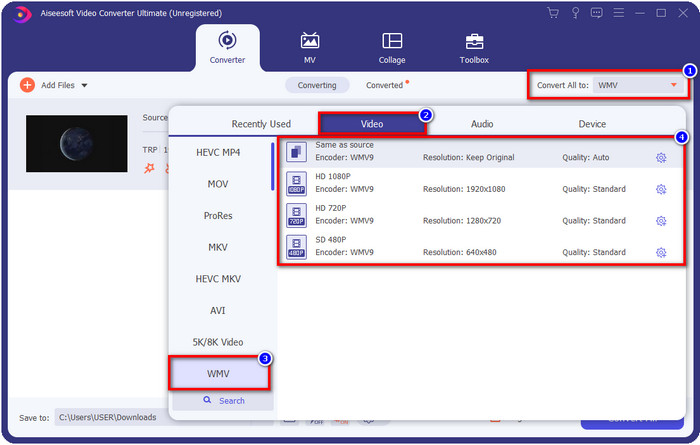
Step 3. Once you have uploaded the file, you must now change the format into WMV by clicking the Convert All to button. You will see that each available format has individual characteristics you can choose from on the list.
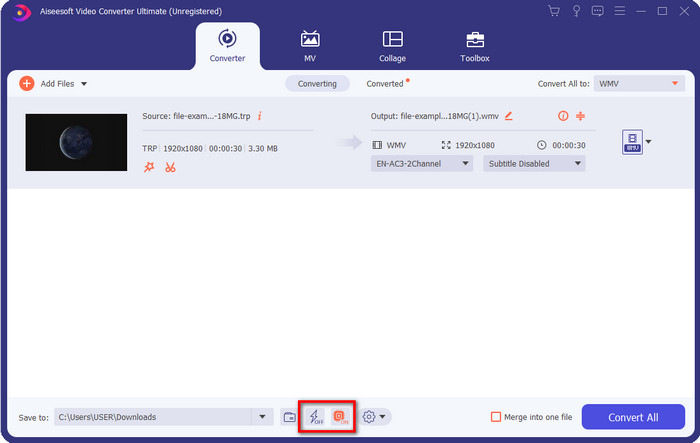
Optional. Want to enjoy the fast conversion we were bragging about? You can click Ultrafast Conversion and Hardware Acceleration below and activate them to enable it.
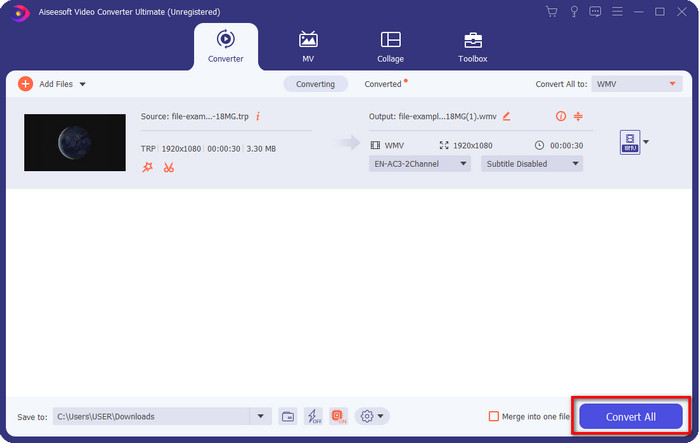
Step 4. Start the converting process by clicking the Convert All button at the bottom right part.
Osa 2. Muunna TRP WMV Online -muotoon
Many converters are available to use on the internet to convert TRP to WMV. Still, the FVC Free Video Converter Online is the best and professional online converter. This converter is free of charge, and no download is needed to use it. It already helps many internet users resolve their problem about converting TRP into a WMV, AVI, MP4, and MOV. But this converter doesn't support many formats like the FVC Video Converter Ultimate; it also has no editing features. So now, if you want to know how to use this converter, you must follow the steps below.
Step 1. Tick this link to open the main FVC Free Video Converter Online.
Step 2. Press the Add Files to Convert button, and the folder will open on your desktop. Locate the TRP file you want to convert and hit Open.

Step 3. After uploading the TRP file, click WMV format on the setlist below.
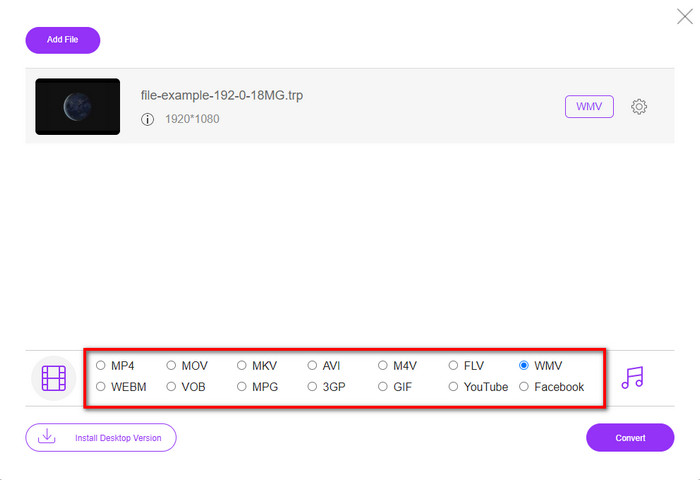
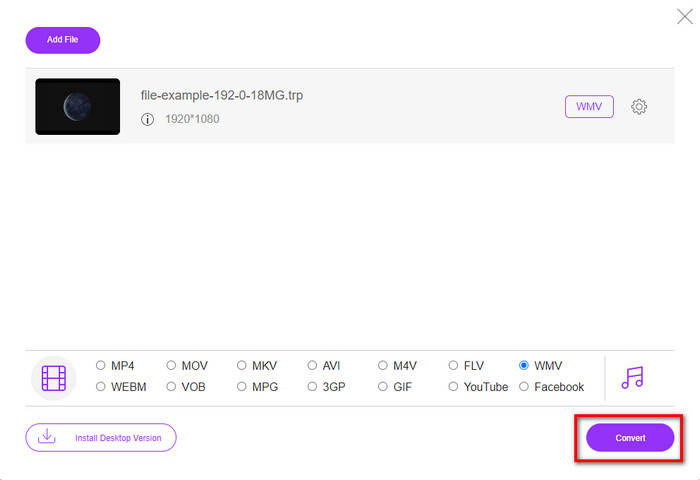
Step 4. Start the converting process by ticking the Convert; the file will automatically save into your drive after the operation.
Osa 3. Mikä on ero TRP:n ja WMV:n välillä
Vaikka nämä kaksi muotoa sopivat erinomaisesti verkkosuoratoistoon, TRP:llä ja WMV:llä on silti erilaiset rakenteet ja käyttö. Lisäksi niiden koodekit eroavat paljon toisistaan. Joten nyt, jos haluat tietää yksityiskohtaisempaa ja syvällisempää tietoa TRP-tiedostoista ja WMV:stä, sinun on pidettävä pallo pyörimässä ja lue alla olevat tiedot.
TRP sisältää teräväpiirtomediatiedoston, joka on koodattu MPEG-2 Part 1 -siirtomuotoon. Tämä muoto tunnetaan multipleksoinnista virrat, jotka voivat toistaa synkronoitua mediasisältöä. Tämä muoto on myös usein DVB- tai Digital Video Broadcasting -ohjelmassa tämän muodon tarjoamien virheiden korjaamiseksi. Lisäksi TRP:n käyttämä data eroaa videon H.264:stä ja äänen AC3:sta. Tällä hetkellä TRP-muoto ei saa paljon tukea, etenkään useimmissa Windowsin mediasoittimissa.
Kääntöpuolella WMV:llä on sarja videokoodekkeja eri tarkoituksiin tiedoston koodaamiseen. Microsoft esitteli tämän muodon kilpaillakseen RM-muodon kanssa online-suoratoistosisällössä. Ja nyt formaatti päivitetty WMV9:ksi, joka aktivoituu, jos mediasisällön videoresoluutio ylittää 300 000 pikseliä. Tämä muoto päivitetty versio mukautettu HD DVD- ja Blu-ray-levyille.
Yksinkertaistaaksemme TRP:n on muututtava WMV:ksi, koska sen toistamisessa Windowsissa on yhteensopivuusongelma. Vaikka TRP ja WMV ovat erinomaisia valintoja online-suoratoistoon, jos haluat katsoa TRP:tä Windowsissa, sinun on tehtävä siitä yhteensopiva. Tästä syystä yllä mainitut työkalut ovat valmiita auttamaan sinua, kun sinun on muutettava TRP WMV:ksi.
Osa 4. Usein kysytyt kysymykset TRP:n muuntamisesta WMV:ksi
Voinko käyttää TRP:tä Macissa?
You are able to use this format if you download a third-party media player and editor that supports this type of format. However, there are limited Mac apps that support this type of format. But we have an idea of how you can use your TRP file without downloading a third-party app. Do you want to know more? If so, you can click this link and read how to convert TRP to MOV.
Onko online-TRP-muuntimen käyttö turvallista?
Yes, you can use an online converter to convert your TRP into a format your desire. But not all of the converters online are a must to use because most of the tools have malicious issues. So, to avoid this problem we suggest that you must pick a tool that is safe like the FVC Free Video Converter Online. Unlike any typical converter, this tool is far from all of the issues because it is guaranteed safe and malware-free.
Mitä minun pitäisi tehdä, jotta .trp-tiedostosta tulee toistettavissa?
Joidenkin tutkimusten mukaan voit muuttaa tiedostopäätteeksi .ts tai .mpg, jotta se on yhteensopiva muiden työpöytäsovellusten kanssa. Mutta menestyksen tae tässä ei ole 100%. Voit kuitenkin muuntaa .trp-tiedoston haluamaasi muotoon, jotta se on yhteensopiva. Sen sijaan, että hukkaat aikaasi tiedostotunnisteen vaihtamiseen ja epäonnistumiseen monta kertaa, sinun on muunnettava se, jotta säästät aikaa ja nautit videon katselusta tai muokkaamisesta.
Johtopäätös
In the end, we found out that the TRP needs to be converted into a WMV format if you want to make it accessible on Windows. Although you can download a third-party app to play or edit the TRP file. Still, there are a small group of applications that supported this format. Instead of doing a trial and error why don't you turn it into WMV? So now, it is in your hand to choose which converter you should depend on. But we greatly suggest to you that you must pick the FVC Video Converter Ultimate. Because of one simple reason, it provides simplicity and a perfect converting process you'll experience.
-
 Helpoin opas TRP:n muuntamiseen AVI:ksi Windowsissa ja Macissa
 Ehkä et tunne TRP-videomuotoa ja ihmettelet, kuinka aiot muuntaa TRP:n AVI:ksi? Lue tämä artikkeli lisäksi saadaksesi tietoa ongelmaan liittyvistä yksityiskohdista.
-
 Muunna TRP FLV:ksi helpoimmilla offline- ja online-menetelmillä
 Haluatko muuntaa TRP-videotiedostosi FLV:ksi nopeasti ja ilman vaivaa? Lue tämä artikkeli tarjotaksesi parhaan ohjelmiston ja verkkopalvelun, joka sopii parhaiten tilanteeseen.
-
 Kolme parasta tapaa muuntaa FLV WMV: ksi Windowsissa ja Macissa
 Etsitkö parasta tapaa muuntaa FLV WMV: ksi menettämättä laatua PC: llä tai Macilla? Olet onnekas, koska täällä jaamme kolme tapaa tehdä työ helposti.
