


 Video Converter Ultimate
 Näytön tallennin
 Videon korjaus
Erinomaisia tapoja muuntaa VOB 3GP:ksi helposti [Parhaat muuntimet]
Haluatko toistaa VOB‑tiedostoasi kolmannen sukupolven laitteellasi, mutta et pysty siihen? Paras ratkaisu on silloin muuntaa VOB‑tiedosto 3GP‑tiedostoksi. 3GP‑tiedostot ovat tiedostoja, joita 3G‑laitteet tukevat. Jos siis etsit parasta tapaa muuntaa VOB‑tiedostosi 3GP‑muotoon, tämä artikkeli voi olla etsimäsi vastaus. Olemme koonneet helpoimmat ja parhaat tavat muuntaa VOB 3GP:ksi.

Osa 1. Muuntaminen FVC Video Converter Ultimate -sovelluksella
FVC Video Converter Ultimate on yksi verkosta löytyvistä tehokkaimmista muuntimista. Tämä maksuton offline‑muunnin tukee lukuisia tiedostomuotoja, kuten VOB, 3GP, MP4, MKV, MOV, AVI, FLV ja yli 1000 muuta formaattia. Tällä muuntimella voit myös lyhentää videosi kestoa ja lisätä tehosteita videon laadun parantamiseksi. Lisäksi, jos haluat yhdistää useita tiedostoja, työkalu tarjoaa joukkomuunnoksen. Jos siis haluat muuntaa VOB‑tiedostosi 3GP‑muotoon vaivattomasti, lue tarkemmat ohjeet alta ja lataa ohjelma ilmaiseksi.

FVC Video Converter Ultimate
5 689 200+ latausta- Voi muuntaa yli 1000 + verkossa saatavilla olevaa tiedostomuotoa.
- Voi erämuuntaa useita tiedostomuotoja.
- Siinä on erittäin nopea muunnosprosessi ja laitteistokiihdytys.
- Siinä on edistyneitä muokkausominaisuuksia, joilla voit leikata, lisätä tekstityksiä ja lisätä vesileimoja tiedostoosi.
- Saatavilla kaikilla media-alustoilla, kuten Windowsilla ja Macilla.
Ilmainen latausWindows 7 tai uudempiTurvallinen lataus
Ilmainen latausMacOS 10.7 tai uudempiTurvallinen lataus
Tässä ovat vaiheet VOB:n muuntamiseksi 3GP:ksi käyttämällä FVC Video Converter Ultimatea:
Vaihe 1. Lataa ensin sovellus napsauttamalla Lataa-painiketta Windowsille tai Macille. Seuraa sitten asennusohjeita ja avaa sovellus.
Ilmainen latausWindows 7 tai uudempiTurvallinen lataus
Ilmainen latausMacOS 10.7 tai uudempiTurvallinen lataus
Vaihe 2. Napsauta Lisää tiedostoja ‑painiketta tai +‑kuvaketta. Tietokoneesi tiedostot avautuvat – valitse VOB‑tiedosto ja lisää se jonoon.
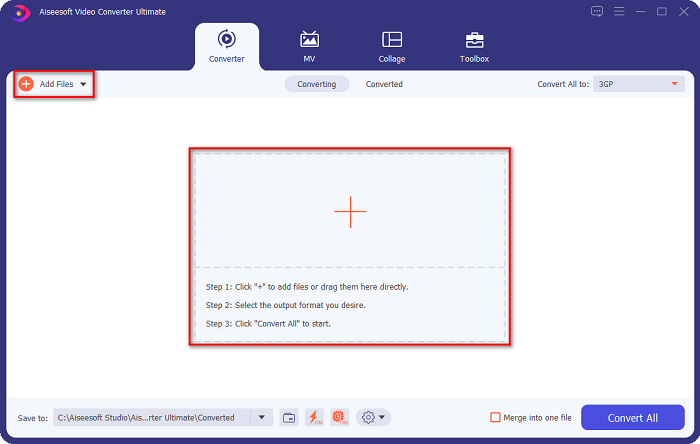
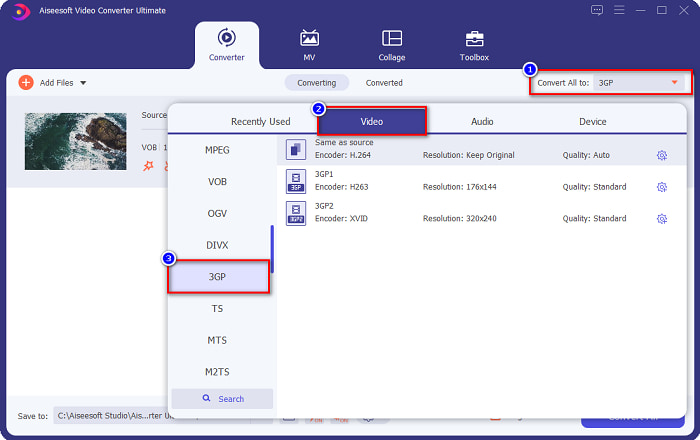
Vaihe 3. Kolmannessa vaiheessa napsauta Muunna kaikki muodosta ‑painiketta ja valitse haluamasi tulostusmuoto. Valitse 3GP ja siirry seuraavaan vaiheeseen.
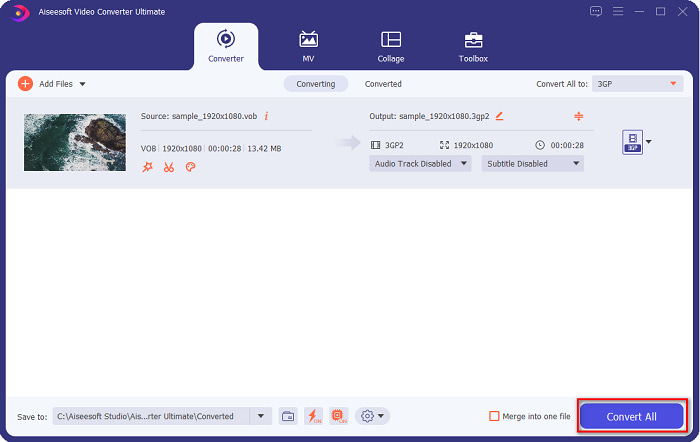
Vaihe 4. Kun olet valinnut haluamasi tulostusmuodon, napsauta Muunna kaikki ‑painiketta aloittaaksesi muunnoksen. Odota muutama sekunti – ja valmista! Näillä yksinkertaisilla vaiheilla voit helposti muuntaa VOB‑tiedostosi 3GP‑muotoon.
Osa 2. Kuinka muuntaa VOB 3GP:ksi ilmaiseksi verkossa
Jos haluat muuntaa VOB-tiedostosi 3GP-tiedostoksi lataamatta, voit käyttää verkossa saatavilla olevia online-muuntimia. Online-muuntimen käytön mukavuus ja tehokkuus ovat epäilemättä hyviä. Siksi tarjosimme kaksi tapaa muuntaa VOB-tiedostosi 3GP-tiedostomuotoon.
FileProInfo
FileProInfo on verkkopohjainen muunnin, jonka helppokäyttöinen käyttöliittymä tekee siitä aloittelijaystävällisen työkalun. Se tukee lähes kaikkia verkossa yleisesti käytössä olevia tiedostomuotoja. Näissä verkkotyökaluissa on kuitenkin usein paljon häiritseviä mainoksia. Tästä huolimatta moni käyttää tätä muunninta edelleen.
Vaihe 1. Etsi FileProInfo selaimellasi siirtyäksesi sen verkkosivulle. Ohjelman päänäkymässä napsauta Valitse VOB‑tiedosto ‑painiketta ja valitse ladattava VOB‑tiedostosi.

Vaihe 2. Valitse sitten haluamasi tulostusmuoto laatikosta sanan to vierestä.

Vaihe 3. Lopuksi napsauta Muunna VOB‑tiedosto ohjelman käyttöliittymän alaosasta ja odota, että muunnos valmistuu.
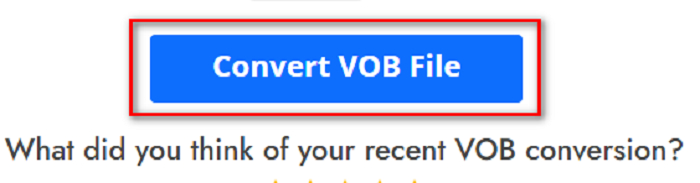
Ja siinä se! Voit muuntaa VOB-tiedostosi 3GP:ksi ilman hikoilua.
Muunna365
Convert365 on verkossa toimiva VOB–3GP‑muunnin, jolla voit muuntaa useimmat yleiset muodot, kuten VOB, 3GP, AVI, MOV, MP4, MPEG ja monet muut. Jos etsit verkkotyökalua, joka pystyy myös normalisoimaan äänenvoimakkuuden, tästä työkalusta löytyy kyseinen ominaisuus. Koska kyseessä on verkkopalvelu, muunnos voi kuitenkin toisinaan olla hidas, sillä se riippuu nettiyhteydestä. Seuraa alla olevia ohjeita, jotta voit muuntaa VOB‑tiedoston 3GP‑muotoon Convert365:llä.
Vaihe 1. Hae selaimessasi Convert365, napsauta Lisää tiedostoja ‑painiketta ja valitse VOB‑tiedostosi, kun tietokoneesi tiedostot avautuvat.

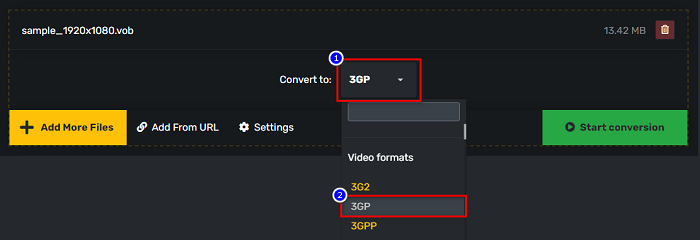
Vaihe 2. Valitse sitten pudotusvalikosta kohdan Muunna muotoon vierestä haluamasi tulostusmuoto. Napsauta 3GP‑tiedostomuotoa.
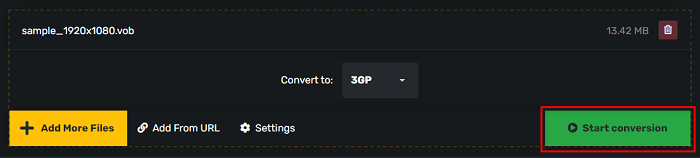
Vaihe 3. Ja lopuksi napsauta Aloita muunnos. -painiketta muuttaaksesi VOB-tiedostosi 3GP-tiedostoksi.
Osa 3. Mitä VOB-3GP-muunninta minun pitäisi käyttää
Kun valitset parhaan muuntimen VOB:n muuntamiseksi 3GP:ksi, sinun on aina otettava huomioon nopeus, sen tukemat tiedostot ja muuntimen ominaisuuksien ainutlaatuisuus. Suosittelemme käyttämään offline-työkalua FVC Video Converter Ultimate yksi parhaista yllä olevien online- ja offline-muuntimien joukosta. Tämä muunnin tarjoaa monia erillisiä ominaisuuksia, joita muilla muuntimilla ei ole, kuten GIF Creator 3D Maker, vesileiman poisto ja monet muut.
Lisäksi, vaikka se voi antaa ammattimaisia tuloksia, siinä on myös helppokäyttöinen käyttöliittymä, jotta sinun ei ole vaikea käyttää sitä.
Osa 4. Lisätietoja VOB:sta ja 3GP:stä
VOB tai Video Object on tiedostosäiliömuoto, jota DVD-levyt käyttävät. Se sisältää videon, äänen, tekstityksen ja valikon sisällön. Tämäntyyppisillä tiedostoilla on rajoituksia ja kopiointirajoituksia, jotka suojaavat niitä suoralta kopioimiselta. Sitä vastoin 3GP-tiedostot ovat tiedostomuotoja, joita voidaan toistaa vain kolmannen sukupolven mobiililaitteilla. Nämä tiedostomuodot on kehittänyt Third Generation Partnership Project (3GPP). Lisäksi tämäntyyppiset tiedostot sisältävät vain pienen tiedostokoon VOB-tiedostoihin verrattuna, koska ne on tehty jaettavaksi 3G-laitteille. 3GP voi tallentaa video- ja äänitiedostoja, joita käytetään yleisesti 3G-puhelimissa.
Osa 5. Usein kysyttyä VOB:n muuntamisesta 3GP:ksi
Voitko pelata 3GP:tä macOS:llä?
3GP‑tiedostoja ei voi toistaa macOS‑järjestelmässä, etenkään uudemmissa QuickTime‑versioissa. Voit kuitenkin muuntaa 3GP‑tiedostosi macOS:n tukemaan muotoon, kuten MOV:iin. Jos haluat lisätietoja 3GP‑tiedostojen muuntamisesta MOV‑muotoon, napsauta tätä linkkiä.
Vaikuttaako VOB:n muuntaminen 3GP:ksi tiedostosi laatuun?
Ehdottomasti kyllä. Tiedostokoko vaikuttaa, kun muunnat VOB:n 3GP:ksi. Koska 3GP sisältää vain video- ja äänitiedostoja ja sillä on pienempi tiedostokoko, VOB-tiedostosi tiedostokoko on pienempi.
Onko 3GP-tiedostomuoto yleinen tiedosto?
Valitettavasti 3GP-tiedostomuodot eivät ole nykyään kovin yleisiä, koska 3G-puhelimia on nykyään vähemmän. Mobiilikäyttäjien yleisin tiedosto on nykyään MP4-tiedostomuoto.
Johtopäätös
Kun esittelemme parhaat ja helpoimmin käytettävät muuntimet VOB:n muuntamiseksi MOV:ksi Windowsissa ja Macissa, päättelemme, että FVC Video Converter Ultimate on paras valituista online- ja offline-muuntimien joukosta. Sen lisäksi, että siinä on ainutlaatuisia ominaisuuksia, joita voit kokeilla, se tarjoaa myös nopean muuntamisen. Jos sinulla on edelleen epäilyksiä tästä muuntimesta, lataa se nyt ja kokeile parasta VOB-3GP-muunninta.
-
 Parhaat tavat muuntaa VOB FLV:ksi [ilmainen ja online mukana]
 Haluatko muuntaa VOB-tiedoston FLV-tiedostoksi? Voit suorittaa tehtävän helposti joko työpöydällä tai verkossa olevilla muuntimilla. Lue tämä opas ja opi muuttamaan VOB FLV: ksi helposti ja nopeasti.
-
 3 kätevää muuntajaa VOB-tiedoston vaihtamiseksi AVI-muotoon [2021]
 Onko sinulla ongelma, koska VOB-tiedostojen toistamista ei tueta? Yritetään sitten muuntaa se alla esitetyillä kolmella tavalla, joissa on yksityiskohtaiset vaiheet jokaisessa muuntimessa.
-
 Erinomaisia menetelmiä VOB:n muuntamiseen MOV:ksi
 Online-videoiden lataaminen on kätevää, mutta entä jos video on VOB-muodossa ja soitin ei tue sitä? Tämä viesti opettaa sinulle, kuinka VOB muunnetaan MOV:ksi.
