


 Video Converter Ultimate
 Näytön tallennin
 Videon korjaus
 Suojattu lataus
YouTuben muuttaminen soittoääneksi: muuntaminen on helppoa
Oletko kyllästynyt siihen, että puhelimesi ilmoitukset soivat aina samoilla, värittömillä ja toistuvilla soittoäänillä? Entä jos ottaisit käyttöön YouTubesta tutun trendikkään, tarttuvan ja energisen sävelen? Et tiedä miten? Ei hätää – ratkaisu on niiden muuntaminen, ja onnekkuutesi vasta alkaa, sillä olemme koonneet ohjelmistoja ja verkkotyökaluja, jotka on suunniteltu muuntamaan YouTube-soittolistat soittoääniksi. Aloita YouTube-videoiden muuntaminen jo tänään ja tee päivittäisestä soittoäänestäsi tylsän sijaan miellyttävä.

Osa 1. Muunna YouTube-linkki MP3-soittoääneksi
Mietitkö kuinka tehdä YouTube-videosta soittoääni? Tässä osassa näytämme sinulle kuinka muuntaa YouTube-video MP3-soittoääneksi kopioimalla ja liittämällä linkki ja käyttämällä verkkopohjaista muunnostyökalua, kuten Y2Mate. Prosessi kestää noin kolme vaihetta, mikä varmistaa suoraviivaisen muuntamisen säästääksesi aikaa ja määrittääksesi juuri muunnetun soittoäänen.
Vaihe 1. Kopioi linkki valitsemaasi YouTube-videoon, josta haluat tehdä soittoäänen. Voit tehdä tämän selaimen kautta tietokoneella tai YouTube-sovelluksella mobiililaitteella.
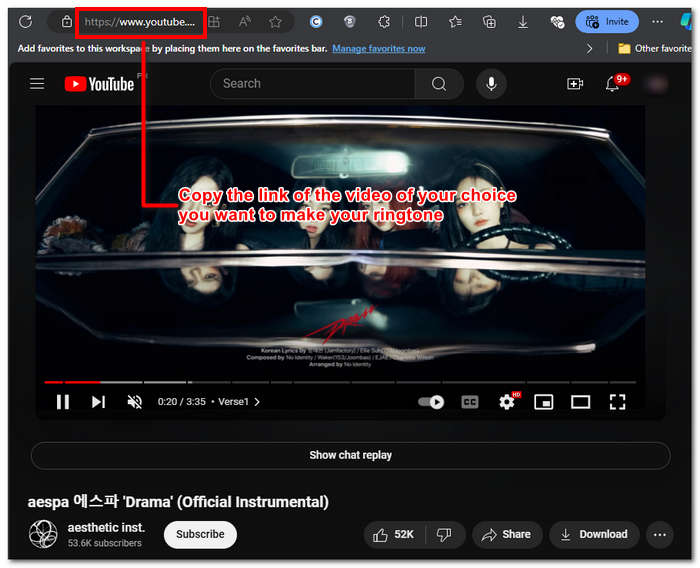
Vaihe 2. Siirry osoitteeseen Y2Mate.com ja liitä YouTube-videosi linkki sille varattuun kenttään.
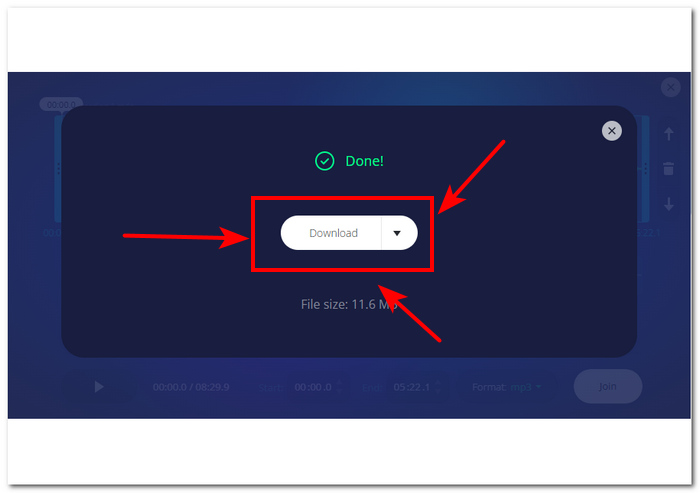
Vaihe 3. Napsauta seuraavaksi Audio-painiketta ja sen jälkeen Download-painiketta muuntaaksesi tiedoston ja tallentaaksesi sen laitteellesi.
Tämä vaihe toimii myös matkapuhelimissa, koska voit käyttää matkapuhelimesi selainta.
Osa 2. Mukauta YouTube-video MP3-soittoääneksi Androidille/iPhonelle
Jos haluat ladata YouTube-videon, muuttaa sen soittoäänesi pohjaksi ja vielä mukauttaa sitä henkilökohtaisemmaksi, ohjelmistopohjainen työkalu on paras ratkaisu. FVC-picked Video Converter Ultimate on monitoimityökalu, joka voi muuntaa, parantaa, pakata ja jopa editoida videoita ja ääntä, ja tukee jopa 1000 eri tiedostomuotoa. Lisäksi siinä on nopea prosessointitekniikka, joka takaa nopean muunnosnopeuden ilman laadun heikkenemistä.
Oletettavasti tehtävänä on mukauttaa YouTube-videotiedosto ennen sen muuntamista M4R- tai MP3-soittoääneksi. Siten ohjelmisto voi auttaa sinua lyhentämään kestoa, lisäämään häivytystehosteita ja poistamaan tarpeettomia osia, mikä tekee täydellisestä mukauttamisesta, joka vastaa täydellisesti mieltymyksiäsi soittoäänessä.
Ennen kuin muokkaat soittoääntäsi, sinun olisi pitänyt ladata YouTube-videosi. Jos et ole ladannut videota laitteellesi, voit käyttää Y2Matea.
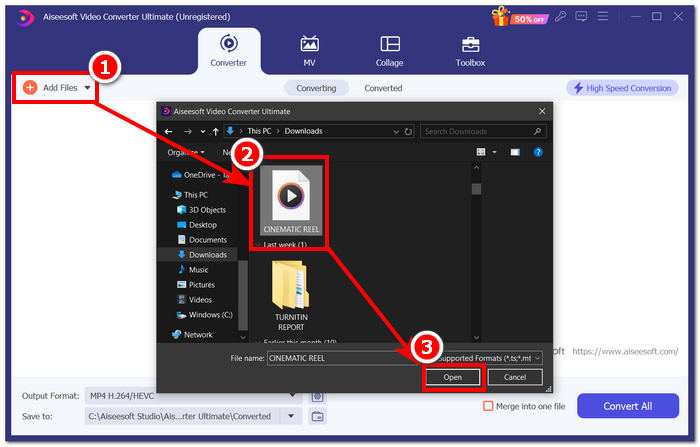
Vaihe 1. Lataa ja asenna FVC-picked Video Converter Ultimate -ohjelma tietokoneellesi. Avaa ohjelma ja lataa ladattu YouTube-video napsauttamalla Add Files -linkkiä käyttöliittymän vasemmassa yläkulmassa.
Ilmainen latausWindows 7 tai uudempiTurvallinen lataus
Ilmainen latausMacOS 10.7 tai uudempiTurvallinen lataus
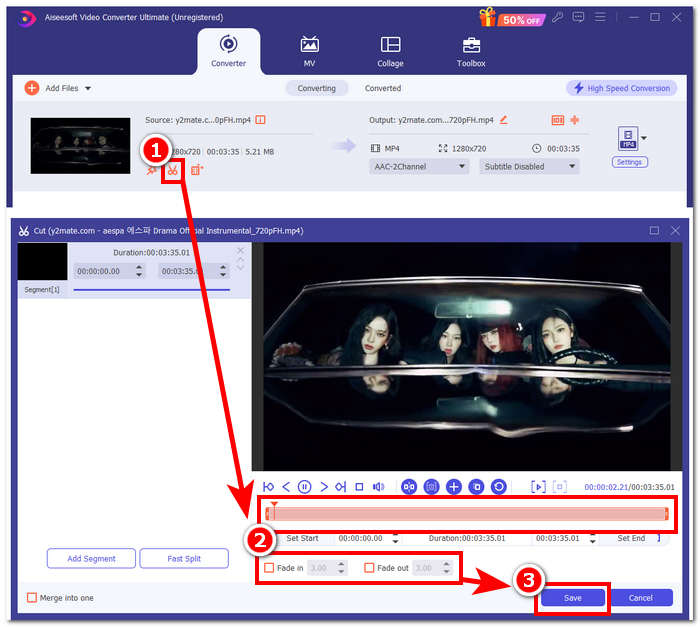
Vaihe 2. Kun video on ohjelmassa, napsauta videon vieressä olevaa sakset-kuvaketta aloittaaksesi soittoäänesi muokkaamisen. Kun uusi ikkuna avautuu, voit lisätä soittoääneen häivytysefektejä ja lyhentää sitä vetämällä osoitinkenttää vasemmalta oikealle. Kun olet valmis mukauttamaan soittoääntäsi, napsauta vain Tallenna-painiketta.
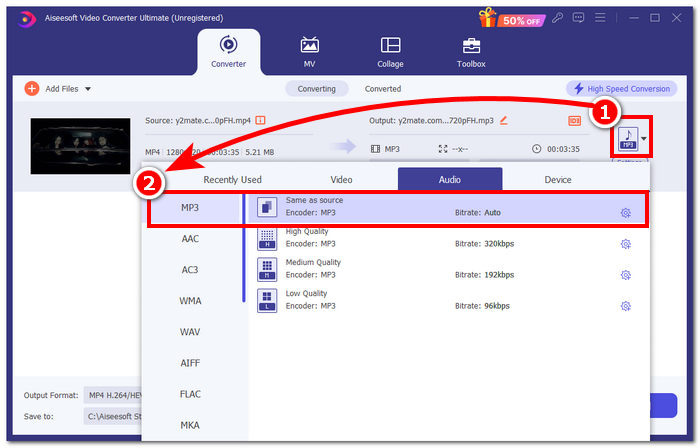
Vaihe 3. Kun olet mukauttanut soittoäänesi, vaihda sen tiedostomuoto MP4:stä, joka on videotiedostomuoto, varsinaiseen MP3-muotoon, jotta se näkyy laitteellasi äänitiedostona.
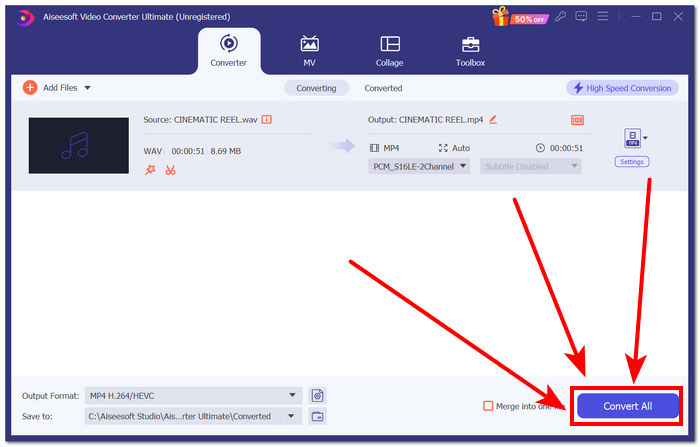
Vaihe 4. Napsauta Convert All -painiketta aloittaaksesi muunnosprosessin ja tallentaaksesi soittoäänen automaattisesti laitteellesi. Kun muunnos on valmis, soittoääni löytyy latauskansiostasi.
Osa 3. Aseta YouTube-video MP3-soittoääneksi
iPhone
Kun olet valmistanut soittoääniä iPhonelle, uuden soittoäänen asettaminen iPhonessa on melko työläämpää kuin Androidilla. iPhoneissa ei ole sisäänrakennettua tukea, joka yksinkertaistaisi toisesta lähteestä peräisin olevan soittoäänen käyttöönottoa. Se ei silti estä meitä etsimästä keinoja, joten seuraava ohje näyttää, miten muunnettu YouTube–MP3-soittoääni saadaan iPhoneen.
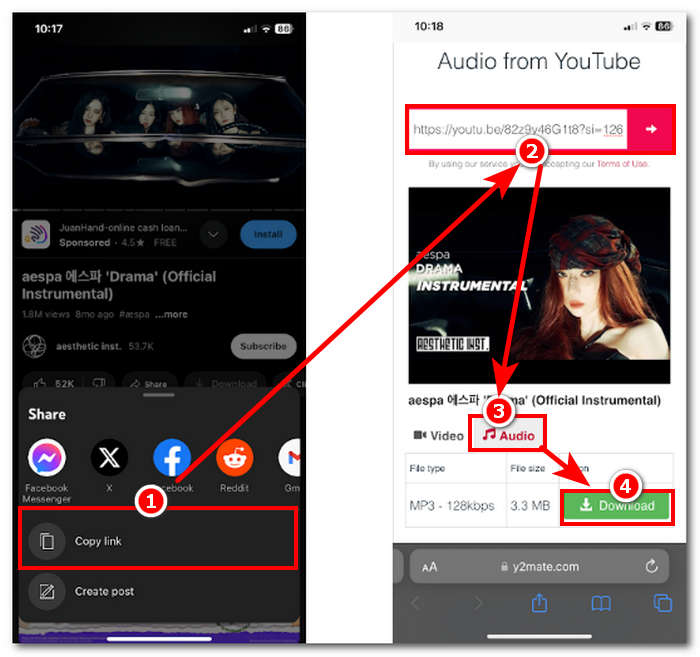
Vaihe 1. Kopioi videon linkki iPhonesi YouTube-sovelluksesta.
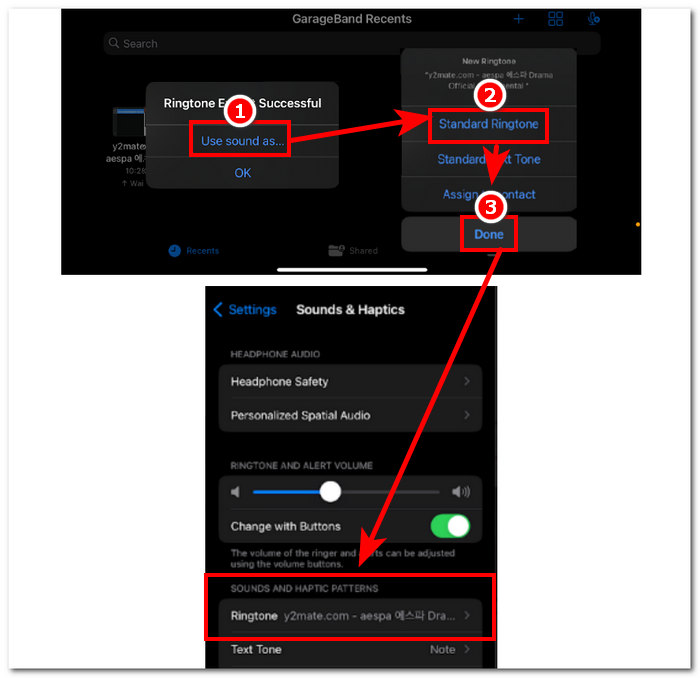
Vaihe 2. Liitä URL valitsemaasi muunnostyökaluun Safarissa. Muista ensin valita Audio-vaihtoehto, jotta videosi muunnetaan MP3-muotoon ennen kuin napautat Download-painiketta.
Huom: Varmista, että olet asentanut GarageBand- ja RingtoneMaker-sovellukset ennen kuin siirryt seuraavaan vaiheeseen.
Vaihe 3. Avaa RingtoneMaker-sovellus ja lataa ladattu YouTube-soittoääni sovellukseen. Kun tiedosto on ladattu, napauta Make Ringtone -painiketta ja valitse jatkoon GarageBand-sovellus.
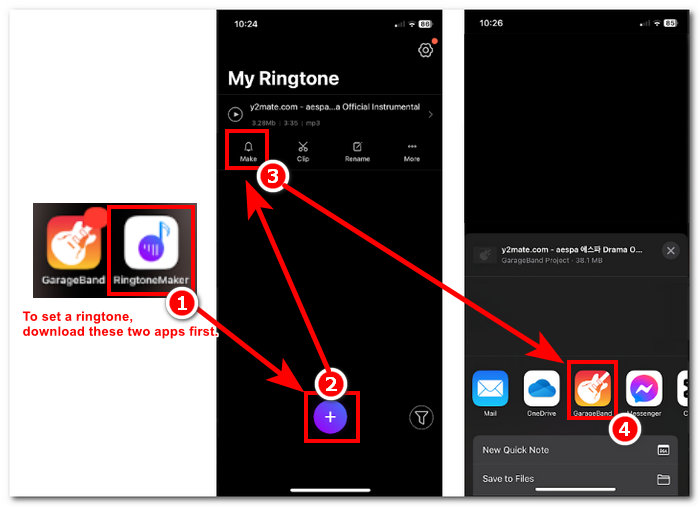
Vaihe 4. Kun sinut on ohjattu GarageBand-sovellukseen, napauta soittoääntä, jonka toit sovellukseen, ja etene sitten seuraavalla polulla: Share > Ringtone > Export.
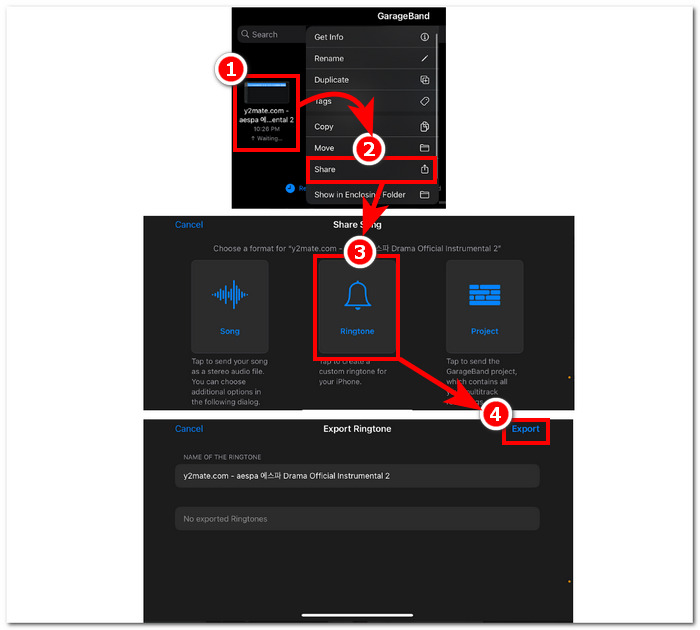
Vaihe 5. Kun vienti on valmis, valitse, että ääntä käytetään tavallisena soittoäänenä, ja napauta Done-painiketta. Tarkista, onnistuiko uuden soittoäänesi asettaminen, siirtymällä kohtaan Settings > Sound & Haptics. Tiedostosi nimi pitäisi näkyä Ringtone-osion alla.
Android
YouTuben muuntaminen MP3-soittoääneksi Androidissa on yhtä helppoa kuin sen määrittäminen. Sisäänrakennettujen ominaisuuksiensa ansiosta Android antaa käyttäjilleen mahdollisuuden asettaa soittoäänen, mikä tekee prosessista paljon helpompaa ja mukavampaa. Siten käyttäjien on silti ladattava ja muutettava YouTube-video Y2mate-verkkotyökalun avulla.
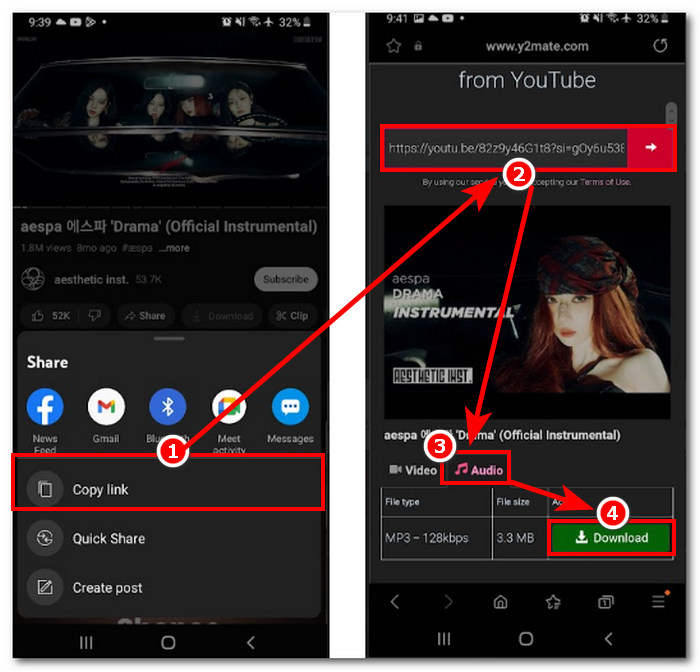
Vaihe 1. Kopioi soittoääneksi haluamasi videon linkki YouTube-sovelluksessa.
Vaihe 2. Liitä linkki valitsemasi muunnostyökalun sivulle selaimessa. Ennen kuin napsautat Download-painiketta, muista valita ensin Audio-osio, jotta videosi muunnetaan MP3-muotoon.
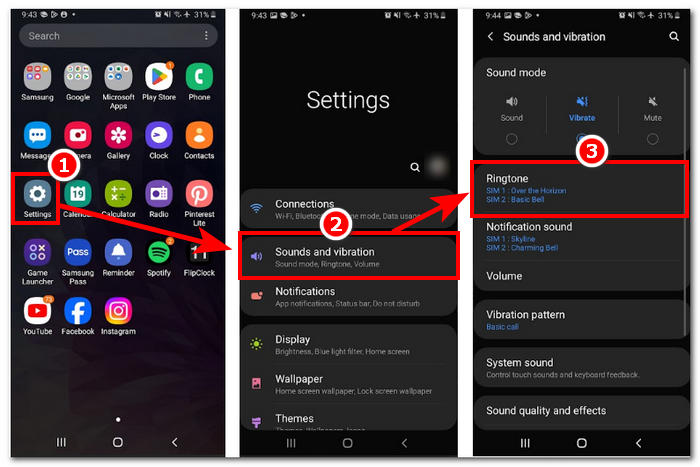
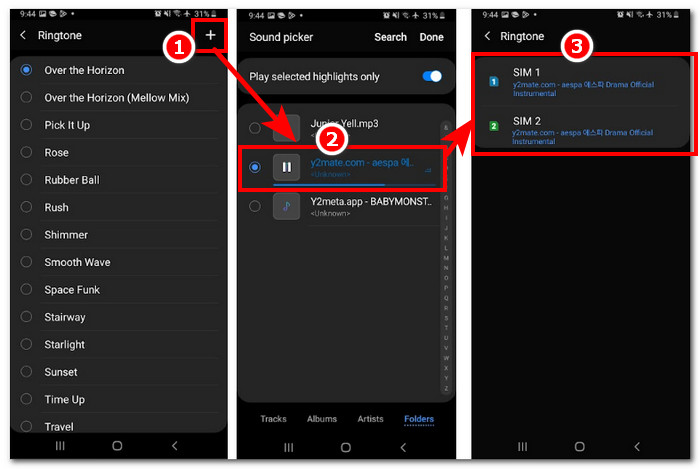
Vaihe 3. Avaa puhelimesi soittoääniasetukset asettaaksesi juuri muunnetun äänen soittoääneksi. Seuraa vain tätä polkua: Settings > Sound and Vibration > Ringtone.
Vaihe 4. Kun olet soittoäänivalikossa, lisää uusi soittoääni napsauttamalla + -painiketta näytön oikeassa yläkulmassa. Ja siinä kaikki – olet onnistuneesti asettanut uuden soittoäänen, joka on peräisin YouTube-videosta.
Osa 4. Usein kysyttyä YouTubesta MP3-soittoääneen
Mikä tekoälytyökalu muuntaa YouTuben MP3:ksi?
Monet A-list AI -työkalut voivat muuntaa YouTube-videoita tehokkaasti MP3-muotoon. Joitakin suosittuja vaihtoehtoja ovat YTMP3.cc ja ClipGrab.
Mikä on YouTube-MP3-muunninsovellus?
YouTube to MP3 -sovellus on työkalu, jonka voi ladata käyttäjän mobiililaitteeseen. Tällaisia muunnossovelluksia ovat TubeMAte, VideMate ja Snaptube.
Kuinka tallennat ääntä YouTube-shortseista?
YouTube kieltää äänen laittoman lataamisen, joten alustan sisällön. Äänen tallentamiseen YouTube-shortseista laittomasti käyttäjät luottavat online-muunnintyökaluihin ja puhelimen näytön tallennukseen.
Johtopäätös
YouTuben muuntaminen MP3-tiedostoksi soittoäänen käyttöä varten voi olla melko monivaiheinen prosessi, erityisesti aloittelijalle tai vähemmän tekniikkaan perehtyneelle. Noudattamalla yllä olevia ohjeita huolellisesti käyttäjät voivat kuitenkin luoda oman soittoäänensä vaivattomasti. Tarjolla on vaihtoehtoja YouTube-videon muuntamiseen ja soittoäänen tekemiseen niin verkossa toimivalla Y2Mate-työkalulla Android- ja iPhone-laitteille kuin ohjelmistopohjaisella FVC-picked Video Converter Ultimate -työkalulla, joka mahdollistaa laajemmat mukautusominaisuudet.
-
 MOV VS MP4 - kumpi valitset?
 Mikä MOV VS MP4 on parempi? Tämä viesti kertoo eron MP4: n ja MOV: n välillä, jotta saat paremman valinnan videotiedostoihisi.
-
 FLAC vs. MP3: Mikä äänitiedostomuoto on ylin
 Tämä viesti vertailee keskeisiä eroja FLAC:n ja MP3:n välillä. Tämä sisältää niiden äänenlaadun, tiedostokoon, yhteensopivuuden ja paljon muuta.
-
 Kuinka muuntaa MP3 M4A:ksi äänenlaadun parantamiseksi
 Paranna musiikkitiedostojesi laatua muuntamalla MP3 M4A:ksi asiantuntijavinkkiemme ja temppujemme avulla. Oppaamme tarjoaa vaiheittaiset ohjeet ja suositellut ohjelmistot.
