


 Video Converter Ultimate
 Näytön tallennin
 Videon korjaus
Lataa 5 parasta käytettävissä olevaa työkalua videon tekemiseen 2x nopeammaksi muutamalla napsautuksella
There are times that you will need to speed up a video like increasing it to 2x video speed. Because there are some parts you want to skip or maybe you want the video to play faster to lessen the duration of it. So, if you want to learn how to make your video speed up then continue reading this article. To have a sufficient idea and knowledge about how to do it and why 2x should be used.

Osa 1. Mikä on 2x-video?
Nopeutettu katselu on videon katselua, joka on kiihdytetty sen luonnolliseen toistonopeuteen. Vain säätämällä katsomamme videon nopeutta; se voi auttaa meitä eri tavoin. Joten jos haluat tietää, mitä etuja luonnollisen nopeuden videon tuomisesta 2x videonopeuteen saa. Lue sitten alla olevat tiedot saadaksesi lisätietoja.
Benefits of watching speed up videos.
◆Jos toistat videon 2x nopeudella, voit helposti määrittää, onko video katsomisen arvoinen vai ei. Tämä saattaa koskea pitkiä videoita, ja suurimman osan ajasta on tylsää katsoa ne kaikki normaalinopeudella.
◆Sillä voimme säästää paljon aikaa kuin normaalilla toistonopeudella. Tässä tapauksessa, jos sinun on katsottava vähintään 2 videota, joiden pituus on 15 minuuttia, on parempi katsoa ne 2x nopeammin. Ymmärtääksesi yksityiskohdat nopeammin kuin katsomalla sitä normaalinopeudella. Joten sen sijaan, että katsoisit yhden videon 15 minuutissa, voit katsoa kaksi tällä ajanjaksolla.
◆Useimmat ihmiset, jotka rakastavat nopealla toistolla toistettujen videoiden katsomista, ovat niitä, jotka haluavat muistaa kaiken ulkoa minuutissa. Tämä toimii parhaiten kiireisille ihmisille tai niille, joilla on kiire.
◆Se parantaa ja harjoittelee keskittymistäsi ja kuuntelutaitojasi paremmin, jos toistat videon 2x nopeudella normaalin nopeuden sijaan. Joten nyt sinulla on idea siitä, mitä etuja videon nopeuttamisesta on. Nyt on oikea aika siirtyä työkaluihin, jotka auttavat sinua nopeuttamaan videotasi. Seuraavassa osassa puhutaan erilaisista työkaluista, joita sinun tulee käyttää.
Osa 2. Kuinka tehdä 2x videoita
If you want to make video 2x faster then try to use the phenomenal video editor, the Video Converter Ultimate. This tool already helped a lot of its customers with their different problems, especially converting, making GIFs, enhancing and more. So, making your video playback faster can be easily done with the help of this tool. Also, while you enhance the speed of the video you can also have a preview of the 2x speed below. To determine if that video speed is right for you. So now, let's proceed on how to change the playback speed of your video by following the steps below.
Vaiheet videon nopeuttamiseen jopa 2X nopeuteen
Step 1. Download the tool to your desktop then install it after it finishes the downloading process.
Ilmainen latausWindows 7 tai uudempiTurvallinen lataus
Ilmainen latausMacOS 10.7 tai uudempiTurvallinen lataus
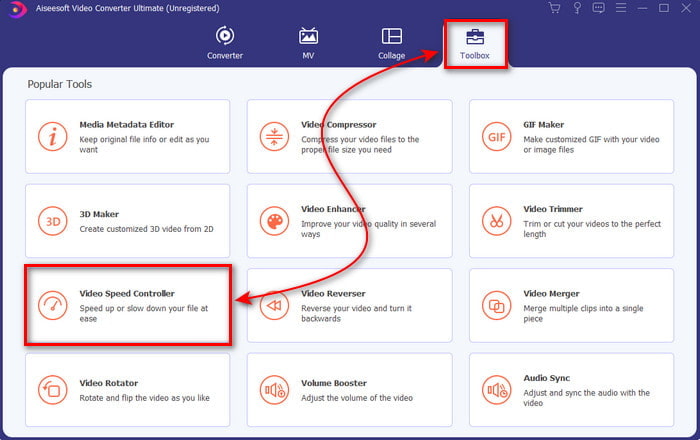
Step 2. Then go to the Toolbox and go find the Video Speed Controller.
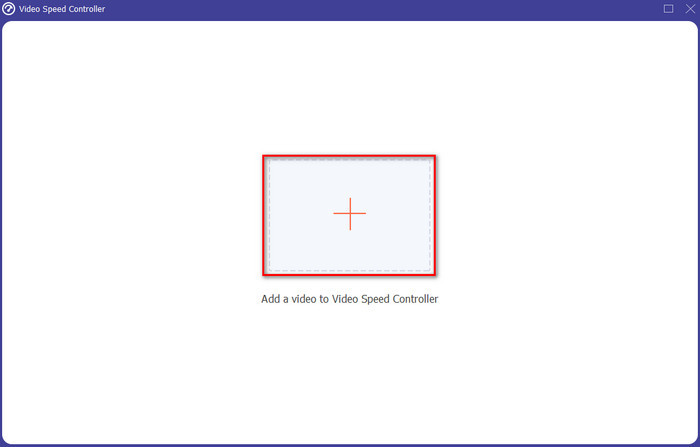
Step 3. Click the + button to insert the file you want to watch at 2x video speed and click Open to proceed.
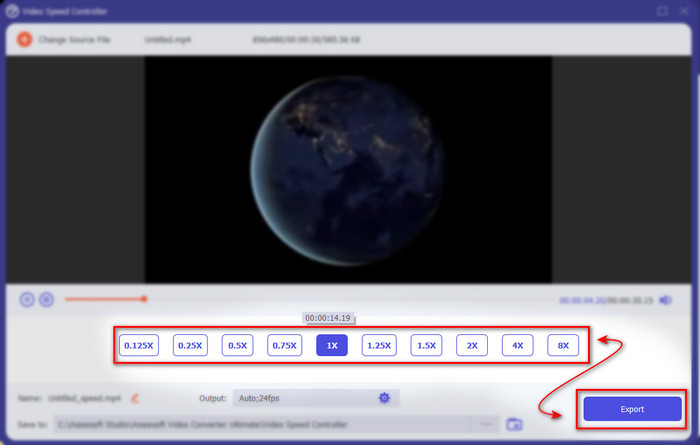
Step 4. After inserting the file, choose the 2x on the video speed list available. Then to save the video speed, click the Export button.
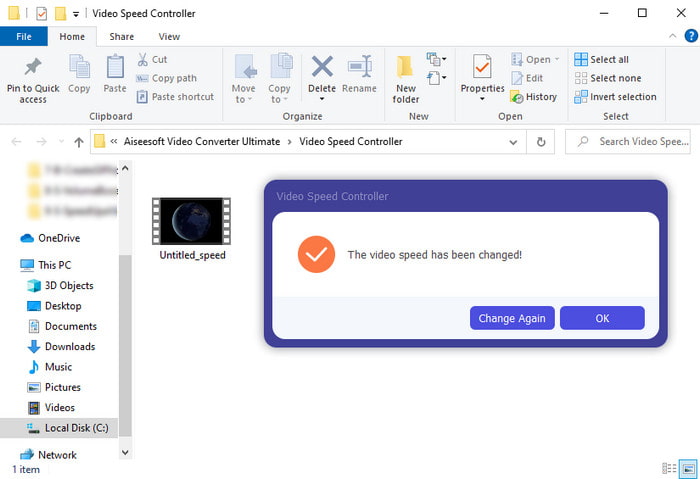
Step 5. After the file is exported, a folder will show to your screen; click the file to watch the speed up version of the video.
Osa 3. Videon toistaminen 2x nopeudella
1. VLC Media Player
The most renowned media player you can download on PC or Mac, is the VLC Media Player. This desktop tool has been used by the users who love watching movie clips. Also, this tool has access in almost all of the formats we know on the web. However, some videos with complicated codecs can't be played here like the AVI or MKV. So, if you want to know how to make a video 2x speed with VLC Media Player then follow the steps provided below.
Step 1. Download the VLC to your desktop then open it.
Step 2. Drag and drop the file to the interface then click the video file you posted in here.
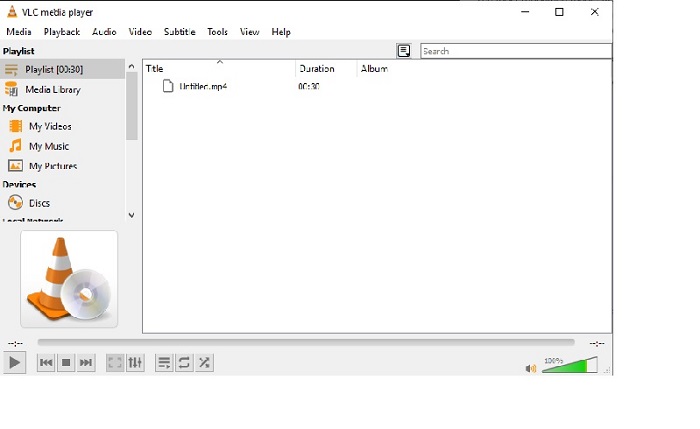
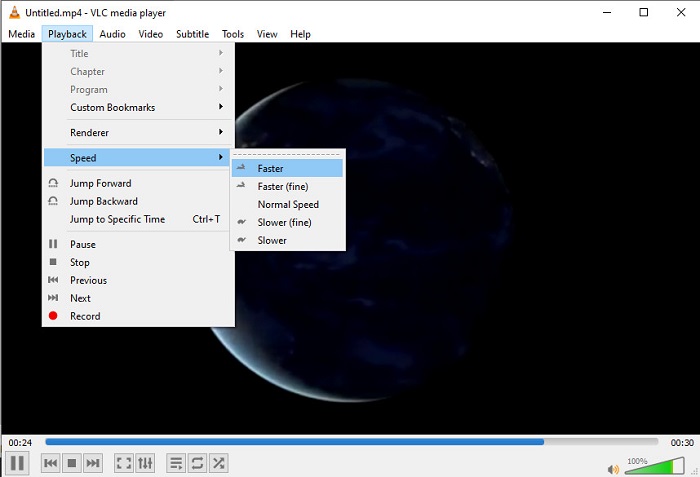
Then go to the Playback and click the Speed to change the natural speed of the video.
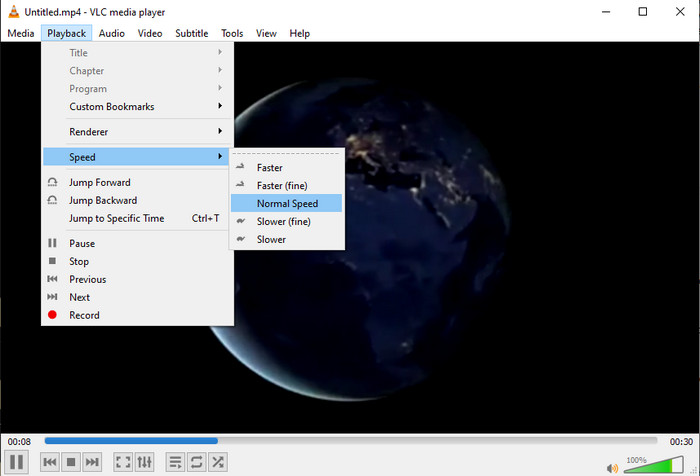
Step 3. And if you want to return the speed to normal go to the Playback and click Speed then locate the normal speed.
2. QuickTime Player
The native media player of Mac is here to help to play at 2x video playback speed. The QuickTime Player is the pre-installed media player you will see on Mac. Unlike VLC, this tool does not need to be downloaded onto your desktop. Unfortunately, if you are a Windows user you can't use this tool because it doesn't support Windows PC. Although the tool can be accessed on Mac, there are still a lot of features that it doesn't support like the formats. Because most of the formats Windows developed can't be played here. So now, if you have a Mac then try to follow the steps below.
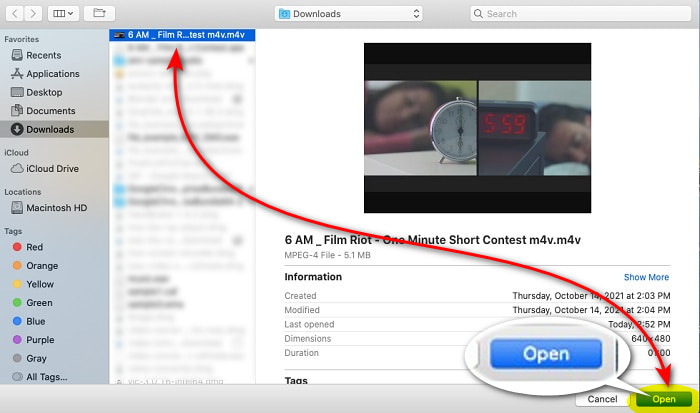
Step 1. Look for the Quicktime on Finder then launch the tool. Click the File and Open File to locate the video and open it.
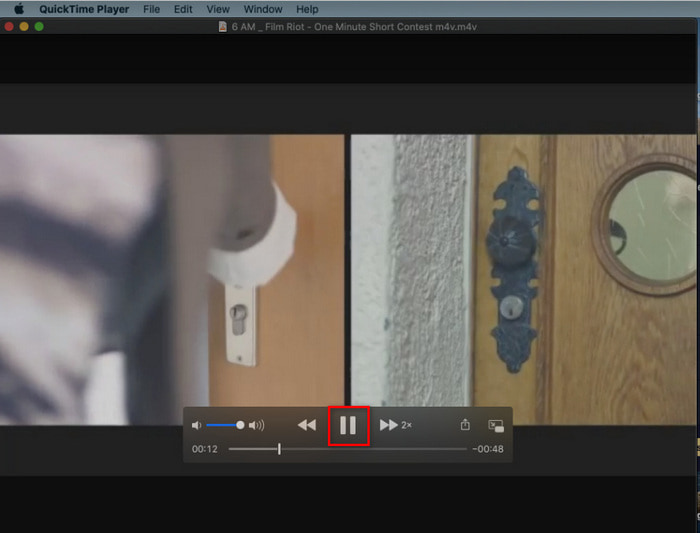
Step 2. While the video is playing, click the fast-forward button to speed it up.
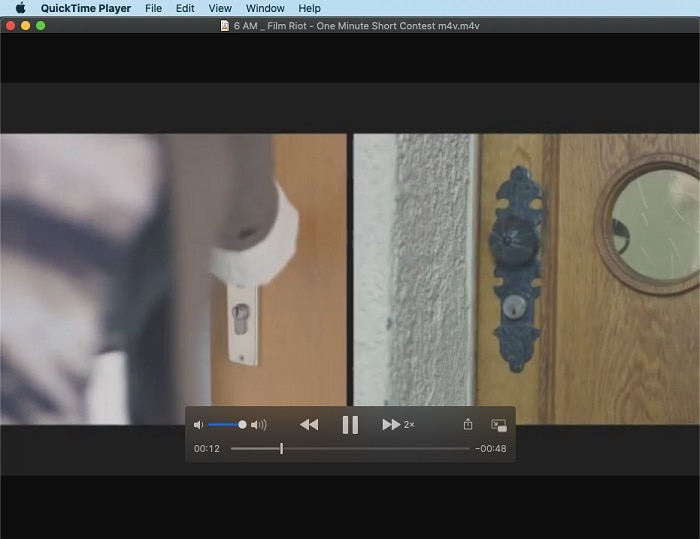
Step 3. And if you want to stop the speed up, click the pause/play button.
3. Windows Media Player
If Mac has its own pre-installed media player, then Windows has its own unique media player, the Windows Media Player. Just like QuickTime, this tool is already pre-installed on Windows and ready to be used to watch and make video 2x faster than its usual speed. However, we consider the speed up of this tool to be the worst because it removes the visual and jumps from seconds to second instead of playing fast. But if that is okay with you then follow the steps below on how to speed it up.
Step 1. Launch the tool to your Windows desktop
Step 2. Click the Playlist then drag and drop the video file to the small box on the right side.
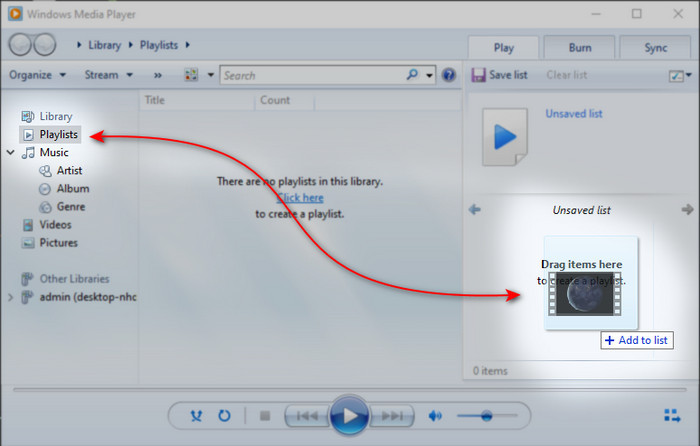
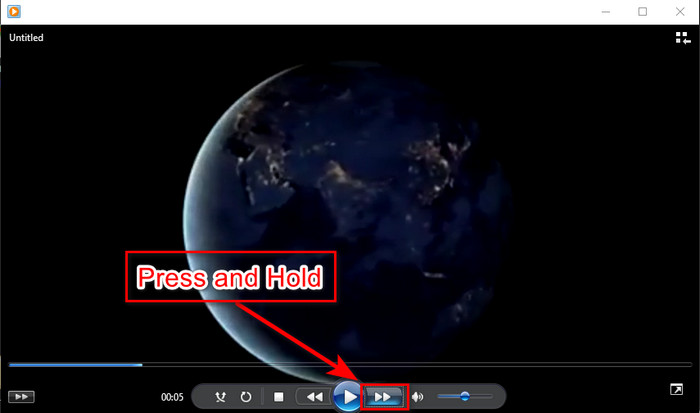
Step 3. The video will automatically be played, to speed up click and hold the fast-forward button and release it to stop.
Osa 4. Usein kysyttyä 2x videosta
Kumpi on parempi: hidastettu vai nopeuttava?
Itse asiassa se riippuu tilanteesta, jossa aiot käyttää sitä. Vaikka molemmat tekemäsi säädöt auttavat sinua. Joten jos katsot opetusohjelmaa tai haluat paljastaa taikurin tempun, käytä hidastettua kuvaa. Jos sinulla on kuitenkin kiire ja haluat katsoa monia videoleikkeitä, se on katsottava toiston nopeuttamiseksi.
Voinko tallentaa supernopean liikkeen toistoon?
Kyllä, voit käyttää aikaviivettä tehdäksesi tunnin mittaisen videon minuutiksi tai sekunniksi. Mutta toisin kuin nopeuttaminen, aikaviive on paljon nopeampi kuin tavallinen 2x, 4x, 8x nopeus.
Mitä haittaa on videon katsomisesta 2x nopeudella?
Vaikka videoiden katsominen tällä nopeudella voi auttaa sinua paljon, pelaamisessa on monia haittoja, että nopeus voi tapahtua sinulle. Jos esimerkiksi videon toistamisesta tulee tapasi, videon normaali nopeus hidastuu.
Johtopäätös
So now that you know the different tools you can use to watch videos at 2x speed.It is now the right time to choose which you prefer. So, we hope that this article helps you to choose which is better. It is either you will use a media player to do the adjustment of speed or use the editor like the Video Converter Ultimate. Although whatever solution you choose is, they all work the best to be used by you as a user.
-
 Top 4 parasta VOB -soitinta Android -matkapuhelimille eri käyttötarkoituksiin
 Kun lataat VOB -videoita ja haluat katsella niitä Androidilla, voit valita sopivimman seuraavista neljästä tämän artikkelin VOB -soittimesta.
-
 Top 5 parasta Windows Media Player -vaihtoehtoa Android -matkapuhelimille
 Koska et voi ladata Windows Media Playeria Androidille, sinun tulee lukea tämä artikkeli ja oppia viidestä parhaasta vaihtoehdosta Windows Media Playerille.
-
 5 parasta iPhonen videosoitinta, joita sinun ei pitäisi missata vuonna 2025
 Jos haluat toistaa videoita kaikissa muodoissa ja saada paremman katselukokemuksen iPhonellasi, sinun kannattaa lukea tämä artikkeli ja oppia viidestä parhaasta videosoittimesta iPhonelle 12/11/ X/8/7/6.
