


 Video Converter Ultimate
 Näytön tallennin
 Videon korjaus
 Suojattu lataus
Opastus MKV-metatietojen muokkaamisesta työpöydällä helpoimmalla tavalla
MKV on hyvin suosittu Matroska‑multimediakontainerin tiedostopääte. Mikä tekee MKV:stä suositumman kuin monet muut formaatit? Monet käyttäjät luulevat, että MKV on äänen ja videon pakkaustapa, vaikka näin ei ole. Formaatista tuli suosittu sen joustavuuden ansiosta: se mukautuu erilaisiin ääni-, video- ja tekstityskoodekkeihin ja tallentaa ne yhteen ainoaan tiedostoon. Näiden ominaisuuksien ansiosta formaatti on käytännössä “tulevaisuuden kestävä”, eli se ei vanhene, eivätkä myöskään tänne tallennetut metatiedot. Jos siis haluat lisätä, poistaa tai muokata MKV‑tiedostosi metatietoja, jatka tämän artikkelin lukemista ja opi, kuinka muokata MKV‑metatietoja entistä nopeammin.

Osa 1. Kuinka muokata MKV-tiedoston metatietoja työpöydän 3 parhaan ohjelmiston avulla
FVC Video Converter Ultimate – Tehokkain MKV Tag Editor Windowsissa ja Macissa
FVC Video Converter Ultimate on paras MKV‑metatietojen muokkain, jonka voit ladata molemmille käyttöjärjestelmille ja hoitaa työn kuin ammattilainen. Tämä huippuohjelmisto käsittelee MKV‑tiedostoja vaivattomasti ja avaa ne metatietojen muuttamista varten, jos haluat niitä muokata. Laajan video‑ ja ääniformaattituen ansiosta minkä tahansa mediamuodon, kuten MKV:n, lataaminen ei ole koskaan ollut rasittavaa. Ohjelmaa käyttäessäsi opit helposti hallitsemaan sen kokonaisuutena. Haluatko käyttää työkalua, mutta sinulla ei ole opasta, johon tukeutua? Onneksi alla antamamme tiedot auttavat sinua suoriutumaan tehtävästä kuin ammattilainen; lue alta, miten MKV‑tiedoston otsikon vaihtaminen onnistuu alle minuutissa.
Vaihe 1. Latauspainiketta napsauttamalla lataat ensin ohjelmiston välittömästi tietokoneellesi ja valitset, kumpaa käyttöjärjestelmää käytät. Asenna se sitten koneellesi ja käynnistä ohjelma, jotta voit lisätä MKV‑tiedostoihisi metatietoja.
Ilmainen latausWindows 7 tai uudempiTurvallinen lataus
Ilmainen latausMacOS 10.7 tai uudempiTurvallinen lataus
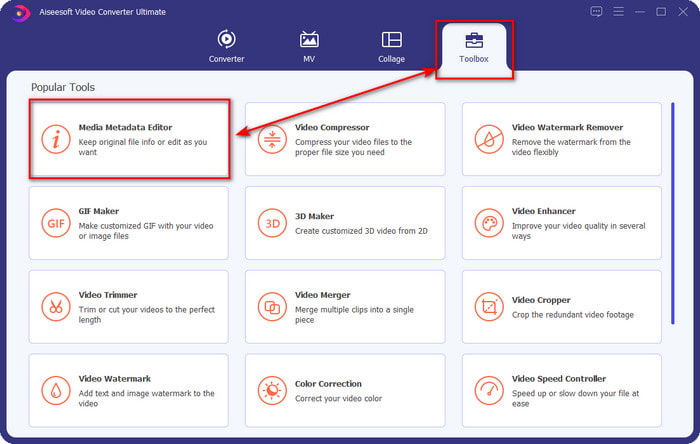
Vaihe 2. Kun olet käynnistänyt työkalun, siirry Toolbox-osioon ja etsi listasta kohta Media Metadata Editor.
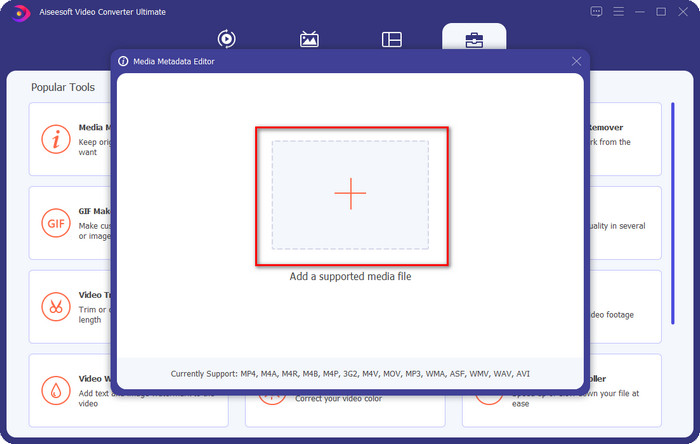
Vaihe 3. Lisätäksesi MKV‑tiedoston napsauta näytölle ilmestyvää +-painiketta, etsi kansiosta .mkv‑tiedosto ja napsauta Open siirtyäksesi seuraavaan vaiheeseen.
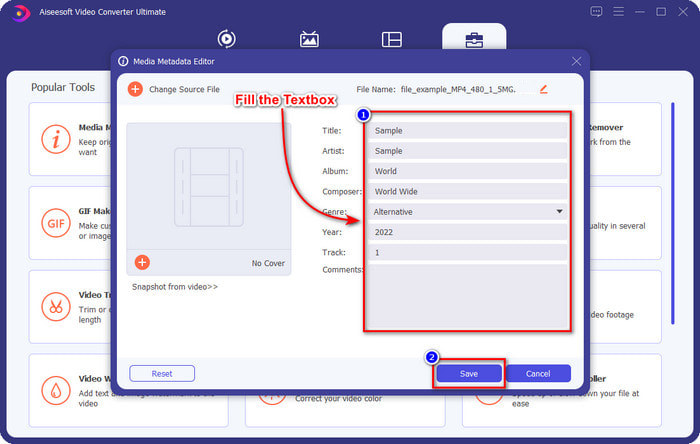
Vaihe 4. Tässä vaiheessa voit lisätä tarvitsemasi metatiedot MKV‑tiedostoon, täytä kentät haluamallasi tavalla ja napsauta Save, kun olet valmis ja haluat ottaa muutokset käyttöön. Näin olet lisännyt MKV‑tiedostoosi tunnisteet, joiden avulla sen sisältö on helppo tunnistaa.
VLC Media Player – ilmainen MKV-metadataeditori
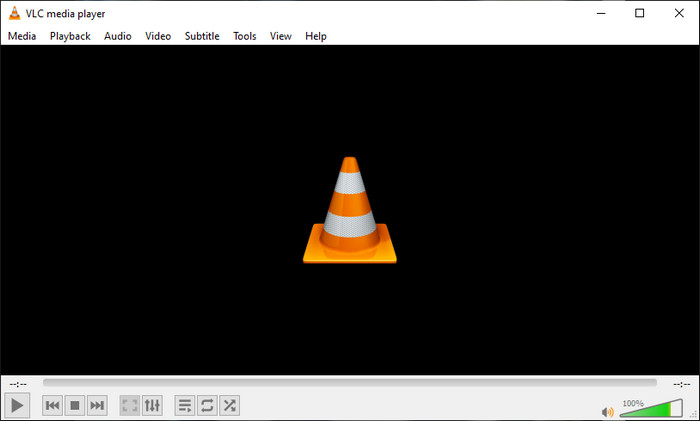
VLC Media Player voi toistaa MKV‑tiedostoja ja muokata niiden tunnisteita helposti. Työkalu on avoimen lähdekoodin, joten ohjelman lataamisesta tietokoneellesi ei tarvitse olla huolissaan: saat sen kaikki ominaisuudet käyttöösi maksutta, vaikka halutessasi voit lahjoittaa. Vaikka työkalu ei ole yhtä kehittynyt kuin muut tämän listan metatietomuokkaimet, sitä pidetään silti luotettavana työkaluna, jota voit käyttää laitteellasi. Lisäksi voit vapaasti lisätä MKV‑tiedostoosi perustiedot, kuten tekijän nimen, otsikon, artistin, albumin jne. Seuraa ohjeita ja opi, miten MKV‑metatietoja muokataan käyttämällä tätä mediasoitinta metatietojen muokkaimena.
Vaihe 1. Lataa ja avaa sitten VLC‑ohjelma tietokoneellasi.
Vaihe 2. Siirry valikkoon Tools ja napsauta Media Information. Jos haluat helpomman tavan, voit käyttää pikanäppäintä painamalla CTRL + I. Kumman tavan valitsetkin, niiden toiminto on sama.
Vaihe 3. Kirjoita tarvitsemasi tiedot ja napsauta Close, jolloin metatiedot tallentuvat automaattisesti.
MKVToolNix GUI – oma MKV-tunnisteeditori
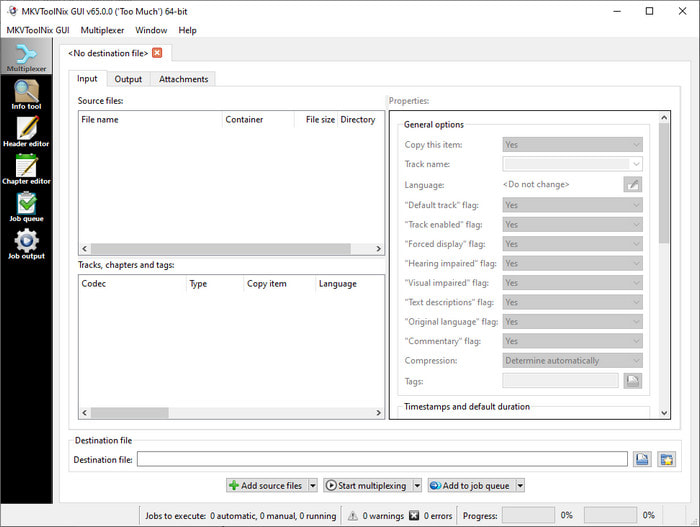
MKVToolNix GUI on MKV‑tiedostoihin erikoistunut ratkaisu; vaikka voit ladata myös muita formaatteja, ohjelmisto muuntaa ne MKV‑muotoon. Työkalu tunnetaan yhtenä ainoana ratkaisuna MKV‑tiedostoihin liittyviin tarpeisiin, sillä se tarjoaa työkalupaketin, eli paljon muitakin toimintoja kuin pelkän metatietojen muokkauksen. Sen selkeän käyttöliittymän ansiosta käytön opettelua ei juuri tarvita – perusasiat oppii muutamassa minuutissa. Vaikka työkalu onkin suoraviivainen, jotkut käyttäjät, jotka ovat tottuneet erittäin hiottuihin metatietomuokkaimiin, ovat verranneet sen käyttöliittymää muihin ja todenneet, ettei se ole heidän mielestään tarpeeksi intuitiivinen. Kaikesta huolimatta on selvää, että työkalulla voidaan silti oppia, miten MKV‑tiedoston otsikkoa muutetaan.
Vaihe 1. Lataa ohjelmisto tietokoneellesi, avaa se, napsauta Add Source File ja etsi MKV‑tiedosto kansiosta.
Vaihe 2. Paina Output ja muuta metatiedot tässä.
Vaihe 3. Kun olet tehnyt kaiken tämän, voit tallentaa muutokset napsauttamalla Start Multiplexing.
Osa 2. Usein kysyttyä MKV-metadataeditorista
Voinko muuntaa VOB: ksi MKV:ksi?
Voit muuntaa VOB:n helposti MKV‑muotoon napsauttamalla tätä linkkiä; selain avaa uuden välilehden, joka auttaa sinua suoraan muuntamaan VOB:n MKV:ksi. Jos haluat lisätietoja VOB‑ ja MKV‑muodoista, tämä artikkeli on sinua varten.
Miksi MKV-tiedostoillani on suurempi tiedostokoko?
MKV‑tiedostosi ovat suuria siksi, että formaatti sisältää muutakin kuin pelkän videon ja äänen. Se voi sisältää useita elementtejä, kuten tekstityksiä, metatietoja, vaihtelevan bittinopeuden ja paljon muuta. Mitä siis pitäisi tehdä, jos haluat pakata MKV‑tiedoston pienemmäksi heikentämättä laatua? Luotettavia videopakkareita ei ole kovin paljon, ja siksi teimme tutkimusta auttaaksemme sinua pakkaamaan MKV‑tiedoston ilman laadun heikkenemistä helposti.
Mitkä ovat MKV-muodon haitat?
Vaikka tiedostomuoto on tiedossa, jotkin mediasoittimet ja editorit voivat silti käsitellä muotoa koodekki- ja elementtiongelman vuoksi. Lisäksi formaatti on valtavan kokoinen, eivätkä kaikki ohjelmistot tue suuren tiedoston lataamista, koska sen tuonti ja vienti vie paljon aikaa. Tiedoston koko kasvaa myös, koska se on osa tiedostoa, sama kuin muu metatiedot lisäämäsi muoto. Vaikka sillä on heikkoutensa, se on silti kilpailukykyinen mediatiedoston tallentamisessa ja säilyttämisessä tulevaisuuden tarpeita varten.
Johtopäätös
Eikö olekin ihmeellistä? Mitä nämä kolme työpöytäohjelmistoa voivat tarjota sinulle? Toinen on mediasoitin, kun taas toinen on MKV:lle omistettu editori, mutta mitä työkalua sinun pitäisi käyttää? Jos haluat parasta, tarjoamme sinulle mielellämme parhaan työkalun. MKV-metatietojen muokkaamisen oppiminen FVC Video Converter Ultimate -sovelluksella on helppoa ja tehokasta. Joten, mitä sinä odotat? Pidä työkalu käytettävissäsi ja korjaa sen avulla MKV-tiedostojesi metatiedot kuin ammattilainen muutaman napsautuksen päässä.
-
 2 parasta tapaa muokata OGG-metatietoja, joita sinun pitäisi kokeilla ilmaiseksi
 Haluatko muokata OGG-metatietoja? No, voit helposti muokata tunnisteita käyttämällä oikeaa ohjelmistoa. Jos sinulla ei ole luettavaa, tämä artikkeli on pakollinen.
-
 Absoluuttinen yleiskatsaus Pentaho Metadata Editorista [Päivitetty 2022]
 Etkö löydä luotettavaa artikkelia Pentaho Metadata Editorista? Onneksi tarkistimme työkalun itse tarjotaksemme faktat, jotka tiedät työkalusta.
-
 Vinkkejä ja temppuja VLC-metadataeditorista, jotka sinun on tiedettävä vuonna 2022
 Haluatko käyttää VLC:tä metatietoeditorina? Tässä tapauksessa voit lukea tämän artikkelin, koska tarjoamme puolueettoman katsauksen VLC-metatietojen editorista.
