


 Video Converter Ultimate
 Näytön tallennin
 Videon korjaus
 Suojattu lataus
2 helppoa tapaa pakata MXF pienemmällä tiedostokoolla
MXF on teollisuuden standardoitu tiedostomuoto, joka tukee täyttä aikakoodia ja metatietoja. Se on pääasiassa suunniteltu ammattimaiseen videosisällön käyttöön, erityisesti televisiolähetyksiin. MXF on SMPTE-standardin mukainen ammattimaisen video- ja äänisisällön säiliömuoto. Voit helposti saada korkealaatuisen MXF-videon digitaalikamerastasi. Samalla MXF-tiedosto vie yleensä paljon tallennustilaa.
Kun haluat jakaa suuren MXF-videon, MXF:n pakkaaminen pienempään tiedostokokoon on varsin tarpeellista. Kysymys kuuluu: tiedätkö, miten MXF-tiedostoja pakataan?

Markkinoilla on itse asiassa monia videonpakkaus- ja editointityökaluja, joiden avulla voit pakata MXF-tiedostoja ja pienentää niiden kokoa. Tässä artikkelissa näytetään, miten pakata MXF-tiedostoja Adobe Premiere Prolla sekä ilmaisella verkkopohjaisella videonpakkaimella.
Osa 1. Kuinka pakata MXF-tiedostoja ilmaiseksi verkossa
Jotta voit pakata MXF-videon pienempään tiedostokokoon, voit valita suositun MXF-videonpakkausohjelman, Free Video Compressor. Se pystyy pienentämään MXF-videon tiedostokokoa säilyttäen alkuperäisen kuvan ja äänen laadun. Tämä videonpakkausohjelma tukee laajasti yleisimpiä videoformaatteja, kuten MXF, MP4, MOV, AVI, MKV, FLV ja monia muita. Sen avulla voit pakata MXF-videoita sekä Windows PC:llä että Macilla.
Vaihe 1. Kun haluat pakata MXF-tiedoston, siirry tämän MXF-tiedostopakkaimen viralliselle sivustolle. Napsauta Add Files to Compress -painiketta asentaaksesi pienen käynnistysohjelman MXF-tiedostojen pakkaamista varten.

Vaihe 2. Valitse ja lisää pakattava MXF-tiedosto tähän ilmaiseen verkkovideon pakkaimeen. Voit tässä vapaasti säätää videon pakkaustasoa tarpeesi mukaan. Lisäksi voit muokata videon tarkkuutta, kuvanopeutta, bittinopeutta ja videon nimeä. Voit myös valita toisen tulostusmuodon, esimerkiksi MP4:n, pakatulle videolle.

Vaihe 3. Tämän jälkeen voit yksinkertaisesti napsauttaa Compress-painiketta aloittaaksesi MXF-tiedoston pakkaamisen ilmaiseksi verkossa.

Erilainen kuin monet muut online-videokompressorit, tämä ilmainen videokompressori ei lisää vesileimaa pakattuun MXF-tiedostoon.
Osa 2. Kuinka pakata MXF Adobe Premiere Prossa
Adobe Premiere Pro on yleisesti käytetty ammattimainen videotuotantosovellus Mac- ja Windows-käyttäjille. Jos sinulla on Premiere Pro asennettuna tietokoneellesi, voit käyttää sitä MXF-tiedostojen pakkaamiseen.
Vaihe 1. Käynnistä Premiere Pro tietokoneellasi. Kun siirryt pääkäyttöliittymään, napsauta New Project luodaksesi uuden projektin. Voit mukauttaa erilaisia asetuksia avautuvassa ikkunassa.
Vaihe 2. Napsauta File, Import ja sitten Media valitaksesi ja tuodaksesi MXF-tiedoston ohjelmaan. Jos haluat pakata digitaalikamerassasi olevan MXF-tiedoston, voit tässä yhdistää kameran tietokoneeseen. Voit myös vetää ja pudottaa MXF-videon suoraan kansiosta.
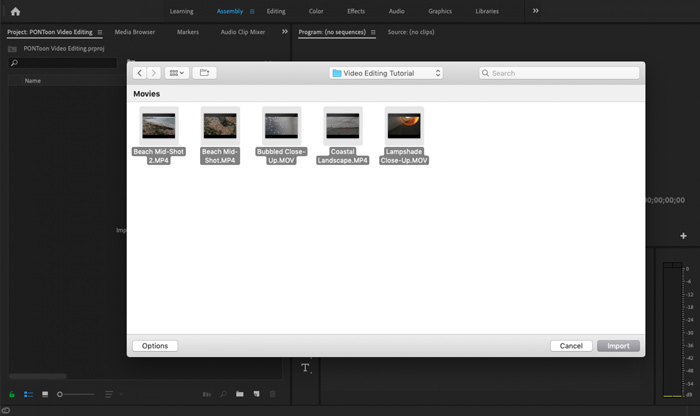
Vaihe 3. Vaihda Editing-työtilaan, jotta voit pakata MXF-tiedostosi tehokkaammin.
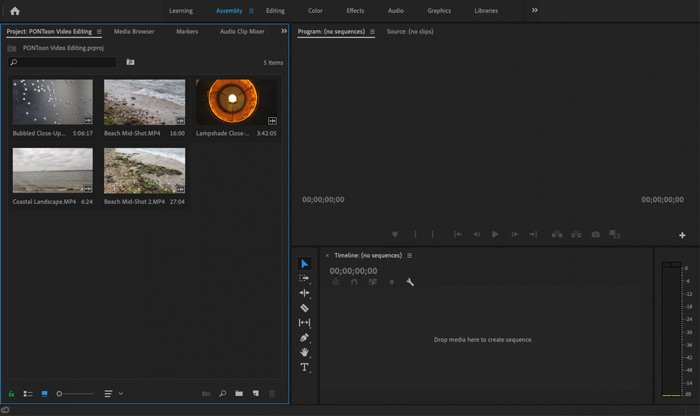
Vaihe 4. Nyt voit muokata MXF-tiedostoasi aikajanalla. Vedä ja pudota MXF-leike tuodusta mediasta aikajanalle luodaksesi uuden sekvenssin. Sen jälkeen voit rajata MXF-tiedostoa pienentääksesi sen tiedostokokoa.

Voit myös valita mukautetun videotarkkuuden ja muut pakata MXF-tiedoston. Lisäksi voit tulostaa MXF-videomuodon, jonka tiedostokoko on pienempi.
Osa 3. MXF-tiedostojen pakkaamisen usein kysytyt kysymykset
Kysymys 1. Mikä on MXF-videoformaatti?
MXF, lyhenne sanoista Material eXchange Format, on konttimuoto, joka tallentaa videota, ääntä ja metatietoja. Se on videosäiliömuoto SMPTE-standardin mukaiselle ammattimaiselle video- ja äänisisällölle. Monet ammattimaiset digitaaliset videokamerat, kuten Sony, Panasonic, Canon ja muut, tallentavat videoita MXF-muodossa.
Kysymys 2. Kuinka muuntaa MXF ilmaiseksi MP4iksi verkossa?
MP4 on kiistatta suosituin formaatti, jota lähes kaikki soittimet, editorit ja laitteet tukevat. Siksi monissa tilanteissa MXF on tarpeen muuntaa MP4-muotoon parempaa toistoa tai editointia varten. Voit käyttää Free Online Video Converter -työkalua tehdäksesi MXF–MP4-muunnoksen helposti.
Kysymys 3. Onko MXF häviötön videoformaatti?
MXF pystyy tallentamaan häviöttömät RAW-materiaalit, jotka tarjoavat ammattimaisille jälkituotantostudioille edistyneitä kykyjä työnkulkuissa värien luokitteluun ja videoiden muokkaamiseen. MXF-muoto tukee täysin SMPTE-aikakoodia.
Johtopäätös
Olemme pääasiassa käsitelleet tässä artikkelissa, miten MXF-tiedostoja pakataan. On myönnettävä, että MXF-tiedostojen pakkaaminen Adobe Premiere Prolla on melko monimutkaista. Siksi on suositeltavaa käyttää esiteltyä Free Video Compressor -ohjelmaa MXF-tiedostojesi koon pienentämiseen.
-
 Kuinka pakata MP4-video pienempään kokoon
 MP4-video on liian suuri lataamista varten? Haluatko pienentää videon kokoa? Tässä on 3 tehokasta tapaa pakata MP4-tiedosto pienempään kokoon ilman rajoituksia.
-
 Opetusohjelma GIF-tiedostojen pakkaamiseen ja tiedostokoon pienentämiseen korkealaatuisina
 Tässä on 2 helppoa tapaa pakata GIF tietokoneellasi tai matkapuhelimellasi. Voit käyttää FVC Free Online Video Compressoria ja Photoshopia pienentämään GIF-tiedostokokoa eri näkökulmista.
-
 4 tapaa pakata suuria QuickTime MOV -tiedostoja menettämättä laatua
 Tässä artikkelissa kuvataan QuickTime MOV -videoiden pakkaaminen puhelimessa tai tietokoneessa. Jos MOV-videosi on liian suuri lähettämistä, jakamista tai tallentamista varten, saat täältä 4 toimivaa ratkaisua.
