


 Video Converter Ultimate
 Näytön tallennin
 Videon korjaus
 Suojattu lataus
Kolme parasta FLAC-metatietoeditoria, jotka sinun pitäisi tietää tämä 2025
Me tiedämme, että FLAC on paras häviötön musiikkitiedostomuoto, ja se on ihanteellinen formaatti CD-levyjen äänen rippaamiseen, koska se ei hävitä raakaa ääntä, jos valitset tämän muodon. Häviöttömien äänitiedostojen joukossa tämä on paras valinta, koska se on yhteensopiva lähes kaikkien laitteiden kanssa. Se pakkaa äänen noin 30–50 prosenttiin menettämättä alkuperäistä laatua. Tällä ääniformaatilla saat metatiedot, albumikannet ja nopean haun kaikki yhtä aikaa. Toisinaan voi ilmetä ongelmia, kuten vääriä tageja FLAC-tiedostossa, koska formaatti ei ole täydellinen – aivan kuten muutkaan formaatit. Alle viidessä minuutissa opit, mitkä ovat eri FLAC-metatiedon muokkaimet Macilla ja Windowsilla, joilla voit korjata nämä ongelmat.

Osa 1. Paras FLAC-metatietoeditori Macille ja Windowsille – FVC Video Converter Ultimate
FVC Video Converter Ultimate on tehokkain ohjelma, joka sinulla kannattaa olla juuri tätä metatiedon muokkausongelmaa varten. Työkalu tarjoaa ammattimaisen ja helposti ymmärrettävän käyttöliittymän, jonka ansiosta kuka tahansa käyttäjä voi muokata tai korjata metatietoja vaivattomasti. Voit myös lisätä useita tietoja tai tageja FLAC-tiedostoihin, kuten kappaleen nimen, tekijän nimen, päivämäärän, albumikannen ja paljon muuta. Sen kilpailevat metatiedon muokkaimet keskittyvät vain muutaman ääni- tai videotiedostomuodon metatietojen muuttamiseen. Tällä ohjelmalla voit sen sijaan ladata ja muokata FLAC-, MP3-, WMA-, WMV-tiedostoja ja yli 1000 muuta formaattia yhtä helposti kuin 1–2–3.
Lisäksi tämä työkalu ei pysty ainoastaan muuttamaan, korjaamaan tai poistamaan metatietoja; sitä voidaan käyttää myös ratkaisuna mihin tahansa videoääneen liittyviin ongelmiin. Ja tällä voimme taata, että kun käytät työkalua, sinun ei tarvitse huolehtia saman ongelman uudelleen kohtaamisesta, koska sinulla on paras ratkaisu. Haluatko käyttää huippuluokan FLAC-metatietoeditoria Macissa ja Windowsissa? Jos näin on, jatka alla olevien vaiheiden lukemista, sillä annamme sinulle helposti seurattavan opetusohjelman ja suoritat tehtävän tehokkaasti.
Vaihe 1. Lataa tämä ultimate-ohjelmisto työpöydällesi napsauttamalla käyttöjärjestelmääsi sopivaa painiketta. Jatka asennusta avaamalla ladattu tiedosto ja paina Start Now jatkaaksesi.
Ilmainen latausWindows 7 tai uudempiTurvallinen lataus
Ilmainen latausMacOS 10.7 tai uudempiTurvallinen lataus
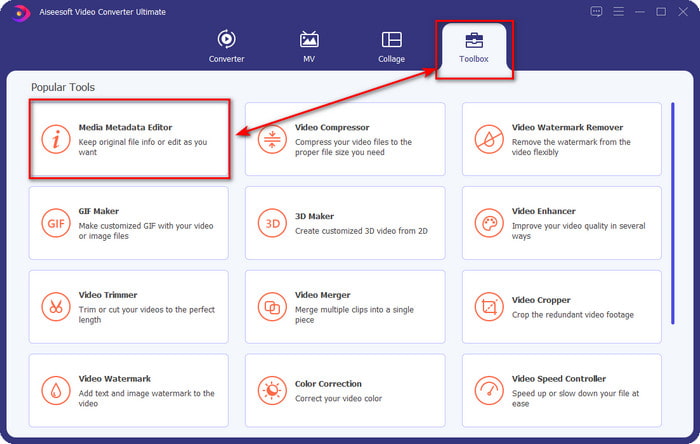
Vaihe 2. Napsauta Media Metadata Editor avataksesi tunnistetietojen muokkaustoiminnon Toolbox-osiossa.
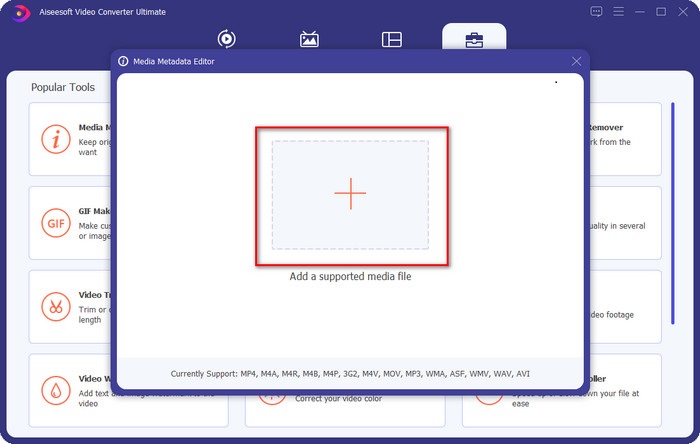
Vaihe 3. Napsauta +-painiketta lisätäksesi tiedoston, etsi se avautuvasta kansioikkunasta ja napsauta Open lisätäksesi FLAC-tiedoston onnistuneesti.
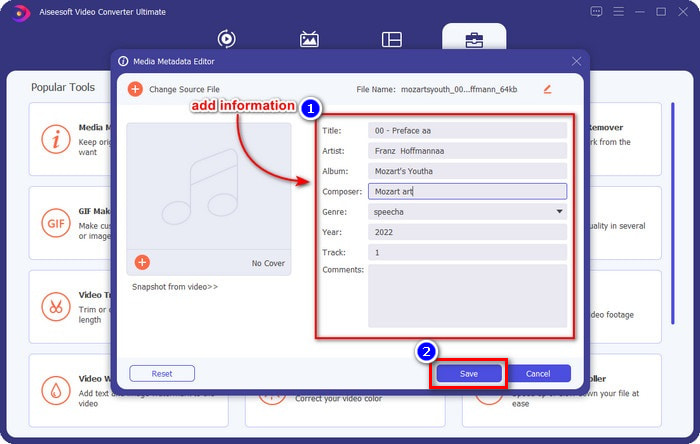
Vaihe 4. Tässä näkymässä voit nyt muuttaa FLAC-tiedostosi metatietoja jokaisessa tekstikentässä. Napsauta sitten Save tallentaaksesi ohjelmalla tekemäsi muutokset. Niin yksinkertaista se on – olet lisännyt tageja FLAC-tiedostoon ja korjannut ne tehokkaasti tämän ultimate-työkalun avulla.
Plussat
- Se on paras valinta metatietojen muokkaamiseen FLAC-, MP4-, WMA-, WAV-, TTA-, OGG- ja yli 1000 muussa muodossa.
- Se tukee useita muokkausominaisuuksia, joita voit käyttää Toolbox-osiossa.
- Intuitiivinen graafinen käyttöliittymä ja helppokäyttöinen.
- Ladattavissa Windows- ja Mac-käyttöjärjestelmissä.
Haittoja
- Työkalun ostaminen on välttämätöntä, jotta voit hyödyntää uskomattomia ominaisuuksia alhaisella hinnalla.
Osa 2. Muut 2 parasta ilmaista FLAC-metatietoeditoria Windowsille
Fregatti 3
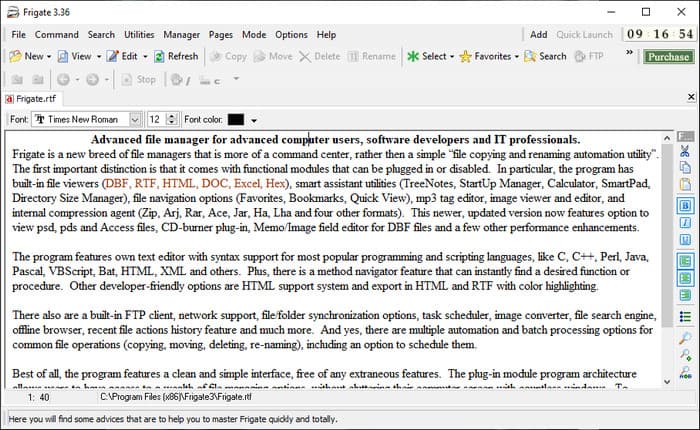
Frigate3 on FLAC-metatiedon muokkain, jota on miellyttävä käyttää Windowsilla. Tällä työkalulla voit helposti säätää tageja, jotka näkyvät työpöydälläsi. Ennen kuin lataat työkalun, tarkista kuitenkin sen kaksi vaihtoehtoa: standard- ja pro-versio. Standard-versio sisältää vain perusominaisuudet, jotka ovat käytettävissä ohjelmaa käytettäessä. Jos lataat standard-version, sen tiedostokoko on pienempi kuin pro-version.
Jos olet ladannut sen sijaan sen pro-version, sinulla on kaikki tämän ohjelmiston tarjoamat ominaisuudet, jotka eivät ole standardin mukaisia, mutta tiedostokoko on paljon suurempi kuin standardi. Huolimatta siitä, että se on ilmainen Windows-ohjelmisto, voimme silti nähdä, että työkalu on hieman vaikea ymmärtää, eikä sen GUI ole niin hyvännäköinen kuin muiden markkinoilla olevien ohjelmistojen. Vaikka tämä on ongelma, sitä pidetään silti tehokkaana työkaluna tämän tehtävän hoitamiseen.
Plussat
- Ladattavissa ilmaiseksi Windowsissa.
- Se tukee työkalun standardi- ja pro-versioita.
- Pystyy lisäämään laajennuksia.
Haittoja
- GUI ei ole hyvä kuin muut metatietoeditorit.
- Joskus työkalua on vaikea käynnistää.
- Verkko on suojaamaton, kun käytät työkalun virallista verkkosivustoa.
MusicBrainz PiCard
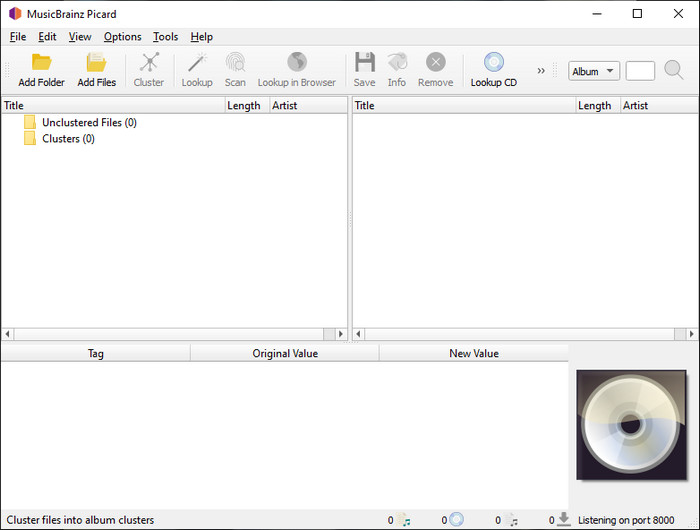
MusicBrainz Picard on Windows-pohjainen FLAC-metatiedon muokkain, jonka voit ladata ilmaiseksi tietokoneellesi metatietojen lisäämistä varten. Jos äänitiedostolle löytyy merkintä tietokannasta, voit tämän työkalun avulla hakea tagit tai päivittää ne. Toisin kuin monet muut työkalut, tämä ohjelma voi lisätä runsaasti yksityiskohtaista tietoa, kuten esittäjät ja kappaleessa käytetyt soittimet. Muista kuitenkin, että MusicBrainzin tageja keräävät vapaaehtoiset.
Lisäksi tämä ohjelmisto on omistettu äänitunnisteeditori, mikä tarkoittaa, että se tukee vain useimpia ääniformaatteja, olivatpa ne häviöllisiä, häviötömiä tai molempia. Vaikka se on kattava musiikkitunnistetietosanakirja ja tekee siitä yleisön käytettävän, jotkin sen tarjoamat tunnisteet ovat epäluotettavia, joten sinun on lisättävä ne manuaalisesti. Siitä huolimatta työkalu on käyttäjäystävällinen ja parempi kuin Fregate3, mutta se ei ole yhtä hyvä kuin paras työkalu.
Plussat
- Siinä on sisäänrakennettu tietokanta äänitageille.
- Yksinkertainen käyttöliittymä.
- Sen käytön oppiminen on helppoa.
Haittoja
- Joskus tietokantaan kerätyt metatiedot ovat epäluotettavia.
- Se on rajoitettu vain äänitiedostoihin.
Osa 3. Usein kysytyt kysymykset FLAC-metatietoeditorista
Voinko tallentaa korkealaatuista FLACia?
Ehdottomasti kyllä, ääntä voi tallentaa tähän formaattiin, mutta muista, että kaikki ääninauhurit eivät tue tätä tiedostomuotoa, eivätkä kaikki pysty tallentamaan korkealaatuista ääntä. Jos et tiedä, kuinka tallentaa korkealaatuista FLAC-häviötöntä ääntä, napsauta tätä linkkiä saadaksesi lisätietoja aiheesta.
Mikä on paras ohjelmisto muuntaa FLAC?
Epäilemättä FVC Video Converter on paras FLAC-muunnin, jonka avulla voit tehdä FLAC:sta yhteensopivan muiden laitteiden kanssa menettämättä alkuperäistä laatua. Tällä työkalulla voit muuntaa useita FLAC-tiedostoja samanaikaisesti, mutta muista, että jos haluat muutakin kuin muuntimen lataamisen, paras työkalu on pakollinen.
Tukeeko äänimuistio FLACia äänilähtönä?
Äänimuistio (Voice Memo) käyttää M4A-muotoa tallentamansa äänen tallennukseen FLACin sijaan. Jos haluat tietää lisää äänimuistioista, voit lukea tekemämme yksityiskohtaisen esittelyn tästä sisäänrakennetusta sovelluksesta; lue se huolellisesti selvittääksesi, onko se paras ääninauhuri iOS-laitteille, napsauttamalla tätä linkkiä.
Johtopäätös
FLAC ei ole vain ääniformaatti, vaan yksi parhaista formaateista, joita kannattaa käyttää korkealaatuisen äänen tallentamiseen laitteillesi. Jos siis haluat järjestellä .flac-tiedostoja kirjastossasi, tässä artikkelissa esitellyt työkalut auttavat hoitamaan tehtävän tehokkaasti. Jos olet Windows-käyttäjä, suosittelemme tutustumaan ohjelmiin, jotka esittelimme osassa 2 FLAC-metatiedon lisäämistä varten Windowsissa. Jos taas haluat luotettavamman ja ammattimaisemman työkalun FLAC-metatietojen muokkaukseen, suosittelemme käyttämään FVC Video Converter Ultimate -ohjelmaa. Tällaisella työkalulla voit tehdä ammattimaista tagien muokkausta tavalla, johon muut esittelemämme Windows-työkalut eivät yllä. Jos haluat tietää lisää parhaasta FLAC-metatiedon muokkaimesta Macille ja Windowsille, lataa ohjelma ja tutustu sen muihin toimintoihin.
-
 Vuoden 2025 viisi parasta videon sisällönkuvaustietojen muokkaajaa [Puolueeton arvostelu]
 Haluatko tarkastella videosi metatietoja? Jos näin on, lue alla olevat tiedot ymmärtääksesi aiheen täysin ja tietääksesi, mikä työkalu sopii sinulle parhaiten.
-
 7 suosittua musiikkitunnisteeditoria Windowsissa, Macissa ja mobiililaitteissa
 Musiikkitunnisteet ovat suosittuja kirjastossasi olevan musiikin sovittamiseen sisällä olevien tietojen mukaan. Entä jos haluat muuttaa sen? Lue alla olevat tiedot saadaksesi lisätietoja.
-
 5 parasta MP4-metadataeditoria [Päivitetty 2025]
 Kuinka voin muuttaa MP4-metatietojani? Paras tapa muuttaa MP4:n metatietoja on käyttää MP4-muotoa tukevaa tag-editoria, kuten alla lueteltu esimerkki.
