


 Video Converter Ultimate
 Näytön tallennin
 Videon korjaus
 Suojattu lataus
2 parasta tapaa yhdistää useita ASF-tiedostoja Windows / Macissa
On tavallista, että pitkä tarina, jonka odottaisimme olevan yhdessä täydellisessä videotiedostossa, onkin hajonnut erillisiksi, keskeneräisiksi videoleikkeiksi. Ehkä olet juuri ladannut UHD-videon elokuvasivustolta ja huomaat, että video on pilkottu erillisiksi ASF-tiedostoiksi ZIP-paketteihin. Miten yhdistää ASF-tiedostot, jotta videosta tulee taas kokonainen ja se toistuu saumattomasti? Tästä artikkelista löydät vastauksen. Olemme koonneet kaksi parasta tapaa yhdistää ASF‑videoleikkeet yhdeksi täydelliseksi tiedostoksi.

Osa 1: Yhdistä useita ASF-tiedostoja verkossa ilmaiseksi
Nopein ratkaisu on käyttää työkalua FVC Free Online Video Merger, kevyttä verkkopohjaista ohjelmaa, jolla voit yhdistää ASF‑tiedostoja ilmaiseksi. Sinun ei tarvitse ladata tai asentaa mitään ohjelmistoa. Lataa vain videotiedostosi ja aloita niiden yhdistäminen yhdellä napsautuksella.
Keskeiset ominaisuudet
- • Liity ASF-videotiedostoihin videon laadun heikkenemättä
- • Älä jätä vesileimaa yhdistettyyn videoon
- • Tallenna yhdistetty video 9 muodossa
- • Lisää videosi 1 sekunnissa, eikä sinun tarvitse ladata tiedostoja palvelimelle
Vaihe 1. Avaa FVC Free Online Video Merger selaimessasi. Näet suuren Upload Videos to Merge ‑painikkeen sivun keskellä. Napsauta sitä.
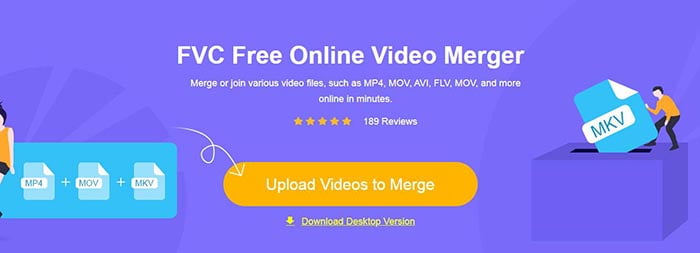
Huom: Kun käytät tätä työkalua ensimmäistä kertaa, sinun on ladattava ja asennettava käynnistysohjelma.
Vaihe 2. Tiedostonhallintaikkuna avautuu. Siinä voit valita ASF‑tiedostot ja ladata ne. Jos haluat valita useita tiedostoja, pidä näppäimistösi Ctrl-näppäin painettuna ja napsauta haluamiasi tiedostoja yksi kerrallaan.
Vaihe 3. Napsauta Open-painiketta lisätäksesi valitut tiedostot, minkä jälkeen näet ASF merging ‑käyttöliittymän. Tässä voit järjestää videoiden toistojärjestyksen poistamalla olemassa olevia ja lisäämällä uusia.
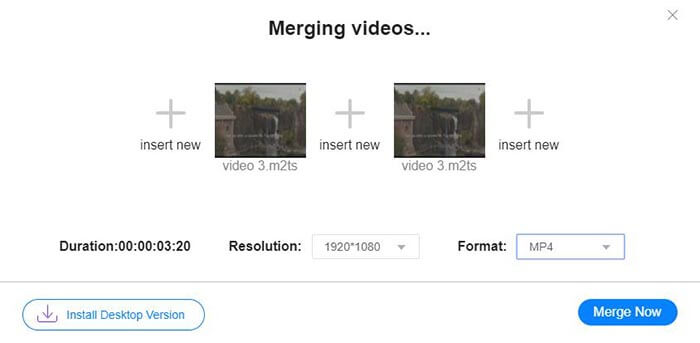
Vaihe 4. Sen jälkeen voit valita tulostusmuodon ja tarkkuuden. Voit hyvin jättää tarkkuuden ennalleen. Huomaa kuitenkin, että tämä verkossa toimiva ASF‑yhdistäjä ei tue yhdistetyn tiedoston vientiä ASF‑muodossa. Voit siis valita vain jonkin muun luettelosta ja muuntaa videon siihen muotoon.
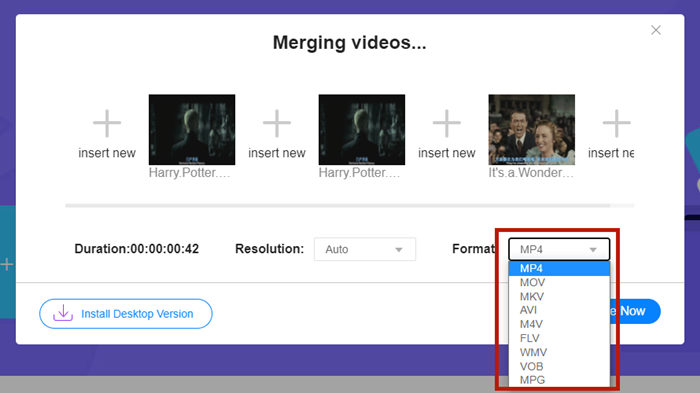
Vaihe 5. Napsauta Merge Now ‑painiketta käyttöliittymän oikeassa alakulmassa yhdistääksesi ASF‑tiedostot. Työkalu pyytää sinua valitsemaan kohdekansion vietävälle tiedostolle.
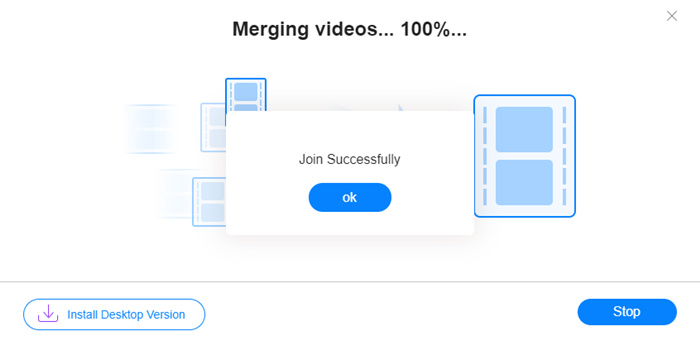
Kun näet ilmoituksen Join Successfully, voit siirtyä kohdekansioon ja tarkistaa yhdistetyn tiedoston.
Tämä menetelmä on todella nopein tapa liittyä ASF-tiedostoihin. Koko prosessi on yhtä yksinkertainen kuin näit. Sen helppokäyttöisyys ja kevyt käyttö kuitenkin rajoittivat sen ominaisuuksia. Et voi järjestää videoiden järjestystä kätevästi. Et välttämättä sovi haluamaasi tarkkuuteen tai tulostusmuotoon. Pahinta on, että kun haluat yhdistää eri tarkkuudella ja suunnalla olevia ASF-videoita, tämä työkalu voi sekoittaa koko asian. Sitten saatat tarvita toisen työkalun sen tekemiseen.
Osa 2: Yhdistä ASF-tiedostot saumattomasti ja nopeammin
Video Converter Ultimate auttaa sinua kääntämään, rajaamaan, leikkaamaan ja mikä tärkeintä, yhdistämään ASF‑tiedostot. Sen avulla voit tallentaa yhdistetyn ASF‑tiedoston missä tahansa muodossa ja millä tahansa tarkkuudella. Yhdistämisprosessi Video Converter Ultimatessa on myös poikkeuksellisen nopea.
Keskeiset ominaisuudet
- • Leikkaa ei-toivotut aloitukset ja lopput ennen liittymistä ASF-tiedostoihin.
- • Kierrä videoita eri suuntiin.
- • Rajaa, jos haluat tehdä kaikista videoleikkeistä saman tarkkuuden.
- • Pakkaa ASF-tiedosto pienempään kokoon YouTube, Facebook jne.
- • Laitteistokiihdytys tuo sinulle 70 kertaa nopeamman videoiden yhdistämisen nopeuden.
Ilmainen latausWindows 7 tai uudempiTurvallinen lataus
Ilmainen latausMacOS 10.7 tai uudempiTurvallinen lataus
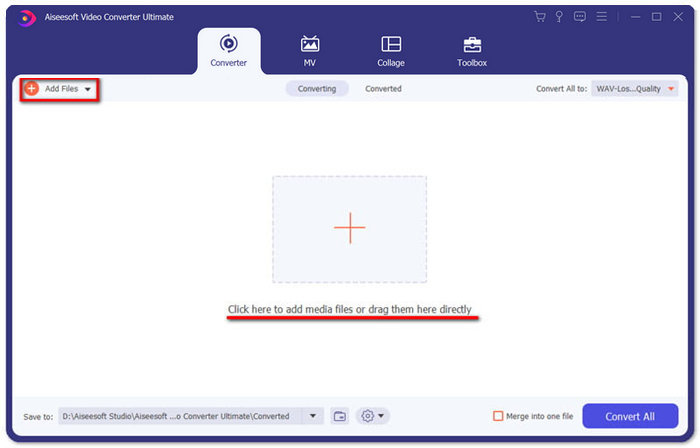
Vaihe 1. Lataa, asenna ja käynnistä Video Converter Ultimate. Napsauta suurta +-painiketta pääikkunan keskellä lisätäksesi yhdistettävät ASF‑tiedostot. Kun olet lisännyt ne, voit vetää tuotuja klippejä muuttaaksesi niiden järjestystä.
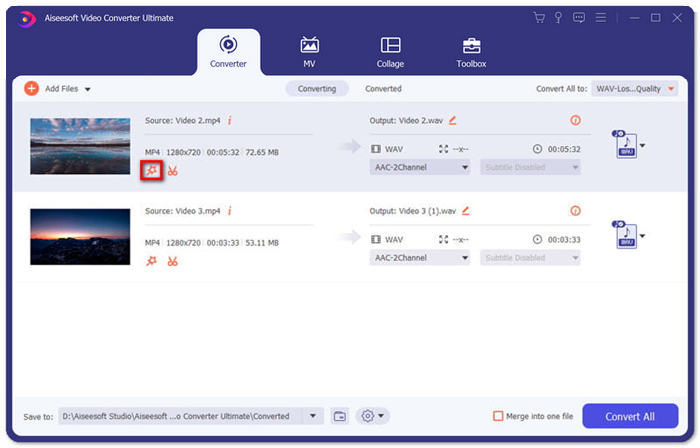
Vaihe 2. Niiden klippien kohdalla, joita haluat rajata, kääntää tai joiden kuvasuhteen haluat muuttaa, napsauta niille Edit-painiketta. Tämän jälkeen siirryt sivulle Rotate & Crop.
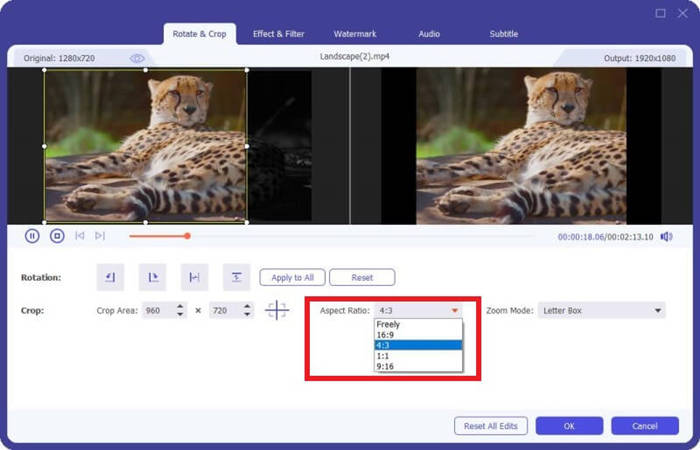
Täällä voit muuttaa kuvasuhdetta Aspect Ratio ‑osiosta. Tarkkuutta voit muuttaa vapaasti vetämällä esikatseluruudun kehystä vasemmalla. Myös kääntäminen onnistuu täällä. Muista napsauttaa OK-painiketta tallentaaksesi asetukset.
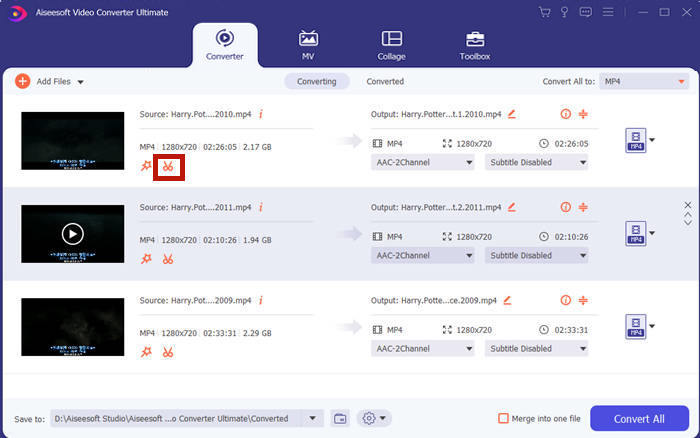
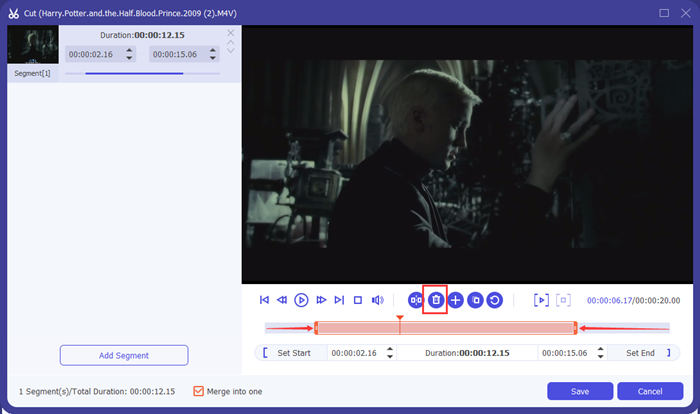
Vaihe 3. Jos haluat leikata pois ei‑toivotut segmentit, käytössä on Cut-toiminto. Siirry sivulle Cut napsauttamalla Cut-painiketta.
Täällä voit valita segmentin ja poistaa sen napsauttamalla Delete-painiketta (roskakori‑ikoni). Lopuksi napsauta tallenna-painiketta palataksesi takaisin.
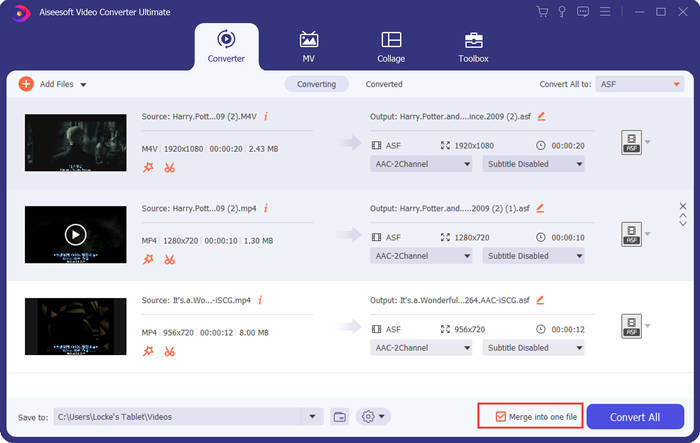
Vaihe 4. Pääikkunassa rastita ruutu Merge into one file oikeassa alakulmassa.
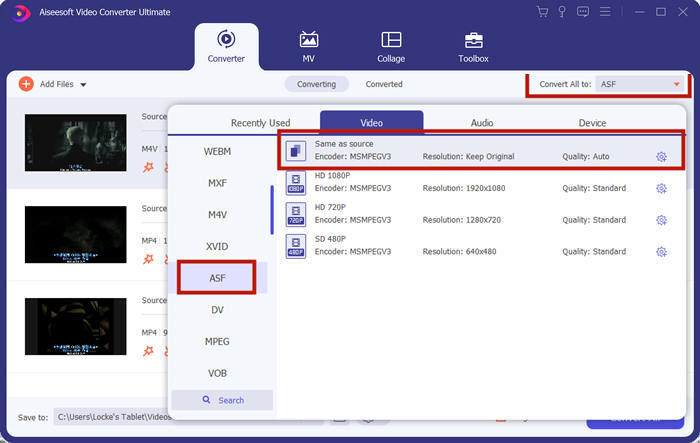
Vaihe 5. Sen jälkeen voit valita tulostusmuodon käyttöliittymän oikeassa yläkulmassa olevasta Convert All to ‑valinnasta. Etsi ASF ja napsauta sitä.
Lopuksi voit aloittaa ASF‑tiedostojen yhdistämisen napsauttamalla Convert All ‑painiketta. Kun prosessi on valmis, lopputulos tallennetaan siihen kansioon, jonka olet määrittänyt pääikkunan vasemmassa alakulmassa. Lopuksi kokosimme 3 usein kysyttyä kysymystä ASF‑tiedostojen yhdistämisestä.
Osa 3: UKK ASF-tiedostoihin liittymisestä
Miksi en voi toistaa ASF-tiedostoa missään soittosovelluksessa?
ASF-laajennusta on kolmenlaisia tiedostoja. Ne ovat Advanced Systems Format, Acclaim Skeleton File ja Electronic Arts Sound File. Ehkä ASF ei ole ollenkaan Advanced Systems Format -videotiedosto.
Miksi en näe kuvaa ASF-tiedostoa toistettaessa?
Miksi en näe kuvaa ASF-tiedostoa toistettaessa? Kaikki ASF-tiedostot eivät sisällä vähintään yhtä videota. Joskus ASF voi sisältää vain palan WMA-ääntä. Lisää äänenvoimakkuutta kaiuttimiin tai kuulokkeisiin ja etsi, kuuluuko tiedoston toistosta ääntä.
Voinko toistaa ASF-tiedostoa älytelevisiossani?
Se riippuu. Jotkut älytelevisiot tukevat ASF‑tiedostoja, kun taas toiset eivät. Jos älytelevisiosi ei toista ASF‑tiedostoa, voit muuntaa tiedoston MP4‑muotoon etukäteen.
Johtopäätös
ASF‑tiedosto sisältää usein WMV‑ tai WMA‑tiedoston. Sitä tukevat laajasti monet laitteet ja ohjelmat. Tässä artikkelissa esitellään kaksi tehokkainta tapaa yhdistää useita ASF‑tiedostoja yhdeksi heikentämättä laatua tai lisäämättä vesileimaa. FVC Free Online Video Merger on kiistatta nopein ratkaisusi. Mutta jos haluat leikata tai kääntää videoita, jotta ne sopivat paremmin yhteen, on parempi käyttää ohjelmaa Video Converter Ultimate. Kohtaatko vaikeuksia ASF‑tiedostojen yhdistämisessä? Kerro niistä meille kommenteissa.
-
 Videoiden yhdistäminen iPhonessa iMovien kanssa tai ilman (ilmainen käyttää)
 Opetusohjelma - 4 ilmaista tapaa yhdistää iPhonen videot uuteen
-
 2 parasta tapaa liittyä MKV-tiedostoihin katsomaan elokuvaa jatkuvasti
 MKV-elokuvatiedostojen sulautuminen: Kuinka yhdistää useita MKV-tiedostoja yhdeksi
-
 Kuinka liittyä WMV-leikkeisiin verkossa? Tässä on 3 todistettua menetelmää
 3 parasta tapaa liittyä WMV-tiedostoihin verkossa ilmaiseksi (päivitys 2021)
