


 Video Converter Ultimate
 Näytön tallennin
 Videon korjaus
 Suojattu lataus
2 parasta tapaa liittyä MKV-tiedostoihin katsomaan elokuvaa jatkuvasti
Yleensä Internetistä lataamasi elokuvat jaetaan kahteen tai kolmeen MKV-tiedostoon, koska elokuvatiedostot ovat aina suuria, etenkin korkealaatuisia. Ja DVD-levyltä kopioidut TV-sarjat jaetaan aina useisiin MKV-tiedostoihin. Jos olet elokuvaharrastaja, sinun on oltava utelias oppimaan liittymään MKV-tiedostoihin. Olet ehkä yrittänyt muuttaa alkuperäisen koodauksen liittyäksesi MKV-tiedostoihin FFmpegin ohjeiden mukaisesti, mutta se on liian monimutkainen ja vaikea oppia. Tässä tapauksessa seuraavat 2 ammattityökalua auttavat sinua liittymään MKV-tiedostoihin helposti ja tehokkaasti.

Osa 1: Kuinka liittyä MKV-tiedostoihin ilmaiseksi verkossa
FVC ilmainen verkkopohjainen videoliitin on tehokkain videoyhdistin MKV‑tiedostojen yhdistämiseen ilmaiseksi verkossa. Vain kolmessa vaiheessa saat valmiin MKV‑elokuvatiedoston, jossa tekstitykset ovat oikeassa järjestyksessä.
- 1. Yhdistä kaksi tai useampia MKV-tiedostoja yhdeksi yksinkertaisilla kolmella vaiheella ilmaiseksi verkossa.
- 2. Käytä kaikkia toimintoja, mukaan lukien MKV-tiedostojen yhdistäminen lataamatta mitään ohjelmistoja.
- 3. Tuki erilaisille tulo- ja lähtömuodoille, mukaan lukien MKV-elokuvatiedostot.
- 4. Ladatut tiedostot poistetaan 24 tunnin sisällä yksityisyyden suojaamiseksi.
Vaihe 1: Avaa FVC ilmainen verkkopohjainen videoliitin ja napsauta Upload Files to Merge ‑painiketta käynnistääksesi liitännäisen, ja napsauta sitten painiketta uudelleen valitaksesi yhdistettävät MKV‑tiedostot.

Vaihe 2: Napsauta insert new ‑painiketta valitaksesi muita MKV‑tiedostoja. Valitse sitten 1920x1080‑resoluutio laadun säilyttämiseksi ja alkuperäinen MKV‑muoto alkuperäisen koodauksen säilyttämiseksi, mikä varmistaa, että tekstitykset toimivat hyvin.

Vaihe 3: Napsauta Merge Now ‑painiketta ja valitse haluamasi kansio tallennusta varten.

Osa 2: Käytä Video Converteria liittyäksesi MKV-tiedostoihin
Ilmainen verkkopohjainen videoliitin täyttää tarpeesi muutamalla napsautuksella ilman ohjelmiston lataamista. Jos sinulla on kuitenkin ongelmia sekaisin olevien tekstitysten tai heikon laadun kanssa, FVC Video Converter Ultimate on verkkotyökaluja ammattimaisempi ratkaisu MKV‑tiedostojen yhdistämiseen korkealla kuvan- ja äänenlaadulla. Lisäksi se tukee korkeampia tarkkuuksia, kuten HD 1080P, 4K ja jopa 8K.
- 1. Pidä katselukokemus yhdistämällä useita MKV-tiedostoja yhdeksi menettämättä laatua.
- 2. Liitä MKV-tiedostot alkuperäiseen MKV-muotoon kaikilla koodauksilla, mukaan lukien H.264, HEVC ja XVID.
- 3. Valitse erilaiset tekstitykset ja äänikanavat, jotka sopivat sinulle.
- 4. Tuki MKV-videoiden muokkaamiseen lisäämällä tehosteita, suodattimia, vesileimoja ja rajaamalla aluetta.
Ilmainen latausWindows 7 tai uudempiTurvallinen lataus
Ilmainen latausMacOS 10.7 tai uudempiTurvallinen lataus
Vaihe 1: Lataa FVC Video Converter Ultimate Windowsille/Macille ja käynnistä se. Napsauta sitten muunnintyökalussa Add Files ‑painiketta valitaksesi kaikki MKV‑tiedostot, jotka haluat yhdistää oikeassa järjestyksessä.

Vaihe 2: Napsauta nuolta Convert All to ‑kohdan vieressä ja valitse MKV‑muoto videoluettelosta. Valitse sitten same as source ‑asetukset, jolloin alkuperäinen kuva- ja äänenlaatu säilyy. Jos haluat toistaa MKV‑videoita muilla laitteilla, voit valita myös muita yhteensopivia muotoja, kuten MP4, AVI ja niin edelleen.
Encoder: Asetuksista on suositeltavaa valita H.264/HEVC‑enkooderi, jotta elokuvat toistuvat hyvin tietokoneilla tai televisiossa.
Subtitle and Audio Track: Jos alkuperäisissä MKV‑elokuvatiedostoissa on useita tekstitys- ja ääniraitoja, voit myös valita haluamasi kielen jokaisen tiedoston alaosasta tai poistaa tekstityksen MKV:stä.
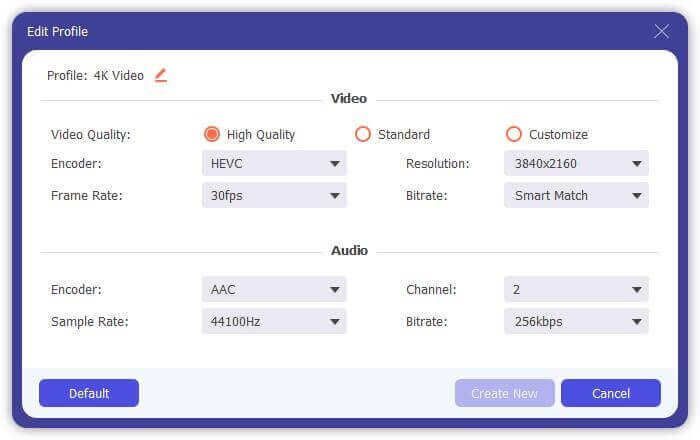
Vaihe 3: Napsauttamalla tiedostojen alareunassa olevaa Edit‑painiketta löydät viisi muokkaustyökalua, joilla voit esimerkiksi kiertää tai rajata videoita sekä lisätä tehosteita ja suodattimia. Näin voit luoda paremman elokuvan erikoistehosteilla. Sen työkalupakki voi pakata MKV‑tiedostoja, muokata MKV:n metatietoja, muuntaa MKV:n 2D:stä 3D:ksi ja paljon muuta.
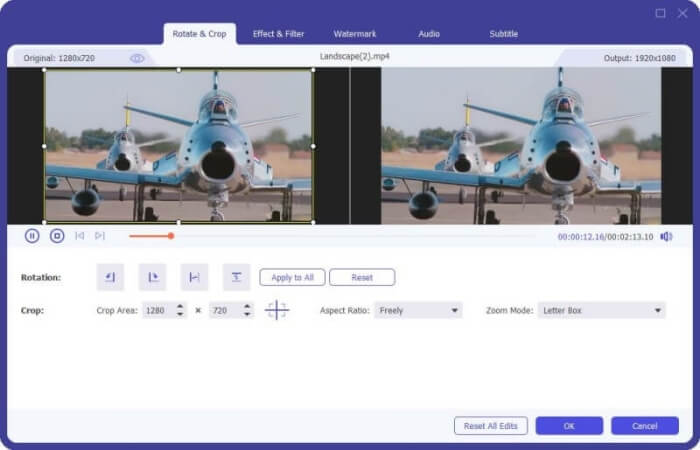
Vaihe 4: Ennen kuin yhdistät kaikki MKV‑videot, voit vetää videotiedostoja ylös ja alas ja sijoittaa ne oikeaan kohtaan järjestyksen säätämiseksi. Merkitse sitten Merge into one file ‑ruutu ja napsauta Convert All ‑painiketta yhdistääksesi MKV‑tiedostot ja tallentaaksesi ne määritettyyn tallennuspolkuun.
Osa 3: UKK-tiedostoihin liittymisen usein kysytyt kysymykset
1. Mikä on MKV?
Normaalisti MKV: n sanotaan olevan eräänlainen videoformaatti, mutta itse asiassa MKV on multimediasäiliömuoto, joka voi sisällyttää ääni-, video- ja tekstitystiedostot eri koodilla yhteen tiedostoon. Siten melkein kaikki elokuvat tallennetaan MKV-muotoisiin tiedostoihin.
2. Voinko liittää MKV-tiedostoihin käsijarrulla?
Ei, et voi. Käsijarru on vain eräänlainen ohjelmisto videon muuntamiseen MKV-tiedostojen muuntamiseksi. Jos haluat liittyä MKV-tiedostoihin, voit yrittää korjata ongelmasi ilmaisilla online-video-liittimillä tai muilla videomuuntimilla.
3. Mikä videosoitin tukee MKV-elokuvatiedostoja?
MKV-muotoiset elokuvat eivät tarvitse toistamiseen erikoistuneita videosoittimia. Sinun on kuitenkin asennettava vastaava MKV-dekoodauslaajennus. Tällä tavoin melkein kaikki videosoittimet, myös tietokoneen alkuperäinen videosoitin, voivat toistaa MKV-elokuvatiedostoja.
Johtopäätös
Kun lataat elokuvan katsottavaksi, mutta huomaat, että nämä MKV-elokuvatiedostot on jaettu useisiin tiedostoihin. Voit katsella sitä jatkuvasti, voit yhdistää MKV-tiedostot videopuusepän avulla ilmaiseksi verkossa. Lisäksi videomuuntimen käyttö voi auttaa liittymään MKV-tiedostoihin, joilla on korkea kuvan- ja äänenlaatu. Tervetuloa jättämään kysymyksesi MKV-tiedostojen yhdistämisestä alla.
-
 Kuinka yhdistää WebM-tiedostot yhdeksi häviöttömäksi tietokoneella
 Kun haluat yhdistää WebM-videotiedostot katsellaksesi videoita jatkuvasti tai haluat luoda uuden videon WebM-tiedostojen mukaan, on kaksi tehokasta tapaa liittyä WebM-tiedostoihin menettämättä laatua.
-
 8 parasta MKV-pelaajaa, jotka voivat toistaa MKV-tiedostoja halutulla tekstityksellä
 Kun haluat toistaa MKV-videota haluamallasi tekstityksellä, voit oppia lisää 8 parhaasta MKV-tiedostosoittimesta PC / Mac-tietokoneille ja valita haluamasi toiveidesi mukaan.
-
 MKV MOV: ksi - Kuinka muuntaa MKV MOV: ksi
 Kuinka muuntaa MKV MOV: ksi Macissa? Voiko iMovie lukea MKV: tä? Mitä MOV-muoto tarkoittaa? Tämä viesti kertoo 2 yksinkertaista tapaa auttaa muuntaa MKV MOV: ksi ilmaisilla online- ja ammattimaisilla videomuuntimilla.
