


 Video Converter Ultimate
 Näytön tallennin
 Videon korjaus
 Suojattu lataus
2 tehokasta tapaa yhdistää WebM-tiedostot menettämättä laatua
Kuinka yhdistää WebM-tiedostot? Kun lataat sarjaa videoita, jotka on ladattu muilta verkossa, ja haluat toistaa niitä jatkuvasti, jotta saat paremman katselukokemuksen, voit harkita näiden WebM-videoiden yhdistämistä yhdeksi. Korkean laadun ja pienen koon vuoksi sinun on kuitenkin parempi liittää WebM-tiedostot MKV: hen pitämään korkea laatu suhteellisen pienessä koossa. Siksi on kaksi tehokasta tapaa auttaa yhdistämään WebM MKV-tiedostoina.

Osa 1: Kuinka yhdistää WebM-tiedostot ilmaiseksi verkossa häviöttömästi
FVC ilmainen verkkopohjainen videoyhdistäjä on monipuolinen työkalu, jolla voit yhdistää minkä tahansa tiedostomuodon, myös WebM-tiedostoja, täysin ilmaiseksi verkossa. Sinun ei tarvitse ladata ohjelmistoa, vaan voit vain ladata WebM-tiedostosi selaimeen ja yhdistää ne muutamalla napsautuksella.
- 1. Yksinkertaiset napsautukset yhdistää mikä tahansa määrä WebM-videotiedostoja yhdeksi täysin ilmaiseksi verkossa.
- 2. Tuki useimpien suosittujen videoformaattien, mukaan lukien MKV-formaatin, korkealaatuiseen vientiin.
- 3. Ei vesileimaa videoiden lataamiseksi suoraan YouTubeen, Facebookiin tai muille alustoille.
- 4. Poista lähetetyt tiedostot pysyvästi 24 tunnissa yksityisyyden suojaamiseksi.
Vaihe 1: Siirry sivulle FVC Free Online Joiner ja asenna laajennus ohjeiden mukaan muutamassa sekunnissa. Napsauta sitten Upload the Videos to Merge -painiketta valitaksesi yhden halutuista WebM-videotiedostoista.

Vaihe 2: Napsauta plus-kuvaketta lisätäksesi muut WebM-videotiedostot, jotka haluat yhdistää. Sinun tulisi lisätä videot siinä järjestyksessä, jossa haluat niiden olevan. Valitse sitten MKV-muoto ja 1920*1080-resoluutio säilyttääksesi videoiden korkean laadun.

Vaihe 3: Napsauta Merge Now -painiketta ja valitse paikallinen kansio. Tämän jälkeen WebM-videotiedostojen yhdistäminen alkaa automaattisesti.
Osa 2: Ammattimaisin tapa liittyä WebM-tiedostoihin uuden luomiseksi
Ilmainen verkkoyhdistäjä voi auttaa sinua yhdistämään WebM-videoita helposti. Mutta jos haluat yhdistää vain tietyt osat WebM-tiedostoista luodaksesi uuden videon, sinun kannattaa käyttää ammattilaistyökalua – Video Converter Ultimate, joka ei ainoastaan yhdistä WebM-tiedostoja, vaan myös muokkaa videoita ennen yhdistämistä.
- 1. Yhdistä WebM-videotiedostot yhteen muotoon, mukaan lukien MKV.
- 2. Pystyy säilyttämään WebM-videoiden alkuperäisen laadun, mukaan lukien 1080p HD ja 4K.
- 3. Helppokäyttöiset muokkaustyökalut videoiden leikkaamiseen, suodattimien lisäämiseen, videotehosteiden säätämiseen ja videoiden jakamiseen.
- 4. Nopea fuusionopeus yhdistää useita WebM-videotiedostoja muutamassa minuutissa.
Ilmainen latausWindows 7 tai uudempiTurvallinen lataus
Ilmainen latausMacOS 10.7 tai uudempiTurvallinen lataus
Vaihe 1: Lataa Video Converter Ultimate ja käynnistä se. Napsauta vasemmassa yläkulmassa olevaa Add Files -painiketta valitaksesi kaikki WebM-tiedostot, jotka haluat yhdistää.

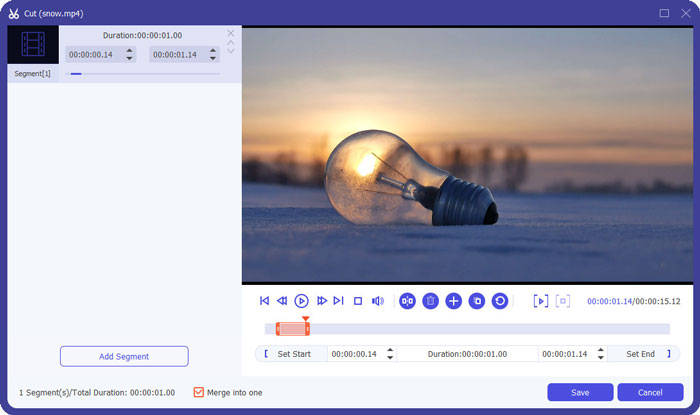
Vaihe 2: Napsauta Cut-painiketta leikataksesi jokaisen videon yksi kerrallaan. Vedä aikajanaa tai syötä tarkka aikakohta valitaksesi tarvittavat osat. Napsauta sitten Save-painiketta tallentaaksesi asetukset.
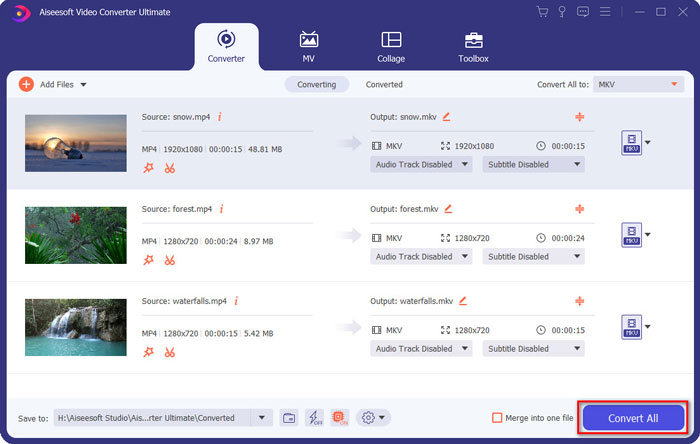
Vaihe 3: Napsauta Convert All to > Video > MKV -painiketta ja valitse Same as Source -vaihtoehto. Vaikka se hieman suurentaa WebM-tiedostojen kokoa, laatu säilyy alkuperäisen videon tasolla.

Vaihe 4: Kun olet valinnut tallennuspolun, ruksaa Merge into one file ja napsauta Convert All -painiketta tallentaaksesi tuloksen.
Saatat olla kiinnostunut myös tästä: Kuinka yhdistää videoita iPhonessa.
Osa 3: Usein kysytyt kysymykset WebM-tiedostoihin liittymisestä
1.Mikä on WebM?
WebM on eräänlainen videomuoto, jonka Google on ehdottanut. Ja WebM-videoita käytetään aina verkkosivustolla, koska niitä voidaan toistaa sujuvasti melkein kaikissa selaimissa, mukaan lukien Google Chrome, Firefox ja niin edelleen, korkealaatuisina ja pieninä.
2.Voiko WebM-tiedostojen yhdistäminen heikentää videon laatua?
Kyllä, se tulee, varsinkin kun yhdistät useita WebM-tiedostoja yhdeksi WebM-tiedostoksi. Paras tapa säilyttää alkuperäinen laatu on liittää WebM-videotiedostot yhteen MKV-tiedostoina.
3.Voinko säilyttää WebM-muodon WebM-videotiedostojen yhdistämisen jälkeen?
Kyllä, voit. On kuitenkin parempi muuntaa formaatti MKV:ksi, joka on WebM:n esiaste. Tämä johtuu siitä, että vaikka WebM pystyy säilyttämään korkean laadun pienellä tiedostokoolla, MKV-muotoa käytetään WebM:ää useammin. Halutessasi voit myös muuntaa WebM:n MP4:ksi.
Johtopäätös
Kun haluat yhdistää verkkosivustolta ladatut WebM-videotiedostot sujuvamman katselukokemuksen saamiseksi, helpoin tapa on käyttää ilmaista online-video-liitintä auttamaan sinua. Jos kuitenkin haluat luoda uuden videon yhdistämällä WebM-videotiedostot, sinun on leikattava tarvittavat osat ennen liittymistä. Tässä tapauksessa ladataan ammattimainen videomuunnin - Video Converter Ultimate WebM-tiedostojen leikkaamiseksi ja yhdistämiseksi samanaikaisesti.
-
 Viisi parasta parasta WebM Player -sovellusta Androidille / iPhonelle / Windows / Macille
 Jos haluat pelata WebM: ää onnistuneesti laitteellasi, sinun kannattaa oppia lisää top 5 parhaasta WebM-soittimesta Androidille, iPhonelle, Windowsille ja Macille tästä artikkelista.
-
 Pakkaa WebM - Kuinka pakata WebM-tiedosto verkossa
 Kuinka pakata WebM-tiedosto verkossa? Mikä on nopein tapa pakata suuria tiedostoja? Tämä viesti kertoo 2 ilmaista tapaa pakata WebM.
-
 MP4 to WebM Converter - 4 parasta tapaa muuntaa MP4 WebM: ksi
 Kun haluat muuntaa MP4: n WebM: ksi ilmaiseksi, voit oppia lisää neljästä yleisimmin käytetystä menetelmästä, joilla saat haluamasi videot ilmaiseksi artikkelista.
