


 Video Converter Ultimate
 Näytön tallennin
 Videon korjaus
Lisää oma taikuus videoon Macin videoeditorien avulla
Nykyään videoiden jakaminen on saanut enemmän huomiota ja suosiota kuin koskaan aiemmin. Tällä hetkellä mediasisällön jakamiseen tarkoitetut alustat ovat jo valloittaneet maailman, eikä mikään tunnu pysäyttävän niitä. Kun pitkästymme, viihdytämme itseämme katsomalla tai tekemällä videoita. Tämän vuoksi myös videoeditorien kysyntä on kasvanut, jotta videoita voidaan parantaa ja tehdä niistä houkuttelevampia. Mutta jos menet etsimään markkinoiden parasta Mac‑videoeditoria, vaihtoehtoja on valtavasti. Sen sijaan, että kokeilisit onneasi arpomalla erilaisia työkaluja, olemme nyt koonneet sinulle valmiiksi useita vaihtoehtoja. Pidetään siis pallo liikkeessä ja tehdään editorien etsimisestä sinulle helpompaa kuin koskaan. Ilman enempää viivytystä käydään läpi parhaat työkalut, jotka tarjoavat erinomaisen lopputuloksen ja muokkausominaisuudet, joihin voit luottaa.

Osa 1. Fantastinen Premium Video Editor for Mac (maksullinen versio)
Ilmiömäinen muunnin on nyt valmis auttamaan sinua ja ottamaan ensimmäisen askeleen videonmuokkauksessa. FVC Video Converter Ultimate on paras työkalu muuntamiseen ja editointiin. Tämä PC‑ ja Mac‑videoeditori auttaa jo nyt käyttäjiä, joilla on ongelmia videoidensa ja äänensä parantelussa. Lisäksi kyseessä on täysiverinen editori, eli se tarjoaa edistyneitä ominaisuuksia ainutlaatuisella tavalla – ja lisäksi selkein käyttöohjein. Jos siis haluat poikkeuksellisen editointikokemuksen, vaikka olisit aloittelija, kokeile tätä työkalua. Seuraa alla olevia ohjeita, jotka on laadittu käyttäjille, jotka haluavat videoidensa erottuvan joukosta.
Vaihe 1. Napsauta Mac‑latauspainiketta ja asenna ohjelma. Suorita nopea käyttöönotto ja käynnistä se.
Ilmainen latausWindows 7 tai uudempiTurvallinen lataus
Ilmainen latausMacOS 10.7 tai uudempiTurvallinen lataus
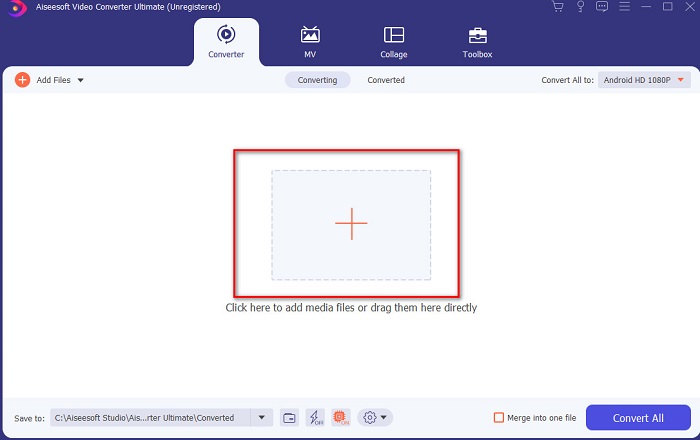
Vaihe 2. Kun Ultimate‑muunnin on jo käynnissä järjestelmässäsi, napsauta Add Files ‑painiketta tai keskellä olevaa +-kuvaketta lisätäksesi videon, jota haluat muokata.
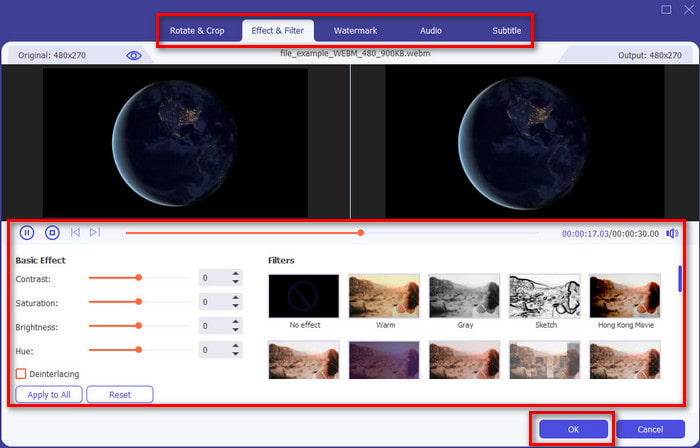
Vaihe 3. Napsauta sitten taikasauva-kuvaketta editoidaksesi ja tehdessäsi taikasi videoon. Videoihin voi lisätä useita eri elementtejä, kuten suodattimia, tehosteita, rajauksia ja niin edelleen. Tallenna tekemäsi muutokset napsauttamalla OK.
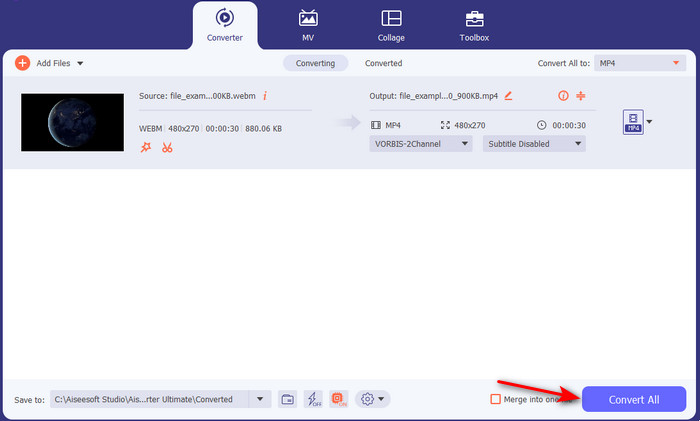
Vaihe 4. Viedäksesi aiemmin muokkaamasi videon napsauta Convert All. Odota hetki, kunnes prosessi on valmis.
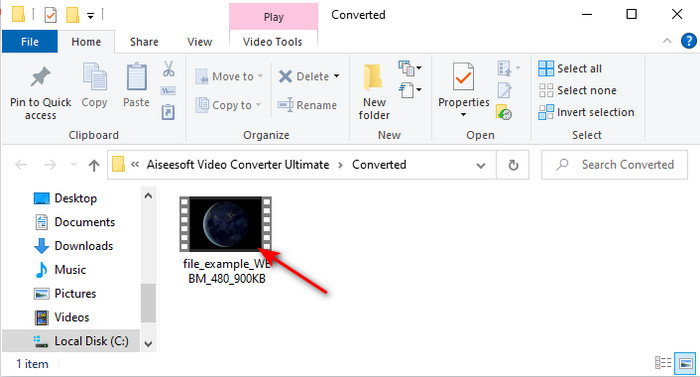
Vaihe 5. Näyttöön avautuu kansio, jossa on muokkaamasi video. Napsauta sitä katsoaksesi videon ja jos haluat yhdistää sen toiseen videoon, voit myös tutustua työkalupakista löytyvään erinomaiseen videoyhdistimeen.
Osa 2. Muita hyödyllisiä videoeditoreja Macille (ilmainen versio ja esiasennettu työkalu)
1. iMovie
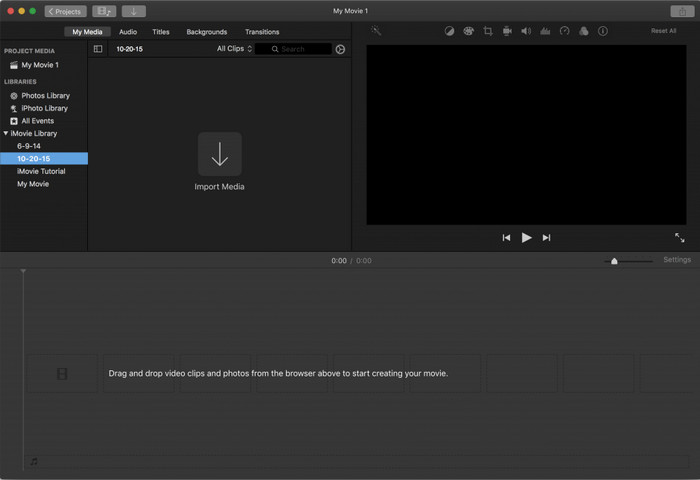
iMovie on valmiiksi asennettu ilmainen videoeditori Macille, joten jos budjettisi on tiukka, voit käyttää sitä. Vaikka tämä työkalu tarjoaa keskitason muokkausominaisuuksia, siitä puuttuu silti edistyneitä toimintoja, kuten kohteenseurantaa. Se on kuitenkin hyvä, vaikkei paras editori, ja sitä voi käyttää Macilla maksutta. Jos taas haluat ammattimaisen lopputuloksen, tämän kannattaa olla viimeinen vaihtoehtosi, sillä se tarjoaa lähinnä perusmuokkauksen yksinkertaisten videoiden editointiin. Lisäksi se on valmiiksi asennettu, joten sinun ei tarvitse ladata mitään kolmannen osapuolen sovellusta muokkausta varten.
Plussat
- Helppo ymmärtää työkalu.
- Alkuperäinen editori Mac-käyttäjille.
Haittoja
- Siitä puuttuu suurin osa ammattilaisen tarvitsemista edistyneistä ominaisuuksista.
- Ei paras työkalu, jos haluat laadukkaan videon jaettavaksi.
2. Avidemux
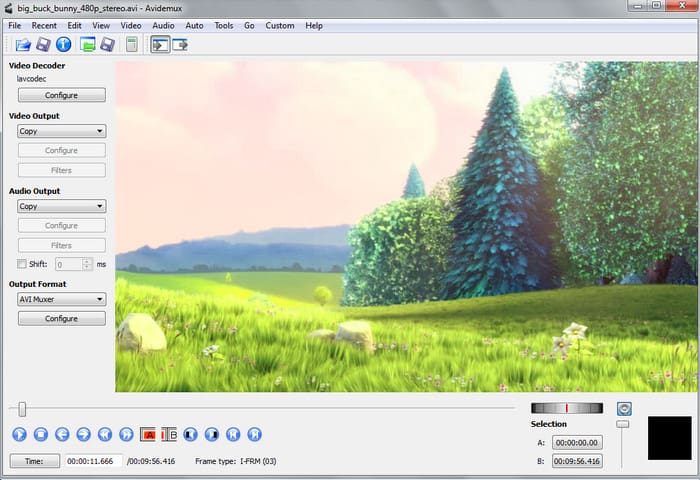
Avidemux on hidastusefekteihin soveltuva videoeditori Macille, ja se on myös tehokas. Se tarjoaa yksinkertaiset editointitoiminnot, mutta iMoviella on enemmän annettavaa kuin tällä editorilla. Kun avaat tämän työkalun etusivun, ei ole suositeltavaa antaa itsestäsi tietoja, sillä sivu ei ole suojattu. Jos siis yrität antaa henkilökohtaisia tietoja, kuten pankkitilin, on suuri riski, että sinut hakkeroidaan. Silti se tarjoaa ihan kelvolliset muokkausmahdollisuudet tarvittavia videoita varten, mutta jos olet ammattilainen, sen taso on korkeintaan kohtalainen.
Plussat
- Ominaisuuksien muokkaaminen onnistuu.
- Se tukee monia tiedostotyyppejä muokattavaksi.
Haittoja
- Ei paras valinta, jos olet ammattilainen editoinnissa, koska siinä ei ole edistyneitä ominaisuuksia.
- Myös työkalun käyttöliittymä on niin tylsä.
3. Kdenlive
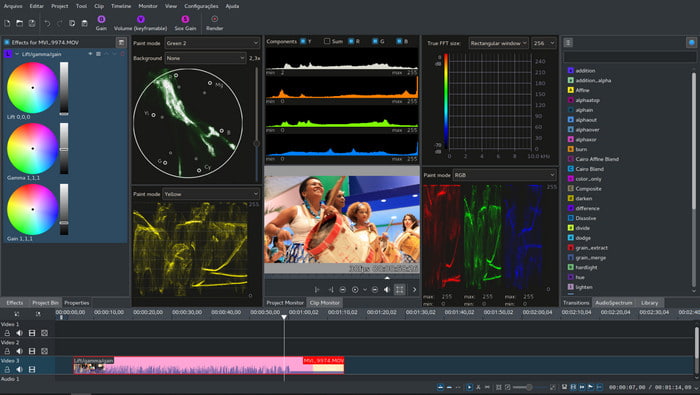
Toinen Mac‑videoeditori, jonka voit helposti ladata työpöydällesi, on Kdenlive. Tältä työkalulta löytyy kaikki, mitä editorilta yleensä odotetaan. Pieniä ja suuriakin virheitä tai bugeja kuitenkin esiintyy, kun yrität käyttää sitä. Tätä työkalua on parempi käyttää PC:llä kuin Macilla, sillä se on suositumpi PC‑käyttäjien keskuudessa. Macilla tarjolla on vanhempi versio työkalusta, mutta se kuitenkin toimii. Vaikka tämä näyttäisi bugeista tai rajoitetuista editointiominaisuuksista johtuen siltä, ettei siitä olisi sinulle hyötyä, sen käyttöä on silti kohtuullisen hyödyllistä opetella.
Plussat
- Se tukee kaikkia tunnettuja alustoja.
- Ei tarvitse maksaa, koska se on ilmainen.
Haittoja
- Videoilla, joita muokkaat täällä, on alhainen mahdollisuus erottua joukosta.
- Siinä on paljon teknisiä ongelmia, joita ei ole vielä korjattu.
Osa 3. Usein kysytyt kysymykset Mac Video Editorista
Kuinka yhdistää eri videoita iMoviessa?
Jos haluat yhdistää kaksi tai useampia erikseen iPhonella kuvaamiasi videoita, kokeile käyttää iMovieta niiden yhdistämiseen. Jos haluat oppia lisää siitä, miten iMoviella yhdistetään videoita, mene tähän linkkiin.
Miksi muokkaamme videoitamme?
Videon editointi tunnetaan jälkituotannona, jossa parannat videotasi ja poistat tarpeettomia leikkeitä. Tämä vaihe on erittäin tärkeä, koska sen avulla videosi on vaikuttavampi ja erottuvampi kuin muut. Vaikka sinulla olisi hämmästyttävää sisältöä, jos muokattu videosi ei ole niin hyvä, se saa vähemmän huomiota muille.
Kuinka muokata GIF-tiedostoja Macissa?
Vaikka iMovie pystyy videoiden muokkaukseen, se ei sovellu GIF‑tiedostoille. Siksi olemme koonneet eri työkaluja, joilla voit muokata GIF‑animaatioita Macilla. Tässä ovat 9 parasta ohjelmistoa GIFien editointiin.
Johtopäätös
Lopuksi, nyt voit tehdä omaa editointiasi tämän artikkelin työkalujen avulla. Vaikka kaikki työkalut eivät tarjoakaan aivan niitä ilmiömäisiä ominaisuuksia, joita ehkä haluat, älä vertaa niitä Video Converter Ultimate ‑ohjelmaan, sillä sillä on paljon enemmän annettavaa. Jos siis haluat tehdä vaikutuksen videosi katsojiin, käytä tätä ultimate‑työkalua saadaksesi aikaan upean lopputuloksen.
-
 Konkreettinen opetusohjelma - Kuinka yhdistää kaksi ääniraitaa Audacityyn
 Audacity nauttii maineesta äänen muokkaajana. Latasit Audacityn, mutta et tiedä kuinka yhdistää ääniraitoja Audacityssä? Tämä viesti kertoo, kuinka kappaleita yhdistetään Audacityssä.
-
 2 tehokasta tapaa yhdistää MPEG-tiedostot vanhojen TV-sarjojen yhdistämiseksi
 Kun sinulla on vanhoja TV-sarjoja MPEG-muodossa, voit oppia lisää kahdesta tehokkaasta tavasta yhdistää MPEG-tiedostot yhdeksi elokuvaksi tarpeidesi mukaan.
-
 [2025 Päivitetty] 9 parasta GIF-editoria PC:lle, Macille, iOS:lle ja Androidille
 Haluatko lisätä henkilökohtaisen kosketuksen GIF -tiedostoosi, jotta siitä voi tulla ilmeikkäämpi? Jatka tämän artikkelin lukemista tietääksesi, miten muokata ja mikä on paras työkalu työhön.
