


 Video Converter Ultimate
 Näytön tallennin
 Videon korjaus
 Suojattu lataus
Kuinka yhdistää MPEG - videotiedostot yhdeksi lopulliseksi menetelmäksi, jotka sinun pitäisi tietää
Kuinka yhdistää MPEG‑tiedostoja? Olet juuri ladannut vanhan TV‑sarjan MPEG‑muodossa, esimerkiksi 8 lyhyttä jaksoa, joista jokaisessa on ylimääräiset alku- ja lopputunnukset. Miten yhdistät nämä MPEG‑tiedostot yhdeksi kokonaisuudeksi kuin elokuvaksi? Tarvitsetpa vain yksinkertaisesti videoiden yhdistämistä yhdeksi tiedostoksi tai MPEG‑tiedostojen yhdistämistä edistyneillä toiminnoilla, tässä on 2 tehokasta menetelmää, joita et saisi ohittaa.

Osa 1: MPEG-tiedostojen yhdistäminen verkossa ilmaiseksi
FVC Free Online Video Merger on ilmainen verkkopohjainen MPEG‑yhdistäjä, jonka avulla voit yhdistää MPEG-, MP4-, AVI- ja monia muita videotiedostoja ilman kokorajoituksia. Sen avulla voit yhdistää useita MPEG‑tiedostoja vaikuttaviksi videoiksi ilman vesileimaa. Lisäksi ladatut tiedostot poistetaan 24 tunnin kuluessa yksityisyytesi suojaamiseksi.
Vaihe 1: Siirry FVC Free Online Video Merger ‑palveluun millä tahansa verkkoselaimella. Napsauta keskellä verkkosivua olevaa Upload Videos to Merge ‑painiketta ladataksesi asennusohjelman. Tämän jälkeen voit napsauttaa painiketta uudelleen ladataksesi MPEG‑tiedostot, jotka haluat yhdistää online‑ohjelmassa.

Vaihe 2: Kun siirryt Merging videos ‑näkymään, voit järjestää yhdistettävien MPEG‑videoiden järjestyksen. Voit hallita videon sijaintia, poistaa tiedostoja tai lisätä lisää MPEG‑tiedostoja napsauttamalla insert new ‑painiketta sopivaan kohtaan.
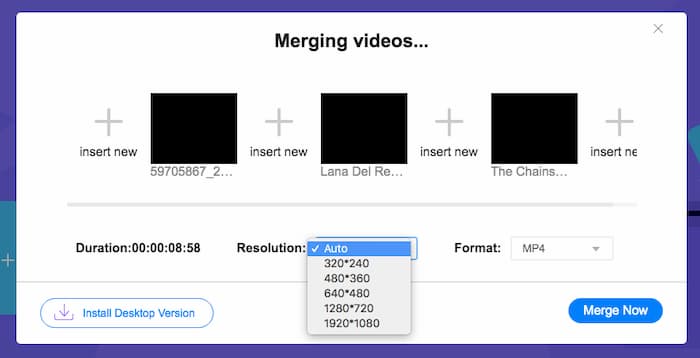
Vaihe 3: Sen jälkeen voit valita lähtövideon tarkkuuden ja muodon. Voit yhdistää MPEG‑tiedostot yhdeksi MP4‑tiedostoksi ennen kuin napsautat Merge now ‑painiketta aloittaaksesi prosessin. Näin saat halutun videon valmiiksi lyhyessä ajassa.

Verkkovideoyhdistelmää on helppo käyttää. Jos kuitenkin haluat leikata jaksojen tarpeettomat aukot ja päätteet, se ei voi auttaa sinua edelleen. Sinun on käytettävä tehokkaampaa MPEG-sulautumista.
Lisäluettavaa:
MPEG‑4‑tiedostojen pakkaaminen
Osa 2: Monipuolinen menetelmä MPEG-videoiden yhdistämiseksi
Aiseesoft Video Converter Ultimate on ammattimainen MPEG‑yhdistäjä, jonka avulla voit liittää halutut osat MPEG‑tiedostoista yhdeksi elokuvaksi. Sen avulla voit rajata MPEG‑tiedostoista halutut osat, säätää videon laatua, mukauttaa vesileimaa tai jopa tehdä elokuvan eri teemoilla.
- 1. Yhdistä MPEG-tiedostot MPEG-, MP4- ja yli 300 videoformaattiin.
- 2. Säädä videon tarkkuutta tai jopa paranna videon laatua tiedostojen yhdistämistä varten.
- 3. Leikkaa halutut MPEG-tiedostojen osat ja yhdistä ne yhdeksi videoksi.
- 4. Lisää tehosteita ja suodattimia ja mukauta vesileimat MPEG-videoihin.
Ilmainen latausWindows 7 tai uudempiTurvallinen lataus
Ilmainen latausMacOS 10.7 tai uudempiTurvallinen lataus
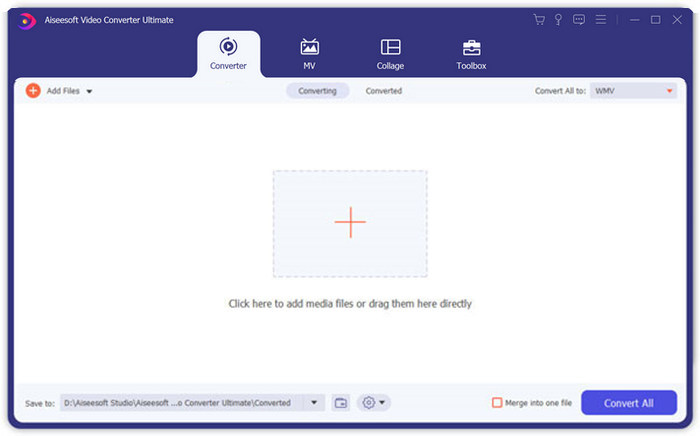
Vaihe 1: Käynnistä Aiseesoft Video Converter Ultimate tietokoneellasi. Siirry Converter‑valikkoon ja napsauta käyttöliittymän keskellä olevaa suurta “+”‑painiketta lisätäksesi MPEG‑tiedostot, jotka haluat yhdistää. Napsauta Add Files ‑painiketta tuodaksesi kaikki tiedostot, jotka haluat yhdistää.
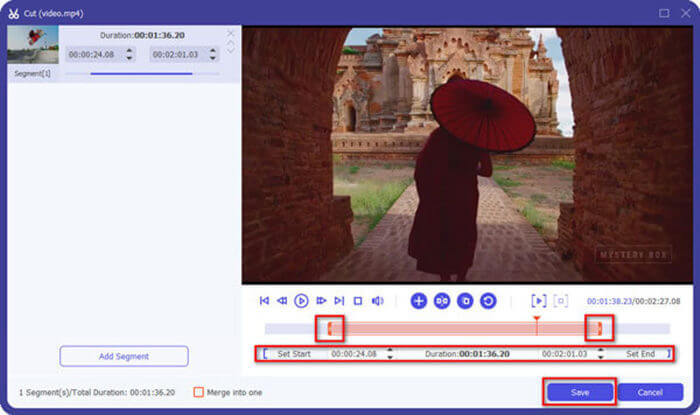
Vaihe 2: MPEG‑leikkeille, joita täytyy lyhentää, napsauta videon vieressä olevaa Cut ‑painiketta. Voit määrittää alku- ja loppukohdat poistaaksesi MPEG‑videoidesi alku- ja lopputunnukset. Sen jälkeen voit napsauttaa alhaalla olevaa Save ‑painiketta tallentaaksesi tiedoston.
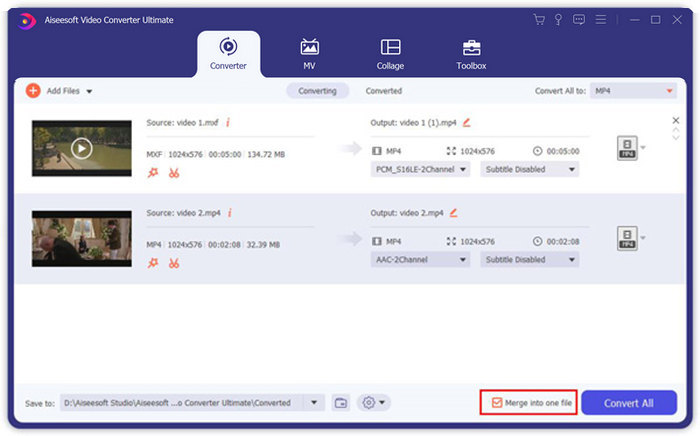
Vaihe 3: Sen jälkeen voit vetää leikatun videon ohjelmaan. Säädä MPEG‑videoiden järjestys. Kun kaikki on valmista, sinun pitää valita Merge into one file ‑ruutu Convert All ‑vaihtoehdon vierestä. Napsauta Convert All ‑painiketta aloittaaksesi MPEG‑tiedostojen yhdistämisen.
Osa 3: UKK MPEG-tiedostoihin liittymisestä
Kuinka yhdistää MPEG-tiedostot parhaalla laadulla?
Kun haluat yhdistää MPEG-tiedostot samalla laadulla, voit valita parametrit alkuperäisiksi videoiksi. Mutta jos MPEG-tiedostojen videolaatu on erilainen, joudut parantamaan joitain MPEG-tiedostoja huonolaatuisina etukäteen ammattimaisen videoyhdistimen kanssa.
Voinko yhdistää MPEG-tiedostot iPhone- tai Android-puhelimen kanssa?
Joo. Ennen kuin lataat videoyhdistelmäsovelluksia MPEG-tiedostoihin liittymistä varten, varmista, että sovellus on yhteensopiva MPEG: n tai muiden videoiden kanssa, jotka haluat yhdistää. Adobe Premiere Clip, Viva Video ja Splice Video ovat suositeltavia, jotka voit ottaa huomioon.
Mikä on MPEG-tiedostomuoto?
MPEG on videotiedostomuoto, joka käyttää joko MPEG-1- tai MPEG-2-tiedostojen pakkaamista. Se on suosittu muoto elokuville, joita levitetään Internetissä, mikä tekee suoratoistosta ja lataamisesta paljon nopeampaa kuin muut suositut videoformaatit.
Johtopäätös
Tässä artikkelissa esitellään kaksi tehokasta tapaa yhdistää MPEG-videotiedostot, varsinkin kun sinun on leikattava ylimääräisiä osia. FVC Free Online Video Ferger on helppo tapa yhdistää MPEG-tiedostot verkossa, mutta et voi muokata videoleikkeitä. Siksi, jos haluat leikata ja muokata MPEG-videoita, Aiseesoft Video Converter Ultimate -ohjelman pitäisi olla lopullinen ratkaisu.
-
 Top 6 parasta MP4-videoiden yhdistäjää yhdistämään MP4-videoita ilmaiseksi
 On olemassa monia MP4-liittimiä, jotka mahdollistavat erilaisten MP4-leikkeiden liittämisen. Tässä artikkelissa olemme valinneet joitain ilmaisia MP4-liittimiä Windows 10/8/7: lle ja Macille.
-
 Kuinka yhdistää M4V-tiedostot? Tässä on 2 nopeinta ratkaisua
 Jos etsit ratkaisua M4V-videotiedostojen yhdistämiseen yhdeksi, älä koskaan missaa tätä kohtaa. Tässä puhumme kahdesta parhaasta tavasta yhdistää M4V-videotiedostot.
-
 3GP-videoiden yhdistäminen matkapuhelimesta yhteen tiedostoon
 Kun haluat yhdistää joitain BlackBerryn 3GP-videoita yhdeksi videoksi, saat lisätietoja artikkelista kahdesta tehokkaasta menetelmästä 3GP-tiedostojen yhdistämiseksi.
