


 Video Converter Ultimate
 Näytön tallennin
 Videon korjaus
4 Tehokkaat metatietojen katselutyökalut metatietojen katseluun tiedostoista
Videon elementin osana metatiedot sisältävät kaiken sen datan, joka sinun täytyy tiedostosta tietää. Mutta kysymys kuuluu: miten voit tarkastella tiedoston metatietoja? Jos siis haluat nähdä videon sisäiset metatiedot, tämä kirjoitus sopii sinulle täydellisesti. Jatka lukemista, sillä esittelemme sinulle parhaat metatietojen katseluohjelmat, joilla voit tarkastella metatietoja ja mahdollisuuksien mukaan myös muokata niitä.

Osa 1. 2 vuoden 2022 Windows- ja Mac-version hienoimmista metatietojen katseluohjelmista
Video Converter Ultimate [paras videon ja äänen metatietojen katselu ja editori]
Video Converter Ultimate tarjoaa parhaan videon metatietojen katseluohjelman Macille ja Windowsille. Tämän työkalun avulla voit helposti lisätä ja tarkastella metatietoja kaikissa video- ja ääniformaateissa vain muutamalla napsautuksella. Vaikka sinulla ei olisi aiempaa kokemusta tämänkaltaisista tehtävistä, voit luottaa tähän katseluohjelmaan apunasi. Toisin kuin muut pelkkää metatietojen tarkastelua tarjoavat työkalut, tämä ohjelmisto sisältää erinomaisia toimintoja, joiden avulla voit tehdä paljon muutakin, kuten muokata metatietoja. Haluatko tietää, mitä nämä ovat? Jos haluat, lue tärkeimmät ominaisuudet, jotka saat käyttöösi, kun hankit tämän ohjelmiston.

FVC Video Converter Ultimate
5 689 200+ latausta- Se on paras työkalu jokaisen videon tai videon metatietojen katseluun ja muokkaamiseen.
- Tukee erilaisia mediamuotoja, mukaan lukien MP4, AVI, MOV, MKV, FLV ja paljon muuta.
- Voit lisätä tähän suuria video- ja äänitiedostoja tarkistaaksesi niiden metatiedot.
- Ensinnäkin tämä on paras metatietojen katseluohjelma käyttäjäystävällisellä käyttöliittymällä.
- Saatavilla kaikilla erilaisilla työpöytäalustoilla, kuten Windows ja Mac.
Ilmainen latausWindows 7 tai uudempiTurvallinen lataus
Ilmainen latausMacOS 10.7 tai uudempiTurvallinen lataus
Joten nyt, jos haluat oppia katsomaan metatietoja, sinun on ensin ladattava työkalu napsauttamalla alla olevaa sopivaa latauspainiketta, asenna se seuraavaksi ja avaa se sitten.
Ilmainen latausWindows 7 tai uudempiTurvallinen lataus
Ilmainen latausMacOS 10.7 tai uudempiTurvallinen lataus
Kuinka tarkastella metatietoja Video Converter Ultimatessa
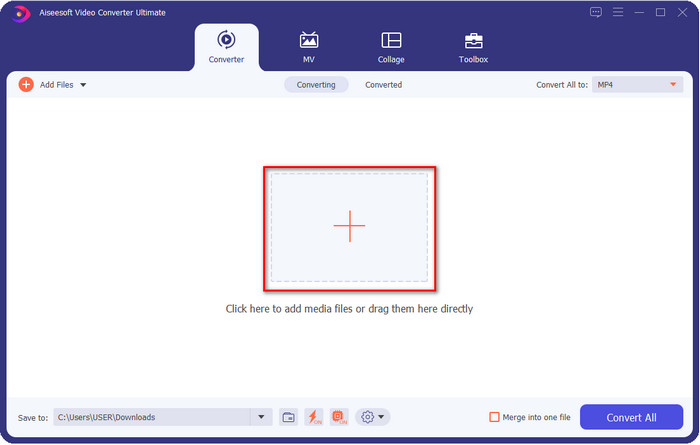
Vaihe 1. Napsauttamalla +-painiketta näytölle avautuu kansio, josta voit etsiä videon tai äänitiedoston, jonka metatiedot haluat tarkistaa. Kun olet valinnut tiedoston, napsauta Avaa ja siirry seuraavaan vaiheeseen.
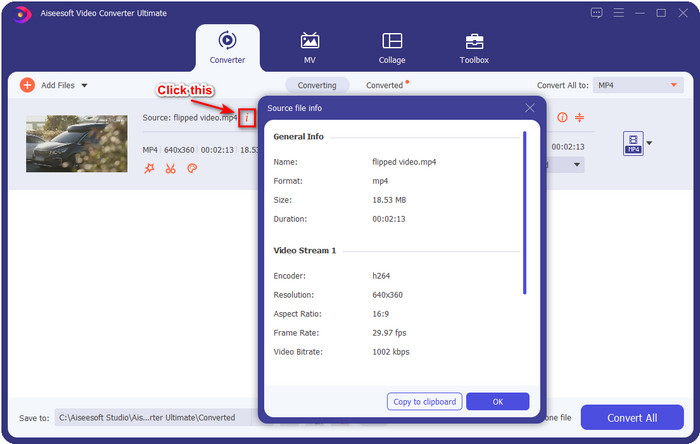
Vaihe 2. Kun tiedosto on jonossa, napsauta i-kuvaketta – siinä kaikki, nyt näet tietokoneellesi tallennetun videotiedoston metatiedot.
Video- tai äänitiedoston metatietojen lisääminen tai muokkaaminen parhaalla metatietoeditorilla
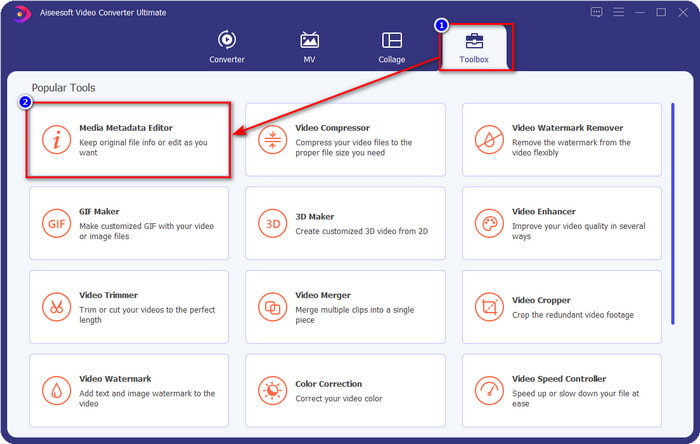
Vaihe 1. Kun olet avannut ohjelmiston, siirry Työkalupakki-osioon, jossa näet toiminnon Media Metadata Editor; napsauta sitä.
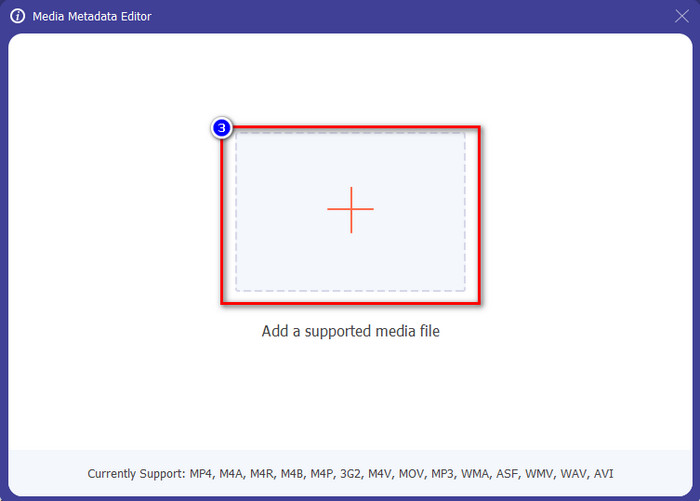
Vaihe 2. Uusi ikkuna avautuu; napsauta +-painiketta, etsi videon tai äänen tiedosto tietokoneen kansiosta ja napsauta Avaa.
Vaihe 3. Lisää tai muokkaa tiedoston tietoja tarpeidesi mukaan ja napsauta lopuksi Tallenna ottaaksesi tekemäsi muutokset käyttöön.

Photoshop [paras metatietojen katseluohjelma ammattilaisille]
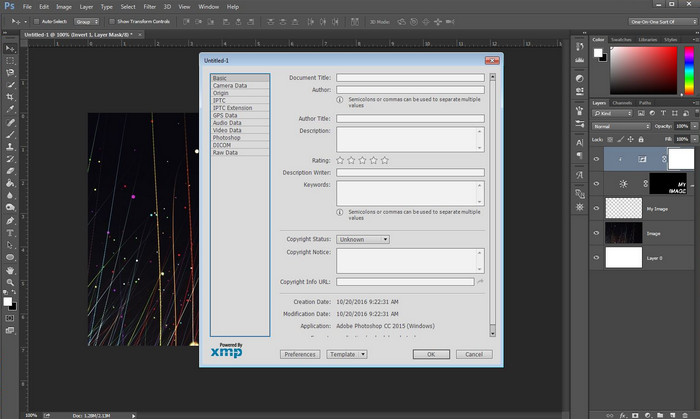
Photoshop tunnetaan ammattilaiskäyttöön sopivana huipputason kuvankäsittelyohjelmana. Sen avulla saat käyttöösi korkealaatuiset muokkaustoiminnot, joilla voit parantaa kuviasi entisestään. Vaikka työkalu tarjoaa edistyneitä muokkausominaisuuksia, tiedoston metatietojen tarkastelun osalta se on joillekin käyttäjille liian kallis. Saatat miettiä, miksi lisäsimme tämän editorin listalle; se on hyvin suosittu ja monilla jo käytössä, joten miksi emme lisäisi sitä. Vaikka Photoshopilla voi lisätä metatietoja jokaiseen PSD-tiedostoon, tuettu metatieto on varsin rajallista ja keskittyy lähinnä perusasioihin. Jos siis haluat tarkastella metatietoja Photoshopissa, sinun täytyy ostaa ohjelma.
Plussat
- Se on paras verkosta löytyvä editori.
- Se tukee laajaa valikoimaa kuvatiedostomuotoja, jotka voit lisätä ja myöhemmin tarkistaa sen metatiedot.
- Toimittajan valinta huippuluokan editoriohjelmistoksi työpöydällä.
Haittoja
- Jos ostat työkalun, oleta, että se on kallis.
- Se tarvitsee huippuluokan työpöydän saadakseen paremman käyttökokemuksen.
- Ei paras valinta aloittelijoille.
Aiheeseen liittyvää:
Kuinka lisätä vesileima Photoshopissa
Osa 2. 2 Ilmaiset metatietojen katseluohjelmat saatavilla verkossa
Jeffreyn kuvan metatietoeditori
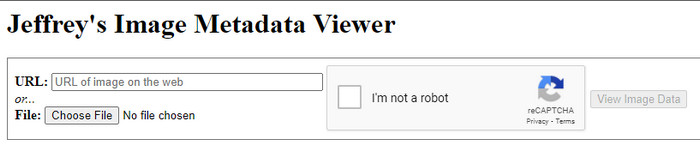
Jos haluat yksinkertaisen ja ilmaisen metatietojen katseluohjelman verkossa, kokeile Jeffrey's Image Metadata Editor -työkalua. Tämä verkkotyökalu on tehokas väline kaikkien mediatiedostojesi metatietojen tarkasteluun ilmaiseksi. Vaikka sen käyttöliittymä ei ole yhtä näyttävä kuin muissa työkaluissa, se hoitaa silti tehtävänsä metatietojen editorina ja katseluohjelmana. Jos haluat kokeilla ja käyttää tätä työkalua, ole kuitenkin varovainen, sillä verkkosivusto ei ole suojattu kaikissa selaimissa – kirjautuminen sivustolle voi altistaa hakkeroinnille tai tiedostojen menetykselle. Muista siis olla varuillasi, jos avaat sivuston tarkastellaksesi tai muokataksesi metatietoja. Toistaiseksi ei kuitenkaan ole raportoitu tapauksia, joissa käyttäjiä olisi hakkeroitu työkalua käytettäessä.
Plussat
- Ilmainen pääsy kaikkiin verkkoselaimiin.
- Se tukee eri formaatteja; voit ladata ja tarkastella metatietoja.
- Voit säästää tilaa lisäämällä URL-osoitteen tiedoston sijaan.
Haittoja
- Captcha on hieman ärsyttävää, jos haluat tarkastella metatietoja.
- Sivusto ei ole suojattu.
Metadata2go
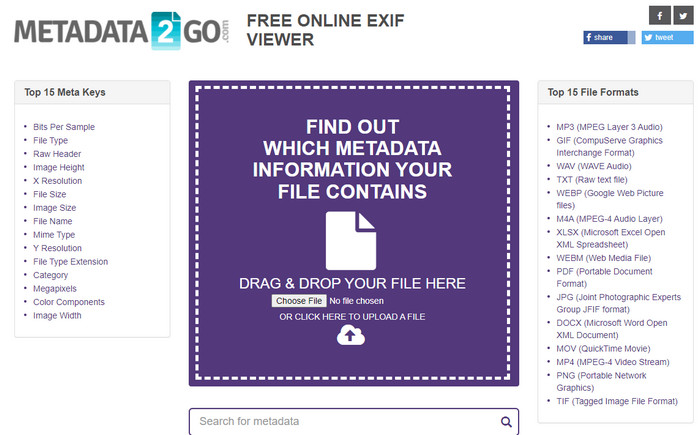
Metadat2go tukee laajaa valikoimaa kuvatiedostomuotoja, joihin voi lisätä ja joissa voi myöhemmin tarkastella metatietoja. Vaikka sen käyttöliittymä on raskaampi kuin ensimmäisen esittelemämme verkkotyökalun, sitä on silti helppo käyttää kaikkien, jotka haluavat käyttää työkalua. Vaikka tämä työkalu on edellistä turvallisempi, sen toiminnoissa on rajoituksia, ja useimmiten vedä ja pudota -toiminto ei toimi kovin hyvin. Jos kuitenkin haluat oppia, miten videon metatiedot avataan ja luetaan, tämä työkalu riittää tarpeisiisi.
Plussat
- Se on ilmainen ja turvallinen käyttää eri hakukoneilla.
- Se hoitaa tehtävänsä sujuvasti.
- Se tukee useita kuvaformaatteja.
Haittoja
- Joissakin tapauksissa vaihtoehdot eivät toimi hyvin, kuten vedä ja pudota.
- Se tukee muita formaatteja, mutta valittuja on vain vähän.
Osa 3. Vertailukaavio 4 Metadata Viewerista [Online & Offline]
| ominaisuudet | FVC Video Converter Ultimate | Photoshop | Jeffreyn kuvan metatietoeditori | Metadata2go |
| Tarkastele ja muokkaa metatietoja helposti |  | | | |
| Turvallinen käyttää | | |  | |
| Budjettiystävällinen | | | | |
| Käyttäjäystävällinen | | | | |
| Lisäominaisuudet saatavilla | | | | |
| Ohjelmapohjainen | Työpöytäpohjainen ohjelma | Työpöytäpohjainen ohjelma | Web-pohjainen ohjelma | Web-pohjainen ohjelma |
Osa 4. Usein kysyttyä metatietojen katseluohjelmasta
Mitä metatietojen sisällä on?
Metatietojen sisällä näet erilaisia tietoja tiedostosta, esimerkiksi tekijöiden nimen, genren (jos se on musiikkia), tiedoston nimen, tiedoston koon ja paljon muuta.
Miksi minun täytyy nähdä metatiedot?
No, metatiedot auttavat sinua saamaan lyhyitä tietoja tiedostosta, joita et näe tiedostossa. Tarkastelemalla metatietoja sinulla on käsitys tietyn tiedoston tiedoista, olipa kyseessä kuva, video, ääni, PDF tai muuta.
Voinko käyttää metatietoja tiedoston suojaamiseen?
Kyllä, voit lisätä metatietoja suojataksesi tiedostoasi ihmisiltä, jotka haluavat yrittää varastaa sen sinulta. Tällä tavalla voit saada antamasi valtuustiedot toimimaan, jos joku yrittää varastaa sen sinulta. On kuitenkin olemassa joitain tekniikoita tiedoston metatietojen poistamiseen. vaikka joku voi poistaa tiedot, on parasta lisätä metatiedot tiedostoon ylimääräisen ja yksinkertaisen suojan takaamiseksi.
Johtopäätös
Nyt kun olemme esitelleet eri metatietojen katseluohjelmat, on aika valita niistä yksi ja käyttää sitä tarkastellaksesi tiedostojesi sisältöä. Lisäksi kaksi ensimmäistä työkalua ovat kiistatta parhaat metatietojen tarkasteluun, mutta näemme, että Photoshop on paljon kalliimpi käyttää kuin Ultimate-työkalu. Jos siis haluat edullisen ja turvallisen tavan tarkastella tai muokata metatietoja, sinun kannattaa käyttää FVC Video Converter Ultimate -ohjelmaa, sillä se on tähän tehtävään täydellinen työkalu. Etkö vieläkään ole vakuuttunut arvostelustamme? Voit ladata ohjelman laitteellesi ja kokeilla sitä itse!
-
 3 parasta ratkaisua vesileiman poistamiseen videoista helposti
 Haluatko poistaa ärsyttävän vesileiman videosta? Tämän blogin avulla voit oppia erilaisia ideoita vesileiman poistamiseen videosta.
-
 4 parasta tapaa lisätä vesileimaa kaikkiin videoihin nopeasti
 Opitaan lisäämään vesileima kaikkiin videoihin Windowsissa, Macissa, Onlinessa, iOS:ssä ja Androidissa yksityiskohtaisten ohjeiden avulla, jos luet tämän artikkelin.
-
 4 tehokasta tapaa poistaa Tiktok-vesileimat Tiktok-videoista
 Pitääkö sinun poistaa Tiktok-vesileima vietyistä Tiktok-videoistasi? Voit tehdä sen täällä esittelemiemme työkalujen avulla; voit tehdä sen helposti.
