


 Video Converter Ultimate
 Näytön tallennin
 Videon korjaus
[Täydellinen tarkistus] 5 uusinta MP3-leikkuria saatavilla Windowsissa/Macissa/Online-käyttöjärjestelmässä
Usein haluamme leikata kuuntelemaamme ääntä ja asettaa sen soittoääneksi korostamalla tärkeän kohdan tai karsimalla äänestä tarpeettomat yksityiskohdat. Vaikka kaikilla alustoilla on tarjolla monia leikkaustyökaluja, kaikkiin niistä ei silti voi luottaa. Siksi esittelemme tänään sinulle leikkaimet, joihin voit luottaa, sillä olemme kokeilleet jokaista näistä työkaluista itse varmistaaksemme, että ne ovat haittaohjelmattomia ja luotettavia. Ennen kuin valitsimme ne, noudatimme tiukkoja, korkeita standardeja yleisölle, joka tarvitsee luotettavan leikkaimen. Jotta internetin selailusi sujuisi mahdollisimman vauhdikkaasti, esittelemme alla viisi MP3-leikkuria, jotka olemme löytäneet ja jotka ovat valmiita leikkaamaan minkä tahansa ääniformaatin.

Osa 1. 2 Offline-MP3-leikkuriohjelmistot Windows- ja Mac-tietokoneille
1. Video Converter Ultimate – paras MP3-leikkuri [suositellaan]
Tämän listan paras MP3‑äänileikkuri on Video Converter Ultimate, jonka avulla käyttäjät voivat leikata mitä tahansa ääntä vaivattomasti. Tämän äärimmäisen työkalun avulla voit rajata ääntä poistaaksesi ei‑toivotut kohdat, yhdistää useita leikattuja äänitiedostoja yhdeksi tiedostoksi ja jopa vahvistaa ääntä, jos se tuntuu liian hiljaiselta. Lisäksi tämä ohjelmisto tarjoaa erittäin nopean prosessoinnin ja säilyttää samalla äänen alkuperäisen laadun.
Toisin kuin muut leikkurit, tämä työkalu tukee monenlaisia muotoja, ei vain MP3:a, vaan myös FLAC-, M4R-, M4A-, OGG-, MKA-, WAV-, WMA- ja muita, ja äänitiedostosi voi todellakin leikata täällä. Ehkä et tiedä kuinka leikata äänitiedostoa ja käyttää sitä tarpeisiisi juuri nyt. Tänään on onnenpäiväsi, koska opetamme sinut käyttämään MP3-leikkuria ja soittoäänien valmistajaa ilmaiseksi seuraamalla alla olevaa opetusohjelmaa.
Vaihe 1. Lataa äänileikkuri tietokoneellesi napsauttamalla alla olevaa latauspainiketta. Valitse käytätkö Windowsia vai Macia, asenna ohjelma heti ja käynnistä se. Muista, että sinun kannattaa ensin tutustua työkalun käyttöliittymään, jotta seuraavia vaiheita on helpompi seurata.
Ilmainen latausWindows 7 tai uudempiTurvallinen lataus
Ilmainen latausMacOS 10.7 tai uudempiTurvallinen lataus
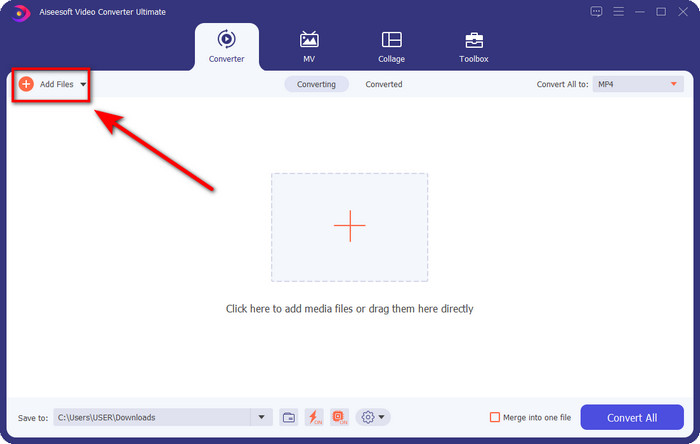
Vaihe 2. Vedä leikattava äänitiedosto käyttöliittymään tai napsauta Add Files ja etsi ääni avautuvasta tietokonekansiosta. Paina Open jatkaaksesi seuraavaan vaiheeseen.
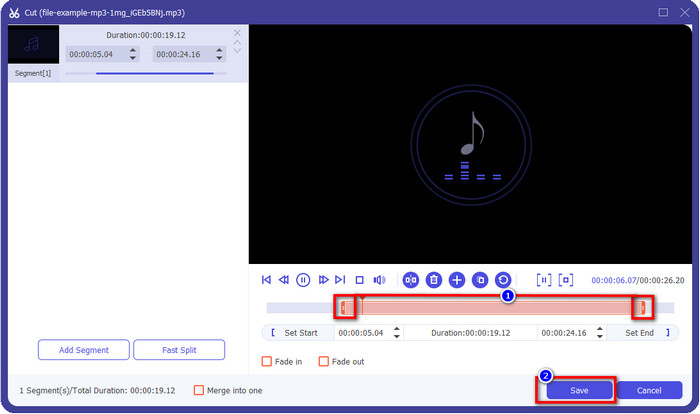
Vaihe 3. Kun äänitiedosto on lisätty, on aika napsauttaa saksien näköistä painiketta. Vedä play in ja play out ‑merkkejä haluamaasi äänipituuteen. Muista, että vain play in ‑ ja play out ‑kohtien väliin jäävä korostettu osa äänestä säilytetään. Paina sitten Save leikataaksesi äänen.
Valinnainen. Pitääkö ääntä vahvistaa? Siinä tapauksessa napsauta taikasauva-painiketta, säädä äänenvoimakkuuden liukusäädintä vetämällä sitä ylöspäin ja paina OK tallentaaksesi muutokset.
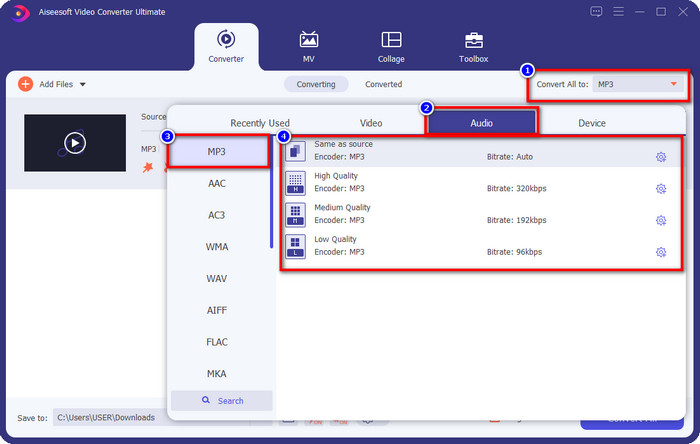
Vaihe 4. Siirry kohtaan Convert All to, Audio ja aseta muodoksi MP3. Vaikka et ole varsinaisesti muuntamassa, varmista, että Convert All to ‑kohdassa näkyvä nimi on MP3 eikä jokin muu, jotta formaatti ei vaihdu toiseen.
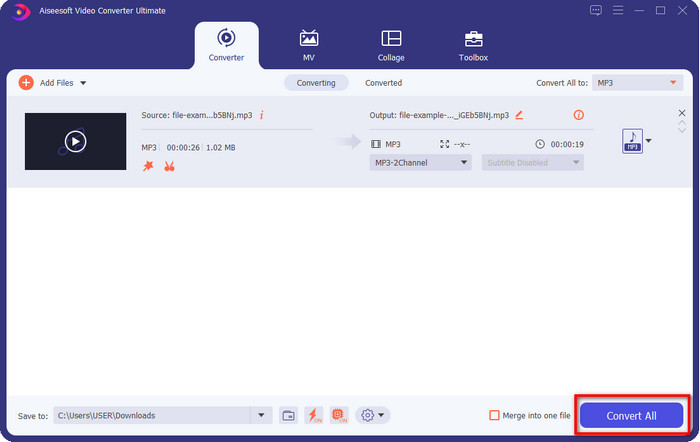
Vaihe 5. Napsauttamalla Convert All aloitat leikatun äänitiedoston tallentamisen. Nyt sinulla on leikattu äänesi parhaalla ilmaisella MP3‑leikkurilla – niin yksinkertaista se on.
Plussat
- Se voi leikata äänen mahdollisimman nopeasti ja käsitellä sen alle sekunnissa.
- Lisäominaisuudet ovat saatavilla äänenvoimakkuuden lisäämiseksi.
- Se tukee kaikkia käyttöjärjestelmiä, kuten Windows tai Mac.
- Useiden äänitiedostojen yhdistäminen on mahdollista tämän työkalun ääniliitännällä.
Haittoja
- Työkalun hankinta on tarpeen.
2. Audacity
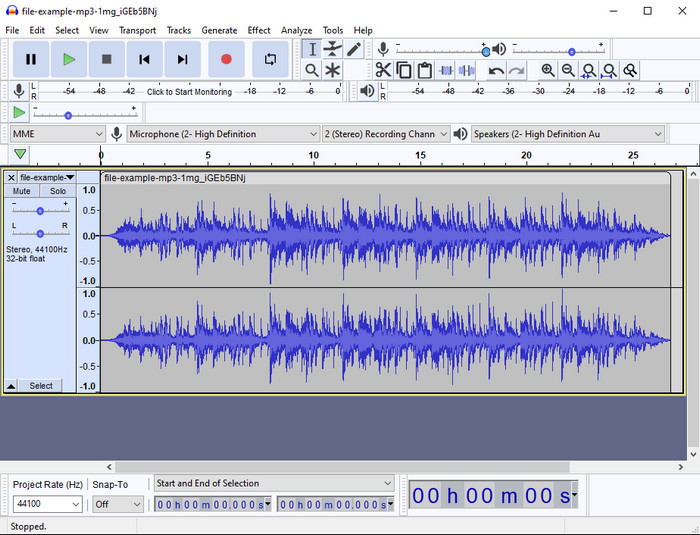
Audacity on tarjonnut ammattimaisia editointiominaisuuksia äänellesi vuosien ajan. Tämä ohjelma on ilmainen ladata, ja se mahdollistaa moniraitamiksauksen. Tunnetusti podcastaajat käyttävät sitä podcastien muokkaamiseen ja nauhoittamiseen helposti. Jotkin sen ominaisuuksista ovat kuitenkin vaikeita ymmärtää, etenkin jos et ole tottunut käyttämään tämänkaltaisia erikoistuneita ohjelmistoja.
Vaikka voit vielä oppia käyttämään sitä, tämän MP3-äänitrimmerin täyden potentiaalin hyödyntäminen vie aikaa, ja äänen leikkaamiseen on reilua sanoa, että se leikkaa heti ja vaivattomasti, jos tarvitset sitä.
Plussat
- Ilmainen ladattavissa kaikissa ohjelmissa, kuten Windowsissa ja Macissa.
- Saatavilla on edistyneitä ja ammattimaisia äänenmuokkausohjelmia, jotka tekevät äänestäsi upean.
- Se sopii parhaiten podcastien ja muiden tallentamiseen.
Haittoja
- Monet kilpailijat tarjoavat käyttäjäystävällisen käyttöliittymän.
- Ei paras valinta aloittelijoille välittömään tulokseen leikkaamiseen ja muihin editointitarkoituksiin.
- Jotkut raportit osoittavat, että tietosi kerätään, jos käytät tätä työkalua, mutta vahvaa näyttöä ei vielä ole.
Osa 2. 3 käytettävissä olevat MP3-leikkurit verkossa
1. mp3cut.net
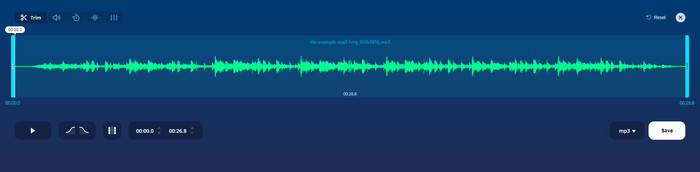
Voit käyttää mp3cut.net-sivustoa, jos tarvitset online-MP3-leikkurin työhön. Kun olet ladannut tiedoston tähän online-leikkuriin, voit nyt poistaa äänen, jonka haluat piirtää äänitiedostoon. Lisäksi työkalussa on myös joitain pieniä muokkausominaisuuksia, joilla voit muuttaa äänen nopeutta ja sävelkorkeutta tarvittaessa.
Vaikka työkalulla on tällainen ominaisuus, se kaatuu suurimman osan ajasta eikä voi toistaa ääntä kuunnellakseen, jos leikat sen oikein. Joten, jotta voit käyttää sitä uudelleen, sinun on päivitettävä selaimesi ja toistettava tekemäsi säätö uudelleen.
Plussat
- Käyttäjäystävällinen ja saatavilla Internetin kautta.
- Ominaisuudet, jotka auttavat sinua leikkaamaan ääntä.
- Perusmuokkausominaisuudet ovat käytettävissä.
Haittoja
- Sen verkkokäyttöliittymässä on mainoksia.
- Joskus se kaatuu ja se on ladattava uudelleen, jotta sitä voi käyttää.
2. audiotrimmeri.com
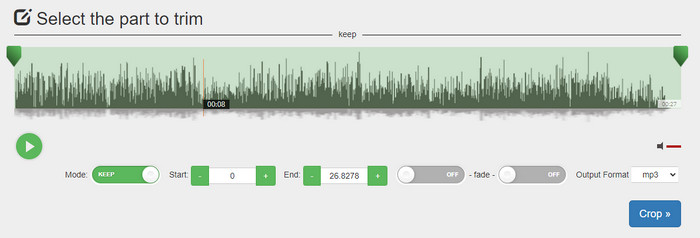
Toinen ilmainen MP3‑leikkuri verkossa on audiotrimmer.com. Tämä työkalu tarjoaa helppokäyttöiset ja suoraviivaiset leikkaustoiminnot; kaikki sen toiminnot ovat täsmällisiä. Sen avulla voit valita, haluatko säilyttää tietyn osan äänestä vai poistaa sen. Lisäksi siinä on häivytys sisään ja ulos ‑efektit, kuten aiemmin mainituissa leikkureissa. Kun testasimme sisään‑ ja uloshäivytysefektiä, se ei kuitenkaan toiminut – ääneemme ei lisätty mitään efektiä. Mutta jos haluat tehdä yksinkertaista leikkausta, tämä verkkotyökalu on ehdottomasti kokeilemisen arvoinen.
Plussat
- Ilmainen ja käytettävissä kaikissa selaimissa.
- Helppo käyttää äänen trimmaamiseen.
- Siinä on fade-in ja out -efektejä.
Haittoja
- Häivytys ja ulostulo eivät toimi hyvin.
- On monia ärsyttäviä mainoksia, jos käytät niitä. Joten varo, ettet napsauta niitä.
3. Clideo

Yksi parhaista MP3‑leikkureista ja ‑yhdistimistä verkossa on Clideo. Useimmat käyttäjät pitävät tämän työkalun käytöstä ja suosivat sitä sen editointiominaisuuksien vuoksi. Lisäksi voit halutessasi lisätä äänitiedostoosi sisään‑ ja uloshäivytyksen. Kun kuitenkin veimme tiedoston ulos ja kuuntelimme sitä, sisään‑ ja uloshäivytystä ei ollut lisätty äänitiedostoomme. Kohtasimme tässä työkalussa yhden pienen ongelman: tiedoston lataaminen palveluun ja lataaminen takaisin koneelle. Toisin kuin ensimmäisenä mainitussa työkalussa, äänen lataaminen tämän leikkuriin kestää kauan, ja joskus emme onnistuneet lataamaan äänitiedostoa lainkaan tuntemattomista syistä.
Vaikka kohtaamme joitain ongelmia, se on silti paras leikkuri verkossa, ja sen käyttö on myös turvallista.
Plussat
- Paras online-leikkuri verkossa.
- Ammattimainen käyttöliittymä.
- Helppokäyttöinen.
Haittoja
- Lataus- ja latausprosessi vie liian paljon aikaasi.
- Häivytys toimii, mutta ei hyvin.
Osa 3. Usein kysyttyä MP3-leikkureista
Mikä on Macin paras MP3-trimmeri?
FVC Video Converter Ultimate on saatavilla myös Macille. Jos siis tarvitset äänileikkausta Macilla, kannattaa ladata tämä ultimate‑työkalu käsittelemään äänitiedostojasi asianmukaisesti. Se ei ole vain erinomainen äänen leikkaamiseen, vaan sen avulla voit myös parantaa ääntä vahvistamalla sitä. Lisäksi jos tarvitset apua äänen muuntamisessa, yhdistämisessä, synkronoinnissa jne., ultimate‑työkalu tulee avuksi. Jos haluat tietää lisää tästä työkalusta, kannattaa lukea yllä esitetyt tiedot.
Vähentääkö äänen trimmaus sen kokoa?
Äänen tiedostokoko pienenee trimmauksen jälkeen. Kun vertailimme alkuperäistä äänitiedostoa leikattuihin tiedostoihin, havaitsimme joitain muutoksia korkeudessa. Joten se tarkoittaa, että mitä lyhyempi äänitiedosto on, sitä pienempi sen koko, mutta jos äänitiedostosi on erittäin pitkä, oletetaan, että koko on myös merkittävä.
Voinko käyttää Audacityä useiden äänien yhdistämiseen?
Kyllä voit, Audacity tukee useiden ääniraitojen yhdistämistä yhdeksi tiedostoksi. Se on kuitenkin vaikeaa, varsinkin jos sinulla ei ole selkeää opasta seurattavana. Jos siis tarvitset äänien yhdistämistä Audacityllä, voit napsauttaa tätä linkkiä ja oppia lisää.
Johtopäätös
Tässä esitellyt MP3‑leikkurit ovat jo läpäisseet asettamamme standardit, jotta voimme tarjota sinulle vain parhaat trimmerit. Tämä artikkeli osoittaa, kuinka tärkeää on valita oikea ja tarpeisiisi sopiva leikkuri. Vaikka tässä mainitut trimmerit tekevät pohjimmiltaan samaa, FVC Video Converter Ultimate tarjoaa huomattavasti tehokkaamman äänileikkauskokemuksen. Tutkimuksemme mukaan tämä ultimate‑työkalu ylittää kaikki asettamamme standardit. Jos siis haluat käyttää huipputason leikkuria, tämä on paras valinta kaikista markkinoilla olevista vaihtoehdoista. Liian hyvää ollakseen totta? Siinä tapauksessa kannattaa ladata työkalu ja testata se itse.
-
 Kuinka leikata ja yhdistää kappaleita verkossa - 4 parasta tapaa, jotka sinun pitäisi tietää
 Kun haluat leikata ja yhdistää kappaleita verkossa luoda musiikkipala, voit oppia lisää 4 parhaasta online-työkalusta kappaleiden leikkaamiseen ja artikkelin tiedostojen yhdistämiseen.
-
 Löydä paras MP4 -trimmeri menettelyjen ja tietojen avulla
 Haluatko oppia leikkaamaan videoita, kuten katsomasi vloggaajat? Jatka sitten tämän viestin lukemista tietääksesi, mitä MP4-trimmereitä voit käyttää.
-
 MP3-soittimen lataus – 10 parasta ilmaista MP3-soitinta vuonna 2025
 Mikä on paras MP3-musiikkisoitin? Kuinka laitan musiikkia MP3-soittimeen? Kuinka saada MP3-musiikkisoitin lataamaan? Tämä viesti antaa sinulle yksityiskohtaisen katsauksen 10 parhaasta ilmaisesta MP3-soittimesta Windows PC: lle ja Macille.
